Instant in Java: Epoch Time and Timestamps Made Simple
-
Last Updated: October 15, 2026
-
By: javahandson
-
Series

Instant in Java made simple. Learn what epoch time means, how to create an Instant, convert it to a date with atZone, and when to use it over LocalDateTime.
Every app needs to record when things happen. For that job, Instant in Java is the perfect tool. It marks a single, exact point on the global timeline.
In simple words, an Instant is a machine timestamp. It counts from a fixed start called the epoch. So it is clean, precise and free of time-zone confusion.
In this guide, we will keep things beginner friendly. First, we will see what an Instant really is. Then we will create one and read it. After that, epoch time will finally make sense.
I have used timestamps across many payment systems. Honestly, Instant made logging far simpler for me. So let us build that same clarity for you. Let us begin.
Timestamps sound easy, yet they cause many bugs. The usual culprit is a missing or wrong time zone. However, Instant sidesteps that pain. So it is a great tool to learn early.
By the end of this guide, you will know:
Let us start with the core idea behind the class.
An Instant is a single point on the timeline. So it answers the question “when exactly did this happen?” The official docs call it an instantaneous point in time.
It lives in the java.time package and arrived with Java 8. Like its siblings, it is immutable and thread-safe. Therefore you can share it freely across threads.
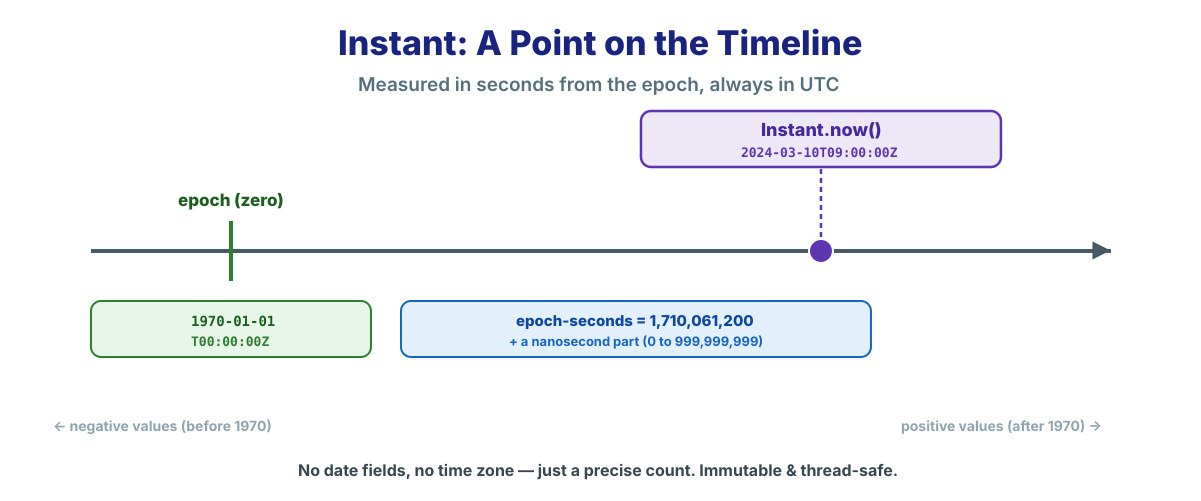
An Instant stores just two numbers. First, it holds the seconds from the epoch. Second, it holds a nanosecond part, for extra precision.
So an Instant is really just a big count. There is no date, month or zone inside it. As a result, it is simple, exact and unambiguous.
This design choice is deliberate and smart. A plain count is easy to store and compare. Moreover, it never argues about zones or formats. So the value stays rock solid across systems.
An Instant carries no time zone at all. So it is always in UTC terms. This is exactly why it is so safe for storage.
Think about two servers in two countries. Both can agree on the same Instant with no argument. Meanwhile, a local time would need a zone to make sense. So Instant removes that whole problem.
This is why most systems store time in UTC. A UTC value is the same everywhere on earth. So you avoid the classic bug of a time that shifts by region. In short, UTC is the safe home for a stored moment.
To use Instant well, you must know the epoch. It is the fixed start point for all the counting. So let us make it clear and simple.
The epoch is a chosen zero moment in time. In Java, it is 1970-01-01T00:00:00Z, in UTC. So every Instant is measured from that exact moment.
So epoch time is just a running count of seconds. It started at the start of 1970. Therefore a bigger number means a later moment.
Let us make this concrete with a number. An Instant like 1700000000 is a count of seconds. So it points to a moment in late 2023. In short, the big number is just time since 1970.
The 1970 start comes from older Unix systems. So it is a shared standard across many languages. As a result, epoch time works the same way almost everywhere.
This shared start is a quiet gift. It means your Java Instant lines up with other systems. So a timestamp from Java matches one from a database or an API. In turn, that makes integration far easier.
Now let us build an Instant. There are a few easy ways to do it. Each one fits a different need.
The most common way is now(). It grabs the current moment from the system clock. So it is perfect for a timestamp.
Instant now = Instant.now();
System.out.println(now);   // e.g. 2024-03-10T09:00:00.123456Z
Notice the Z at the end of the output. So the value is in UTC, as always. This is the timestamp you will log most often.
You can also build one from an epoch count. So ofEpochSecond() takes seconds, and ofEpochMilli() takes milliseconds. These help when you read a stored number.
Instant fromSeconds = Instant.ofEpochSecond(1_700_000_000L);
Instant fromMillis = Instant.ofEpochMilli(1_700_000_000_000L);
So a plain long becomes a full Instant. This is common when loading old data. Many legacy systems store time as an epoch number.
Keep one detail in mind about units. Seconds and milliseconds are a thousand apart. So check which one your data uses. Otherwise, your timestamp will be off by a factor of 1000.
You can also parse an Instant from text. So parse() reads the standard ISO format. The text must end with a Z for UTC.
Instant parsed = Instant.parse("2024-03-10T09:00:00Z");So parsing is handy when you read a stored string. The format follows the ISO standard. Therefore the same text works across many tools.
Once you have an Instant, using it is easy. So let us look at the common operations. Each one returns a clear value.
You can read the raw count back out. So getEpochSecond() returns the seconds. Likewise, toEpochMilli() gives the milliseconds.
Instant now = Instant.now();
long seconds = now.getEpochSecond();   // seconds since 1970
long millis = now.toEpochMilli();      // milliseconds since 1970
int nanos = now.getNano();             // the nanosecond part
So you can store any of these numbers. A long is easy to save in a database. Then you rebuild the Instant later with a factory method.
Should you store a long or an Instant? Both work, and both are fine. A long is compact and portable across systems. However, a proper timestamp column is often clearer to read. So pick the one your database and team prefer.
You can add or subtract time as usual. So plusSeconds() and minusSeconds() both work. Still, remember that the result is a new object.
Instant now = Instant.now();
Instant later = now.plusSeconds(60);    // one minute later
Instant earlier = now.minusSeconds(30); // 30 seconds earlier
So instant math is quick and clear. You add or subtract an exact amount of time. Because there is no calendar here, the result is always precise.
For the gap between two instants, use Duration. So Duration.between() gives an exact length. We cover that fully in the Period vs Duration article.
Comparing two instants is simple and clear. So isBefore() and isAfter() answer the usual questions. This is great for checking order or expiry.
Instant start = Instant.now();
Instant end = start.plusSeconds(10);

System.out.println(start.isBefore(end));  // true
System.out.println(end.isAfter(start));   // true
Beginners often confuse Instant and LocalDateTime. However, they serve very different needs. So let us clear this up for good.
An Instant is a machine timestamp in UTC. Meanwhile, a LocalDateTime is a human wall-clock value with no zone. So one is for machines, and the other is for people.
| Feature | Instant | LocalDateTime |
|---|---|---|
| Meaning | A machine timestamp | A human wall-clock value |
| Time zone | UTC (no zone stored) | None |
| Best for | Logs, events, storage | Meetings, local schedules |
| Human readable? | Not directly | Yes |
| Example | 2024-03-10T09:00:00Z | 2024-03-10T14:30 |
So pick Instant for a real event on the global timeline. Meanwhile, pick LocalDateTime for a plain local time. In short, match the type to the job.
The table also hints at a storage rule. An Instant is ideal to save, since it needs no zone. A LocalDateTime, on the other hand, can be unclear without context. So for stored moments, Instant usually wins.
Here is an easy way to choose. Use Instant when a machine records the time. Use LocalDateTime when a human reads or sets it.
Let us test the rule with two examples. A server log line is a machine fact, so use Instant. Meanwhile, a 3 PM meeting is a human choice, so use LocalDateTime. In each case, the rule points you the right way.
| 💡 Interview Insight A common interview question is the difference between Instant and LocalDateTime. Keep it sharp. An Instant is a machine timestamp in UTC, ideal for logs and storage. A LocalDateTime is a human wall-clock value with no time zone, ideal for local schedules. |
An Instant is not easy for people to read. So you often convert it to a local date and time. For that, you add a time zone.
The atZone() method adds a zone to an Instant. So the result is a ZonedDateTime. Then the user sees a friendly local value.
Instant instant = Instant.now();

ZonedDateTime india =
        instant.atZone(ZoneId.of("Asia/Kolkata"));
System.out.println(india);   // local date-time in India
So the same instant becomes a readable time. You just pick the user’s zone. As a result, two users in two zones each see their own clock.
This pattern is the heart of good time handling. You keep one Instant inside your system. Then you show many local views on the outside. So the stored value stays clean and single.
Sometimes you want a fixed offset, not a full zone. For that, atOffset() helps. So you get an OffsetDateTime instead.
Instant instant = Instant.now();
OffsetDateTime utc = instant.atOffset(ZoneOffset.UTC);
// 2024-03-10T09:00:00Z shown with a +00:00 offset
So atOffset() keeps the gap from UTC, with no region rules. This is a good fit for network calls. Many protocols expect an offset, not a zone name.
Instant fits many everyday jobs. So it is worth knowing where it helps most. Here are the common cases from real projects.
So in each case, the time is a machine fact. There is no human wall clock involved. Therefore Instant is the honest, safe choice.
In real projects, you still meet java.util.Date. So you often bridge between it and Instant. Luckily, the conversion is short and clean.
The old Date has a toInstant() method. So it turns a legacy Date into a modern Instant. The moment stays exactly the same.
Date legacy = new Date();          // old API
Instant instant = legacy.toInstant();
// same point in time, now in java.time
So Instant is the natural meeting point here. Both a Date and an Instant are really timestamps. Therefore they map onto each other cleanly.
You can also go the other way. So Date.from() takes an Instant and returns a Date. This helps when an old library needs a Date.
Instant instant = Instant.now();
Date legacy = Date.from(instant);   // back to the old API
One small note matters here. A Date has only millisecond precision. However, an Instant has nanoseconds. So the conversion drops the extra precision.
For most apps, that lost precision does not matter. Milliseconds are plenty for logs and events. Still, it is good to know the detail. So you are never surprised by a tiny rounding.
Let us tie the ideas together now. Say we time a task, then show the start in local time. So we use Instant for both jobs.
Instant start = Instant.now();
doSomeWork();
Instant end = Instant.now();

long millis = Duration.between(start, end).toMillis();
System.out.println("Took " + millis + " ms");

ZonedDateTime shown = start.atZone(ZoneId.of("Asia/Kolkata"));
System.out.println("Started at: " + shown);
So Instant handles the exact timing part. Then a zone makes the start readable. As a result, you get both precision and a friendly display.
Notice how the two roles stay separate here. The Instant does the measuring and storing. Meanwhile, the zone only handles the display. So each piece does one clear job.
Let me share a few habits from real projects. They will save you from time-zone pain. So keep them in mind as you code.
These habits share one simple theme. Keep time in UTC until the very last step. Then add a zone only to display it. So your core logic stays clean and bug-free.
That third mistake is very common. An Instant has no date fields to read. So you must convert it to a zoned value first.
A: An Instant is a single point on the timeline. It stores seconds and nanoseconds from the epoch (1970-01-01T00:00:00Z). So it is a precise machine timestamp in UTC, ideal for logs and events.
A: Epoch time is a count of seconds from a fixed start, which in Java is 1970-01-01T00:00:00Z in UTC. Moments after it are positive, and moments before it are negative. An Instant is measured from this point.
A: Call atZone() with a ZoneId, which returns a ZonedDateTime the user can read. For a fixed offset instead of a region, use atOffset() to get an OffsetDateTime.
A: An Instant is a machine timestamp in UTC, best for logs and storage. A LocalDateTime is a human wall-clock value with no time zone, best for local schedules. Use Instant when a machine records the time, and LocalDateTime when a human reads or sets it.
Using Instant in Java is simple once the epoch idea clicks. It is a machine timestamp, measured from 1970 in UTC. So it is clean, exact and free of zone confusion.
Here is a quick recap of what we covered:
So reach for Instant whenever you record a real event. For a local schedule, use a local type instead. The pillar guide below ties the whole family together.
One final habit will serve you well. Store a UTC Instant, and display a local view. Then every user sees the right time, wherever they are. Over time, this pattern becomes second nature.