HashSet in Java: How Sets Work (Beginner’s Guide)
-
Last Updated: June 25, 2026
-
By: javahandson
-
Series

A HashSet in Java is the collection you reach for when you need to store unique elements with no duplicates. In this guide, we will cover what a Set really is, why equals() and hashCode() are essential to uniqueness, and how HashSet works under the hood — including its O(1) speed and whether it is safe to use across threads.
A Set is a collection of unique elements. Its main purpose is to store items where each value appears only once; it cannot contain duplicate values. If you try to add an element that already exists, the Set simply ignores the operation and stays unchanged.
A set is a mathematical concept representing a collection of distinct objects.
For example:
Set of vowels = {a, e, i, o, u}
Writing – {a, e, i, o, u, a}
doesn’t add any new information because a is already present.
Since a set represents membership (“is this element in the set?”), Having the same element multiple times is meaningless.
A Quick Example
import java.util.HashSet;
import java.util.Set;

public class SetUniquenessDemo {
    public static void main(String[] args) {
        Set<String> fruits = new HashSet<>();

        fruits.add("Apple");
        fruits.add("Banana");
        fruits.add("Apple");   // duplicate — silently ignored
        fruits.add("Mango");

        System.out.println(fruits);       // [Banana, Apple, Mango]
        System.out.println(fruits.size()); // 3, not 4
    }
}
Notice two things in the output. First, “Apple” appears only once, even though we added it twice — the second add() had no effect. Second, the size() is 3, not 4. The Set quietly enforced uniqueness without throwing an error or issuing a warning.
The add() method returns a boolean so you can detect whether an element was actually inserted:
Set<String> fruits = new HashSet<>();

boolean first  = fruits.add("Apple");  // true  — added
boolean second = fruits.add("Apple");  // false — already present

System.out.println(first);   // true
System.out.println(second);  // false
A return value of true means the element was new and got added. false means it was already in the Set, so nothing changed. This is handy when you want to take action only on genuinely new entries.
The easiest way to understand a Set is to contrast it with a List, the collection most beginners learn first. They look similar but follow opposite rules.
| Feature | List | Set |
|---|---|---|
| Duplicates Allowed | Can hold the same value many times | Not allowed — each value appears at most once |
| Ordering | Maintains insertion order; elements have a position (index) | No index; ordering depends on the implementation |
| Access by Index | Yes — list.get(0) | No — there is no get(index) method |
| Primary Use | When sequence and repetition matter | When membership and uniqueness matter |
The same operation produces different results depending on which one you pick:
import java.util.*;

List<Integer> list = new ArrayList<>(Arrays.asList(1, 2, 2, 3, 3, 3));
Set<Integer>  set  = new HashSet<>(Arrays.asList(1, 2, 2, 3, 3, 3));

System.out.println(list); // [1, 2, 2, 3, 3, 3] — keeps every duplicate
System.out.println(set);  // [1, 2, 3]          — collapses to unique values
Because a Set focuses on whether an element exists rather than where it sits, it deliberately gives up index-based access. You can’t call set.get(2) to fetch “the third element,” because conceptually a Set has no first, second, or third — just a bag of unique members.
In exchange, checking whether an element exists (set.contains(x)) is typically far faster than the same check on a List, a benefit you’ll see quantified later in the performance section.
Now that you understand what a Set does, let’s see where it fits inside Java’s Collections Framework. Understanding this hierarchy helps you know which methods a Set inherits, how it relates to other collections, and why the three implementations behave so differently.
At the very top of the framework sits the Collection interface — the root of nearly all Java collections. Set, List, and Queue are all sub-interfaces that extend Collection. This means a Set is-a Collection and inherits its core methods.
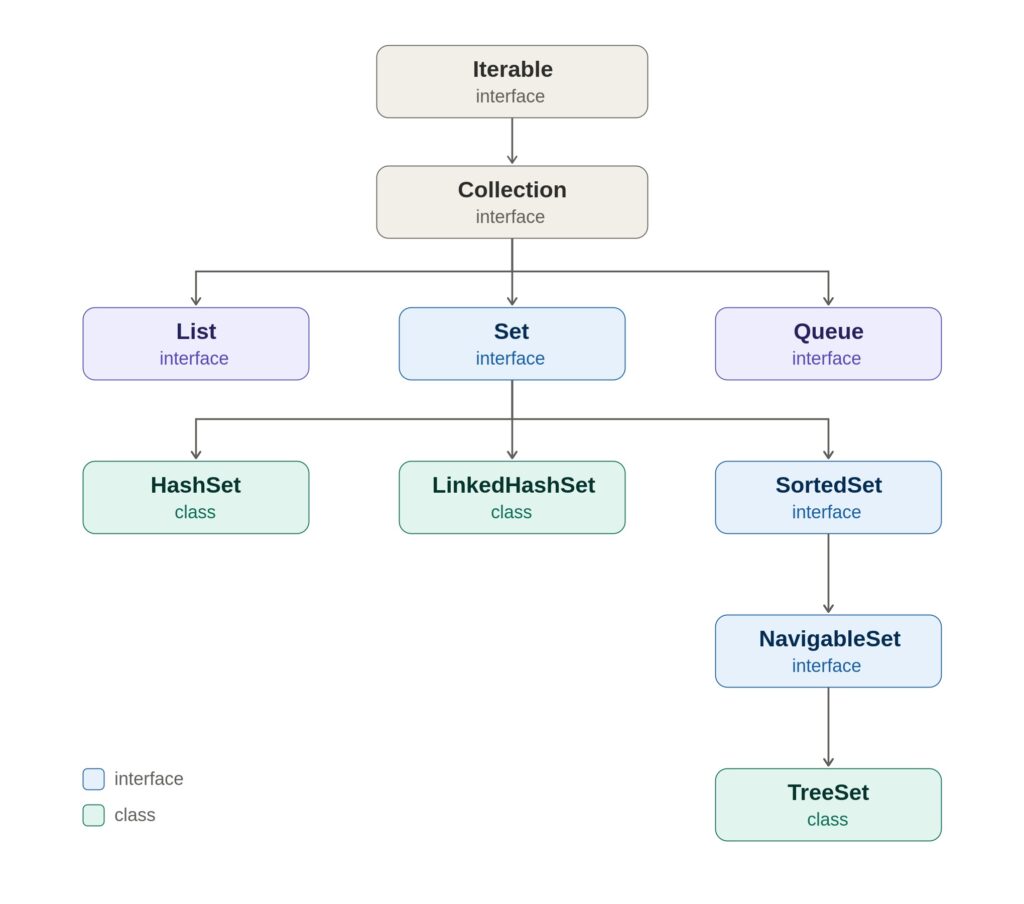
A few things are worth noticing in this diagram. Collection itself extends Iterable, which is why you can use a for-each loop on any Set. HashSet and LinkedHashSet implement Set directly. TreeSet sits lower because it implements NavigableSet, which extends SortedSet, which extends Set — those extra layers are exactly what give TreeSet its sorting and navigation powers (covered in a later topic).
Because Set extends Collection, every Set implementation supports these standard operations without defining them itself:
import java.util.*;

Set<String> langs = new HashSet<>();

langs.add("Java");              // add an element
langs.remove("Java");           // remove an element
langs.contains("Java");         // check membership → boolean
langs.size();                   // number of elements
langs.isEmpty();                // true if no elements
langs.clear();                  // remove everything
langs.addAll(otherCollection);  // bulk add
The Set interface doesn’t add many methods of its own. Its real contribution isn’t new methods — it’s a stricter contract: the promise that no duplicates will ever be stored. Methods like add() are inherited from Collection, but Set redefines their behavior to enforce uniqueness.
Because of the no-duplicates contract, Set is the natural home for classic set-theory operations — union, intersection, and difference — built using the inherited bulk methods:
import java.util.*;

Set<Integer> a = new HashSet<>(Arrays.asList(1, 2, 3, 4));
Set<Integer> b = new HashSet<>(Arrays.asList(3, 4, 5, 6));

// Union (everything in either set)
Set<Integer> union = new HashSet<>(a);
union.addAll(b);                  // [1, 2, 3, 4, 5, 6]

// Intersection (only what's in both)
Set<Integer> intersection = new HashSet<>(a);
intersection.retainAll(b);        // [3, 4]

// Difference (in a but not in b)
Set<Integer> difference = new HashSet<>(a);
difference.removeAll(b);          // [1, 2]

System.out.println(union);        // [1, 2, 3, 4, 5, 6]
System.out.println(intersection); // [3, 4]
System.out.println(difference);   // [1, 2]
These three lines — addAll, retainAll, removeAll — map directly onto union, intersection, and difference. This is something Sets do elegantly that Lists cannot, and it flows naturally from the framework’s design.
The Set interface is just a contract — you can’t instantiate it directly (new Set<>() won’t compile). You always pick a concrete implementation. There are three you’ll use day-to-day, each making a different trade-off between ordering and performance.
| Implementation | Ordering | Backed By | Performance (add / contains) | Allows null? |
|---|---|---|---|---|
| HashSet | No order — unpredictable | HashMap | O(1) — fastest | One null |
| LinkedHashSet | Insertion order | LinkedHashMap | O(1) — slight overhead | One null |
| TreeSet | Sorted order | TreeMap (Red-Black Tree) | O(log n) | No null |
Here’s the same data added to all three, side by side, to make the ordering difference concrete:
import java.util.*;

public class SetComparison {
    public static void main(String[] args) {
        String[] data = {"Banana", "Apple", "Cherry", "Apple"};

        Set<String> hashSet       = new HashSet<>(Arrays.asList(data));
        Set<String> linkedHashSet = new LinkedHashSet<>(Arrays.asList(data));
        Set<String> treeSet       = new TreeSet<>(Arrays.asList(data));

        System.out.println("HashSet:       " + hashSet);
        System.out.println("LinkedHashSet: " + linkedHashSet);
        System.out.println("TreeSet:       " + treeSet);
    }
}
Output:
HashSet:       [Banana, Cherry, Apple]          // no guaranteed order
LinkedHashSet: [Banana, Apple, Cherry]          // order they were inserted
TreeSet:       [Apple, Banana, Cherry]          // alphabetical (sorted)
HashSet gives you no promises, LinkedHashSet remembers the order you inserted, and TreeSet keeps everything sorted. Choosing between them is almost always a question of which ordering you need versus how much speed you’re willing to trade for it.
We will learn more about LinkedHashSet and TreeSet in the next articles.
Understanding equals() and hashCode() is one of the most important concepts when working with Java collections. It is also one of the most common sources of bugs for developers who are new to Sets and HashMaps.
A Set promises that it will never store duplicate elements. However, this raises an important question: How does a Set determine whether two objects are duplicates?
The answer lies in two methods inherited from Object:
For built-in types like String and Integer, uniqueness just works — they already define equals() and hashCode() correctly. But for your own classes, Java has no idea what makes two objects “the same.” Consider a Person class:
public class Person {
    private String name;
    private int age;

    public Person(String name, int age) {
        this.name = name;
        this.age = age;
    }
    // no equals() or hashCode() overridden
}
Now, let’s add two people who are clearly the same person:
Set<Person> people = new HashSet<>();
people.add(new Person("Alice", 30));
people.add(new Person("Alice", 30));   // same data, different object

System.out.println(people.size());     // 2  ← BUG!
Most developers expect the output to be 1, because both objects contain the same data.
Instead, the Set stores both objects.
At first glance, it looks like the Set has failed to prevent duplicates. In reality, the problem is that the Person class never defined what “equal” means.
Every Java class automatically inherits these methods from the Object class.
equals() – The default implementation of the equals method checks object identity:
obj1 == obj2
In other words, two objects are considered equal only if they refer to the exact same object in memory.
hashCode() – The default implementation of the hashCode method generates a hash value based on the object’s identity.
As a result:
new Person("Alice", 30)and
new Person("Alice", 30)are treated as completely different objects because they occupy different memory locations.
Therefore:
person1.equals(person2) // false
And their hash codes are usually different as well. The Set sees two different objects and stores both.
A HashSet uses a two-step process.
Step 1: Calculate the Hash Code
The Set first calls: hashCode()
The resulting value determines which bucket the object should be stored in. Think of buckets as small containers inside the hash table.
Step 2: Compare with Existing Objects
If the bucket already contains objects, the Set uses: equals()
to compare the new object against existing objects in that bucket. If any comparison returns true, the object is considered a duplicate and is not added.
add(newElement):
    bucket = hashCode(newElement) % numberOfBuckets
    for each existing in bucket:
        if newElement.equals(existing):
            return false   // duplicate — reject
    store newElement in bucket
    return true
Imagine two objects that represent the same person.
new Person("Alice", 30)
new Person("Alice", 30)
Suppose equals() says they are equal. But if their hash codes differ, they will be placed in different buckets. Because they end up in different buckets, equals() is never called between them.
The duplicate slips into the Set unnoticed. This is why Java defines an important rule.
If two objects are equal according to equals(), they must return the same hashCode(). Violating this rule leads to unpredictable behavior in hash-based collections, such as:
The Fix: Override Both Correctly
Here’s Person with both methods properly overridden:
import java.util.Objects;

public class Person {
    private String name;
    private int age;

    public Person(String name, int age) {
        this.name = name;
        this.age = age;
    }

    @Override
    public boolean equals(Object o) {
        if (this == o) return true;                  // same reference
        if (o == null || getClass() != o.getClass()) // null or different type
            return false;
        Person person = (Person) o;
        return age == person.age &&
               Objects.equals(name, person.name);    // compare fields
    }

    @Override
    public int hashCode() {
        return Objects.hashCode(name, age);          // derive from same fields
    }
}
Now rerun the earlier test:
Set<Person> people = new HashSet<>();
people.add(new Person("Alice", 30));
people.add(new Person("Alice", 30));

System.out.println(people.size());  // 1  ✓ correct!
The Set recognizes that both objects represent the same logical person and stores only one.
Consider this implementation:
@Override
public boolean equals(Object o) {
    // compares name and age
}
But no custom hashCode(). Now:
Set<Person> people = new HashSet<>();
people.add(new Person("Alice", 30));
people.add(new Person("Alice", 30));

Output: 2
Even though equals() says the objects are equal, the default hash code places them into different buckets. Since they never end up in the same bucket, equals() is never consulted. The duplicate remains in the Set.
This demonstrates why equals() and hashCode() are inseparable.
Understanding this relationship is essential not only for Sets, but also for every hash-based collection in Java. Once you grasp how equals() and hashCode() work together, many seemingly mysterious collection bugs suddenly become easy to understand and fix.
Among all Set implementations in Java, HashSet is the most commonly used. When developers need a collection that stores unique elements and provides fast lookup, insertion, and removal operations, HashSet is usually the first choice.
Its popularity comes from one key characteristic:
A HashSet provides near-constant-time performance for most operations while automatically preventing duplicates.
To use a HashSet effectively, it’s important to understand how it works internally, why it doesn’t maintain order, how it handles null, and why its operations are so fast.
One of the most interesting facts about HashSet is that it does not maintain its own complex storage structure. Internally, a HashSet is simply built on top of a HashMap. Conceptually, every element added to a HashSet becomes a key in an internal HashMap.
If you look at the actual JDK source, the HashSet class holds a HashMap field and delegates almost everything to it:
// Simplified from the actual JDK HashSet source
public class HashSet<E> {
    private transient HashMap<E, Object> map;

    // A dummy value shared by every key — the map needs *some* value
    private static final Object PRESENT = new Object();

    public HashSet() {
        map = new HashMap<>();
    }

    public boolean add(E e) {
        return map.put(e, PRESENT) == null;
    }

    public boolean contains(Object o) {
        return map.containsKey(o);
    }

    public boolean remove(Object o) {
        return map.remove(o) == PRESENT;
    }
}
The trick is elegant. A HashMap already guarantees unique keys, so HashSet simply reuses that machinery. Your elements go in as keys, and since the map doesn’t care about values here, every key is paired with the same throwaway placeholder object called PRESENT. The Set never uses that value — it only ever cares whether a key exists.
This is why understanding HashSet is understanding HashMap. The uniqueness, the bucket mechanism, the hashCode() and equals() comes from the previous section – all of it actually lives in HashMap, and HashSet is a thin wrapper that exposes only the “keys” half of it.
Internally, the map maintains an array of “buckets.” When you add an element, the process is exactly the two-step mechanism from the previous topic:
add("Apple"):
   1. hash = "Apple".hashCode()        → compute a hash
   2. index = hash & (capacity - 1)    → map it to a bucket index
   3. look in that bucket:
        - empty?      → store "Apple" here
        - occupied?   → use equals() to check each entry
                         - match found  → duplicate, reject
                         - no match     → add alongside (collision)
When two different elements map to the same bucket — a hash collision — they’re chained together in that bucket. In modern Java (8+), a bucket starts as a linked list, and if it grows large enough, it’s automatically converted into a balanced tree to keep lookups fast. This is an internal optimization you benefit from without doing anything.
This is the headline limitation of HashSet: it does not maintain any order. The position of an element depends on its hash code and the internal bucket layout, not on when you inserted it or its natural value.
import java.util.*;

Set<String> set = new HashSet<>();
set.add("Banana");
set.add("Apple");
set.add("Cherry");
set.add("Date");

System.out.println(set);  // [Banana, Date, Apple, Cherry] — unpredictable
The output order is neither insertion order nor alphabetical — it’s an artifact of the hashing. Two critical rules follow from this:
A HashSet permits exactly one null element. This works because HashMap allows one null key, and null is handled as a special case that maps to bucket 0.
Set<String> set = new HashSet<>();
set.add(null);       // allowed
set.add(null);       // ignored — already present, still one null
set.add("Hello");

System.out.println(set.size());        // 2
System.out.println(set.contains(null)); // true
You can add null once; a second null is treated as a duplicate and ignored. This is a small but useful distinction from TreeSet, which rejects null entirely (because it can’t sort it).
The defining strength of HashSet is speed. Because elements are located by jumping straight to a bucket via their hash code — rather than scanning through the collection — the core operations run in constant time, O(1), on average:
| Operation | Average Time | Worst Case |
|---|---|---|
add(e) | O(1) | O(log n) |
remove(e) | O(1) | O(log n) |
contains(e) | O(1) | O(log n) |
Reminder on Big-O: O(1) means the time stays roughly the same no matter how many elements the Set holds — checking membership in a 10-element Set takes about as long as in a 10-million-element Set. That’s what makes HashSet so powerful for “have I seen this before?” lookups.
The worst case of O(log n) only happens with severe hash collisions — many elements crammed into the same bucket. Thanks to the linked-list-to-tree conversion in Java 8+, even this degraded case stays reasonable (previously it was O(n)). In practice, with a well-distributed hashCode(), you’ll see O(1) virtually always — which is precisely why a broken hashCode() that returns a constant is so damaging: it forces every element into one bucket and collapses your fast O(1) Set into a slow linear scan.
When a HashSet fills beyond a threshold, it resizes—doubling its bucket array and redistributing all elements —an expensive operation. Two parameters control this:
// initialCapacity = 16 (buckets), loadFactor = 0.75 (resize at 75% full)
Set<String> set = new HashSet<>(16, 0.75f);
The load factor (default 0.75) is the fullness threshold that triggers a resize. If you know you’ll store many elements, setting a larger initial capacity up front avoids repeated resizing and improves performance. For most code, the defaults are perfectly fine — but it’s worth knowing the knobs exist.
So far, we have treated HashSet as if only one thread ever touches it. In real applications — web servers, background workers, parallel jobs — that assumption often breaks. So it is worth asking a question that comes up constantly in interviews and production bugs alike: is HashSet thread-safe?
The short answer is no. HashSet is not synchronized. If a single HashSet is shared across multiple threads and even one of them modifies it, you are in unsafe territory.
It is easy to repeat “not thread-safe” without understanding the real danger. Concretely, if two threads call add() or remove() on the same HashSet at the same time, their operations can interleave badly. Remember that HashSet is backed by a HashMap with an array of buckets. When two threads write concurrently, they can overwrite each other’s changes, silently drop elements, or leave the internal bucket structure corrupted. In the worst case — particularly during a resize, when the entire bucket array is being rebuilt — a thread can get stuck in an infinite loop.
The damage is not always a loud crash. Sometimes it is a quietly lost element or a size() that no longer matches reality. Those silent corruptions are the hardest bugs to track down, which is exactly why understanding this matters.
There is a second, more visible way HashSet reacts to unsafe modification. Its iterators are fail-fast. If the set is structurally modified while you are iterating over it, the iterator throws a ConcurrentModificationException.
import java.util.*;

Set<String> set = new HashSet<>(Arrays.asList("A", "B", "C"));

for (String item : set) {
    set.add("D");   // modifying during iteration
}                   // throws ConcurrentModificationException
Notice that this can bite you even in a single-threaded program — modifying a set inside a for-each loop triggers the same exception. It is important to understand that fail-fast behavior is a best-effort safeguard, not a guarantee. It exists to help you catch bugs early, not to make the set thread-safe. You should never rely on it as a concurrency mechanism.
The simplest way to get a thread-safe set is to wrap your HashSet using the Collections utility class:
import java.util.*;

Set<String> safeSet = Collections.synchronizedSet(new HashSet<>());

safeSet.add("Apple");   // each method call is now synchronized
safeSet.remove("Apple");
This wrapper synchronizes all methods using a single internal lock, so individual calls like add(), remove(), and contains() are safe.
However, there is a catch: iteration is not automatically safe. When you loop over the wrapped set, you must synchronize on it manually, or you can still get a ConcurrentModificationException:
synchronized (safeSet) {
    for (String item : safeSet) {
        System.out.println(item);
    }
}
Forgetting this block is one of the most common mistakes with synchronizedSet. The single-lock design also means only one thread can use the set at a time, which becomes a bottleneck under heavy concurrent load.
For applications where many threads hit the set at once, there is a better, more modern choice:
import java.util.*;
import java.util.concurrent.*;

Set<String> concurrentSet = ConcurrentHashMap.newKeySet();

concurrentSet.add("Apple");
concurrentSet.remove("Apple");
This gives you a set backed by a ConcurrentHashMap, and it scales far better than synchronizedSet. Instead of locking the entire set on every operation, it allows multiple threads to work on different parts of the set concurrently. Its iterators are also weakly consistent rather than fail-fast — meaning you can iterate while other threads modify the set without getting a ConcurrentModificationException. The trade-off is that an iteration may or may not reflect modifications made after it began, which is usually an acceptable price for the concurrency you gain.
As a rule of thumb, reach for synchronizedSet when concurrency is light, or you just need a quick, safe wrapper around an existing set. Choose newKeySet() when many threads will be hitting the set simultaneously, and performance matters.
This is only a practical introduction to keeping a Set safe across threads. The deeper machinery — how ConcurrentHashMap achieves its concurrency through fine-grained locking, and how the broader family of concurrent collections works — is covered separately in our multithreading series.
The Set interface solves one specific problem extremely well: storing a collection of unique elements. Throughout this article, we saw that this single guarantee — no duplicates — shapes everything about how a Set behaves, from the methods it inherits to the way it stores data under the hood.
We started with the core idea that a Set, unlike a List, has no index and no room for repetition. We then placed it in the Collections hierarchy, where it extends Collection and contributes not new methods but a stricter contract. From there, we reached the most important foundation of all: a Set is only as reliable as the equals() and hashCode() of the objects you put in it. Override one without the other, and your Set quietly stops enforcing uniqueness — which is exactly why interviewers ask about it so often.
The heart of the article was HashSet, the implementation you will reach for most of the time. We saw that it is really a thin wrapper over a HashMap, that it locates elements through a fast bucket-and-hash mechanism, and that this design is what gives it its hallmark O(1) performance for add, remove, and contains. We also saw its honest limitations: it maintains no order and is not thread-safe. For concurrent use, you now know two practical fixes — Collections.synchronizedSet() for simple cases and ConcurrentHashMap.newKeySet() for high-concurrency workloads.
If there is one thing to carry forward, it is this: HashSet is the default choice whenever you need uniqueness and do not care about order. It is fast, simple, and correct — provided your objects implement equals() and hashCode() properly. The moment you do need ordering, HashSet is no longer the right tool, and that is precisely where the next article picks up.
A Set enforces no-duplicates using equals() and hashCode(). When you add an element, it computes the hashCode() to find the right bucket, then uses equals() to check that bucket for a match. If equals() returns true against an existing element, the add is rejected. For your own classes, uniqueness only works if you’ve overridden both methods correctly.
They work as a pair. hashCode() decides which bucket an element goes to; equals() decides whether it’s truly a duplicate within that bucket. If you override only equals(), two “equal” objects can get different default hash codes, land in different buckets, and never be compared — so the duplicate slips in. The contract is: equal objects must return the same hash code.
A HashSet is a thin wrapper over a HashMap. Each element you add becomes a key in that map, paired with a shared dummy value object called PRESENT. Since a HashMap already guarantees unique keys, HashSet reuses that machinery — all the bucket, hashing, and collision logic actually lives in HashMap.
HashSet and LinkedHashSet allow exactly one null. TreeSet does not — it must compare elements to keep them sorted, and null can’t be compared, so adding null to a non-empty TreeSet throws a NullPointerException.
add(), remove(), and contains() are O(1) on average, because elements are located by jumping straight to a bucket via their hash code. The worst case is O(log n) (Java 8+, when a bucket tree-ifies) — triggered by heavy hash collisions, such as a broken hashCode() that returns a constant and forces every element into one bucket.
An element’s position depends on its hash code and the internal bucket layout, not on insertion order or value. The order can even change as the set resizes or between Java versions. If you need a predictable order, use LinkedHashSet (insertion order) or TreeSet (sorted order) instead.
PRESENT is a single static dummy object that HashSet uses as the value for every key in its backing HashMap. Since HashSet stores your elements as the map’s keys, but a HashMap’s put() requires both a key and a value, HashSet supplies this shared throwaway object as the value for all entries. It’s never used or returned — the Set only ever cares whether a key exists. Using one shared constant (rather than a new object per element) avoids wasting memory.
No, HashSet is not thread-safe. Concurrent modification from multiple threads can corrupt its internal state, and its iterators are fail-fast (they throw ConcurrentModificationException if the set changes during iteration). To make it thread-safe, wrap it with Collections.synchronizedSet(new HashSet<>()), or for high-concurrency scenarios, use ConcurrentHashMap.newKeySet(), which avoids locking the entire set on every operation.
The Set still works correctly — uniqueness is preserved because equals() is the final arbiter — but performance collapses. A constant hash code sends every element to the same bucket, so that bucket becomes one long chain. Every add() and contains() must then scan the whole chain with equals(), degrading HashSet’s O(1) operations to O(n) — effectively turning your fast hash set into a slow linear search.