Move Zeroes in Java DSA: Push Every Zero to the End Without Losing Order
-
Last Updated: July 29, 2026
-
By: javahandson
-
Series

Learn move zeroes in java DSA three ways, from a helper list to the one-pass two-pointer swap, with full step-by-step dry runs and clean code.
Move Zeroes in Java is one of those problems that looks tiny but hides a neat trick. You get an array of numbers. Your job is to push every zero to the end. The catch is the order of the other numbers must stay the same.
So [0, 1, 0, 3, 12, 0, 5] should turn into [1, 3, 12, 5, 0, 0, 0]. Notice how 1, 3, 12, and 5 kept their old order. Only the zeros slid to the back.
One more rule makes it fun. You should do this in place, without building a brand new array. That means moving things around inside the same array you were given.
We build the answer in three steps, from clumsy to clean. First a brute-force version that copies non-zeros into a helper list. Then a leaner one that overwrites in place and fills zeros after. Last comes the one-pass two-pointer swap, which is the version interviewers hope to see.
Every approach gets a full, step-by-step dry run on the same seven numbers. Nothing is skipped. You can watch each line of code fire and see exactly what changes at every move.
Let us pin down the rules before we write any code.
For our array the result is [1, 3, 12, 5, 0, 0, 0]. There are three zeros, and they all end up parked at the back. The four non-zeros stay in the order they first appeared. Holding that order while sweeping zeros away is the real work here.
In place means we reuse the same array instead of allocating another one. We can read a value, overwrite a slot, or swap two slots. What we cannot do is create a second array of the same size just to hold the answer.
Why bother? A huge array might not have room for a second copy. Doing the work in place keeps extra memory near zero.
The key idea is two indexes moving at different speeds. One index reads every slot from left to right. The other index marks the next free spot where a non-zero belongs.
Because the write index moves slower, it always sits at or behind the read index. That gap is exactly the space the zeros used to take.
| 💡 Interview Insight A common opener is “can you do it in one pass with O(1) extra space?” The answer is yes: one scan, two indexes, a swap when you meet a non-zero. Say that up front and you have already described the optimal solution. |
The simplest idea is to sort the numbers into two buckets by hand. First collect every non-zero into a helper list, in order. Then add enough zeros to fill the rest. Finally copy that list back into the original array.
temp = empty list

for i from 0 to n-1:          // collect non-zeros
    if nums[i] != 0:
        add nums[i] to temp

while size of temp < n:       // pad with zeros
    add 0 to temp

for i from 0 to n-1:          // copy back into nums
nums[i] = temp[i]That copy-back step is easy to forget. Without it the original array never changes.
import java.util.*;

public class MoveZeroesBrute {

    public static void moveZeroes(int[] nums) {
        List<Integer> temp = new ArrayList<>();
        for (int i = 0; i < nums.length; i++) {
            if (nums[i] != 0) {
                temp.add(nums[i]);
            }
        }
        while (temp.size() < nums.length) {
            temp.add(0);
        }
        for (int i = 0; i < nums.length; i++) {
            nums[i] = temp.get(i);
        }
    }

    public static void main(String[] args) {
        int[] nums = { 0, 1, 0, 3, 12, 0, 5 };
        moveZeroes(nums);
        System.out.println(Arrays.toString(nums)); // [1, 3, 12, 5, 0, 0, 0]
    }
}Array: [0, 1, 0, 3, 12, 0, 5], length 7. We trace all three phases: collecting, padding, then copying back. Nothing is hidden.
Legend for the phases below:
Phase A — collect non-zeros into temp:
| i (read index) | nums[i] (value there) | zero? | action | temp after |
|---|---|---|---|---|
| 0 | 0 | yes | skip | [ ] |
| 1 | 1 | no | add 1 | [1] |
| 2 | 0 | yes | skip | [1] |
| 3 | 3 | no | add 3 | [1, 3] |
| 4 | 12 | no | add 12 | [1, 3, 12] |
| 5 | 0 | yes | skip | [1, 3, 12] |
| 6 | 5 | no | add 5 | [1, 3, 12, 5] |
Next, Phase B — pad temp with zeros until its length is 7:
| pad step | temp size before | action | temp after |
|---|---|---|---|
| 1 | 4 | add 0 | [1, 3, 12, 5, 0] |
| 2 | 5 | add 0 | [1, 3, 12, 5, 0, 0] |
| 3 | 6 | add 0 | [1, 3, 12, 5, 0, 0, 0] |
Finally, Phase C — copy temp back into nums, one slot at a time:
| i (write index) | temp[i] (value copied) | nums after this copy |
|---|---|---|
| 0 | 1 | [1, 1, 0, 3, 12, 0, 5] |
| 1 | 3 | [1, 3, 0, 3, 12, 0, 5] |
| 2 | 12 | [1, 3, 12, 3, 12, 0, 5] |
| 3 | 5 | [1, 3, 12, 5, 12, 0, 5] |
| 4 | 0 | [1, 3, 12, 5, 0, 0, 5] |
| 5 | 0 | [1, 3, 12, 5, 0, 0, 5] |
| 6 | 0 | [1, 3, 12, 5, 0, 0, 0] |
There are three phases to follow: collect, pad, then copy back. We take them one at a time, and the only thing worth tracking is the temp list on the right.
Phase A — collecting non-zeros.
We walk every slot and grab only the non-zeros, keeping their order.
Notice the order. We added 1, then 3, then 12, then 5, exactly as they appeared. That is how the non-zero order survives.
Phase B — padding with zeros.
temp holds four numbers, but the array has room for seven. So we add zeros until it is full.
temp is now exactly the answer we want. All that is left is to move it into the real array.
Phase C — copying back into nums.
We overwrite nums one slot at a time with temp. The middle rows look messy on purpose, so read them slowly.
The stale leftovers like 12 and 5 in the tail get overwritten as we go. Once the last slot is written, the array matches temp exactly.
It works and it is easy to read. The problem is that helper list. Interviewers want the zeros moved without spending O(n) extra memory, so we tighten it next.
We can drop the helper list. Use one write index that marks the next free front slot. Walk the array, and each time you meet a non-zero, drop it at the write index and step that index forward. After the walk, everything from the write index onward gets set to zero.
pos = 0                       // next free front slot

for i from 0 to n-1:          // overwrite non-zeros to the front
    if nums[i] != 0:
        nums[pos] = nums[i]
        pos = pos + 1

for j from pos to n-1:        // fill the rest with zeros
nums[j] = 0Since pos only moves on a non-zero, it lags behind i. That lag is where the leftover zeros will go.
import java.util.*;

public class MoveZeroesOverwrite {

    public static void moveZeroes(int[] nums) {
        int pos = 0;
        for (int i = 0; i < nums.length; i++) {
            if (nums[i] != 0) {
                nums[pos] = nums[i];
                pos++;
            }
        }
        for (int j = pos; j < nums.length; j++) {
            nums[j] = 0;
        }
    }

    public static void main(String[] args) {
        int[] nums = { 0, 1, 0, 3, 12, 0, 5 };
        moveZeroes(nums);
        System.out.println(Arrays.toString(nums)); // [1, 3, 12, 5, 0, 0, 0]
    }
}Array: [0, 1, 0, 3, 12, 0, 5], length 7. We trace every i in the overwrite loop, then every j in the fill loop. No step is skipped.
Legend for the tables below:
Phase A — overwrite non-zeros to the front:
| i (read index) | nums[i] (value there) | zero? | action | pos after | nums after |
|---|---|---|---|---|---|
| 0 | 0 | yes | skip | 0 | [0, 1, 0, 3, 12, 0, 5] |
| 1 | 1 | no | nums[0] = 1 | 1 | [1, 1, 0, 3, 12, 0, 5] |
| 2 | 0 | yes | skip | 1 | [1, 1, 0, 3, 12, 0, 5] |
| 3 | 3 | no | nums[1] = 3 | 2 | [1, 3, 0, 3, 12, 0, 5] |
| 4 | 12 | no | nums[2] = 12 | 3 | [1, 3, 12, 3, 12, 0, 5] |
| 5 | 0 | yes | skip | 3 | [1, 3, 12, 3, 12, 0, 5] |
| 6 | 5 | no | nums[3] = 5 | 4 | [1, 3, 12, 5, 12, 0, 5] |
Phase B — fill from pos=4 to the end with zeros:
| j (fill index) | action | nums after |
|---|---|---|
| 4 | nums[4] = 0 | [1, 3, 12, 5, 0, 0, 5] |
| 5 | nums[5] = 0 | [1, 3, 12, 5, 0, 0, 5] |
| 6 | nums[6] = 0 | [1, 3, 12, 5, 0, 0, 0] |
The one thing to watch is pos, the next free front slot. It only moves on a non-zero, so it lags behind i. Read each step and keep an eye on that gap.
Phase A — overwriting to the front.
See the gap. When i reached 6, pos was only 4. That difference of 2 is exactly the count of zeros we passed. The front four slots now hold 1, 3, 12, 5 in order. The tail still has stale leftovers like 12 and 5, but we clean those next.
Phase B — filling the tail.
pos stopped at 4, which means slots 4, 5, and 6 are free for zeros.
The stale 12 and 5 from the tail get overwritten, and the answer is complete.
This is a big win over the helper list. It touches the array at most twice, though. The next version does the whole job in a single pass.
Here is the cleanest version. Keep one write index for the next free front slot. Scan with a read index across the array. Every time the read index lands on a non-zero, swap it into the write slot and bump write. Zeros drift to the back on their own, and it all happens in a single pass.
write = 0                     // next free front slot

for read from 0 to n-1:
    if nums[read] != 0:
        swap nums[write] and nums[read]
write = write + 1When write equals read, the swap just trades a slot with itself, which is harmless. When they differ, the swap pushes a zero toward the back for free.
import java.util.*;

public class MoveZeroesTwoPointer {

    public static void moveZeroes(int[] nums) {
        int write = 0;
        for (int read = 0; read < nums.length; read++) {
            if (nums[read] != 0) {
                int t = nums[write];
                nums[write] = nums[read];
                nums[read] = t;
                write++;
            }
        }
    }

    public static void main(String[] args) {
        int[] nums = { 0, 1, 0, 3, 12, 0, 5 };
        moveZeroes(nums);
        System.out.println(Arrays.toString(nums)); // [1, 3, 12, 5, 0, 0, 0]
    }
}Array: [0, 1, 0, 3, 12, 0, 5], length 7. We trace every read step, including the zeros that trigger no swap. Watch write climb only on a non-zero.
Legend for the table below:
| read (scan index) | nums[read] (value there) | zero? | write before | action | write after | nums after |
|---|---|---|---|---|---|---|
| 0 | 0 | yes | 0 | skip | 0 | [0, 1, 0, 3, 12, 0, 5] |
| 1 | 1 | no | 0 | swap idx0 & idx1 | 1 | [1, 0, 0, 3, 12, 0, 5] |
| 2 | 0 | yes | 1 | skip | 1 | [1, 0, 0, 3, 12, 0, 5] |
| 3 | 3 | no | 1 | swap idx1 & idx3 | 2 | [1, 3, 0, 0, 12, 0, 5] |
| 4 | 12 | no | 2 | swap idx2 & idx4 | 3 | [1, 3, 12, 0, 0, 0, 5] |
| 5 | 0 | yes | 3 | skip | 3 | [1, 3, 12, 0, 0, 0, 5] |
| 6 | 5 | no | 3 | swap idx3 & idx6 | 4 | [1, 3, 12, 5, 0, 0, 0] |
Read each read step with one question in mind: is this a zero we skip, or a non-zero we swap forward? Every swap does two jobs at once, so watch both the value that lands up front and the zero that drops back.
Two things make this work. First, every swap places a non-zero and evicts a zero at the same time, so one move does double duty. Second, write only moves after a placement, so it always points at the earliest zero. That is why non-zeros stay in order and zeros end up neatly at the back.
| 💡 Interview Insight If asked “does swapping break the order of the non-zeros?” the answer is no. The write slot always holds either a zero or the very value you are about to place, so a non-zero never jumps ahead of an earlier non-zero. Order is preserved by construction. |
| Approach | How it moves zeros | Extra memory | Passes over array |
|---|---|---|---|
| Helper list | Copy non-zeros out, pad, copy back | A full list | Three |
| Overwrite + fill | Push non-zeros forward, zero the tail | Just one index | Two |
| Two-pointer swap | Swap each non-zero to the front | Just one index | One |
Tables are exact, but a sketch often lands faster. Here is the same two-pointer trace drawn by hand.
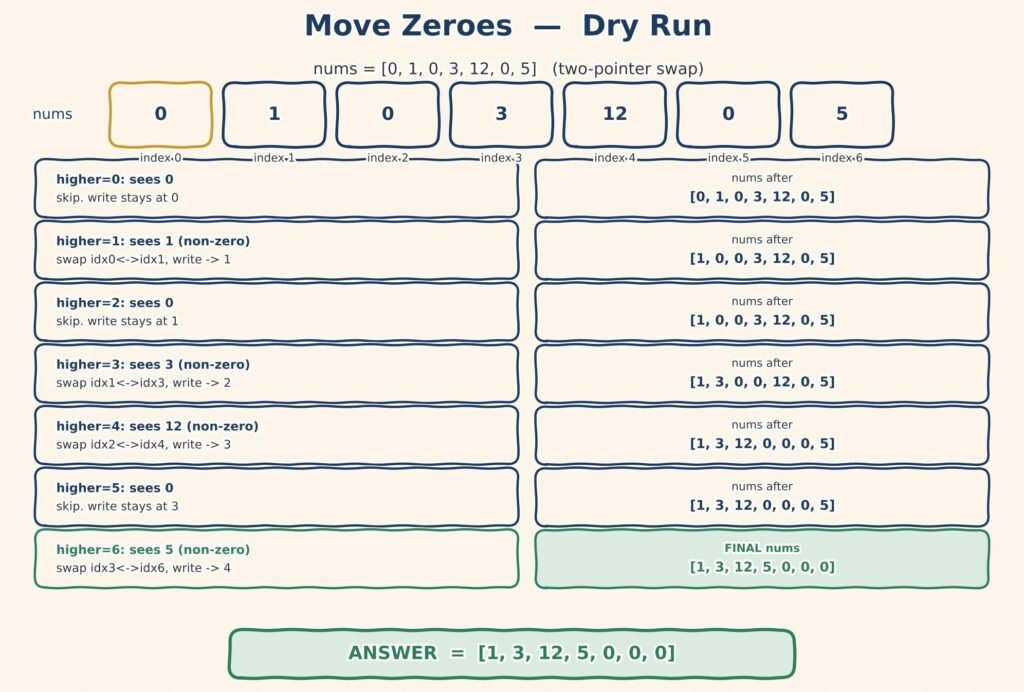
All three give the same result. They just pay different prices.
| Approach | Time | Space | Note |
|---|---|---|---|
| Helper list | O(n) | O(n) | Easy to read, but copies the whole array |
| Overwrite + fill | O(n) | O(1) | In place, walks the array twice |
| Two-pointer swap | O(n) | O(1) | In place, single pass, the expected answer |
All three run in linear time. What separates them is memory and passes. The two-pointer swap carries almost nothing and finishes in one sweep, so it is the version to reach for.
In an interview, start with the helper list, point out the wasted O(n) memory, then tighten it into the one-pass swap. That climb from clumsy to clean is the story interviewers want to hear.
| 💡 Interview Insight If pushed on edge cases, mention an array that is all zeros or has no zeros at all. The swap handles both without any special code: all zeros means write never moves, and no zeros means every swap is a slot trading with itself. |
A few small traps catch beginners on Move Zeroes. Keep them in mind.
Run those last two cases through your code before you call it done. They catch more bugs than any ordinary input will.
A: The one-pass two-pointer swap is best. It uses O(n) time and O(1) extra space, scanning once and swapping each non-zero to the front while zeros drift to the back.
A: Yes. The write slot always holds a zero or the value being placed, so a non-zero never jumps ahead of an earlier one. Order is preserved by construction.
A: Test an all-zeros array like [0, 0, 0] and a no-zeros array like [1, 2, 3]. The two-pointer swap handles both with no special code.
Move Zeroes in Java looks simple, and with the right idea it truly is. The trick is a write index that lags behind a read index. That single gap is where all the zeros quietly collect.
Our seven-number trace showed the payoff clearly. The helper list copied everything twice over. The one-pass swap fixed each non-zero into place and let the zeros drift back on their own.
So take the pattern, not just the answer. A slow write pointer and a fast read pointer solve a whole family of array problems. You will see the same two-index move again and again as the series goes on.