ArrayList in Java: List Interface Core Concepts & Internals (Beginner’s Guide)
-
Last Updated: July 7, 2026
-
By: javahandson
-
Series
Learn Java in a easy way

Learn how ArrayList in Java works under the hood — the List interface, index access, dynamic array resizing, and why get() is O(1) but middle inserts are O(n).
You’ve been storing things in arrays for a while now. Then you hit a wall. The array fills up, and you want to add one more item. Now what?
A plain array in Java has a fixed size. You decide the length up front, and that’s it. Adding a tenth item to a nine-slot array just doesn’t work.
That’s where the List interface steps in. A List is like an array that grows on its own. You keep adding items, and it makes room for them.
In this article, we’ll start with the List interface itself. Then we’ll dig into ArrayList, the List you’ll reach for most of the time.
Here’s what we’ll cover:
No prior List knowledge needed. If you know what a Java array is, you’re ready.
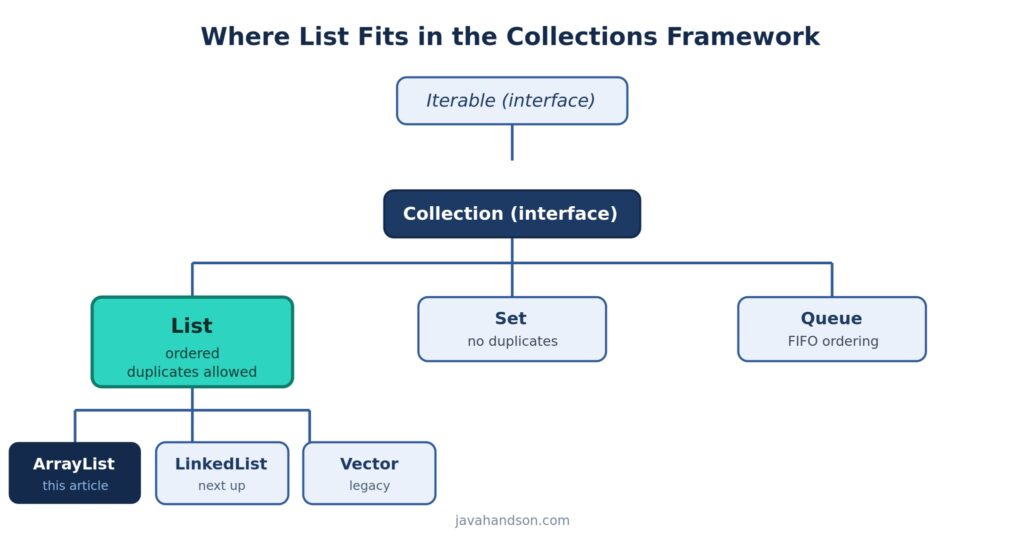
A List is an ordered collection. Order matters here. The first item you add sits at the front, and the next one goes right behind it.
Think of a shopping list on paper. You write milk, then eggs, then bread. When you read it back, you see them in that same order. A Java List works the same way.
A List lets you store the same value more than once. Add “apple” twice, and both copies stay. This is different from a Set, which drops duplicates.
So if you need to keep every entry, even repeats, a List is the right tool. Vote counts, log lines, and cart items all work well here.
Each element in a List has an index. The first item is at index 0, the second at index 1, and so on. This is exactly like an array.
Because of these positions, you can ask for the item at any spot. You can also insert, replace, or remove an item by its index.
It helps to see them side by side. Both hold ordered items with indexes. But they behave very differently once you start using them.
| Feature | Array | List (ArrayList) |
|---|---|---|
| Size | Fixed at creation | Grows and shrinks |
| Add / remove methods | None built in | add(), remove(), and more |
| Holds primitives | Yes (int[], etc.) | Only objects (boxed) |
| Type safety | Yes | Yes, with generics |
| Length check | arr.length | list.size() |
| Duplicates allowed | Yes | Yes |
So a List trades a little raw speed for a lot of convenience. For most day-to-day code, that trade is well worth it.
One small gotcha. An array uses length with no parentheses. A List uses size() as a method call. Mixing them up is a common beginner slip.
One thing trips up beginners. You can’t write new List(). The List is an interface, so it only describes what a list can do.
A concrete class actually does the work. Java gives you a few options:
ArrayList — backed by a resizable array, and the usual default.
LinkedList — built from linked nodes, good for frequent inserts at the ends.
Vector — an older, synchronized version, rarely used today.
We’ll cover LinkedList and Vector in later articles. For now, we focus on ArrayList.
Here’s the common way to declare one:
List<String> fruits = new ArrayList<>();
fruits.add("apple");
fruits.add("banana");
fruits.add("apple");   // duplicates are fine

System.out.println(fruits);
// Output: [apple, banana, apple]
Notice the left side says List, not ArrayList. This is a good habit. You code to the interface, so swapping the implementation later stays easy.
Before we go deeper, here’s a quick tour of the methods you’ll use daily. You don’t need to memorize them. Just know they exist.
add(item) — put an item at the end.
add(index, item) — insert at a spot.
get(index) — Read the item at a spot.
set(index, item) — replace an item.
remove(index) — delete by position.
size() — How many items are in the list?
contains(item) — check if a value is present.
isEmpty() — true if the list has no items.
That handful covers most real work. We’ll see several of them in action below.
The biggest perk of a List is direct access by position. You point at a spot, and you get the item there instantly.
Use get(index) to read an item. Use set(index, value) to replace one. Both take an index that starts at 0.
List<String> colors = new ArrayList<>();
colors.add("red");
colors.add("green");
colors.add("blue");

System.out.println(colors.get(0));   // red
System.out.println(colors.get(2));   // blue

colors.set(1, "yellow");             // replace green
System.out.println(colors);          // [red, yellow, blue]
The get() call is fast. It doesn’t scan the list. It jumps straight to the slot, which we’ll explain soon.
You can drop an item into the middle. Call add(index, value), and everything after that index shifts right by one.
List<String> names = new ArrayList<>();
names.add("Amy");
names.add("Ben");
names.add("Cara");

names.add(1, "Alex");   // insert at index 1
System.out.println(names);
// Output: [Amy, Alex, Ben, Cara]
Alex lands at index 1. Ben and Cara each move one step to the right. That shifting has a cost, and we’ll return to it.
You can remove an item two ways. Pass an int index to remove by position. Pass an object to remove by value.
List<String> pets = new ArrayList<>();
pets.add("cat");
pets.add("dog");
pets.add("fish");

pets.remove(0);          // removes "cat" by index
pets.remove("fish");     // removes "fish" by value
System.out.println(pets); // [dog]
Watch out here. remove(0) on a List<Integer> removes by index, not by the value 0. This surprises a lot of people.
Now for the fun part. Let’s open up ArrayList and see what makes it tick.
Inside every ArrayList sits a plain Java array. The field is roughly Object[] elementData. That’s where your items really live.
So when you call get(), the ArrayList reaches into that array and hands back the item. A regular array read. Nothing more.
But wait. Arrays have a fixed size. How does the list keep growing? That’s the clever bit.
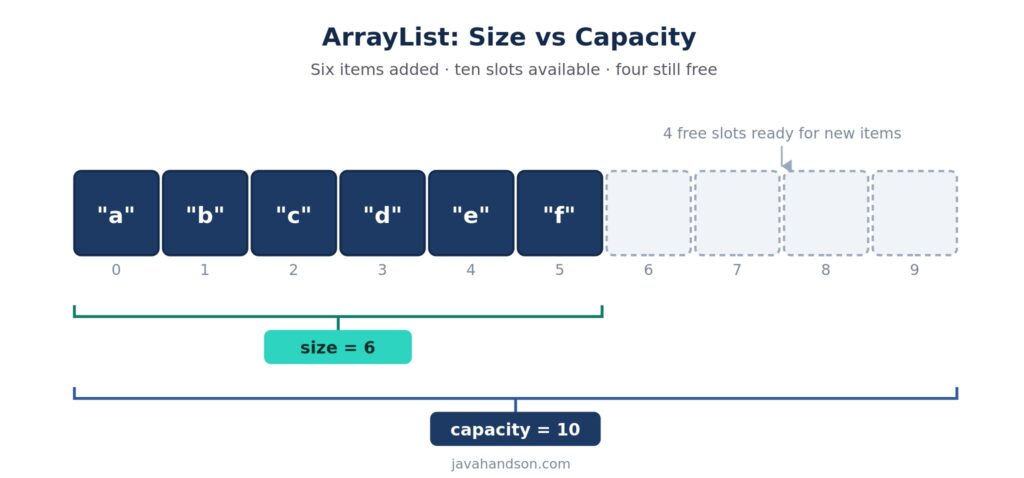
An ArrayList tracks two numbers, and they aren’t the same:
Size — how many items you’ve actually added.
Capacity — how many slots the internal array can hold right now.
Say the internal array has 10 slots but you’ve added 6 items. The size is 6, and the capacity is 10. Four empty slots sit ready for more.
You control size with add() and remove(). You don’t touch capacity directly. The list manages it for you.
Here’s the question everyone asks. What happens when the array runs out of slots?
The ArrayList grows itself. When you add an item and there’s no room, it does three things:
In modern Java, the new array is about 1.5 times the old size. A capacity of 10 becomes 15. Then 15 becomes 22, and so on.
This copy step isn’t free. It touches every element. But it doesn’t happen on every add, and that’s the key.
You might wonder why it grows by half instead of just one slot. Growing by one slot would mean a copy on every single add. That would be painfully slow.
By grabbing extra room each time, the list copies rarely. Most adds just drop the item into a free slot. Fast and simple.
Spread across many adds, the average cost stays low. We call this amortized cost, and we’ll explain it next.
Here’s a detail that pays off later. An ArrayList keeps its items in one solid block of memory. The slots sit right next to each other.
This layout has a real speed benefit. Modern CPUs load memory in chunks, not one byte at a time. When items are neighbors, the CPU grabs several at once.
So walking through an ArrayList tends to be fast. The next item is usually already loaded and waiting. This is often called good cache locality.
A linked structure spreads its items all over memory. We’ll compare that with LinkedList in the next article. For now, just remember: neighbors are fast.
You don’t have to trust me on this. Open the JDK source for ArrayList, and you’ll spot the pieces we described.
The class holds two key fields, roughly like this:
// Simplified from the JDK source
transient Object[] elementData;   // the backing array
private int size;                 // how many items are in use

public E get(int index) {
    Objects.checkIndex(index, size);
    return (E) elementData[index]; // direct array read = O(1)
}
See the get() method? It reads straight from the array. No loop, no scan. That’s why it’s constant time.
Let’s talk speed. Some ArrayList operations are quick. Others can drag. Knowing which is which helps you write faster code.
Reading or writing by index is constant time, written as O(1). The list jumps straight to the slot.
Why so fast? An array stores items in one solid block of memory. The address of any slot is a simple bit of math from the start.
It doesn’t matter if the list holds 10 items or 10 million. Grabbing item number 500 takes the same tiny effort either way.
Adding to the end with add(value) is fast most of the time. There’s a free slot, so the item just drops in.
Once in a while the array is full. Then a resize kicks in, and that single add is slow. But it’s rare.
Averaged over many adds, the cost is O(1). This is what “amortized constant time” means. The occasional slow add gets spread out.
Here’s where ArrayList slows down. Insert or remove in the middle, and things must shift.
Insert at the front of a 1,000-item list, and all 1,000 items shift right by one. That’s O(n) work, where n is the list size.
Remove from the front, and everything shifts left to fill the gap. Same cost. The bigger the list, the more shifting.
So if you do lots of inserts at the start or middle, ArrayList may not be your best pick. A LinkedList can do better there, and we cover that next article.
Looking for a value with contains() or indexOf() scans from the start. In the worst case, it checks every item.
That’s O(n) too. If you search by value a lot, a HashSet or HashMap will serve you better.
Here’s the whole thing at a glance:
| Operation | Time | Why |
|---|---|---|
| get(index) | O(1) | Direct jump to the slot |
| set(index, value) | O(1) | Direct jump to the slot |
| add(value) — at end | O(1)* | Amortized; rare resize |
| add(index, value) | O(n) | Shifts items right |
| remove(index) | O(n) | Shifts items left |
| contains / indexOf | O(n) | Scans the list |
*The star on add() means amortized. Almost always fast, slow only when a resize hits.
So when does ArrayList shine? Let’s keep it practical.
Most everyday needs land here. A list of users, rows from a database, items in a cart. ArrayList handles all of them well.
For heavy front-end inserts, look at LinkedList or ArrayDeque. For thread safety, look at CopyOnWriteArrayList or external synchronization.
If you know roughly how many items you’ll add, set the capacity up front. Pass it to the constructor: new ArrayList<>(1000).
This skips several resize-and-copy rounds. For big lists built in a loop, it’s a nice, easy win.
Let’s tie it together with a small, realistic task. Say you’re building a simple to-do list app.
You start empty and add tasks as the user types them. Adds land at the end, so each one is cheap.
List<String> todos = new ArrayList<>();
todos.add("Buy groceries");
todos.add("Call the dentist");
todos.add("Finish the report");

System.out.println("Tasks: " + todos.size());
// Output: Tasks: 3
Three quick adds. No shifting, no drama. This is ArrayList at its best.
The user marks task two as done. You read it, tweak it, and write it back by index.
String task = todos.get(1);          // O(1) read
todos.set(1, task + " (done)");      // O(1) write

System.out.println(todos.get(1));
// Output: Call the dentist (done)
Both operations jump straight to index 1. Fast and clean, no matter how long the list gets.
Now the user drags a new task to the very top. That’s an insert at index 0.
todos.add(0, "URGENT: pay rent");   // O(n) shift
System.out.println(todos);
Every existing task shifts right by one. With three items, you barely notice. With fifty thousand, you would.
This is the moment to ask: do I insert at the front often? If yes, an ArrayDeque or LinkedList might fit better. If not, ArrayList is still your friend.
A few traps catch beginners again and again. Let’s name them so you can dodge them.
On a List<Integer>, remove(1) removes the item at index 1, not the value 1. To remove the value, box it: remove(Integer.valueOf(1)).
Change a list inside a for-each loop, and you’ll often hit a ConcurrentModificationException. The iterator notices the list changed under it.
To remove safely while looping, use an Iterator and its remove() method:
Iterator<String> it = list.iterator();
while (it.hasNext()) {
    String s = it.next();
    if (s.startsWith("x")) {
        it.remove();   // safe removal
    }
}People assume ArrayList inserts are always cheap. They aren’t. An insert in the middle is O(n) because of shifting. Pick the right structure for your access pattern.
A List<Integer> boxes every int into an Integer object. For huge numeric lists, that adds memory and slows things down. Primitive-focused libraries can help there.
These come up a lot in Java interviews. Short, honest answers work best.
A List is an ordered collection that grows and shrinks on its own. An array has a fixed size you set at creation. A List also gives you rich methods like add, remove, and contains, which a raw array doesn’t.
A plain resizable array, held internally as an Object[]. When it fills up, ArrayList makes a bigger array and copies the items over.
Because items sit in one continuous block of memory. The address of any index is quick arithmetic from the start, so the list jumps straight to it without scanning.
Every item after the insert point shifts one slot to the right. For a list of size n, that’s up to n shifts, so the cost grows with the list.
Most adds are constant time because there’s a free slot. Once in a while the array fills and a resize copies everything, which is slow. Spread across many adds, the average stays constant.
When full, it builds a new array about 1.5 times larger, copies the old items in, and drops the old array. Growing by a factor keeps resizes rare.
Loop with an explicit Iterator and call its remove() method. Don’t modify the list directly inside a for-each loop.
Index. remove(int) matches on position. To remove the value 1, call remove(Integer.valueOf(1)) so the object overload runs.
Prefer List on the left side. Coding to the interface lets you swap the implementation later without touching the rest of your code. Use the concrete type only when you need a method that lives on it alone.
Set an initial capacity if you know the rough size, like new ArrayList<>(10000). This skips several resize-and-copy rounds and saves time on big lists.
Let’s wrap up what we covered. A List is an ordered collection that allows duplicates and gives each item an index.
ArrayList backs that List with a resizable array. Reads by index are O(1). Adds at the end are amortized O(1). Inserts and removes in the middle are O(n) because of shifting.
Reach for ArrayList when you read by index and add to the end. Look elsewhere when you insert at the front a lot or search by value often.
Next up, we open the LinkedList. You’ll see where a linked structure beats a dynamic array, and where the textbook Big-O doesn’t match the real world.