BlockingQueue in Java: Producer-Consumer Pattern
-
Last Updated: October 22, 2026
-
By: javahandson
-
Series

Learn BlockingQueue in Java with the producer-consumer pattern. Simple put/take examples, implementations, poison pills, and common mistakes to avoid.
Imagine a busy kitchen in a restaurant. Cooks prepare dishes and place them on a counter. Waiters pick up those dishes and serve them to customers. The counter sits in the middle. It connects two groups of people who work at their own speed. BlockingQueue in Java plays exactly that role for threads. It is a thread-safe queue that sits between threads producing data and threads consuming it.
The magic word here is “blocking”. When the counter is full, a cook simply waits. When the counter is empty, a waiter simply waits. Nobody shouts, nobody crashes, and nobody drops a plate. In this guide, we will build that mental model from scratch, look at real code, and understand why this one interface makes concurrent programming so much calmer.
Before we talk about the solution, let us feel the pain of the problem. This way the solution will make real sense.
In many programs, one part of the code creates work and another part finishes it. We call the creator a producer. We call the finisher a consumer. A classic example is a file downloader. One thread downloads chunks of data. Another thread writes those chunks to disk.
The trouble is speed. The producer might be fast while the consumer is slow. Or the other way around. So they need a shared space to hand off work. A plain list looks like the obvious choice. Sadly, a plain list falls apart the moment two threads touch it together.
Say the producer adds items to an ArrayList and the consumer removes them. Both run at the same time. Here is what can go wrong:
You could wrap every access in a synchronized block. You could add wait and notify calls by hand. People have done this for years. But hand-written locking is easy to get wrong. A tiny mistake leads to a deadlock or a lost signal. Honestly, it is a headache nobody enjoys.
| 💡 Interview Insight Interviewers love to start with “how would you share data between a producer thread and a consumer thread?” A weak answer reaches for synchronized, wait, and notify. A strong answer says: use a BlockingQueue, because it hides all that low-level coordination behind a clean interface. |
A BlockingQueue is a queue that is safe for many threads to use at once. It lives in the java.util.concurrent package. It extends the normal Queue interface, so it still has the familiar add, offer, poll, and peek methods. On top of that, it adds something special.
The word “blocking” is the whole point. A BlockingQueue can pause a thread until the queue is ready. Two situations trigger this pause:
This waiting happens on its own. You do not write any wait or notify code. The queue handles it for you. That is the gift BlockingQueue gives every Java developer.
A BlockingQueue can have a fixed size or no fixed size. A bounded queue has a capacity limit. When it fills up, producers must wait. An unbounded queue has no real limit, so producers rarely block.
Most of the time you want a bounded queue. Why? Because it gives you backpressure. If consumers fall behind, the queue fills, and producers slow down automatically. Without that limit, a fast producer can fill memory and crash the whole application. Keep this trade-off in mind when you pick a size.
| 💡 Interview Insight “What is backpressure?” is a common follow-up. Backpressure means a slow consumer can push back on a fast producer. A bounded BlockingQueue gives you this for free: once it is full, put() blocks the producer, which naturally throttles the whole pipeline. |
BlockingQueue gives you four sets of methods. Each set reacts differently when the queue is full or empty. This is the part people mix up, so let us make it crystal clear.
| Situation | Throws Exception | Returns Special Value | Blocks Forever | Blocks with Timeout |
|---|---|---|---|---|
Insert | add(e) | offer(e) | put(e) | offer(e, time, unit) |
Remove | remove() | poll() | take() | poll(time, unit) |
Examine | element() | peek() | not available | not available |
Let us decode this table in plain words.
The add() and remove() methods are strict. If add() hits a full queue, it throws an IllegalStateException. If remove() hits an empty queue, it throws a NoSuchElementException. Use these only when you are sure the queue has room or has items.
The offer() and poll() methods are gentle. If offer() cannot insert, it returns false instead of crashing. If poll() finds nothing, it returns null. These are perfect when you want to try an operation and move on.
The put() and take() methods are the stars of the show. They wait. The put() method waits for space. The take() method waits for an item. These two methods make the producer-consumer pattern almost effortless.
Sometimes waiting forever is risky. So offer() and poll() also come in timed versions. You pass a time limit. The thread waits only up to that limit. If nothing happens in time, the method gives up and returns. This keeps your app responsive.
| 💡 Interview Insight A favourite trick question: “what is the difference between add() and put()?” The answer: add() throws an exception on a full bounded queue, while put() blocks the calling thread until space is free. Mixing these two up is a classic bug in real code. |
BlockingQueue is just an interface. You need a real class to use it. Java ships several, and each fits a different job. Let us walk through the ones you will actually reach for.
This is a bounded queue backed by an array. You must give it a fixed size when you create it. That size never changes. It is simple, fast, and predictable.
Pick this one when you know your capacity upfront. The fixed size also gives you clean backpressure. It is often the first choice for a basic producer-consumer setup.
This queue uses linked nodes instead of an array. You can set a capacity, or leave it out for an almost unbounded queue. It uses separate locks for the head and the tail. So producers and consumers can often work at the same time without blocking each other.
Reach for this when you want higher throughput under heavy load. But be careful with the unbounded version. A runaway producer can eat all your memory.
Most queues follow first-in, first-out order. This one does not. It orders items by priority. The most important item comes out first. You decide the order with a Comparator or by making your items Comparable.
This queue is unbounded, so put() never blocks. Use it when some tasks matter more than others. A job scheduler is a good example.
This one is unusual. It holds zero items. Yes, zero. Each insert must wait for a matching remove. A producer and a consumer must meet at the exact same moment to hand off a single item.
Think of it as a direct handoff with no storage in between. It shines when you want work passed straight from one thread to another. The cached thread pool inside Java uses it under the hood.
A DelayQueue holds items that are not ready yet. Each item carries a delay. You can only take an item after its delay has passed. Until then, take() blocks.
This is handy for scheduled tasks. Think of a cache where entries expire, or a retry system that waits before trying again.
| 💡 Interview Insight If asked “which BlockingQueue has zero capacity?”, the answer is SynchronousQueue. A follow-up often asks where it is used. Java’s Executors.newCachedThreadPool() uses it so tasks are handed directly to a free thread, creating a new thread only when none is free. |
Now comes the fun part. Let us build a working producer-consumer with a BlockingQueue. Watch how little code it takes. There is no synchronized block anywhere.
import java.util.concurrent.ArrayBlockingQueue;
import java.util.concurrent.BlockingQueue;

public class SimpleProducerConsumer {

    public static void main(String[] args) {
        // A bounded queue that holds at most 5 items
        BlockingQueue<Integer> queue = new ArrayBlockingQueue<>(5);

        // The producer thread
        Thread producer = new Thread(() -> {
            try {
                for (int i = 1; i <= 10; i++) {
                    queue.put(i);                 // waits if the queue is full
                    System.out.println("Produced: " + i);
                    Thread.sleep(100);            // pretend work takes time
                }
            } catch (InterruptedException e) {
                Thread.currentThread().interrupt();
            }
        });

        // The consumer thread
        Thread consumer = new Thread(() -> {
            try {
                for (int i = 1; i <= 10; i++) {
                    int value = queue.take();     // waits if the queue is empty
                    System.out.println("        Consumed: " + value);
                    Thread.sleep(300);            // consumer is slower here
                }
            } catch (InterruptedException e) {
                Thread.currentThread().interrupt();
            }
        });

        producer.start();
        consumer.start();
    }
}
Look closely at the two key lines. The producer calls put(i). The consumer calls take(). That is all the coordination you need. The consumer here is slower than the producer. So the queue fills up to five items. Then the producer waits on put() until the consumer makes room. The whole dance happens on its own.
When you run this, you will see production race ahead at first. Soon the queue hits its limit of five. After that, each new “Produced” line waits for a “Consumed” line. The producer and consumer fall into a steady rhythm. No item is lost. No thread crashes. That balance is backpressure in action.
You will notice both put() and take() throw InterruptedException. This checked exception is not noise. It is Java’s way of saying a thread can be asked to stop while it waits. A good habit is to catch it and call Thread.currentThread().interrupt() to keep the interrupt flag set. Never swallow it silently.
| 💡 Interview Insight Why do put() and take() throw InterruptedException? Because they may park the thread for a long time. If another part of the system wants to shut down, it interrupts the waiting thread. Restoring the interrupt flag lets higher-level code notice and react properly. |
The simple example used a fixed count of ten. Real systems rarely know the count ahead of time. So how does a consumer know when to stop? A neat trick is the poison pill. You send a special value that means “we are done, please stop”.
import java.util.concurrent.BlockingQueue;
import java.util.concurrent.LinkedBlockingQueue;

public class PoisonPillExample {

    // A special object that signals the end
    private static final String POISON_PILL = "STOP";

    public static void main(String[] args) {
        BlockingQueue<String> queue = new LinkedBlockingQueue<>(10);

        Thread producer = new Thread(() -> {
            try {
                String[] tasks = {"task-A", "task-B", "task-C"};
                for (String task : tasks) {
                    queue.put(task);
                    System.out.println("Produced: " + task);
                }
                queue.put(POISON_PILL);           // tell the consumer to stop
            } catch (InterruptedException e) {
                Thread.currentThread().interrupt();
            }
        });

        Thread consumer = new Thread(() -> {
            try {
                while (true) {
                    String task = queue.take();
                    if (task.equals(POISON_PILL)) {
                        System.out.println("Consumer stopping.");
                        break;                     // leave the loop cleanly
                    }
                    System.out.println("        Consumed: " + task);
                }
            } catch (InterruptedException e) {
                Thread.currentThread().interrupt();
            }
        });

        producer.start();
        consumer.start();
    }
}
The idea is simple. The producer sends all its real work first. Then it sends one poison pill. The consumer loops forever with take(). When it sees the pill, it breaks out and stops. If you have many consumers, send one pill for each of them. This gives you a clean, graceful shutdown.
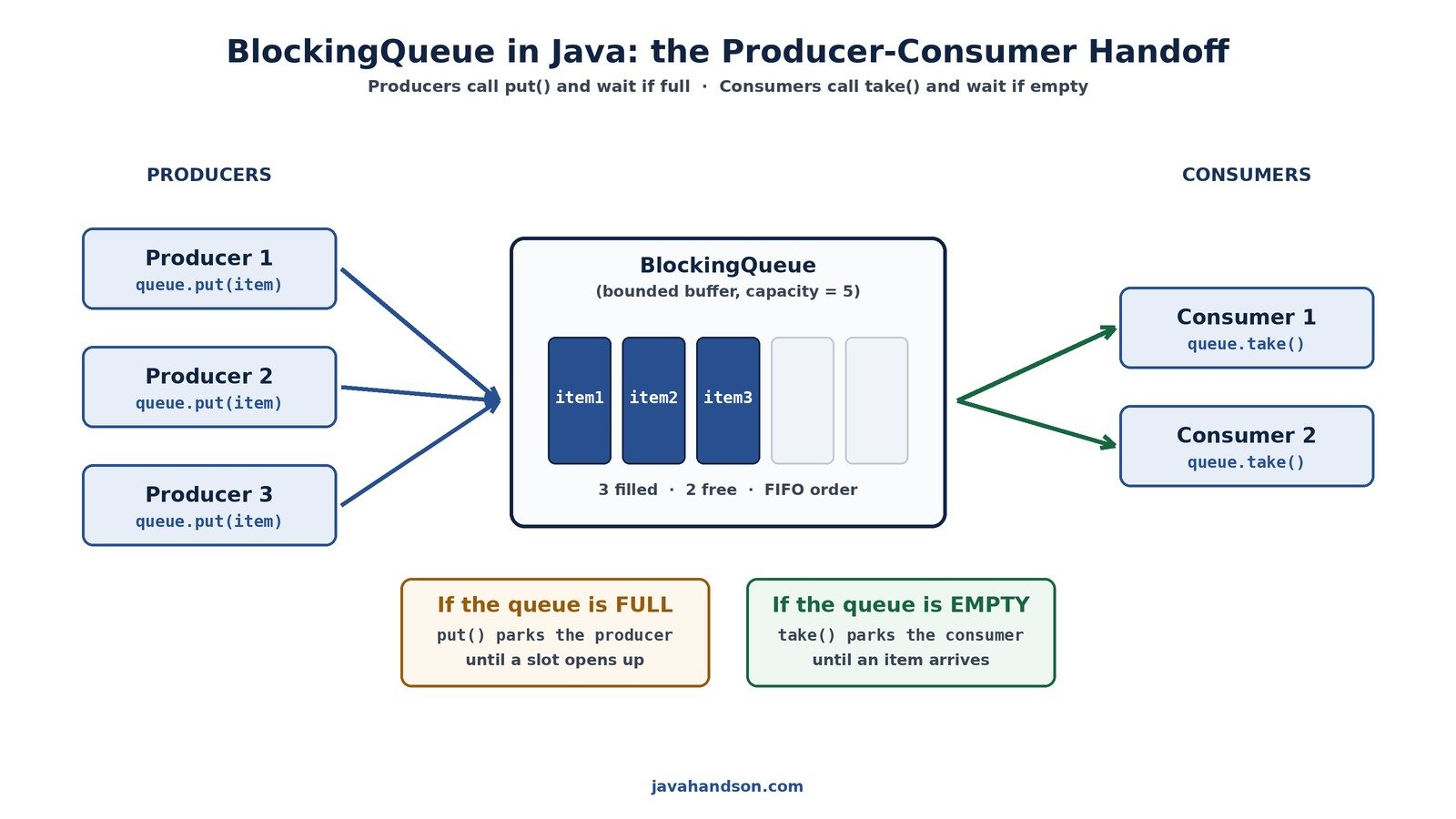
People often ask which pair of methods to use. Both move data in and out of the queue. The real difference is how they behave when the queue is full or empty.
Use put() and take() when waiting is fine. In a steady pipeline, blocking is a feature. The producer should wait if the buffer is full. The consumer should wait if there is nothing to do. This keeps the pipeline balanced with almost no effort.
Sometimes a thread must not get stuck. Maybe it handles a user request and needs to stay responsive. Here, use the timed offer() and poll(). They wait only for a set time, then give up. Your code stays in control and can react to a timeout.
| 💡 Interview Insight A sharp question is: “your consumer must never hang. Which method do you call?” The answer is poll(timeout, unit). It waits only for the given time and then returns null, letting your thread continue instead of parking forever. |
BlockingQueue is friendly, but a few traps still catch people. Here are the ones worth remembering.
A LinkedBlockingQueue with no size is unbounded. If your producer outruns your consumer, the queue grows and grows. Memory fills up and the app dies with an OutOfMemoryError. The fix is simple: always set a sensible capacity for production code.
It is tempting to catch InterruptedException and do nothing. Please do not. Swallowing it hides shutdown signals. At the very least, restore the flag with Thread.currentThread().interrupt(). Your future self will thank you.
A consumer looping on take() never ends on its own. If you forget a stop signal, the thread lives forever. Use a poison pill, or interrupt the thread, or check a shared flag. Give every long-running consumer a clear way out.
Calling add() on a full bounded queue throws an exception. Many people expect it to block like put(). Read the method table once more and pick the right family for your need. A clear choice here prevents surprise crashes.
With several choices available, a quick guide helps. Here is a simple way to decide.
When in doubt, start with ArrayBlockingQueue and a reasonable size. It is easy to reason about. You can always switch later once you measure real behaviour. Measuring beats guessing every single time.
| 💡 Interview Insight Interviewers often ask you to compare ArrayBlockingQueue and LinkedBlockingQueue. Key points: ArrayBlockingQueue is always bounded and uses a single lock. LinkedBlockingQueue can be optionally bounded and uses two locks, so it often handles concurrent producers and consumers with better throughput. |
Here is a nice surprise. If you have ever used a thread pool, you have already used a BlockingQueue. You just did not see it. The ThreadPoolExecutor class keeps a BlockingQueue inside it. That queue holds the tasks waiting to run.
When you submit a task to a pool, it does not always run at once. If every thread is busy, the task goes into the pool’s internal queue. A free thread later takes it out and runs it. This is a producer-consumer setup. Your code is the producer. The pool threads are the consumers.
The kind of queue you give the pool changes its behaviour a lot. A bounded queue makes the pool reject or slow down work when overloaded. An unbounded queue lets tasks pile up without limit. So the choice of BlockingQueue quietly shapes how your whole application handles load.
One more handy method is drainTo(). It moves many items from the queue into a list in a single call. This is faster than taking items one by one. It helps when a consumer wants to grab a batch and process it together.
import java.util.ArrayList;
import java.util.List;
import java.util.concurrent.BlockingQueue;
import java.util.concurrent.LinkedBlockingQueue;

public class DrainExample {
    public static void main(String[] args) throws InterruptedException {
        BlockingQueue<Integer> queue = new LinkedBlockingQueue<>();
        for (int i = 1; i <= 5; i++) {
            queue.put(i);
        }

        List<Integer> batch = new ArrayList<>();
        queue.drainTo(batch);                 // move everything at once

        System.out.println("Got a batch of: " + batch);
        System.out.println("Queue now empty? " + queue.isEmpty());
    }
}
The output shows all five numbers moved into the list in one go. The queue ends up empty. Batch processing like this can lift performance when you handle a steady stream of small items.
| 💡 Interview Insight A strong closing point in interviews: “BlockingQueue is the backbone of Java’s thread pools.” The ThreadPoolExecutor uses one as its work queue, and the queue type you choose decides whether the pool queues tasks, rejects them, or creates new threads. |
A: A BlockingQueue is a thread-safe queue in the java.util.concurrent package. It sits between producer threads and consumer threads. When the queue is full, put() makes a producer wait. When it is empty, take() makes a consumer wait. You get all this without writing any wait or notify code.
A: On a full bounded queue, add() throws an IllegalStateException right away. The put() method instead blocks the calling thread until a slot opens up. Use put() for steady producer-consumer pipelines and add() only when you are sure there is room.
A: Start with ArrayBlockingQueue when you know the capacity upfront and want simple, clean backpressure. Switch to a bounded LinkedBlockingQueue if you need higher throughput with many producers and consumers, since it uses separate locks for the head and tail.
A: Both methods can park a thread for a long time. If another part of the system wants to shut down, it interrupts the waiting thread, which raises InterruptedException. A good habit is to catch it and call Thread.currentThread().interrupt() so higher-level code can still react.
A: No. BlockingQueue does not allow null elements. It uses null as a signal that the queue is empty, for example when poll() finds nothing. Trying to insert null throws a NullPointerException.
A: A poison pill is a special value the producer sends to tell consumers to stop. A consumer loops on take() and breaks out when it sees the pill. If you have many consumers, send one pill for each. This gives a clean, graceful shutdown.
BlockingQueue in Java turns a messy concurrency problem into a tidy one. It is the shared counter between your producers and your consumers. It handles the waiting, the signalling, and the thread safety for you. You get to focus on the actual work instead of low-level locks.
Remember the core ideas. Use put() and take() for simple blocking pipelines. Prefer a bounded queue for backpressure. Pick the implementation that matches your job. Handle the InterruptedException with care. Give your consumers a clean way to stop. Get these right, and your concurrent code becomes calm, correct, and easy to read.