Encapsulation in Java: A Beginner-Friendly Guide with Examples
-
Last Updated: July 26, 2026
-
By: javahandson
-
Series

Learn encapsulation in Java the easy way. Understand private fields, getters and setters, access modifiers, and see a full working BankAccount example.
Picture your bank. You walk up to the counter and ask for your balance. Nobody lets you march into the vault and count the cash yourself. You ask, and the teller hands you a number. That gap between you and the vault is the whole idea behind encapsulation in Java.
Encapsulation is one of the four pillars of object-oriented programming. The other three are inheritance, polymorphism, and abstraction. Out of all of them, this one is the easiest to grasp and the easiest to get wrong.
In plain words, encapsulation means keeping your data safe inside a class. You hide the fields. Then you hand out a few controlled ways to touch them. Nobody pokes at your variables directly.
Why does that matter so much? Because data has a way of going wrong when everyone can touch it. A field meant to hold an age might end up with the value -3. A price might turn into a huge negative number. When code all over your project can change a field, you lose track of who broke it.
Encapsulation puts a wall around that data. The wall has one door, and you build the door. You decide who gets in and what they can do once inside. It sounds strict, but it saves you hours of debugging down the road.
Here’s what we’ll walk through:
You only need to know what a Java class and an object are. If you’ve written a class with a couple of fields, you’re ready.
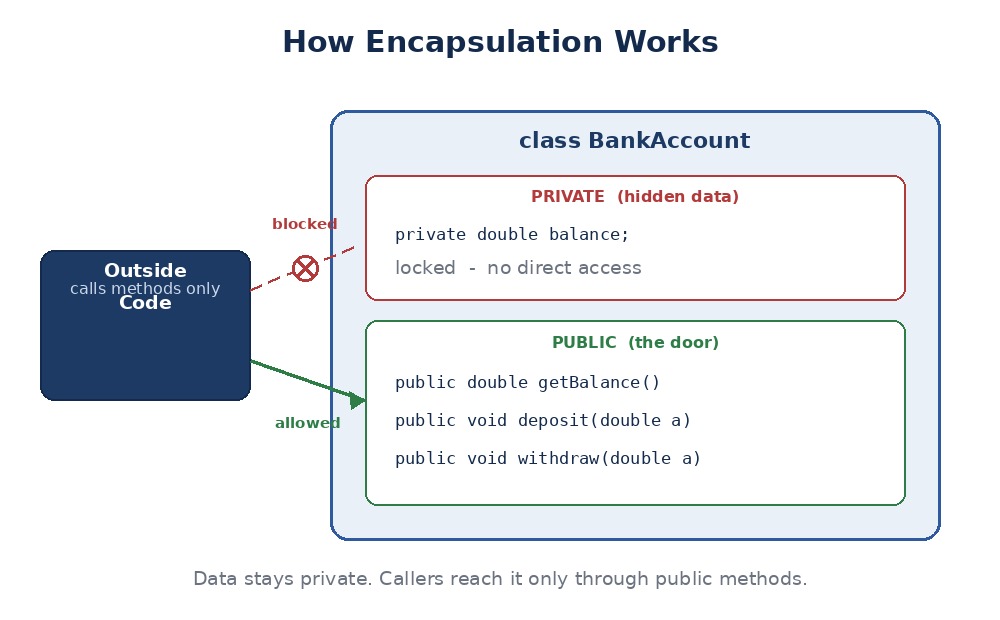
Encapsulation is the idea of bundling data and the methods that work on that data into one unit. That unit is your class. The data stays private. The methods form the door.
Think of a medicine capsule. The powder sits inside a shell. You don’t touch the powder. You swallow the whole thing, and it does its job. A Java class wraps its data the same way.
The word itself is a clue. A capsule is a small case. Encapsulation is the act of putting something in that case. In Java, the case is your class, and the something is your data plus the methods that work on it.
Here’s the mental model I like. Your class is a small machine. It has parts inside, and it has a few buttons on the front. The parts are the private fields. The buttons are the public methods. You press a button, the machine does its thing, and you never see the gears turn.
The heart of encapsulation is data hiding. You mark your fields as private. Now no outside class can read or change them directly.
So how does anyone use the data? Through public methods that you write yourself. You decide what’s allowed. You set the rules.
This gives you control. One field can stay read-only. Another can reject bad values. You hold the gate, not the caller.
Data hiding also draws a clean line. Inside the class, you can do whatever you want with the fields. Outside the class, callers see only the methods you chose to share. That line is what keeps a big program from turning into a tangle.
Let’s start with the messy way first. Here’s an Account class where every field is wide open.
class Account {
    public double balance;   // anyone can touch this
}

Account a = new Account();
a.balance = -5000;   // uh oh, a negative balance
System.out.println(a.balance);  // -5000
See the problem? Any code anywhere can set the balance to a nonsense value. A negative bank balance should never happen, yet nothing stops it. The class has no say.
You might ask why bother. Public fields work, right? They do, until they don’t. Let’s look at what encapsulation buys you.
With private fields, bad values can’t sneak in. You add a check inside a setter and block anything wrong. The balance stays sane because the class refuses garbage.
This is called keeping an object in a valid state. A valid state means the data always makes sense. An age is never negative. A percentage never goes above 100. The class guards those rules so you don’t have to trust every caller to remember them.
Say you store a temperature as Celsius today. Tomorrow you want to store it as Fahrenheit under the hood. With private fields, you swap the internals and keep the same methods. Outside code never notices.
That freedom is huge on a real project. You refactor the guts without breaking every file that uses your class. The public methods act like a promise. As long as you keep that promise, you’re free to change everything behind it.
Now flip it around. Imagine the field was public and used in fifty places. Change how it works, and you might break all fifty. Encapsulation is what saves you from that mess.
A class with a clear set of public methods reads like a menu. You see what you can do and nothing else. The messy details stay tucked away where they belong.
When a field only changes through one setter, you have one place to watch. Add a log line there and you catch every update. Compare that to hunting through dozens of files that all poke the field directly.
Bugs love shared, open data. A value goes wrong, and you have no idea which line did it. With a single setter as the gate, your search shrinks to one method. That alone can turn an hour of hunting into a two-minute fix.
A well-encapsulated class tells you exactly how to use it. The public methods are the contract. Anything not on that list is off-limits, and that’s a good thing. You and your teammates work against a small, clear surface instead of a free-for-all.
Encapsulation leans on access modifiers. These keywords decide who can see what. Java gives you four levels of access.
Here’s a quick tour, from most locked-down to most open:
For encapsulation, the pattern is simple. Fields go private. Methods that others need go public. That’s the everyday rule you’ll reach for most.
A quick word on the middle two. Default access, which you get by writing no keyword at all, keeps things within one package. Protected opens the door a little wider, letting subclasses reach in. You’ll meet both more once you dig into inheritance. For now, private and public do the heavy lifting.
One habit worth building early: reach for the tightest access that still works. Start with private. Loosen it only when you have a real reason. It’s far easier to open a door later than to close one that half your code depends on.
Watch what happens when you try to touch a private field from outside its class.
class Student {
    private String name;   // locked down
}

Student s = new Student();
s.name = "Ravi";   // compile error, name is private
The compiler stops you cold. That’s the point. The field is off-limits, so you must go through a proper method instead.
So your fields are private. Now you need a way in. That’s the job of getters and setters. They’re just plain methods with a naming habit.
A getter reads a field and returns its value. By habit, it starts with get, followed by the field name. It takes no arguments and hands back the value.
public String getName() {
    return name;
}
Simple enough. Someone calls getName() and receives the name. They never touch the field itself.
A setter updates a field. It starts with set, takes the new value as a parameter, and stores it. Better yet, it can check the value first.
public void setName(String name) {
    if (name != null && !name.isEmpty()) {
        this.name = name;
    }
}
Notice the guard clause. A blank or null name gets rejected. The field only changes when the value makes sense. That check is where encapsulation earns its keep.
This is the part people miss. A setter isn’t just a way to assign a value. It’s a checkpoint. Every update passes through it, so every update can be checked, logged, or even blocked. A public field gives you none of that.
You can put real logic in here too. Trim extra spaces from a string. Round a number to two decimals. Convert text to uppercase. The caller passes a value, and your setter cleans it up before it lands in the field.
You may wonder about this.name = name. The parameter and the field share a name. So this.name means the field, and plain name means the parameter. The this keyword clears up the clash.
The get and set prefixes aren’t just style. Java tools rely on them. Frameworks like Spring, and libraries that turn objects into JSON, look for methods named this way. Follow the habit and your classes play nice with the whole Java world.
There’s one twist for booleans. A getter for a boolean field often starts with is instead of get. So a field named active gets a method called isActive(). It reads more like a plain question, which is the point.
You don’t have to write both a getter and a setter. Skipping one gives you a special kind of field:
This flexibility is a quiet win. You expose exactly as much as you want, no more.
Let’s tie it all together with a real class. We’ll build a proper BankAccount that guards its balance. This is the bank counter from the intro, in code.
public class BankAccount {
    private double balance;   // hidden from the outside

    // getter — read the balance
    public double getBalance() {
        return balance;
    }

    // deposit — add money, but only a positive amount
    public void deposit(double amount) {
        if (amount > 0) {
            balance = balance + amount;
        }
    }

    // withdraw — take money, but never overdraw
    public void withdraw(double amount) {
        if (amount > 0 && amount <= balance) {
            balance = balance - amount;
        }
    }
}
Look at what we did. The balance is private. There’s no setBalance() at all. You can only change the money through deposit and withdraw, and both check the amount first.
Now let’s put it to work and see the guards do their thing.
BankAccount acc = new BankAccount();
acc.deposit(1000);
acc.withdraw(300);
System.out.println(acc.getBalance());  // 700.0

acc.withdraw(5000);   // ignored, not enough money
acc.deposit(-50);     // ignored, negative amount
System.out.println(acc.getBalance());  // still 700.0
The bad calls simply do nothing. No crash, no weird balance. The class protected itself, which is exactly what we wanted.
Compare this to the open Account from earlier. Here, a negative balance can’t happen. An overdraft can’t happen either. The rules live inside the class, so every caller follows them whether they like it or not.
Notice one more thing. We chose not to write a setBalance() method at all. Why? Because nobody should set a balance to any number they please. Money changes only through a deposit or a withdrawal. Leaving out that setter was a design choice, and encapsulation gave us the freedom to make it.
That’s the real lesson. Encapsulation isn’t about adding a getter and setter for every field on autopilot. It’s about thinking through what each field needs, then exposing only that. Sometimes that means both methods. Other times just one. And now and then, neither.
People mix these two up all the time. They’re related, yet they solve different problems. Let’s clear the fog.
Abstraction is about hiding complexity. You show what a thing does and hide how it does it. A car’s steering wheel is abstraction. You turn it and steer, with no clue about the gears below.
Encapsulation is about hiding data. You wrap fields in a class and guard them with methods. It’s the how-do-I-protect-my-state question.
Here’s a side-by-side to make it stick:
You often use both at once. Abstraction decides what to expose. Encapsulation locks down the data behind that exposed surface. One is the design idea, the other is the enforcement.
Take our BankAccount again. Deposit and withdraw are the abstract actions, the what. Behind them, the private balance and the value checks are the encapsulation, the how. The two ideas team up in almost every class you write.
Encapsulation looks easy, and that’s the trap. Here are the slips that trip up beginners and pros alike.
Some folks make a field public and still add a getter and setter. That defeats the whole point. If the field is public, callers skip your methods and touch it directly. Keep fields private.
A setter that just assigns the value gives you nothing over a public field. The magic is in the check. If your setter has no guard, ask whether you even need it.
Say a getter returns your internal List. Now the caller can add and remove items behind your back. You handed out a private field by reference. Return a copy or an unmodifiable view instead.
// risky — caller can change your internal list
public List<String> getTags() {
    return tags;
}

// safer — hand back a read-only view
public List<String> getTags() {
    return Collections.unmodifiableList(tags);
}Your IDE can spit out getters and setters for every field with one click. Handy, but lazy. Not every field needs both. Think about what should be read-only, what needs a check, and what nobody outside should ever see.
Encapsulation isn’t just a textbook idea. It shows up everywhere in real Java code, often without you noticing. Once you know the shape, you’ll spot it fast.
Think of a User class with a name, email, and age. Each field stays private. Each gets a getter, and maybe a setter with a check. This kind of class is so common it has a nickname: a POJO, short for Plain Old Java Object.
These classes hold data and pass it around your app. Encapsulation keeps that data tidy. An email setter can reject a string with no @ sign. An age setter can block negatives. The class polices its own fields.
Java’s own classes lean on encapsulation hard. When you use an ArrayList, you never touch its internal array. You call add, remove, and get. The messy resizing logic stays hidden inside.
That’s encapsulation working for you. The ArrayList team can rewrite the internals in a new Java version, and your code keeps running. You depend on the methods, not the guts.
Popular frameworks expect encapsulated classes. Spring wires objects together using their getters and setters. A JSON library reads your getters to build output. Follow the pattern and your classes just work with these tools out of the box.
This topic shows up in almost every Java interview. Short, clear answers land best. Here are the ones you’ll likely face.
A: Encapsulation means bundling your data and the methods that use it into one class, then hiding the data with the private keyword. Outside code can only reach the data through public methods you write, so you stay in control of every read and change.
A: Abstraction hides complexity, showing what a thing does while hiding how. Encapsulation hides data, wrapping fields in a class and guarding them with methods. Abstraction is the design idea. Encapsulation is how you enforce it.
A: Private fields stop outside code from changing your data directly. Every change must pass through a method, so you can validate values and keep the object in a valid state. It also lets you change the internals later without breaking other code.
A: They are plain methods that read and update private fields. A getter returns a field’s value and starts with get. A setter takes a new value, often checks it, then stores it, and starts with set. They form the controlled door into your data.
A: Yes, and that’s the point. A setter can reject bad values, trim spaces, round numbers, or convert case before storing. A setter with no check gives you nothing over a public field, so the logic is where the value lies.
A: Give it a getter but no setter. Outside code can read the value but never change it. This suits things like an ID or a creation date that should stay fixed once set.
A: No. If the fields are public, callers touch them directly and skip any checks. Real encapsulation needs private fields plus methods that guard access. Adding getters and setters on top of public fields does nothing.
A: A POJO is a Plain Old Java Object, a simple class with private fields and their getters and setters. It holds data and passes it around your app. POJOs are a classic use of encapsulation.
A: It can. If a getter hands back your internal List directly, the caller can change it behind your back. Return a copy or an unmodifiable view so your private data stays private.
A: Use private for fields and public for methods others need. Start with the tightest access that works and loosen it only when you have a real reason. It’s easier to open access later than to take it back.
Let’s wrap up. Encapsulation means bundling your data and its methods into a class, then hiding the data behind private fields.
You expose the data through getters and setters, and those methods let you add checks. Bad values get blocked. Your class stays in a valid state.
The payoff is control. You protect your data, you change internals without breaking callers, and you debug from one spot. Reach for it every time you write a class with state worth guarding.