final Keyword in Java: Variables, Methods, and Classes (A Beginner’s Guide)
-
Last Updated: July 25, 2026
-
By: javahandson
-
Series

Learn the final keyword in Java the easy way. See how final locks variables, methods, and classes, plus final vs finally vs finalize and interview questions.
You write a value into a variable. Later, some other part of your code changes it by mistake. Now a bug creeps in, and you spend an hour hunting it down.
The final keyword in Java exists to stop that pain. It’s a small word with a big job. You put it in front of something, and Java locks that thing down.
But final does more than freeze variables. You can mark a method as final so nobody overrides it. You can mark a whole class as final so nobody extends it.
In this article, we’ll walk through all three uses, one at a time. We’ll keep it simple, and we’ll lean on small examples you can run yourself.
Here’s the plan:
You don’t need to be an expert. If you know what a variable and a class are, you’re ready to go.
One thing to set straight from the start. The word final shows up a lot in interviews. So even if you rarely write it yourself, you’ll want to know what it does.
By the end, you’ll read final in someone else’s code and know exactly what it locks. That alone saves you plenty of guessing.
We’ll also clear up a classic mix-up along the way. Java has two other words that look like final: finally and finalize. They do totally different jobs, and we’ll sort them out so you never confuse them.
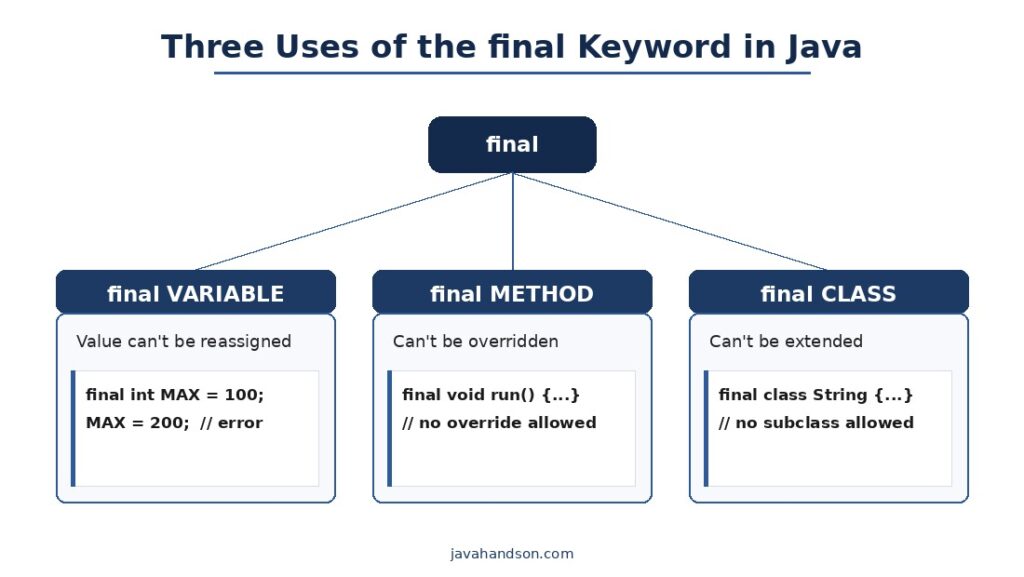
The word final in Java means “this can’t change.” Once you set it, it stays set. That’s the whole idea, boiled down.
Think of writing something in ink instead of pencil. With pencil, you can erase and rewrite. With ink, what’s on the page is there for good.
Java lets you apply final in three spots. Each spot locks a different thing:
So final is really one rule wearing three hats. In every case, it says “stop, this is fixed.” Let’s take each hat in turn.
Before we dive in, a quick word on where you place it. The final keyword goes in front of the thing you want to lock. You write final before the type of a variable, before the return type of a method, or before the word class.
That position never changes. Once you see the pattern, you’ll spot final at a glance and know what it’s guarding. It always sits just left of what it protects.
One more thing worth saying early. final is a compile-time promise. The compiler checks it while you build, not while the program runs. So a broken final rule stops your code before it ever starts.
That’s actually good news. A compile-time error is the friendliest kind of error. You catch it at your desk, not in production at 2 a.m. The word final turns a possible runtime bug into an instant red squiggle in your editor.
This is the use you’ll meet first, and the one you’ll use most. A final variable gets a value once, and then it’s frozen.
Mark a variable final, and Java lets you assign it a single time. Try to change it later, and the code won’t even compile.
final int maxUsers = 100;
System.out.println(maxUsers); // 100

maxUsers = 200; // compile error: cannot assign a value to final variable
The compiler catches the second line right away. You never even get to run the program. That early warning is the point.
So final variables give you safety. A value that should never move simply can’t move. Bugs from accidental changes just vanish.
There’s a nice side benefit too. When another developer reads final int maxUsers, they know at a glance the value won’t shift. The keyword tells a small story about your intent.
You can mark local variables final as well, not just fields. Inside a method, a final local behaves the same way. It takes one value and holds it.
Programmers often use final to make constants. A constant is a value that’s fixed for the life of the program, like Pi or a max limit.
The common style pairs final with static, and uses ALL_CAPS names:
public static final int MAX_SPEED = 120;
public static final String APP_NAME = "JavaHandsOn";
The static part means one shared copy for the whole class. The final part means nobody can change it. Together they spell “constant.”
You’ll spot this pattern everywhere in real code. Things like Integer.MAX_VALUE follow the very same rule.
Why bother with constants at all? They kill magic numbers. Instead of writing 120 in ten places, you write MAX_SPEED once. Change it in one spot, and every use updates.
Constants also read better. A raw 3.14159 means little on its own. The name PI tells the reader what it stands for right away.
A final variable doesn’t need its value on the same line. You can declare it now and assign it a bit later. This is called a blank final.
The catch is simple. You must assign it exactly once before you use it, and never again.
final int result;
if (userIsAdmin) {
    result = 10;
} else {
    result = 5;
}
System.out.println(result); // fine: assigned exactly once
Both branches set result one time. Java is happy. But if you tried to assign it a second time, the compiler would stop you.
A final variable does more than protect you. It also helps the compiler and the JVM. When Java knows a value won’t change, it can reason about your code more freely.
For example, the compiler can sometimes fold a final constant right into the spots where you use it. This is a small speed win, and you get it for free.
Don’t add final just chasing performance, though. The real gains are tiny. The bigger prize is clearer code and fewer bugs. Treat any speed boost as a bonus, not the goal.
There’s also a threading angle. In multi-threaded code, final fields carry extra safety guarantees once an object is built. That matters more in advanced work, but it’s good to know the keyword pulls its weight there too.
You can leave a final field blank at first and fill it in the constructor. This is a common, clean pattern for objects that shouldn’t change after they’re built.
class User {
    private final String name;

    User(String name) {
        this.name = name;   // set once, right here
    }

    String getName() {
        return name;
    }
}
The name field is final, so it locks the moment the constructor runs. After that, no method can change it. Each User keeps the name it was born with.
Notice there’s no setter. That’s on purpose. A final field plus no setter equals a value that stays put for the object’s whole life. This is a building block for safe, predictable classes.
You’ll see this style all over good Java code. Fields that shouldn’t wobble get marked final and set once. It makes bugs harder to write.
Here’s where many beginners trip. When you make an object reference final, what exactly gets locked? The answer surprises people.
To get this right, you need one idea first. A variable that holds an object doesn’t hold the object itself. It holds a reference, which is like an address pointing to the object.
So when you mark that variable final, you lock the address. You don’t lock what lives at the address. That gap is the whole lesson of this section.
A final object variable freezes the reference. In plain terms, the variable can’t point to a different object later.
But the object it points to? That can still change. Its fields are fair game unless they’re locked too.
final List<String> names = new ArrayList<>();
names.add("Amy");   // allowed: we change the object
names.add("Ben");   // still fine

names = new ArrayList<>(); // compile error: reassigning the reference
See the difference? Adding items works because the object itself isn’t frozen. Pointing names at a brand-new list fails, because the reference is frozen.
This trips up loads of people in interviews. Someone asks, “Can you change a final list?” The honest answer is yes and no. You can change what’s inside it. You can’t swap it for a different list.
Picture a final reference as a name tag glued to one box. You can’t peel the tag off and stick it on another box.
Yet the box still opens. You can add things, take things out, or rearrange what’s inside. The tag never moved, but the contents did.
So final on an object means “same object forever,” not “unchangeable object.” Keep that split clear, and this stops being confusing.
What if you truly want an object that can’t change? final alone won’t do it. You need to design the object itself to be immutable.
That means a few things working together:
The String class does exactly this. Its internal data is locked, and it offers no way to change a String in place. That’s why String is both final and immutable, two separate ideas stacked together.
So remember the recipe. final on the reference stops the swap. Immutable design on the object stops the change. Use both when you want a value that truly can’t move.
It helps to compare the two cases side by side. With a primitive, final really does lock the value. With an object, final only locks the reference.
| Type | What final locks | Can the value change? |
|---|---|---|
| final int x | The number itself | No, x is truly fixed |
| final String s | The reference | No, but String is also immutable |
| final List list | The reference | Yes, you can add or remove items |
See the pattern? A final int is fully locked because a number has no inside to change. A final List keeps its contents open because the object behind it can still change.
The String row is the tricky one. It’s locked twice over. The reference is final, and the String object itself is immutable. That double lock is why String feels so solid.
Now we move from variables to methods. A final method is one that a subclass can’t override. The parent locks the behavior in place.
Normally, a child class can rewrite a parent’s method. That’s overriding, and it’s a core part of inheritance. Mark the method final, and that door closes.
class Payment {
    final void process() {
        System.out.println("Processing payment");
    }
}

class CardPayment extends Payment {
    // void process() { }  // compile error: cannot override final method
}
The parent Payment says process() is final. So CardPayment can’t supply its own version. The compiler blocks it.
Think about why that’s useful here. A payment process might run fraud checks or log every transaction. If a subclass could rewrite it, those checks might vanish. final keeps the important steps in place.
You might ask why you’d ever want this. The reason is trust. Some methods do something so important that changing them would break your design.
A few common cases:
In those cases, final says “trust me, don’t touch this.” A subclass can still add new methods. It just can’t rewrite the locked one.
You’ll see this in framework code often. Library authors don’t know what subclasses people will write. So they lock the parts that must stay stable, and leave the rest open.
A final method still gets inherited. That surprises some people. The child class receives the method and can call it. It just can’t rewrite it.
Picture a parent class with three methods, one of them final. A subclass gets all three. It can use every one, and it can override the two that aren’t locked.
So final doesn’t hide a method. It shares the method but freezes its behavior. The child gets the exact logic the parent wrote, and nothing sneaks in to change it.
This gives library designers a nice middle ground. They can hand you useful methods and still guarantee a few of them behave the same everywhere. You get the benefit without the risk.
The last use is the strongest. A final class can’t be extended at all. No other class may inherit from it.
Put final in front of a class, and inheritance stops there. Try to extend it, and the compiler refuses.
final class Constants {
    static final double PI = 3.14159;
}

// class MyConstants extends Constants { }  // compile error: cannot inherit from final class
Since Constants is final, no child class exists. The class stands alone, and that’s the intent.
This is handy for utility classes. A class full of helper methods and fixed values usually shouldn’t be extended. Marking it final says so out loud, and the compiler backs it up.
You’ve used a final class already, maybe without knowing it. The String class in Java is final.
Why did Java’s designers do that? A few solid reasons drove the choice:
Other core types follow the same idea. Integer, Long, and the rest of the wrapper classes are all final too.
Imagine if String weren’t final. Someone could extend it and quietly change how equals works. Then password checks and map keys across the whole language might break. Java’s designers wouldn’t risk that.
It helps to see these side by side. They lock different things, and mixing them up is easy.
| Feature | final method | final class |
|---|---|---|
| What it locks | One method | The whole class |
| Can you subclass? | Yes | No |
| Can you override it? | No, that one method | Nothing to override |
| Common example | A security check | String, Integer |
A final method still lets you extend the class. A final class shuts the whole door. That’s the key gap between them.
You won’t mark most of your classes final. That’s fine. It’s a tool for specific jobs, not an everyday habit.
Reach for a final class when:
There’s a trade-off, though. A final class can’t be extended, so you lose some flexibility. If you’re unsure whether others might want to build on your class, leave it open.
A good rule of thumb: start without final. Add it only when you have a clear reason to lock the class down. Locking too early can box you in later.
There’s one more spot for final, and it’s often overlooked. You can mark a method parameter as final.
A final parameter can’t be reassigned inside the method body. The value you pass in stays put for the whole call.
void greet(final String name) {
    System.out.println("Hello, " + name);
    // name = "Bob";  // compile error: final parameter
}
The line that tries to change name won’t compile. Inside greet, name is read-only from start to finish.
This can prevent a subtle slip. Say you meant to build a new string but accidentally overwrote the parameter instead. With final on it, the compiler flags your mistake right away.
Honestly, final parameters are optional most of the time. Plenty of good code skips them. They add a little safety and a little noise.
Some teams use them to make intent clear. Others find them cluttered. Either view is fine. Just know the option exists when you read someone else’s code.
There’s one spot where this idea matters more, though. It ties into a term you’ll hear in modern Java: effectively final. Let’s touch on that briefly, since interviewers love to ask about it.
Java has a related idea called effectively final. It means a variable that you never reassign, even though you didn’t write the word final.
In other words, if a local variable gets one value and you leave it alone, Java treats it as effectively final. It acts locked, without the keyword.
Why does this matter? Some newer Java features need variables that don’t change. As long as your variable stays effectively final, those features work, and you don’t have to type final yourself.
For now, just hold onto the term. It shows up in interviews, and it flows straight from the same “don’t change this” spirit that final carries everywhere else.
Enough rules. Let’s look at where final actually shows up when you read real Java. Knowing the common spots helps the keyword click.
This is the most common sight. Near the top of a class, you’ll find a row of static final fields in all caps. They hold values the class treats as fixed.
class Config {
    public static final int TIMEOUT = 30;
    public static final String VERSION = "1.0";
    public static final int MAX_RETRIES = 3;
}
These are settings that shouldn’t change while the program runs. Marking them final makes that promise clear and keeps anyone from editing them by accident.
Classes that hold data often lock their fields with final. Think of a Point with an x and a y, or a Money object with an amount and a currency.
Once you create one, it never changes. If you need a different value, you make a new object. This style avoids a whole class of sneaky bugs where data shifts under you.
The Java standard library uses this idea a lot. String is the star example, but many small types follow the same rule.
Here’s what a tiny immutable class looks like in practice:
final class Point {
    private final int x;
    private final int y;

    Point(int x, int y) {
        this.x = x;
        this.y = y;
    }

    int getX() { return x; }
    int getY() { return y; }
}
The class is final, both fields are final, and there are no setters. Once you build a Point, it stays exactly as it is. Need a different one? Make a new Point.
This might feel wasteful at first. Why create new objects instead of editing old ones? The payoff is trust. You can pass a Point anywhere and know nobody will change it behind your back.
Open up a big framework, and you’ll spot final methods here and there. The authors lock the steps that must always work the same way.
You can still extend their classes and add your own logic. You just can’t rewrite the pieces they’ve frozen. It’s a way of saying “build on this, but don’t break the core.”
Some codebases mark every parameter final by habit. When you read that code, don’t panic. It simply means those arguments won’t be reassigned inside the method.
It’s a style choice, nothing more. The logic works the same with or without it. Now you know why it’s there when you meet it.
Here’s a trap that catches almost everyone. Java has three words that look alike: final, finally, and finalize. They sound related, but they do completely different jobs.
Interviewers ask about this often. So let’s clear it up once, and you’ll never mix them up again.
You’ve met final already. It’s the keyword that locks a variable, method, or class. It’s the whole topic of this article.
Keep this anchor in mind. final is about stopping change. That’s its one and only job.
The word finally belongs to exception handling. It pairs with try and catch. Code inside a finally block always runs, whether an error happened or not.
try {
    readFile();
} catch (Exception e) {
    System.out.println("Something failed");
} finally {
    System.out.println("This always runs");
}
So finally is about cleanup. You use it to close files or free resources, no matter what happened above. It has nothing to do with locking things.
The last one, finalize, was an old method the garbage collector could call before destroying an object. It let you run some last-minute cleanup.
In practice, you should avoid it. Modern Java has deprecated finalize because it was unreliable and slow. Newer tools do the job better.
Still, remember the name for interviews. finalize is a method tied to garbage collection, not a keyword and not a block. Three names, three totally separate roles.
| Name | What it is | What it does |
|---|---|---|
| final | A keyword | Locks a variable, method, or class |
| finally | A block | Runs cleanup code after try-catch |
| finalize | A method | Old garbage-collection cleanup (avoid it) |
One word each. Keyword, block, method. If you can say that fast, you’ve beaten a classic Java interview question.
Here’s a memory trick. final has one L and locks things. finally has two Ls and follows a try. finalize ends in -ize like a verb, and it was an action the garbage collector took. Silly, but it sticks.
A handful of traps catch beginners over and over. Let’s name them so you can step around each one.
This is the number-one mix-up. A final reference stops reassignment, not mutation. You can still edit the object’s fields or add to a final list.
A final variable takes one value, ever. Set it in a constructor and again in a method, and the code breaks. Assign it exactly once.
The words final and immutable sound alike, but they aren’t the same. Immutable means the object’s state never changes. final just means a variable or class is locked. A class can be final yet still hold changeable data.
Some folks slap final on every variable in sight. It can help, but too much of it clutters the code. Use it where it adds real value, not out of habit.
Beginners sometimes try to extend a class like String to add a method. It won’t work. String is final, so the compiler stops you cold.
The fix is simple. Instead of extending, write a helper method or a separate utility class that takes a String and does what you need. You get the feature without fighting the lock.
These questions pop up often in Java interviews. Short, clear answers land best.
A: You can use final on a variable, a method, or a class. On a variable it blocks reassignment. A final method can’t be overridden. And a final class can’t be extended.
A: No. It means the reference can’t point to another object. The object it points to can still change its own fields, unless those are locked too.
A: It’s a final variable declared without a value, then assigned exactly once before use. You often assign it inside a constructor or an if-else.
A: No. A subclass inherits it but can’t supply its own version. The compiler stops any override attempt.
A: To keep it safe, immutable, and fast. No subclass can change how String behaves, which lets the JVM share and cache String values safely.
A: final locks a variable, method, or class. Immutable means an object’s state never changes after creation. A final variable can still point to an object with changeable fields.
A: No. That’s the whole point. Marking a class final stops any other class from extending it.
A: Yes, and it’s common. Together they create a constant: one shared copy that never changes, like public static final int MAX = 100.
A: Sometimes, in small ways. The compiler and JVM can make certain optimizations when they know a value or class won’t change. Don’t add it just for speed, though.
A: No. Constructors are never inherited, so overriding them isn’t possible anyway. Marking one final has no meaning and won’t compile.
A: final is a keyword that locks a variable, method, or class. finally is a block that always runs after try-catch, used for cleanup. finalize is an old, now-deprecated method the garbage collector could call before destroying an object.
A: It’s a local variable you never reassign, even without the final keyword. Java treats it as if it were final, which lets certain newer features use it safely.
Let’s pull the threads together. The final keyword in Java says one thing across the board: this is fixed, don’t change it.
On a variable, final blocks reassignment. A final method can’t be overridden. And a final class can’t be extended. One rule, three targets.
Remember the object gotcha. A final reference freezes the pointer, not the object behind it. That single idea trips up more people than anything else here.
If you want a value that truly can’t change, pair final with immutable design. Lock the reference, make the fields final, and drop the setters. That combo gives you rock-solid objects.
Reach for final when a value, method, or class should stay locked. Used with care, it makes your code safer and your intent clearer.
And don’t forget the lookalikes. final locks things, finally cleans up after errors, and finalize is an old method you should avoid. Three names, three jobs.
That’s the full picture. Play with the examples above, break a few rules on purpose, and watch the compiler react. Seeing final in action is the fastest way to make it stick.
Once you’re comfortable here, the same instinct carries into bigger topics like immutability and thread safety. final is a small keyword, but it opens the door to writing calmer, safer Java.