HashMap Internal Working in Java: A Beginner-Friendly Deep Dive
-
Last Updated: July 30, 2026
-
By: javahandson
-
Series

Learn the HashMap internal working in Java in simple words — hashing, buckets, collisions, resizing, and the equals/hashCode contract, with clear examples.
Almost every Java program you write ends up using a HashMap somewhere. It is that common. Yet most developers use it for years without ever asking how it works inside. This guide fixes that. We will walk through the HashMap internal working in Java one step at a time, in plain language, so the whole thing finally clicks.
At its heart, a HashMap is just a container for key-value pairs. You hand it a key, and it gives you back the value tied to that key. A phone contact list is a good mental picture. The contact name is the key, and the phone number is the value. You do not scroll through every contact to find one number. You jump straight to it. A HashMap gives your code that same jump-straight-to-it speed.
Before we open the hood, here are the headline facts. Keep them nearby, because the rest of the article keeps circling back to them.
The HashMap class ships with Java inside the java.util package, as part of the Collections Framework. Reach for it any time you want to look something up by a key rather than a position. A few everyday examples make this concrete.
So what makes it special? Speed, mostly. Suppose you keep a plain list of a million entries and search it for one item. In the worst case, you touch every single element before you find a match. A HashMap skips that pain. It calculates where the item should live and goes there directly. That calculation is the secret sauce, and it has a name: hashing.
Here is a small addition worth mentioning early. Because a HashMap trades a little extra memory for that direct-access speed, it is a classic space-versus-time deal. You spend some memory on the bucket array so that every lookup stays cheap. In most applications that trade is well worth it.
Every HashMap wraps an internal array. Each slot in that array is called a bucket. When you look at the source, the array is declared roughly like this.
Node<K, V>[] table;
Each pair you store gets wrapped in a small object called a Node. A single Node carries four things, shown in this trimmed-down version of the real class.
static class Node<K, V> {
    final int hash;   // cached hash of the key
    final K key;      // the key itself
    V value;          // the value tied to the key
    Node<K, V> next;  // link to the next node in the bucket
}
Let us take those fields one by one, because they explain the map’s whole behavior.
That final field is the important clue. Since a node can point to a next node, one bucket is able to hold several nodes chained together. We will see exactly when and why that chaining kicks in a little later.
When you insert a pair, the map first needs a number for the key. So it calls the key’s hashCode() method. That gives back an int. But an int on its own is not a valid array slot, so the map converts it into an index that fits inside the bucket array.
The conversion looks like this.
index = hash & (n - 1);
In that line, n is the current number of buckets, which starts at 16. The bitwise AND keeps the result inside the array bounds and helps scatter keys across the buckets. Spreading keys out matters, because clustered keys cause slow lookups.
| Interview Insight A favorite question: why does HashMap use hash & (n – 1) rather than hash % n? Two reasons. Bitwise AND runs faster than modulo, and it behaves like modulo only because capacity is always a power of two. That is also why HashMap rounds any capacity you request up to the next power of two. |
Creating an empty map sets that starting capacity for you automatically.
HashMap<String, Integer> scores = new HashMap<>();
// Starts life with 16 buckets under the hood.
One extra detail rounds out this section. The map does not feed the raw hash straight into the formula. First it stirs the higher bits of the hash down into the lower bits. Java calls this the hash spread or perturbation step.
Why do that? The index formula only reads the lowest bits of the hash. If two keys differ mainly in their top bits, they would still collide. Mixing the bits first spreads keys more evenly, which keeps buckets short and lookups quick. It is a tiny trick with a real payoff.
The put() method drops a key-value pair into the map. It always follows the same routine. To see it clearly, we will add three entries, and the third one will deliberately clash with the first. This time we will use city names as keys.
scores.put("Delhi", 20);Behind the scenes, the map runs through these steps.
{
  int hash = 118;
  String key = "Delhi";
  Integer value = 20;
  Node next = null;
}
Bucket 6 is empty at this moment, so the node simply moves in. Nothing else needs to happen.
scores.put("Mumbai", 30);The routine repeats, only the numbers change.
{
  int hash = 115;
  String key = "Mumbai";
  Integer value = 30;
  Node next = null;
}
Bucket 3 sits empty, so the node settles there cleanly. Still no drama.
scores.put("Chennai", 40);Here comes the twist. Notice what the hash turns out to be.
{
  int hash = 118;
  String key = "Chennai";
  Integer value = 40;
  Node next = null;
}
But bucket 6 is already taken by the Delhi node. Two different keys now want the exact same slot. That situation is a collision. It sounds scary, yet the map takes it in stride.
When a collision shows up, the map compares the new key with the one already sitting there.
The get() method fetches a value using its key. It walks almost the same path as put(). Let us trace a lookup for the key “Mumbai”.
Integer v = scores.get("Mumbai");The steps stay short and predictable.
This is exactly why lookups feel instant. The map never sweeps the entire array. It heads to one bucket and inspects only the handful of nodes parked there.
There is a nice speed trick hidden in step three. Before running the fairly expensive equals() check, the map first compares the cached hash values, which are just ints. Comparing two ints is dirt cheap. So when the hashes differ, the map skips equals() entirely. Multiply that saving across millions of lookups and it adds up fast.
| Interview Insight You will often be asked why get() needs both hashCode() and equals(). Short answer: hashCode() finds the right bucket, but a bucket can hold many keys. So equals() is what confirms which key inside that bucket is actually yours. |
A collision just means two different keys ended up pointing at the same bucket. It is not a bug and not rare. No hashing scheme can dodge collisions forever, so Java expects them and handles them cleanly.
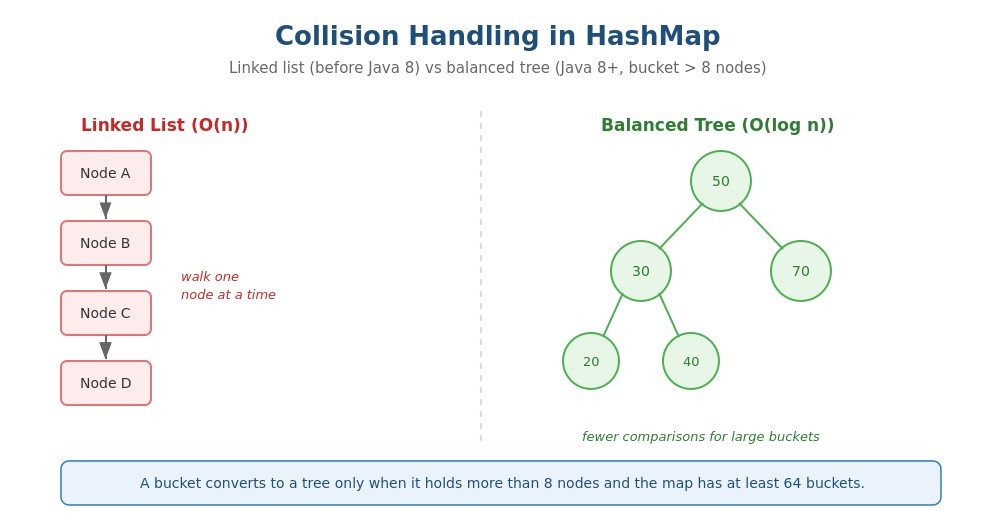
When a collision happens, both entries live in the same bucket, linked together. How they are linked has evolved across Java versions, and that evolution is worth knowing.
Older Java kept each bucket as a plain linked list. Every new colliding node was tacked onto the chain through its next reference. To find a key, the map walked that chain node by node until it hit a match or ran out.
Java 8 brought a clever improvement. Once a single bucket collects more than 8 nodes, its linked list is upgraded into a balanced tree made of TreeNode objects. Searching that tree costs O(log n) instead of the O(n) a long list would cost.
Two extra rules are worth adding here, since interviewers love them. First, the tree conversion only kicks in when the whole map has at least 64 buckets. If the map is still smaller than that, Java just resizes the array instead of building a tree. Second, trees are not permanent. If enough entries get removed and a tree bucket shrinks below 6 nodes, Java quietly converts it back into a linked list.
So collisions are never fatal. The map simply parks several entries in one bucket and picks whichever structure keeps lookups fast. Your code carries on none the wiser.
A HashMap does not keep the same capacity forever. As entries pile up, buckets get crowded, collisions climb, and speed drops. To stay fast, the map enlarges itself when it gets too full.
The trigger is the load factor, a number that decides how full the map may get before growing. The rule is easy to remember.
entries > capacity x loadFactor
Drop in the default values and it becomes obvious.
So the moment you add the 13th entry, the map decides it is time to grow. It deliberately does not wait until every bucket is packed.
The growth itself is simple in concept, even if it takes some work.
That whole move-and-recompute pass is called rehashing. It runs in O(n) time, so it is not cheap. That is precisely why the map only does it occasionally, instead of nudging the array on every insert.
Modern Java made resizing lighter. When capacity doubles from N to 2N, each node in a bucket does one of only two things.
Because of this pattern, Java can split each bucket without recomputing full hashes for every key. The result is a faster, cheaper resize. It is a small piece of engineering with a genuinely nice return.
| Interview Insight Expect to be asked why the default load factor is 0.75. It is a deliberate compromise. A smaller value means fewer collisions but wasted memory, while a larger value packs the map tighter but invites collisions. The value 0.75 has proven to be a sweet spot for typical workloads. |
The remove() method deletes an entry by its key. It behaves a lot like get(), except it also repairs the bucket after pulling a node out. Three steps cover it.
First, the map hashes the key and computes its bucket index, exactly as get() does. That lands it on the correct bucket right away.
Next, it scans the nodes in that bucket, whether they form a list or a tree, hunting for a node whose key matches the one you asked to remove.
Once it finds the match, it unhooks that node from the structure and fixes the surrounding links or tree pointers so nothing breaks. Then it decreases the size counter by one.
In a linked-list bucket, unhooking simply means pointing the previous node straight at the next node. The removed node is left dangling and later swept up by the garbage collector.
A HashMap leans hard on two methods that belong to your key object: hashCode() and equals(). Get them wrong and the map misbehaves in ways that are maddening to debug. So it is worth understanding the rules they must follow.
hashCode() hands back a number for the key, and that number chooses the bucket. A well-behaved hashCode() sticks to a few simple promises.
equals() decides whether two keys are genuinely the same. When several keys share a bucket, the map calls equals() to pick the right one. Without a correct equals(), the map cannot tell your key apart from its neighbors.
Here is a small key class that plays by the rules. Notice that both methods rely on the same field, which keeps them in sync.
public final class ProductKey {
    private final int sku;

    public ProductKey(int sku) {
        this.sku = sku;
    }

    @Override
    public boolean equals(Object o) {
        if (this == o) return true;
        if (!(o instanceof ProductKey)) return false;
        return sku == ((ProductKey) o).sku;
    }

    @Override
    public int hashCode() {
        return Integer.hashCode(sku);
    }
}
The class is final and the sku field is final too, so once you build a key it can never change. Both methods use only that field. As a result, equal keys always share a hash code, exactly as the contract demands.
Now imagine a broken hashCode() or equals(). Or picture using a changeable object as a key and then editing a field that those methods depend on. Either slip can corrupt the map in confusing ways.
So correct hashCode() and equals() methods are not a nice-to-have. They are the foundation the whole map stands on.
| Interview Insight A classic trap: what breaks if you override equals() but forget hashCode()? Two objects you consider equal may hash to different buckets. The map then stores both as separate keys, and a later get() can miss the entry you expected to find. |
Let us pin down how fast these operations really are. The honest answer is that speed depends on how evenly your keys spread across buckets.
When keys spread out nicely, the numbers look great.
put:    O(1)
get:    O(1)
remove: O(1)
That near-instant behavior is the whole reason developers reach for a HashMap first whenever fast lookups matter.
Now imagine a flood of keys all crashing into the same bucket, whether through weak hashing or a deliberate attack. Performance then hinges on your Java version.
Clearly, modern Java copes with the worst case far more gracefully. The tree upgrade shields your program even under a punishing pile-up of collisions.
A HashMap carries a few extra traits that surface often in real code and in interviews. Let us run through them.
The map is relaxed about nulls, within limits.
A HashMap makes no promise about the order you see when looping over it. Small tests might look stable, but you must not depend on that. A resize or a different insertion pattern can reshuffle everything. When order truly matters, switch to a LinkedHashMap instead.
The iterators of a HashMap are fail-fast. If you change the map’s structure mid-loop, and you do not go through the iterator’s own remove method, it throws a ConcurrentModificationException. Think of it as a smoke alarm. It stops you from chasing silent, unpredictable bugs during iteration.
A HashMap is not synchronized, so sharing one across threads without protection is asking for trouble. When several threads need the same map, you have better tools.
Once you know the pattern, you will spot HashMaps everywhere. Their flexible key-to-value mapping fits a surprising range of jobs. Here are the common ones.
Frequency counting is such a common beginner task that it deserves a quick snippet. This one counts words, using getOrDefault to stay short and readable.
Map<String, Integer> counts = new HashMap<>();
for (String word : words) {
    counts.put(word, counts.getOrDefault(word, 0) + 1);
}
The word is the key and its running tally is the value. The map quietly handles all the lookups. You will meet this exact pattern in log analysis, search tooling, and countless small utilities.
A handful of habits will keep your maps both correct and fast. Let us cover the ones that matter most.
Once a key is inside the map, leave it alone. If you change a field that hashCode() or equals() reads, the map can lose the entry entirely. Prefer immutable keys such as String, the wrapper types, or your own carefully designed immutable classes.
Picture the bug in plain terms. You insert a key that hashes into bucket 6. Later you mutate a field inside it, and now the same key would hash into bucket 10. When you call get(), the map looks in bucket 10 and finds nothing, even though your entry is still sitting quietly in bucket 6. The map simply cannot reach it anymore.
For any custom key class, treat these two methods as a pair. Include every field that defines equality in both. And keep them consistent: if equals() says two objects are equal, their hash codes must match too.
If you already know roughly how many entries are coming, pass an initial capacity when you create the map. Doing so avoids early resizes and the rehashing cost they bring. In hot code paths, this small step can make a real difference.
The default load factor of 0.75 is a safe pick for most situations. Even so, it helps to know the trade-off you are accepting.
A HashMap is not always the best answer. Match the map to the need.
Beginners often blur the different map classes together. Each one exists for a slightly different reason. A few quick side-by-sides clear the fog.
Hashtable is a leftover from early Java. Every one of its methods is synchronized, which locks the whole table on each call. That makes it thread-safe but sluggish, and it refuses null keys and null values outright. HashMap, by contrast, skips synchronization, runs faster in single-threaded code, and tolerates nulls. For new work, most teams ignore Hashtable and reach for ConcurrentHashMap when they need safety.
LinkedHashMap builds directly on HashMap and adds a linked list that remembers insertion order. So iterating gives you entries back in the order you added them. It shines when order carries meaning, such as an LRU-style cache that should drop its oldest entry first.
TreeMap keeps its keys sorted at all times using a red-black tree. That sorting costs you O(log n) per operation instead of O(1). Choose it when you need keys in order or want range queries, and accept the modest speed hit in exchange.
ConcurrentHashMap is the thread-safe relative of HashMap. Rather than locking the whole map on every write, it locks only small segments, so many threads can work at once. It is the right tool for multi-threaded services where several threads read and write together.
Certain questions come up again and again for newcomers. Let us settle them so they never slow you down.
No. Whatever order you see while iterating is not guaranteed and can shift after a resize. If order matters to you, use a LinkedHashMap or a TreeMap instead.
Yes, and that is completely fine. Different keys can happily coexist in one bucket through chaining. The map still tells them apart with equals(). Nothing breaks as long as your key methods are correct.
Not really. A large capacity burns memory even while the map sits mostly empty. Set it high only when you truly expect many entries. For small maps, the default of 16 is perfectly fine.
Because the index formula uses hash & (n – 1). That AND trick only distributes keys evenly when n is a power of two. So Java always rounds any requested capacity up to the next power of two.
Let us wrap the whole class into a single picture you can carry into any interview. Whenever you think about a HashMap, imagine three parts working as a team.
Every operation reuses those three parts. A put() call locates the bucket and either adds or replaces a node. Meanwhile, get() locates the bucket and returns the matching value. Finally, remove() locates the bucket and detaches the node. Once you see this rhythm, the entire class feels predictable.
Hold onto this model during interviews. If you can explain those three parts with confidence, you can reason through almost any HashMap question thrown at you. Resizing, treeification, and the rest are just extra layers stacked on top of this simple core.
A: A HashMap stores entries in an array of buckets. It calls hashCode() on the key, converts that hash into a bucket index using index = hash & (n-1), and places the node in that bucket. Lookups jump straight to the bucket instead of scanning every entry, which gives average O(1) speed.
A: A collision happens when two different keys map to the same bucket. The map stores both entries in that bucket and links them. Before Java 8 it used a linked list. Since Java 8, a bucket with more than 8 nodes (in a map of at least 64 buckets) converts to a balanced tree for O(log n) lookups.
A: A HashMap resizes when the number of entries exceeds capacity multiplied by the load factor. With the default capacity of 16 and load factor of 0.75, the threshold is 12, so the 13th entry triggers a resize. The array doubles and entries are rehashed into the new buckets.
A: hashCode() decides which bucket a key goes into, and equals() confirms the exact key inside a crowded bucket. If two equal keys return different hash codes, the map may store duplicates or fail to find entries. So both methods must agree, and keys should be immutable.
A: No. HashMap is not synchronized and is unsafe for concurrent use without external synchronization. For thread-safe access, use ConcurrentHashMap, which locks only small parts of the map instead of the whole structure.
A: For well-distributed keys, put, get, and remove are O(1) on average. In the worst case with many collisions, older Java versions drop to O(n) with linked lists, while Java 8+ stays at O(log n) using balanced trees.
You now have a solid grip on the HashMap internal working in Java. We traced how a key becomes a hash, how that hash picks a bucket, and how collisions get absorbed through chains and trees. Along the way you saw how the map resizes itself, how remove() untangles a node, and why hashCode() and equals() sit at the very center of it all.
Carry these ideas into your everyday code. Favor immutable keys, size your maps with intent, and pick the map type that fits the task. With that foundation, you can wield a HashMap with real confidence and explain it clearly whenever an interviewer asks.