Java Security Updates Are Going Monthly: What the New CSPU Cadence Means for Your JDK
-
Last Updated: August 19, 2026
-
By: javahandson
-
Series

Java security updates are shifting to a monthly CSPU cadence. Learn what JDK 26.0.2.1 means, why Oracle made the change, and how to patch safely.
Java security updates just changed in a big way, and many teams have not noticed yet. On 18 August 2026, Oracle shipped its first Java CSPU, short for Critical Security Patch Update. This new release arrived outside the usual quarterly schedule. It is a small signal with large consequences. If you run Java in production, this shift affects how you patch, test, and ship for years to come.
For a long time, Java followed a steady rhythm. Security fixes came four times a year. Teams built their calendars around it. Now that rhythm is speeding up. Oracle wants to push security fixes every month. This article explains what happened, why it matters, and how you should prepare your pipelines for a faster patch world.
I will keep things practical. We will look at the exact version numbers, the reason behind the change, and the real work you need to do. There is some code too, so you can wire these checks into your own builds.
Let me start with the plain facts. Oracle released a new Java update on 18 August 2026. This was not a normal quarterly release. Instead, it was the first of a new kind of release called a CSPU.
The JDK 26 line moved from 26.0.2 to a new build. The full version string is 26.0.2.1+1. Notice the extra number at the end. That fourth part is the whole story in one small detail. We will come back to it soon.
This was not just a JDK 26 thing. Oracle shipped the same August update across all its supported lines. The Long-Term Support builds moved too. That included 25.0.4.1, 21.0.12.1, 17.0.20.1, 11.0.32.1, and 8u503. So no matter which Java version you run, a fresh build is likely waiting for you.
Oracle had warned about this in advance. The earlier 26.0.2 notes told users something clear. They said it was not recommended to stay on 26.0.2 after the 18 August CSPU. In other words, the older build had a shelf life, and that date was the marker.
Here is a detail many people miss. The clock is already ticking again. Oracle’s notes say you should not use 26.0.2.1 after the next patch update. That next update is scheduled for 20 October 2026.
So this is not a one-time event. It is a pattern starting to form. The pace may feel uneven at first. Even so, the direction is clear, and this is the shift you need to plan for.
The big question is simple. Why change a system that worked fine for years? The answer comes straight from Oracle, and it is worth understanding.
Oracle’s own team explained the reasoning. They plan to shift Java security updates toward a monthly cadence over the coming year. The August release was the first real step. More monthly updates are planned for 2027, so teams should get ready now.
The focus of these monthly updates is narrow. They are about security and stability fixes. They are not about new features. This is an important point. You will not get shiny new language features in a CSPU. You get patches that keep you safe.
One honest detail matters here. Not every month will bring a Java CSPU right away. Oracle’s wording is careful. Java fixes ship as part of some monthly updates, not all of them. There is no Java CSPU planned for September 2026, for example. So expect an irregular pace at first, moving closer to monthly through 2027.
Now here is the part that surprised me. Oracle points to AI as a driver of this change. Their reasoning is direct.
The latest generation of AI is changing how software flaws get found and fixed. It speeds up both discovery and repair. Attackers and defenders both move faster now. So waiting three months between security fixes feels too slow in this new world.
Think about it this way. If a serious flaw is found in July, the old model made you wait until October for the fix. That is a long window. A monthly cadence shrinks that gap a lot. The goal is to close doors faster than attackers can walk through them.
This tells us something bigger. Security patching is becoming a continuous job. It is no longer a thing you do once a quarter and forget. The whole industry is moving this way, and Java is following the trend.
Let me clear up two terms that sound alike. You will see both CPU and CSPU from now on. They are related, but they are not the same thing.
CPU stands for Critical Patch Update. This is the old quarterly release you already know. It comes four times a year, in January, April, July, and October. It bundles many fixes across many Oracle products.
CSPU stands for Critical Security Patch Update. This is the new, smaller, more focused release. It targets high-priority security fixes only. It is meant to be easy to apply with little disruption.
So the CSPU does not replace the CPU. Instead, it fills the gaps between them. You still get your quarterly CPU. But now you also get targeted fixes in the months between. The August release was a CSPU, sitting neatly between the July and October CPUs.
Why does this split matter to you? Because your patch calendar now has more entries. You cannot plan around just four dates a year anymore. You need a process that handles patches whenever they arrive.
Let me go back to that odd version string. It looks small, but it can break your tooling if you ignore it. This is where many teams will trip up.
For years, Java versions had three main parts. You saw numbers like 26.0.2. That maps to feature, interim, and update. Most scripts and scanners expect exactly this shape.
Now look at the new build: 26.0.2.1. There is a fourth part now. That final .1 is the CSPU patch component. It is new, and your tools may not expect it.
Imagine you have a script that checks Java versions. Maybe it splits the version string by dots. Maybe it only reads three parts. What happens when a fourth part shows up?
Your script might fail. It might read the version wrong. It might even allow an outdated build to pass a check. These are real risks, not just theory. A patch-level check that ignores the fourth number is a check that misses patches.
So the action here is clear. You need to make sure your tooling can read four-part versions. Do not assume three parts anymore. Let me show you a safe way to read the full version in Java.
JAVA
public final class JdkVersionInfo {
    public static void main(String[] args) {
        Runtime.Version v = Runtime.version();

        System.out.printf(
            "version=%s feature=%d interim=%d update=%d patch=%d%n",
            v,
            v.feature(),
            v.interim(),
            v.update(),
            v.patch()
        );
    }
}
This code uses the built-in Runtime.Version class. It reads each part safely. The patch() method gives you that fourth number. So you never have to guess or split strings by hand. Use this approach instead of parsing text yourself.
Here is a trap I want you to avoid. Some teams think security patches are always safe to drop in. They assume no features change, so nothing can break. That assumption is dangerous.
A security patch can still change behavior. It touches low-level parts of the platform. Things like TLS, certificates, and crypto can shift. Even without a single API change, your app might behave differently.
Let me give you a concrete example from the previous 26.0.2 release. That update changed how certain private keys were encoded by default. It moved the encoding for some post-quantum keys to a new format. Keys made by the new build would not be accepted by older builds by default.
Now imagine two services talking to each other. One is patched, one is not. If they exchange keys, they might suddenly fail. That is a real outage risk, and it comes from a “security-only” change.
The same release added more small shifts. It set a size limit on certificate revocation list downloads. New trusted roots were added as well. Some transport layer behavior changed too.
None of these are features you would read about in a headline. Yet each one can affect a real app in production. This is why blind patching is risky. You must test, even for security-only builds.
The lesson is simple but important. Treat every JDK patch as a change that needs testing. Do not wave it through just because it is labeled security. Your tests are what catch these quiet surprises before your users do.
So how do you test a security patch well? You need a regression suite built for this exact job. Let me walk you through what it should cover.
The goal is to catch behavior changes fast. You want to run these tests every time a new JDK build lands. Speed matters, because now these builds land monthly.
Here are the core areas your suite should cover:
Notice the theme here. Most of these areas touch crypto, network, or the JVM itself. Those are exactly the places a security patch might change. So that is where your tests should focus.
You can also add a hard check in your pipeline. This makes sure your build runs on the exact JDK you expect. Here is a small shell example.
BASH
#!/usr/bin/env bash
set -euo pipefail

EXPECTED="26.0.2.1"

java -version 2>&1 | tee /tmp/java-version.txt

if ! grep -Fq "$EXPECTED" /tmp/java-version.txt; then
  echo "Wrong JDK patch level; expected ${EXPECTED}" >&2
  exit 1
fi
This script reads the Java version. Then it checks for the exact build you want. If the build is wrong, the pipeline stops. This is handy for tightly controlled production images.
One word of caution though. Do not hard-code a single version across your whole fleet. If you run many Java lines, use a config-driven list instead. That way each service can pin its own correct build without breaking the others.
Before you patch anything, you need to know what you have. This sounds boring, but it is the step teams skip most. And skipping it causes real pain later.
Java hides in many places. It is not just on your servers. Developer laptops, CI runners, and container images all carry it. Virtual machine templates and build toolchains hold it too.
So make a real inventory. Write down every place Java runs. For each one, record two things: the vendor and the exact version. Both matter, and here is why.
Not all Java builds come from Oracle. Many teams use other distributions. You might run Temurin, Corretto, Azul, or Microsoft builds. Each vendor ships on its own timeline.
So the August CSPU might reach one vendor before another. A build from one source may appear a day or two before another. If you assume all builds arrive together, you may get confused.
This is why your inventory must list the vendor. When a security fix drops, you check each vendor’s advisory. Then you pull the right build for each service. Guessing here leads to gaps in coverage.
Now you have tested and taken inventory. The last step is the rollout. You want this to be calm and controlled, not a scramble.
The key idea is to separate two things. One is whether a build is available. The other is whether you approve it for production. These are not the same, and mixing them causes trouble.
Here is a sensible order for a rollout:
At each stage, you watch and decide. If something looks wrong, you stop. You do not push forward and hope. This staged path turns a scary patch into a routine task.
Before you start, decide what “bad” looks like. Pick clear signals that mean stop. A spike in errors is one such signal. Slower response times could be another. Failed TLS handshakes might be a third.
Write these rules down before the rollout. Do not decide them in the heat of the moment. Clear rules help your team act fast and stay calm when pressure is high.
Containers add a twist to all of this. Many teams use base images with floating tags. A tag like 21-jre sounds stable, but it moves under you. This can help or hurt, depending on how you handle it.
On one hand, a floating tag can pull a patched build for free. On the other hand, you lose control over when that happens. A silent change to your base image is a change you did not test.
So my advice is to make the JDK an explicit input. Pin your image by version or by digest. Then refresh it on purpose, not by accident. Here is a simple pattern.
DOCKERFILE
# Pass an explicitly reviewed image tag or digest from CI.
ARG JDK_IMAGE
FROM ${JDK_IMAGE}

RUN java -version

COPY target/app.jar /app/app.jar
ENTRYPOINT ["java", "-jar", "/app/app.jar"]
This makes the JDK a clear choice, not a hidden default. Your CI passes the exact image you reviewed. So you always know which build is running. That control is worth the small extra effort.
After you update a base image, do two things. First, rebuild your SBOM, which is your software bill of materials. Second, verify the Java version inside the running container.
Do not trust that the image holds what you think. Check it at runtime. A quick java -version inside the container confirms the truth. This habit catches many silent mistakes.
Dates make this shift easy to see. The timeline below shows the real Oracle Java update dates for 2026. Every date here comes straight from Oracle’s own release notes. Keep it near your patch calendar.
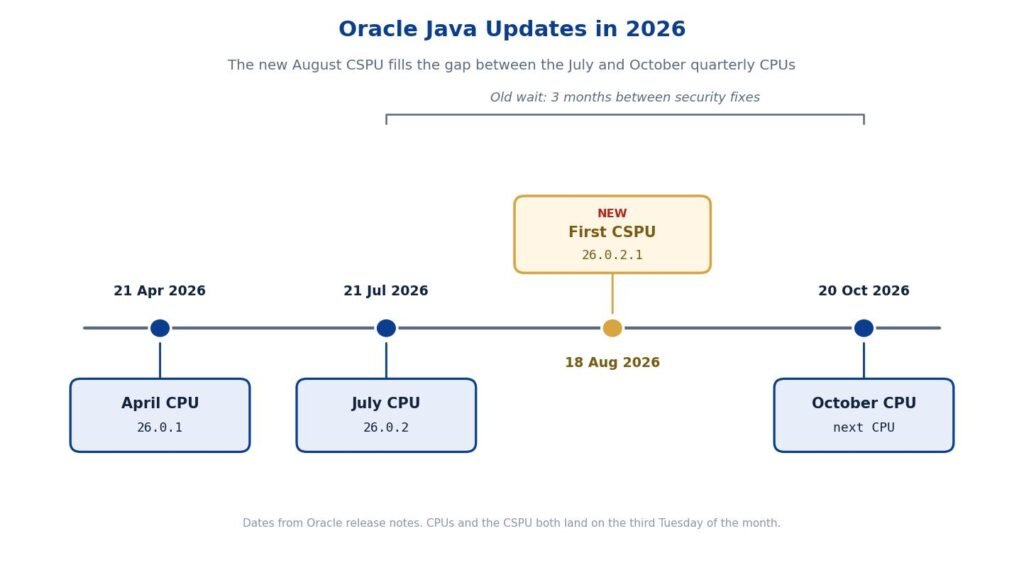
Look at the gap the CSPU fills. The July CPU landed on 21 July 2026. The next quarterly CPU is set for 20 October 2026. That is a three-month gap. The new CSPU on 18 August 2026 sits right in the middle of it.
This is the whole point in one picture. In the old world, you waited from July to October for a security fix. Now a targeted fix can arrive in between. The August CSPU is the first real example of that shorter wait.
One note on reading the dates. The quarterly CPUs follow a fixed rhythm. They land on the third Tuesday of January, April, July, and October. The CSPU uses the same third-Tuesday pattern, which is why 18 August fits so neatly between the quarterly dates.
You might wonder about Spring or Hibernate here. The good news is that this week brought no forced framework upgrade. The latest baselines still hold steady.
Still, your JDK patching should include framework tests. Run your Spring app against the new build. Check your database calls, your TLS endpoints, and your startup path. Even a security-only JDK patch can shift these areas.
So the framework itself may not change. But the platform under it does. That is reason enough to test your full stack, not just the JDK in isolation.
If you run Spring or Spring Boot, here is a short list to run through. It covers the spots most likely to feel a JDK patch.
Run this list in your staging environment first. Do not run it straight in production. A few minutes of checks here can save hours of firefighting later.
Let me zoom out for the big picture. This is not really about one August release. It is about a new way of working. Monthly security updates are coming, and they will keep coming.
The teams that win here will treat patching as a pipeline skill. They will automate their checks. Tight inventories become a habit for them. Fast, focused regression suites run on every build. In short, they will make patching routine.
The teams that struggle will do it by hand each time. They will scramble when a fix drops. They will risk outages from untested changes. You do not want to be in that group.
So start now. Build the habits while the pace is still gentle. When monthly updates become the norm in 2027, you will be ready. That is the whole point of acting today.
A quick word of caution for anyone writing or reporting on this. Do not publish exact CVE numbers for a build until the vendor’s final advisory is out. The CSPU date and version are confirmed. But the full list of fixed flaws should come from the official bulletin.
This keeps your information accurate. It also protects your readers from acting on wrong details. When in doubt, link to the vendor advisory and let it speak for itself.
Java security updates are entering a faster era, and the first CSPU on 18 August 2026 proved it. The move from 26.0.2 to 26.0.2.1 looks tiny. Yet it marks a real shift toward monthly patching driven by a faster security world.
Your job now is to get ready. Read four-part versions correctly. Test every patch, even security-only ones. Keep a clear inventory with vendors listed. Roll out in stages with clear stop rules. And make your containers pin the JDK on purpose.
Do these things, and monthly Java security updates become a calm routine. Ignore them, and each patch becomes a fresh fire drill. The choice, and the time to act, is yours.