PriorityQueue in Java: Heap Internals & Comparators
-
Last Updated: August 12, 2026
-
By: javahandson
-
Series

Learn how PriorityQueue in Java works under the hood — the min-heap, array storage, natural ordering, and custom comparators — with clear, runnable examples.
Think about a hospital waiting room for a second. People don’t get seen in the order they walked in. Someone with a broken arm jumps ahead of someone with a mild cough, even if the cough came first. The staff pick the most urgent case each time. That simple idea, always serving the most important item first, is exactly what PriorityQueue in Java gives you.
A normal queue is fair and boring. First in, first out. A PriorityQueue breaks that rule on purpose. It hands you items in order of priority, not order of arrival. And it does this fast, because underneath it runs on a clever structure called a heap.
Most beginners use PriorityQueue without ever knowing what sits below it. That’s fine for a while. But once you understand the heap and how comparators plug in, you stop guessing. You know why the smallest element pops out first, why iteration looks scrambled, and how to flip the whole thing to serve the largest item instead.
In this guide we’ll go slow. We’ll build a mental picture of the heap, poke at the internals, and write real code you can run. By the end, PriorityQueue won’t feel like magic. It’ll feel like a tool you actually understand.
Here’s the road ahead:
You only need to know what a Java class is and how a basic loop works. If you’ve used an ArrayList before, you’re more than ready.
A PriorityQueue in Java is a queue where each element has a priority. When you remove an item, you don’t get the oldest one. You get the one with the highest priority. By default, that means the smallest value comes out first.
It lives in the java.util package and it implements the Queue interface. So it shares the same core methods you already know, like offer, poll, and peek. The twist is only in the ordering.
Let me show you the plainest example first. Watch the order things come out.
import java.util.PriorityQueue;

PriorityQueue<Integer> pq = new PriorityQueue<>();
pq.offer(40);
pq.offer(10);
pq.offer(30);
pq.offer(20);

System.out.println(pq.poll());  // 10
System.out.println(pq.poll());  // 20
System.out.println(pq.poll());  // 30
System.out.println(pq.poll());  // 40
We added them in a jumbled order: 40, 10, 30, 20. But they came out sorted: 10, 20, 30, 40. That’s the whole point. The queue always gives you the smallest number it currently holds.
A regular queue, like a LinkedList used as a queue, follows FIFO. First in, first out. The first person in line gets served first. Simple and fair.
A PriorityQueue throws fairness out the window. It serves by rank. If a small number shows up late, it still jumps to the front when you poll. Order of arrival means nothing here. Only priority matters.
Here’s the difference in a nutshell:
One more thing worth noting. A PriorityQueue is unbounded, meaning it grows to hold as many items as you throw at it. There’s no fixed size limit like some queues have. It also allows duplicate values without any complaint. Two items with the same priority live together happily; they just come out one after the other.
So what counts as “highest priority”? By default, PriorityQueue uses natural ordering. For numbers, natural order means smallest first. For strings, it means alphabetical. This works for any type that implements Comparable.
But you can change the rule. Pass in a Comparator and you decide the order yourself. Want the biggest number first? Easy. Want to sort people by age? Also easy. We’ll get to all of that soon. For now, just remember the default: smallest comes out first.
Under the hood, a PriorityQueue is built on a heap. If the word sounds scary, don’t worry. A heap is just a special kind of binary tree, and the idea behind it is pretty simple once you see it.
A binary tree is a structure where each node has at most two children. A heap adds one strict rule on top of that. Every parent must follow an order rule against its children. In a min-heap, every parent is smaller than or equal to its children. In a max-heap, every parent is bigger than or equal to its children.
Java’s PriorityQueue uses a min-heap by default. That’s why the smallest element always sits at the very top, ready to pop out first.
Picture a family tree, but with numbers. The root is at the top. It has two children below it. Each of those has two children, and so on. The min-heap rule says one thing: a parent is never bigger than its kids.
So the smallest number in the whole tree ends up at the root. Always. That’s the value you get when you poll. You never have to search for the minimum. It’s just sitting there at the top, waiting.
Notice the rule only talks about parent and child. It says nothing about left versus right siblings. So a heap is not fully sorted. It’s loosely ordered. The minimum is at the top, but the rest can look messy. This is why iterating over a PriorityQueue gives you a scrambled order, not a sorted one. That surprises a lot of people.
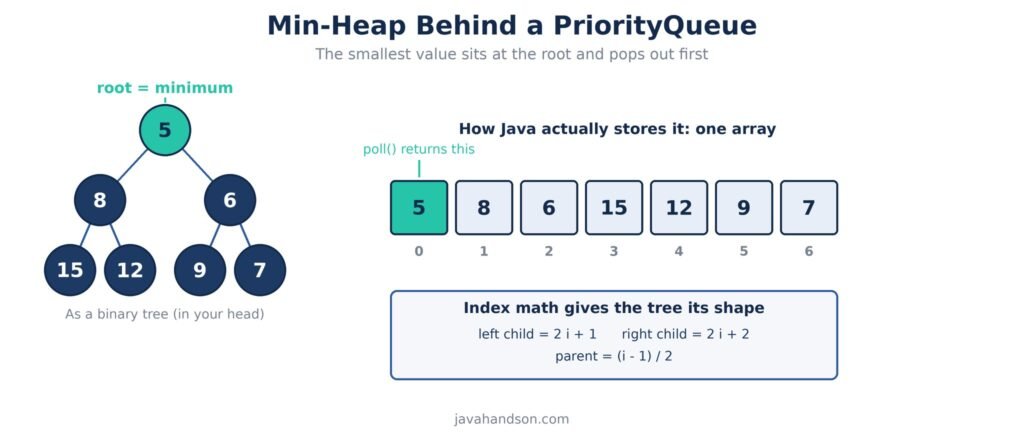
Let me make that looseness concrete. Imagine a heap holding 5 at the root, with 8 and 6 as its two children. Both children are bigger than 5, so the rule holds. But 8 sits to the left of 6, even though 8 is larger. A fully sorted structure would never allow that. A heap simply doesn’t care. It only promises that the top is the minimum, nothing more.
That trade-off is the whole reason a heap is fast. Keeping everything fully sorted would cost you on every insert. By only enforcing the parent-child rule, the heap does far less work while still keeping the one thing you actually care about ready at the top.
Here’s the neat trick. A heap looks like a tree in our heads, but Java stores it as a plain array. No node objects, no left and right pointers. Just one flat array holding the values.
How does an array act like a tree? Through simple math on the index. If a node sits at index i, then:
That’s the entire secret. The array holds the data, and these three formulas give the tree its shape. No pointers needed. This is why a heap is so memory-friendly. It packs everything tightly, with no wasted space on links between nodes.
| 💡 Interview Insight Q: Why does a PriorityQueue use an array instead of tree nodes with pointers? A: A heap is always a complete binary tree, meaning it fills each level left to right with no gaps. That shape maps perfectly onto a contiguous array, so index math replaces pointers. You save memory (no node objects, no references) and you get better cache performance, since the values sit next to each other. Parent and child positions come from arithmetic, not from following links. |
When you add an item, Java drops it at the end of the array. Then it “bubbles up.” The new value swaps with its parent again and again until the parent is smaller. This is often called sift-up. It keeps the min-heap rule intact.
When you poll, the root leaves. Java takes the last item, moves it to the top, and “sinks it down.” It swaps with the smaller child over and over until the rule holds again. That’s sift-down. Both moves only touch one path from top to bottom, so they stay fast.
The height of the tree is small. It grows with the logarithm of the number of items. So even for a million elements, a bubble-up or sink-down touches only around twenty spots. That’s the reason add and remove run in O(log n) time.
Let’s walk a quick example so it clicks. Suppose the heap holds 10 at the top, with 15 and 20 below. Now you add 5. Java places 5 at the end, then compares it to its parent, 15. Since 5 is smaller, they swap. Next 5 meets 10, the new parent. Still smaller, so they swap again. Now 5 sits at the root, and the min-heap rule is happy once more. Just two swaps, and the smallest value found its way to the top.
The reverse happens on poll. Say you remove 5 from that heap. Java grabs the last element, drops it into the root, then sinks it down by swapping with the smaller child until order returns. Both moves follow a single path from top to bottom or bottom to top, never wandering across the whole tree. That focus is what keeps the cost logarithmic instead of linear.
Enough theory. Let’s write some code and get comfortable with the everyday methods. Most of your work with a PriorityQueue comes down to three actions: adding, removing, and peeking.
There are a few ways to build a PriorityQueue. The simplest uses the empty constructor, which gives you a min-heap with natural ordering.
import java.util.PriorityQueue;

// default: min-heap, natural ordering
PriorityQueue<Integer> pq = new PriorityQueue<>();

// with an initial capacity hint
PriorityQueue<Integer> pq2 = new PriorityQueue<>(20);

// built from an existing collection
List<Integer> nums = List.of(5, 1, 3);
PriorityQueue<Integer> pq3 = new PriorityQueue<>(nums);
The capacity number is just a hint about the starting size. It doesn’t cap the queue. A PriorityQueue grows on its own as you add more items, much like an ArrayList does.
You’ll reach for the same handful of methods over and over. Here’s the group you need to know:
A small note on the pairs. Both offer and add insert an item, and for a PriorityQueue they behave the same in practice. The difference matters more in bounded queues. Here, pick whichever reads better to you.
Let’s see the full cycle in action.
PriorityQueue<String> tasks = new PriorityQueue<>();
tasks.offer("wash dishes");
tasks.offer("call mom");
tasks.offer("buy milk");

System.out.println(tasks.peek());  // "buy milk" (alphabetical)
System.out.println(tasks.size());  // 3

while (!tasks.isEmpty()) {
    System.out.println(tasks.poll());
}
// prints: buy milk, call mom, wash dishes
See how strings come out in alphabetical order? That’s natural ordering doing its job. The letter ‘b’ beats ‘c’, which beats ‘w’, so that’s the poll order.
Here’s a trap that catches almost everyone. If you loop over a PriorityQueue with a for-each, the order looks random. It is not sorted.
PriorityQueue<Integer> pq = new PriorityQueue<>();
pq.offer(40);
pq.offer(10);
pq.offer(30);
pq.offer(20);

// DON'T expect sorted output here
for (int n : pq) {
    System.out.print(n + " ");
}
// might print: 10 20 30 40 OR 10 20 40 30 — heap order, not sorted
Remember the heap rule from earlier? Only the root is guaranteed to be the minimum. The rest just follow the loose parent-child rule. Iteration walks the array in storage order, so what you see is heap layout, not sorted layout.
If you truly need sorted output, poll every item one by one. Each poll gives you the next smallest, so draining the queue produces a clean sorted sequence. Never trust the for-each loop for order.
By default a PriorityQueue uses natural ordering. But the real power shows up when you take control of the order yourself. That’s where the Comparator comes in.
Natural ordering works for any type that implements the Comparable interface. Integer, String, Double, and many others already do. They come with a built-in compareTo method that defines their default order.
For Integer, natural order is ascending. For String, it’s dictionary order. So when you drop these into a plain PriorityQueue, you get a min-heap for free, no extra code needed.
The catch shows up with your own classes. If you make a custom type and toss it into a PriorityQueue without any ordering rule, Java throws a ClassCastException at runtime. It simply doesn’t know how to compare two of your objects. You have to tell it how.
So when does natural ordering actually help you? Whenever your data is a built-in type with an obvious order. Queuing numbers, words, or dates? Natural ordering handles it with zero extra code. You only need to step in and write your own rule when the default doesn’t match what you want, or when your objects don’t have a default order at all.
A Comparator is a small object whose only job is to compare two things. You hand it to the PriorityQueue constructor, and from then on the queue orders items your way.
The classic use is flipping to a max-heap, so the biggest value pops out first. Here’s the cleanest way to do it.
import java.util.PriorityQueue;
import java.util.Collections;
import java.util.Comparator;

// max-heap: largest first
PriorityQueue<Integer> maxHeap =
        new PriorityQueue<>(Comparator.reverseOrder());

maxHeap.offer(40);
maxHeap.offer(10);
maxHeap.offer(30);

System.out.println(maxHeap.poll());  // 40
System.out.println(maxHeap.poll());  // 30
System.out.println(maxHeap.poll());  // 10
Comparator.reverseOrder() reverses the natural order. So now the largest number wins and comes out first. You could also write Collections.reverseOrder(), which does the same thing. Both are common in real code.
Here’s a point that trips people up. The heap itself never changes. It’s still a min-heap internally. What changes is the meaning of “small.” By flipping the comparator, you tell the heap that a bigger number now counts as lower in rank. So the largest value floats to the top. The machinery stays the same; only your definition of order moves.
If you write your own Comparator, you need to understand its return value. The compare(a, b) method returns an int, and the sign of that int decides the order:
A handy shortcut for numbers is subtraction: a – b sorts ascending, and b – a sorts descending. But be careful. Subtraction can overflow with very large or very small ints. For safety, prefer Integer.compare(a, b), which handles the edge cases for you.
| 💡 Interview Insight Q: What is the difference between Comparable and Comparator? A: Comparable is implemented by the class itself, through a compareTo method, and it defines one natural order for that type. Comparator is a separate object that defines an order from the outside, and you can have many different comparators for the same class. Use Comparable when there’s one obvious default order; use Comparator when you need custom or multiple orderings, or when you can’t edit the class. A PriorityQueue reads Comparable by default, but a Comparator passed to its constructor always wins. |
Real programs rarely queue plain numbers. You queue tasks, orders, patients, jobs. So let’s build a PriorityQueue of your own objects and order them the way you want.
Say we’re running a task scheduler. Each task has a name and a priority number, where a lower number means more urgent. Here’s the class.
public class Task {
    private String name;
    private int priority;   // lower = more urgent

    public Task(String name, int priority) {
        this.name = name;
        this.priority = priority;
    }

    public String getName() { return name; }
    public int getPriority() { return priority; }

    @Override
    public String toString() {
        return name + " (p" + priority + ")";
    }
}
Nothing fancy here. Two fields, a constructor, two getters, and a toString so we can print tasks cleanly. Notice this class does not implement Comparable. That’s on purpose. We’ll order it with a Comparator instead.
Now we build a PriorityQueue that pulls the most urgent task first. We give it a Comparator that reads the priority field.
import java.util.PriorityQueue;
import java.util.Comparator;

PriorityQueue<Task> queue =
    new PriorityQueue<>(Comparator.comparingInt(Task::getPriority));

queue.offer(new Task("Deploy hotfix", 1));
queue.offer(new Task("Reply to email", 5));
queue.offer(new Task("Review PR", 2));

while (!queue.isEmpty()) {
    System.out.println(queue.poll());
}
// Deploy hotfix (p1)
// Review PR (p2)
// Reply to email (p5)
Comparator.comparingInt(Task::getPriority) reads each task’s priority and sorts by it, lowest first. So the hotfix at priority 1 jumps ahead of everything. The email at priority 5 waits its turn. This is the hospital waiting room from the intro, now in code.
What if two tasks share the same priority? You often want a tie-breaker. Comparators chain together nicely with thenComparing.
PriorityQueue<Task> queue = new PriorityQueue<>(
    Comparator.comparingInt(Task::getPriority)
              .thenComparing(Task::getName)
);
Now tasks sort by priority first. When two tasks tie on priority, the queue falls back to the name in alphabetical order. You can chain as many tie-breakers as you need. This reads almost like plain English, which is the whole appeal.
| 💡 Interview Insight Q: Your custom class throws a ClassCastException inside a PriorityQueue. What went wrong? A: The class does not implement Comparable, and you didn’t pass a Comparator to the constructor. With no ordering rule, the PriorityQueue tries to cast your object to Comparable when it needs to compare two elements, and the cast fails. The fix is one of two things: make the class implement Comparable with a compareTo method, or pass a Comparator when you create the queue. The exception often appears only on the second offer, because a queue with one element never needs to compare anything. |
One reason people love the PriorityQueue is speed. Getting the smallest item is instant, and adding or removing stays cheap even for huge datasets. Let’s break down the costs.
Here’s how the main operations perform:
| Operation | Time | Why |
|---|---|---|
peek() | O(1) | The minimum is always at the root, so no searching |
offer() / add() | O(log n) | Bubble the new item up one path of the tree |
poll() | O(log n) | Sink the replacement down one path of the tree |
contains(e) | O(n) | No shortcut; it scans every element |
remove(e) | O(n) | Must find the element first, then fix the heap |
The takeaway is simple. Peeking is free. Adding and removing the top are fast. But searching for a specific element is slow, because a heap is not built for lookup. If you find yourself calling contains a lot, a PriorityQueue is probably the wrong tool.
A PriorityQueue shines whenever you repeatedly need the best or worst item from a changing set. Some classic cases:
In all of these, you don’t need a fully sorted collection. You just need quick access to the one item that matters right now. That’s the sweet spot for a heap.
PriorityQueue looks friendly, but a few sharp edges catch people again and again. Here are the ones worth knowing before they bite you.
We covered this, but it deserves repeating because it’s the number one mistake. A for-each loop or toString on a PriorityQueue does not give sorted output. It gives heap order. To get sorted results, poll every element out one at a time.
Drop a custom object into a PriorityQueue without a Comparator or Comparable, and you’ll hit a ClassCastException. It usually shows up on the second insert, not the first, which confuses people. Always give your custom types an ordering rule.
A PriorityQueue does not accept null. Try to offer a null and you’ll get a NullPointerException. This makes sense: the queue can’t compare null against a real value to decide its priority. Keep your nulls out.
A plain PriorityQueue is not thread-safe. If several threads add and remove at once, you can corrupt the heap. For concurrent work, use PriorityBlockingQueue instead. It offers the same ordering with proper thread safety built in.
Both remove(element) and contains run in O(n) time. If your code leans on them heavily, the performance edge of a heap disappears. When you need fast lookups plus ordering, think about a different structure, like a TreeSet, which keeps elements sorted and searchable.
This isn’t just an interview toy. A PriorityQueue turns up in plenty of real systems once you know what to look for.
Dijkstra’s algorithm and Prim’s algorithm both lean on a PriorityQueue. They repeatedly grab the node with the smallest distance or edge weight. A heap makes that pick fast, which keeps the whole algorithm efficient on large graphs.
Picture Dijkstra finding the shortest route on a map. At each step it must pick the unvisited spot that’s closest to the start. Without a heap, you’d scan every spot to find the minimum, which is slow. With a PriorityQueue, that closest spot is already at the top, so you just poll it. That one change turns a sluggish search into a fast one, especially on maps with thousands of points.
Operating systems and background job runners often order work by priority or deadline. A PriorityQueue is a natural fit. The most urgent job floats to the top, and the scheduler just polls to get its next task.
Need the ten biggest numbers from a stream of millions? Keep a min-heap of size ten. For each new number, if it beats the smallest in the heap, swap them. This classic trick uses a PriorityQueue and runs far faster than sorting the entire dataset. It shows up constantly in coding interviews too.
Why does this beat sorting? Sorting a million items to grab the top ten is wasteful. You’d do a ton of work you throw away. The heap keeps only ten items at any moment. Each new number costs a cheap comparison and maybe one swap. So you glide through the stream once, and the ten winners are sitting right there when you’re done. Less memory, less time, same answer.
PriorityQueue is a favorite in Java and data-structure interviews. It tests whether you understand heaps, ordering, and complexity all at once. Keep your answers short and concrete.
A: By default it is a min-heap, so the smallest element (by natural ordering) comes out first. You can turn it into a max-heap by passing Comparator.reverseOrder() to the constructor.
A: A PriorityQueue stores elements as a heap, which only guarantees the minimum is at the root. Iteration walks the backing array in heap order, not sorted order. To get sorted output, call poll() repeatedly until the queue is empty.
A: peek() is O(1) because the minimum is always at the root. offer() and poll() are O(log n) since they bubble up or sink down one path of the tree. contains() and remove(element) are O(n) because they scan the whole heap.
A: Pass a reversed comparator to the constructor: new PriorityQueue<>(Comparator.reverseOrder()). This flips the ordering so the largest element comes out first. Collections.reverseOrder() works the same way.
A: Yes, but the objects need an ordering rule. Either make the class implement Comparable with a compareTo method, or pass a Comparator to the PriorityQueue constructor. Without one, you get a ClassCastException when the queue tries to compare two elements.
A: No. A plain PriorityQueue is not thread-safe, and concurrent inserts or removals can corrupt the heap. For multithreaded use, choose PriorityBlockingQueue, which offers the same ordering with built-in thread safety.
A: Duplicates are allowed and coexist fine. Null values are not allowed, because the queue cannot compare null against a real element to determine its priority — offering null throws a NullPointerException.
Let’s pull it all together. A PriorityQueue in Java serves items by priority instead of arrival order. By default it’s a min-heap, so the smallest element always comes out first.
Underneath, it runs on a heap stored as a plain array. Simple index math gives the array a tree shape, and bubble-up and sink-down keep the order valid in O(log n) time. Peeking at the top is instant.
When you need a different order, reach for a Comparator. Flip to a max-heap, sort custom objects, or chain tie-breakers, all with a line or two of code. Just remember the traps: iteration isn’t sorted, nulls aren’t allowed, and it isn’t thread-safe on its own.
Get comfortable with these ideas and the PriorityQueue becomes one of the most useful tools in your kit. Reach for it any time you keep asking, “what’s the most important item right now?”