Thread Life Cycle in Java: States and Transitions Explained
-
Last Updated: September 2, 2026
-
By: javahandson
-
Series

A deep dive into the thread life cycle in Java. Understand all six thread states, every transition between them, getState(), and the RUNNABLE vs running myth.
When you order a parcel online, it goes through several stages before it arrives at your door: ordering, packing, shipping, out for delivery, and delivered. At any time, the parcel is in one specific stage and can only move to certain next stages. The thread life cycle in Java works in a similar way. A thread moves through a set of stages one at a time, and each stage allows only specific moves to the next stages.
This guide is the complete tour of those states and the moves between them. We will name all six states, explain what each one means with a plain example, and trace every transition that carries a thread from one state to another. By the end, you will be able to look at any thread and reason about where it is and where it can go.
Before we begin, this article assumes you already know how to create a thread. If you’re not familiar with that or need a reminder, please check the article on creating threads for complete guidance. Here, we will focus only on what happens once a thread is created.
Here is the path we will take:
You should be comfortable writing a basic thread and running it. Beyond that, we build everything up as we go.
A thread is a basic unit of execution in a program, but it doesn’t always perform tasks. At times, it actively runs on the CPU, processing instructions. Other times, it must wait for its turn to use the CPU, which means it is idle until it can continue its work. A thread may also go to sleep when it needs to pause for a specific duration or wait for an event. Additionally, it can become blocked if it tries to access a resource, such as a lock, that another thread currently holds. The state of a thread indicates what it is doing at any given moment, whether it is running, waiting, sleeping, or blocked.
These labels are not just for show. The JVM tracks each thread’s state to decide what to do with it. A thread ready to run gets considered for CPU time. A thread waiting on a lock does not, until the lock frees up. Without states, the system would have no clean way to manage many threads at once.
Start with one clear idea: a state shows a condition, not a command. A thread does not set its state directly. Its state changes based on what happens: when you start it, when it hits a lock, when it goes to sleep, or when it finishes its work. Each of these events moves the thread into a new state.
So the states and the transitions go hand in hand. A state is where the thread sits. A transition is the event that moves it somewhere new. Learn both, and the whole picture makes sense.
Java clearly defines thread states. These states are grouped in an enum called Thread.State, which is part of the standard library. There are exactly six values, and a thread is always in one of these six states at any given time.
💡 Interview Insight
A frequent question is “how many states does a Java thread have, and where are they defined?” Answer: six, defined in the Thread.State enum — NEW, RUNNABLE, BLOCKED, WAITING, TIMED_WAITING, and TERMINATED. Naming the enum shows you know it comes straight from the JDK, not folklore.
Let us walk through each state in turn. For every one, we cover what it means and a plain example of a thread sitting in it. Take these slowly, because the transitions in the next section build right on top of them.
A thread is in the NEW state as soon as you create it but before you start it. It is ready to run and exists in memory, but no code inside it has executed yet.
Thread t = new Thread(() -> System.out.println("Working"));
// t is in the NEW state right now.
// The run code has not executed yet.
Think of NEW as a runner standing at the starting line. The runner is present and ready, but the gun has not fired. Nothing happens until you call start.
When you call start, the thread goes into the RUNNABLE state. This means the thread is ready to run. It might be using the CPU right now, or it might be waiting for its turn with other ready threads. Both situations count as RUNNABLE.
This surprises people, so hold onto it. Java does not have a separate “running” state. A thread that is actively using the CPU and a thread that is merely ready both wear the same RUNNABLE label. We come back to this point later, because it causes real confusion.
Thread t = new Thread(() -> System.out.println("Working"));
t.start(); // t moves from NEW to RUNNABLEA thread enters a BLOCKED state when it attempts to acquire a lock that is currently held by another thread. This can be illustrated with the analogy of a single bathroom that has one key. When one person is using the bathroom, any subsequent person must wait outside until the first person exits and relinquishes the key. During this waiting period, the subsequent individual is considered blocked, as they cannot proceed until they gain access to the key.
In code, this happens around a synchronized block or method. If thread A is inside a synchronized section, and thread B tries to enter the same one, thread B goes BLOCKED until A leaves. The thread is alive, but stuck at the door.
A thread in a WAITING state pauses its work without a set time limit, waiting for a signal from another thread. This is different from a blocked thread, which is unable to proceed because of a lock. A waiting thread has chosen to pause for a specific event. It will stay in this state until that event happens, which helps threads work together efficiently.
The classic causes are calling wait() with no timeout, or join() with no timeout. A thread that calls join on another thread says, in effect, “I will wait here until that thread finishes, however long it takes.” That patient, open-ended pause is the WAITING state.
TIMED_WAITING functions similarly to the WAITING state, with the key difference of having a predefined time limit. In this state, a thread pauses for a specified duration and will automatically resume execution once that time has elapsed. Unlike the WAITING state, where another thread must signal it to wake up, a thread in TIMED_WAITING will autonomously wake up after the allotted time expires.
The most common cause is Thread.sleep with a duration. Call sleep for two seconds, and the thread drops into TIMED_WAITING for those two seconds. Methods like wait(1000) or join(500), which take a timeout, land a thread here too.
Thread t = new Thread(() -> {
    try {
        Thread.sleep(2000);   // t is in TIMED_WAITING for 2 seconds
    } catch (InterruptedException e) {
        // handle interruption
    }
});A thread reaches the TERMINATED state once its run method has completed, regardless of whether it finished successfully or encountered an unhandled exception. At this point, the thread has fulfilled its purpose and is permanently inactive. It is important to note that a terminated thread cannot transition back to any other state.
This is a one-way door. Once a thread is terminated, it stays terminated. You cannot restart it by calling start again. Trying to do so throws an exception. If you need the work done once more, you make a fresh thread.
💡 Interview Insight
Interviewers love “can you restart a terminated thread?” The answer is no. A thread runs once; after TERMINATED it cannot return to RUNNABLE, and calling start on it a second time throws IllegalThreadStateException. To repeat the work, create a new thread object.
Now the heart of the topic. Knowing the six states is only half the story. The other half is knowing what carries a thread from one state to the next. Each move has a specific trigger.
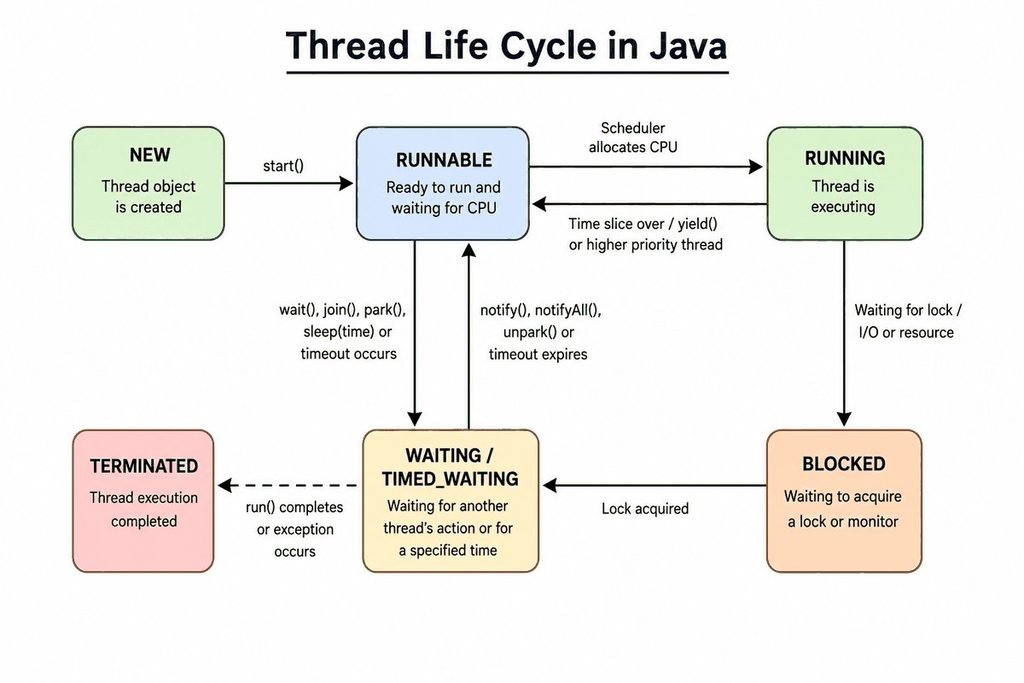
To start a new thread and make it ready to run, you need to call the start() method. When you first create a thread, it is in the NEW state, meaning it has been defined but is not yet active. It stays in this state until you use start(). This method does two important things: it registers the thread with the system’s thread scheduler and shows that the thread is ready to run. After calling start(), the thread moves from the NEW state to the RUNNABLE state, and the scheduler decides when it will actually execute. No other method can change the thread’s state to RUNNABLE; start() is the only way to do this.
Note that calling run() directly does not move the thread anywhere. It just executes the run code on your current thread, like a normal method call. Only start creates a new thread of execution and makes the transition happen.
In the RUNNABLE state, a thread switches between running its code and waiting for CPU resources. The thread scheduler manages which RUNNABLE thread runs at any time. This scheduler is part of the Java Virtual Machine (JVM) and works with the operating system. It gives each RUNNABLE thread a certain amount of time, called a time slice or quantum, to run. When this time is up, the scheduler may pause the current thread so another RUNNABLE thread can use the CPU. This process allows for efficient multitasking and resource sharing, letting multiple threads use CPU time smoothly while keeping the application running well.
Here is the key point. Both of these situations, running and ready-but-waiting, are still RUNNABLE. Java does not split them into two states. The scheduler moves the thread on and off the CPU constantly, and through all of it the state stays RUNNABLE.
When a thread attempts to enter a synchronized section of code, it may encounter a situation where the required lock is currently held by another thread. In this case, the attempting thread cannot proceed and enters a state known as BLOCKED. Essentially, it is as if the thread is waiting at a locked door, unable to gain access to the critical section it needs to execute.
While in the BLOCKED state, the thread remains inactive and does not consume processor resources. It will continue to wait patiently until the lock is released by the thread that currently holds it. Once the lock becomes available and the blocked thread successfully acquires it, it transitions back to the RUNNABLE state. At this point, the thread can resume its execution and carry on with its tasks, now having access to the synchronized section it was previously trying to enter. This mechanism helps to ensure that shared resources are accessed in a thread-safe manner, preventing data corruption and ensuring consistency.
A thread transitions to the WAITING state when it invokes a method that causes it to wait indefinitely, like wait() or join() without a specified timeout. The thread remains in this state until another action triggers its wakeup. In the case of wait(), another thread is required to call either notify() or notifyAll() to bring it back to the runnable state. For join(), the thread will continue waiting until the thread it is waiting on has completed its execution.
Once that signal arrives, the thread leaves WAITING and returns to RUNNABLE, ready to run again. It does not jump straight back onto the CPU. Like every ready thread, it waits its turn from the scheduler.
The TIMED_WAITING state in a thread is similar to the WAITING state but includes a time constraint. A thread transitions to TIMED_WAITING when it invokes methods like sleep(time), wait(time), or join(time). The thread will exit this state in one of two scenarios: either the specified time elapses, or the event it was waiting for occurs first. In both cases, the thread will return to the RUNNABLE state.
// This thread cycles RUNNABLE -> TIMED_WAITING -> RUNNABLE
Thread t = new Thread(() -> {
    try {
        System.out.println("Before sleep");   // RUNNABLE
        Thread.sleep(1000);                    // TIMED_WAITING
        System.out.println("After sleep");     // RUNNABLE again
    } catch (InterruptedException e) {
        Thread.currentThread().interrupt();
    }
});
t.start();A thread enters the TERMINATED state when its run method has completed execution. This transition occurs from the RUNNABLE state, as the thread must be actively running to finish its task. Once the run method returns or if an uncaught exception occurs, the thread moves into the TERMINATED state and ceases to operate permanently.
There is no coming back. A terminated thread cannot re-enter any state. This is the final stop on the whole journey, the delivered parcel from our opening picture.
Put together, the flow reads like this. A thread starts in NEW. Call start, and it becomes RUNNABLE. From RUNNABLE it may run, or slip into BLOCKED, WAITING, or TIMED_WAITING, always returning to RUNNABLE when it is ready again. When run finishes, it lands in TERMINATED for good. That single loop, from ready to waiting and back, then out to terminated, is the whole life cycle in one breath.
Let us trace a single thread as it moves through several states in one short run. Follow the numbered comments and match each to a state we have covered. This ties the whole map together in one concrete story.
Object lock = new Object();

Thread worker = new Thread(() -> {
    // (2) RUNNABLE: the thread is now running
    try {
        Thread.sleep(1000);      // (3) TIMED_WAITING for 1 second
    } catch (InterruptedException e) { }

    synchronized (lock) {         // (4) may go BLOCKED if lock is taken
        System.out.println("Got the lock");
    }
    // (5) run() returns next -> TERMINATED
});

// (1) NEW: created, not started
worker.start();                   // NEW -> RUNNABLE
Read the numbers in order. The thread is NEW when created, becomes RUNNABLE on start, drops into TIMED_WAITING during sleep, may hit BLOCKED at the synchronized block if another thread holds the lock, returns to RUNNABLE, and finally reaches TERMINATED when run ends. One thread, five states, in a handful of lines.
Not every thread touches every state. A simple thread might go NEW, RUNNABLE, TERMINATED and nothing else. The states a thread visits depend entirely on what its code does. Sleeping, locking, and waiting are what pull it into the middle states.
You don’t need to guess the state of a thread. In Java, you can check directly. The getState() method gives you the thread’s current state as a Thread.State value. This is an easy way to see the lifecycle of a thread clearly.
Here we check a thread’s state before and after starting it, and after it finishes. Watch how the state changes at each step.
public class StateDemo {
    public static void main(String[] args) throws InterruptedException {
        Thread t = new Thread(() -> {
            try { Thread.sleep(500); }
            catch (InterruptedException e) { }
        });

        System.out.println("Before start: " + t.getState());  // NEW
        t.start();
        System.out.println("After start:  " + t.getState());  // RUNNABLE

        Thread.sleep(100);
        System.out.println("During sleep: " + t.getState());  // TIMED_WAITING

        t.join();
        System.out.println("After join:   " + t.getState());  // TERMINATED
    }
}
Run this and you see the thread pass through NEW, RUNNABLE, TIMED_WAITING, and TERMINATED, all printed in order. It turns the abstract list of states into something you can watch happen.
It’s important to note that the function getState is designed primarily for monitoring and gaining insights into a program’s behavior rather than for managing its logic. The state of a thread can change almost immediately after you retrieve it, which means relying on this information for decision-making can lead to fragile and race-condition-prone code. Thus, caution should be exercised when using getState in your applications.
Use getState to observe and understand. When you need real coordination between threads, reach for proper tools like join, locks, or the higher-level classes in the concurrency library. Those exist precisely to handle timing safely.
💡 Interview Insight
If asked “how do you check a thread’s state?”, mention getState() returning a Thread.State enum value. Then add the mature point: it is for monitoring and debugging, not for driving program logic, because the state can change right after you read it.
This single point trips up more beginners than any other part of the life cycle. Many tutorials and older diagrams show a separate “Running” state. Java’s actual model does not have one. Let us set the record straight.
Look at the Thread.State enum, and you will find no value called RUNNING. There is only RUNNABLE. A thread that is actively executing on the CPU and a thread that is ready and waiting for the CPU both report the same state: RUNNABLE.
Java’s design choices are influenced significantly by the behavior of the Java Virtual Machine (JVM). From the perspective of the JVM, the distinction between “ready” and “running” threads is minimal and fluctuates rapidly. The scheduler is capable of moving threads on and off the CPU thousands of times per second. Consequently, separating these two states would result in a distinction that changes too quickly to be effectively monitored or utilized.
The concept of a distinct Running state originates from foundational principles in computer science and historical thread models often found in textbooks. Many operating systems differentiate between a ready state and a running state, treating them as separate categories. However, Java adopts a different approach by combining both of these states into a single designation known as RUNNABLE within its threading model.
So if you see a five-state or seven-state diagram elsewhere with a Running box, it is not exactly wrong in spirit. It just does not match Java’s real enum. When someone asks about the states in Java, stick to the six that actually exist.
Here is a clean way to hold it. RUNNABLE means “able to run.” That covers both a thread on the CPU right now and a thread ready to jump on the moment the scheduler picks it. The running-versus-ready split lives below Java, down at the operating system level, and Java does not expose it as a separate state.
💡 Interview Insight
A classic trap: “name the states, is Running one of them?” Say Java has six states, and Running is not one — an executing thread is still RUNNABLE. Explaining that the JVM folds ready and running into a single RUNNABLE state is exactly the depth interviewers want.
You may hear the term daemon thread near this topic and wonder if it is a state. It is not. Daemon is a property of a thread, not one of its six life cycle states. A thread is either a daemon or a normal user thread, and either way it still passes through the same NEW to TERMINATED journey.
A daemon thread is a type of thread in the Java programming environment that runs in the background to perform tasks without interfering with the execution of the main program. One key feature of daemon threads is that the Java Virtual Machine (JVM) will not wait for these threads to finish executing before it shuts down. This means that when your program completes its main tasks and triggers the JVM to terminate, any active daemon threads can be terminated abruptly, potentially leading to incomplete operations or unfinished work.
This behavior is particularly relevant when considering how a Java application ends, as it affects the timing of the program’s termination. However, it does not impact the specific states that the daemon threads may transition through during their lifecycle. The operations and management of daemon threads involve various nuances that warrant a dedicated discussion. In order to provide a thorough understanding of daemon threads, including their lifecycle, characteristics, and usage scenarios, we will explore this topic in detail in a separate article, allowing for a clearer and more focused examination.
A: A Java thread has exactly six states, defined in the Thread.State enum: NEW, RUNNABLE, BLOCKED, WAITING, TIMED_WAITING, and TERMINATED. At any instant a thread is in exactly one of these six.
A: No. Java has no separate RUNNING state. A thread that is actively executing on the CPU and a thread that is ready and waiting for the CPU both report the same state: RUNNABLE. The JVM folds “ready” and “running” into that single label, and the running-versus-ready split is handled below Java at the operating system level.
A: A thread is BLOCKED when it is trying to acquire a lock that another thread currently holds, such as entering a synchronized block. A thread is WAITING when it has deliberately paused with no time limit, waiting for another thread to signal it, usually after calling wait() or join() with no timeout. BLOCKED is about locks; WAITING is about a signal that never times out.
A: Both mean the thread is paused waiting for something. WAITING has no time limit and continues until another thread wakes it. TIMED_WAITING has a clock attached, so the thread also wakes on its own once the time runs out. Thread.sleep(time), wait(time), and join(time) all put a thread into TIMED_WAITING.
A: No. Once a thread reaches the TERMINATED state, it cannot return to any other state. Calling start() on it a second time throws IllegalThreadStateException. If you need the work done again, you must create a fresh thread object.
A: You call the getState() method, which returns a Thread.State enum value such as NEW, RUNNABLE, or TERMINATED. It is useful for monitoring and debugging, but you should not use it to drive program logic, because a thread’s state can change the instant after you read it.
A: Only one thing: calling start(). A newly created thread stays in NEW until you call start on it, which registers it with the scheduler and moves it to RUNNABLE. Calling run() directly does not make this transition; it just runs the code on the current thread with no new thread of execution.
Let us gather it all up. A thread in Java moves through six states: NEW, RUNNABLE, BLOCKED, WAITING, TIMED_WAITING, and TERMINATED. It sits in one at a time, and specific events carry it from one to the next.
You learned what each state means and what causes each transition. You discovered how to check a thread’s state using getState and understood that this check is for observing, not for controlling. Most importantly, you clarified the difference between RUNNABLE and running, which is the most common source of confusion.
Keep the parcel picture in mind. A thread flows through its stages in order, ends at TERMINATED, and never runs again once delivered. With the states and transitions clear, you are ready to dig into the tools that drive them, like synchronization and the thread methods that pause, wake, and join threads.