URL Shortener System Design: How to Build a Scalable Short-Link Service
-
Last Updated: August 11, 2026
-
By: javahandson
-
Series

URL shortener system design explained end to end: estimation, Base62 short codes, read and write paths, caching, and sharding for a scalable short-link service.
You paste a giant link into a chat, and it looks ugly. It wraps to three lines, breaks in email, and nobody wants to type it. A short link fixes all of that in seconds. This is why URL shortener system design is one of the most loved topics in backend interviews and real projects alike.
A URL shortener takes a long web address and gives back a short one. When someone clicks the short link, the service sends them to the original long address. Services like TinyURL and Bitly do exactly this. The idea sounds tiny, but the design behind it teaches almost every core system concept you will ever need.
In this article, we go deep but stay simple. We start with what the service must do. Then we size it with rough numbers. After that, we design the data model, the short-code generator, and the read and write paths. We also cover caching, scaling, and the trade-offs that senior engineers love to discuss. By the end, you will be able to draw a basic URL shortener on a whiteboard and defend every box in it.
This piece is language-neutral on purpose. The ideas here apply whether you build with Java, Go, Python, or Node. We focus on the architecture and the reasoning, not on any single framework.
Before any design, let us pin down the job. A URL shortener has two main actions, and everything else grows around them.
That is the heart of it. The first action is a write. The second action is a read. Keep this write-versus-read split in your head, because it shapes the whole design. Reads happen far more often than writes, and that single fact drives most of our choices later.
Functional requirements are the features the service must offer. For a basic URL shortener, the list stays short and clear.
Non-functional requirements describe how well the service must behave. These are the qualities interviewers dig into, so state them early.
Notice how reads dominate. Most traffic is people clicking links, not people creating them. So we optimize hard for fast, cheap, reliable reads. We will return to this idea many times.
Good design starts with rough math. We do not need exact numbers. We need the order of magnitude, so we know whether one server is enough or we need a fleet. Let us pick some friendly assumptions and work them out.
| Our assumptions (invented for the exercise) New short links created per day: 100 million (writes). Read-to-write ratio: about 100 to 1, since clicks far outnumber new links. So redirects per day: about 10 billion (reads). Links are stored for 5 years. |
A day has about 86,400 seconds. We round that to 100,000 seconds for easy division. Now the numbers fall out quickly.
Real traffic is bursty, not flat. So we multiply by 2 to 3 for peak hours. That means roughly 3,000 writes per second and 300,000 reads per second at peak. This read-heavy shape is the single most important insight. It tells us to pour effort into making reads fast, mostly through caching.
Each link record is small. It holds a short code, the long URL, a creation time, and maybe an owner. Call it about 500 bytes per record to be safe. Now project it forward.
100 million new records per day is roughly 50 GB per day. Over 5 years, that is about 90 TB of link data. That number is large but not scary. It fits comfortably in a distributed database spread across several nodes. We are not in petabyte territory here, because we store text, not photos or video.
Over 5 years at 100 million per day, we create around 180 billion links. So our short-code scheme must comfortably produce hundreds of billions of unique codes, with lots of room to spare. Hold that number. It decides how long our short codes must be, which we work out next.
The short code is the star of the show. It is the little string after the slash, like aZ4x9Qk. A good code is short, unique, and safe to put inside a URL. Let us build up to a solid approach.
A short code should use only characters that are safe in a URL and easy to read. The common choice is Base62. Base62 uses 62 characters: the digits 0 to 9, the lowercase letters a to z, and the uppercase letters A to Z. All of these are URL-safe, so no ugly escaping is needed.
Why not Base64? Base64 adds symbols like plus and slash, which cause trouble inside URLs and need extra encoding. Why not just numbers? Plain numbers would make the code far too long. Base62 hits the sweet spot between short and safe.
| The power of Base62 length A 7-character Base62 code gives 62 to the power 7 combinations. That is roughly 3.5 trillion unique codes. At 100 million new links per day, that pool lasts many decades. So a 7-character code is the popular default, with huge headroom. |
One idea is to run the long URL through a hash function like MD5 or SHA-256, then take the first few characters as the short code. It is simple and needs no counter. But it has a real problem: collisions.
A collision happens when two different long URLs produce the same short code after you trim the hash. When that happens, one link would overwrite another, and users land on the wrong page. To handle this, you must check the database on every create and retry with a different slice if the code is taken. Under heavy write load, those extra checks and retries slow things down. Hashing works, but collision handling makes it messy at scale.
A cleaner idea is to keep a counter that only goes up. Each new link gets the next number: 1, 2, 3, and so on. Then we convert that number into Base62 to get the short code. This method never collides, because every number is unique by design. No database check for duplicates is needed on the happy path.
For example, the number 1 becomes the code b, the number 125 becomes cb, and a large number like 1,000,000 becomes a compact string like 4c92. As the counter climbs, the codes get slightly longer, but they stay short for a very long time. This counter-to-Base62 method is the approach most large services lean on because it is fast, simple, and collision-free.
A single counter in one database becomes a bottleneck when writes are heavy. If every create must ask the same row for the next number, that row turns into a traffic jam. So we spread the counter out. There are two common ways to do this.
Both approaches remove the single hot counter. They let many servers create codes in parallel while keeping every code unique. This is exactly the kind of trade-off senior interviews reward: you spotted the bottleneck and removed it without breaking uniqueness.
The data model for a basic URL shortener is refreshingly simple. At its core, we store a mapping from the short code to the long URL, plus a little metadata. One main table or collection does most of the work.
Each record holds the fields below. The short code is the key we look up by, so it must be indexed for fast reads.
| Field | Meaning |
|---|---|
| short_code | The Base62 code; the primary key we look up by. |
| long_url | The original destination address. |
| created_at | When the link was created. |
| expires_at | Optional time after which the link stops working. |
| owner_id | Optional; who created the link, for analytics or limits. |
This is a favorite interview question, so have a clear view. The access pattern is a simple key lookup: give me the long URL for this short code. There are no complex joins and no heavy relational logic. That pattern suits a key-value or NoSQL store very well, because such stores are built for fast lookups by key and scale out easily.
A relational SQL database can also work fine at moderate scale, and its simplicity is appealing. The honest answer in an interview is this: for a basic shortener, either can work, but a NoSQL key-value store shines when you push to billions of rows and very high read traffic. State the trade-off and pick one with reasons, rather than claiming one is always right.
Now we connect the pieces into flows. There are two flows: creating a short link (the write path) and following a short link (the read path). The diagram below shows both in one picture. Keep it in view as we walk through each step.
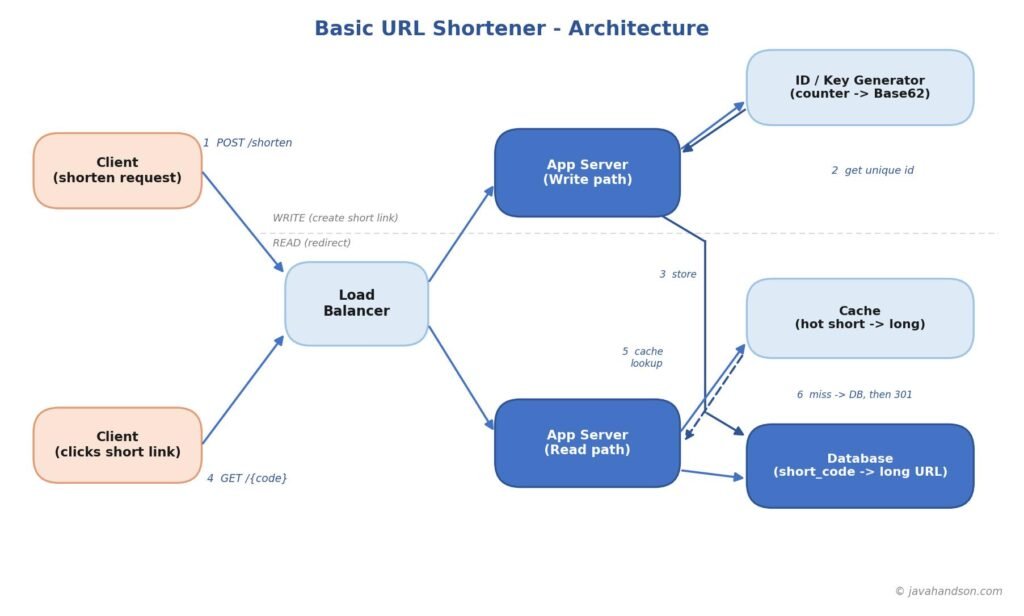
The write path runs when a user submits a long URL. The goal is to produce a unique short code and store the mapping. Here is the sequence, step by step.
The server then returns the finished short link to the user. The whole thing takes a few milliseconds. Because IDs are pre-allocated, the server rarely has to wait, so writes stay fast even under load.
The read path runs every time someone clicks a short link. This path carries the heaviest traffic, so we make it as fast as possible. Caching is the key trick here.
The redirect itself is an HTTP redirect. Most services use a 301 or a 302, and that choice has real consequences, which we cover next.
When the server finds the long URL, it tells the browser to go there using a redirect status code. The two common choices behave differently, and the difference matters for analytics.
| Aspect | 301 Permanent | 302 Temporary |
|---|---|---|
| Browser caching | Browser caches the target aggressively | Browser does not cache; asks each time |
| Server load | Lower; browser skips the server on repeat clicks | Higher; every click hits the server |
| Click analytics | Weaker; cached clicks never reach you | Stronger; you see every click |
| Best when | You do not need per-click tracking | You want to count every single click |
So the choice is a trade-off between server load and analytics. If tracking every click matters, pick 302 and accept more traffic. If speed and lower load matter more, pick 301 and let browsers cache. Naming this trade-off out loud is exactly what interviewers want to hear.
Theory sticks better when you watch it happen. So let us take one real long URL and follow it through the whole system, from the moment it is created to the moment two different people click it. We will use small, concrete numbers so every step is easy to picture.
Say a user wants to shorten this long link:
| Our example input Long URL: https://shop.example.com/products/winter-jacket?id=88213&ref=newsletter Short domain: https://sho.rt |
The user sends the long URL to the service. The load balancer picks a free app server to handle it. Now the server needs a unique number for this link, so it asks the ID generator. Suppose the ID generator hands back the number 1,000,000. This number belongs to this link and no other.
Next, the server turns 1,000,000 into a Base62 code. Base62 works like normal number bases, but with 62 symbols instead of 10. You repeatedly divide by 62 and map each remainder to a character in the set 0-9, a-z, A-Z. For our number, that process produces the short code 4c92. It is compact, URL-safe, and unique, because the number it came from was unique.
The server now saves one small record in the database. This row is the single source of truth for the link. From here on, the whole service just looks up this row by its short code.
| Field | Stored value |
|---|---|
| short_code | 4c92 |
| long_url | https://shop.example.com/products/winter-jacket?id=88213&ref=newsletter |
| created_at | 2026-08-10 09:15:00 |
| expires_at | (none) |
The server then returns the finished short link to the user: https://sho.rt/4c92. The user copies it and shares it in a newsletter. The write path is done, and it took only a few milliseconds.
A reader opens the newsletter and clicks https://sho.rt/4c92. The browser sends a request for the code 4c92. A read server receives it and first checks the cache. Since nobody has clicked this brand-new link yet, the cache does not have it. This is a cache miss.
On a miss, the server reads the row from the database, finds the long URL, and does two things. First, it saves the mapping 4c92 to the long URL in the cache, so the next click is faster. Second, it sends the browser an HTTP redirect to the real product page. The reader lands on the winter jacket page and never notices the extra database step, which took only a few milliseconds.
A minute later, a second reader clicks the same link https://sho.rt/4c92. This time the story is different. The read server checks the cache and finds 4c92 already there from the first click. This is a cache hit.
Because the cache holds the answer, the server skips the database completely. It reads the long URL straight from memory and redirects instantly. This is the magic of caching: the first click warms the cache, and every click after that is served from fast memory. When a link goes viral, millions of clicks are served this way while the database stays calm.
Here is the entire life of our example link in one compact table, so you can see the flow end to end.
| Stage | What happens | Result |
|---|---|---|
| Create | Server gets number 1,000,000, encodes to Base62 | Short code 4c92 |
| Store | Mapping saved in the database | Row: 4c92 to long URL |
| Return | Short link handed back to the user | https://sho.rt/4c92 |
| 1st click | Cache miss, read from database, then cache it | Redirect + cache warmed |
| 2nd click | Cache hit, served from memory | Instant redirect |
That single journey ties together every idea in this article. Estimation told us reads would dominate. The short-code design gave us 4c92 without collisions. The read and write paths moved the link through the system. And caching turned repeat clicks into instant redirects. If you can narrate this journey on a whiteboard, you truly understand the design.
Remember our estimate: reads outnumber writes by about 100 to 1. That single fact makes caching the most important optimization in the whole design. A cache is a fast in-memory store, such as Redis, that sits in front of the database and holds the hottest mappings.
Link popularity is very uneven. A tiny slice of links gets the vast majority of clicks. Think of a viral post or a promo link shared to millions. Meanwhile, most old links sit quiet for months. This uneven pattern is perfect for caching, because a small cache can serve most of the traffic.
A common rule of thumb says roughly 20 percent of links drive about 80 percent of clicks. So if we keep just the hot 20 percent in memory, we absorb most reads without ever touching the database. That keeps redirects fast and protects the database from overload.
A cache cannot hold everything, so it must evict old entries. A Least Recently Used, or LRU, policy works well here. It throws out the links that have not been clicked in the longest time, keeping hot links in memory. Since link mappings almost never change once created, we rarely worry about stale data, which makes caching even safer for this use case.
Our estimates already told us a single machine cannot cope. Hundreds of thousands of reads per second and billions of stored links force us to scale out. Here is how each layer grows.
App servers are stateless. Each request carries everything the server needs, and no user data is kept in server memory between requests. Because of this, we can run many identical servers behind a load balancer. If traffic doubles, we add more servers. If one dies, the load balancer routes around it. Statelessness is what makes this easy.
One database cannot hold billions of rows and serve peak reads alone. So we shard, which means we split the data across many database nodes. A simple scheme shards by the short code itself, sending each code to a node based on its value. That way, reads and writes spread evenly across the fleet instead of piling onto one machine.
Because reads dominate, we add read replicas: extra copies of the database that only serve reads. The primary handles writes, and many replicas share the read load. For truly global traffic, a content delivery network or edge layer can cache redirects close to users, cutting latency for people far from your main servers.
| The scaling recipe in one line Stateless app servers behind a load balancer, a distributed cache for hot links, a sharded database for storage, and read replicas or an edge layer to soak up the read flood. |
A basic design is complete, but a few extra features and edge cases come up often. Knowing them shows depth and care.
Certain slip-ups show up again and again. Being aware of them early saves pain and impresses interviewers.
System design interviews reward clear structure far more than memorized facts. When asked to design a URL shortener, follow a simple order and think out loud at each step. That order alone signals maturity.
Start by clarifying requirements and stating assumptions. Then estimate traffic and storage, and call out the read-heavy ratio early, because it drives everything. Next, design the short code and explain why counter-plus-Base62 beats naive hashing. After that, walk the read and write paths, then layer in caching, sharding, and replicas as the scale demands.
Finish by naming trade-offs without being asked. Mention 301 versus 302, SQL versus NoSQL, and how you removed the counter bottleneck. Interviewers love candidates who surface trade-offs on their own, because real engineering is choosing well among imperfect options.
Here is a compact glossary of the core terms from this article, so you can revisit them quickly.
| Term | Meaning in One Line |
|---|---|
| Short code | The compact Base62 string that maps to a long URL. |
| Base62 | A 62-character, URL-safe encoding of numbers into short strings. |
| Redirect (301/302) | The HTTP response that sends a click to the original URL. |
| Key Generation Service | A service that hands out unique IDs so no counter becomes a bottleneck. |
| Cache hit / miss | Whether the hot store already holds the mapping or not. |
| Sharding | Splitting data across many database nodes to scale storage. |
| Read replica | An extra database copy that serves reads to spread load. |
A: A URL shortener maps a long web address to a short code, such as sho.rt/aZ4x9Qk. When a user clicks the short link, the service looks up the code and redirects the browser to the original long URL. Creating a link is a write; following a link is a read, and reads far outnumber writes.
A: Base62 uses 62 URL-safe characters (0-9, a-z, A-Z), so codes stay short and need no escaping. A 7-character Base62 code gives about 3.5 trillion combinations, enough to last decades. Base64 is avoided because its extra symbols cause problems inside URLs.
A: A counter that increments and then converts to Base62 is usually preferred because it never collides. Hashing the long URL and trimming it can produce collisions, forcing database checks and retries. To scale the counter, use a Key Generation Service or give each server its own ID range.
A: Reads outnumber writes by roughly 100 to 1, and a small share of links get most of the clicks. An in-memory cache like Redis holding the hot links serves most redirects without touching the database, keeping latency low and protecting the database from overload.
A: A 301 is permanent, so browsers cache it and skip your server on repeat clicks, which lowers load but hides click analytics. A 302 is temporary, so every click reaches your server, giving full analytics at the cost of more traffic. Choose based on whether tracking each click matters.
A: Run stateless app servers behind a load balancer, put a distributed cache in front for hot links, shard the database by short code to spread storage and load, and add read replicas or an edge layer to absorb heavy read traffic.
A URL shortener system design looks small but teaches almost every backend idea worth knowing. You size the load, spot that reads dominate, and let that insight steer the whole design toward fast, cached reads.
The core is a mapping from a short code to a long URL. You generate that code cleanly with a counter and Base62, store the mapping in a store built for key lookups, and serve clicks through a cache backed by a sharded database. Around this core, you add stateless servers, replicas, and an edge layer to scale, plus small extras like custom aliases, expiry, and rate limiting.
Carry the same habit into your own projects: estimate first, find the dominant traffic pattern, and design around it. Master this one service, and larger designs will feel like natural extensions rather than fresh leaps.
To go deeper into the sources and related ideas behind this design, explore the following.