Understanding Inheritance in Java: Syntax, Types, and the Diamond Problem
-
Last Updated: September 11, 2025
-
By: javahandson
-
Series

Inheritance in Java lets one class reuse the fields and methods of another class. This guide covers the extends keyword, the types of inheritance, the super keyword, constructor chaining, and the diamond problem.
Inheritance in Java lets one class build on top of another. The new class picks up the fields and methods of the old one, then adds whatever it needs. You write the shared code once and reuse it everywhere.
Think about a family for a second. A child picks up a surname, an eye colour, maybe a talent for music. The child also has habits nobody else in the house has. Java classes work in much the same way.
Why does this matter so much? Real programs are full of near-duplicates. A savings account and a current account share a balance. A car and a truck both have wheels and an engine. Copy-pasting those shared parts leaves you with five copies of the same bug.
Inheritance kills that duplication. Put the common parts in one class. Let the specific classes extend it. Fix a bug once, and every child gets the fix for free.
It is also one of the four pillars of object-oriented programming, alongside encapsulation, abstraction, and polymorphism. Interviewers ask about it constantly. Get it right, and the rest of OOP falls into place much faster.
We start from the plain idea and build up slowly. Here is the plan:
No prior OOP background required. If you can write a class with a field and a method, you have everything you need.
Inheritance models an IS-A relationship. Dog IS-A Animal. Manager IS-A Employee. SavingsAccount IS-A Account.
Read that sentence out loud before you write extends. Does it sound true? A Car IS-A Vehicle sounds fine. A Car IS-A Engine sounds silly, and that tells you inheritance fits the first pair but not the second.
This one test saves you from most bad hierarchies. If the sentence sounds wrong to a human, the code will feel wrong to whoever maintains it later.
Java has several names for the same two roles. Books, tutorials, and interviewers mix them freely, so learn all of them now.
That last point surprises people. Write a class with no extends at all, and Java still puts Object above it. That is why every object you create already has toString, equals, and hashCode.
Picture a Student. Every student has a name, and every student studies. That is the shared part.
Now split students into two groups. A school student carries a lunch box and sits in a fixed classroom. A college student eats in the canteen and picks their own electives.
Both groups still have a name. Both still study. Neither group needs its own copy of that code, because the Student class already holds it.
So SchoolStudent extends Student, and CollegeStudent extends Student. Each child adds only what makes it different. Nothing repeats.
Three benefits show up again and again in real projects:
There is a fourth benefit that only shows up later. Inheritance is what makes polymorphism possible. A Vehicle reference can hold a Car, a Truck, or a Bike, and the right method still runs.
One keyword does all the work. Put extends after the child class name, then name the parent.
class Parent {
    // shared fields and methods
}

class Child extends Parent {
    // extra fields and methods
}
That is the whole syntax. From this moment on, Child can use the visible members of Parent as if it had written them itself.
One rule to memorise: a Java class may extend exactly one class. Not two, not three. We will see why in section 4.
Here is the student idea turned into code you can run.
package com.javahandson;

class Student {
    String name;

    void study() {
        System.out.println("Student studies");
    }
}

class SchoolStudent extends Student {
    void getLunchBox() {
        System.out.println("School student gets the lunch box");
    }
}

class CollegeStudent extends Student {
    void getLunchFromCanteen() {
        System.out.println("College student gets the lunch from the canteen");
    }
}

public class Main {
    public static void main(String[] args) {
        SchoolStudent schoolStudent = new SchoolStudent();
        schoolStudent.name = "Suraj";

        System.out.println(schoolStudent.name + " is a School student");
        schoolStudent.study();
        schoolStudent.getLunchBox();

        System.out.println();

        CollegeStudent collegeStudent = new CollegeStudent();
        collegeStudent.name = "Shweta";

        System.out.println(collegeStudent.name + " is a College student");
        collegeStudent.study();
        collegeStudent.getLunchFromCanteen();
    }
}
// Output:
// Suraj is a School student
// Student studies
// School student gets the lunch box
//
// Shweta is a College student
// Student studies
// College student gets the lunch from the canteen
Look at what we never wrote. SchoolStudent has no name field. CollegeStudent has no study method. Both use them anyway, because Student already supplies them.
Each child then adds its own single method. That is the whole point: shared code up top, differences down below.
A child class picks up these members from its parent:
Protected deserves a special mention. It exists mainly for inheritance. Mark a member protected when subclasses need it but outside code should not touch it.
Want the full breakdown of who can see what? Our guide to access specifiers in Java walks through all four levels.
Three things stay behind, and each one trips up beginners:
The private rule confuses people the most. Say Student has a private balance field with a public getBalance method. SchoolStudent cannot write balance directly, yet getBalance() returns the right number every time.
The types describe the shape of the hierarchy, not different keywords. Java uses extends for all of them. What changes is how many levels and how many branches you end up with.
One parent, one child. This is the simplest shape and by far the most common.
package com.javahandson;

class Student {
    String name;

    void study() {
        System.out.println("Student studies");
    }
}

class CollegeStudent extends Student {
    void getLunchFromCanteen() {
        System.out.println("College student gets the lunch from the canteen");
    }
}
CollegeStudent gets everything Student offers, plus one method of its own. Nothing more to it.
Here the chain grows. A class extends a class that already extends something else.
Student to CollegeStudent to EngineeringStudent. Each link adds detail. The last class in the chain collects everything above it.
package com.javahandson;

class Student {
    String name;

    void study() {
        System.out.println("Student studies");
    }
}

class CollegeStudent extends Student {
    void getLunchFromCanteen() {
        System.out.println("College student gets the lunch from the canteen");
    }
}

class EngineeringStudent extends CollegeStudent {
    void takePlacementTraining() {
        System.out.println("Engineering student has to take the placement training");
    }
}

public class Main {
    public static void main(String[] args) {
        EngineeringStudent engineeringStudent = new EngineeringStudent();
        engineeringStudent.name = "Shweta";

        System.out.println(engineeringStudent.name + " is a College student");
        engineeringStudent.study();
        engineeringStudent.getLunchFromCanteen();
        engineeringStudent.takePlacementTraining();
    }
}
// Output:
// Shweta is a College student
// Student studies
// College student gets the lunch from the canteen
// Engineering student has to take the placement training
One EngineeringStudent object calls methods from three different classes. Java walks up the chain until it finds each one.
A word of caution: deep chains hurt. Four or five levels make a bug hunt miserable, because the method you want could sit anywhere above you. Two or three levels is plenty for most designs.
Now the tree branches. Several children share a single parent.
package com.javahandson;

class Student {
    String name;

    void study() {
        System.out.println("Student studies");
    }
}

class SchoolStudent extends Student {
    void getLunchBox() {
        System.out.println("School student gets the lunch box");
    }
}

class CollegeStudent extends Student {
    void getLunchFromCanteen() {
        System.out.println("College student gets the lunch from the canteen");
    }
}
SchoolStudent and CollegeStudent both sit under Student. Neither knows the other exists.
This shape pairs beautifully with polymorphism. Declare a Student reference, point it at either child, and call study(). The correct version runs without a single if statement.
Multiple inheritance means one class extending two or more classes at once. Java flatly refuses.
package com.javahandson;

class Cricketer {
    void playCricket() {
        System.out.println("Playing cricket");
    }
}

class Artist {
    void draw() {
        System.out.println("Drawing art");
    }
}

// Compile-time error: class MultiTalentedStudent cannot extend two classes
class MultiTalentedStudent extends Cricketer, Artist {
    void showcaseTalent() {
        System.out.println("Showing cricket and art skills");
    }
}
The compiler stops you right at the comma. Section 5 explains the reasoning in full.
Java still gives you a way out. A class can implement as many interfaces as it likes, and that covers almost every case where you wanted two parents.
Hybrid inheritance simply means mixing two or more of the shapes above in one design. You might have a hierarchical split at the top and a multi-level chain hanging off one branch.
Since pure multiple inheritance is off the table, any hybrid design in Java combines the legal shapes only. Interfaces can join the mix wherever a class needs behaviour from more than one direction.
| Type | Shape | Supported With Classes? | Example |
|---|---|---|---|
| Single-level | One parent, one child | Yes | CollegeStudent extends Student |
| Multi-level | A chain of classes | Yes | Student to CollegeStudent to EngineeringStudent |
| Hierarchical | Many children, one parent | Yes | SchoolStudent and CollegeStudent extend Student |
| Multiple | One child, many parents | No, use interfaces | implements Cricketer, Artist |
| Hybrid | A mix of the shapes above | Partly, through interfaces | Chain plus interfaces |
The diamond problem is the classic argument against multiple inheritance. It appears when one class inherits from two classes that both descend from the same grandparent.
Draw it on paper and you get a diamond. One shape at the top, two in the middle, one at the bottom.
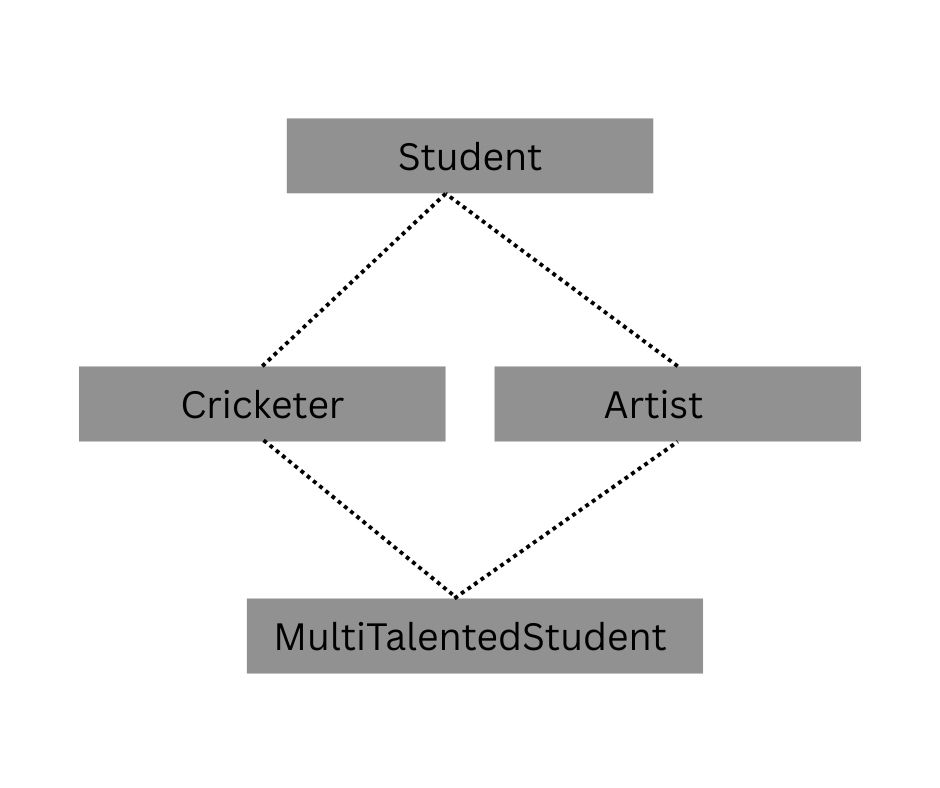
Now suppose both middle classes override the same method. The bottom class calls that method. Which version should run? Nobody can say for sure, and neither can the compiler.
Here is the diamond written out. Student sits at the top. Cricketer and Artist both override study().
package com.javahandson;

class Student {
    void study() {
        System.out.println("Student studies");
    }
}

class Cricketer extends Student {
    @Override
    void study() {
        System.out.println("Playing cricket");
    }
}

class Artist extends Student {
    @Override
    void study() {
        System.out.println("Drawing art");
    }
}

// Compile-time error in Java: no class may extend two classes
class MultiTalentedStudent extends Cricketer, Artist {
    void showcaseTalent() {
        study();   // which study() would this even be?
    }
}
Three answers look equally valid. It could print “Playing cricket”, or “Drawing art”, or “Student studies”.
What if neither middle class overrides study()? Then only one version exists, and the call resolves cleanly. So why does Java still say no?
Because that safety is temporary. Somebody adds an override to Cricketer six months later, and a class they have never seen suddenly stops compiling. Java removes the whole risk by banning multiple class inheritance up front.
Interfaces let a class inherit from many types at once. The trick is that a classic interface declares method signatures only, so there is no rival implementation to choose between.
package com.javahandson;

interface Cricketer {
    void playCricket();
}

interface Artist {
    void draw();
}

class MultiTalentedStudent implements Cricketer, Artist {
    public void playCricket() {
        System.out.println("Playing cricket");
    }

    public void draw() {
        System.out.println("Drawing art");
    }

    void showcaseTalent() {
        playCricket();
        draw();
    }
}

public class Main {
    public static void main(String[] args) {
        MultiTalentedStudent student = new MultiTalentedStudent();
        student.showcaseTalent();
    }
}
// Output:
// Playing cricket
// Drawing art
MultiTalentedStudent writes both method bodies itself. No ambiguity survives, because exactly one implementation exists for each method.
So the rule reads like this. Java supports single inheritance of implementation and multiple inheritance of type. For a deeper look, see our guide to interfaces in Java.
Java 8 added default methods, which let an interface ship a real method body. That reopened a small crack in the door.
Implement two interfaces that both declare the same default method, and the compiler complains again. This time the fix lands on you: override the method in your class.
package com.javahandson;

interface Cricketer {
    default void warmUp() {
        System.out.println("Stretching before the match");
    }
}

interface Artist {
    default void warmUp() {
        System.out.println("Sketching rough lines");
    }
}

class MultiTalentedStudent implements Cricketer, Artist {
    @Override
    public void warmUp() {
        Cricketer.super.warmUp();   // pick one explicitly
        System.out.println("Then setting up the easel");
    }
}

public class Main {
    public static void main(String[] args) {
        new MultiTalentedStudent().warmUp();
    }
}
// Output:
// Stretching before the match
// Then setting up the easel
Notice the InterfaceName.super.methodName() syntax. It names the exact version you want, which removes every trace of doubt.
Java never guesses here. Either you override the clash yourself, or your code does not compile.
The super keyword points at the immediate parent class. It has three jobs, and we will take them one at a time.
Override a method and the parent version disappears from normal calls. Write super.methodName() to reach it again.
This pattern shows up constantly. You want the parent behaviour plus a little extra, not a full replacement.
Declare a field in the child with the same name as one in the parent, and the child version hides the parent version. Write super.fieldName to read the original.
package com.javahandson;

class Student {
    String name;
    int rollNumber = 101;

    void study() {
        System.out.println("Super class : Student studies");
    }
}

class SchoolStudent extends Student {
    int rollNumber = 102;

    void studentDetails() {
        // no name field here, so no super needed
        System.out.println("Student name is : " + name);

        // rollNumber exists in both, so super picks the parent one
        System.out.println(name + " previous roll number was : " + super.rollNumber);
        System.out.println(name + " current roll number is : " + rollNumber);
    }

    @Override
    void study() {
        super.study();   // run the parent version first
        System.out.println("Sub class : Student studies");
    }
}

public class Main {
    public static void main(String[] args) {
        SchoolStudent schoolStudent = new SchoolStudent();
        schoolStudent.name = "Suraj";
        schoolStudent.studentDetails();
        schoolStudent.study();
    }
}
// Output:
// Student name is : Suraj
// Suraj previous roll number was : 101
// Suraj current roll number is : 102
// Super class : Student studies
// Sub class : Student studies
Both rollNumber fields live in the same object at once. Plain rollNumber means the child copy, and super.rollNumber means the parent copy.
Honestly, hiding a field like this causes more confusion than it solves. Treat the example as something to recognise in an interview, not a habit to pick up.
Write super(…) as a constructor call and it runs the matching parent constructor. Java adds a silent super() for you whenever you leave it out.
That silent call always targets the no-argument constructor. If the parent has none, you must call super(arguments) yourself.
package com.javahandson;

class Student {
    String name;

    Student(String name) {
        this.name = name;
        System.out.println("Superclass : Student constructor : " + name);
    }
}

class SchoolStudent extends Student {
    SchoolStudent(String name) {
        super(name);   // required: Student has no no-arg constructor
        System.out.println("Subclass : SchoolStudent constructor");
    }
}

public class Main {
    public static void main(String[] args) {
        SchoolStudent schoolStudent = new SchoolStudent("Suraj");
    }
}
// Output:
// Superclass : Student constructor : Suraj
// Subclass : SchoolStudent constructor
Traditionally super() had to be the very first statement in the constructor. Java 25 relaxed that with flexible constructor bodies, so you may now run validation code before super(), as long as it never touches the object under construction.
Want more depth on the two keywords together? Read our guide to this and super in Java.
Create one child object and several constructors fire, not one. Java builds the object from the top of the hierarchy downwards.
Why that order? A child often depends on parent state. Initialising the parent first guarantees those fields hold real values by the time the child body runs.
package com.javahandson;

class Student {
    Student() {
        System.out.println("Student constructor");
    }
}

class CollegeStudent extends Student {
    CollegeStudent() {
        System.out.println("CollegeStudent constructor");
    }
}

class EngineeringStudent extends CollegeStudent {
    EngineeringStudent() {
        System.out.println("EngineeringStudent constructor");
    }
}

public class Main {
    public static void main(String[] args) {
        EngineeringStudent eng = new EngineeringStudent();
    }
}
// Output:
// Student constructor
// CollegeStudent constructor
// EngineeringStudent constructor
One new keyword produced three lines of output. Notice the order, though. The class you asked for prints last.
None of those three constructors mentions super(). Java inserts it anyway.
Every constructor that does not start with an explicit this(…) or super(…) call gets an implicit super() as its first action. The chain therefore climbs all the way to Object before anything prints.
Here is the sequence for the example above:
The implicit super() looks for a no-argument parent constructor. Remove that constructor and the whole thing falls apart.
package com.javahandson;

class Student {
    Student(String name) {        // only a parameterised constructor
        System.out.println("Student : " + name);
    }
}

class SchoolStudent extends Student {
    SchoolStudent() {
        // error: there is no Student() to call implicitly
        System.out.println("SchoolStudent");
    }
}
The compiler reports something like “constructor Student in class Student cannot be applied to given types”. Beginners often read that message as a bug in the child class.
Two fixes work. Call super(“some name”) explicitly in the child, or add a no-argument constructor to Student. Pick whichever matches your design.
One more detail worth remembering. Writing any constructor at all removes the free default constructor Java would otherwise generate. That is exactly what bites you here.
A child can replace a parent method by declaring one with the same signature. We call this overriding, and it powers runtime polymorphism.
package com.javahandson;

class Student {
    void study() {
        System.out.println("Reading the textbook");
    }
}

class EngineeringStudent extends Student {
    @Override
    void study() {
        System.out.println("Solving lab assignments");
    }
}

public class Main {
    public static void main(String[] args) {
        Student student = new EngineeringStudent();   // parent reference
        student.study();
    }
}
// Output:
// Solving lab assignments
Read the reference type and you would expect the parent version. Java looks at the actual object instead, so the child version wins.
Always add @Override. The annotation costs nothing and catches typos at compile time, long before they become a debugging session.
An override must satisfy every one of these:
Widening access is fine. A protected parent method can become public in the child. Going the other way fails immediately.
Fields and static methods behave differently from instance methods. They hide rather than override, and the reference type decides which one you get.
| Member | What Happens | Which Version Runs |
|---|---|---|
| Instance method | Overriding | Decided by the actual object |
| Static method | Hiding | Decided by the reference type |
| Field | Hiding | Decided by the reference type |
| private method | Neither | Only the declaring class sees it |
Interviewers love this table. Given Student s = new EngineeringStudent(), a method call follows the object, while a field read follows the Student reference.
Composition is the other way to reuse code. Instead of extending a class, you hold an instance of it as a field.
Inheritance answers “IS-A”. Composition answers “HAS-A”. A Car IS-A Vehicle, and a Car HAS-A Engine.
package com.javahandson;

class Engine {
    void start() {
        System.out.println("Engine started");
    }
}

class Car {
    private final Engine engine = new Engine();   // HAS-A, not IS-A

    void drive() {
        engine.start();
        System.out.println("Car is moving");
    }
}

public class Main {
    public static void main(String[] args) {
        new Car().drive();
    }
}
// Output:
// Engine started
// Car is movingReach for composition in these situations:
Inheritance creates tight coupling. Your class depends on the parent’s internals, so a small refactor upstream can break you. Composition keeps that dependency behind a field you control.
| Aspect | Inheritance | Composition |
|---|---|---|
| Relationship | IS-A | HAS-A |
| Keyword | extends | A field of that type |
| Coupling | Tight | Loose |
| Changes at runtime | Fixed once compiled | Swap the field any time |
| Reuse granularity | All visible members | Only what you delegate |
Somebody needs one handy method, so they extend the class that has it. The IS-A test fails badly, and the design rots from there.
Classic example: Stack extends Vector in the old Java library. A stack should expose push and pop only, yet it inherited every list method. You can insert into the middle of a Java Stack, which makes no sense at all.
Add a parameterised constructor to a parent class and the free default constructor disappears. Every child that relied on the implicit super() stops compiling.
Fix it by calling super(arguments) in each child, or by keeping a no-argument constructor around in the parent.
People try super.super.study() to skip a level in a chain. Java rejects it outright.
The keyword reaches exactly one level up, and no further. Skipping a level would let you bypass a class’s own rules, so the language never allows it.
Turning a public parent method into a protected child method fails to compile. The message reads “attempting to assign weaker access privileges”.
Think about why. Callers holding a parent reference already expect that method. Hiding it from them would break the IS-A promise.
This one produces a genuinely baffling bug. A parent constructor calls a method, the child overrides it, and the child fields have not been initialised yet.
package com.javahandson;

class Student {
    Student() {
        printDetails();   // runs the child version, too early
    }

    void printDetails() {
        System.out.println("A student");
    }
}

class SchoolStudent extends Student {
    String school = "Green Valley";

    @Override
    void printDetails() {
        System.out.println("Studies at " + school);
    }
}

public class Main {
    public static void main(String[] args) {
        new SchoolStudent();
    }
}
// Output:
// Studies at null
Where did the school name go? The parent constructor finished before Java assigned that field, so the override read a null.
Keep constructors boring. Mark such helper methods final or private, and do the real work in a separate method the caller invokes later.
Let us tie everything together with a payroll example. Every employee has a name and a base salary. Managers earn a bonus, and developers earn overtime.
The program below uses a parent constructor, an override, a super call, and a polymorphic loop.
package com.javahandson;

class Employee {
    protected String name;
    protected double baseSalary;

    Employee(String name, double baseSalary) {
        this.name = name;
        this.baseSalary = baseSalary;
    }

    double calculatePay() {
        return baseSalary;
    }

    void printSlip() {
        System.out.println(name + " earns " + calculatePay());
    }
}

class Manager extends Employee {
    private final double bonus;

    Manager(String name, double baseSalary, double bonus) {
        super(name, baseSalary);
        this.bonus = bonus;
    }

    @Override
    double calculatePay() {
        return super.calculatePay() + bonus;
    }
}

class Developer extends Employee {
    private final int overtimeHours;

    Developer(String name, double baseSalary, int overtimeHours) {
        super(name, baseSalary);
        this.overtimeHours = overtimeHours;
    }

    @Override
    double calculatePay() {
        return super.calculatePay() + (overtimeHours * 500);
    }
}

public class Main {
    public static void main(String[] args) {
        Employee[] team = {
            new Employee("Ravi", 40000),
            new Manager("Suraj", 60000, 15000),
            new Developer("Shweta", 50000, 10)
        };

        for (Employee employee : team) {
            employee.printSlip();
        }
    }
}
// Output:
// Ravi earns 40000.0
// Suraj earns 75000.0
// Shweta earns 55000.0Several ideas from this article show up in those twenty lines. Let us pick them apart.
Now look at printSlip. We wrote it once, in the parent, and it produced three correct slips. Adding an Intern class tomorrow means writing one constructor and one override.
That is inheritance earning its keep. To see how the method dispatch works underneath, read our guide to polymorphism in Java.
A: Inheritance lets one class acquire the fields and methods of another class using the extends keyword. The child class reuses the parent’s visible members and can add its own. It models an IS-A relationship, such as Manager IS-A Employee.
A: Two parent classes can supply two different versions of the same method. The compiler would then have no way to pick one, which is the diamond problem. Java avoids the ambiguity entirely by allowing only one superclass, and offers interfaces for multiple inheritance of type.
A: It happens when one class inherits from two classes that share a common grandparent, forming a diamond shape. If both middle classes override the same method, the bottom class has two competing versions and no rule to choose between them. Java blocks the situation by refusing multiple class inheritance.
A: No. A constructor belongs to the class that declares it, so a child never receives it. The child writes its own constructor and reaches the parent version through super(). Java inserts an implicit no-argument super() call when you omit it.
A: Not directly. A private field still occupies memory inside the child object, but the child code cannot name it. Access it through a public or protected getter, or mark the member protected when subclasses genuinely need it.
A: Creating one child object triggers a chain of constructor calls up the hierarchy to Object. Each constructor calls its parent first, so the bodies finish from the top down. This guarantees the parent’s fields hold valid values before the child body runs.
A: It did for most of Java’s history. Java 25 finalised flexible constructor bodies, so you may now place statements before super() as long as they never read or write the object under construction. Argument validation is the main use case. On older versions, super() still has to come first.
A: Overriding applies to instance methods, and the actual object decides which version runs. Hiding applies to fields and static methods, and the reference type decides. So a method call on a parent reference runs the child version, while a field read on the same reference returns the parent value.
A: Choose composition whenever the IS-A sentence sounds false, or when you only want a few methods from the other class. Composition also wins when you need to swap the helper object at runtime. Inheritance couples your class tightly to the parent’s internals, so upstream changes can break you.
A: Yes. Mark the class final and no other class may extend it, which is how String works. Java 17 added sealed classes for finer control, letting you list exactly which classes may extend yours. A private constructor also blocks subclassing indirectly.
Let us wrap up what we covered. Inheritance lets a child class reuse the fields and methods of a parent through the extends keyword, modelling an IS-A relationship.
Java supports single-level, multi-level, and hierarchical shapes. Multiple inheritance with classes stays off limits, because two parents could supply rival versions of the same method.
Interfaces solve that cleanly. A class implements as many as it likes, and any clash between default methods forces you to write one explicit override.
The super keyword reaches the immediate parent, whether you want a method, a hidden field, or the constructor. Constructor chaining then builds every object from the top of the hierarchy downwards.
One last piece of advice. Say the IS-A sentence out loud before you type extends. If it sounds strange, reach for composition instead and your future self will thank you.