HashMap in Java: Map Interface, Buckets & Hashing Explained
-
Last Updated: July 11, 2026
-
By: javahandson
-
Series

Learn how HashMap in Java works — the Map interface, key-value pairs, buckets, hashing, collisions, and treeification since Java 8. A clear beginner’s guide.
A HashMap in Java stores data as key-value pairs. You hand it a key, and it hands back the value. No scanning, no looping. Just a quick, direct lookup.
Picture a list of students. Say you want to look up one by their roll number. With an ArrayList, you would scan item by item until you find a match. You check the first, then the second, then the third. That works, but it gets slow fast.
Now imagine ten thousand students. That scan could touch every single record before it finds the right one. For a lookup you run again and again, that cost adds up in a hurry.
What if you could just say “give me roll number 42” and get the answer right away? That is exactly what a Map does. It skips the search and goes straight to the value. And of all the maps, HashMap is the one you will reach for almost every time.
HashMap shows up everywhere in real code. Caches use it. Word counters use it. Config lookups, database row caches, and lookup tables all lean on it. It is one of the most used classes in the whole Java library.
In this article, we start with the Map interface itself. Then we open up HashMap and see how it works inside. Here is the plan:
You do not need to know Map already. If you have used an ArrayList, you are ready to go. We will build up each idea slowly, with plenty of small examples along the way.
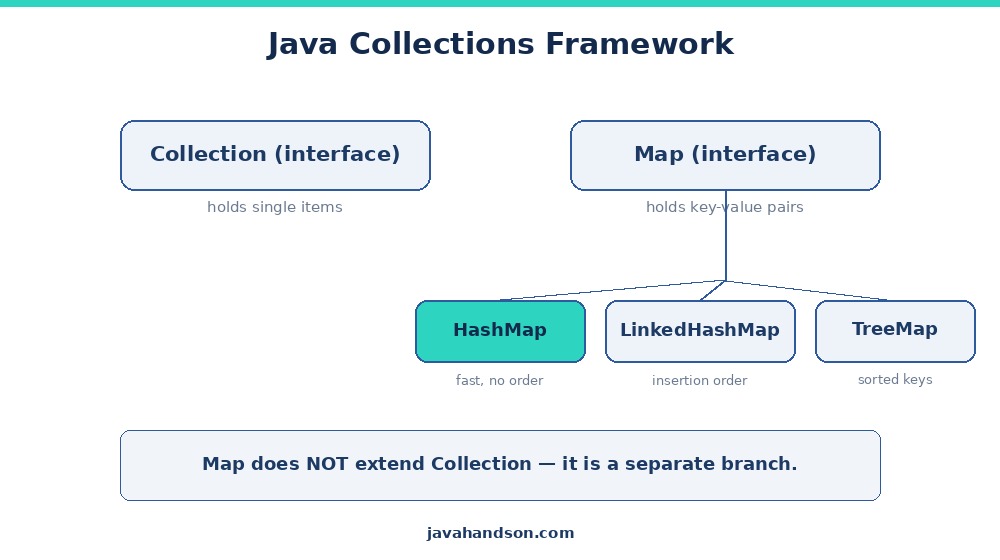
A Map is a collection of key-value pairs. Each key points to one value. Think of a real dictionary. You look up a word, the key, and you get its meaning, the value.
A phone contact list works the same way. The name is the key. The number is the value. You search by name, and the number pops up. You never scroll the whole list to find one friend.
That is the core idea behind every Map. You store data in pairs, then fetch a value by its key. The key is how you find things later, so choosing a good key matters.
In a Map, no two keys can be the same. Each key shows up once and only once. This keeps lookups clean and predictable.
Why does this rule exist? A key is a label. If two entries had the same label, the map would not know which value you meant. So the map forbids that from the start.
Put a value under the key “apple”, then put another value under “apple” again. The second one wins. The old value is simply replaced, and no error is thrown.
Map<String, Integer> stock = new HashMap<>();
stock.put("apple", 5);
stock.put("apple", 9);   // same key, overwrites
System.out.println(stock.get("apple")); // Output: 9
So a key acts like a unique ID. Values, on the other hand, can repeat freely. Two different keys can point to the same value with no trouble at all.
Here is a quick example. Two people can share a birthday, so “Amy” and “Ben” might both map to “May 5”. Two keys, one value, and the map is perfectly happy.
Here is a fact that surprises many beginners. The Map interface does not extend Collection. It stands on its own branch of the framework.
Why the split? A Collection holds single items. A Map holds pairs. Those are different shapes of data, so they get different interfaces.
Think of it this way. A List is a row of boxes. A Map is a row of labeled drawers. Both store things, but you reach into them in very different ways.
Still, Map plays nicely with the rest. You can pull out its keys, its values, or its pairs. Each of those is a Collection you can loop over. So Map connects to the framework without being a Collection itself.
Before we go deeper, here is a quick tour of the methods you will use most. No need to memorize them. Just know they are there.
That short list covers most real work. We will see several of these in action below.
One thing trips up beginners. You cannot write a new Map(). Map is an interface, so it only describes what a map can do. It lists the methods but writes none of the logic.
A concrete class does the actual work. Each class stores pairs in its own way, with its own trade-offs. Java gives you a few choices:
So which one do you pick? Most of the time, HashMap. It is the fastest for plain lookups, and order rarely matters. Reach for the others only when you need order or sorting.
We cover LinkedHashMap, TreeMap, and Hashtable in later articles. For now, we stay with HashMap and dig into how it earns that default spot.
Here is the common way to declare one:
Map<String, String> capitals = new HashMap<>();
capitals.put("India", "New Delhi");
capitals.put("Japan", "Tokyo");
System.out.println(capitals.get("Japan")); // Output: Tokyo
Notice the left side says Map, not HashMap. That is a good habit. You code to the interface, so swapping the implementation later stays easy. Change one word on the right, and the rest of your code still works.
Let us play with a Map for a bit. These are the moves you will make every day.
Use put(key, value) to add a pair. Use get(key) to read the value back. Both are quick and direct, and both are the workhorses of any map.
Map<String, Integer> ages = new HashMap<>();
ages.put("Amy", 30);
ages.put("Ben", 25);

System.out.println(ages.get("Amy"));  // 30
System.out.println(ages.get("Ben"));  // 25
Ask for a key that is not there, and you get null back. That null can bite you, so watch for it. A missing key does not throw an error; it just quietly returns nothing.
To avoid that null surprise, check first. The containsKey method tells you if a key exists, and returns a clean true or false.
if (ages.containsKey("Cara")) {
    System.out.println(ages.get("Cara"));
} else {
    System.out.println("No entry for Cara");
}
// Output: No entry for Cara
Another option is getOrDefault. It returns a fallback when the key is missing, so your code stays tidy. No if-else block needed.
int age = ages.getOrDefault("Cara", 0);
System.out.println(age); // Output: 0
Both tricks solve the same problem in different ways. Use containsKey when you need a yes-or-no answer. Use getOrDefault when you want a safe fallback value.
Call remove(key) to drop a pair. Call put again with the same key to update a value.
ages.put("Amy", 31);   // update Amy's age
ages.remove("Ben");    // drop Ben entirely
System.out.println(ages); // {Amy=31}
Remember, a second put with the same key does not add a new pair. It overwrites the old one.
Often, you want to walk through every pair. The cleanest way is to use entrySet, which gives you each key-value pair.
Map<String, Integer> scores = new HashMap<>();
scores.put("Math", 90);
scores.put("Science", 85);

for (Map.Entry<String, Integer> e : scores.entrySet()) {
    System.out.println(e.getKey() + " = " + e.getValue());
}
// Math = 90
// Science = 85
You can also loop over just the keys with keySet, or just the values with values. Pick whichever fits your task.
Now for the fun part. Let us open up HashMap and see what makes those lookups so fast.
Inside every HashMap sits a plain array. Each slot in that array is called a bucket. A bucket can hold one pair, several pairs, or none at all.
In the source code, this array is roughly Node[] table. Each Node holds a key, a value, the key’s hash, and a link to the next node. That link is what lets a bucket hold more than one pair.
When you add a pair, the map picks a bucket for it. When you read, the map goes straight to that same bucket. No scanning the whole thing, and no looping over every entry.
So the array is the backbone. Everything else, the hashing and the chains, exists to place pairs into these buckets and find them again. But how does the map pick the right bucket? That is where hashing comes in.
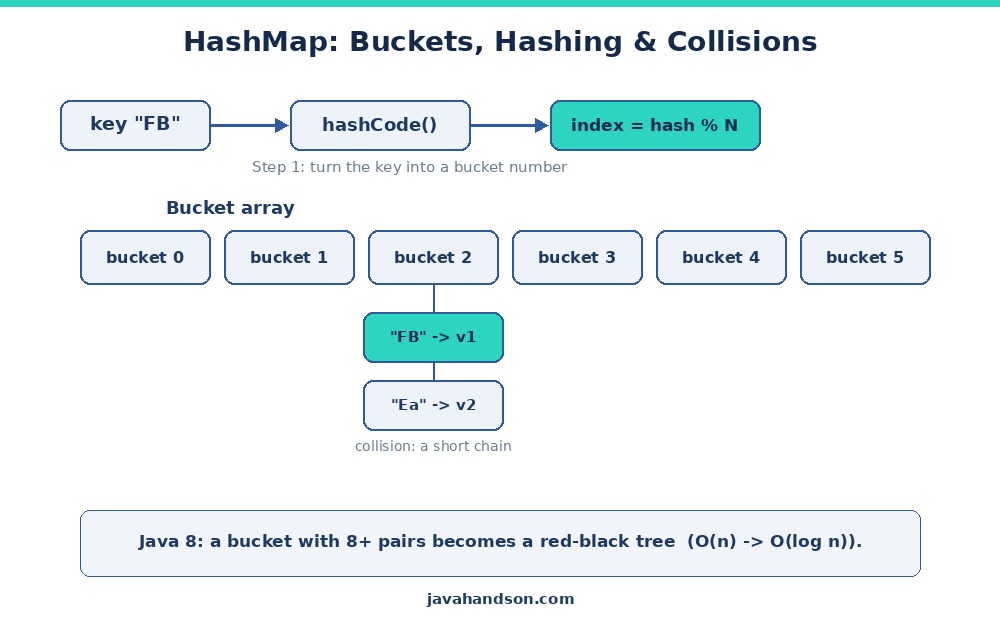
Every Java object has a hashCode() method. It returns an int, a kind of numeric fingerprint for that object. Two equal objects share the same fingerprint.
The HashMap takes that hash code and shrinks it down to a bucket index. Roughly, it does a hash modulo the number of buckets. The result points to one slot in the array.
There is a small twist worth knowing. HashMap does not use the raw hash code straight away. It first mixes the high bits into the low bits, a step called spreading. This scatters keys more evenly and reduces clashes.
So the flow is simple. You give a key. The map hashes it into a number, spreads the bits, then maps that to a bucket. Your pair goes there, or gets read from there.
Because the map jumps straight to a bucket, a lookup is usually O(1). That means the speed stays the same whether the map holds ten pairs or ten million.
Compare this to a List. To find an item in a List, you often scan from the front. You check each element until you hit a match. The bigger the list, the longer the scan runs.
A HashMap skips the scan entirely. It computes the bucket and goes there directly. One hash, one jump, and you are at the right spot. That is the whole reason maps feel so fast for lookups.
Here is a snag. Different keys can hash to the same bucket. Two people can share a birthday, and two keys can share a bucket. We call that a collision.
Collisions are normal, not a bug. There are only so many buckets, but far more possible keys. So some keys are bound to overlap. A good HashMap expects this and handles it smoothly.
HashMap handles it gracefully. It does not panic or overwrite. Instead, it stores both pairs in the same bucket, linked together in a small chain.
So a bucket is not just one pair. It can be a short list of pairs that all landed in the same spot.
// Both keys land in the same bucket, but stay separate
map.put("FB", value1);   // hashes to bucket 5
map.put("Ea", value2);   // also hashes to bucket 5
// Bucket 5 now holds a chain: FB -> Ea
When you read a key from a busy bucket, the map walks the chain and checks each key with equals(). It stops at the match and returns that value. A short chain means this check stays quick.
This is why a good hash matters so much. Spread keys evenly, and most buckets hold just one pair. Spread them badly, and a few buckets bloat into long chains that slow you down.
This is the heart of it. A HashMap leans on two methods from your key objects: hashCode() and equals(). Together, they decide where a pair lives and how the map finds it again.
The hashCode() picks the bucket. The equals() confirms the exact key inside that bucket. Break either one, and your map misbehaves in ways that are hard to debug.
The rule is: if two keys are equal, they must return the same hash code. Java’s own String and Integer already follow this rule, so they work well as keys with no extra effort.
Write your own class as a key, though, and you must override both methods. Forget that, and lookups quietly fail. The map hides your value in one bucket, then searches another.
class Point {
    int x, y;
    // ... constructor ...

    @Override
    public boolean equals(Object o) { /* compare x and y */ }

    @Override
    public int hashCode() { return Objects.hash(x, y); }
}
One safe shortcut is a record. A Java record generates a correct equals and hashCode for you, based on its fields. So records make excellent map keys with almost no code.
We will dig into this trap more in the mistakes section. For now, just remember: custom keys need both methods, and they must agree with each other.
A HashMap does not stay one size forever. As you add more pairs, buckets get crowded, and lookups slow down. More pairs per bucket means longer chains to walk.
To stop that, the map watches its load factor. The load factor is the ratio of pairs to buckets. By default, once the map is about 75% full, it grows itself.
As it grows, the map allocates a larger bucket array and moves every pair into it. This move is called rehashing, because each key gets a fresh bucket in the larger array.
Rehashing costs some time. It touches every pair, after all. But it keeps buckets roomy and lookups fast, and it does not happen often. The map trades a rare slow moment for many quick ones.
Here is a handy tip. If you know you will store many pairs, set the size up front: new HashMap<>(1000). This skips several costly grow-and-rehash rounds and saves real time on big maps.
Why 0.75 as the default? It is a sweet spot. A lower value wastes memory on empty buckets. A higher value crams buckets and slows lookups. The 0.75 balance keeps both in check.
Now, for a smart trick added in Java 8. It fixes a rare but nasty slowdown in busy buckets.
Recall that a crowded bucket holds a chain of pairs. To find a key there, the map walks the chain one node at a time. It checks each key until it hits a match.
A short chain is fine. Two or three nodes take no time to check. But imagine a bucket containing dozens of pairs, maybe due to bad hashing or an attack.
Now each lookup crawls through a long list. That is slow, O(n) in the worst case, where n is the chain length. The whole speed benefit of a map slips away.
This was a real weak spot before Java 8. A clever attacker could feed keys that all collide, dragging every lookup down to a crawl. Java needed a fix.
Java 8 added a neat safety net. When a single bucket gets too crowded, HashMap swaps that chain for a balanced tree, a red-black tree.
A tree search is much faster than a long walk. It skips past most items instead of checking each one. Each step in a tree roughly halves the remaining options.
That drops the worst-case from O(n) to O(log n). For a bucket of a thousand pairs, that is the difference between a thousand steps and about ten. A huge win under stress.
This swap is called treeification. It only kicks in for that one busy bucket, not the whole map. Every other bucket stays a simple chain.
Why the 64-bucket rule? Below that, the map prefers to just resize. Growing the array often spreads the crowded keys out on its own, which is cheaper than building a tree.
So most buckets stay as simple chains. Only the rare overcrowded bucket becomes a tree. You get the best of both worlds, quietly and automatically.
With good keys, hashing spreads pairs evenly. Buckets stay short, so treeification almost never happens in normal code. You could write Java for years and never trigger it.
Java’s String hashing, for example, scatters keys well. So a map full of String keys rarely sees a long chain, let alone a tree.
Think of treeification as a seatbelt. You hope you never need it. But when hashing goes wrong, it saves your lookups from crawling. It is protection, not a feature you plan around.
You might ask, why not make every bucket a tree from the start? The answer is cost. A tree node carries more overhead than a simple chain link.
For a short bucket, a plain chain is actually faster and lighter. Walking two nodes beats the extra bookkeeping a tree needs. A tree only pays off once the bucket grows long.
So HashMap waits for the crowd before it upgrades. That is why the threshold sits at 8 pairs. Below it, chains win. Above it, trees win. HashMap picks the right tool for each bucket on its own.
Let us talk speed. Most HashMap work is quick. Knowing the numbers helps you trust it, and helps in interviews.
Reading or writing by key is constant time on average. The map hashes the key, jumps to the corresponding bucket, and is done.
It does not matter if the map holds ten pairs or ten million. A good hash keeps the work tiny either way.
In the worst case, many keys crash into one bucket. Before Java 8, that bucket became a long chain, so lookups fell to O(n).
Thanks to treeification, the worst-case is now O(log n). Much gentler, even under a bad hash storm.
Here is the whole thing at a glance:
| Operation | Average | Worst Case |
|---|---|---|
get(key) | O(1) | O(log n) |
put(key, value) | O(1) | O(log n) |
remove(key) | O(1) | O(log n) |
containsKey(key) | O(1) | O(log n) |
containsValue(value) | O(n) | O(n) |
Notice containsValue is O(n). It has no key to hash, so it scans every bucket. Use it sparingly.
So, when does HashMap shine? Let us keep it practical.
Most lookup tasks land here. A cache, a word count, a config store. HashMap handles all of them well.
We cover those cousins in later articles. For plain, fast lookups, HashMap is still the go-to.
A few traps catch beginners again and again. Let us name them so you can dodge them.
This is the big one. Use your own class as a key without overriding both methods, and lookups break.
Why? Two objects that look equal get different hash codes. So they land in different buckets, and the map cannot find your entry.
Map<Point, String> map = new HashMap<>();
map.put(new Point(1, 2), "A");
// Without overrides, this returns null!
System.out.println(map.get(new Point(1, 2))); // null
The fix is easy. Override equals and hashCode together, and keep them consistent. Better yet, use a record, which does it for you.
Put an object in as a key, then change a field it hashes on. Now its hash code shifts, and the map looks in the wrong bucket.
The entry gets stranded. You can no longer find it. So keep your keys immutable, like String or Integer.
A HashMap gives no order promise. Print it today, get one order. Print it after a resize, get another.
Need an order? Reach for LinkedHashMap or TreeMap. Do not rely on HashMap to remember insertion order.
A plain HashMap is not thread-safe. Two threads writing at once can corrupt it, or even freeze in older versions.
For shared access, use ConcurrentHashMap instead. We will cover it in the concurrency section.
A HashMap allows one null key and many null values. So a get that returns null is unclear. It might mean “missing” or “the value is null”.
To tell them apart, use containsKey. It gives a clear yes-or-no, with no null confusion.
Let us tie it together with a small, real task. Say you want to count how often each word shows up in a sentence.
A HashMap is perfect here. The word is the key. The count is the value. You bump the count each time you see a word.
Why a map and not a list? Because you need to find each word fast to update its count. A list would force a scan on every word. A map jumps straight to the entry.
String text = "red blue red green blue red";
Map<String, Integer> counts = new HashMap<>();

for (String word : text.split(" ")) {
    counts.put(word, counts.getOrDefault(word, 0) + 1);
}

System.out.println(counts);
// {red=3, green=1, blue=2}
See the getOrDefault trick? It returns 0 for a new word, then we add one. So the first sighting sets the count to 1, and each repeat bumps it up. No messy if-else needed.
Walk through it once. First, “red” is unseen, so 0 plus 1 gives 1. Later, “red” is at 1, so it climbs to 2, then 3. The map tracks it all for you.
Now you can ask about any word instantly. No looping over the text again, and no re-counting.
System.out.println(counts.get("red"));   // 3
System.out.println(counts.getOrDefault("yellow", 0)); // 0
Notice the second line. The word “yellow” never appeared, so getOrDefault hands back 0 instead of null. That keeps your reporting code safe and clean.
That is the power of a Map. Build it once, then answer questions in a snap. This same pattern powers tally counts, caches, and lookup tables all over real code.
A: A HashMap keeps an array of buckets. It calls hashCode() on the key, shrinks that to a bucket index, and stores the pair there. On a read, it hashes the key again and jumps straight to the bucket, so lookups are O(1) on average.
A: A collision is when two different keys map to the same bucket. HashMap does not overwrite. It stores both pairs in that bucket as a short chain, then uses equals() to tell them apart on lookup.
A: hashCode() picks the bucket, and equals() confirms the exact key inside it. If two equal keys return different hash codes, they land in different buckets, so the map cannot find your entry. The rule: equal objects must return the same hash code.
A: Since Java 8, when one bucket holds 8 or more pairs (and the map has at least 64 buckets), HashMap converts that chain into a red-black tree. This drops the worst-case lookup from O(n) to O(log n). If the bucket shrinks below 6, it turns back into a chain.
A: The load factor decides when the map grows. The default is 0.75, so once the map is about 75% full, it doubles its bucket array and rehashes every pair. Default capacity starts at 16, so growth kicks in near 12 pairs.
A: No. HashMap gives no order guarantee, and the order can change after a resize. For insertion order use LinkedHashMap, and for sorted keys use TreeMap.
A: Yes. HashMap allows one null key and multiple null values. Because of this, a get() that returns null is ambiguous, so use containsKey() to tell a missing key from a null value.
A: No. A plain HashMap is not thread-safe, and concurrent writes can corrupt it. For shared access across threads, use ConcurrentHashMap instead.
A: get, put, remove, and containsKey are O(1) on average and O(log n) in the worst case thanks to treeification. containsValue is O(n) because it has no key to hash and must scan every bucket.
A: A Collection holds single items, while a Map holds key-value pairs. Those are different shapes of data, so Map sits on its own branch. It still integrates through keySet(), values(), and entrySet(), each of which is a Collection you can loop over.
Let us wrap up what we covered. A Map stores key-value pairs, with each key unique and mapping to a single value.
HashMap backs that Map with an array of buckets. It hashes each key to pick a bucket, so get and put are O(1) on average. Collisions form small chains, and equal keys must share a hash code.
Since Java 8, an overcrowded bucket turns into a red-black tree. That keeps the worst case at O(log n) instead of O(n).
Reach for HashMap when you look things up by key and do not care about order. For custom keys, always override equals and hashCode together.