Database Replication in System Design Explained: Leader-Follower, Sync vs Async, and Read Replicas
-
Last Updated: July 22, 2026
-
By: javahandson
-
Series

Database replication in system design explained simply — leader-follower, sync vs async, read replicas, replication lag, failover, and how apps route reads and writes.
Your application runs fine. One database, one connection pool, and everything feels smooth. Then traffic grows. Reports start timing out. A single slow query blocks the checkout page. And one night the database server dies, taking the whole product down with it.
That is the moment most teams meet database replication for the first time. The idea is simple. Keep more than one copy of your data on more than one machine. If one copy dies, another one is still there. If reads pile up, spread them across copies.
Simple to say, tricky to get right. Replication brings its own set of questions. Which copy accepts writes? How fast does data travel between copies? What happens when a reader sees old data? These questions decide whether replication helps you or quietly breaks your app.
We start with the basics of replication and why teams reach for it. After that, we walk through the leader-follower model, the one you will meet in almost every real system. Then we compare synchronous and asynchronous replication, because that single choice shapes your durability and your latency.
Later sections cover read replicas, replication lag, failover, and the practical side of routing reads and writes from your application. Here is the full path:
No prior distributed systems knowledge needed. If you have connected an application to a database, you are ready.
Database replication means keeping the same data on several machines. Each machine holds a full copy. When data changes on one machine, that change travels to the others.
Think of a shared notebook. One person writes in the master copy. Photocopies go out to everyone else. Readers use the photocopies, and only the master copy gets edited. Replication works the same way, just faster and automatic.
Each machine holding a copy is called a node, or a replica. Some documentation calls them instances. The names change, but the meaning stays the same. A replica is a machine with a full copy of your data.
People mix these two up constantly. They solve different problems, so the difference matters.
Replication copies the same data to many machines. Every replica holds everything. Sharding splits different data across machines. Each shard holds only a slice.
Say you have ten million users. With replication, every node stores all ten million. With sharding, one node stores users 1 to 5 million, and another stores the rest. Replication gives you redundancy and read capacity. Sharding gives you write capacity and storage headroom.
Large systems use both together. Each shard gets replicated for safety. So a system might have four shards, each with three replicas, for twelve machines total.
| Aspect | Replication | Sharding |
|---|---|---|
| What it does | Copies all data to each node | Splits data across nodes |
| Solves | Read load and failure | Write load and data size |
| Data on one node | The complete dataset | One slice of the dataset |
| Node loss impact | Others still have everything | That slice becomes unavailable |
| Main cost | Consistency lag | Routing and rebalancing |
Replication is not free. Teams take on the extra complexity for a few concrete reasons.
That last point wins over a lot of teams. Analysts love running huge queries. Those queries lock tables and eat CPU. Move them to a replica, and the checkout page stops suffering.
This is the model you will meet everywhere. MySQL uses it. PostgreSQL uses it. MongoDB uses it. Amazon RDS builds on it too. Learn this one well, and most replication setups become easy to read.
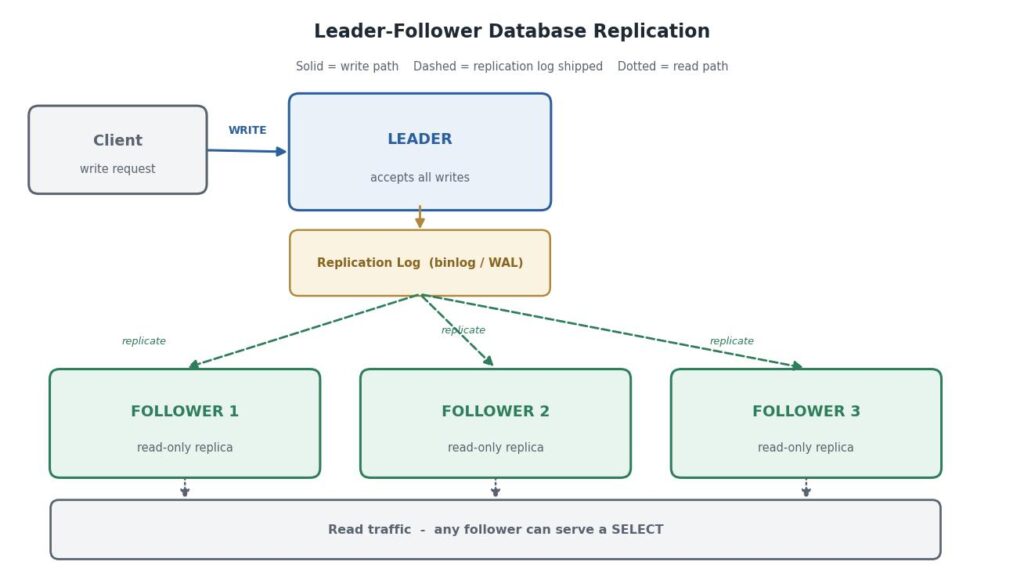
One node is the leader. It accepts all writes. Every other node is a follower, and followers only serve reads. The leader sends its changes to the followers, and the followers apply those changes in order.
You will see several names for the same thing. Older documentation says master and slave. Newer documentation prefers leader and follower, or primary and replica.
They all describe the same setup. One writable node, several read-only copies. This article uses leader and follower throughout, since that is now the common wording in modern databases and books.
Followers do not copy the whole database over and over. That would be far too slow. Instead, the leader keeps a log of every change it makes, and it ships that log to the followers.
The log goes by different names. MySQL calls it the binlog. PostgreSQL calls it the write-ahead log, or WAL. Whatever the name, it is an ordered list of changes: insert this row, update that column, delete this record.
Here is the flow, step by step:
Order matters enormously here. Followers must apply changes in the exact same sequence as the leader. Swap two updates on the same row, and the follower ends up with a different value. So the log is strictly ordered, and followers never skip ahead.
| ▶ Interview insight Interviewers often ask what gets shipped between nodes. A strong answer names the options: statement-based replication sends the SQL text, row-based replication sends the changed rows, and write-ahead log shipping sends the low-level storage changes. Statement-based breaks with non-deterministic functions like NOW() or RAND(), which is why most modern systems default to row-based replication. |
A follower rejects writes. Try an INSERT on a MySQL read replica, and you get an error saying the server is running in read-only mode. That restriction is deliberate.
Imagine if followers accepted writes. Two nodes could then edit the same row at once. Their logs would diverge, and no one could say which version is correct. Keeping writes on a single node avoids that whole class of conflict.
So the leader is your single writer. That is the great strength of this model, and also its main limit. Write throughput caps out at whatever one machine can handle.
Now the big decision. When the leader gets a write, does it wait for the followers before replying to the client? That single choice changes your durability, your latency, and your failure behaviour.
With synchronous replication, the leader waits. It applies the write, sends it to the follower, and holds the client response until the follower confirms.
Only then does the client see success. So when your service gets a commit acknowledgement, you know for certain that at least two machines hold that data.
The upside is strong durability. Lose the leader right after a commit, and the follower still has the row. No data disappears, and failover becomes clean and safe.
The downside is speed and fragility. Every write now pays a network round trip. Worse, if the follower is slow or unreachable, the leader blocks. Writes pile up, and the whole system stalls waiting for one lagging node.
Asynchronous replication flips the trade. The leader applies the write, replies to the client immediately, and ships the log entry to followers in the background.
Writes feel fast, because the client never waits on the network hop. Followers can also lag or restart without hurting write availability. The leader simply keeps going.
The risk is data loss. Say the leader confirms a write and then its disk fails one second later. If that change had not reached any follower yet, it is gone. The client believes the order was saved, but no surviving node has it.
Most teams accept this risk anyway. The window is usually small, often milliseconds. And the performance gain is large, especially across regions where a round trip costs a hundred milliseconds or more.
Pure synchronous is risky, and pure asynchronous can lose data. So most production systems land in between.
In a semi-synchronous setup, the leader waits for one follower to confirm, not all of them. The remaining followers catch up asynchronously. You get a durable second copy without waiting on the slowest node in the fleet.
If the synchronous follower goes down, the database promotes another follower into that role. MySQL supports this directly, and PostgreSQL offers similar behaviour through synchronous standby settings.
| Aspect | Synchronous | Asynchronous | Semi-Synchronous |
|---|---|---|---|
| Client waits for | Leader plus follower | Leader only | Leader plus one follower |
| Write latency | Highest | Lowest | Moderate |
| Data loss risk | None on leader crash | Small window exists | Very small window |
| Slow follower impact | Blocks all writes | No impact | Fails over to another |
| Common use | Financial ledgers | Read-heavy web apps | Most production systems |
| ▶ Interview insight When asked to pick a replication mode, do not name one and stop. Tie the choice to the business need. Payments and ledgers justify synchronous or semi-synchronous durability. A social feed or product catalogue works fine asynchronously, since a lost like or a stale view count costs almost nothing. Naming the trade-off matters more than naming the mode. |
A read replica is just a follower that your application queries directly. Instead of sending every SELECT to the leader, you spread reads across replicas and keep the leader free for writes.
This works beautifully for read-heavy systems, which covers most web applications. Product pages, dashboards, search results, and profile views are all reads. Writes are usually a small slice of the traffic.
Before adding replicas, look at your traffic mix. Most consumer apps read far more than they write. A ratio of ten reads per write is common, and social apps often hit a hundred to one.
With that shape, read replicas pay off fast. Add three replicas, and your read capacity roughly quadruples. The leader keeps handling the same modest write load as before.
Now flip the shape. Suppose your system writes as much as it reads, like an event ingestion pipeline. Read replicas barely help there. Every replica still applies every write, so you added machines without adding write capacity.
Some workloads belong on a replica almost by default. Moving them off the leader is often the fastest performance win available.
Some workloads should stay on the leader. Anything that reads a value and immediately writes based on it needs current data. Stock checks before an order, balance reads before a transfer, and unique-name checks all belong on the leader.
Replicas are not free money. Each one is a full database server, so you pay for the machine, the storage, and the network traffic between nodes.
There is also an operational cost. More nodes mean more monitoring, more upgrades, and more things that can fail at three in the morning. Add replicas because your metrics ask for them, not because the architecture diagram looks better with more boxes.
Here is where replication bites people. With asynchronous replication, followers are always slightly behind the leader. That gap is called replication lag.
Usually the lag is tiny, a few milliseconds. But it can spike. A bulk import, a long transaction, a network hiccup, or a busy follower can push lag into seconds or even minutes.
During that window, a read from a follower returns old data. The database is not broken. It is doing exactly what asynchronous replication promises. Your application just has to expect it.
This is the classic bug, and every team hits it eventually. A user updates their profile name. The write goes to the leader. The page then reloads and reads from a follower, which has not caught up yet.
So the user sees their old name. They assume the save failed, and they click save again. Support tickets follow. The data was fine the whole time.
Read-your-own-writes consistency means a user always sees their own updates immediately. Other users can see stale data for a moment, but the author of a change should never see it missing.
A few practical fixes exist:
That last option is often the simplest. Your service already knows what it just saved, so send it back in the response and skip the extra query.
Here is a stranger failure. A user refreshes a page twice and sees data move backwards in time.
It happens when two reads hit two different replicas. The first read lands on a fresh replica and shows a new comment. The second read lands on a lagging replica, and the comment disappears.
Monotonic reads means time never goes backwards for one user. The usual fix is sticky routing. Send each user to the same replica, often by hashing their user ID. Then their view only moves forward.
You cannot manage lag you never measure. Every database exposes it, and you should alert on it.
MySQL reports Seconds_Behind_Master in the replica status output. PostgreSQL exposes replay lag through its replication views. Cloud services like RDS publish a replica lag metric directly to their monitoring dashboards.
Set a threshold that matches your app. A search page might tolerate thirty seconds. An order status page probably should not tolerate more than one. When lag crosses the line, route those reads back to the leader until it recovers.
| ▶ Interview insight Replication lag is a favourite interview topic because it exposes real-world thinking. Mention the three consistency guarantees by name: read-your-own-writes, monotonic reads, and consistent prefix reads. Then give one concrete fix each, such as leader reads after a write, sticky replica routing, and ordered log shipping. That structure shows you have debugged this and not only read about it. |
Replication buys you availability, but only if failover works. Failover is the process of promoting a follower to leader after the current leader fails.
It sounds simple. In practice, it is one of the trickiest parts of running a database, and it goes wrong in interesting ways.
Most systems follow a similar sequence when the leader disappears.
Step five trips up a lot of teams. Your connection pool caches the old host. Unless the setup uses a virtual IP, a DNS switch, or a proxy layer, your app keeps trying to write to a dead machine.
Failover has a few well-known failure modes, and each one has bitten real production systems.
Split brain is the scariest. The old leader was not really dead, just unreachable. It comes back and keeps accepting writes, while the new leader also accepts writes. Now two nodes hold conflicting data, and merging it is painful.
Lost writes are the asynchronous cost. The old leader had writes that never reached the new one. When the old node rejoins, those writes usually get discarded, since keeping them would break the log order.
Timeout tuning is a quieter problem. Set the failure timeout too high, and outages last longer than they should. Set it too low, and a brief network blip triggers a needless failover, which itself causes an outage.
Fencing is the usual defence against split brain. The system forcibly blocks the old leader from writing, often by revoking its lease or shutting the node down. Many teams also require a quorum, so a node only leads if most nodes agree.
Now the practical part. Adding replicas is only half the job. Your application still has to decide, for every query, whether it goes to the leader or to a follower.
That decision can live in three different places. Each one has a different cost, and most teams eventually use a mix of them.
The first option is the database driver. Many drivers can split reads and writes on their own, once you list the leader and replica hosts in the connection string. You change configuration and almost nothing else.
The second option is a proxy. A middleware layer sits between your app and the database, inspects each query, and forwards it to the right node. ProxySQL, PgBouncer with a router in front, and cloud proxy services all work this way.
The third option is your application code. You open two separate connection pools, one per role, and pick the pool yourself. This gives the most control, because your code knows the business meaning of each query.
| Approach | Effort | Control | Best when |
|---|---|---|---|
| Driver-level split | Low | Low | You want replicas working quickly |
| Proxy layer | Medium | Medium | Many services share one database |
| Application routing | Higher | High | Some reads must never be stale |
| Mix of proxy and app | Medium | High | Most mature production systems |
Driver and proxy routing usually decide by query type. A SELECT goes to a replica, and everything else goes to the leader. That rule is easy, but it is also blunt, because some SELECT queries genuinely need current data.
Consider a stock check before an order. It is a plain SELECT, so an automatic splitter sends it to a replica. If that replica lags, your system reads old stock and oversells the last item.
The same trap appears in balance checks, coupon validation, and unique-name lookups. All of them read a value and then write based on what they read. A stale answer there causes real damage, not just an odd screen.
So treat automatic splitting as a starting point, not a finished design. Then override it for the queries that matter.
Application-level routing starts with two pools. One points at the leader, and one points at the replica endpoint. Most managed services give you a single replica hostname that balances across all followers.
# Two pools, one per role.

leader:
  host: leader.db.internal
  port: 5432
  database: shopdb
  user: app_writer
  max_connections: 20

replica:
  host: replica.db.internal      # load balances across all followers
  port: 5432
  database: shopdb
  user: app_reader               # read-only account
  max_connections: 40
Two details there are worth copying. The replica pool is larger, because reads outnumber writes. And the replica user is a read-only database account, so an accidental write fails immediately instead of behaving oddly.
That read-only account is cheap insurance. Grant SELECT and nothing else. Then a bug that routes a write to a replica shows up as a clear permission error in your logs, on the first run, in development.
With both pools in place, each query needs a role. The cleanest pattern marks the intent at the boundary of a unit of work, then reuses that choice for every query inside it.
# Pseudocode: pick a pool based on declared intent.

def run(intent, work):
    if intent == "READ_TOLERANT":
        pool = replica_pool
    else:
        pool = leader_pool          # safe default

    conn = pool.acquire()
    try:
        return work(conn)
    finally:
        pool.release(conn)


# Browsing tolerates stale data, so it uses a follower.
def browse_catalog(category):
    return run("READ_TOLERANT",
               lambda c: c.query(
                   "SELECT * FROM products WHERE category = ?", category))


# Checkout reads stock and then writes, so it stays on the leader.
def place_order(product_id, quantity):
    return run("WRITE",
               lambda c: reserve_and_insert(c, product_id, quantity))
Notice the default. When the intent is missing or unknown, the query lands on the leader. A routing bug then costs you some extra load on one machine, which is far better than silently serving stale data.
Notice also that the intent describes the business meaning, not the SQL keyword. A SELECT can still be marked as a leader query, and that flexibility is exactly what automatic splitters cannot give you.
One rule catches many teams by surprise. A single transaction must stay on a single node, start to finish.
You cannot read from a follower and then write through the leader inside the same transaction. They are separate connections to separate machines, so the database cannot give you atomicity across both.
The fix is simple. Decide the role before the transaction opens, then keep every statement inside it on that one connection. If a unit of work contains any write at all, the whole unit belongs on the leader.
| ▶ Interview insight When asked how an application routes reads and writes, name all three layers: the driver, a proxy, and the application itself. Then add the two details that show real experience. Always default to the leader when the intent is unclear, because a stale read is worse than extra load. And never split one transaction across two nodes, since atomicity cannot cross a connection boundary. |
Application routing often stores the chosen role in per-request state, such as a thread variable, a context object, or a coroutine local. That state must be cleared when the request ends.
Web servers reuse workers between requests. So a role left behind on a worker quietly carries into the next request. The next user then reads from a replica when they should not, and the bug looks random and untraceable.
Always reset the routing state in a cleanup step that runs even when the request throws. Then add a log line during development that prints the chosen role. Seeing that value in your logs makes routing mistakes obvious within minutes.
Leader-follower covers most systems, but it is not the only option. Two other models show up in interviews and in specific products, so they are worth knowing at a high level.
Here several nodes accept writes. Each one is a leader, and each also acts as a follower for the others. Changes flow in every direction.
The usual reason is geography. Put a leader in each region, and users write to the nearest one. Latency drops sharply, and a regional outage does not stop writes elsewhere.
The price is write conflicts. Two users in two regions can edit the same row at the same instant. Now the system must decide which edit wins, using rules like last-write-wins timestamps, version vectors, or custom merge logic in the application.
Most teams avoid multi-leader unless they truly need it. Conflict resolution is genuinely hard, and the bugs it produces are subtle.
Some databases drop the leader entirely. Cassandra and DynamoDB work this way. A client writes to several nodes at once and reads from several nodes at once.
Correctness comes from quorums. If you have three replicas, you might write to two and read from two. Since those groups overlap, at least one node in every read holds the latest value.
That is the classic quorum rule: reads plus writes must exceed the replica count. Tune the numbers, and you trade consistency against availability without changing the architecture.
| Model | Who writes | Main strength | Main cost |
|---|---|---|---|
| Leader-follower | One node | Simple and conflict free | Write capacity capped |
| Multi-leader | Several nodes | Local writes per region | Conflict resolution |
| Leaderless | Any node | High availability | Tunable but tricky consistency |
Reading about database replication is one thing. Picking a setup for your own service is another. A short checklist keeps that decision grounded in evidence instead of guesswork.
Pull real metrics before drawing any architecture. Three numbers tell you almost everything you need.
That third number is the one teams skip, and it is the most important. Ask your product owner directly. A catalogue page might happily show data from five seconds ago. An account balance almost certainly cannot.
Once you know the numbers, the shape of the answer usually becomes obvious. Here are the common cases.
A small internal tool with light traffic needs no replicas at all. One node plus solid backups is enough, and adding replication would only add work.
A typical read-heavy web application benefits most from one leader and two or three asynchronous replicas. Reporting moves to a replica first, then tolerant page reads follow once lag monitoring is in place.
A payments or ledger system should run semi-synchronous replication. Losing a confirmed transaction is unacceptable, so paying a few extra milliseconds per write is a fair trade.
A global product with users on several continents may need regional replicas for read latency. Multi-leader replication comes into play only when regional write latency becomes a genuine problem worth conflict handling.
| Workload | Suggested setup | Why |
|---|---|---|
| Internal tool | Single node plus backups | Traffic never justifies the complexity |
| Read-heavy web app | Leader plus async replicas | Cheap read scaling with small lag |
| Payments or ledger | Semi-synchronous replication | Confirmed writes must survive a crash |
| Analytics alongside live traffic | Dedicated reporting replica | Heavy scans stay off the leader |
| Global user base | Regional read replicas | Local reads cut round trip latency |
| Write-heavy ingestion | Sharding plus replication | Replicas alone add no write capacity |
Database replication rarely goes badly when introduced slowly. Adding a replica and immediately routing half your traffic to it, on the other hand, tends to end in an incident.
A safer order of operations looks like this:
Feature flags matter here. When lag spikes or a bug appears, flipping reads back to the leader takes seconds. Without that switch, your only option is a deployment during an incident.
Most replication problems come from a handful of repeated mistakes. Knowing them early saves a painful debugging night.
It feels efficient to move all reads off the leader. Then a checkout reads stale stock and oversells the last item. Keep correctness-critical reads on the leader, and send only tolerant reads to replicas.
Teams set up replicas and never monitor the gap. Lag then creeps up during a bulk job, and users start seeing yesterday data. Alert on lag from day one, and route reads back to the leader when it spikes.
Replicas add read capacity, not write capacity. Every follower still applies every write. If your bottleneck is inserts, more replicas will not help, and sharding is the real answer.
A routing role left on a reused worker leaks into the next request. That request then reads from a replica when it should not, and the bug appears at random. Always reset the routing state in a cleanup step.
Promotion may work perfectly while your application keeps writing to the old address. Test failover on purpose, in a staging environment, and confirm the app reconnects without a manual restart.
Synchronous replication feels safer, so teams turn it on for every table. Then one slow follower blocks all writes, and the safety measure becomes the outage. Reserve it for data that genuinely cannot be lost.
A few habits will carry you a long way when you introduce replication into any system.
| Term | Meaning in one line |
|---|---|
| Replication | Keeping the same data on several machines |
| Leader | The node that accepts writes |
| Follower | A read-only node that copies the leader |
| Replication log | The ordered list of changes shipped to followers |
| Synchronous | The leader waits for a follower before replying |
| Asynchronous | The leader replies first and ships changes later |
| Semi-synchronous | The leader waits for one follower only |
| Read replica | A follower your application queries for reads |
| Replication lag | How far behind the leader a follower is |
| Failover | Promoting a follower after the leader fails |
| Split brain | Two nodes accepting writes at the same time |
| Quorum | A majority agreement rule used in leaderless systems |
A: Database replication means keeping the same data on several machines. One node accepts writes and ships its change log to the others, so every node holds a full copy. It gives you failure protection and extra read capacity.
A: Replication copies all data to every node, which helps with reads and failure recovery. Sharding splits different data across nodes, which helps with write volume and storage size. Large systems usually use both together.
A: Use synchronous or semi-synchronous replication for data that cannot be lost, such as payments and ledgers. Use asynchronous replication for read-heavy traffic, where a few milliseconds of lag costs nothing. Most production systems settle on semi-synchronous.
A: Replication lag is the delay between a write landing on the leader and that change appearing on a follower. It is usually a few milliseconds, but bulk jobs or network problems can push it to seconds. During that window, replica reads return stale data.
A: A user saves a change, then reads from a lagging replica and sees the old value. They assume the save failed. Fix it by routing that user’s reads to the leader for a few seconds, or by returning the saved value directly in the write response.
A: Routing can live in the database driver, in a proxy such as ProxySQL, or in the application itself using two connection pools. Always default to the leader when the intent is unclear, and never split a single transaction across two nodes.
A: No. Every follower still applies every write, so replicas add read capacity only. If inserts and updates are your bottleneck, sharding is the correct answer instead.
A: Split brain happens when an old leader was only unreachable, not dead. It returns and accepts writes while the newly promoted leader also accepts writes, so the two copies diverge. Fencing and quorum rules prevent it.
Database replication solves two real problems. It keeps your system alive when a machine dies, and it spreads read load across many nodes. The leader-follower model delivers both with a simple rule: one writer, many readers.
The choice between synchronous and asynchronous replication is where the thinking happens. Waiting for followers protects your data but slows every write. Not waiting keeps writes fast but opens a small loss window. Most teams settle on semi-synchronous, which gives a durable second copy without the stall.
Read replicas then scale your reads, as long as you respect replication lag. Send tolerant queries to followers and keep correctness-critical reads on the leader. A driver setting, a proxy, or a small routing layer in your code can make that split almost invisible day to day.
Start small. Add one replica, move your reporting queries onto it, and watch the lag metric for a week. Once that feels boring, you are ready to route real traffic. Replication rewards teams who introduce it gradually and measure everything along the way.