Scaling and Data Basics
-
Last Updated: July 28, 2026
-
By: javahandson
-
Series

Scaling and data basics explained: scalability, load balancing, caching, replication, and SQL vs NoSQL — a Week 1 system design roadmap with six deep dives.
Every backend system starts small and simple. Then traffic arrives, data piles up, and the easy choices from day one begin to hurt. This is where scaling and data basics become the skills that separate a hobby project from a system that survives real load. This article is the map for Week 1 of our system design journey, and it ties together six hands-on deep dives into one clear picture.
Think of this page as the trailhead. Each idea here gets a short, plain explanation so you see how the pieces fit. Then a link takes you to a full article that unpacks that topic with diagrams, trade-offs, and worked examples. You can read straight through, or jump to whatever you need right now.
The goal is simple. By the end of Week 1, you should be able to look at a feature request and reason about scale, speed, caching, and storage the way a senior engineer does in a design review or an interview. No heavy math, no exotic tools. Just a solid mental model you can carry into every project that follows.
You cannot design a house without understanding load, materials, and foundations. System design works the same way. Before you reach for message queues, sharding, or consensus algorithms, you need the basics that everything else rests on.
These fundamentals answer the questions that show up in every design discussion. How does a system grow when users double overnight? Where does the first bottleneck appear? How do you keep responses fast while serving millions of reads? What kind of database fits the shape of your data? Miss these, and the fancy techniques later will not save you.
There is a career angle too. System design rounds now sit at the center of mid-level and senior interviews. Interviewers rarely want a perfect answer. Instead, they want to watch you reason about scale, name trade-offs, and stay calm while you estimate. The six topics below are exactly what those rounds test.
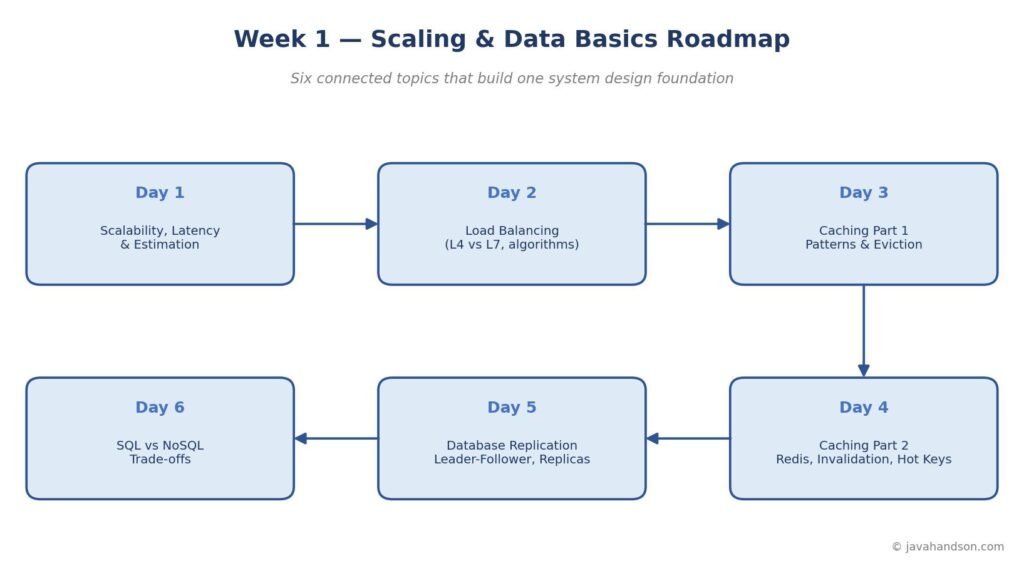
These articles are not a random list. They follow a natural order, and each one leans on the one before it. Here is the thread that runs through all six:
Read in order, they build a complete Week 1 foundation. Read on their own, each still stands as a full guide to its topic.
Everything begins with three ideas. How a system grows, how you measure its speed, and how you size it before writing any code. Get these right, and the rest of the week clicks into place.
Scalability is the ability to handle more work by adding resources. You have two paths. Vertical scaling means a bigger single machine: more CPU, more memory, faster disks. It is simple because your code does not change, but a machine has a hard ceiling and stays a single point of failure.
Horizontal scaling means more machines working in parallel behind a load balancer. It scales almost without limit and survives the loss of any one node. The cost is complexity, since many servers must now behave like one system. Most large systems scale out for exactly this reason.
These two metrics get confused constantly, yet they measure different things. Latency is how long one request takes, measured in milliseconds, and lower is better. Throughput is how many requests the system handles per second, and higher is better.
Picture a highway. Latency is how long one car takes to cross it. Throughput is how many cars pass a checkpoint each hour. A ten-lane road can carry many cars yet still crawl in a jam. Improving one does not always improve the other, and knowing which one a requirement really cares about is a core design skill.
Before building anything, good engineers do a rough calculation to feel out the scale. This is back-of-the-envelope estimation: an approximate answer in a minute using round numbers. Is it ten requests per second or fifty thousand? Gigabytes or petabytes? The answer decides whether you need one server or a thousand.
The trick is a few numbers worth memorizing. A day has about 86,400 seconds, which you round to 100,000. So one million requests per day is roughly ten per second on average. Multiply by two or three for peak. Storage math rides on the powers of two, where each unit is about a thousand times the last.
| ▶ Interview insight Start every system design answer with estimation. State your assumptions about daily traffic, convert them to queries per second, and size storage with the power-of-two units. This one habit signals that you think about scale before architecture, which is exactly what interviewers look for in the first two minutes. |
Day 1 sets the vocabulary for the whole series. For the full walkthrough, including the latency numbers every programmer should know, a worked photo-sharing estimate, and the availability nines, read the deep dive: Back-of-the-Envelope Estimation and System Design Basics.
Once you scale out to many machines, something has to decide which machine serves each request. That job belongs to the load balancer. It sits in front of your servers, spreads traffic across them, and routes around any node that fails.
Load balancers work at two levels. A Layer 4 balancer routes on network details like IP and port, without looking inside the request. It is fast and simple. A Layer 7 balancer reads the actual request, so it can route by URL path, headers, or cookies. It is smarter but does more work per request.
The balancer also needs a rule for picking a server. Round robin cycles through them in turn. Least connections sends the next request to the least busy node. Others weight machines by capacity or hash on the client. Each rule fits a different traffic shape.
Sticky sessions pin a user to one server so their session data stays put. It sounds convenient, yet it fights horizontal scaling, because that user now depends on one specific machine. The cleaner fix is to keep services stateless and push session data into a shared store.
Load balancing is the glue that makes horizontal scaling real. The full article covers each algorithm, the L4 versus L7 trade-off, health checks, and why sticky sessions are usually a smell: Load Balancing in System Design.
A cache is a small, fast store that holds copies of data you read often. It sits between your application and a slower source like a database. Done well, caching cuts latency sharply and takes huge load off the database at the same time.
There are a few standard ways to wire a cache in. Cache-aside is the most common: the app checks the cache first, and on a miss it loads from the database and fills the cache. Write-through writes to the cache and database together, keeping them in sync. Write-behind writes to the cache first and flushes to the database later, trading durability for speed.
A cache has limited room, so it must decide what to drop when it fills up. LRU removes the least recently used entry, a safe default for most workloads. LFU drops the least frequently used. FIFO evicts the oldest. TTL expires entries after a set time. The right policy depends on how your data is actually accessed.
| ▶ Interview insight When asked to make a read-heavy system faster, reach for caching before anything exotic. Name the pattern (usually cache-aside) and the eviction policy (usually LRU), then explain the trade-off each one makes. Mentioning cache invalidation as the hard part shows maturity, and it sets up the Part 2 discussion perfectly. |
Part 1 builds the mental model for caching before touching any specific tool. The full guide has diagrams for each pattern and worked examples for every eviction policy: Caching Strategies: Patterns and Eviction Policies.
Patterns are theory until you run a real cache. Redis is the tool most teams reach for. It stores data in memory as key-value pairs, expires entries automatically, and evicts under memory pressure. Part 2 moves from concept to a working cache tier.
Keeping the cache in step with the database is the classic hard problem. TTL-based invalidation lets entries expire on their own. Delete-on-write removes the stale entry the moment the source changes. The dual-write problem, where the cache and database can drift apart, is the trap to design around from the start.
Sometimes one key gets hammered far more than the rest, and that single hot key can overwhelm a node. Fixes include copying it into local memory or splitting it across several keys. A related danger is the cache stampede, where many requests rebuild the same expired entry at once. Rebuild locks, early refresh, and jittered expiry times tame it.
Part 2 is where caching gets real, with the failure modes that only show up in production. The deep dive covers Redis expiration, invalidation strategies, hot key fixes, and stampede defenses: Redis Deep Dive: Cache Invalidation and Hot Keys.
Caching relieves the database, but the database itself still needs to scale. Replication is the first move. You keep multiple copies of your data on different machines, so a single box is no longer a bottleneck or a single point of failure.
The common shape is leader-follower. One node, the leader, accepts all writes. It then streams those changes to follower nodes, which serve reads. This split matters because most systems read far more than they write, and followers soak up that read load.
How fast changes reach followers is a real trade-off. Synchronous replication waits for a follower to confirm before the write succeeds, which is safe but slower. Asynchronous replication does not wait, so it is fast but can leave followers slightly behind. That lag is why a user sometimes writes data and then fails to see it on the next read.
Followers used purely to serve reads are called read replicas. Point your read traffic at them and your write traffic at the leader, and a single database suddenly handles far more load. The catch is replication lag, which you plan around with patterns like reading your own writes from the leader.
Replication is how a database grows past one machine without losing its data. The full article covers leader-follower topology, sync versus async, read replicas, and lag handling: Database Replication Explained.
All the scaling in the world will not help if you picked the wrong kind of database. Day 6 closes the week by choosing the storage model that fits your data and access patterns, rather than defaulting to whatever you know best.
SQL databases use a fixed schema and give you strong consistency and joins, which suits structured, related data. NoSQL databases relax the schema and trade some guarantees for flexibility and easy horizontal scaling. They come in families: document, key-value, wide-column, and graph, each shaped for a different job.
There is no universal winner. A banking ledger wants the strict correctness of SQL. Meanwhile, a product catalog with varied fields fits a document store, and a session store maps cleanly to key-value. Graph databases suit a social network of connections. Many real systems mix several models, an approach called polyglot persistence.
| Aspect | SQL (Relational) | NoSQL |
|---|---|---|
| Schema | Fixed, defined up front | Flexible, schema-on-read |
| Scaling | Mostly vertical | Built for horizontal |
| Consistency | Strong (ACID) | Often eventual (BASE) |
| Best for | Structured, related data | Large scale, varied shape |
| ▶ Interview insight Never answer “SQL or NoSQL?” with a blanket rule. Instead, ask about the data shape, the access patterns, and the consistency needs, then justify your pick against those. Naming polyglot persistence, where one system uses several databases for different jobs, shows you think in trade-offs rather than tribes. |
Choosing the right database is the decision that shapes everything above it. The full guide has five concrete scenarios, the four NoSQL families, and a clear decision framework: SQL vs NoSQL Trade-offs: When to Pick Which.
Step back and the six topics form one loop. First you estimate the scale, then decide how to grow. Next comes spreading load across machines, followed by cutting work with caching. Replication then scales the database, and the right storage model anchors it all. Each choice feeds the next.
Return to a familiar example, a read-heavy social feed. Estimation reveals a hundred-to-one read-to-write ratio. That number pushes you toward horizontal scaling and a load balancer. The read pressure demands a cache, so you add Redis and design its invalidation. The database still needs help, so you add read replicas. And the data shape decides whether metadata lives in SQL while media lives elsewhere. Every Week 1 topic shows up in that single design.
If you want a path through the week, here it is in one place. Each link is a complete, standalone guide:
The same slips show up again and again for beginners. Spotting them early saves real pain later.
A handful of habits carry the whole week into daily work:
None of this needs advanced math or rare tools. It needs the habit of thinking in scale and trade-offs before you write code. Master these six topics, and every advanced subject that follows feels like a natural extension rather than a leap.
The six deep-dive articles in this series:
External references worth exploring: