HashMap vs LinkedHashMap vs TreeMap in Java (A Beginner’s Guide)
-
Last Updated: August 6, 2026
-
By: javahandson
-
Series

HashMap vs LinkedHashMap vs TreeMap in java explained simply. Compare order, speed, and null handling, and learn exactly when to use each Java Map class.
You have a bunch of data, and each piece has a name. A student has a roll number, a product has an ID, and a country has a capital. To store and look up such pairs, Java gives you the Map interface and three main classes: HashMap vs LinkedHashMap vs TreeMap.
So what does a Map actually do? It stores things as key-value pairs. You give it a key, and it hands back the matching value.
A plain array won’t help much here. Arrays use number positions, not names. So you can’t just ask for the value under the key “India” and get “New Delhi” back.
In this article, we’ll start with the Map interface itself. After that, we’ll compare its three main classes: HashMap, LinkedHashMap, and TreeMap. Each one stores pairs, but each behaves a little differently.
Here’s what we’ll cover:
No prior Map knowledge is needed. If you know what a Java List is, you’re ready to go.
A Map is a collection of key-value pairs. Think of a real dictionary. You look up a word, the key, and you read its meaning, the value.
There’s no flipping through page by page. You jump straight to the word and read what’s next to it. A Java Map works in that same spirit.
Every entry in a Map has two parts: a key and a value. The key is how you find things. The value is what you get back.
Say you store phone contacts. The name is the key, and the number is the value. Ask for “Mom”, and you get her number. Simple and direct.
A Map does not allow duplicate keys. Each key can point to only one value at a time. This is a core rule, so keep it in mind.
What if you put the same key twice? The new value simply replaces the old one. Nothing breaks, but the earlier value is gone.
Values, on the other hand, can repeat freely. Two different keys can hold the same value with no problem at all.
Here’s a fact that surprises beginners. The Map interface does not extend Collection. A List and a Set both come from Collection, but a Map stands on its own.
Why the split? A Collection holds single items. A Map holds pairs. Two things per entry just don’t fit the single-item model, so Map gets its own family tree.
It helps to see them side by side. Both store data, yet they answer very different questions.
| Feature | List | Map |
|---|---|---|
| Stores | Single items | Key-value pairs |
| Access by | Index number | Key object |
| Duplicates | Allowed | Keys must be unique |
| Order | Insertion order | Depends on the class |
| Extends Collection | Yes | No |
| Main use | Ordered list of items | Fast lookup by key |
So you pick a List when you care about order and position. You pick a Map when you care about looking things up by a name.
Before we go deeper, here’s a quick tour of the methods you’ll use daily. You don’t need to memorize them yet. Just know they exist.
That handful covers most real work. We’ll see several of them in action below.
Map<String, String> capitals = new HashMap<>();
capitals.put("India", "New Delhi");
capitals.put("Japan", "Tokyo");
capitals.put("India", "Mumbai");   // replaces New Delhi

System.out.println(capitals.get("India"));  // Output: Mumbai
System.out.println(capitals.size());         // Output: 2
Notice the left side says Map, not HashMap. This is a good habit. You code to the interface, so swapping the class later stays easy.
HashMap is the Map you’ll reach for most of the time. It’s quick, it’s simple, and it handles the common cases well.
The secret is hashing. When you add a key, HashMap runs it through a hash function. That gives back a number, which points to a slot, often called a bucket.
So the key isn’t searched for one by one. Instead, HashMap computes where it should live and jumps straight there. That’s why lookups feel instant.
Because of this, get() and put() run in O(1) time on average. It doesn’t matter if the map holds ten keys or ten million. The lookup stays roughly the same speed.
Here’s the catch with HashMap. It does not keep any order. The pairs come out in whatever arrangement the hashing decides.
Add keys in the order A, B, C, and you might read them back as B, A, C. Or C, B, A. There’s no promise either way.
Map<String, Integer> ages = new HashMap<>();
ages.put("Amy", 30);
ages.put("Ben", 25);
ages.put("Cara", 28);

System.out.println(ages);
// Possible output: {Ben=25, Amy=30, Cara=28}
// The order is not guaranteed
So if order doesn’t matter to you, HashMap is perfect. If it does, keep reading. The next two classes solve that.
A HashMap lets you store one null key. It also lets you store null values, as many as you like. This can be handy, though you should use it with care.
TreeMap does not share this freedom, as we’ll see soon. So this is one small point in HashMap’s favor.
| 💡 Interview Insight Q: Why is HashMap not thread-safe, and what do you use instead? A: A plain HashMap has no locks, so two threads writing at once can corrupt it. For safe concurrent use, reach for ConcurrentHashMap. It allows many threads to work at the same time without the heavy locking of the older Hashtable. |
LinkedHashMap is a HashMap with a memory for order. It does everything HashMap does, and it also keeps track of how you added things.
When you loop over a LinkedHashMap, the pairs come out in the order you put them in. First in, first out during a read. That’s the main draw.
How? It links each entry to the next one behind the scenes, like a chain. That chain remembers the sequence, even though the fast hashing still works underneath.
Map<String, Integer> ages = new LinkedHashMap<>();
ages.put("Amy", 30);
ages.put("Ben", 25);
ages.put("Cara", 28);

System.out.println(ages);
// Output: {Amy=30, Ben=25, Cara=28}
// Same order you added them
Run that a hundred times, and the output stays the same. That predictability is the whole point of this class.
You might worry that keeping order slows things down. It barely does. The extra chain adds a tiny bit of memory and a small overhead, nothing more.
So get() and put() are still O(1) on average. You gain predictable order at a very small cost. For many apps, that’s a great deal.
Reach for LinkedHashMap when order matters but you don’t need sorting. A few good examples come up often:
In each case, you want the order to stay stable. HashMap can’t promise that, but LinkedHashMap can.
TreeMap takes a different path. It keeps your keys in sorted order at all times. Add them in any sequence, and they come out sorted.
By default, TreeMap sorts keys in their natural order. Strings go alphabetically. Numbers go smallest to largest. You get sorting for free.
Map<String, Integer> ages = new TreeMap<>();
ages.put("Cara", 28);
ages.put("Amy", 30);
ages.put("Ben", 25);

System.out.println(ages);
// Output: {Amy=30, Ben=25, Cara=28}
// Sorted by key, no matter the add order
See how Cara went in first but comes out last? TreeMap re-sorts on every insert, so the read is always in order.
Under the hood, TreeMap uses a balanced tree called a red-black tree. You don’t need the deep theory here. Just know it keeps the tree neat and even.
Because of that tree, operations like get() and put() run in O(log n) time. That’s slower than HashMap’s O(1), but still very fast for most sizes.
So you pay a little speed to gain sorted order. Whether that trade is worth it depends on your needs.
TreeMap has one strict rule. You cannot use a null key. If you try, it throws a NullPointerException right away.
Why? To sort keys, TreeMap must compare them. You can’t compare null to anything, so it simply refuses. Values may still be null, though.
Sorting unlocks some extra tricks. Since keys sit in order, TreeMap can answer range questions that HashMap can’t:
These come from the NavigableMap interface. They’re a big reason people choose TreeMap over the faster HashMap.
| 💡 Interview Insight Q: How does TreeMap decide the order for custom objects? A: For your own class, TreeMap needs a way to compare objects. Either make the class implement Comparable and define compareTo(), or pass a Comparator to the TreeMap constructor. Without one of these, TreeMap throws a ClassCastException at runtime. |
Now let’s put all three next to each other. This is the part most people come here for, so let’s keep it clear.
Here’s the whole picture at a glance:
| Feature | HashMap | LinkedHashMap | TreeMap |
|---|---|---|---|
| Order | None | Insertion order | Sorted by key |
| get / put speed | O(1) avg | O(1) avg | O(log n) |
| Null key | One allowed | One allowed | Not allowed |
| Backing structure | Hash table | Hash table + list | Red-black tree |
| Best when | Speed, no order | Order matters | Sorted keys |
Don’t overthink it. Ask yourself one question about order, and the answer usually falls out:
That’s really the heart of it. Speed favours HashMap, but the other two earn their place when order is part of the job.
Picture three small tasks to make it stick:
Same data shape, three different needs. The right Map makes each one easier.
Let’s tie it together with a small task. Say you’re counting how many times each word shows up in a sentence.
A clean trick uses getOrDefault(). It reads the current count, or gives 0 if the key is new. Then you add one and put it back.
String text = "cat dog cat bird dog cat";
Map<String, Integer> count = new HashMap<>();

for (String word : text.split(" ")) {
    count.put(word, count.getOrDefault(word, 0) + 1);
}

System.out.println(count);
// Output (order may vary): {bird=1, cat=3, dog=2}
Short and readable. HashMap fits here because we don’t care what order the words print in.
Suppose your boss wants the words listed alphabetically. You don’t rewrite the loop. You just change one word: HashMap becomes TreeMap.
Map<String, Integer> count = new TreeMap<>();  // only change

for (String word : text.split(" ")) {
    count.put(word, count.getOrDefault(word, 0) + 1);
}

System.out.println(count);
// Output: {bird=1, cat=3, dog=2}  (always sorted)
This is the payoff of coding to the Map interface. The logic stays the same, and only the behaviour you need changes.
Often you want both the key and the value together. The cleanest way is entrySet(). It hands you each pair in one shot.
for (Map.Entry<String, Integer> entry : count.entrySet()) {
    String word = entry.getKey();
    int times = entry.getValue();
    System.out.println(word + " appears " + times + " times");
}
This reads well and avoids extra lookups. Calling get() inside a keySet() loop would work too, but it does more work than needed.
A few traps catch beginners again and again. Let’s name them so you can dodge them.
If your key is a custom class, you must override hashCode() and equals(). Skip them, and the map may store duplicates or fail to find keys.
Two objects that you think are equal will land in different buckets. So the map treats them as separate keys, which is rarely what you want.
Never rely on HashMap for order. Your test might pass today and fail tomorrow. If order matters, pick LinkedHashMap or TreeMap instead.
A null key crashes a TreeMap with a NullPointerException. If nulls are possible, either clean them out first or use a HashMap for that part.
Don’t change an object after using it as a key. Its hash may shift, and then the map loses track of it. Keys should stay unchanged, or immutable, once stored.
A: The Map interface stores data as key-value pairs. Each key is unique and points to one value. You use a key to look up its value fast, instead of scanning items one by one.
A: No. A Collection holds single items, while a Map holds pairs. Because of that difference, Map sits in its own branch and does not extend Collection.
A: HashMap keeps no order and is the fastest. LinkedHashMap keeps the order you inserted keys. TreeMap keeps keys sorted. HashMap and LinkedHashMap are O(1) on average, while TreeMap is O(log n).
A: HashMap uses hashing. It runs the key through a hash function to find a bucket, then jumps straight there. So it does not search key by key, which makes get and put O(1) on average.
A: Use LinkedHashMap when you want the pairs to come out in the order you added them. It gives predictable order at a very small extra cost, while HashMap gives no order promise.
A: Use TreeMap when you need keys sorted at all times, or when you need range methods like firstKey, floorKey, and ceilingKey. You trade a bit of speed for sorted order.
A: HashMap and LinkedHashMap allow one null key and many null values. TreeMap does not allow a null key, because it must compare keys to sort them, and you cannot compare null.
A: The new value replaces the old one. Keys must be unique, so the map keeps only the latest value for that key. The earlier value is gone.
A: HashMap uses hashCode to pick a bucket and equals to match keys. If you skip them, two objects you think are equal land in different buckets, so the map may store duplicates or fail to find your key.
A: No, a plain HashMap is not thread-safe. For safe use across many threads, use ConcurrentHashMap. It allows concurrent work without the heavy locking of the older Hashtable.
Let’s wrap up what we covered. A Map stores key-value pairs, keeps keys unique, and lets you look up values fast by their key.
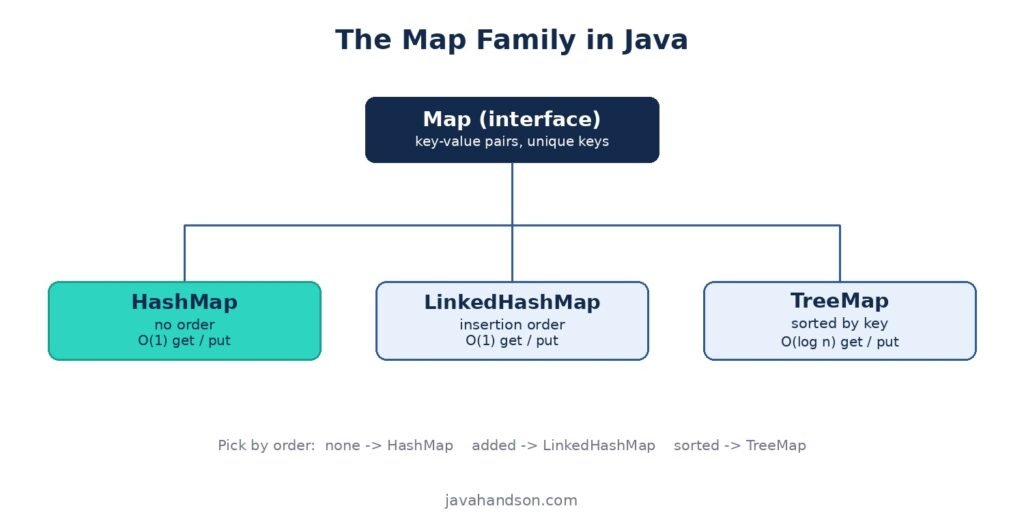
HashMap gives you raw speed with no order. LinkedHashMap adds insertion order for a tiny cost. TreeMap keeps keys sorted, trading a bit of speed for that.
So choose based on order. No order needed? Go HashMap. Insertion order? Go LinkedHashMap. Sorted keys? Go TreeMap.
Next up, we’ll open the HashMap internals and see exactly how buckets, hashing, and collisions play out under the hood.