EnumMap and IdentityHashMap in Java: Two Special Maps Worth Knowing
-
Last Updated: August 10, 2026
-
By: javahandson
-
Series

EnumMap and IdentityHashMap in Java explained simply. Learn how each stores keys, when to use them, and the bugs IdentityHashMap can cause. With examples.
You already know HashMap. You probably know TreeMap and LinkedHashMap too. So why bother with two more map types? Because Java ships a couple of niche maps that solve very specific problems, and EnumMap and IdentityHashMap are two of them.
Most days you won’t touch either one. But when the right situation shows up, these maps do a cleaner job than a plain HashMap ever could. Knowing they exist saves you from writing clumsy workarounds.
In this article we look at both maps side by side. First we take EnumMap, a tiny map built only for enum keys. Then we move to IdentityHashMap, a map that compares keys in an unusual way.
Here’s what we’ll cover:
You only need to know basic maps and enums to follow along. If you’ve used a HashMap before, you’re ready.
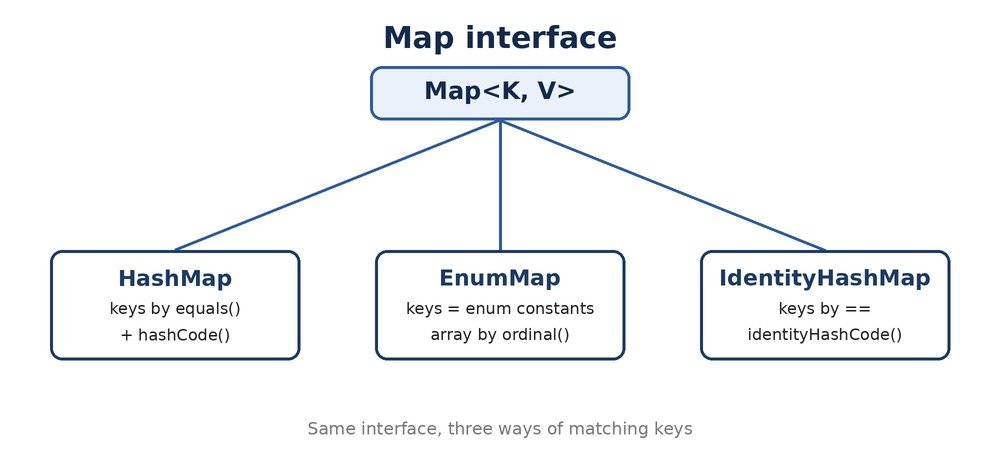
An EnumMap is a map where the keys must be enum constants. That’s the whole rule. You pick one enum type, and only values of that type can be keys.
Think of a weekly planner. The days of the week never change, and there are exactly seven of them. An EnumMap keyed by a Day enum fits that job perfectly.
Say you have an enum for days. You want to store a task for each day. An EnumMap makes this clean and safe.
enum Day { MON, TUE, WED, THU, FRI }

EnumMap<Day, String> tasks = new EnumMap<>(Day.class);
tasks.put(Day.MON, "Team standup");
tasks.put(Day.WED, "Code review");
tasks.put(Day.FRI, "Deploy release");

System.out.println(tasks.get(Day.WED)); // Code review
System.out.println(tasks);
// {MON=Team standup, WED=Code review, FRI=Deploy release}
Notice the constructor. You pass Day.class, not an initial size. The EnumMap needs to know the enum type up front, because it uses that type to size itself.
Print an EnumMap and the keys come out in the order the enum declares them. MON always comes before WED, no matter when you added them.
This ordering is baked in. You don’t sort anything, and you don’t pay for sorting. The enum’s natural order does the work for free.
You can’t use null as a key in an EnumMap. Try it and you get a NullPointerException. Values can be null, but keys cannot.
That’s usually fine. Enum keys come from a fixed set, so a null key rarely makes sense anyway.
Here’s the part that makes EnumMap special. It doesn’t hash anything. There are no buckets, no hash codes, and no collisions.
Every enum constant has a fixed position, given by its ordinal() value. MON is 0, TUE is 1, WED is 2, and so on. An EnumMap uses these numbers as array indexes.
So inside, an EnumMap holds a plain array of values. When you put a key, it drops the value at the slot matching the key’s ordinal. When you get a key, it reads that same slot.
This is why EnumMap is so quick. A get or a put is just an array access. No hashing, no scanning, no bucket walk.
// Rough idea of what EnumMap does inside
// values[] is sized to the number of enum constants

Object[] values;   // one slot per enum constant

// put(key, value)
values[key.ordinal()] = value;

// get(key)
return values[key.ordinal()];  // direct array read
A HashMap carries extra weight. It keeps an array of buckets, plus a node object for every entry. Each node stores a key, a value, a hash, and a next pointer.
An EnumMap skips all of that. It’s one small array of values, sized exactly to the enum. No nodes, no hash fields, no wasted buckets.
For a map with a handful of enum keys, this saves real memory. It also keeps everything in one tight block, which the CPU loves.
| Interview Insight Q: Why is EnumMap faster than HashMap for enum keys? A: EnumMap stores values in a plain array, indexed by each enum’s ordinal() value. A get or put is a direct array read or write, with no hashing and no collision handling. A HashMap has to compute a hash, find a bucket, and sometimes walk a chain. For enum keys, the array approach is simpler and faster. |
EnumMap has a cousin called EnumSet. It’s a Set that only holds enum constants. It uses the same ordinal trick, but packs the values into bits.
So if you ever need a set of enum values, EnumSet is the matching tool. It’s tiny and lightning fast, for the same reason EnumMap is.
We won’t dig into EnumSet here. Just remember it exists as the set-shaped partner to EnumMap.
An EnumMap sizes its array from the enum at creation time. Add a new constant to the enum and recompile, and fresh EnumMaps pick up the larger size automatically.
You don’t manage capacity at all. The enum defines how many slots exist, so there’s never a resize like a HashMap does.
The rule is simple. If your keys are enum constants, reach for EnumMap first. It’s the tool built for exactly that job.
In all these cases the keys are known ahead of time and never change. That’s the sweet spot for EnumMap.
Say you track order counts by status. The status is an enum, so EnumMap is a natural pick.
enum Status { NEW, PAID, SHIPPED, CANCELLED }

EnumMap<Status, Integer> counts = new EnumMap<>(Status.class);
counts.put(Status.NEW, 12);
counts.put(Status.PAID, 8);
counts.put(Status.PAID, counts.get(Status.PAID) + 1); // bump PAID to 9

System.out.println(counts.get(Status.PAID)); // 9
System.out.println(counts);
// {NEW=12, PAID=9}
Clean, fast, and readable. The keys come out in enum order, so PAID always follows NEW in the printout.
Don’t force it. If your keys aren’t enums, EnumMap isn’t an option at all. A plain HashMap is your default for everything else.
Also, EnumMap isn’t thread-safe on its own. For concurrent access, wrap it or use a different approach.
Now for the stranger one. An IdentityHashMap looks like a normal map, but it compares keys in an unusual way. It uses reference identity instead of equals().
A normal HashMap asks, “are these two keys equal?” using the equals() method. An IdentityHashMap asks, “are these two keys the exact same object?” using ==.
That difference sounds small. In practice it changes everything about how the map behaves.
Two strings can be equal by value but be different objects in memory. Watch how each map treats them.
String a = new String("hello");
String b = new String("hello");

// a.equals(b) is true, but a == b is false

Map<String, Integer> normal = new HashMap<>();
normal.put(a, 1);
normal.put(b, 2);
System.out.println(normal.size()); // 1  (a and b are "equal")

Map<String, Integer> identity = new IdentityHashMap<>();
identity.put(a, 1);
identity.put(b, 2);
System.out.println(identity.size()); // 2  (a and b are different objects)
Look at the sizes. The HashMap sees one key, because a and b are equal by value. The IdentityHashMap sees two keys, because they are separate objects.
This is the core of IdentityHashMap. Value equality means nothing here. Only the object reference counts.
IdentityHashMap doesn’t call your key’s hashCode() method. Instead it uses System.identityHashCode(), which is based on the object’s identity, not its fields.
So even if you override equals() and hashCode() on your key class, this map skips them both. It only cares which object you handed it.
| Interview Insight Q: How does IdentityHashMap differ from HashMap? A: A HashMap compares keys with equals() and hashes them with hashCode(). An IdentityHashMap compares keys with == and hashes them with System.identityHashCode(). So two objects that are equal by value are treated as one key in a HashMap, but as two separate keys in an IdentityHashMap. Reference identity is all that matters. |
IdentityHashMap doesn’t use buckets with linked nodes like HashMap does. It uses a single flat array, with keys and values sitting in alternating slots.
When two keys land on the same spot, it just probes the next slot along. This trick is called open addressing. It keeps the structure simple and compact.
You don’t need to know these details to use the map. Still, it explains why the map feels a bit different from a normal HashMap under load.
Here’s a subtle trap. Java pools string literals, so two identical literals can be the very same object. That makes an IdentityHashMap look like it merges them.
String x = "hi";      // pooled literal
String y = "hi";      // same pooled object, x == y is true

Map<String, Integer> m = new IdentityHashMap<>();
m.put(x, 1);
m.put(y, 2);
System.out.println(m.size()); // 1  (same object!)

// But new String("hi") creates a fresh object each time
String z = new String("hi");
m.put(z, 3);
System.out.println(m.size()); // 2  (z is a different object)
So the same code can behave differently based on how the strings were created. This is exactly why casual use of IdentityHashMap is risky.
This map is rare on purpose. You reach for it only when object identity is exactly what you need to track. Most code never needs it.
Notice the pattern. Each case cares about the physical object, not its contents. That’s when identity beats equality.
Take a library that serializes an object graph. Two different nodes might hold the same data but still need separate handling. A normal map would merge them, which would break the graph.
IdentityHashMap keeps them apart. It also dodges any slow or buggy equals() and hashCode() on user classes. For framework internals, that safety is worth a lot.
This is the big warning. Never reach for IdentityHashMap just because it’s a map. If you use it by accident, your keys will behave in ways that confuse everyone.
For normal lookups by value, always use HashMap. Keep IdentityHashMap for the narrow cases where identity truly matters.
Let’s put the three side by side. Each one keys its entries differently, and that drives when you’d pick it.
| Feature | HashMap | EnumMap | IdentityHashMap |
|---|---|---|---|
| Key type | Any object | Enum constants only | Any object |
| Key comparison | equals() | Enum identity | == reference |
| Hashing | hashCode() | ordinal() index | identityHashCode() |
| Backing store | Bucket array + nodes | Plain value array | Open-addressed array |
| Iteration order | No order | Enum order | No order |
| Null keys | One allowed | Not allowed | Allowed |
| Typical use | Everyday lookups | Enum-keyed tables | Identity tracking |
The takeaway is short. Use HashMap by default. Switch to EnumMap when keys are enums. Reach for IdentityHashMap only when reference identity is the point.
Both maps come with a few traps. Let’s name them so you can steer clear.
A new EnumMap needs the enum’s Class object. Write new EnumMap<>(Day.class), not new EnumMap<>(). Skip the class and the code won’t even compile.
This one bites hard. A developer picks IdentityHashMap thinking it’s a faster HashMap. Then keys that should match don’t, and the bug is a nightmare to trace.
So treat IdentityHashMap as a specialist. Reach for it on purpose, never by habit.
Two equal strings, two equal Integers, two equal records. In an IdentityHashMap, each pair can land as two keys. If you assumed value equality, your counts and lookups go wrong.
Boxed numbers make this worse. The same int can box into different Integer objects. Put them in an IdentityHashMap and you may get surprise duplicates. Stick to HashMap for numeric keys.
It isn’t. Neither map is synchronized. For shared access across threads, add your own synchronization or pick a concurrent map.
A: An EnumMap is a Map whose keys must be constants of a single enum type. It stores values in a plain array indexed by each key’s ordinal, so it is faster and lighter than a HashMap for enum keys. It also keeps keys in enum declaration order.
A: It holds a simple array of values, one slot per enum constant. A put writes to the slot at key.ordinal(), and a get reads from it. There is no hashing, no buckets, and no collision handling.
A: No. A null key throws a NullPointerException. Values can be null, but keys cannot, since keys must be real enum constants.
A: It compares keys using reference equality (==) instead of equals(), and it hashes with System.identityHashCode() instead of the key’s hashCode(). So two objects that are equal by value count as two separate keys.
A: Serialization and deep-copy code often uses it to track which exact objects have already been processed. Two nodes with equal data still need separate handling, so identity matters more than value equality there.
A: Keys that look equal by value will not match, because the map only checks reference identity. Lookups miss, entries duplicate, and the bugs are hard to spot. Use it only when identity tracking is the actual goal.
A: No. It ignores both. It uses == for comparison and System.identityHashCode() for hashing, so your custom equals() and hashCode() have no effect.
A: Neither is thread-safe. For concurrent access you must synchronize externally or choose a concurrent alternative.
Let’s wrap up. EnumMap and IdentityHashMap are both niche, but each solves a clear problem.
EnumMap is the go-to map when your keys are enum constants. It’s backed by a simple array, so it’s fast, small, and keeps keys in enum order. Any time you see enum keys, think EnumMap first.
IdentityHashMap is the specialist. It keys by reference identity, not value, which suits serializers, deep-copy tools, and object graph work. Reach for it only when identity is exactly what you need, and never as a plain HashMap replacement.
Together they round out the map family. You now know when the standard HashMap isn’t the best fit, and which special map to grab instead.