Sorting Streams in Java 8 – sorted, Comparator.comparing, thenComparing, reversed
-
Last Updated: August 17, 2026
-
By: javahandson
-
Series

Learn sorting streams in Java 8 with sorted, Comparator.comparing, thenComparing and reversed. Simple examples for sorting objects, tie-breakers and nulls.
Sorting streams in Java 8 is one of those things that looks simple until you hit a real list of objects. Sorting a few numbers is easy. But as soon as you have a list of employees, orders, or products, plain sorting isn’t enough. You suddenly need to sort by name, then by age, then flip the order. That is where the Stream API and the Comparator helpers really shine.
In this guide, we’ll take our time to build things up gradually, making the learning process smooth and understandable. We’ll start by sorting simple values, then move on to sorting custom objects. Afterwards, we’ll explore chaining multiple sort keys and reversing the order whenever needed. By the end, you’ll be able to look at a sorting pipeline and instantly understand what it’s doing, feeling confident in your newfound skills.
We will mostly use four tools: the sorted() method on streams, the Comparator.comparing factory, the thenComparing method for tie-breakers, and reversed() to flip the direction. Each one solves a specific problem, and they work beautifully together.
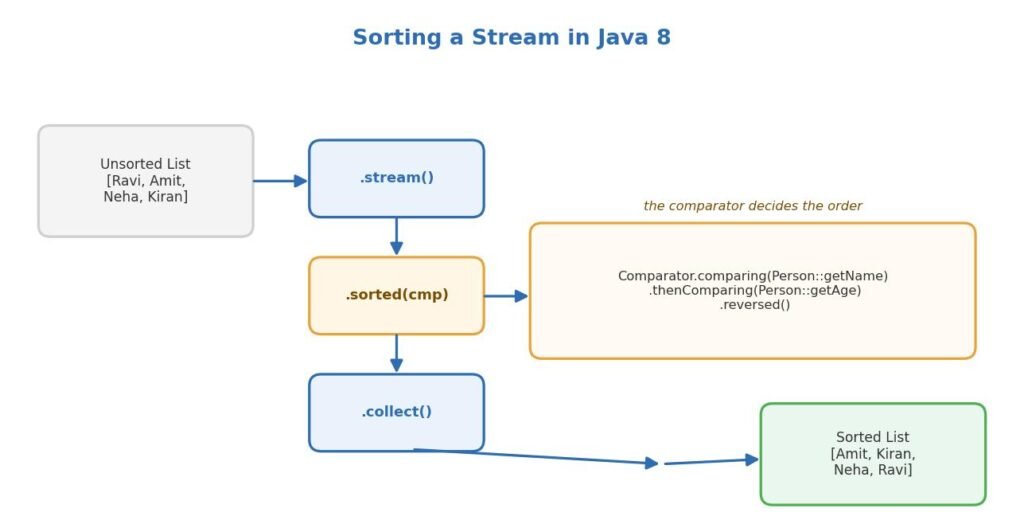
Before Java 8, sorting a list often meant dealing with an anonymous inner class. You’d create a Comparator manually, override the compare method, and write a few lines just to say “sort by name.” It did the job, but it could feel a bit cluttered. The core logic was only two words, yet you ended up writing ten lines around it.
Here is what that old style looked like. Notice how much of it is just plumbing.
Collections.sort(people, new Comparator<Person>() {
    @Override
    public int compare(Person a, Person b) {
        return a.getName().compareTo(b.getName());
    }
});
Java 8 gave us lambdas and the Comparator.comparing helpers. The same sort now fits on one line. On top of that, the Stream API added a sorted() step you can drop right into a pipeline. So sorting became part of the flow instead of a separate chore.
The mindset has also evolved. Instead of guiding Java through each comparison step by step, now you simply indicate the field you’re interested in. For example, you can say “sort by name,” and the library takes care of everything else. This approach is not only easier to read but also reduces the chance of making mistakes.
The simplest form of sorted() takes no arguments. It sorts elements in their natural order. For numbers that means ascending. For strings that means alphabetical, based on Unicode. This works only when the elements already know how to compare themselves, which means they implement Comparable.
Let us start with a list of names. We turn it into a stream, sort it, and collect the result back into a list.
List<String> names = Arrays.asList("Ravi", "Amit", "Neha", "Kiran");

List<String> sorted = names.stream()
        .sorted()
        .collect(Collectors.toList());

System.out.println(sorted);
// Output: [Amit, Kiran, Neha, Ravi]
That is the whole thing. The sorted() call sits in the middle of the pipeline. It does not touch the original list. Streams never change the source, so names stays exactly as it was. You get a fresh sorted list out the other end.
Numbers follow the same simple rule: a stream of integers naturally sorts from smallest to largest, and there’s no need for any extra code to make it happen.
List<Integer> marks = Arrays.asList(78, 45, 92, 60, 33);

List<Integer> sorted = marks.stream()
        .sorted()
        .collect(Collectors.toList());

System.out.println(sorted);
// Output: [33, 45, 60, 78, 92]
One thing to keep in mind. The no-argument sorted() throws a ClassCastException at runtime if the elements do not implement Comparable. A String and an Integer both do, so you are fine here. A custom class like Person usually does not, so you must pass a comparator instead. We will get to that next.
💡 Interview insight
A common question is: what happens if you call sorted() on a stream of objects that do not implement Comparable?
The response is that the code compiles without issues; however, it throws a ClassCastException during execution. The compiler is unable to detect this error as the stream type remains valid. It is advisable to always pass a Comparator when dealing with custom objects.
The Comparable interface provides natural ordering. A class that implements it defines a compareTo method. That method says how one object compares to another. String, Integer, LocalDate, and most built-in value types already do this. So you can sort them with no extra effort.
The compareTo method returns a number. A negative value means the current object comes first. A positive value means it comes later. Zero means they are equal. Comparators follow the exact same contract, which is why they slot into sorted() so cleanly. Once you know this rule, every comparator behaves predictably.
Your own classes usually do not implement Comparable, and that is fine. You do not need a single natural order for a Person. People might be sorted by name today and by age tomorrow. That is why passing a Comparator per situation is the flexible choice, and it keeps your class free of sorting concerns.
Real projects rarely sort plain strings. You sort lists of objects. To do that, you tell the stream which field to compare on. The Comparator.comparing method makes this easy and readable.
Let’s start by setting up a simple Person class. It will have a name and an age. Throughout the rest of this article, we’ll explore various ways to sort lists of these people.
class Person {
    private String name;
    private int age;

    public Person(String name, int age) {
        this.name = name;
        this.age = age;
    }

    public String getName() { return name; }
    public int getAge() { return age; }

    @Override
    public String toString() {
        return name + "(" + age + ")";
    }
}
Now we build a list of people. This is our sample data for the examples below.
List<Person> people = Arrays.asList(
        new Person("Ravi", 30),
        new Person("Amit", 25),
        new Person("Neha", 30),
        new Person("Kiran", 22)
);To sort by name, we pass a comparator built from the getName method. The comparing method takes a function that pulls out the key. Here that key is the name.
List<Person> byName = people.stream()
        .sorted(Comparator.comparing(Person::getName))
        .collect(Collectors.toList());

System.out.println(byName);
// Output: [Amit(25), Kiran(22), Neha(30), Ravi(30)]
The Person::getName part is a method reference. It simply says “use the name as the sort key”. Behind the scenes, Java compares those names using their natural order. Since names are strings, that means alphabetical. Clean and readable, right?
Sorting by age works the same way. Point comparing at getAge and you are done.
List<Person> byAge = people.stream()
        .sorted(Comparator.comparing(Person::getAge))
        .collect(Collectors.toList());

System.out.println(byAge);
// Output: [Kiran(22), Amit(25), Ravi(30), Neha(30)]
For number keys, there are also primitive versions like comparingInt, comparingLong, and comparingDouble. They avoid boxing the value into an object. For a small list the difference is tiny. For large lists or hot code paths, the primitive version is a nice, cheap win.
List<Person> byAge = people.stream()
        .sorted(Comparator.comparingInt(Person::getAge))
.collect(Collectors.toList());Look at the earlier name sort again. Ravi and Neha are both 30. When you sort only by age, you don’t define their order relative to each other. It just happens to fall wherever the sort leaves them. In most apps, you want a clear tie-breaker, and that is exactly what thenComparing is for.
The idea is simple. Sort by the first key. When two elements are equal on that key, fall back to the second key. You can chain as many levels as you need.
Think of how a phone contact list works. Names are sorted alphabetically by first name. When two people share a first name, the last name determines who comes first. That is a tie-breaker in action, and it is the exact behaviour that thenComparing gives you. Almost every real sort has this second layer once the data grows.
Say we want people sorted by age first. When two people share the same age, we want them in name order. Here is how that reads.
List<Person> sorted = people.stream()
        .sorted(Comparator.comparing(Person::getAge)
                          .thenComparing(Person::getName))
        .collect(Collectors.toList());

System.out.println(sorted);
// Output: [Kiran(22), Amit(25), Neha(30), Ravi(30)]
See the difference? Ravi and Neha are both 30. So the thenComparing(Person::getName) step kicks in. Neha comes before Ravi because “Neha” is alphabetically before “Ravi”. The primary sort still wins overall, and the secondary sort only decides the ties.
💡 Interview insight
Interviewers love to ask how thenComparing works internally.
The key idea is that the second comparator activates only if the first comparator returns zero, which indicates that the two elements are equal on the first key. It does not re-sort all the elements but only resolves ties, ensuring that the overall order remains unaffected.
You are not limited to two levels. You can chain thenComparing again and again. Each call adds one more tie-breaker below the last one. Read it top to bottom and it makes sense.
Comparator<Person> byAgeThenNameThenSomething =
        Comparator.comparing(Person::getAge)
                  .thenComparing(Person::getName)
                  .thenComparingInt(Person::getAge);
There is also a primitive-friendly thenComparingInt and friends, just like with comparing. Use them when the tie-breaker key is a number and you want to skip boxing. The behavior is identical, only the performance is a touch better.
So far everything sorted ascending. Often you want the opposite. Highest marks first. Newest orders first. Most expensive product first. The reversed() method flips a comparator so it sorts the other way.
To arrange individuals in order from the oldest to the youngest, construct the age comparator and invoke the ‘reversed’ method on it.
List<Person> oldestFirst = people.stream()
        .sorted(Comparator.comparing(Person::getAge).reversed())
        .collect(Collectors.toList());

System.out.println(oldestFirst);
// Output: [Ravi(30), Neha(30), Amit(25), Kiran(22)]
The reversed() call wraps the whole comparator before it. That matters a lot when you combine it with thenComparing, which trips up a lot of people. Let us look at that carefully, because the placement of reversed() changes the result.
Here is the tricky part. Where you put reversed() decides what gets reversed. Compare these two versions. They look almost the same but behave very differently.
Let’s start with the first version. First, reverse the ages, and if there are any ties, break them by name in ascending order. This way, the instructions are clear and easy to follow.
Comparator<Person> cmp =
        Comparator.comparing(Person::getAge).reversed()
                  .thenComparing(Person::getName);
In this version, reversed() applies only to the age part. The name tie-breaker is added after and stays ascending. So people go oldest to youngest, and within the same age they go A to Z by name.
Here’s a suggested second version: build the complete comparator first, and then reverse the entire thing. This way, the process is clear and easy to follow.
Comparator<Person> cmp =
        Comparator.comparing(Person::getAge)
                  .thenComparing(Person::getName)
                  .reversed();
Now reversed() flips the combined result. Both the age order and the name tie-breaker get reversed. So it is youngest-to-oldest flipped to oldest-first, and within a tie the names go Z to A. This is almost never what you actually want, so be careful.
The rule of thumb is easy to remember. Attach reversed right after the key you want to reverse. If you tack it on at the very end, you reverse everything, tie-breakers included.
💡 Interview insight
A classic trap question shows two comparators, one with reversed in the middle and one with reversed at the end, and asks for the output.
Explain that reversed() reverses whatever comparator it is called on. In the middle, it flips only the previous key. At the end, it flips the entire chain, including all tie-breakers. Placement is everything.
Real data has holes. Sometimes a name is null or a field was never set. If you sort such a stream naively, you get a NullPointerException. Java gives you two wrappers to deal with this: Comparator.nullsFirst and Comparator.nullsLast.
These wrap around another comparator and determine where nulls are placed. All other items are sorted using the inner comparator as usual.
This matters more than it sounds. In production, data comes from databases, APIs, and user input. Any of those can hand you a null. A sort that crashes on the first null value is a fragile sort. Wrapping your comparator once makes the whole pipeline safe, and it costs you nothing in readability.
List<String> names = Arrays.asList("Ravi", null, "Amit", null, "Neha");

List<String> sorted = names.stream()
        .sorted(Comparator.nullsFirst(Comparator.naturalOrder()))
        .collect(Collectors.toList());

System.out.println(sorted);
// Output: [null, null, Amit, Neha, Ravi]
Swap nullsFirst for nullsLast and the nulls move to the end instead. When you sort objects and the key itself might be null, you can nest this inside comparing too. That keeps your pipeline from blowing up on messy data.
Comparator<Person> safe =
        Comparator.comparing(Person::getName,
Comparator.nullsLast(Comparator.naturalOrder()));Two more small helpers are worth knowing. Comparator.naturalOrder() gives you a comparator that sorts elements in their natural order. Comparator.reverseOrder() gives you the opposite. They are really useful when you need a comparator for a method but prefer to avoid writing a lambda.
List<Integer> marks = Arrays.asList(78, 45, 92, 60, 33);

List<Integer> desc = marks.stream()
        .sorted(Comparator.reverseOrder())
        .collect(Collectors.toList());

System.out.println(desc);
// Output: [92, 78, 60, 45, 33]
For simple values, sorted(Comparator.reverseOrder()) is the cleanest way to sort descending. It reads well and needs no lambda. Keep it in your toolkit for those quick descending sorts on numbers and strings.
Let us combine everything into one realistic scenario. Imagine a list of employees. We want them grouped by department name in order, with the highest salary first within each department. When salaries tie, we break ties by name.
class Employee {
    String name;
    String dept;
    int salary;

    Employee(String name, String dept, int salary) {
        this.name = name;
        this.dept = dept;
        this.salary = salary;
    }

    String getName() { return name; }
    String getDept() { return dept; }
    int getSalary() { return salary; }

    public String toString() {
        return dept + " | " + name + " | " + salary;
    }
}
Now the data and the sort. Read the comparator from top to bottom and it tells a clear story.
List<Employee> staff = Arrays.asList(
        new Employee("Ravi", "Sales", 50000),
        new Employee("Amit", "Tech", 90000),
        new Employee("Neha", "Sales", 70000),
        new Employee("Kiran", "Tech", 90000)
);

List<Employee> sorted = staff.stream()
        .sorted(Comparator.comparing(Employee::getDept)
                .thenComparing(Comparator.comparing(Employee::getSalary).reversed())
                .thenComparing(Employee::getName))
        .collect(Collectors.toList());

sorted.forEach(System.out::println);
// Output:
// Sales | Neha | 70000
// Sales | Ravi | 50000
// Tech  | Amit | 90000
// Tech  | Kiran | 90000
Notice how we reversed only the salary part, inside its own comparing call. Department stays ascending. Salary goes high to low. Name breaks the final ties. This is the pattern you will reach for again and again in real code.
Sorting a Map is a common task, and Java 8 makes it so straightforward and elegant. You cannot sort a Map directly because a plain HashMap has no order. Instead, you stream its entries, sort them, and collect them into an ordered map like LinkedHashMap. The order you build it in is the order it keeps.
Let us take a small map of names to scores. First we sort it by the key, which is the name.
Map<String, Integer> scores = new HashMap<>();
scores.put("Ravi", 78);
scores.put("Amit", 92);
scores.put("Neha", 60);

Map<String, Integer> byKey = scores.entrySet().stream()
        .sorted(Map.Entry.comparingByKey())
        .collect(Collectors.toMap(
                Map.Entry::getKey,
                Map.Entry::getValue,
                (a, b) -> a,
                LinkedHashMap::new));

System.out.println(byKey);
// Output: {Amit=92, Neha=60, Ravi=78}
The important bit is Map.Entry.comparingByKey(). It gives you a comparator that sorts entries by their key. There is also Map.Entry.comparingByValue() for sorting by value. We collect into a LinkedHashMap so the sorted order survives. A regular HashMap would scramble it again.
Let’s now organise the same map by value, starting from the highest score and going to the lowest. All we need to do is swap the comparator and add’ reversed’- making it simple and straightforward!
Map<String, Integer> byValueDesc = scores.entrySet().stream()
        .sorted(Map.Entry.<String, Integer>comparingByValue().reversed())
        .collect(Collectors.toMap(
                Map.Entry::getKey,
                Map.Entry::getValue,
                (a, b) -> a,
                LinkedHashMap::new));

System.out.println(byValueDesc);
// Output: {Amit=92, Ravi=78, Neha=60}
Two details matter here. First, we passed the type hint <String, Integer> before comparingByValue so the compiler can figure out the generics with reversed() in the mix. Without it, type inference sometimes fails. Second, the merge function (a, b) -> a handles duplicate keys, which cannot happen here but toMap still asks for it when you supply a map factory.
💡 Interview insight
A frequent question is how to sort a HashMap by value in Java 8.
The clean answer: you cannot sort a HashMap in place. Stream the entrySet, sort with Map.Entry.comparingByValue(), and collect into a LinkedHashMap to keep the order. Mention LinkedHashMap explicitly, because that is the part people forget.
Sometimes natural order on the key is not what you want. Maybe you want to sort names by their length, or ignore case. The comparing method has a second form that takes both a key extractor and a comparator for that key. This gives you full control.
Say we want to sort names ignoring upper and lower case. Plain natural order puts capital letters before small ones, which looks odd. A case-insensitive comparator fixes it.
List<String> names = Arrays.asList("ravi", "Amit", "neha", "Kiran");

List<String> sorted = names.stream()
        .sorted(String.CASE_INSENSITIVE_ORDER)
        .collect(Collectors.toList());

System.out.println(sorted);
// Output: [Amit, Kiran, neha, ravi]
For objects, you nest the same idea inside comparing. Here we sort people by name, but ignoring case, so mixed casing does not throw off the order.
List<Person> sorted = people.stream()
        .sorted(Comparator.comparing(Person::getName,
                String.CASE_INSENSITIVE_ORDER))
        .collect(Collectors.toList());
You can pass any comparator as that second argument. It could be case-insensitive, it could be by string length, or it could be your own custom logic. This form is a hidden gem. It keeps the readable comparing style while letting you decide exactly how the key is compared.
The key extractor doesn’t need to be just a getter—it can be any function you choose. This means you could sort items based on something you calculate on the spot, like the length of a name, making your sorting even more flexible and fun.
List<String> byLength = names.stream()
        .sorted(Comparator.comparingInt(String::length))
        .collect(Collectors.toList());

System.out.println(byLength);
// Output: [ravi, Amit, neha, Kiran]
Here String::length is the key extractor. Java calls it on each string, gets a number, and sorts on that. Shorter names come first. You can compute anything in that function, which makes comparing far more flexible than it first appears.
People sometimes ask whether they should use sorted() or a TreeSet. Both give sorted results, but they solve different problems. Knowing when to use which keeps your code clean and fast.
Use sorted() when you have a one-time pipeline. You take some data, sort it, and produce output. The sort happens once, and you move on. This fits the stream style perfectly and reads well inside a chain of operations.
Reach for a TreeSet or TreeMap when you need the data to stay sorted as you keep adding to it. A tree structure holds its order automatically on every insert. If you insert once and read once, that overhead is wasted, and a stream sort is simpler.
So the rule is about lifetime. A short-lived, one-shot sort belongs in sorted(). A long-lived collection that must always stay ordered belongs in a tree-based collection. Picking the wrong one is not a bug, but it is often slower or clumsier than it needs to be.
💡 Interview insight
When should you use stream sorted() versus TreeSet? This comes up a lot.
Say that sorted() is best for a one-time sort inside a pipeline, while a TreeSet keeps elements ordered on every insert. Choose based on whether the ordering must persist across many insertions or is needed just once.
While sorting does require some resources, it’s handy to have a general sense of what to expect. In Java, streams are sorted using a method similar to merge sort, which is quite efficient. This runs in n log n time, which is quite efficient for most types of data. For the majority of lists you’ll work with, you probably won’t even notice the time it takes.
The pain points often come from sorting through more data than necessary. If your goal is to keep just the top five results, there’s no need to sort a million records—simply focus on the top five directly! Instead, filter first, or ask whether you even need a full sort. Every element you sort is work, so sort as little as possible.
Building a fresh Comparator each time is cheap, so do not worry about that. What is not cheap is repeated boxing on primitive keys. That is exactly why comparingInt and friends exist. On a big list of objects sorted by an int field, the primitive version can be noticeably faster because it avoids creating millions of Integer objects.
A stream never edits the collection it came from. When you call sorted(), you get a new sorted result. The original list stays untouched. Beginners often expect the source list to change and get confused when it does not. If you want a sorted list, capture the collect output.
We covered this above, but it is worth repeating because it bites everyone once. Put reversed() right after the key you mean to reverse. At the very end of a chain, it flips all your tie-breakers too.
The sorted() step needs to see every element before it can produce output. It buffers the whole stream, sorts it, then passes it on. On a very large or infinite stream, this can eat memory or never finish. Filter first to shrink the data, then sort what remains.
When your sort key is a primitive number, reach for comparingInt, comparingLong, or comparingDouble. They skip the autoboxing that plain comparing does. On hot paths and big lists, that small choice adds up.
💡 Interview insight
You may be asked why sorted() can be a problem on an infinite stream.
Because it is a stateful intermediate operation, it must collect all elements before it can emit any. An infinite stream never ends, so sorted() would wait forever and never produce a result. Bound the stream with limit() before sorting.
A: Call the sorted() method on the stream. With no argument it sorts in natural order, which needs elements that implement Comparable. To sort objects, pass a comparator like Comparator.comparing(Person::getName). The result is a new sorted stream; the source list stays unchanged.
A: Comparator.comparing sets the primary sort key. thenComparing adds a tie-breaker that runs only when two elements are equal on the first key. You can chain thenComparing many times to add more levels, and each one settles ties left by the level above it.
A: reversed() flips whatever comparator it is attached to. Placed right after one key, it reverses only that key. Placed at the very end of a chain, it reverses everything, including all tie-breakers. Attach reversed directly after the specific key you want to flip.
A: You cannot sort a HashMap in place. Stream the entrySet, sort with Map.Entry.comparingByValue(), and collect into a LinkedHashMap so the order is kept. Add reversed() to the comparator for highest-to-lowest order.
A: Wrap your comparator with Comparator.nullsFirst or Comparator.nullsLast. These decide where null keys land while everything else sorts through the inner comparator. This stops a NullPointerException on messy real-world data.
A: Use sorted() for a one-time sort inside a pipeline. Use a TreeSet or TreeMap when the collection must stay ordered as you keep adding to it. Choose based on whether the ordering has to persist across many insertions or is needed just once.
Here is a short cheat sheet you can keep handy while writing code.
sorted() – sort in natural order, needs Comparable elements.sorted(Comparator.comparing(Type::getField)) – sort objects by one field.thenComparing(...) – add a tie-breaker when the first key is equal.reversed() – flip the comparator it is attached to.comparingInt / comparingLong / comparingDouble – primitive keys without boxing.nullsFirst / nullsLast – decide where null keys land.naturalOrder / reverseOrder – ready-made comparators for simple values.Sorting streams in Java 8 turns a once-clunky task into a readable one-liner. Start with sorted() for natural order. Move to Comparator.comparing the moment you sort objects. Add thenComparing for tie-breakers, and use reversed() to flip direction, keeping a close eye on where you place it.
Once these four tools come together, you’ll find it easy to express almost any kind of order using just a few clear lines. The code reads like plain English, which means the next person on your team, or you six months later, can understand it instantly. Practice with your own domain objects, and it will become second nature fast.