Iterator and ListIterator in Java: Fail-Fast vs Fail-Safe
-
Last Updated: August 21, 2026
-
By: javahandson
-
Series

Learn how Iterator and ListIterator in Java work, the difference between fail-fast and fail-safe iterators, and how to avoid ConcurrentModificationException.
Whenever you go through a list, set, or map in Java, there’s a gentle little helper working quietly behind the scenes. That helper is called an Iterator, and most of the time, you’ll hardly notice it. When you write a for-each loop, Java takes care of that helper for you. However, understanding how the Iterator and ListIterator function in Java can transform this unseen assistant into a manageable tool that you can confidently control.
The idea is simple. A collection holds many items. You want to visit each one, maybe read it, maybe change it, maybe remove it. An iterator gives you a clean way to do that without caring how the collection stores things inside.
This guide gently introduces both cursors, starting with the simple Iterator and then exploring the more versatile ListIterator. We’ll also take a friendly deep dive into the often tricky distinction between fail-fast and fail-safe behaviours. Since this topic frequently comes up in interviews, we’ll be sure to spend meaningful time on it to help you feel confident.
You only need to know what a List and a basic loop are. If you have ever written a for-each over an ArrayList, you are ready to go.
Here is the ground we cover:
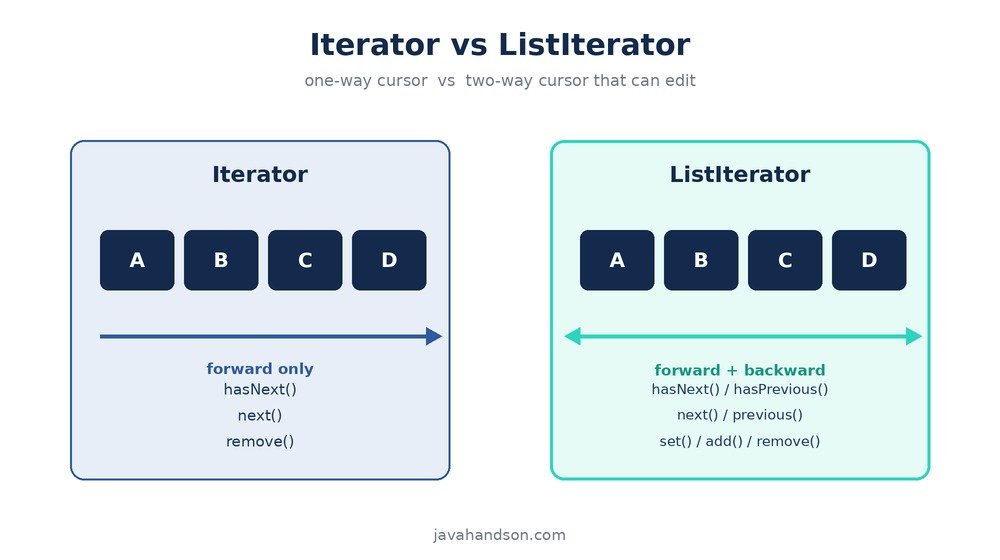
An Iterator is an object that lets you walk through a collection one element at a time. Think of it as a finger pointing at a row of items. The finger starts before the first item. You ask it to move forward, and it lands on the next value. You keep asking until there are no items left.
Java has an Iterator interface in the java.util package, and almost every collection easily provides one. When you call iterator() on a List, a Set, or any Collection, you’ll receive a new cursor ready for use.
Why not just use an index and a plain for loop? Because not every collection has an index. A HashSet has no position numbers. A LinkedList does, but reaching item number five by index is slow. An Iterator hides all of that. It gives every collection the same simple way to be looped over, fast or slow, indexed or not.
The Iterator interface is small. You mostly deal with three methods:
Notice that remove has no arguments. It always acts on the last item you pulled with next. That design keeps it simple and safe.
Let us loop over a list of names the manual way, using an Iterator directly.
import java.util.ArrayList;
import java.util.Iterator;
import java.util.List;

public class IteratorDemo {
    public static void main(String[] args) {
        List<String> names = new ArrayList<>();
        names.add("Asha");
        names.add("Ravi");
        names.add("Meena");

        Iterator<String> it = names.iterator();
        while (it.hasNext()) {
            String name = it.next();
            System.out.println(name);
        }
    }
}
Read it top to bottom. We grab an iterator with names.iterator(). The while loop calls hasNext each round. As long as an item is available, next returns it, and we print it. When the list runs dry, hasNext returns false and the loop ends. Clean and predictable.
You have probably written this a hundred times:
for (String name : names) {
    System.out.println(name);
}
This is the exact same thing as the while loop above. The compiler quietly turns the for-each into a call to iterator(), then hasNext, then next. So when people say the for-each loop uses an Iterator under the hood, this is what they mean. The for-each is just sugar on top of the same cursor.
| 💡 Interview Insight Interviewers love this one: “How does the for-each loop work internally?” The answer is that it calls iterator() on the collection and repeatedly uses hasNext() and next(). Any class that implements Iterable can be used in a for-each loop. That is the whole contract. |
This is a common mistake among beginners. When attempting to remove items from a list during iteration, one might use a for-each loop and call the list’s remove method. As a result, the program may encounter runtime errors or unexpected behaviour.
This code looks fine but throws an exception at runtime:
List<String> names = new ArrayList<>(List.of("Asha", "Ravi", "Meena"));

for (String name : names) {
    if (name.equals("Ravi")) {
        names.remove(name);   // ConcurrentModificationException!
    }
}
When you modify a list while an iterator is using it, Java quickly notices. The next time you call next, it detects the mismatch and throws a ConcurrentModificationException. We’ll explore the reasons for this in the fail-fast section. For now, just keep in mind that this pattern doesn’t work as expected.
Use the iterator own remove method instead. It tells the iterator about the change, so there is no mismatch.
Iterator<String> it = names.iterator();
while (it.hasNext()) {
    String name = it.next();
    if (name.equals("Ravi")) {
        it.remove();   // safe, no exception
    }
}
The difference is small but it matters a lot. When you call it.remove(), the iterator updates its own bookkeeping. The list and the cursor stay in sync. No exception, and the item leaves cleanly.
Since Java 8, you also have another tidy option: the removeIf method. It handles the loop and the safe removal for you in one line.
names.removeIf(name -> name.equals("Ravi"));| 💡 Interview Insight A classic question: “How do you remove elements from a list while iterating?” The safe answers are Iterator.remove() or Collection.removeIf(). Calling list.remove() inside a for-each loop throws ConcurrentModificationException. Say that clearly and you have nailed it. |
The plain Iterator is quite useful, but it does have its boundaries. It only moves forward and can remove items, but it can’t add or replace them. When you want a bit more control and you’re working with a List, that’s when you reach for a ListIterator—it’s really handy!
ListIterator extends Iterator. So it has everything the plain one has, plus a set of extra powers. But there is a catch worth remembering: only List types give you a ListIterator. A HashSet will not. That makes sense, because these extra powers lean on order and position, and a set has neither.
On top of the basics, ListIterator brings these to the table:
So a ListIterator can go both ways, tell you its position, swap values in place, and insert new ones. That is a lot more muscle than the plain cursor.
Say you want to print a list in reverse. With a ListIterator you first walk to the end, then step back.
import java.util.ArrayList;
import java.util.List;
import java.util.ListIterator;

List<String> colors = new ArrayList<>(List.of("Red", "Green", "Blue"));

// jump the cursor to the end of the list
ListIterator<String> it = colors.listIterator(colors.size());

while (it.hasPrevious()) {
    System.out.println(it.previous());
}
// prints: Blue, Green, Red
We start the cursor at the end by passing colors.size() to listIterator. Then hasPrevious and previous walk us back to the front. A plain Iterator simply cannot do this.
The set method swaps out the item you just touched. It is perfect for updating values as you scan.
List<String> words = new ArrayList<>(List.of("cat", "dog", "bird"));

ListIterator<String> it = words.listIterator();
while (it.hasNext()) {
    String word = it.next();
    it.set(word.toUpperCase());   // replace in place
}
System.out.println(words);   // [CAT, DOG, BIRD]
Each round, we read a word with next, then set the uppercase version back in its place. No new list, no index math. The values change right where they sit.
The add method introduces a new element exactly where your cursor is placed. It inserts the item right before the current next element, making it easy to add items exactly where you want them.
List<Integer> nums = new ArrayList<>(List.of(1, 2, 3));

ListIterator<Integer> it = nums.listIterator();
while (it.hasNext()) {
    int value = it.next();
    if (value == 2) {
        it.add(99);   // insert after the current item
    }
}
System.out.println(nums);   // [1, 2, 99, 3]
After we read the value 2, we call add(99). The 99 slides in right after it. And because we used the iterator own add, there is no ConcurrentModificationException. The cursor and the list stay friends.
| 💡 Interview Insight Expect this comparison question: “What is the difference between Iterator and ListIterator?” Key points: Iterator works on any Collection and moves forward only; ListIterator works only on List types, moves both ways, and can add, set, and report indexes. Iterator has remove(); ListIterator has remove(), set(), and add(). |
Let’s compare them side by side to really see the differences. Both are cursors, but one is like a bicycle and the other like a car—each with its own unique charm!
| Feature | Iterator | ListIterator |
|---|---|---|
| Works on | Any Collection (List, Set, Queue) | Only List types |
| Direction | Forward only | Forward and backward |
| Get from | iterator() | listIterator() |
| Remove element | Yes, remove() | Yes, remove() |
| Replace element | No | Yes, set() |
| Add element | No | Yes, add() |
| Read position | No | Yes, nextIndex() / previousIndex() |
The rule of thumb is easy. If you only need to walk forward and maybe remove a few items, the plain Iterator is enough. If you need to go backward, edit in place, or insert new items, reach for ListIterator, and make sure you are on a List.
Now we reach the heart of the topic, and the part interviewers poke at the most. Iterators in Java come in two flavors when it comes to handling changes during a loop: fail-fast and fail-safe. Getting this right separates people who memorized the API from people who understand it.
A fail-fast iterator quickly detects problems as soon as they happen. If the collection changes during the loop, but not through the iterator itself, it immediately throws a ConcurrentModificationException. It doesn’t hesitate or try to keep going; the loop just stops as soon as it notices something is wrong.
Most of the everyday collections behave this way. ArrayList, HashMap, HashSet, and LinkedList all hand you fail-fast iterators. This is the default behavior in the core collection classes.
Under the hood, each of these collections keeps a counter called modCount. It counts how many times the structure has changed, meaning items have been added or removed. When you create an iterator, it snapshots that number into its own field, often called expectedModCount.
Every time you call next, the iterator compares the two numbers. If they still match, everything’s fine. But if the collection’s modCount has changed while the iterator’s expected value hasn’t, it signals that someone might have changed the collection unexpectedly. That’s when it throws an exception.
This also explains why it.remove() is safe. The iterator remove method bumps both counters together, so they stay equal. A direct list.remove() only bumps the collection counter, leaving the two out of step. That mismatch is exactly what trips the alarm.
List<String> list = new ArrayList<>(List.of("a", "b", "c"));

for (String s : list) {
    if (s.equals("b")) {
        list.remove(s);   // modCount changes, iterator notices
    }
}
// throws ConcurrentModificationExceptionHere is a case that catches even seasoned developers. You loop over a list, and inside that loop you start a second loop over the same list. Now you have two iterators walking the same collection at once. If the inner loop removes an item from the collection, the outer iterator sees a changed modCount on its next step and throws.
The fix is the same idea as before. Don’t change the collection while an iterator is active. If you must edit during a nested walk, collect the changes and apply them once both loops finish. That keeps every modCount in step.
The lesson here is broader than nested loops. Any time two pieces of code touch the same collection while a loop runs, you invite this exception. The safest habit is to treat a collection as read-only for the whole span of a loop, unless you are editing through the iterator on purpose.
A fail-safe iterator does not throw when the collection changes during a loop. Instead of watching the live collection, it works on a copy or a snapshot of the data. So changes to the real collection during iteration don’t affect what the iterator reads.
The classic examples live in the java.util.concurrent package. CopyOnWriteArrayList and ConcurrentHashMap give you fail-safe iterators. These types were built for situations where many threads read and write at once, so blowing up on every change would make them useless.
The term “fail-safe” can be a bit misleading, and it’s good to be honest about that. While these iterators don’t actually fail, there’s a cost to that. You might end up reading slightly outdated data because the snapshot was taken at the start of the loop. Some folks prefer to call this “weakly consistent,” which is actually the term used in the official Java documentation.
Watch this run without any exception, even though we add to the list mid-loop.
import java.util.List;
import java.util.concurrent.CopyOnWriteArrayList;

List<String> list = new CopyOnWriteArrayList<>();
list.add("x");
list.add("y");

for (String s : list) {
    System.out.println(s);
    if (s.equals("x")) {
        list.add("z");   // no exception here
    }
}
System.out.println(list);   // [x, y, z]
The loop reads the snapshot taken when it started, so it prints x and y. The new item z gets added to the real list, and you see it in the final print. No crash, because the iterator never looked at the live data.
| Point | Fail-Fast | Fail-Safe |
|---|---|---|
| On modification | Throws ConcurrentModificationException | No exception thrown |
| Works on | The live collection | A copy or snapshot |
| Memory use | Low, no copy | Higher, copies data |
| Data freshness | Always current | May be slightly stale |
| Examples | ArrayList, HashMap, HashSet | CopyOnWriteArrayList, ConcurrentHashMap |
| Best for | Single-threaded loops | Concurrent, multi-threaded access |
| 💡 Interview Insight The big interview question: “What is the difference between fail-fast and fail-safe iterators?” A strong answer: fail-fast iterators throw ConcurrentModificationException when the collection is structurally modified during iteration, because they track a modCount; they iterate over the live collection (ArrayList, HashMap). Fail-safe iterators work on a copy or snapshot, throw no exception, but may read stale data (CopyOnWriteArrayList, ConcurrentHashMap). Mention that the Java docs prefer the term “weakly consistent”. |
This exception tends to worry people more than necessary. Its name hints at threads and concurrency, but you can actually trigger it even in a simple, single-threaded program with no threads involved. The name can be a bit confusing.
The word “concurrent” here means the collection changed while it was being iterated, in the same breath. That change can come from your own single thread. The remove-inside-a-for-each example from earlier proves it. One thread, one loop, and still the exception fires.
Of course, this situation can also occur across different threads. If one thread is looping over an ArrayList while another thread adds to it, the thread doing the looping might encounter this exception. However, don’t forget that it’s not always about multiple threads; sometimes it’s just a simple loop modifying its own list.
You have a few solid ways to sidestep this error:
Pick the lightest option that fits. For a simple single-threaded delete, removeIf is usually the cleanest. Bring in the concurrent collections only when real thread sharing is on the table, because they cost more memory.
People often mix up two ways of making collections thread-safe, and the mix-up leads straight to a ConcurrentModificationException. Let us clear it up, because it matters for choosing the right iterator behavior.
The older approach is Collections.synchronizedList, which wraps a normal list and locks each method call. This makes single operations thread-safe, so two threads will not corrupt the list when they both call add. But here is the catch: the iterator you get from it is still fail-fast.
A synchronized list doesn’t protect you during iteration. If one thread is looping while another adds, you might still encounter an exception. To ensure safe looping, you’ll need to lock the entire list yourself for the duration of the loop. It’s something that’s easy to forget and even easier to do wrong.
import java.util.*;

List<String> list = Collections.synchronizedList(new ArrayList<>());
list.add("a");
list.add("b");

// you must synchronize on the list while iterating
synchronized (list) {
    for (String s : list) {
        System.out.println(s);
    }
}The newer approach is the java.util.concurrent family, like CopyOnWriteArrayList and ConcurrentHashMap. These give you fail-safe iterators out of the box. You do not need to wrap your loop in a manual lock, because the iterator already reads from a safe snapshot.
This is why modern concurrent code leans on these types. They cost more memory, and their snapshots can be a touch stale, but they save you from the fragile manual locking that synchronized wrappers demand. For read-heavy shared data, they are usually the better pick.
| 💡 Interview Insight A sneaky interview question: “Is a synchronized list fail-fast or fail-safe?” The answer trips people up. Collections.synchronizedList makes each method thread-safe, but its iterator is still fail-fast, so you must synchronize manually while looping. Only the java.util.concurrent collections give you truly fail-safe iterators. |
Iterators look simple, and that is where people slip. Here are the mistakes that show up again and again.
If you call next when there are no more elements, you’ll encounter a NoSuchElementException. To keep things smooth, it’s a good idea to always check hasNext first, or simply use a for-each loop that handles the check automatically.
The iterator remove method only works after a call to next. Call it first, or call it twice in a row, and you get an IllegalStateException. Remember, remove always acts on the element next just handed you.
A Set has no listIterator() method, because a set has no ordering or position. If you need backward travel or in-place edits, your data must live in a List. Reaching for ListIterator on a HashSet will not compile.
Fail-safe iterators are reliable and won’t crash, but they might give you older data sometimes. If you add items while you’re in the middle of a loop, a snapshot-based iterator might not show those new additions. It’s a good idea not to assume the iterator notices every single change. Instead, think of reading the data as looking at a snapshot—like a photo—rather than a live, real-time view.
Iterators are not just a textbook topic. They run under most of the loops you write, and they show up in plenty of real situations too.
Say you have a list of tasks and you want to drop the finished ones. An iterator with remove, or a simple removeIf, does the job without a second list and without any exception. This pattern comes up constantly in day-to-day code.
When you create your own class and want to use it in a for-each loop, simply make it implement Iterable and include an iterator() method. Once you do this, your class will work just like any of the built-in collections. This approach is how many libraries allow you to write clear and concise for-each loops for their custom types.
In multi-threaded apps, the fail-safe collections earn their keep. When several threads read and write shared data, a CopyOnWriteArrayList or a ConcurrentHashMap lets each thread loop without tripping over the others. The fail-safe iterator is what makes that possible.
A: An Iterator moves in one direction only and can read and remove elements. A ListIterator works only on Lists, but it moves both forward and backward, and it can also replace and add elements during the loop using set() and add().
A: A fail-fast iterator throws ConcurrentModificationException the moment the collection changes structurally during iteration, because it tracks a modCount. A fail-safe iterator loops over a snapshot of the data, so it never throws, but it may show slightly stale values. ArrayList and HashMap are fail-fast; CopyOnWriteArrayList and ConcurrentHashMap are fail-safe.
A: Use the iterator’s own remove() method instead of the collection’s remove(). Even simpler, use removeIf() on the collection. Removing directly from the list inside a for-each loop is what triggers ConcurrentModificationException.
A: No. It makes each individual method thread-safe, but its iterator is still fail-fast. You must synchronize manually on the list while looping. Only the java.util.concurrent collections give you truly fail-safe iterators.
A: No. A Set has no position or ordering, so it offers no listIterator() method. If you need backward travel or in-place edits, your data must live in a List such as ArrayList or LinkedList.
Let us pull it together. An Iterator is a simple forward cursor that every collection can hand you, and it powers the for-each loop you already use. When you need more, ListIterator lets you move both ways, replace items, and insert new ones, as long as you are working with a List.
The real prize is understanding fail-fast versus fail-safe. Fail-fast iterators keep an eye on a modCount and immediately throw an exception if the collection changes while you’re working with it. On the other hand, fail-safe iterators operate on a snapshot, so they never throw an error, but you might see slightly outdated data. By knowing which collection offers which behaviour, you’ll be able to write loops that behave exactly as you expect.
Whenever you’re looping and thinking about changing the collection, take a moment to pause and consider. You might want to use the iterator’s own remove method, opt for removeIf, or choose a concurrent collection. Doing this can help prevent the frustrating ConcurrentModificationException from catching you off guard.