Kafka Deep Dive: Partitions, Consumer Groups, Offsets, and Ordering Guarantees
-
Last Updated: August 29, 2026
-
By: javahandson
-
Series

A beginner-friendly Kafka deep dive into partitions, consumer groups, offsets, and ordering guarantees — with clear diagrams and interview insights for backend developers.
If you have experience with backend systems, you have likely heard the name Kafka in many design discussions. Someone often suggests, “let’s just push it to Kafka.” But when you start to learn more, it can get confusing quickly. What is a partition? Why do we need consumer groups? What is an offset, and why is ordering so important? This Kafka deep dive explains everything in simple terms.
I want to keep this simple. We will avoid overwhelming details about configuration files or cluster tuning. Instead, we will focus on four key ideas that are essential for understanding Kafka: partitions, consumer groups, offsets, and ordering guarantees. Once you grasp these concepts, the rest of Kafka will feel much easier.
Think of this as a friendly walkthrough from someone who has been burned by these concepts in production. I will point out the traps I fell into so you can skip them. By the end, you will be able to reason about Kafka the way senior engineers do in design reviews and interviews. Let us start from the very beginning, with the mental picture of what Kafka actually stores.
Before we begin, I want to make one promise. I will use everyday examples like notebooks, post offices, restaurant kitchens, and delivery vans. Kafka may seem confusing until you relate it to things you already know. Once you make that connection, understanding will come easily. So if some words seem unfamiliar now, don’t worry. They will start to make sense soon.
Before partitions make sense, you need the core idea behind Kafka. At its heart, Kafka is just a log. Not a log file for debugging, but an append-only sequence of records. New records go to the end. Old records stay where they are. Nothing gets updated in the middle.
Think of a long notebook where you only write on the next empty line. You never erase anything, and you never add lines in between. You just keep writing at the bottom. This simple rule makes Kafka fast and easy to use. Writing is inexpensive because adding a line is easy. Reading is also inexpensive because each reader remembers the last line they read.
Kafka is different from a regular message queue because of its log-first design. In a typical queue, a message gets removed after someone reads it. But in Kafka, the record stays in the log for a certain period, even after many consumers read it. This means different readers can access the same records at their own pace. This key difference enables features like replay, multiple independent consumers, and stream processing.
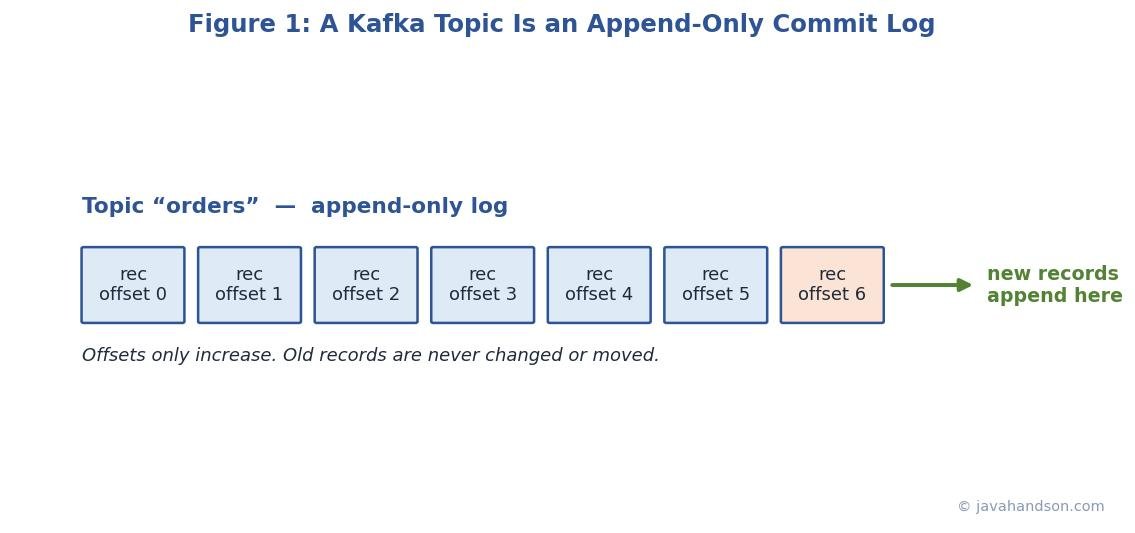
A topic is simply a named log. You might have a topic called orders, another called payments, and another called clicks. Producers write records into a topic. Consumers read records from a topic. The name is just a label so everyone knows which stream they are dealing with.
Right now, it seems like we have one big notebook for each topic. This is fine when there’s not much traffic. However, one notebook can only handle so much. Only one person can add to it at a time, and it can only store a limited amount of data. To handle more users, Kafka divides each topic into smaller parts. These parts are called partitions, and they are where things really get interesting.
Before we proceed, let’s identify the main characters. Kafka has four roles that you will see often. Knowing who they are will make everything else simpler.
Here is a simple way to hold it in your head. Picture a busy post office. Producers drop letters into a box. The topic is the box itself, labelled by purpose. Brokers are the sorting rooms that hold and copy the mail. Consumers are the delivery staff who carry letters onward. This one picture will carry you through the whole article.
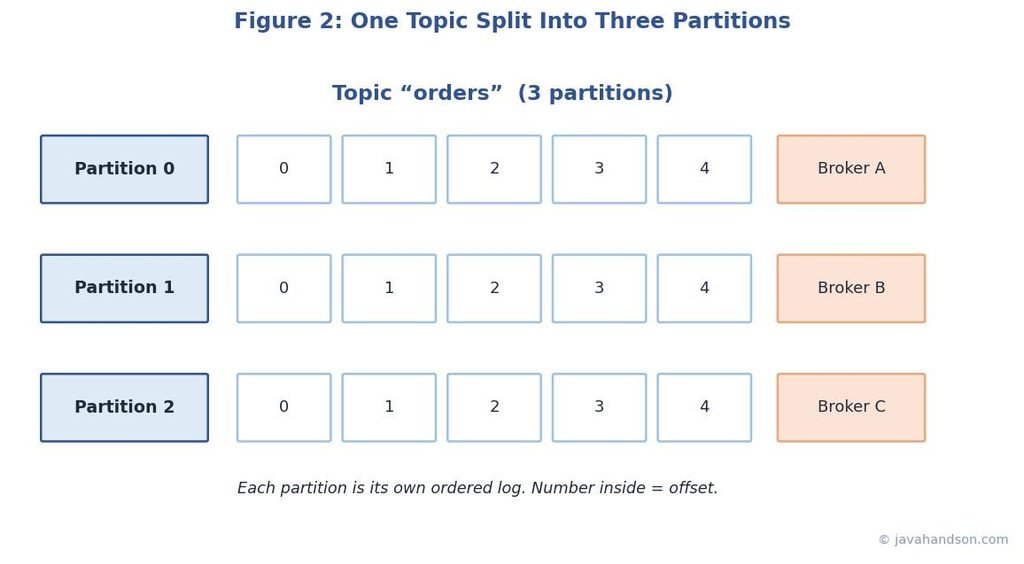
A partition is a slice of a topic. Instead of one big log, a topic is broken into several smaller logs that live side by side. Each of these smaller logs is a partition. A topic with six partitions is really six independent append-only logs sharing one name.
Why split? Splitting allows Kafka to share work across many machines and readers at the same time. Each partition can be on a different server, known as a broker. You can write to and read from each partition separately. This is how Kafka grows. More partitions mean more work can be done at once. This is the most important idea in the whole system.
When a producer sends a record, Kafka must decide which partition it lands in. There are three common paths, and the one that gets used depends on what the producer provides.
The keyed path is important to remember. For example, if you use a customer ID as the key, every record for that customer goes to the same partition. This fact is key to how we organize data, which we will discuss later. Keys do more than just label things; they shape your entire system.
Let’s break down how hashing works. Imagine a topic with three parts, called partitions, numbered zero, one, and two. A producer sends a record with the key “user-42.” Kafka uses a hash function on that key and gets a large number, like 9,001. It then divides 9,001 by 3 and keeps the remainder, which is zero. This means the record goes into partition zero. Every time a record with the key “user-42” is sent, the same calculation happens, and it goes to partition zero again. This is why the same key consistently stays in one partition.
This also explains a subtle trap. If you later change the partition count from three to four, the same key now divides by four instead of three. The remainder can change, so “user-42” might suddenly map to a different partition. This is why growing partitions later can quietly break ordering, and why you should size partitions with room to grow from the start.
People always ask how many partitions they need. There is no magic number, but there is a useful way to think about it. Partitions set the ceiling on how many consumers can work in parallel. Ten partitions means at most ten consumers share the load inside one group. So pick a number that leaves room to grow.
Don’t go overboard with partitions. Each partition requires memory, file handles, and coordination. Having thousands of partitions on a small cluster can slow everything down. A good practice is to estimate your peak throughput, divide that by what one consumer can manage, and then add extra capacity. Finally, round up to a reasonable number.
| Interview Insight Interviewers love the question, “how do you decide partition count?” A strong answer ties partitions to target throughput and consumer parallelism, then mentions the cost of too many partitions. Bonus points for noting that increasing partitions later can break key-based ordering, because existing keys may hash to different partitions after the change. |
Before we move on, let’s talk more about partitions. A partition isn’t stored on a single machine. Instead, Kafka keeps multiple copies of each partition on different servers, called brokers. One of these copies is the leader, and the others are followers. All reading and writing happens through the leader, while the followers simply copy the data.
If the leader broker dies, one of the up-to-date followers takes over as the new leader. Your data survives, and consumers barely notice. This is why Kafka is called fault tolerant. Replication is the safety net under the whole design. You set the replication factor when you create a topic, and three is a common choice in production.
Now that records are spread across partitions, who reads them? A single consumer could read everything, but that does not scale. This is where consumer groups come in. A consumer group is a team of consumers that work together to read one topic. Together they split the partitions among themselves.
The main rule is simple. In one group, each partition is read by only one consumer. No two consumers in the same group share a partition. This rule keeps the order correct and prevents two workers from processing the same record at the same time.
A restaurant kitchen makes this click. Picture four order rails on the wall, each holding tickets. That is four partitions. You have two cooks, and you want no ticket cooked twice. So you split the rails: cook one takes rails one and two, cook two takes rails three and four. Each rail has exactly one cook. If a third cook joins, you can hand them a rail. But a fifth cook with only four rails just stands around. That is the whole idea of a consumer group in one kitchen.
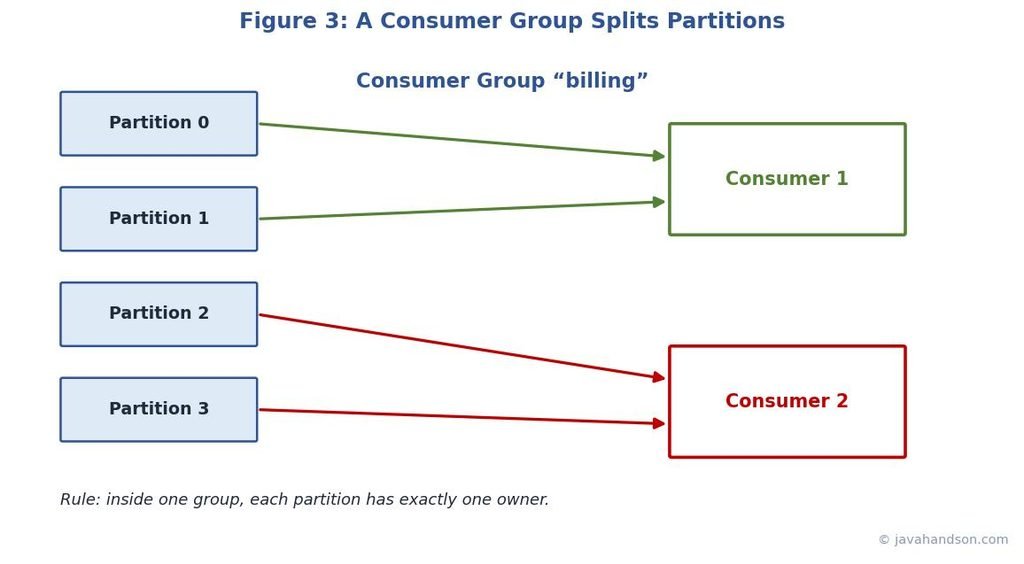
Say a topic has four partitions. With one consumer in the group, that consumer reads all four. Add a second consumer, and now each reads two. Add two more, and each of the four consumers reads one partition. This is how you scale reading. You just add consumers, and Kafka rebalances the load.
Keep an eye on the ceiling. If you add a fifth consumer to a topic with four partitions, that fifth consumer will not receive any data. It will be idle because there are no available partitions for it. The number of partitions limits how much parallel work can happen. Many teams get confused by this and think that more consumers always increase speed.
| Interview Insight A classic trap question is, “what happens if consumers outnumber partitions?” The clean answer is that the extra consumers stay idle and act only as standby. To raise the ceiling, you must increase partitions, not just add consumers. Mention that idle consumers are still useful as instant failover if an active consumer dies. |
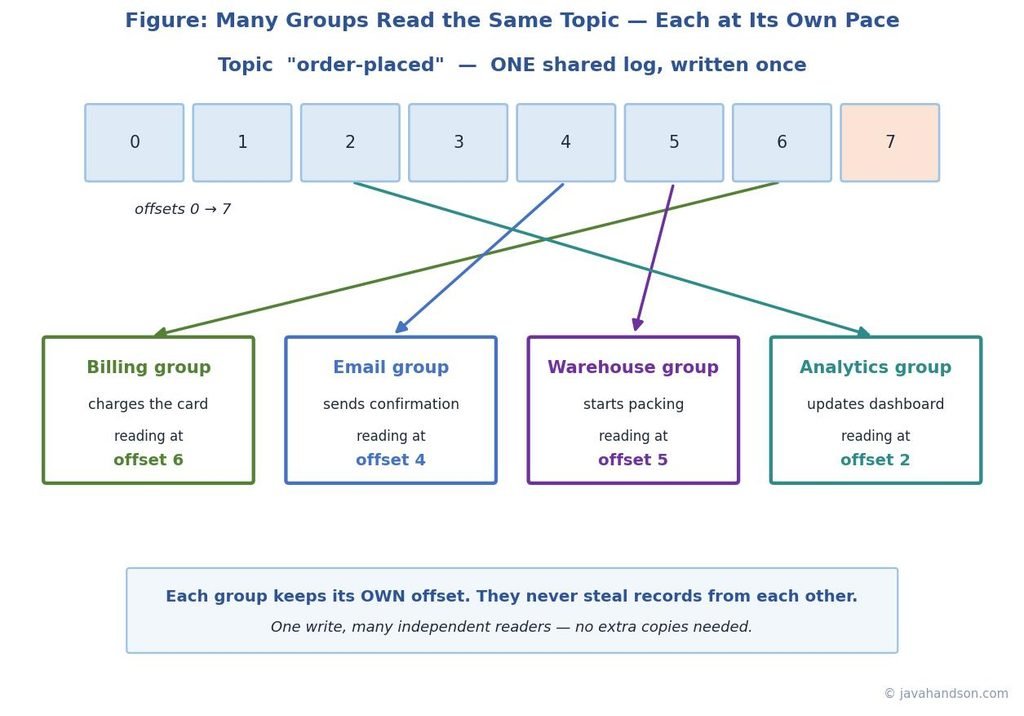
Here is where Kafka feels different from a normal queue. Many groups can read the same topic at the same time, and each group gets its own full copy of the stream. A billing group and an analytics group can both read the orders topic. Neither one steals records from the other.
This works because each group tracks its own reading position separately. The billing group might be at record 900 while analytics is still at record 500. Both read the same log, just at their own pace. This is why one Kafka topic can feed many independent systems without any of them interfering. It is one of Kafka’s best features.
Picture a real online store to see why this matters. A single “order placed” topic can feed four different teams at once. Billing charges the card. Meanwhile, the email group sends a confirmation. Over in the warehouse, another group starts packing, while an analytics group updates the sales dashboard. Each group reads every order, and none of them slows the others down. In an old-style queue, you would need four separate copies of every message. In Kafka, you write the order once and all four teams read it freely.
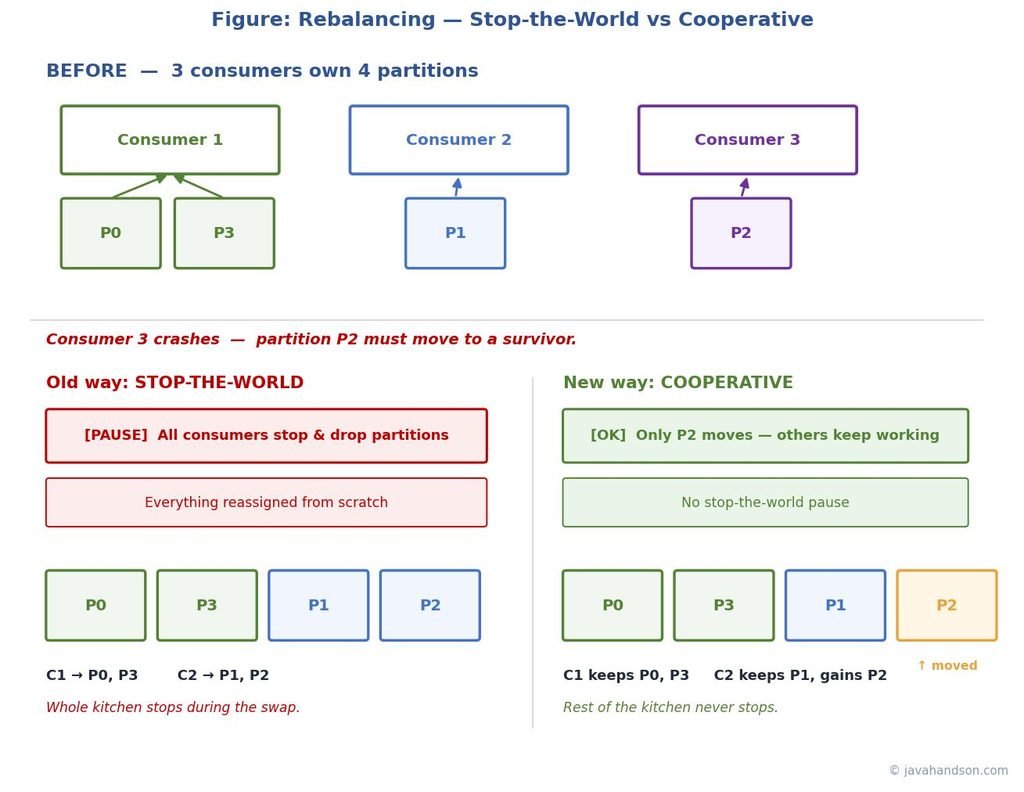
Consumers come and go. One might crash, a new one might start, or you might deploy a new version. Whenever the group membership changes, Kafka reshuffles which consumer owns which partition. This reshuffle is called a rebalance. It makes sure every partition still has exactly one owner.
Rebalances are important, but they come with a cost. In older systems, everything stopped while the group assigned new tasks. This can slow things down during scaling. The newer Kafka system uses a cooperative method that only moves the necessary parts, allowing most consumers to continue working. If you’re using a recent version, you can enjoy smoother rebalances with little impact.
Back to the kitchen for a moment. A rebalance is like a shift change. When a cook clocks out, the rails they held must go to someone still working. In the old way, every cook drops their tickets and the manager reassigns all the rails from scratch, so the whole kitchen pauses. In the cooperative way, only the leaving cook’s rails move, and everyone else keeps cooking. You can guess which one your customers prefer during a dinner rush.
Each record in a partition has a unique number called an offset. The first record is offset zero, the second is offset one, and this continues in order. The offset shows the position of a record within its partition. Offsets are never reused in the same partition and always increase. You can think of them like line numbers in an append-only notebook.
Offsets matter because they let a consumer remember where it stopped. When a consumer reads up to offset 500, it can save that number. If it restarts, it asks Kafka to continue from 501. No records are missed, and none are read twice on a clean restart. The offset is the bookmark that makes reliable reading possible.
Imagine reading a long novel over several nights. Each night, you put a bookmark on the page where you stopped. The next night, you open right to that page and continue reading. You don’t go back to reread the whole book, and you don’t skip any pages. The offset acts like that bookmark, but it stays saved for you, even if you lose the book. Different readers can have bookmarks on different pages in the same book, which is how many groups can read one topic together.
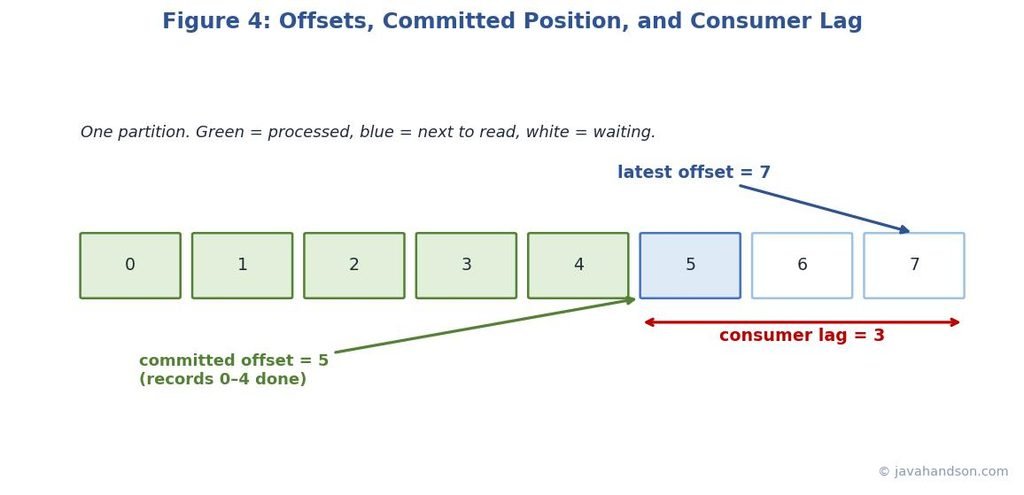
Saving your position is called committing an offset. Kafka stores these committed offsets in a special internal topic so they survive restarts and crashes. Each group commits its own offsets per partition. When a consumer restarts, it reads its last committed offset and picks up from there.
There are two ways to commit. Automatic commit saves your position on a timer in the background. It is easy but risky, because it might mark records as done before you actually finished processing them. Manual commit puts you in control. You commit only after your work truly succeeds. For anything important, manual commit is the safer path.
Consumer lag is the gap between the newest offset in a partition and the offset your group has committed. If new records arrive faster than you process them, this gap grows. A growing lag is a warning sign. It means your consumers are falling behind and users may see stale data.
Lag is the most important metric to watch for Kafka in production. A lag close to zero means you are on track. If the lag keeps increasing, you need more consumers, faster processing, or more partitions. I have seen outages where the first sign was a lag chart slowly rising for an hour before anyone noticed.
| Interview Insight Expect the question, “how do you know if consumers are healthy?” Lead with consumer lag. Explain that lag is the difference between the latest produced offset and the committed offset, and that a steadily rising lag signals trouble. Then mention scaling consumers up to the partition limit, or adding partitions, as fixes. |
When a new consumer group starts, it does not have a saved offset. So Kafka needs to know where to begin. You can control this with a simple setting that has two common options. The choice you make is more important than you might think on the first day.
Picking the wrong one causes real surprises. Start a brand-new analytics group with the latest setting, and it quietly ignores months of past data. Start a busy group with the earliest setting on a huge topic, and it suddenly tries to replay everything at once. So choose this on purpose, not by accident. Once a group has a committed offset, this setting no longer applies, because Kafka just resumes from the saved position.
Offsets sit at the centre of how Kafka delivers messages. The timing of your commit decides what happens when things crash. There are three levels people talk about, and the difference comes down to when you commit versus when you process.
For most systems, it works best to process records at least once and to allow for repeated processing without causing problems. This means you should set up your consumer to handle the same record multiple times safely. A common method is to check a unique ID before taking action, so if a record comes in again, it is simply ignored. This approach keeps you safe without the complexity of requiring exact one-time processing.
Let us ground this with a payment example, because it makes the stakes obvious. Suppose a record says “charge card for order 789”. With at-most-once, you commit first, then charge. If the app crashes between the two steps, the charge never happens and the customer got their goods free. With at-least-once, you charge first, then commit. If you crash after charging but before committing, the record is redelivered and you might charge twice. Neither raw option is safe for money on its own.
The fix is that idempotent check. Before charging, you look up whether order 789 was already charged. If yes, you skip it and just commit. If no, you charge and record that you did. Now a redelivered record does no harm, because the second attempt sees the charge already exists. This is at-least-once delivery made safe by an idempotent handler, and it is how most real payment flows are built.
Ordering is where most Kafka confusion lives. People assume Kafka keeps every record in perfect global order. It does not. The real rule is narrow but powerful. Kafka guarantees order only within a single partition. Across partitions, all bets are off.
In partition zero, records come out in the same order they went in. The same applies to partition one and every other partition individually. However, if you read from two partitions, Kafka does not guarantee how records from both will mix together. This one rule explains nearly every confusion about order that people experience in the real world.
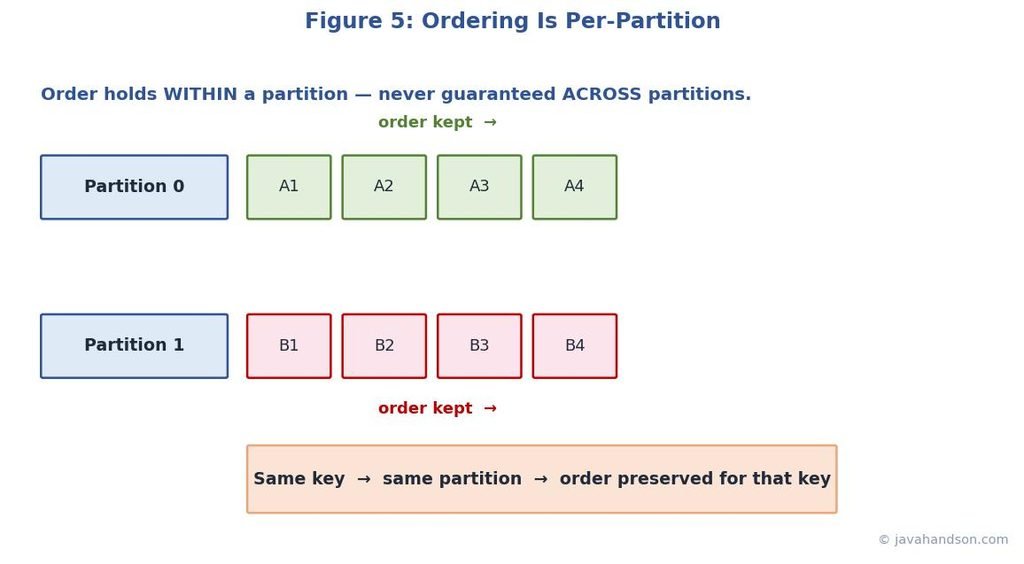
This is where partition keys earn their keep. Remember that the same key always maps to the same partition. So if you need records for one customer to stay in order, use the customer ID as the key. Every event for that customer lands in one partition, and that partition keeps them in order.
Choosing the right key is important. Select the item whose order matters to you. For a bank, this could be the account ID, which keeps all events linked to that account in the right order. For a chat app, it might be the conversation ID. You don’t need everything to be in a global order. You just need the order to be correct within each important unit, and a good key provides that.
Let us walk through a bank account to see this in action. Three events happen for account A5 in this order: deposit 100, withdraw 30, then check balance. If these get processed out of order, the balance check could run before the deposit and show the wrong number. So order clearly matters here.
Now imagine a different account, B9, doing its own three events at the same time. Those go to a different partition and a possibly different consumer, running fully in parallel. So account A5 stays perfectly ordered, account B9 stays perfectly ordered, and the two accounts do not wait on each other. That is the magic: order where you need it, parallel speed everywhere else.
| Interview Insight A favourite interview scenario is, “how do you keep events for one user in order?” The answer is to use the user ID as the partition key so all their events go to one partition. Follow up by noting the trade-off: a hot key can overload one partition, so key choice must balance ordering needs against even load spreading. |
Keys give you ordering, but they can bite you. Suppose one customer is a thousand times busier than the rest. All their records pile into one partition. That partition gets swamped while the others sit nearly idle. This is the hot partition problem, and it quietly kills performance.
There is no free lunch here. You might face a trade-off between perfect ordering and even load distribution. Sometimes, you may need to split a hot key into sub-keys, sacrificing strict order for that one entity. Other times, you may accept an uneven load because maintaining order is more important. Which choice is right depends on your business. Just be aware that this trade-off exists so it doesn’t catch you by surprise later.
A simple example: think of a social app where you key posts by user ID. Most users are quiet, but one celebrity has ten million followers and posts constantly. All their events crush into one partition while the others idle. One common fix is to split that hot user into sub-keys like “celebrity-1”, “celebrity-2”, and so on, spreading their load across partitions. You lose strict order for that one user, but you save the whole system. For a feed, slightly out-of-order posts are usually fine, so this trade is worth it.
There is a subtle ordering trap on the sending side too. If a producer sends many records at once and one fails and gets retried, that retried record could slip in after later ones. Suddenly your careful ordering is broken, even inside one partition. This surprises a lot of people.
To avoid problems with duplicates in Kafka, turn on idempotent producing. This feature tags each record, allowing Kafka to detect duplicates and maintain the correct order during retries. Most modern Kafka clients have this option enabled by default. If keeping strict order is important to you, make sure idempotence is turned on. This way, you can safely retry without changing the order.
Let us tie the four ideas into one flow, because they really work as a team. A producer writes a record and picks a partition, usually by hashing a key. The partition keeps records in order and stores replicated copies for safety. A consumer group splits the partitions so each has one owner. Each consumer tracks its offset to remember its place and recover after a crash.
Ordering then falls out naturally. Because each partition stays ordered and each key sticks to one partition, records for the same key are processed in order. Offsets make the reading reliable, consumer groups make it scalable, and partitions make it all parallel. Four simple ideas, working together, give you a system that is fast, ordered where it counts, and hard to knock over.
When you design with Kafka, walk this same path. Decide what needs to stay ordered, and that tells you your key. Estimate your throughput, and that tells you your partition count. Plan your commit strategy, and that tells you your delivery guarantee. Watch your lag, and that tells you if the whole thing is healthy. Everything traces back to these four foundations.
Imagine an order service that sends every order event to Kafka. You want to keep all events for a single order in the correct order, while allowing different orders to be processed at the same time. Use the order ID as your key. This means that every event for order 123 goes into one partition and stays in order, while events for order 456 go into another partition.
Now size it. Say you expect a peak of about eight thousand events per second, and one consumer comfortably handles two thousand. That points to at least four active consumers, so four partitions is the bare floor. But you want room to grow, so you pick twelve partitions. This lets you scale from four consumers today up to twelve later, without touching your keys or breaking order.
Finally, decide safety. You choose at-least-once with manual commits, so an order is never lost even if a consumer crashes mid-process. You make the handler idempotent by checking whether an order event was already applied. With that, a rare duplicate does no harm. Four decisions, and the whole design falls into place cleanly.
Building a Kafka system is one thing. Keeping it healthy while real traffic flows is another. The good news is that a few simple habits catch most problems early. You do not need fancy tools on day one. You need to watch a handful of signals and know what each one is telling you.
Start with consumer lag, which you know about. It is your best health signal. A flat lag close to zero means you are doing well. A rising lag indicates that problems are growing. Besides lag, a few other signals complete the picture and help you find the cause, not just the symptom.
When lag increases, you can follow a clear set of steps to fix it. First, add consumers up to the number of partitions, as this is a simple way to increase parallelism. If you’ve reached the maximum consumers, add more partitions to allow for additional consumers, but keep in mind this may disrupt key ordering. If the processing is slow, try to speed up the handler, group database writes, or move heavy tasks away from the main workflow.
For rebalance storms, the usual cause is a consumer that takes too long between polls and looks dead. Give the handler more time or process smaller batches so it checks in on schedule. Small tuning here removes a surprising amount of pain. The point is that most Kafka fires have calm, well-known fixes once you can see the right signal.
| Interview Insight If asked “how do you operate Kafka in production?”, lead with monitoring consumer lag per partition, then name rebalance frequency and under-replicated partitions. Show that you fix lag by scaling consumers to the partition count first, then adding partitions, then speeding up processing. This ordered, calm answer signals real operational experience. |
Most Kafka pain comes from the same handful of mistakes. Knowing them ahead of time saves you many late nights. Here are the ones I see most often, along with the reason each one hurts.
None of these are exotic. They are everyday slips that come from assuming Kafka behaves like a simple queue. Once you carry the correct mental model of partitions, groups, offsets, and ordering, these traps become easy to spot before they reach production.
A: A partition is a slice of a topic. It is an independent, append-only log. A topic is split into several partitions so Kafka can spread reads and writes across many machines and consumers in parallel.
A: The extra consumers stay idle because each partition can be owned by only one consumer in a group. To raise parallelism you must add more partitions, not just more consumers. Idle consumers still act as instant failover if an active one dies.
A: Kafka guarantees ordering only within a single partition, not across partitions. To keep related records in order, give them the same key so they all land in the same partition.
A: An offset is the position of a record inside its partition. Offsets always increase and never repeat within a partition. A consumer commits its offset so it can resume from the right place after a restart.
A: Consumer lag is the gap between the latest offset in a partition and the offset your group has committed. A steadily rising lag means consumers are falling behind and is one of the most important Kafka metrics to monitor.
Kafka can seem complicated at first, but it has four basic ideas. Partitions divide a topic so that work can happen at the same time. Consumer groups share these partitions to help with reading. Offsets keep track of where each reader is, ensuring nothing gets lost. Ordering rules apply within each partition, and keys help group related records together in the same partition to maintain their order.
Hold on to those four, and the rest of Kafka becomes far easier to learn. Every advanced feature, from stream processing to exactly-once pipelines, builds on this same base. So the next time someone says “let us just push it to Kafka,” you will know exactly what that means and what questions to ask. Start with the key, size your partitions, plan your commits, and watch your lag. That habit alone will carry you a long way.