RabbitMQ Exchanges and Queues Explained, Plus the Real Kafka vs RabbitMQ Trade-offs
-
Last Updated: September 9, 2026
-
By: javahandson
-
Series

RabbitMQ exchanges and queues explained simply, with exchange types, Spring Boot code, and the real Kafka vs RabbitMQ trade-offs.
Many Java developers first encounter a message broker when a single service can no longer handle everything by itself. For example, your order service might need to send an email, update inventory, and notify a warehouse all at the same time. Doing this inline can make the request slow and unreliable. This is where RabbitMQ exchanges and queues are useful. This article will explain how they work from the basics.
RabbitMQ is one of the most widely used message brokers in the Java world. It sits between your services and moves messages around so that senders and receivers never have to talk directly. That small idea unlocks a lot: services become loosely coupled, slow work moves to the background, and a burst of traffic no longer knocks everything over.
In the first half, we will explain how RabbitMQ sends messages. You will learn about the roles of a producer, exchange, binding, queue, and consumer. Then, we will review each type of exchange with simple examples. In the second half, we will address a common question for backend engineers: Should you choose Kafka or RabbitMQ? We will focus on real pros and cons, including recent changes in RabbitMQ.
You do not need any prior broker experience to follow along. If you know Spring Boot and you have written a REST controller, you are ready. Let us start with the problem a broker solves.
Imagine an e-commerce checkout. A user clicks “Place Order” and your service has to do several things. It must save the order, charge the card, send a confirmation email, update stock, and maybe push a message to a shipping partner. If you do all of this inside the HTTP request, the user waits for every step to finish.
This approach has serious problems. If the email server is slow, the checkout process becomes slow. If the shipping API is down, the entire order fails, even though the payment went through. All services rely on each other too much. If one part fails, it brings everything else down with it.
A message broker fixes this by adding a middle layer. Your order service saves the order and drops a small message that says “order placed” onto the broker. Then it returns a response to the user right away. Other services pick up that message on their own time and do their part. The email service sends the email. The inventory service updates stock. Nobody blocks anybody.
This approach has three main benefits. First, decoupling: services communicate through messages instead of direct calls, allowing them to change without affecting each other. Second, resilience: if the email service goes down, messages are safely stored in a queue until it is back up. Third, load smoothing: when there is a sudden increase in orders, they build up in the queue and get processed steadily, preventing a crash of the downstream service.
RabbitMQ is the broker that sits in the middle. Now let us look at the pieces that make it work.
RabbitMQ has a small set of parts. Once you understand how they fit together, everything else is a variation on the same idea. Here is a useful analogy: think of RabbitMQ as a post office. You hand a letter to the counter, and the post office decides which mailboxes it belongs in. You never deliver the letter yourself.
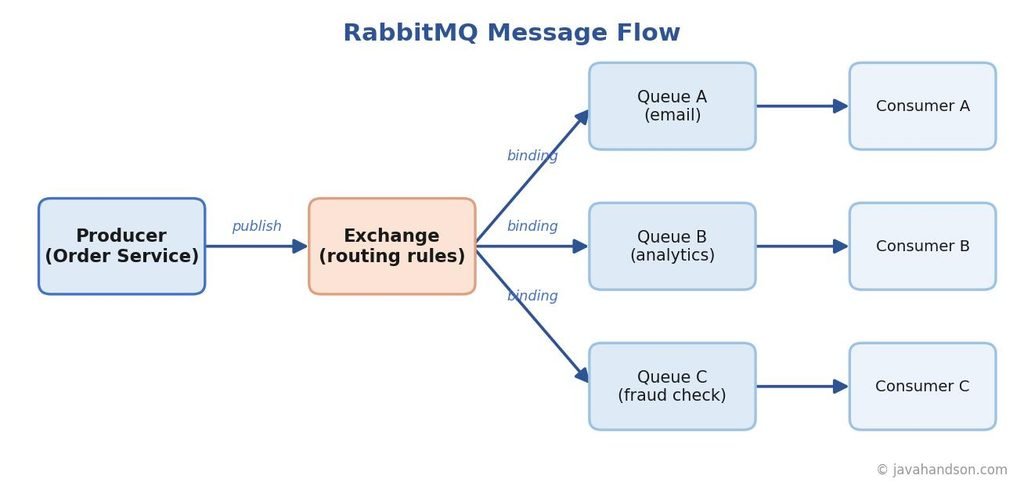
A producer is an application that sends messages. In our checkout example, the order service acts as the producer. It’s important to note that a producer does not send messages directly to a queue; instead, it always sends them to an exchange. This might surprise some beginners, but it is essential to how RabbitMQ remains flexible.
An exchange functions as a routing mechanism within a messaging system. It receives messages sent by producers and determines which queues should receive copies of those messages based on predefined rules. Notably, an exchange does not store messages; its primary role is to apply these rules and facilitate the forwarding of messages. If no queues match the specified rules, the exchange discards the message, highlighting the importance of proper setup and configuration.
It helps to stop thinking of an exchange as a box you drop things into. It is really a set of routing rules. You publish a message, and the exchange uses those rules to decide where the message goes next. The exchange type decides which kind of rule applies.
A queue serves as a storage system for messages until they are processed by a consumer. It functions as a buffer with a first-in-first-out (FIFO) structure, ensuring that messages are stored and retrieved in the order they were received. Queues can accommodate thousands of messages, allowing consumers to catch up at their own pace. To ensure that messages remain intact even after a broker restart, you can configure the queue to be durable and mark the messages as persistent. This setup is critical for maintaining message integrity in event-driven architectures.
A binding serves as the connection between an exchange and a queue, defining the criteria for message delivery. It instructs the exchange by specifying, “send messages that match this criteria to that particular queue.” Bindings frequently include a routing key or a specified pattern to determine which messages are directed where. Without an established binding, an exchange lacks a destination for its messages, resulting in no deliveries being made.
In message queuing systems, a consumer is defined as any application that retrieves and processes messages from a queue. For instance, an email service functions as a consumer by reading messages from the queue and handling them accordingly. Once it successfully processes a message, the service sends an acknowledgment back to RabbitMQ, the messaging broker. This acknowledgment is crucial; it signals to RabbitMQ that the message has been handled properly, prompting the broker to remove the message from the queue. If the consumer fails or crashes before sending this acknowledgment, RabbitMQ ensures reliability by re-delivering the message to another consumer, thus preventing any loss of work..
Put together, the flow reads like a sentence: a producer publishes to an exchange, the exchange uses bindings to route the message to one or more queues, and consumers read from those queues. The table below summarizes the parts.
| Part | Role in One Line |
|---|---|
| Producer | Sends messages; always to an exchange, never straight to a queue |
| Exchange | Routes each message to queues based on rules |
| Binding | The rule linking an exchange to a queue |
| Queue | Stores messages until a consumer reads them |
| Consumer | Reads and acknowledges messages from a queue |
The exchange type is a crucial component of message routing in RabbitMQ, as it determines how messages are distributed among queues. RabbitMQ offers four built-in exchange types: direct, fanout, topic, and headers. Each type serves a specific purpose in message delivery, addressing different routing needs. In the following sections, we will explore each exchange type in detail, starting with the simplest and progressing to the most flexible option.
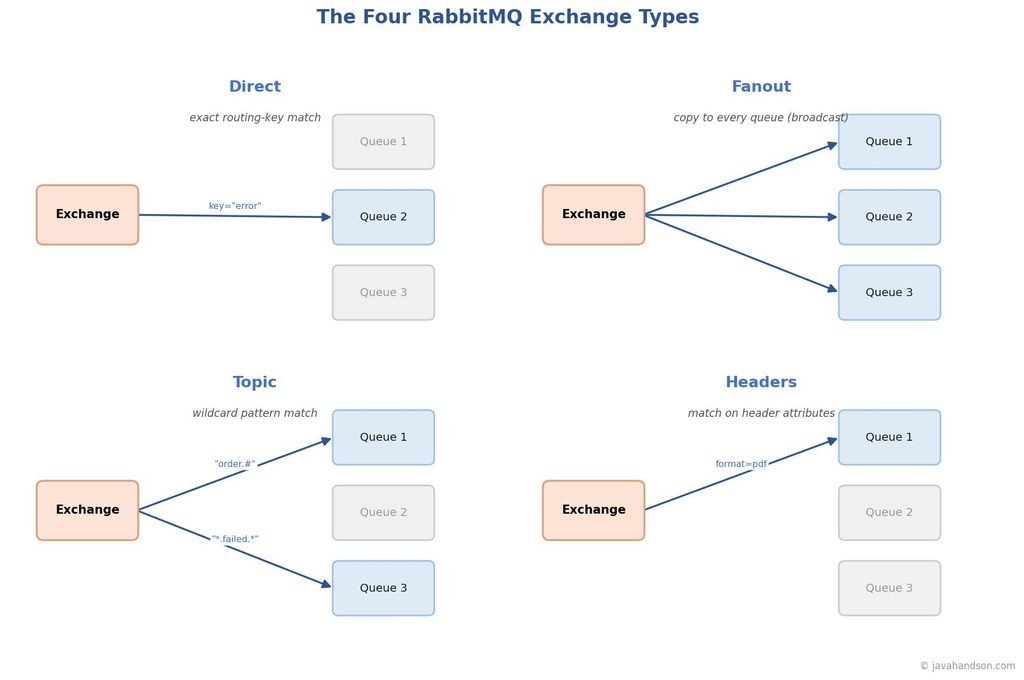
A direct exchange sends a message to the queue that has a binding key matching the message’s routing key exactly. Think of it like a specific address. For example, if a message has the routing key “payment,” only the queues with the key “payment” will receive it.
This is the go-to type when you want to send a specific message to a specific worker. Say you have three queues for three log levels: info, warning, and error. Each queue binds to the exchange with its own key. A message tagged “error” lands only in the error queue. Nothing else sees it.
Direct exchanges shine for task routing and targeted delivery. When a message clearly belongs to one kind of consumer, direct is simple and fast.
A fanout exchange sends every message to all the queues connected to it, without considering routing keys. If ten queues are connected, each one receives the message. This is simply broadcasting.
Fanout is perfect for the publish-subscribe pattern. Picture an “order placed” event. One queue feeds the email service, another feeds the analytics service, and a third feeds the fraud-check service. All three need the same event, and none should miss it. A fanout exchange sends a copy to each without any routing logic.
Fanout is one of the fastest exchange types because it does not check keys or headers. Use fanout when every subscriber needs to receive every message.
A topic exchange is the flexible middle ground. It routes messages using pattern matching on the routing key. The routing key is a set of words separated by dots, like “order.created.india” or “payment.failed.eu”.
Bindings in messaging systems utilize two types of wildcards for pattern matching. The star wildcard () matches exactly one word, while the hash wildcard (#) accommodates zero or more words. For example, a queue bound with the pattern “order.#” will receive every message that begins with “order.” On the other hand, a queue bound with the pattern “.failed.*” will capture any failure event from any domain and region. This functionality allows a single exchange to efficiently serve multiple consumers, each with their own specific interests.
Topic exchanges are great when messages have categories and consumers want slices of them. A logging system is the classic case: one consumer wants all errors, another wants everything from the payment service, and a third wants only critical alerts. One topic exchange handles all three.
A headers exchange uses message header attributes for routing instead of the routing key. You add key-value pairs to a message, and the bindings look for matches among those pairs. You can set it up so that all headers must match or just any one of them.
This type is the least used, but it helps when routing depends on several attributes at once. For example, route a message only if its format is “pdf” and its region is “asia”. Expressing that as a single routing-key string is awkward, so headers make it cleaner. In practice, most teams get by with direct, fanout, and topic.
| Exchange Type | Routes By | Best For |
|---|---|---|
| Direct | Exact routing key match | Targeted delivery to a specific queue |
| Fanout | Nothing; copies to all queues | Broadcasting the same event to everyone |
| Topic | Wildcard pattern on routing key | Category-based routing with flexible rules |
| Headers | Message header attributes | Routing on several attributes at once |
To understand theory better, it’s useful to look at code. Let’s create a small topic exchange using Spring Boot. Spring AMQP makes this setup straightforward, and the same concepts apply to other types of exchanges. First, we’ll set up the exchange, a queue, and a binding as beans.
In this setup, an order service publishes events with routing keys like “order.created” and “order.cancelled”. A notification queue binds with the pattern “order.#”, so it receives every order event. This is a common real-world shape.
@Configuration
public class RabbitConfig {

    public static final String EXCHANGE = "order.exchange";
    public static final String QUEUE = "order.notification.queue";

    // A topic exchange lets consumers subscribe with patterns.
    @Bean
    public TopicExchange orderExchange() {
        return new TopicExchange(EXCHANGE);
    }

    // A durable queue so messages survive a broker restart.
    @Bean
    public Queue notificationQueue() {
        return QueueBuilder.durable(QUEUE).build();
    }

    // Bind the queue to catch every 'order.*' event.
    @Bean
    public Binding binding(Queue notificationQueue, TopicExchange orderExchange) {
        return BindingBuilder
                .bind(notificationQueue)
                .to(orderExchange)
                .with("order.#");
    }
}
Now the producer. It uses RabbitTemplate to publish a message to the exchange with a routing key. Notice that the producer names the exchange, not the queue. It has no idea which queues exist, and that is exactly the point.
@Service
public class OrderEventPublisher {

    private final RabbitTemplate rabbitTemplate;

    public OrderEventPublisher(RabbitTemplate rabbitTemplate) {
        this.rabbitTemplate = rabbitTemplate;
    }

    // Publish to the exchange with a routing key.
    // The exchange decides which queues receive it.
    public void publishOrderCreated(String orderId) {
        String routingKey = "order.created";
        rabbitTemplate.convertAndSend(
                RabbitConfig.EXCHANGE, routingKey, orderId);
    }
}
Finally, the consumer. A single annotation tells Spring to listen on the queue. When a message arrives, the method runs. If it returns normally, Spring acknowledges the message and RabbitMQ removes it. If it throws, the message can be retried or sent to a dead-letter queue, depending on your config.
@Component
public class OrderEventListener {

    // Listens on the queue; runs for every message received.
    @RabbitListener(queues = RabbitConfig.QUEUE)
    public void handleOrderEvent(String orderId) {
        // Do the slow work here: send email, update analytics, etc.
        System.out.println("Handling order event for: " + orderId);
    }
}
That is a full round trip. The producer publishes, the exchange routes by pattern, the queue stores, and the listener consumes. Swap TopicExchange for FanoutExchange and drop the routing key, and you have a broadcast instead. The building blocks stay the same.
Moving messages is easy. Making sure they are never quietly lost is the harder part, and it is where production systems earn their keep. RabbitMQ gives you several tools to control reliability. You should know them before you ship.
By default, when a consumer receives a message from RabbitMQ, it must send a confirmation, known as an acknowledgment (ack), after it has processed the message. RabbitMQ will hold onto the message until it receives this ack. If the consumer unexpectedly stops working or crashes before sending the ack, RabbitMQ will re-deliver the message to avoid losing any important information or tasks. This process is called manual acknowledgement and is crucial for protecting your operations in case of service failures while tasks are being handled.
For important messages, it is advisable to avoid using auto-acknowledgment. When using auto-ack, RabbitMQ removes the message from the queue as soon as it is delivered, even if your processing code has not yet executed. This could lead to situations where messages are lost and not processed correctly, which can have serious consequences for your application. Thus, understanding and implementing manual ack is essential for maintaining data integrity in your workflow.
A durable queue ensures that it remains operational even after a broker restart. In this setup, persistent messages are stored on disk, providing an added layer of security as they also survive crashes. To guarantee the preservation of your messages, it is essential to use both a durable queue and persistent message storage. If you only have a durable queue with non-persistent messages, any crashes will result in the loss of those messages. For critical data that you cannot afford to lose, enable both durability and persistence, keeping in mind that writing to disk may slightly impact speed.
Certain messages may be unprocessable due to issues like malformed data or repeated failures in downstream calls. To prevent endless retries, it’s beneficial to route these problematic messages to a dead-letter queue. This allows either a human or an automated process to review the messages at a later time. Implementing a dead-letter queue helps maintain the cleanliness of your main queue and prevents consumers from becoming trapped in a repetitive loop.
In messaging systems like RabbitMQ, it’s crucial for producers to ensure that their messages are successfully received by the broker. To confirm this, the publisher must enable acknowledgments, known as “confirms.” When confirms are activated, RabbitMQ sends a small acknowledgment back to the producer once it has safely received the message. If that acknowledgment is not received, the producer has the option to retry sending the message. This is particularly important for critical events, such as payment transactions, where enabling confirms can prevent the loss of important data due to transient network issues.
| Interview Insight A common interview question is: “How do you guarantee a message is not lost in RabbitMQ?” A strong answer names all four layers together: manual consumer acknowledgements, durable queues with persistent messages, publisher confirms on the producer side, and a dead-letter queue for messages that repeatedly fail. Mentioning that each layer protects a different stage, from publish to storage to consume, shows you understand the whole path, not just one trick. |
Now for the question that starts many architecture debates. Should you use Kafka or RabbitMQ? The honest answer is that they were built for different jobs, and the old one-line summary you may have read is now partly out of date. Let us look at what really separates them.
When comparing RabbitMQ and Kafka, it’s helpful to use a simple analogy. RabbitMQ functions like a post office, efficiently routing each message to the appropriate mailbox. Once the intended recipient retrieves a message, it is removed from the system. In contrast, Kafka operates more like a library or a logbook. Messages are stored in an append-only log, meaning they remain accessible for an extended period, allowing readers to consume them at their own pace. This fundamental difference in message handling and retention highlights the diverse use cases for each messaging system.
The main difference between RabbitMQ and Kafka is how they handle messages. In RabbitMQ, a message is deleted once the consumer confirms it was received. In contrast, Kafka keeps messages for a specific time or until a certain amount of data is reached. This allows multiple consumers to read the same message, and they can also go back and read old messages anytime. The ability to replay messages is a key feature of Kafka.
Here is a difference that shows up in real behavior. RabbitMQ mostly uses a push model. The broker pushes messages to consumers as they arrive, which gives low latency for each message. You set a prefetch limit so a slow consumer is not flooded.
Kafka operates on a pull model, allowing consumers to request batches of messages from a specific position known as an offset, which they track independently. This design gives consumers greater control over their processing pace, enabling them to easily pause, resume, or rewind their consumption of messages. Additionally, this approach facilitates efficient batching, contributing to Kafka’s ability to handle large volumes of data effectively.
People often say, “Kafka is faster,” but whether this is true depends on what you measure. Kafka is built to handle very high amounts of data at once. It uses message batching and writes data to disk in order, which allows it to manage millions of messages each second across multiple servers. This ability is a major reason why it is popular for data pipelines and event streaming applications.
RabbitMQ is known for sending messages quickly with lower delays, especially when handling moderate amounts of data. Its push delivery method avoids the waiting time that comes with checking for new messages. This is especially useful for small tasks that need to be done fast. In contrast, Kafka is great for managing large amounts of data, but RabbitMQ usually sends individual messages faster when the number of messages is not too high.
Kafka processes events in the order they occur within a partition, and consumers track their offsets. This allows for easy replays of events. For example, if there is a bug and you need to reprocess a whole day’s events, Kafka lets you easily go back and consume those events again.
On the other hand, RabbitMQ, when used in its standard mode, orders messages in a single queue but deletes them after they are consumed. This means it does not provide a simple way to replay messages.
It’s important to note a key aspect that many older comparisons overlook: RabbitMQ has evolved beyond being just a message queue. With the release of version 3.9, RabbitMQ introduced streams, which are designed as an append-only, replicated, disk-based log that allows for offset-based reading and retention. This functionality aligns more closely with the model used by Kafka. Subsequent versions have further enhanced this feature by adding partitioned streams, enabling parallel and ordered consumption of messages.
The old rule of thumb was, “Use RabbitMQ for queuing and Kafka for streaming.” However, things have changed. RabbitMQ can now handle log-style streaming, and both tools are more versatile than before. Today, your choice should depend on your environment, your team’s experience, and the specific requirements you have, rather than on strict differences in their capabilities.
| Dimension | RabbitMQ | Apache Kafka |
|---|---|---|
| Core idea | Message broker that routes and delivers | Distributed append-only log |
| Delivery model | Mostly push to consumers | Consumers pull at their own pace |
| Message life | Deleted after acknowledgement (classic queues) | Kept by retention policy; re-readable |
| Replay | No, in classic queue mode | Yes, by resetting the offset |
| Routing | Rich: direct, fanout, topic, headers | Simple: topic and partition based |
| Best throughput | High, lower latency per message | Very high aggregate throughput |
| Sweet spot | Task queues, complex routing, RPC | Event streaming, pipelines, log data |
Rules of thumb are more useful than a feature list, so here is how to decide in practice. Neither tool is a strict upgrade over the other. Match the tool to the shape of your problem.
Many large systems use both Kafka and RabbitMQ. They rely on Kafka for handling high volumes of event streams and use RabbitMQ for directing specific tasks between services. It’s fine to use two tools when each one has its role. The mistake happens when you try to force one tool to do a job it is not designed for.
| Interview Insight When an interviewer asks “Kafka or RabbitMQ for this design?”, resist naming one on reflex. Ask what the workload looks like first. If it is high-volume event streaming with replay and many independent readers, lean Kafka. If it is task distribution with complex routing and per-message acknowledgement, lean RabbitMQ. Bonus points for noting that RabbitMQ streams have narrowed the gap, so the decision now depends more on the exact guarantees and the team’s existing stack than on a hard line between the two. |
A few traps catch almost every team new to RabbitMQ. Knowing them early saves painful debugging later.
Here is a compact glossary of the core terms from this article, so you can revisit them fast.
| Term | Meaning in One Line |
|---|---|
| Producer | An app that sends messages to an exchange |
| Exchange | The router that decides which queues get a message |
| Binding | The rule linking an exchange to a queue |
| Queue | A buffer that stores messages until they are read |
| Consumer | An app that reads and acknowledges messages |
| Routing key | A label on a message that direct and topic exchanges match against |
| Acknowledgement | A consumer’s signal that a message was handled |
| Dead-letter queue | A holding place for messages that repeatedly fail |
| Offset | A consumer’s read position in a Kafka partition or a RabbitMQ stream |
| Replay | Re-reading old messages from a log, a Kafka strength |
A: An exchange is the router that decides which queues a message should go to, based on rules called bindings. A queue is the buffer that actually stores messages until a consumer reads them. Producers always send to an exchange, never straight to a queue.
A: RabbitMQ has direct, fanout, topic, and headers exchanges. Direct routes on an exact routing-key match, fanout copies a message to every bound queue, topic routes using wildcard patterns on the routing key, and headers routes on message header attributes.
A: Use RabbitMQ for task queues, complex routing, and low-latency per-message delivery at moderate volume. Use Kafka for very high-volume event streaming, event sourcing, and cases needing replay. RabbitMQ Streams have narrowed the gap, so the decision now leans on your exact guarantees and existing stack.
A: RabbitMQ mostly pushes messages to consumers as they arrive, which gives low latency. Kafka uses a pull model where consumers request batches from an offset they track themselves, giving them control over pace and the ability to rewind and replay.
A: Combine four layers: manual consumer acknowledgements, durable queues with persistent messages, publisher confirms on the producer side, and a dead-letter queue for messages that repeatedly fail. Each layer protects a different stage from publish to storage to consume.
RabbitMQ exchanges and queues are simpler than they first look. A producer publishes to an exchange, bindings decide the route, queues hold the messages, and consumers read them. Once that flow clicks, the four exchange types are just different routing rules, and reliable delivery is a matter of stacking acknowledgements, durability, confirms, and dead-letter queues.
There is no clear winner between Kafka and RabbitMQ. RabbitMQ is a flexible message broker designed for routing messages and task delivery. Kafka is a durable log that is built for handling high-volume streaming and replaying data. RabbitMQ has added streaming features that make it more similar to Kafka, so choose based on your actual workload, the guarantees you need, and your team’s skills, rather than just a catchy slogan.
Start small. Wire up a topic exchange in Spring Boot, watch a message flow from producer to consumer, and add reliability one layer at a time. Once you have felt a broker take load off your services, you will reach for one naturally the next time a request is trying to do too much at once.