Collections Utility Class in Java: sort, binarySearch, and unmodifiable
-
Last Updated: August 30, 2026
-
By: javahandson
-
Series

Learn the Collections utility class in Java — sort, binarySearch, unmodifiable, min, max, shuffle and more, with simple examples and interview tips.
If you have a list of names and want to sort it, you don’t need to create your own sorting loop. Java has already taken care of that for you. The Collections utility class in Java can give you a sorted list with just one method call. This is the main purpose of this class—it helps you avoid writing the same repetitive code over and over.
This class lives in the java.util package. Its full name is java.util.Collections. Notice the s at the end. That extra letter trips up a lot of people. There is Collection, the interface your List and Set implement. And there is Collections, a toolbox full of ready-made helper methods.
So what does it actually do? It gives you static methods that work on your lists, sets, and maps. You want to sort a list? There is a method. You want to search it fast? There is a method. You want to stop anyone from changing it? Yes, a method for that too. You never create an object of this class. You just call its methods straight off the class name.
This class is valuable because it saves you time and helps reduce bugs. Writing your own sorting and searching loops can lead to mistakes. You might make off-by-one errors, wrong comparisons, or miss important edge cases. The methods in this class have been tested in millions of programs. By using them, your code will be shorter and safer.
In this guide we will walk through the most useful methods, one by one, with small examples you can run. By the end you will know when to reach for this class and which method fits the job.
Here is the plan for the rest of the article:
You only need to know what a List is and how to create one. If you have used an ArrayList before, you are ready to go.
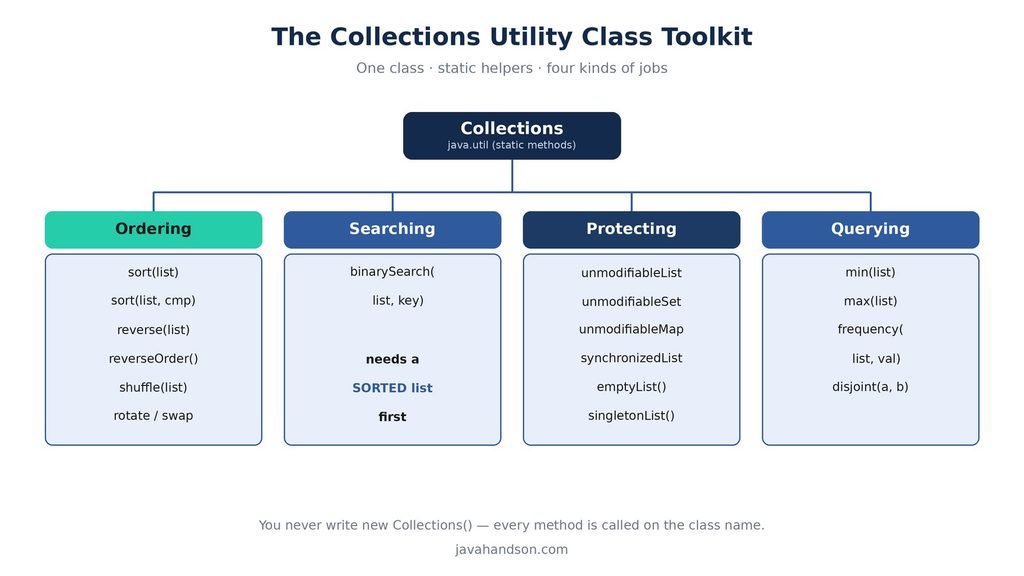
The Collections class is a helper class. In Java we call this a utility class. It holds a bunch of static methods that do common jobs on collections. Sorting, searching, reversing, and more all live here.
A utility class has a straightforward design. All its methods are static, meaning they work without needing an object created from the class. You can use it like the Math class, calling Math.max or Math.sqrt without creating a new Math object. The Collections class functions in the same way.
Why does Java bundle these methods in one place? Because they are jobs almost every program needs. Sorting a list, searching it, protecting it. Rather than each of us writing our own version, the Java team wrote one solid version and put it here. It is tested, fast, and free. That is the spirit of a utility class.
You will also encounter a class called Arrays in the java.util package. It works similarly to Collections but specifically for regular arrays. For example, Arrays.sort is used to sort an int array, while Collections.sort is meant for sorting a List. Both perform the same function but target different types of data.
Let me clear up the name confusion right now, because it matters.
So one is a contract your data structures follow. The other is a set of tools you use on those data structures. Keep that split in your head and half the confusion goes away.
You cannot create a new instance of Collections() because it has a private constructor. The Java team made this choice on purpose. This class is a utility class that only has static methods, making an object from it unnecessary. By keeping the constructor private, they prevent anyone from accidentally creating an instance.
Collections c = new Collections();  // compile error, constructor is private

// This is how you actually use it:
Collections.sort(myList);   // call straight off the class name
Notice how you call the method. You write the class name, a dot, then the method. No object needed. That is the pattern for every method in this class.
💡 Interview Insight: Interviewers love the Collection vs Collections question. Keep it short: Collection is an interface data structures implement, and Collections is a utility class of static helpers. Mixing them up is a common slip.
Before we dig in, here is a quick map of the methods we will cover. Skim it now, and it will make more sense as we go.
| Method | What it does |
|---|---|
| sort | Orders a list in place, natural or custom order |
| binarySearch | Finds an item fast in a sorted list |
| reverse | Flips the current order of a list |
| reverseOrder | Returns a comparator for descending sort |
| shuffle | Randomly mixes the elements of a list |
| min / max | Returns the smallest or largest element |
| frequency | Counts how many times a value appears |
| swap | Swaps elements at two index positions |
| unmodifiableList | Returns a read-only view of a list |
| synchronizedList | Returns a thread-safe wrapper of a list |
| emptyList | Returns an immutable empty list |
| singletonList | Returns an immutable one-element list |
That is the core toolkit. Most days you will use sort, binarySearch, and the unmodifiable methods the most. The rest are nice to have when the need comes up.
Sorting is a common way to arrange a list. When you have items in a random order and want them organized, sorting helps. The sort method changes your original list directly, meaning it does not create a new list; it simply rearranges the items you already have.
Natural order is the default way a type sorts. Numbers go small to large. Strings go alphabetical, roughly like a dictionary. To sort in natural order you pass just the list.
List<Integer> nums = new ArrayList<>(Arrays.asList(5, 1, 4, 2, 3));
Collections.sort(nums);
System.out.println(nums);   // [1, 2, 3, 4, 5]

List<String> names = new ArrayList<>(Arrays.asList("Ravi", "Amit", "Zara"));
Collections.sort(names);
System.out.println(names);  // [Amit, Ravi, Zara]
You should pay attention to one important thing. The items in the list need to be able to compare themselves. This means they must use the Comparable interface. Built-in types like Integer and String already do this, so they work easily. If you create your own classes, you’ll need to put in some extra effort, which we will discuss next.
Say you have a Student class with a name and a marks field. You cannot sort a list of students unless Java knows what to compare. You have two ways to tell it.
The first way is to make Student implement Comparable. Then sort with just the list. The second way is to pass a Comparator as a second argument. A Comparator is a small object that knows how to compare two things. This is handy when you want to sort by different fields at different times.
// Sort students by marks using a Comparator
List<Student> students = getStudents();

Collections.sort(students, new Comparator<Student>() {
    public int compare(Student a, Student b) {
        return a.getMarks() - b.getMarks();   // low to high
    }
});
This inner class seems a bit complex. In modern Java, you would usually use a lambda or Comparator.comparing to simplify it. However, we are using the traditional form here to make the idea clear. Note: The lambda and Comparator.comparing methods require Java 8 or later, which is important for deciding the version of this series.
Sometimes you want the largest item first. To do this, use a reverse order sort. The Collections class provides a method called reverseOrder for this purpose.
List<Integer> nums = new ArrayList<>(Arrays.asList(5, 1, 4, 2, 3));
Collections.sort(nums, Collections.reverseOrder());
System.out.println(nums);   // [5, 4, 3, 2, 1]
There is also a plain reverse method, but that one is different. It flips whatever order the list is already in. It does not sort. So reverse on an unsorted list just gives you the same mess, backwards. We look at reverse again later.
Real data often needs a tie-breaker. Say you sort students by marks, but two students score the same. Which one comes first? You can add a second rule, like name, to settle the tie.
The classic way is to write a comparator that checks the first field, and if those are equal, checks the second. It reads a bit long, but the logic is plain.
Collections.sort(students, new Comparator<Student>() {
    public int compare(Student a, Student b) {
        int byMarks = a.getMarks() - b.getMarks();
        if (byMarks != 0) {
            return byMarks;          // marks differ, done
        }
        return a.getName().compareTo(b.getName());  // tie: sort by name
    }
});
This pattern scales to as many fields as you need. Check the first, fall through to the next when equal, and so on. It is a very common thing to write in day-to-day code.
You might hear that Collections.sort is stable. This means that when two items are equal, they stay in the same order they were in before sorting. The item that appeared first will still be first after sorting.
Why care? Think about sorting a table twice. First you sort by name. Then you sort by city. With a stable sort, people in the same city stay in name order from the first pass. You get a clean, layered sort for free. An unstable sort would scramble that.
💡 Interview Insight: A frequent question: what sorting algorithm does Collections.sort use? Under the hood it uses a tuned merge sort called TimSort. It is stable, so equal elements keep their original relative order, and it runs in O(n log n) time.
Once a list is sorted, you can search it very fast. The binarySearch method finds an element and returns its index. It is much quicker than checking every item one by one.
Binary search starts by looking at the middle value of the list. If the middle value is too high, it checks the left half. If it’s too low, it looks in the right half. It keeps splitting the search area in half until it finds the target. This process makes it very fast.
List<Integer> nums = new ArrayList<>(Arrays.asList(10, 20, 30, 40, 50));
int index = Collections.binarySearch(nums, 30);
System.out.println(index);   // 2
The method returns 2 because 30 sits at index 2. Simple enough when the value is there.
Here is the problem: You must sort the list first. Binary search only works when the data is organized. If the list is not sorted, you will get an incorrect index or a confusing number, and there will be no warning to alert you.
So the safe pattern is always the same. Sort, then search.
List<Integer> nums = new ArrayList<>(Arrays.asList(40, 10, 50, 20, 30));
Collections.sort(nums);                 // sort first, every time
int index = Collections.binarySearch(nums, 20);
System.out.println(index);   // 1
What if you look for something that is missing? This method does not return -1 like some other search methods. Instead, it gives you a negative number that shows where the item would fit if you added it.
The rule is: the return value is minus the insertion point, minus one. That sounds odd, so let me show it.
List<Integer> nums = new ArrayList<>(Arrays.asList(10, 20, 30, 40));
int index = Collections.binarySearch(nums, 25);
System.out.println(index);   // -3

// 25 would slot in at index 2 (between 20 and 30).
// So the result is -(2) - 1 = -3.
Why bother with this design? Because it lets you find the right spot to insert a value and keep the list sorted. A plain -1 would tell you nothing useful. If you only care whether the item exists, just check if the result is negative.
💡 Interview Insight: Watch out in interviews: people expect binarySearch to return -1 for a missing element. It does not. It returns (-(insertion point) – 1). And it only works on a sorted list, so a wrong answer on an unsorted list is a classic bug.
Sometimes you want to share a list but don’t want others to change it. This could be for configuration values or a specific set of options. The Collections class provides methods that give you a read-only view.
The method is Collections.unmodifiableList. You pass your list, and it hands back a wrapped version. You can read from that wrapped list all you want. But the moment you try to add or remove, it throws an exception.
List<String> colors = new ArrayList<>(Arrays.asList("red", "green", "blue"));
List<String> readOnly = Collections.unmodifiableList(colors);

System.out.println(readOnly.get(0));   // red, reading is fine
readOnly.add("yellow");                // throws UnsupportedOperationException
The error you see is called UnsupportedOperationException. This name explains the problem. The add operation is not allowed on this view. It means that this list is locked and you cannot change it.
This is not just for lists. The class has a matching method for each main type.
They all behave the same way. Reading works, changing throws. Pick the one that matches your data type.
The wrapper is a view of your original list, not a separate copy. This means that if you change the original list, the read-only view will also show those changes. The lock prevents changes only through the wrapper, not through the original list itself.
List<String> original = new ArrayList<>(Arrays.asList("a", "b"));
List<String> view = Collections.unmodifiableList(original);

original.add("c");            // changing the source is allowed
System.out.println(view);    // [a, b, c] — the view sees it
If you want a truly frozen copy, make a fresh list from the original first, then wrap that. Or in newer Java, List.of gives you a real immutable list in one step.
💡 Interview Insight: A sharp interview point: an unmodifiable collection is a wrapper view over the original, not a deep copy. Mutating the backing collection is still visible through the view. Only calls through the wrapper are blocked.
Beyond sorting and searching, the class has small handy methods for everyday questions. What is the largest value? How many times does this appear? These save you a manual loop.
The min method finds the smallest item in a collection. The max method finds the largest item. By default, both methods use the natural order. If you want to use a custom rule, you can provide a Comparator.
List<Integer> nums = Arrays.asList(7, 2, 9, 4, 1);
System.out.println(Collections.max(nums));   // 9
System.out.println(Collections.min(nums));   // 1
Notice these do not need a sorted list. They scan through and pick the winner. That makes them safe to use on any order.
If you want to find the student with the highest marks instead of just the largest number, use a comparator. This way, the min or max function will follow your rules to make a decision. It simplifies what would be a long loop into a single clear line.
Student topper = Collections.max(students,
        new Comparator<Student>() {
            public int compare(Student a, Student b) {
                return a.getMarks() - b.getMarks();
            }
        });
System.out.println(topper.getName()); // the highest scorerThe frequency method counts how many times a value shows up in a collection. It is a clean one-liner instead of writing a counting loop.
List<String> votes = Arrays.asList("yes", "no", "yes", "yes", "no");
int yesCount = Collections.frequency(votes, "yes");
System.out.println(yesCount); // 3The disjoint method checks if two groups have no elements in common. It returns true when they don’t share anything. This method is a quick way to see if two collections overlap.
List<Integer> a = Arrays.asList(1, 2, 3);
List<Integer> b = Arrays.asList(4, 5, 6);
List<Integer> c = Arrays.asList(3, 9);

System.out.println(Collections.disjoint(a, b));  // true, no overlap
System.out.println(Collections.disjoint(a, c));  // false, 3 is shared
This group of methods rearranges the elements in a list. They change the list in place, just like sort does.
The reverse method flips the order of a list end to end. The first becomes the last, the last becomes the first. It does not sort. It only reverses whatever order is already there.
List<Integer> nums = new ArrayList<>(Arrays.asList(1, 2, 3, 4));
Collections.reverse(nums);
System.out.println(nums);   // [4, 3, 2, 1]
The shuffle method randomly rearranges the items in a list. It is useful for card games, quizzes, or any situation where you want to add randomness. Each time you use it, you get a different order.
List<String> cards = new ArrayList<>(Arrays.asList("A", "K", "Q", "J"));
Collections.shuffle(cards);
System.out.println(cards); // random each run, e.g. [Q, A, J, K]The swap method exchanges the elements at two given index positions. You pass the list and the two indexes.
List<String> list = new ArrayList<>(Arrays.asList("a", "b", "c"));
Collections.swap(list, 0, 2);
System.out.println(list); // [c, b, a]A few more methods help you set up or bulk-change a list. They are less famous but come in handy now and then.
The fill method changes every item in a list to the same value. The size of the list stays the same, but now each spot holds your chosen value.
List<String> list = new ArrayList<>(Arrays.asList("a", "b", "c"));
Collections.fill(list, "x");
System.out.println(list); // [x, x, x]Do you need a list with the same value repeated multiple times? The nCopies method creates a new list that contains the same value, repeated n times. It’s a useful shortcut.
List<String> zeros = Collections.nCopies(4, "0");
System.out.println(zeros);   // [0, 0, 0, 0]
The rotate method shifts the elements of a list by a set number of positions. Items that fall off one end wrap around to the other. Think of it like a conveyor belt that loops.
List<Integer> list = new ArrayList<>(Arrays.asList(1, 2, 3, 4, 5));
Collections.rotate(list, 2);
System.out.println(list);   // [4, 5, 1, 2, 3]
Two more groups of methods round out the class. One helps with threads. The other gives you clean empty and single-item collections.
An ArrayList is inherently not thread-safe, which means it can lead to issues if multiple threads attempt to modify it simultaneously. To address this, the Java Collections framework provides synchronized wrappers for ArrayLists. These wrappers introduce a locking mechanism around each operation, ensuring that the ArrayList can be safely shared and manipulated across multiple threads without running into concurrency problems.
List<String> list = Collections.synchronizedList(new ArrayList<>());
// Now list operations are synchronized and thread-safe.
It’s important to note that when working with synchronized collections, there is an essential consideration. While these collections do provide synchronization for individual operations, they do not inherently guard a complete loop. Therefore, if you are iterating over a synchronized collection, you need to explicitly use a synchronized block to protect the entire loop. Additionally, for scenarios involving extensive multi-threaded operations, data structures such as ConcurrentHashMap and CopyOnWriteArrayList are often more efficient. These alternatives are discussed in detail in the concurrent collections article.
Sometimes a method needs to return a list with nothing in it, or with exactly one item. The class has neat helpers for that.
List<String> nothing = Collections.emptyList();     // safe empty list
List<String> one = Collections.singletonList("hi");  // list with one item
Returning an empty list instead of null is a small habit that prevents a lot of NullPointerException headaches. The caller can loop over it safely without a null check.
The Collections class is easy to use, but a few slips catch people out. Here are the ones worth knowing.
This is important. The binarySearch method only works on a sorted list. If you use it on an unsorted list, you will get a meaningless result with no warning. Always sort the list first.
If you call sort on a read-only list, you get an UnsupportedOperationException. The same goes for a list made with List.of or Arrays.asList in some cases. Sort needs to modify the list, and a locked list will not allow it.
While “reverse” and “reverseOrder” may sound similar, they serve distinct purposes in programming. The function “reverse” is used to invert the current order of a list, while “reverseOrder” provides a comparator that can be utilized with sort functions to arrange elements in descending order. Confusing these two can lead to unexpected results. Understanding their differences is essential for effective coding.
As we saw, unmodifiableList gives a view, not a copy. Change the original and the view reflects it. If you truly need a frozen snapshot, copy the list first and then wrap it.
The Collections class shows up all over real Java projects. Once you know its methods, you spot them everywhere.
Most apps that show lists start by sorting the items. This includes product listings, leaderboards, search results, and contact lists. A simple use of Collections.sort with the right comparator can take care of this in most cases.
Good code often provides lists that cannot be changed when using getters. This prevents callers from accidentally altering a class’s internal data. It is a common way to protect data, and it works well with the principle of encapsulation.
Games, quizzes, and sampling tools lean on shuffle. It is the easiest way to randomize a deck of cards or a set of questions without writing your own shuffle logic.
Let’s combine a few methods in a simple example: a quiz app. You have a list of scores. First, you want to show the highest score. Then, you need to sort the list of scores. Finally, check if a specific score is on the list.
List<Integer> scores = new ArrayList<>(Arrays.asList(70, 95, 60, 88, 75));

// 1. Highest score
int top = Collections.max(scores);
System.out.println("Top score: " + top);   // 95

// 2. Sort the leaderboard high to low
Collections.sort(scores, Collections.reverseOrder());
System.out.println(scores);   // [95, 88, 75, 70, 60]

// 3. Is 75 on the board? (sort ascending first for binarySearch)
Collections.sort(scores);                       // [60, 70, 75, 88, 95]
int pos = Collections.binarySearch(scores, 75);
System.out.println(pos >= 0 ? "Found" : "Missing");   // Found
Three methods, a few lines, and no hand-written loops. That is the class doing its job. Notice we sorted in ascending order again before the binary search, because that method needs ascending order to work right.
You may wonder how this class relates to the newer Stream API. Both can sort and search, so which do you pick? The short answer is they solve slightly different problems.
When working with collections in Java, it’s important to understand the difference between Collections.sort and using Streams for sorting. The Collections.sort method modifies the original list directly, sorting the elements in place. In contrast, Streams provide a way to sort your data without altering the original list; instead, they generate a new sorted result. Therefore, one approach mutates the original data, while the other preserves it.
If you just want your list sorted and do not mind changing it, the Collections method is shorter and quicker. If you want to keep the original untouched, or chain more steps like filter and map, the Stream way fits better.
When deciding between using the Collections class or Streams for operations like sorting or searching a list, clarity is a key advantage of the Collections class. It allows for a straightforward, single call to achieve the desired outcome. However, if you’re working with a pipeline of operations or need to maintain the integrity of the source data, Streams provide a more readable and efficient approach. Both tools are essential to have in your programming toolkit, and skilled developers often utilize each one based on the specific needs of their code. It’s important to note that the Stream API requires Java 8 or later, so make sure your environment meets this requirement when implementing it.
A: Collection (no s) is an interface that data structures like ArrayList and HashSet implement. Collections (with s) is a utility class that holds static helper methods such as sort, binarySearch, and unmodifiableList. One is a contract your structures follow; the other is a toolbox you use on them.
A: The Collections class has a private constructor. Since it holds only static methods, an object of it would be useless, so the private constructor blocks anyone from creating one by mistake. You call every method straight off the class name, like Collections.sort(list).
A: No. It returns a negative value equal to (-(insertion point) – 1), which tells you where the element would go to keep the list sorted. It also only works on a sorted list. If you just need to know whether an item exists, check if the result is negative.
A: It uses TimSort, a tuned merge sort. It is stable, meaning equal elements keep their original relative order, and it runs in O(n log n) time.
A: No, it is a read-only view over the original, not a copy. Changes made to the backing collection are still visible through the view. Only changes attempted through the wrapper are blocked, and those throw UnsupportedOperationException. For a frozen snapshot, copy the list first, then wrap it.
A: Collections.reverse(list) flips the current order of a list without sorting it. Collections.reverseOrder() returns a comparator you pass to sort, like Collections.sort(list, Collections.reverseOrder()), to sort in descending order.
The Collections utility class in Java contains useful static methods for working with lists, sets, and maps. You don’t create an object of this class; instead, you call its methods directly using the class name.
The best tools for the class are clear. Start by sorting a list in either natural or reverse order. Then, after sorting, use binarySearch to quickly find an item. The unmodifiable methods provide read-only collections. Keep smaller helpers like min, max, frequency, reverse, and shuffle handy for use.
Learn these methods well and you will write less code and fewer bugs. Next time you catch yourself writing a loop to sort or search, stop and check. There is a good chance this class already has a method for it.