Creating Threads in Java: Thread Class vs Runnable Interface
-
Last Updated: September 6, 2026
-
By: javahandson
-
Series

Learn creating threads in Java two ways — extending Thread vs implementing Runnable. Full examples, a comparison table, lambdas, and the start() vs run() trap.
When you learn to create threads in Java, you’ll encounter two basic options for running your code. You can either extend the Thread class or implement the Runnable interface. Both methods work well and are commonly found in beginner tutorials and interview questions.
So which one should you pick? That is the real question, and this guide answers it in plain words.
A thread is a separate path for a program to run. Normally, a program runs on one path called the main thread. When you create a new thread, it allows another piece of code to run at the same time. This helps keep an app responsive while it does heavy work in the background.
We will create both styles from the ground up. You will see complete working code for each style. Then we will place them side by side to resolve the debate. Along the way, we will use lambdas to simplify things, and we will address a common mistake: using run() when you meant to use start().
Here is the plan for the next few sections:
You only need to know what a class, an object, and a method are. If you have written a simple Java program before, you are ready. We will not walk through every thread state here. That belongs to its own article, linked at the end.
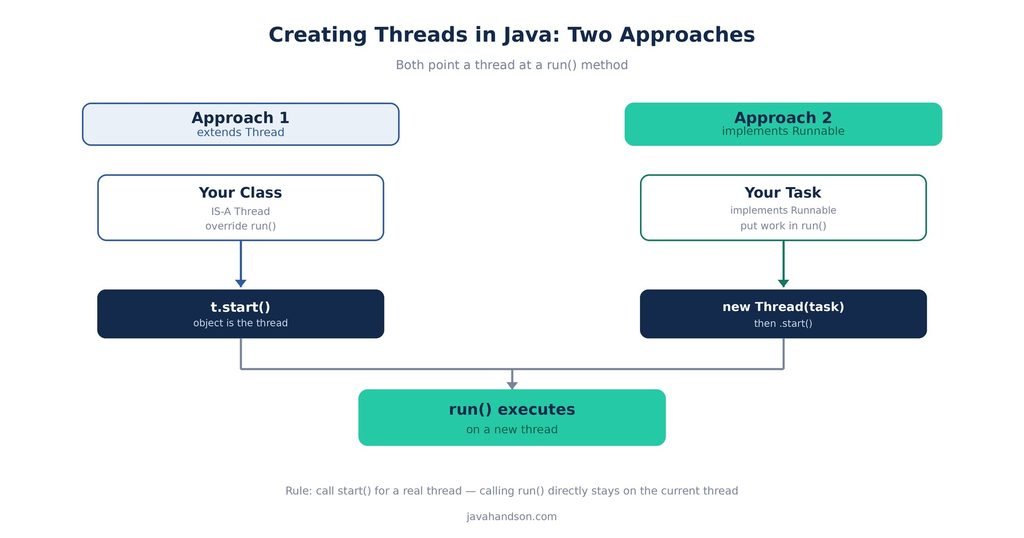
Before we write code, let us set the scene. Every Java program starts with one thread already running. It is called the main thread. Your main() method runs on it.
A thread does one job: it runs some code. When you create a new thread, you are asking Java to run a block of code on a separate lane. The main lane keeps going, and your new lane runs beside it.
A thread runs its code in a method called run(). This method is the core of the topic. Any task you place inside run() is what the thread will execute. We cover two approaches for one main reason: to inform Java about what should go in the run() method.
Why bother with a second lane at all? Think of a real app. A user clicks a button that starts a big export. If that export ran on the main thread, the whole screen would freeze until it finished. Nobody likes a frozen app. A second thread does the export while the screen stays alive and clickable.
That is the core promise of threads: do slow work in the background and keep the rest of the program responsive. Both approaches in this guide exist to make that happen.
| 💡 Interview Insight Interviewers love to ask what the run() method is for. Keep it simple: run() holds the code that a thread executes. It is the task. Everything else in this topic is just plumbing to point a thread at the right task. |
One approach to creating a new thread in Java is to define your own class that extends the built-in Thread class. By inheriting from the Thread class, you can override its run() method, allowing you to implement your custom code that will execute when the thread is run. This provides a straightforward way to handle multithreading in your Java applications.
Here is a small example. We build a class that prints a few numbers on its own thread.
class NumberPrinter extends Thread {
    // override run() with the work we want done
    public void run() {
        for (int i = 1; i <= 3; i++) {
            System.out.println("Thread says: " + i);
        }
    }
}
Notice two things. Our class says extends Thread, so it is a Thread now. And we wrote a run() method that holds the actual work. That loop is what the new thread will do.
Writing the class is only half the job. Now we make an object and start it.
public class Main {
    public static void main(String[] args) {
        NumberPrinter t = new NumberPrinter();
        t.start();   // this launches a new thread
        System.out.println("Main thread is done");
    }
}
We use start() instead of run(). This choice is important, and we will discuss it later. For now, understand that start() creates a new thread, and then that thread calls run() by itself.
The output order can shift from run to run. The main thread and the new thread race a little. That is normal, and it is the whole point of threads.
This approach has one real weakness. Java lets a class extend only one parent class. So if your class already extends Thread, it cannot extend anything else.
When working with classes in your project, you may encounter a scenario where a class needs to extend a specific base class. This can create a challenge if you also want that class to extend the Thread class, as most programming languages typically allow only single inheritance. This limitation is a key reason many development teams opt for alternative design patterns to overcome these restrictions and maintain flexibility in their application’s architecture.
Here is a concrete case. Imagine you have an Employee class in your app. You want an Employee to also run on its own thread. If Employee extends Thread, it can no longer extend a shared base class like Person. You are forced to choose one parent. With Runnable, that problem simply goes away, as we will see next.
| 💡 Interview Insight A classic interview point: extending Thread burns your one shot at inheritance. Java allows only single class inheritance, so your class can never extend another class after it extends Thread. This is the number one reason Runnable wins in real code. |
The second way to manage concurrency in Java is by implementing the Runnable interface. This interface is quite straightforward, as it consists of a single method called run(). To use it, you create a class that implements Runnable, define the desired tasks or work within the run() method, and then pass an instance of this class to a Thread. This approach allows for a clean separation of task definition and execution, enabling better organization of code when working with multiple threads.
Here is the same number-printing task, this time with Runnable.
class NumberTask implements Runnable {
    // the single method Runnable asks for
    public void run() {
        for (int i = 1; i <= 3; i++) {
            System.out.println("Task says: " + i);
        }
    }
}
Our class says implements Runnable now, not extends Thread. The run() method looks the same as before. The difference is that this class is not a Thread. It is just a task that a thread can run.
Since our class is not a Thread, we need a real Thread to run it. So we create a Thread and pass our task into it.
public class Main {
    public static void main(String[] args) {
        NumberTask task = new NumberTask();
        Thread t = new Thread(task);   // hand the task to a thread
        t.start();                     // start the thread
        System.out.println("Main thread is done");
    }
}
We build the task first. Then we wrap it in a Thread. Then we call start() on that Thread. The thread picks up our task and runs its run() method for us.
At first this looks like extra work. You made two objects instead of one. But there is a real payoff.
The task class you are using is now free, meaning it can implement an interface. This flexibility allows it to extend any class you choose. In Java, a class can implement multiple interfaces while extending a single parent class. This capability is highly beneficial for large projects, as it provides greater versatility and organization in your code structure.
The Runnable interface has only one method, which makes it a functional interface. This means you can use a lambda expression to replace an entire class. This practice is very common in new code nowadays.
Watch how short it gets.
public class Main {
    public static void main(String[] args) {
        Runnable task = () -> {
            for (int i = 1; i <= 3; i++) {
                System.out.println("Lambda says: " + i);
            }
        };

        Thread t = new Thread(task);
        t.start();
    }
}
No separate class. No implements keyword. Just the work itself, handed straight to a Thread. You can even inline it in one shot:
new Thread(() -> System.out.println("Hello from a thread")).start();That one line creates a task, wraps it in a thread, and starts it. Clean and quick.
Should you always use a lambda then? Not quite. Lambdas are perfect for short tasks. But if your task is long or has many steps, a named class or method reads better. A giant lambda crammed into a Thread call is hard to follow. Use the short form for short work, and a proper class or method for bigger jobs.
| 💡 Interview Insight Lambdas for threads are a Java 8+ feature. If your project is stuck on an older Java version, use the plain Runnable class instead. The idea is identical; only the syntax is shorter with a lambda. |
Now let us settle the debate with a clear table. Both approaches run code on a new thread. The differences are about design and flexibility, not raw ability.
| Point | Extending Thread | Implementing Runnable |
|---|---|---|
| Inheritance | Uses up your single parent slot | Leaves you free to extend another class |
| What you write | A class that IS a thread | A task that a thread runs |
| Reusability | Tied to one thread | Same task fits thread pools and executors |
| Design | Task and thread are mixed | Task and thread stay separate |
| Lambda support | Not possible | Yes, since Runnable is functional |
| Common in real code | Rare | Very common |
Read the table top to bottom and a pattern jumps out. Runnable wins on almost every line that matters for real projects.
Let us pull the reasons together in one place. When people say “prefer Runnable,” here is what they mean.
Java enforces a single inheritance model, which means a class can only have one parent class. This becomes a limitation when you extend the Thread class because it occupies that inheritance slot. On the other hand, using the Runnable interface allows your class to remain flexible, as it can still extend any other class you need in addition to implementing Runnable. This design offers more versatility in your class hierarchy.
A Runnable represents a task that needs to be executed, while a Thread serves as a worker responsible for carrying out that task. Maintaining a clear separation between the two is considered good design practice. The key advantage is that the Runnable does not depend on the specifics of how it is executed. This means that you can run it on a standard thread today and switch to a thread pool tomorrow without making any modifications to the task itself. This flexibility enhances the versatility and maintainability of your code.
Real apps rarely make raw threads one by one. They use thread pools through the executor framework. Those tools take a Runnable, not a Thread subclass. So writing Runnable from the start means your code fits right in later.
A Runnable can be efficiently simplified into a single lambda expression, allowing for concise and easily readable representations of small tasks. In contrast, extending the Thread class does not offer the same level of clarity or brevity.
Yes, sometimes. The Thread approach is not evil. It is just less flexible. There are a few small cases where it feels fine.
Maybe you are writing a quick demo and you do not care about design. Maybe you truly need to override other Thread methods, not just run(). In those rare spots, extending Thread can read a little cleaner.
But be honest about how rare that is. For day-to-day work, Runnable is the safer default. When in doubt, pick Runnable and move on.
| 💡 Interview Insight When an interviewer asks which approach you prefer and why, lead with inheritance. Say: I prefer Runnable because it keeps my class free to extend another class, it separates the task from the thread, and it works with thread pools and lambdas. That one sentence covers the whole answer. |
Before the big mistake, let us cover two small skills you will use every day. They are easy, and they make your thread code much nicer to read and debug.
Every thread has a name. If you do not set one, Java picks a dull default like Thread-0. When you have many threads, those default names are useless. So give your threads real names.
Thread t = new Thread(() -> {
    System.out.println("Running on: " + Thread.currentThread().getName());
});
t.setName("download-worker");
t.start();
Now your logs read like plain English. Instead of Thread-3, you see download-worker. That small habit saves real time when something breaks and you are staring at a log file.
You can find out which thread is running your code by using Thread.currentThread(). This method gives you the thread object for the current lane.
System.out.println("Main runs on: " + Thread.currentThread().getName());
// prints: Main runs on: main
This is handy when you want to prove a task really ran on a new thread and not on main. Print the name inside run(), then print it in main(), and compare. Two different names means two different threads.
| 💡 Interview Insight A neat interview trick: to show that start() creates a new thread but a direct run() call does not, print Thread.currentThread().getName() inside run(). With start(), you see a worker name. With a direct run() call, you see main. Same output text, different thread name. |
This is the trap that catches almost every beginner. It also shows up in interviews all the time. So slow down and read this part twice.
The start() method is the pivotal function in multithreading within Java. When you invoke this method on a thread instance, it signals the Java Virtual Machine (JVM) to create a new thread of execution. This new thread operates independently, executing the code within the run() method that you have defined. Meanwhile, the original thread—often referred to as the main thread—continues its own execution path concurrently. This parallelism allows multiple tasks to be performed simultaneously, enhancing the application’s efficiency and responsiveness.
In short: start() gives you real, concurrent execution. Two lanes running at once.
Here’s a revised and more detailed version of the text:
It’s important to understand a key aspect of how threading works in Java. The run() method is simply a standard method like any other method in the Java programming language. If you invoke the run() method directly by calling it from your code, Java does not create a new thread for its execution. Instead, it executes the run() method on the same thread from which it was called, behaving just like any other regular method invocation. This means that if you need the run() method to execute concurrently in a separate thread, you must explicitly create a thread instance and pass the runnable that contains the run() method, or use other threading constructs like Executors or ForkJoinPool. Failing to do this will lead to blocking the current thread until the run() method completes, which eliminates the benefits of threading altogether.
So calling run() directly gives you no new thread at all. The code runs, sure, but it runs on the same old thread. No parallel work happens.
Look at these two lines side by side.
Thread t = new Thread(() -> System.out.println("hi"));

t.start();   // correct: creates a new thread, then that thread runs run()
t.run();     // wrong: no new thread, runs on the current thread
Both print “hi.” That is why the bug is so sneaky. The output looks fine, so you think it works. But with run(), you never got a second thread. Your whole program is still single-threaded, and you did not notice.
| 💡 Interview Insight Remember it this way: start() starts a new thread; run() just runs code where you stand. Calling run() directly is legal Java, but it defeats the entire purpose. Always call start() when you want real concurrency. |
In Java, a thread represents a single sequence of execution within a program, and it is designed to be a one-time worker. When you invoke the start() method on a thread object, it initiates the thread and allows it to begin executing its associated task. However, it’s important to note that you can call the start() method on a specific thread instance only once. If you attempt to call start() again on the same thread object after it has completed its task, Java will throw an IllegalThreadStateException. This exception indicates that the thread cannot be restarted because it has already finished its execution.
Once a thread has executed its task and the run method has completed, that particular thread instance is considered finished and cannot be reused. If you need to perform the same task again, you must create a new instance of the thread. In summary, each thread is unique in its lifecycle; after it has completed running, you’ll need to instantiate a new thread for another execution of the task.
Let us end with a tiny scene that shows why threads matter. Imagine you download a file while a spinner keeps moving. Here the download is the background task, and the spinner is the main thread staying alive.
public class Downloader {
    public static void main(String[] args) {
        Runnable download = () -> {
            for (int i = 10; i <= 100; i += 10) {
                System.out.println("Downloaded " + i + "%");
                sleep(200);
            }
            System.out.println("Download complete");
        };

        new Thread(download).start();   // runs in the background

        // main thread is free to do other work
        System.out.println("You can keep using the app...");
    }

    static void sleep(long ms) {
        try { Thread.sleep(ms); } catch (InterruptedException e) { }
    }
}
That download runs on its own thread. Meanwhile the main thread prints its message right away and does not wait. So you get the everyday value of threads: keep the app moving while slow work happens elsewhere.
We used a lambda Runnable here on purpose. It is short, it keeps the task separate from the thread, and it is the style you will meet most often in real code.
When you first run threaded code, the output can surprise you. Run it once, you see one order. Run it again, you see another. New learners often think their code is broken. It is not. This is exactly how threads behave.
Java does not run threads in a set order. A system component called the thread scheduler decides which thread runs and when. It can switch between threads at any time. You do not control this switching, and you should not try to.
So two threads printing numbers may interleave in odd ways. One might print 1, 2, then the other jumps in, then the first finishes. That mix is normal and expected.
Here are two simple threads racing to print. Watch the output change between runs.
Runnable job = () -> {
    String name = Thread.currentThread().getName();
    for (int i = 1; i <= 3; i++) {
        System.out.println(name + " -> " + i);
    }
};

Thread a = new Thread(job, "A");
Thread b = new Thread(job, "B");
a.start();
b.start();
You might see A print all its numbers first. Or B might sneak in between. Both results are correct. That is the nature of concurrent code.
Never write code that assumes a fixed thread order. If order matters, you need real coordination tools like join, locks, or synchronization. Those topics get their own articles. For now, just know this: unordered output is a feature of threads, not a bug in your code.
| 💡 Interview Insight Interviewers sometimes show threaded code and ask, “What is the output?” The safe answer is: the order is not guaranteed. The thread scheduler decides, so the output can differ each run. Saying a fixed sequence is a common trap answer. |
A few slips come up again and again. Watch for these.
Most of these come down to one habit: pause and ask whether you truly need a new thread, and whether Runnable would serve you better than Thread. Nine times out of ten, it will.
A: You can extend the Thread class and override its run() method, or implement the Runnable interface and pass your task to a Thread object. Both run your code on a new thread. Runnable is preferred in most real projects.
A: Java allows only one parent class. Extending Thread uses up that single inheritance slot, so your class cannot extend anything else. Runnable is an interface, so your class stays free to extend another class. Runnable also separates the task from the thread and works with thread pools and lambdas.
A: start() creates a new thread, and that new thread then calls run() on its own. Calling run() directly is just a normal method call — it runs on the current thread and creates no new thread at all. Always call start() when you want real concurrency.
A: Yes. Runnable is a functional interface with one method, so you can replace the whole class with a lambda, like new Thread(() -> System.out.println(“hi”)).start(). This is a Java 8+ feature. On older Java versions, use a plain Runnable class instead.
A: Java throws an IllegalThreadStateException. A thread is a one-time worker — once it has started and finished, it cannot be started again. To run the task again, create a new thread object.
A: The thread scheduler decides which thread runs and when, and it can switch between threads at any moment. So the output order is not guaranteed and can change between runs. If order matters, you need coordination tools like join, locks, or synchronization.
You now know both ways of creating threads in Java. You can extend the Thread class, or you can implement the Runnable interface. Both point a thread at a run() method full of your work.
Using Thread is easy, but it can be expensive. It uses one of your inheritance slots and combines the task with the thread. On the other hand, using Runnable keeps your class clean, separates the task from the worker, and works well with lambdas and thread pools. In most cases, you should choose Runnable.
And never forget the golden rule of this topic. Call start() to launch a real thread. Calling run() directly just runs the code where you are, with no new thread at all. Get that one right and you have the hardest part beaten.