Thread Methods in Java: start, run, sleep, join, and more
-
Last Updated: September 12, 2026
-
By: javahandson
-
Series

A beginner-friendly reference to the core thread methods in Java — start, run, sleep, join, yield, interrupt, isAlive, and more — each with a small runnable example.
When you first learn about threads in Java, you create one and call start(). This works well, but a Thread object offers much more. There are several helpful methods in Java that you will use frequently. Knowing these methods can save you a lot of trouble later on.
This article is a working reference. We go method by method. Each one gets a plain explanation and a tiny example you can run. No long theory. Just what the method does, when you use it, and the one thing people trip on.
Here is what we cover:
You only need to know how to create a thread. If you have written a class that extends Thread or a Runnable, you are ready to go.
This is the first trap every beginner hits, so let us clear it fast. Creating Threads in Java covers thread creation in full, so here we just hit the key point.
The start() method is responsible for creating a new thread in which your code will execute. Meanwhile, the run() method contains the implementation of the tasks you want to perform. While you define your logic within the run() method, it is not typical to call it directly; instead, it is invoked automatically when the thread is started.
Here is the mistake. If you call run() directly, nothing new happens. Your code just runs on the current thread, like any normal method call. No second thread is born.
class Task extends Thread {
    public void run() {
        System.out.println("Running on: " + Thread.currentThread().getName());
    }
}

Task t = new Task();
t.run();    // prints "main" — same thread, no new one
t.start();  // prints "Thread-0" — a real new thread
See the difference? Call run() and it says main. Call start() and a fresh thread does the work. So the rule is simple. Use start() to get a new thread. Never call run() by hand unless you have a strange reason.
| 💡 Interview Insight A common interview question: what happens if you call start() twice on the same thread? You get an IllegalThreadStateException. A thread can be started only once. After it finishes, you cannot restart it. |
In certain scenarios, you might need a thread to pause its execution for a period of time. For instance, this could be necessary when you’re regularly checking the status of a service every few seconds, or when you want to introduce a delay in a loop to allow a human observer to follow along more easily. The sleep() method is designed specifically for this purpose, enabling you to halt the thread’s activity temporarily to achieve your desired timing.
It is a static method on the Thread class. You pass the pause time in milliseconds. The current thread stops and does nothing for that time, then wakes up and carries on.
System.out.println("Start");
try {
    Thread.sleep(2000);   // pause for 2 seconds
} catch (InterruptedException e) {
    System.out.println("Sleep was interrupted");
}
System.out.println("Two seconds later");You must wrap sleep() in a try-catch, or declare the exception. Java forces this. Why?
In Java, a thread can sleep while waiting for a task to complete. However, another thread can interrupt this sleep. This interruption signals that something has changed, and the thread should stop waiting. When this happens, the sleep() method will throw an InterruptedException. This helps your code recognize that the sleep period ended early. Remember, sleep can be interrupted, and Java requires you to handle this situation in your code.
The sleep time is a request, not a promise. If you ask for 2000 milliseconds, you get at least that much. But the thread may wake a little late if the system is busy. So do not build anything that needs exact timing off sleep(). It is fine for pauses, not for precision clocks.
When the main thread initiates a worker thread to load data, there may be scenarios where it is crucial for the main thread to wait until the data is completely loaded before proceeding with subsequent operations. This is particularly important in situations where the availability of the loaded data is essential for the main thread’s functionality or workflow.
To facilitate this synchronization between threads, the join() method can be employed. The join() method effectively instructs the main thread to pause its execution until the specified worker thread has finished running. By calling join() on the worker thread, the main thread ensures that it will not continue to the next line of code until the worker has completed its data-loading task. This mechanism is vital for maintaining data integrity and ensuring that operations dependent on the loaded data are executed accurately.
You call it on the thread you want to wait for. The thread that calls join() then pauses until the other one is done.
Thread worker = new Thread(() -> {
    for (int i = 0; i < 3; i++) {
        System.out.println("Working... " + i);
    }
});

worker.start();
worker.join();   // main waits here until worker ends
System.out.println("Worker is done, main continues");
Without join(), the last line might print before the worker even starts its loop. With join(), main sits and waits, then prints its message once. That ordering is the whole point.
Like sleep(), join() can throw InterruptedException, so you handle it the same way. You can also pass a timeout, such as worker.join(1000), which means wait at most one second and then move on whether the worker finished or not.
| 💡 Interview Insight Interviewers love this: how do you make the main thread wait for several worker threads? Start them all, keep their references, then call join() on each one in turn. Main only moves on after the last join() returns. |
The yield() method serves as a suggestion to the thread scheduler, indicating that the current thread is willing to pause its execution. This allows other threads of the same priority an opportunity to run. It’s important to note that this is merely a hint to the scheduler and does not guarantee an immediate pause or context switch.
The key word is hint. The scheduler can honor it or completely ignore it. On many systems it does nothing useful at all. That is why you rarely see it in real code.
Runnable job = () -> {
    for (int i = 0; i < 5; i++) {
        System.out.println(Thread.currentThread().getName() + " step " + i);
        Thread.yield();   // "others can go now if they want"
    }
};

new Thread(job, "A").start();
new Thread(job, "B").start();
Run this and the output order may change, or it may not. There is no guarantee. Do not use yield() to control the order of your threads. If you need real ordering, use join() or proper coordination tools instead. Treat yield() as a curiosity you should recognize, not a tool you depend on.
You cannot force a Java thread to stop from outside. There is no safe kill switch. Instead, Java uses a polite system: you ask a thread to stop, and the thread checks for that request and decides what to do.
Three methods make up this system, and their names are close enough to confuse everyone. Let us take them one at a time.
When you invoke the interrupt() method on a thread, it primarily sets the interrupt flag for that particular thread by changing a boolean value to true. It’s important to note that this action does not forcibly stop the thread; it merely signals that an interruption has been requested. The actual handling of the interrupt needs to be managed by the thread itself, which can check its interrupt status and respond accordingly.
When a thread is in a sleeping state or waiting due to a join() operation, an interrupt can trigger it to wake up and throw an InterruptedException. However, if the thread is actively running, it will continue its execution, and it becomes the responsibility of your code to check for the interrupt flag and respond accordingly.
The isInterrupted() method asks, “has this thread been interrupted?” It returns true or false. Importantly, it leaves the flag alone. You can call it many times and it keeps reporting the same answer until the flag is cleared.
Thread task = new Thread(() -> {
    while (!Thread.currentThread().isInterrupted()) {
        System.out.println("Still working...");
    }
    System.out.println("Stopped cleanly");
});

task.start();
Thread.sleep(10);
task.interrupt();   // ask it to stop
The loop keeps going until someone sets the flag. Once interrupt() runs, the check fails, the loop ends, and the thread stops on its own terms. That is clean shutdown the Java way.
It’s important to understand a common pitfall related to the interrupted() method. This method is static and is designed to check the status of the current thread. A key aspect to keep in mind is that it clears the interrupt flag as a side effect when called. Therefore, if you call this method once, it may return true, indicating that the thread is interrupted. However, if you call it again immediately after, it will likely return false because the initial call has already cleared the interrupt flag.
Keep the two apart:
| 💡 Interview Insight Classic trap question: what is the difference between isInterrupted() and interrupted()? Both check the interrupt status. But interrupted() is static and resets the flag to false, while isInterrupted() is an instance method that does not touch it. Mixing them up causes bugs that vanish on the second check. |
The isAlive() method provides information about the status of a thread. It returns true if the thread has been started and has not yet completed its execution. Once the run() method completes, isAlive() will return false, indicating that the thread has finished its task.
Thread t = new Thread(() -> {
    try { Thread.sleep(100); } catch (InterruptedException e) {}
});

System.out.println(t.isAlive());   // false, not started yet
t.start();
System.out.println(t.isAlive());   // true, running now
t.join();
System.out.println(t.isAlive());   // false, finished
This is handy for quick checks and logging. You will often use it alongside join() to see the state of a thread at different points. Just know it is a snapshot. The answer can change the instant after you read it.
When you have many threads running, telling them apart matters. Good logs need names. Java gives you a few simple methods for this.
In Java, every thread is assigned a name, which can be useful for identification purposes. If a name is not explicitly set, Java will assign a default name, such as Thread-0. You can retrieve the name of a thread using the getName() method and modify it with the setName() method. Additionally, when creating a thread, you can directly provide a name through its constructor, which is considered a more organized approach.
Thread t = new Thread(() -> {
    System.out.println("Hi from " + Thread.currentThread().getName());
});

t.setName("data-loader");
t.start();
System.out.println("Thread name is: " + t.getName());
A clear name turns a messy log into a readable one. Instead of Thread-7 all over the place, you see data-loader or email-sender. On a real project, that small habit saves a lot of squinting.
The getId() method returns a unique long number for the thread. The JVM assigns it, and no two live threads share the same id. Names can repeat if you are careless, but ids do not. Use it when you need a guaranteed unique tag for a thread.
The currentThread() method is a static method that provides access to the Thread object representing the thread that is currently executing. This concept has been illustrated in the previous examples, demonstrating how it can be utilized in various scenarios.
Why does it matter? Because inside a method you often do not have a reference to the running thread. This static call gets it for you, anywhere, anytime.
public void doWork() {
    Thread me = Thread.currentThread();
    System.out.println("Name: " + me.getName());
    System.out.println("Id: " + me.getId());
    System.out.println("Alive: " + me.isAlive());
}
From that one reference you can read the name, the id, the interrupt flag, and more. It is the entry point to the thread you are actually on. That is why it shows up so often, and why forgetting it makes simple tasks harder than they should be.
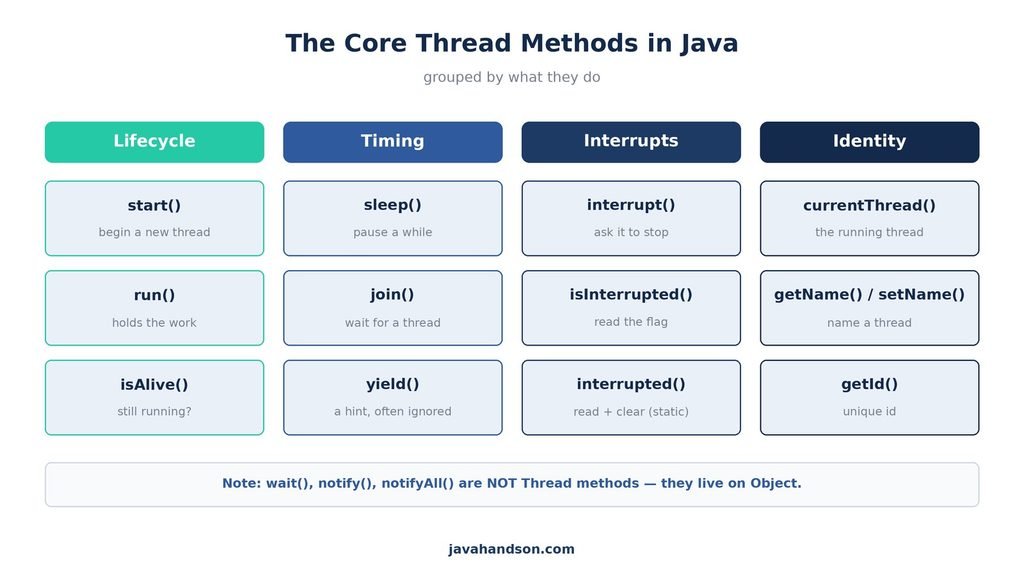
Here are the thread methods in Java at a glance, so you can scan and pick the one you need.
| Method | Static? | What it does |
|---|---|---|
| start() | No | Begins a new thread and runs run() on it |
| run() | No | Holds the work; do not call it directly |
| sleep(ms) | Yes | Pauses the current thread for a time |
| join() | No | Waits for another thread to finish |
| yield() | Yes | Hints the scheduler to let others run |
| interrupt() | No | Sets the interrupt flag on a thread |
| isInterrupted() | No | Reads the flag, leaves it set |
| interrupted() | Yes | Reads the flag of current thread, clears it |
| isAlive() | No | True if the thread is still running |
| getName() / setName() | No | Reads or changes the thread name |
| getId() | No | Returns a unique id for the thread |
| currentThread() | Yes | Returns the running thread object |
It’s important to note that the methods wait(), notify(), and notifyAll() are not part of the Thread class, but rather reside in the Object class. This means that every object in Java has access to these methods. They play a crucial role in thread coordination, utilizing an object’s monitor to facilitate communication between threads effectively. Understanding this distinction can help clarify how thread synchronization works in Java.
They belong to a different topic: threads talking to each other and sharing work safely. We cover them in wait and notify in Java. For now, just file this away so an interview question does not catch you off guard.
| 💡 Interview Insight Quick trap: are wait() and sleep() the same? No. sleep() is a static Thread method that just pauses. wait() is an Object method that releases a lock and waits for a notify. They live in different classes and solve different problems. |
A: start() creates a new thread and runs your run() code on it. Calling run() directly just runs the code on the current thread, so no new thread is created.
A: You get an IllegalThreadStateException. A thread can be started only once, and it cannot be restarted after it finishes.
A: isInterrupted() is an instance method that reads the interrupt flag and leaves it set. interrupted() is a static method that checks the current thread and clears the flag after reading it.
A: No. They belong to the Object class, not Thread. Every object has them because they work with the object’s monitor for inter-thread communication.
A: No. sleep() is a static Thread method that pauses the current thread without releasing any lock. wait() is an Object method that releases the lock and waits for a notify.
A: Start all the workers, keep their references, then call join() on each one. The main thread only moves on after the last join() returns.
A: yield() is only a hint to the scheduler that other threads of the same priority may run. The scheduler is free to ignore it, so it should not be used to control thread order.
The fundamental methods for managing threads in Java are relatively straightforward. However, there are common pitfalls that developers might encounter. For instance, it’s crucial to use start() to initiate a thread rather than directly calling run(), as the latter does not start a new thread. Additionally, it’s important to differentiate between Thread.interrupted() and Thread.isInterrupted(), as they serve distinct purposes. Finally, keep in mind that wait() should not be invoked on a Thread instance; it is meant to be used within synchronized blocks on objects. Understanding these nuances is essential for effective thread management in Java.
Keep this as a reference. Reach for start() to launch, sleep() to pause, join() to wait, and the interrupt methods for clean shutdown. Learn the quirks once, and threads stop feeling scary. They become tools you control.