Deadlock in Java: Causes and How to Avoid It
-
Last Updated: September 23, 2026
-
By: javahandson
-
Series

A deadlock in Java freezes threads with no crash. Learn the four Coffman conditions, a two-lock example, and how to detect and prevent it with jstack.
Two threads freeze. Neither one crashes, and no error prints. Your app just hangs there, doing nothing forever. That silent freeze is often a deadlock in Java, and it is one of the trickiest bugs a developer can hit.
The idea is simple, even if the bug feels scary. A deadlock happens when two threads wait on each other. Thread A holds something Thread B needs. Thread B holds something Thread A needs. So both wait, and neither moves.
The worst part is how quiet it is. There is no stack trace to read. The program does not die, so your monitoring may not even notice. Users just see a screen that never loads.
But here is the good news. Deadlock follows clear rules. Once you know those rules, you can spot it, reproduce it, and prevent it. That is exactly what this guide will teach you, step by step.
We will go deep, but the language stays simple. First comes the plain intuition. Then we cover the four conditions, build a deadlock on purpose, scale it to many threads, detect it with a thread dump, and finally prevent it in several ways.
You only need to know what a thread is and what a lock does. If you have used the synchronized keyword once or twice, you are ready. Here is the road ahead.
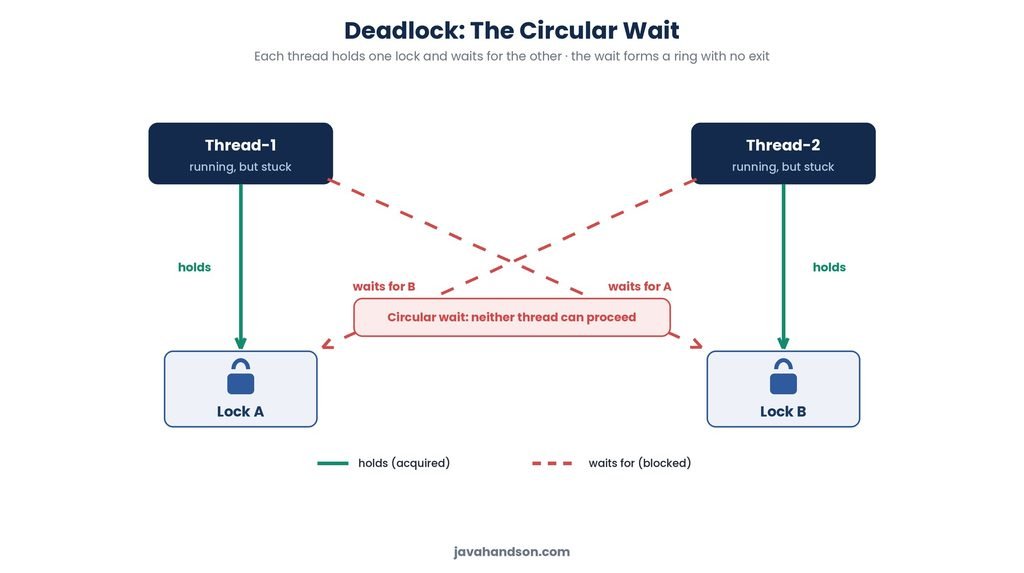
Before any code, let us build a clear mental picture. Deadlock is easier to grasp with a real-life story than with theory. So let us start there.
Imagine two people at a dinner table. There is one fork and one spoon between them. Both want to eat, and both need both utensils.
The first person grabs the fork. At the same moment, the second person grabs the spoon. Now the first waits for the spoon, and the second waits for the fork. Neither will let go, so both sit there hungry forever.
That is deadlock in one image. Each person holds one thing and waits for the other. Nobody backs down, so nobody wins. Swap the people for threads and the utensils for locks, and you have the exact bug we are studying.
In Java, threads often need locks to touch shared data safely. A lock lets one thread work while others wait their turn. This usually keeps things orderly.
Trouble starts when a thread needs two locks at once. Say Thread A grabs Lock 1 and then wants Lock 2. Meanwhile Thread B grabs Lock 2 and then wants Lock 1. Each holds what the other needs, so both freeze.
That frozen state is a deadlock. The threads are alive, yet stuck. They will wait for each other until you kill the program. No amount of patience will fix it on its own.
A Java thread is always in one of a few states. Knowing them helps you read a freeze correctly. The states are NEW, RUNNABLE, BLOCKED, WAITING, TIMED_WAITING, and TERMINATED.
In a lock deadlock, the stuck threads sit in the BLOCKED state. BLOCKED means a thread is waiting to enter a synchronized block. It wants a monitor lock that another thread holds.
This detail matters during detection. When you open a thread dump, deadlocked threads show up as BLOCKED. Each one names the lock it wants and the thread that owns it. That pairing is your smoking gun.
A crash is loud, and a crash is easy to notice. Deadlock is the opposite, which makes it worse in some ways. Here is why it hurts so much.
So deadlock can sit hidden in your code for months. Then one busy day, the timing lines up and everything locks. That is why understanding it early pays off so well.
Deadlock is timing-dependent, so it is often a Heisenbug. A Heisenbug is a bug that hides when you look for it. Add a log line or a debugger, and the timing shifts, so the freeze disappears.
This is why deadlocks slip past tests. A quick unit test rarely hits the exact overlap. A loaded production server hits it often. That mismatch is what makes deadlock so frustrating to chase.
| 💡 Interview Insight A common opener in interviews is “explain deadlock like I am five.” Use the dinner-table story: two people, one fork, one spoon, each holding one and waiting for the other. Then map it to two threads and two locks. A clear analogy shows you truly understand the concept. |
Every deadlock needs four things to be true at once. These are called the Coffman conditions, named after the researchers who listed them. Do not worry about the fancy name.
The key point is powerful and simple. All four must hold together for a deadlock to form. Break even one, and the deadlock cannot happen. Let us go through each in plain words.
A resource can be held by only one thread at a time. That is what a lock does. While one thread holds it, others must wait.
This is normal and often needed. You lock shared data so two threads do not corrupt it. But this exclusive hold is the first ingredient of trouble.
A thread holds one resource while waiting for another. It does not let go of what it already has. It just keeps waiting for the next one.
Picture our diner holding the fork while reaching for the spoon. The fork stays in hand the whole time. That grip-and-reach behaviour is the second ingredient.
You cannot force a thread to give up a lock. Nobody can snatch it away. The thread must release it on its own, when it is good and ready.
So if a thread holds a lock and then freezes, that lock is stuck too. No outside force can pry it loose. This is the third ingredient of a deadlock.
This is the one that closes the trap. A chain of threads each waits for the next, and the chain loops back. Thread A waits for B, and B waits for A.
With two threads, the circle is short and direct. With more threads, the loop can be longer. Either way, the wait forms a ring with no exit. This fourth ingredient completes the deadlock.
Here is the practical gold in these four conditions. You do not have to attack all of them. Remove any single one, and deadlock becomes impossible.
Most real fixes target the circular wait, and we will see how soon. Some fixes attack hold-and-wait instead, often with a timeout. Keep this idea in your pocket, because it drives every prevention trick below.
| 💡 Interview Insight Interviewers often ask you to list the four conditions and then say how to break one. Name mutual exclusion, hold and wait, no preemption, and circular wait. Then add that lock ordering breaks the circular wait, while tryLock breaks hold and wait. Linking theory to a real fix is what earns the marks. |
Enough theory for a moment. Let us build a real deadlock in Java that you can run. Money transfers between two accounts make a perfect example.
Say we have two bank accounts. To move money safely, we lock both accounts during the transfer. That way no other thread can change a balance mid-transfer.
Sounds sensible, right? The catch is the order of locking. One transfer locks account A first, and another transfer locks account B first. That tiny difference is all it takes.
Here is the code. Read the transfer method closely, and watch the order in which the two locks are taken.
public class Account {
    private int balance = 1000;

    // Locks 'this' account first, then the other account.
    public void transfer(Account to, int amount) {
        synchronized (this) {                 // lock #1: this account
            System.out.println(Thread.currentThread().getName()
                               + " locked " + this);
            sleep(50);                         // give the other thread time
            synchronized (to) {               // lock #2: the other account
                this.balance -= amount;
                to.balance += amount;
                System.out.println("Transfer done by "
                                   + Thread.currentThread().getName());
            }
        }
    }

    private void sleep(long ms) {
        try { Thread.sleep(ms); } catch (InterruptedException e) { }
    }
}
Now let us run two transfers in opposite directions at the same time. This is where the trap springs shut.
public class DeadlockDemo {
    public static void main(String[] args) {
        Account a = new Account();
        Account b = new Account();

        // Thread 1: a -> b, so it locks a first, then b
        Thread t1 = new Thread(() -> a.transfer(b, 100), "Thread-1");
        // Thread 2: b -> a, so it locks b first, then a
        Thread t2 = new Thread(() -> b.transfer(a, 200), "Thread-2");

        t1.start();
        t2.start();
        // The program hangs here — both threads are stuck.
    }
}
Run this, and it freezes almost every time. Both transfers print their first lock message. After that, nothing happens. The program hangs, and you have to kill it by hand.
Let us trace it step by step. The small sleep makes the timing line up, so the deadlock is easy to see.
That final line is the deadlock. Each thread holds one lock and waits for the other. The circle is closed, so both wait forever.
You may wonder about that Thread.sleep call. It is not part of a real fix or a real bug. It is only there to widen the timing window.
Without the sleep, one thread might grab both locks before the other even starts. Then no deadlock shows, and the code looks safe. This is the scary part of deadlock. The bug is real, yet it hides unless the timing is just wrong.
So the sleep does not create the deadlock. It only makes a rare event happen every time. In production, heavy load plays the same role, and the freeze finally appears.
Notice how all four conditions show up here. Each synchronized block gives mutual exclusion. Each thread holds one lock while waiting for the second, which is hold and wait.
Also, no thread can be forced to release its lock, so there is no preemption. And Thread-1 waits on Thread-2 while Thread-2 waits on Thread-1, which is the circular wait. All four line up, and the deadlock is complete.
| 💡 Interview Insight This bank-transfer example is a classic interview task. You may be asked to write code that deadlocks, or to spot the bug in code like this. The key detail is the opposite lock order across the two threads. Point to that order, and you show you know the real cause. |
Deadlock is not limited to two threads. The circle can be much bigger. The most famous larger example is the dining philosophers problem.
Picture five philosophers sitting around a round table. Between each pair sits one chopstick, so there are five chopsticks in total. To eat, a philosopher needs both the left and the right chopstick.
Now suppose every philosopher picks up the left chopstick at the same time. Each one then reaches for the right chopstick. But every right chopstick is already someone’s left chopstick.
So all five philosophers hold one chopstick and wait for the next. The wait forms a ring around the whole table. Nobody eats, and the table is deadlocked.
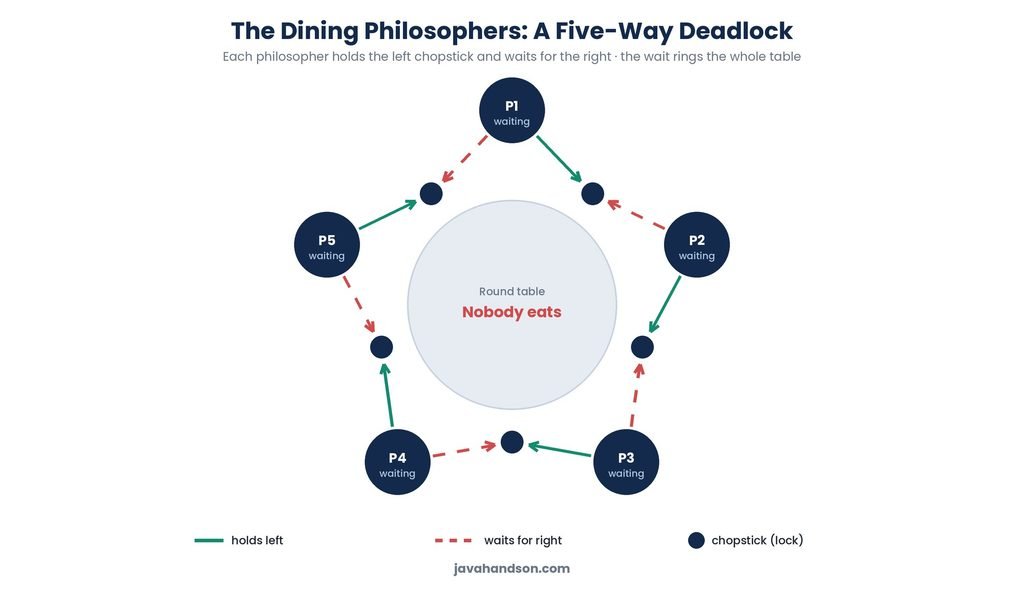
In our bank example, the circle had just two links. Here it has five. But the shape is the same, and so is the cause.
Each philosopher is a thread. Each chopstick is a lock. Everyone grabs locks in the same greedy left-then-right pattern. That shared pattern is what builds the ring.
The four conditions hold here too, just on a bigger scale. The fix is also the same idea we will use everywhere: change the lock order.
For example, make one philosopher pick up the right chopstick first. That one change breaks the perfect ring. The circular wait cannot close, so the deadlock is gone.
| 💡 Interview Insight The dining philosophers problem is a favourite in senior interviews. If asked, explain the five-way circular wait and then give the fix: break the symmetry by making one philosopher pick up chopsticks in the opposite order. Naming both the cause and the fix shows real depth. |
So your app is frozen. How do you know it is a deadlock and not something else? Java gives you good tools to find out. Let us look at them.
The first sign is a hang with no error. Some requests stop responding, yet the process is still alive. CPU usage often drops near zero, because the stuck threads are just waiting.
That quiet, low-CPU freeze is a strong hint. A busy loop would burn CPU, but a deadlock does not. So a frozen, idle app points you toward locks.
The best tool here is a thread dump. A thread dump is a snapshot of every thread and what it is doing. The JDK ships a command called jstack that grabs one for you.
First, find the process id of your Java app. The jps command lists running Java processes. Then pass that id to jstack, like this.
# 1. Find the process id (PID) of your Java program
jps

# 2. Take a thread dump using that PID
jstack <pid>

# On many systems you can also press Ctrl+Break in the
# console where the app runs to print a thread dump.
The JVM is smart about this. It scans the locks and often finds the deadlock for you. It then prints a clear section right in the dump.
Look for a line that says “Found one Java-level deadlock.” That line is the JVM telling you exactly what went wrong. Below it, the dump names the threads and the locks involved.
Found one Java-level deadlock:
=============================
"Thread-1":
  waiting to lock monitor 0x... (object 0x..., a Account),
  which is held by "Thread-2"
"Thread-2":
  waiting to lock monitor 0x... (object 0x..., a Account),
  which is held by "Thread-1"

Java stack information for the threads listed above:
"Thread-1":
    at Account.transfer(Account.java:12)
    - waiting to lock <0x...> (a Account)   // BLOCKED here
    - locked <0x...> (a Account)            // already holds this
Read it slowly and the story is clear. Thread-1 holds one lock and waits for another that Thread-2 holds. Thread-2 does the mirror image. The dump even points to the exact line in your code.
Notice the two markers in the stack. One line says “locked,” which is the lock the thread already owns. The other says “waiting to lock,” which is the lock it wants. Match those across threads, and you see the circle.
Sometimes you want your app to notice a deadlock itself. Java has an API for exactly that. It is called ThreadMXBean, and it can find deadlocked threads at runtime.
You can run a small watchdog thread that checks now and then. If it finds a deadlock, it logs the threads or raises an alert. Here is the core idea in a few lines.
import java.lang.management.*;

ThreadMXBean bean = ManagementFactory.getThreadMXBean();

// Returns the ids of deadlocked threads, or null if there are none.
long[] ids = bean.findDeadlockedThreads();

if (ids != null) {
    ThreadInfo[] infos = bean.getThreadInfo(ids);
    for (ThreadInfo info : infos) {
        System.out.println("Deadlocked: " + info.getThreadName());
    }
    // now alert, log, or dump the stack for investigation
}
This will not fix the deadlock for you. But it turns a silent freeze into a loud alert. In a long-running service, that early warning can save hours of guessing.
The jstack command is not your only option. A few graphical tools do the same job with a nicer view.
For quick checks on a server, jstack is usually fastest. For a deeper look on your own machine, the GUI tools help a lot. Either way, the deadlock section reads the same.
| 💡 Interview Insight Expect the question “how do you detect a deadlock in production?” A strong answer names thread dumps via jstack, and mentions the “Found one Java-level deadlock” line. Add that deadlocked threads show as BLOCKED, and name jconsole or VisualVM as GUI options. Knowing the actual tools marks you as hands-on. |
Detecting a deadlock is useful, but preventing one is far better. The good news is that prevention is mostly about discipline. A few simple habits go a long way.
The most reliable fix is a global lock order. Decide one fixed order for taking locks, and make every thread follow it. When all threads lock in the same order, the circle can never form.
Think back to our bank example. The bug was that one thread locked a first and the other locked b first. If both always lock the lower account id first, the problem disappears. Same locks, same work, just a consistent order.
Let us fix the transfer method. We give each account a unique id. Then we always lock the smaller id first, no matter which direction the money flows.
public class Account {
    private final int id;        // a unique, fixed id per account
    private int balance = 1000;

    public Account(int id) { this.id = id; }

    public void transfer(Account to, int amount) {
        // Always lock the lower id first, then the higher id.
        Account first  = this.id < to.id ? this : to;
        Account second = this.id < to.id ? to : this;

        synchronized (first) {
            synchronized (second) {
                this.balance -= amount;
                to.balance   += amount;
            }
        }
    }
}
Now both threads always take the locks in the same order. Thread-1 and Thread-2 both grab the lower id first. The circular wait cannot happen, so the deadlock is gone.
This is the single most important trick. Whenever a piece of code needs several locks, give those locks a fixed order. Then apply that order everywhere, without exception.
Sometimes your objects have no clean id to sort by. You can fall back on System.identityHashCode to order them. It gives each object a number you can compare.
But there is a rare snag. Two different objects can share the same hash value. When that happens, your ordering fails, and the deadlock risk returns. So you need a backup plan.
The backup is a third, static tie-breaker lock. When two hashes tie, both threads grab this extra lock first. That forces them into single file for that one rare case.
private static final Object TIE_LOCK = new Object();

public void transfer(Account from, Account to, int amount) {
    int h1 = System.identityHashCode(from);
    int h2 = System.identityHashCode(to);

    if (h1 < h2) {                 // order by hash: lower first
        synchronized (from) {
            synchronized (to) { doTransfer(from, to, amount); }
        }
    } else if (h1 > h2) {          // higher hash: reverse the pair
        synchronized (to) {
            synchronized (from) { doTransfer(from, to, amount); }
        }
    } else {                       // rare: equal hashes
        synchronized (TIE_LOCK) {  // tie-breaker orders the threads
            synchronized (from) {
                synchronized (to) { doTransfer(from, to, amount); }
            }
        }
    }
}
This pattern comes straight from real production code. The tie-breaker is only touched in the rare hash-collision case. So it stays fast, yet it closes the last tiny gap.
Another approach is to stop waiting forever. Instead of blocking on a lock, you try to get it for a limited time. If the time runs out, you back off and retry later.
Plain synchronized cannot do this, since it waits with no timeout. For that you need ReentrantLock and its tryLock method. This lets a thread give up rather than freeze.
// A ReentrantLock can try for a lock with a timeout.
if (lock.tryLock(1, TimeUnit.SECONDS)) {
    try {
        // got the lock — do the work here
    } finally {
        lock.unlock();
    }
} else {
    // could not get the lock in time — back off and retry
}
This breaks the hold-and-wait condition. A thread no longer clings to a lock while blocked forever. We cover ReentrantLock and tryLock in depth in Article 16 — Locks in Java: ReentrantLock vs synchronized.
An open call means calling a method while you hold a lock. If that method is code you did not write, it is alien code. You cannot see what locks it might grab.
This is a hidden deadlock trap. The alien method may lock something you never expected. Now you hold two locks in an order you never planned. So try to call other code outside your locked block whenever you can.
Lock ordering and timeouts are the big two. But a few smaller habits also cut your risk sharply. Keep these in mind as you write threaded code.
None of these needs deep magic. They are just good manners for shared data. Follow them, and most deadlocks never get a chance to form.
| 💡 Interview Insight For “how do you prevent deadlock,” lead with lock ordering, since it breaks the circular wait. Mention the tie-breaker lock for objects with no natural order. Then add tryLock with a timeout to break hold and wait. A layered answer like this shows you can go well beyond a single trick. |
Not every deadlock comes from two synchronized blocks. Some hide in resource pools and frameworks. These are trickier, because there is no obvious pair of locks to spot.
Thread pools have a fixed number of worker threads. Say every worker is busy running a task. Now a task waits for the result of another task in the same pool.
But that second task cannot start, because no worker is free. The waiting tasks hold all the workers, and the needed tasks wait for a worker. This is a resource deadlock, and it freezes the pool.
The fix is to never submit a task that waits on another task in the same pool. If you must, use separate pools for the two levels of work. Keeping dependent work off one small pool avoids the trap.
The same shape appears with database connections. A pool holds a limited number of connections. Suppose one request needs two connections at once and holds the first while it waits for a second.
Under load, every request may grab one connection and wait for a second that never comes. The pool is drained, and all requests hang. It looks like a slowdown, but it is really a resource deadlock.
So be careful about holding one scarce resource while asking for another. Grab what you need in one go, or size the pool with this pattern in mind. Small habits here save big outages.
Databases can deadlock too, when two transactions lock rows in opposite orders. This feels just like our Java example, but it lives in the database. The cause is the same circular wait.
There is one happy difference, though. Most databases detect these deadlocks on their own. They pick one transaction as the victim and roll it back with an error. Java gives you no such automatic rescue, which is why prevention matters more on the Java side.
| 💡 Interview Insight A strong candidate mentions resource deadlocks, not just lock deadlocks. Bring up thread-pool starvation, where tasks in a pool wait on other tasks in the same pool. Add that databases auto-detect and roll back a victim, while the JVM does not. That contrast shows broad, real-world understanding. |
Deadlock has two cousins that people often mix up. They are livelock and starvation. Both leave a thread stuck, but for different reasons. Let us keep this short and clear.
In a deadlock, threads freeze and stop. In a livelock, threads keep running, yet still make no progress. They react to each other over and over, but the work never gets done.
Picture two people in a narrow hallway. Both step left to pass, then both step right, again and again. They are moving the whole time, but neither ever gets through. That is livelock in a picture.
Starvation is different again. Here a thread never gets the resource it needs, because other threads keep taking it first. The starved thread is ready, but it always loses the race.
This often comes from unfair scheduling or greedy high-priority threads. One thread hogs the lock, and a lower-priority thread waits and waits. It is not frozen, but it never gets served.
Here is the difference in one glance. All three are progress problems, but the cause differs each time.
Knowing these apart helps you name a bug correctly. A frozen app with idle threads points to deadlock. A busy app that never finishes points to livelock. And a single slow, ignored task often means starvation.
| 💡 Interview Insight A neat interview question is “deadlock vs livelock vs starvation.” Say deadlock means stuck and frozen, livelock means busy but stuck, and starvation means always waiting for a turn. One sharp line each is enough. Crisp distinctions here read as real experience. |
Most deadlocks come from a handful of habits. Spot these in your code early, and you dodge a lot of pain. Here are the usual suspects.
This is the number one cause, as our bank example showed. Two code paths grab the same locks in opposite orders. Fix it with a single global lock order everywhere.
The longer you hold a lock, the wider the danger window. Slow work inside a synchronized block invites trouble. Do the heavy work outside the lock, and lock only the tiny critical part.
Say you call a method you did not write while holding a lock. That method might grab another lock behind your back. Now you have a nested lock you never planned for. Avoid calling unknown code inside a locked block.
More locks mean more chances for a bad order. Sometimes one coarser lock is safer than several fine ones. Simpler locking is often better locking, especially early on.
Let us wrap it all up. A deadlock in Java happens when threads wait on each other in a circle. Each holds a lock the other needs, so both freeze with no error and no crash.
Every deadlock needs four conditions together: mutual exclusion, hold and wait, no preemption, and circular wait. Break any one, and the deadlock cannot form. That single idea powers all your fixes.
When a freeze does happen, reach for a thread dump with jstack. Look for the “Found one Java-level deadlock” line, and it points you to the guilty threads and locks. Detection is quick once you know where to look.
For prevention, lock ordering is your best friend, with a tie-breaker for the rare tie. Add tryLock timeouts, watch out for alien calls, and mind your resource pools. Follow these habits, and deadlock stops being a mystery you fear.
A: A deadlock is when two or more threads wait on each other forever. Each thread holds a lock the other needs, so none can move ahead. The program does not crash, it just freezes with no error.
A: They are the Coffman conditions: mutual exclusion, hold and wait, no preemption, and circular wait. All four must be true at once for a deadlock to form. Break any one, and the deadlock cannot happen.
A: Take a thread dump with jstack <pid>, or press Ctrl+Break in the console. Look for the line “Found one Java-level deadlock”, which names the stuck threads and locks. Tools like jconsole, VisualVM, or the ThreadMXBean API can also detect it.
A: The best fix is lock ordering: make every thread acquire locks in the same fixed order, which breaks the circular wait. You can also use tryLock with a timeout so a thread backs off instead of waiting forever. Keep lock scope small and avoid nested locks.
A: In a deadlock, threads are stuck and frozen. In a livelock, threads keep running but make no progress, like two people dodging in a hallway. In starvation, a thread is ready but never gets its turn because others keep taking the resource first.
A: No. Java has no built-in way to break a deadlock once it forms, because locks cannot be preempted. The stuck threads stay stuck until you restart the app. That is why prevention through lock ordering matters so much.