Introduction to java.util.concurrent Package in Java: A Beginner’s Map
-
Last Updated: September 28, 2026
-
By: javahandson
-
Series

Learn what the java.util.concurrent package offers: executors, locks, synchronizers, atomics and concurrent collections, explained simply with a reading map.
By now, you probably know how to create threads by hand. You may also have used the synchronized keyword, wait() and notify() and the volatile keyword. And you have probably felt the pain too. The java.util.concurrent package is Java’s answer to that pain. It gives you ready-made, well-tested tools for the hard parts of multithreading.
This article is a map, not a deep dive. I will show you why the package exists and what lives inside it. Every tool gets one short paragraph and a link to its own detailed article. Think of this page as the index of a book. You can come back to it any time you need a quick reminder of which tool does what.
Here is what we will cover:
The java.util.concurrent package is a set of classes and interfaces for writing multithreaded code. It ships inside the standard JDK. So you don’t need any extra library or Maven dependency. Just import it and start using it.
Most of its tools solve one of four problems:
Keep these four problems in mind. The rest of this article follows the same order.
When people say “java.util.concurrent”, they usually mean three packages together:
java.util.concurrent.locks) – explicit locks like ReentrantLock and ReadWriteLockjava.util.concurrent.atomic) – lock-free variables like AtomicInteger and AtomicLongJava keeps these two sub-packages apart on purpose. Locks and atomics are lower-level building blocks. In fact, many classes in the main package use them internally.
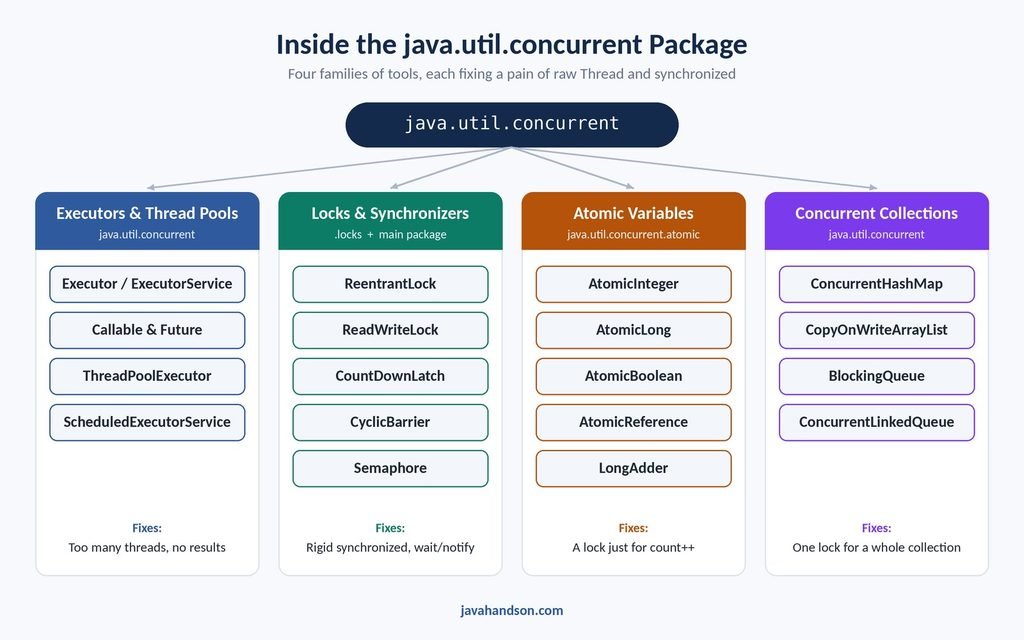
Before Java 5, Java had only the basic tools. You had the Thread class, the Runnable interface, synchronized, wait() and notify(). Serious projects often wrote their own thread pools and locks. And many of those home-made versions had bugs.
Java 5 changed that in 2004. It added the java.util.concurrent package through JSR 166. Doug Lea led that work. He had already built a popular concurrency library of his own, and much of it moved into the JDK. Later versions kept adding tools. For example, Java 7 brought ForkJoinPool, and Java 8 brought CompletableFuture and LongAdder.
To value these tools, you first need to feel the problems they fix. So let’s look at what goes wrong when you only have Thread and synchronized. If you have worked through Thread Synchronization in Java and wait and notify in Java, most of these will look familiar.
Suppose a web server gets 1,000 requests. The simple approach is to start one new thread per request.
class RequestTask implements Runnable {
    private final int id;

    RequestTask(int id) {
        this.id = id;
    }

    @Override
    public void run() {
        System.out.println("Handling request " + id);
    }
}

public class NaiveServer {
    public static void main(String[] args) {
        for (int i = 1; i <= 1000; i++) {
            new Thread(new RequestTask(i)).start();   // one thread per task
        }
    }
}
This works for a demo. In real life, it hurts in three ways:
What we really want is a small group of threads that we reuse. That idea is a thread pool. You will see it in Section 3.
[ IMAGE PLACEHOLDER: thread-per-task-vs-thread-pool.jpg ]
Alt text: Thread per task vs thread pool in the java.util.concurrent package
Caption: One thread per task vs a small pool of reused threads
The run() method returns void. It also can’t throw a checked exception. So how do you get a result out of a thread?
With raw threads, you build that plumbing yourself. Here is the usual trick:
class SumTask implements Runnable {
    int result;          // shared field to hold the answer

    @Override
    public void run() {
        int sum = 0;
        for (int i = 1; i <= 100; i++) {
            sum += i;
        }
        result = sum;
    }
}

public class ResultTheHardWay {
    public static void main(String[] args) throws InterruptedException {
        SumTask task = new SumTask();
        Thread t = new Thread(task);
        t.start();
        t.join();                        // wait, then read the field
        System.out.println(task.result); // 5050
    }
}
It works, but look at the effort. You need a shared field, a join() call and careful ordering. And what if run() fails halfway? You have to catch the exception inside and pass it out somehow. That is a lot of code for a very simple need.
The synchronized keyword is simple and safe. But it gives you very little control:
These limits matter in real systems. For example, a deadlock with synchronized has no way out. The threads just wait forever.
Sometimes one thread must wait for others. Maybe the main thread needs five workers to finish loading data. Or ten threads should start a test at the exact same moment.
You can build all of this with wait() and notify(). But you must get many small details right. You need the synchronized block, the while loop and the correct notify call. Miss one, and your program hangs or behaves randomly. Worse, the next developer has to understand all that code too.
Here is a classic surprise for beginners. The count++ statement looks like one step, but it isn’t.
public class HitCounter {
    private int count = 0;

    public void hit() {
        count++;   // read, add one, write back: three steps, not one
    }

    public int getCount() {
        return count;
    }
}
Two threads can read the same value at the same time. Both add one, and both write back the same number. So one hit simply disappears. Marking the field volatile does not fix this. You need synchronized, and that means a lock just to add one to a number.
Classes like HashMap and ArrayList are not thread-safe. If many threads update them together, you can lose data or get a ConcurrentModificationException.
The old fix was to wrap them with Collections.synchronizedMap() or use Hashtable. That works, but one lock guards the whole collection. So only one thread can use it at a time, even for reads. Under heavy load, threads spend most of their time waiting in line.
Let’s put all six pains side by side with their fixes:
| Pain | What the package gives you | Where it lives |
|---|---|---|
| Too many threads | Thread pools and executors | java.util.concurrent |
| No result from a task | Callable and Future | java.util.concurrent |
| synchronized is too rigid | Lock, ReentrantLock, ReadWriteLock | java.util.concurrent.locks |
| Hand-made wait/notify logic | CountDownLatch, CyclicBarrier, Semaphore | java.util.concurrent |
| A lock for a simple counter | AtomicInteger, AtomicLong | java.util.concurrent.atomic |
| Slow, fully locked collections | ConcurrentHashMap, CopyOnWriteArrayList, BlockingQueue | java.util.concurrent |
Notice one thing here. None of these tools replace the basics. They build on the same ideas you already learned. They simply package those ideas in a safer and easier form.
This is the part of the package you will use the most. The core idea is simple. You stop managing threads yourself. Instead, you hand tasks to an executor, and it decides which thread runs them.
Here is a small taste. It rewrites our naive server with a pool of four threads:
import java.util.concurrent.ExecutorService;
import java.util.concurrent.Executors;

public class PooledServer {
    public static void main(String[] args) {
        ExecutorService pool = Executors.newFixedThreadPool(4);

        for (int i = 1; i <= 1000; i++) {
            pool.submit(new RequestTask(i));   // same RequestTask as before
        }

        pool.shutdown();   // accept no new tasks, finish the queued ones
    }
}
Now just four threads handle all 1,000 tasks. Extra tasks wait in a queue until a thread is free. That’s the whole trick. Let’s meet the main members of this family.
Executor is the simplest interface in the package. It has one method, execute(), which takes a Runnable. ExecutorService extends it and adds the features you need in practice. With it, you can submit tasks, get results back and shut the pool down cleanly. On top of that, the Executors factory class gives you ready-made pools, such as fixed, cached and single-thread pools. Read the full guide in ExecutorService in Java.
Callable fixes Pain 2. It works like Runnable, but its call() method returns a value and can throw a checked exception. When you submit a Callable, you get a Future back. Think of a Future as a receipt for a result that isn’t ready yet. You can check if it’s done, wait for it or cancel it. You’ll find the details in Callable and Future in Java.
Behind most of the Executors factory methods sits one class: ThreadPoolExecutor. It is the real engine. It controls the core pool size, the maximum pool size, the waiting queue and what happens when the pool is full. You don’t need it on day one. However, you will need it to tune a pool for production. See ThreadPoolExecutor and Thread Pools Explained.
Sometimes a task should run later, or again and again. For example, you may want to clear a cache every ten minutes. ScheduledExecutorService handles this. It can run a task once after a delay, or repeat it at a fixed rate or with a fixed delay. It is the modern replacement for the old Timer and TimerTask classes. Learn more in ScheduledExecutorService in Java.
Java 8 added CompletableFuture to the same package. It lets you chain async steps without blocking a thread. It leans heavily on lambdas, so get comfortable with Lambda Expression in Java 8 first. Callable and Future in Java gives it a short introduction, and it will get a full guide of its own in the Java 8 section.
This family fixes Pain 3 and Pain 4. Locks give you more control than synchronized. Synchronizers, on the other hand, help threads wait for each other without hand-written wait() and notify() code.
The Lock interface is an explicit version of synchronized. You call lock() to get the lock and unlock() to release it. ReentrantLock is the main implementation. It adds tryLock(), which lets a thread give up if the lock is busy, with or without a timeout. It also supports interruptible waiting and an optional fair mode. The one rule to remember: always call unlock() inside a finally block. Read Locks in Java: ReentrantLock vs synchronized.
Many programs read data far more often than they change it. A single lock makes readers wait for each other, even though reads don’t conflict. ReadWriteLock gives you two locks instead. Many threads can hold the read lock together, but the write lock is exclusive. ReentrantReadWriteLock is the standard implementation. See ReadWriteLock in Java Explained.
A CountDownLatch starts with a count, say 3. Worker threads call countDown() when they finish. Other threads call await() and wait until the count reaches zero. It’s perfect for “wait until all three services have started”. The catch? You can’t reset it. Once it hits zero, it stays open. Details are in CountDownLatch in Java with Examples.
A CyclicBarrier is a meeting point. A fixed number of threads each call await(). Nobody moves on until all of them have arrived. Then the barrier resets itself for the next round. That is why it’s called cyclic. You can also give it a small action to run each time everyone arrives. Read CyclicBarrier in Java with Examples.
A Semaphore controls how many threads can use something at once. It holds a number of permits. A thread calls acquire() to take a permit and release() to give it back. If no permits are left, the thread waits. A common use is limiting how many threads hit a database or an external API together. Learn more in Semaphore in Java Explained.
The package has a few more, like Phaser and Exchanger. They solve rarer problems, so you can safely skip them as a beginner. Once latches and barriers make sense to you, you can pick these up from the Javadoc quickly.
This family fixes Pain 5. The java.util.concurrent.atomic package gives you variables that update safely without a lock. The most used ones are AtomicInteger, AtomicLong, AtomicBoolean and AtomicReference.
Here is the hit counter again. This time it’s thread-safe, with no synchronized at all:
import java.util.concurrent.atomic.AtomicInteger;

public class SafeHitCounter {
    private final AtomicInteger count = new AtomicInteger(0);

    public void hit() {
        count.incrementAndGet();   // one atomic step
    }

    public int getCount() {
        return count.get();
    }
}
How does it work without a lock? Atomics rely on a CPU instruction called compare-and-swap, or CAS. In simple words, it says: “set the value to 6, but only if it is still 5.” If another thread changed it first, the update fails. The atomic class then simply tries again.
Java 8 also added LongAdder for counters under heavy contention. One word of caution, though. Atomics protect one variable at a time. If two fields must change together, you still need a lock. Read the full guide in Atomic Variables in Java (AtomicInteger, AtomicLong, CAS).
This family fixes Pain 6. These collections let many threads read and write at the same time, without one big lock. They belong to this package, but they are also part of the Collections Framework. If you are new to collections, start with Introduction to Collections Framework in Java and HashMap in Java. Below, each collection gets a short summary and a link to its detailed guide.
ConcurrentHashMap is the thread-safe map you should reach for first. It doesn’t lock the whole map. From Java 8 onward, a write locks only a single bucket, and most reads need no lock at all. If you are choosing between map types, start with HashMap vs Hashtable vs ConcurrentHashMap in Java. To see how it works inside, read ConcurrentHashMap Internals Explained.
CopyOnWriteArrayList takes a different approach. Every write makes a fresh copy of the underlying array. Reads never lock, and its iterators never throw ConcurrentModificationException. That makes it great for lists that you read often and change rarely, like a list of event listeners. Both this list and ConcurrentHashMap appear in Concurrent Collections in Java: ConcurrentHashMap & CopyOnWriteArrayList.
A BlockingQueue is a queue that makes threads wait. If a thread tries to take from an empty queue, it waits until an item arrives. If the queue is bounded and full, a thread trying to add waits for space. This is exactly what the producer-consumer pattern needs. Fun fact: thread pools use a BlockingQueue internally to hold waiting tasks. Read BlockingQueue in Java: Producer-Consumer Pattern.
Still unsure when to pick Collections.synchronizedList() and when to pick a concurrent collection? That comparison has its own article: Synchronized vs Concurrent Collections in Java.
Here is everything from this article in one table. Bookmark it as your quick reference.
| Tool | Use it when |
|---|---|
| ExecutorService | You want many tasks to run on a few reused threads |
| Callable and Future | You need a result or an exception back from a task |
| ThreadPoolExecutor | You need to tune pool size, queue or rejection |
| ScheduledExecutorService | A task must run later or repeatedly |
| ReentrantLock | synchronized is too rigid (timeouts, tryLock) |
| ReadWriteLock | Reads greatly outnumber writes |
| CountDownLatch | You wait for N events to finish, once |
| CyclicBarrier | N threads meet at a point, round after round |
| Semaphore | You limit how many threads use a resource |
| Atomic variables | You update one counter or reference without a lock |
| ConcurrentHashMap | Many threads share one map |
| CopyOnWriteArrayList | You read a list often and change it rarely |
| BlockingQueue | Producers hand work to consumers |
Before you dive in, here are a few traps I see again and again. Each one gets proper coverage in its own article.
A: It is a set of ready-made tools in the JDK for writing multithreaded code. It includes executors and thread pools, locks, synchronizers, atomic variables and concurrent collections. Java added it in Java 5 through JSR 166.
A: synchronized and raw threads work, but they are low-level. You must write thread management, result passing and coordination yourself. The package gives you tested, higher-level tools, so you write less code and make fewer mistakes.
A: There are two. java.util.concurrent.locks holds explicit locks like ReentrantLock and ReadWriteLock. java.util.concurrent.atomic holds lock-free variables like AtomicInteger and AtomicLong.
A: A pool reuses a small number of threads, so you avoid the cost of creating and destroying them. It also caps the thread count, so a traffic spike can’t crash the JVM. Extra tasks simply wait in a queue.
A: A CountDownLatch is one-shot and waits for a number of events to finish. A CyclicBarrier is reusable and makes a fixed group of threads wait for each other, round after round.
A: No. volatile only makes changes visible to other threads. count++ is three steps, so updates can still get lost. Use AtomicInteger or a lock for counters.
The java.util.concurrent package exists because raw threads and synchronized are too low-level for everyday work. They do the job, but they make you write a lot of careful, error-prone code.
The package groups its answer into four families:
You don’t need to learn all of it at once. Start with ExecutorService, since you’ll use it the most. Read ExecutorService in Java first, then pick up the locks, synchronizers and atomics as you need them. And whenever you need the map again, come back to this page.