Callable and Future in Java: Results, Exceptions & Timeouts
-
Last Updated: September 29, 2026
-
By: javahandson
-
Series

Master Callable and Future in Java: get results and exceptions back from tasks, use Future.get() without killing performance, and handle timeouts and cancel().
If you have written a few threads in Java, you have probably hit this wall. Your background task finishes its work, but it has no clean way to hand the answer back. Callable and Future in Java solve exactly this problem. A Callable is a task that can return a value and throw an exception. A Future is the object you hold while that task runs somewhere else.
I use these two almost daily in backend work. Fetching a balance, calling a fraud service, generating a report — all of these run in the background and return something useful. So in this guide, we will go step by step. We will keep the language simple and run real code at every stage.
Here is what we will cover:
Future.get() blocks, and what that costs youisDone() and isCancelled()Let us start with the problem. In Creating Threads in Java: Thread Class vs Runnable Interface, we used Runnable to describe a task. It works well for “fire and forget” jobs. However, it has two big limits.
Look at the method inside Runnable. It is tiny:
// java.lang.Runnable
public interface Runnable {
    void run();
}
Two things jump out here:
IOException. You must catch it inside run() and deal with it there.For a logging job, that is fine. But most real tasks produce something. You calculate a total, read a file or call an API. And real tasks fail too. A network call can time out. A file may be missing.
Before Java 5, developers used a shared variable to pass the result out. The main thread then waited using join(). Here is how that looks:
public class RunnableWorkaround {

    private static int total; // shared field to hold the result

    public static void main(String[] args) throws InterruptedException {
        Runnable task = () -> {
            int sum = 0;
            for (int i = 1; i <= 100; i++) {
                sum += i;
            }
            total = sum; // write the result into the shared field
        };

        Thread worker = new Thread(task);
        worker.start();
        worker.join(); // wait till the worker finishes

        System.out.println("Total: " + total);
    }
}
Output:
Total: 5050
It works, but it is clumsy. Think about what happens as the code grows:
join() saves us, but that is easy to forget.Some people go further and use wait() and notify() for this. We covered that pattern in Inter-Thread Communication in Java. It works, but it is a lot of code for a simple “give me the answer” job. Java 5 gave us a much cleaner option.
Callable is an interface in the java.util.concurrent package. Java 5 added it along with the executor framework. You can think of it as “Runnable, but grown up”.
Here is the full interface. Compare it with Runnable above:
// java.util.concurrent.Callable
@FunctionalInterface
public interface Callable<V> {
    V call() throws Exception;
}
Just two small changes, but both matter a lot:
V. V is a generic type, so you choose it. It can be Integer, String, a List, or your own class.Also notice the @FunctionalInterface annotation. Callable has only one abstract method, so you can write it as a lambda. Java 8 added this annotation. The interface itself has been around since Java 5.
Let us write a task that adds the numbers from 1 to a limit. First, as a normal class:
import java.util.concurrent.Callable;

public class SumTask implements Callable<Integer> {

    private final int limit;

    public SumTask(int limit) {
        this.limit = limit;
    }

    @Override
    public Integer call() {
        int sum = 0;
        for (int i = 1; i <= limit; i++) {
            sum += i;
        }
        return sum; // the result goes back to the caller
    }
}
See how natural that feels? The task simply returns the sum. You do not need any shared field.
For small tasks, a lambda is shorter. This one does the same job:
Callable<Integer> sumTask = () -> {
    int sum = 0;
    for (int i = 1; i <= 100; i++) {
        sum += i;
    }
    return sum;
};Now the second benefit. Say your task reads a config file. Files.readAllLines() throws IOException, which is a checked exception. With Callable, you can let it fly:
// Works fine: call() is allowed to throw IOException
Callable<List<String>> readTask =
        () -> Files.readAllLines(Paths.get("config.txt"));

// Does not compile: run() cannot throw a checked exception
Runnable readJob =
        () -> Files.readAllLines(Paths.get("config.txt"));
The Runnable version fails with an “unreported exception” error. You would need a try-catch inside it. And then what? You still have no clean way to tell the caller the file was missing.
With Callable, the exception does not vanish. It travels back to whoever asks for the result. We will see exactly how in section 5.
Here is a quick comparison you can keep handy:
| Point | Runnable | Callable |
|---|---|---|
| Package | java.lang | java.util.concurrent |
| Added in | Java 1.0 | Java 5 |
| Method | void run() | V call() throws Exception |
| Returns a value? | No | Yes, of type V |
| Checked exceptions? | No, must catch inside | Yes, can throw |
| Pass to new Thread()? | Yes | No, wrap it in FutureTask first |
| Pass to ExecutorService? | execute() or submit() | submit() only |
| 💡 Interview Insight Interviewers love asking “Callable vs Runnable”. Do not stop at “one returns a value”. Mention all three points: the return value, the checked exception, and that new Thread() only accepts a Runnable. Bonus point: Executors.callable(runnable) converts a Runnable into a Callable that returns null. |
A Callable describes the work. But when you hand that work to another thread, you need something to hold on to. That something is a Future.
Picture a busy dosa counter at a food court. You place your order and pay. The cashier gives you a token number. You do not stand at the counter blocking everyone. Instead, you go and find a table.
That token is your Future. With it you can:
isDone())get())get() with a timeout)cancel())isCancelled())And if the kitchen burns your dosa? You find out when you come to collect it. The same thing happens with exceptions in a Future.
Future<V> is also an interface in java.util.concurrent. Here are its core methods:
public interface Future<V> {

    boolean cancel(boolean mayInterruptIfRunning);

    boolean isCancelled();

    boolean isDone();

    V get() throws InterruptedException, ExecutionException;

    V get(long timeout, TimeUnit unit)
            throws InterruptedException, ExecutionException, TimeoutException;
}
That is the whole API you need for daily work. Notice the exceptions on get(). Each one tells a different story, and we will go through them one by one.
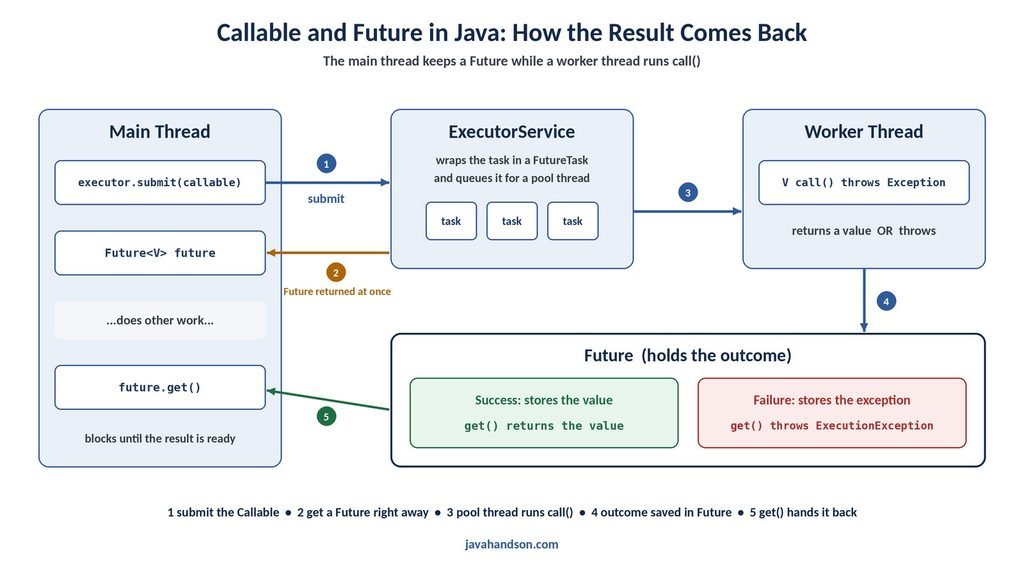
You now have a task and you know what a Future is. So how do you connect the two? The most common way is through an ExecutorService.
We covered executors in detail in ExecutorService in Java. For now, just remember this: submit() takes your Callable, runs it on a pool thread, and hands you a Future right away.
import java.util.concurrent.Callable;
import java.util.concurrent.ExecutorService;
import java.util.concurrent.Executors;
import java.util.concurrent.Future;

public class SubmitCallableDemo {

    public static void main(String[] args) throws Exception {
        ExecutorService executor = Executors.newFixedThreadPool(2);

        Callable<Integer> task = new SumTask(100);
        Future<Integer> future = executor.submit(task);

        System.out.println("Task submitted. Main thread is free.");

        Integer result = future.get(); // waits if the result is not ready yet
        System.out.println("Result: " + result);

        executor.shutdown();
    }
}
Output:
Task submitted. Main thread is free.
Result: 5050
Let us walk through what happened:
submit() returns immediately. It does not wait for the task.call() on a worker thread.get() gives us the value that call() returned.shutdown() lets the pool finish its work and then stop.We are using a simple fixed pool with two threads here. Pool sizing and tuning is a separate topic. You will find it in ThreadPoolExecutor and Thread Pools Explained.
Here is something many beginners miss. submit() also accepts a Runnable. It still gives you a Future. But since Runnable returns nothing, get() returns null once the task finishes.
import java.util.concurrent.ExecutorService;
import java.util.concurrent.Executors;
import java.util.concurrent.Future;

public class SubmitRunnableDemo {

    public static void main(String[] args) throws Exception {
        ExecutorService executor = Executors.newSingleThreadExecutor();

        Runnable emailTask = () -> System.out.println("Sending email...");
        Future<?> future = executor.submit(emailTask);

        Object result = future.get(); // waits for the task, then returns null
        System.out.println("Result: " + result);

        executor.shutdown();
    }
}
Output:
Sending email...
Result: null
So why is this useful? Even without a value, the Future still lets you wait, cancel and catch exceptions. There is also submit(Runnable task, T result), which returns the given result on success. I rarely use that one, but it exists.
Earlier we said new Thread() does not accept a Callable. So is an executor the only way? Not quite. Java gives us a bridge class called FutureTask.
FutureTask implements both Runnable and Future. You wrap your Callable in it and pass it to a plain thread:
import java.util.concurrent.FutureTask;

public class FutureTaskDemo {

    public static void main(String[] args) throws Exception {
        FutureTask<Integer> futureTask = new FutureTask<>(new SumTask(10));

        // works, because FutureTask is also a Runnable
        Thread worker = new Thread(futureTask);
        worker.start();

        System.out.println("Sum: " + futureTask.get()); // and it is also a Future
    }
}
Output:
Sum: 55
In fact, this is what happens inside most executors. When you call submit(), the executor wraps your task in a FutureTask and returns it to you as a Future. In real projects, I always prefer executors. Still, knowing FutureTask helps you understand the design.
| 💡 Interview Insight A common follow-up question is “How does submit() give you a Future?”. Answer: AbstractExecutorService.submit() wraps the task in a FutureTask (via newTaskFor()), calls execute() on it, and returns that same object. The worker thread runs it as a Runnable, and you read it as a Future. |
get() is the method you will call the most. It is also the one people misuse the most. So let us slow down here.
When you call get(), one of two things happens:
get() returns the result straight away.That waiting is called blocking. The calling thread can do nothing else while it waits. Let us see it in action:
import java.util.concurrent.Callable;
import java.util.concurrent.ExecutorService;
import java.util.concurrent.Executors;
import java.util.concurrent.Future;

public class BlockingGetDemo {

    public static void main(String[] args) throws Exception {
        ExecutorService executor = Executors.newSingleThreadExecutor();

        Callable<String> slowTask = () -> {
            Thread.sleep(3000); // pretend this is a slow report
            return "Report ready";
        };

        Future<String> future = executor.submit(slowTask);

        long start = System.currentTimeMillis();
        System.out.println("Calling get()...");
        String report = future.get(); // main thread waits here
        long waited = System.currentTimeMillis() - start;

        long seconds = waited / 1000;
        System.out.println(report + " (waited about " + seconds + " seconds)");
        executor.shutdown();
    }
}
Output:
Calling get()...
Report ready (waited about 3 seconds)
The main thread stood still for three seconds. In a small demo, that is harmless. In a web server handling hundreds of requests, it can hurt badly.
This is the mistake I see most in code reviews. A developer submits a task and calls get() on the very next line. The code looks parallel. But it runs one task at a time.
Let us prove it. We have three tasks, and each one takes two seconds. First we call get() too early, then we do it properly:
import java.util.ArrayList;
import java.util.List;
import java.util.concurrent.Callable;
import java.util.concurrent.ExecutorService;
import java.util.concurrent.Executors;
import java.util.concurrent.Future;

public class GetTooEarlyDemo {

    static Callable<String> task(int id) {
        return () -> {
            Thread.sleep(2000);
            return "Task " + id + " done";
        };
    }

    public static void main(String[] args) throws Exception {
        ExecutorService executor = Executors.newFixedThreadPool(3);

        // Wrong way: submit, then get() at once, inside the loop
        long start = System.currentTimeMillis();
        for (int i = 1; i <= 3; i++) {
            Future<String> future = executor.submit(task(i));
            future.get(); // blocks before the next task is even submitted
        }
        long took = (System.currentTimeMillis() - start) / 1000;
        System.out.println("Wrong way took ~" + took + " s");

        // Right way: submit everything first, then collect the results
        start = System.currentTimeMillis();
        List<Future<String>> futures = new ArrayList<>();
        for (int i = 1; i <= 3; i++) {
            futures.add(executor.submit(task(i)));
        }
        for (Future<String> future : futures) {
            future.get();
        }
        took = (System.currentTimeMillis() - start) / 1000;
        System.out.println("Right way took ~" + took + " s");

        executor.shutdown();
    }
}
Output:
Wrong way took ~6 s
Right way took ~2 s
Same pool, same tasks, but three times faster. The rule is simple:
get() only at the point where you truly need the answer.There is one more subtle cost. In the “right way” loop, we call get() on the futures in order. Suppose task 1 takes five seconds, but tasks 2 and 3 finish in one second. Your loop still sits on task 1 for five seconds. Results 2 and 3 are ready, yet nobody reads them.
Usually this is fine, since you need all results anyway. If you want to process results as each one completes, look at ExecutorCompletionService. It hands futures back in completion order. That class is outside our scope here, but it is good to know the name.
This is where Callable and Future really shine. When call() throws an exception, the worker thread does not crash your program. Instead, the Future stores the exception. Later, get() throws an ExecutionException that wraps the original one.
import java.io.IOException;
import java.util.concurrent.Callable;
import java.util.concurrent.ExecutionException;
import java.util.concurrent.ExecutorService;
import java.util.concurrent.Executors;
import java.util.concurrent.Future;

public class ExecutionExceptionDemo {

    public static void main(String[] args) throws InterruptedException {
        ExecutorService executor = Executors.newSingleThreadExecutor();

        Callable<Double> balanceTask = () -> {
            throw new IOException("Bank server not reachable");
        };

        Future<Double> future = executor.submit(balanceTask);

        try {
            Double balance = future.get();
            System.out.println("Balance: " + balance);
        } catch (ExecutionException e) {
            Throwable cause = e.getCause(); // the real exception from call()
            System.out.println("Task failed: " + cause);
            boolean isIo = cause instanceof IOException;
            System.out.println("Is it an IOException? " + isIo);
        }

        executor.shutdown();
    }
}
Output:
Task failed: java.io.IOException: Bank server not reachable
Is it an IOException? true
A few things to note:
ExecutionException is only a wrapper. Always call getCause() to see what really went wrong.get(), not on the worker thread.IOException.get() also throws InterruptedException. This one is not about the task. It means someone interrupted the waiting thread while it sat inside get().
Please do not swallow it. A good habit is to restore the interrupt flag, so code higher up can see it:
try {
    Double balance = future.get();
    // use the balance
} catch (InterruptedException e) {
    Thread.currentThread().interrupt(); // keep the interrupt status
    // stop what you are doing and return
} catch (ExecutionException e) {
    Throwable cause = e.getCause();
    // log it, retry, or show a friendly error
}Here is a bug that once cost my team half a day. With execute(), an exception in the task shows up on the console. With submit(), the exception goes into the Future. So if nobody calls get(), nobody ever sees it.
import java.util.concurrent.ExecutorService;
import java.util.concurrent.Executors;

public class SilentFailureDemo {

    public static void main(String[] args) throws InterruptedException {
        ExecutorService executor = Executors.newSingleThreadExecutor();

        Runnable badTask = () -> {
            throw new IllegalStateException("Payment file missing");
        };

        executor.execute(badTask); // stack trace is printed
        Thread.sleep(500);
        System.out.println("--- now with submit() ---");
        executor.submit(badTask);  // nothing is printed at all!

        executor.shutdown();
    }
}
Output:
Exception in thread "pool-1-thread-1" java.lang.IllegalStateException: Payment file missing
    at SilentFailureDemo.lambda$main$0(SilentFailureDemo.java:10)
    ...
--- now with submit() ---
The second failure left no trace at all. So if you use submit(), make sure someone eventually calls get(). Or catch and log exceptions inside the task itself.
| 💡 Interview Insight A classic interview question: “Where does an exception thrown inside a submitted task go?” Answer: submit() captures it inside the Future. It comes back as an ExecutionException from get(). If you never call get(), the exception is silently lost. With execute(), it reaches the thread’s uncaught exception handler instead. |
A plain get() can wait forever. If the task hangs on a dead network socket, your thread hangs with it. In server code, that is dangerous. Luckily, Future has a second version of get() that takes a time limit.
You pass a number and a TimeUnit. If the result arrives in time, you get it. If not, get() throws a TimeoutException.
import java.util.concurrent.ExecutionException;
import java.util.concurrent.ExecutorService;
import java.util.concurrent.Executors;
import java.util.concurrent.Future;
import java.util.concurrent.TimeUnit;
import java.util.concurrent.TimeoutException;

public class TimeoutDemo {

    public static void main(String[] args)
            throws InterruptedException, ExecutionException {
        ExecutorService executor = Executors.newSingleThreadExecutor();

        Future<String> future = executor.submit(() -> {
            Thread.sleep(5000); // a slow exchange-rate service
            return "Exchange rate: 83.20";
        });

        try {
            String rate = future.get(2, TimeUnit.SECONDS);
            System.out.println(rate);
        } catch (TimeoutException e) {
            System.out.println("Took too long. Using the cached rate.");
            future.cancel(true); // we do not need the task any more
        }

        executor.shutdown();
    }
}
Output:
Took too long. Using the cached rate.
This point surprises a lot of people. When get() times out, only the waiting stops. The task keeps running in the background. It keeps using a pool thread, memory and maybe a database connection.
That is why the example above calls future.cancel(true) inside the catch block. If you do not need the result any more, tell the task to stop. We will look at cancel() properly in the next section.
A few practical tips on timeouts:
get() in request-handling code.Sometimes you no longer need a result. Maybe the user closed the page. Maybe another task already gave you the answer. In such cases, you call cancel() on the Future.
The method takes one boolean, mayInterruptIfRunning. What it does depends on where the task is right now:
| Task state | cancel(false) | cancel(true) |
|---|---|---|
| Still waiting in the queue | Cancelled. It will never run. | Cancelled. It will never run. |
| Already running | Marked cancelled. The thread keeps running, and the result is thrown away. | Marked cancelled. The worker thread also gets an interrupt. |
| Already finished | Nothing happens. Returns false. | Nothing happens. Returns false. |
So cancel(false) means “don’t start it if it hasn’t started”. And cancel(true) means “also try to stop it if it is running”.
Here is the catch. cancel(true) does not force a thread to stop. Java has no safe way to kill a thread. It only sets the interrupt flag on the worker thread. The task must notice that flag and stop on its own.
A task can notice the interrupt in two ways:
Thread.sleep(), wait() and join() throw InterruptedException.Thread.currentThread().isInterrupted() on each round.Here is a task that cooperates properly:
import java.util.concurrent.CancellationException;
import java.util.concurrent.Callable;
import java.util.concurrent.ExecutorService;
import java.util.concurrent.Executors;
import java.util.concurrent.Future;

public class CancelDemo {

    public static void main(String[] args) throws Exception {
        ExecutorService executor = Executors.newSingleThreadExecutor();

        Callable<Long> countTask = () -> {
            long count = 0;
            while (!Thread.currentThread().isInterrupted()) { // checks the flag
                count++;
            }
            return count;
        };

        Future<Long> future = executor.submit(countTask);
        Thread.sleep(500); // let it run for a bit

        boolean cancelled = future.cancel(true);
        System.out.println("cancel() returned: " + cancelled);
        System.out.println("isCancelled(): " + future.isCancelled());
        System.out.println("isDone(): " + future.isDone());

        try {
            future.get();
        } catch (CancellationException e) {
            System.out.println("get() threw CancellationException");
        }

        executor.shutdown();
    }
}
Output:
cancel() returned: true
isCancelled(): true
isDone(): true
get() threw CancellationException
Now imagine the loop was while (true) instead. The interrupt flag would be set, but nobody would read it. The Future would still say “cancelled”. Meanwhile, the thread would spin forever and hold the pool thread hostage.
So when you write a long-running Callable, build in interrupt checks. Your future self will thank you.
Once a task is cancelled, get() never returns a value. It throws CancellationException straight away. This is an unchecked exception, so the compiler will not remind you to catch it. Keep that in mind when you mix cancel and get in the same code.
You cannot cancel something that is already done. In that case, cancel() simply returns false:
import java.util.concurrent.ExecutorService;
import java.util.concurrent.Executors;
import java.util.concurrent.Future;

public class CancelFinishedDemo {

    public static void main(String[] args) throws Exception {
        ExecutorService executor = Executors.newSingleThreadExecutor();

        Future<String> future = executor.submit(() -> "done");
        future.get(); // make sure it has finished

        System.out.println("cancel() returned: " + future.cancel(true));
        System.out.println("isCancelled(): " + future.isCancelled());
        System.out.println("Result is still: " + future.get());

        executor.shutdown();
    }
}
Output:
cancel() returned: false
isCancelled(): false
Result is still: done
| 💡 Interview Insight If an interviewer asks “Does cancel(true) stop a running thread?”, the safe answer is “not by force”. It only interrupts the worker thread. The task stops only if it checks the interrupt flag or calls a blocking method that responds to interrupts. Either way, the Future reports itself as cancelled. |
Sometimes you want to peek at a task without blocking. For that, Future gives you two simple checks. Neither of them waits.
isDone() returns true when the task has completed in any way. That includes three cases:
So “done” does not mean “successful”. Many beginners assume it does. If isDone() is true, get() will not block, but it may still throw.
isCancelled() returns true only if the task was cancelled before it completed normally. In other words, a successful cancel() call happened. If cancel() returned false, isCancelled() stays false too.
Put the two together, and you get this simple map:
| What happened | isDone() | isCancelled() | get() gives you |
|---|---|---|---|
| Still running or waiting | false | false | Blocks until done |
| Finished normally | true | false | The result |
| Threw an exception | true | false | ExecutionException |
| Cancelled | true | true | CancellationException |
You can use isDone() to do other work while you wait. The main thread checks now and then instead of blocking:
import java.util.concurrent.ExecutorService;
import java.util.concurrent.Executors;
import java.util.concurrent.Future;

public class PollingDemo {

    public static void main(String[] args) throws Exception {
        ExecutorService executor = Executors.newSingleThreadExecutor();

        Future<String> future = executor.submit(() -> {
            Thread.sleep(2000);
            return "Statement generated";
        });

        while (!future.isDone()) {
            System.out.println("Still working... doing something else meanwhile");
            Thread.sleep(500); // do not spin without a pause
        }

        System.out.println(future.get()); // will not block now
        executor.shutdown();
    }
}
Output:
Still working... doing something else meanwhile
Still working... doing something else meanwhile
Still working... doing something else meanwhile
Still working... doing something else meanwhile
Statement generated
The exact number of “Still working” lines may differ on your machine. That is normal.
A word of caution, though. Polling in a tight loop without sleep() burns CPU for nothing. And if you have no other work to do, polling is pointless. Just call get() with a timeout instead. I use isDone() mainly for progress screens and health checks.
If you are on Java 19 or later, Future got a few handy default methods. state() returns an enum with four values: RUNNING, SUCCESS, FAILED and CANCELLED. resultNow() returns the result of a finished task without any checked exceptions. exceptionNow() returns the exception of a failed one.
if (future.state() == Future.State.SUCCESS) {
    System.out.println(future.resultNow()); // no try-catch needed
}
These make status checks much cleaner. However, older projects on Java 8 or 11 will not have them.
Let us put everything together. In payment systems, you often run a few checks before you approve a transfer. For example:
These checks do not depend on each other. So there is no reason to run them one by one. We submit all three, then collect the answers with a timeout.
import java.util.concurrent.ExecutionException;
import java.util.concurrent.ExecutorService;
import java.util.concurrent.Executors;
import java.util.concurrent.Future;
import java.util.concurrent.TimeUnit;
import java.util.concurrent.TimeoutException;

public class PaymentPrecheck {

    public static void main(String[] args) throws InterruptedException {
        ExecutorService executor = Executors.newFixedThreadPool(3);

        // 1. Submit all checks first. They run in parallel.
        String account = "ACC-1001";
        Future<Double> balanceFuture = executor.submit(() -> fetchBalance(account));
        Future<Boolean> fraudFuture = executor.submit(() -> isFraudSafe(account));
        Future<Double> rateFuture = executor.submit(() -> fetchRate("USD", "INR"));

        try {
            // 2. Collect the results, each with a time limit.
            double balance = balanceFuture.get(3, TimeUnit.SECONDS);
            boolean safe = fraudFuture.get(3, TimeUnit.SECONDS);
            double rate = rateFuture.get(3, TimeUnit.SECONDS);

            double amountInInr = 200 * rate;
            if (safe && balance >= amountInInr) {
                System.out.println("Approved. Debiting INR " + amountInInr);
            } else {
                System.out.println("Rejected.");
            }
        } catch (ExecutionException e) {
            System.out.println("A check failed: " + e.getCause().getMessage());
        } catch (TimeoutException e) {
            System.out.println("A check took too long. Payment on hold.");
        } finally {
            // 3. Clean up. cancel() is harmless on finished tasks.
            balanceFuture.cancel(true);
            fraudFuture.cancel(true);
            rateFuture.cancel(true);
            executor.shutdown();
        }
    }

    private static double fetchBalance(String account) throws InterruptedException {
        Thread.sleep(800); // pretend to call the core banking system
        return 25000.0;
    }

    private static boolean isFraudSafe(String account) throws InterruptedException {
        Thread.sleep(1200); // pretend to call the fraud engine
        return true;
    }

    private static double fetchRate(String from, String to)
            throws InterruptedException {
        Thread.sleep(600); // pretend to call the rates service
        return 83.20;
    }
}
Output:
Approved. Debiting INR 16640.0
The whole thing takes about 1.2 seconds, which is the time of the slowest check. Done one by one, it would take 2.6 seconds. Now look at what each Future gave us:
Double or Boolean).ExecutionException.Most bugs around Future come from a small set of habits. Here are the ones I have seen most often in real projects.
getCause().Thread.currentThread().interrupt().main() ends.Future has one big weakness. The only way to use the result is to call get(), and get() blocks. You cannot say “when this finishes, do that next”. Java 8 fixed this with CompletableFuture. It implements Future too, so everything in this article still applies. On top of that, it lets you chain steps with methods like thenApply() and thenCombine(). It also handles errors with exceptionally(), all without blocking a thread. It is a big topic of its own, so we will cover it properly in the Java 8+ series. For now, get comfortable with plain Callable and Future. Everything in CompletableFuture builds on these ideas.
A: Runnable’s run() returns nothing and cannot throw checked exceptions. Callable’s call() returns a value of type V and can throw any exception. Also, new Thread() accepts only a Runnable, so a Callable must go through an ExecutorService or be wrapped in a FutureTask.
A: get() returns the result of the task. If the task is still running, the calling thread blocks until the result is ready. Calling get() right after submit() removes all parallelism, so submit all tasks first and call get() only when you need the answer.
A: The Future stores the exception. When you call get(), it throws an ExecutionException that wraps it. Call getCause() on the ExecutionException to get the original exception thrown by call().
A: It is silently lost. submit() captures the exception inside the Future, and only get() reveals it. With execute(), the exception goes to the thread’s uncaught exception handler and is printed instead.
A: No. get(timeout, unit) only stops the waiting and throws a TimeoutException. The task keeps running in the background. Call future.cancel(true) if you no longer need the result.
A: Not by force. cancel(true) only interrupts the worker thread. The task stops only if it checks Thread.currentThread().isInterrupted() or is inside a blocking call like sleep() that responds to interrupts. The Future is marked cancelled either way, and get() throws CancellationException.
A: Both prevent a queued task from ever starting. For a task that is already running, cancel(false) lets it keep running but throws away its result, while cancel(true) also interrupts the worker thread. On a finished task, both do nothing and return false.
A: No. isDone() returns true when the task finished normally, threw an exception, or was cancelled. It only guarantees that get() will not block. get() can still throw ExecutionException or CancellationException.
A: FutureTask implements both Runnable and Future. You can wrap a Callable in it and pass it to a plain Thread. Executors use it internally: submit() wraps your task in a FutureTask and returns it to you as the Future.
Callable and Future in Java give your background tasks a proper way to talk back. Let us quickly recap what we learned:
submit().ExecutionException. Use getCause().My suggestion is to run every example in this article on your own machine. Change the sleep times. Throw different exceptions. Cancel at odd moments. Ten minutes of playing will teach you more than any amount of reading.