ScheduledExecutorService in Java: Run Tasks Later or on a Repeating Schedule
-
Last Updated: October 1, 2026
-
By: javahandson
-
Series

Learn ScheduledExecutorService in Java with simple examples: schedule(), fixed rate vs fixed delay, silent exception traps, and why it replaces Timer.
Sometimes you don’t want a task to run right now. You want it to run after five seconds, or every ten minutes, or once every night. That is exactly the job of ScheduledExecutorService in Java. It lets you run a task later, or run it again and again on a schedule.
I have used it a lot in payment systems. We used it to retry failed bank callbacks, to refresh tokens before they expire, and to clean up old records. It looks simple. But two of its methods behave in a way that surprises many developers. And one small mistake can stop your repeating task forever, without a single log line.
In this guide, we will go through it step by step:
schedule()scheduleAtFixedRate() and scheduleWithFixedDelay() workTimer and TimerTaskIf thread pools are new to you, read ExecutorService in Java first. We won’t repeat pool basics here. This guide stays focused on scheduling.
ScheduledExecutorService is an interface in the java.util.concurrent package. Java added it in version 5. It extends ExecutorService, so it can do everything a normal executor does. On top of that, it adds four methods for time-based work.
In simple words, it is a thread pool with a clock attached.
Before this API, many people wrote code like this to run something every few seconds:
new Thread(() -> {
    while (true) {
        doWork();
        try {
            Thread.sleep(5000);
        } catch (InterruptedException e) {
            return;
        }
    }
}).start();
It works. But it has a bunch of problems:
doWork() throws an exception, the thread dies and nobody notices.ScheduledExecutorService fixes all of these. You hand over the task and the timing. The scheduler takes care of threads, timing and cancellation.
Here is the simple hierarchy:
Executor – the basic interface with execute()ExecutorService – adds submit(), shutdown() and futuresScheduledExecutorService – adds the scheduling methodsScheduledThreadPoolExecutor – the main class that implements itScheduledThreadPoolExecutor extends ThreadPoolExecutor. So its worker threads behave like any normal pool. To learn how core threads and work queues behave, check ThreadPoolExecutor and Thread Pools Explained.
| Method | What it does | Returns |
|---|---|---|
schedule(Runnable, delay, unit) | Runs once after the delay | ScheduledFuture<?> |
schedule(Callable, delay, unit) | Runs once after the delay and gives back a value | ScheduledFuture<V> |
scheduleAtFixedRate(...) | Repeats, based on start times | ScheduledFuture<?> |
scheduleWithFixedDelay(...) | Repeats, with a fixed rest after each run | ScheduledFuture<?> |
Every method takes a TimeUnit. So you can say 500 milliseconds, 10 seconds or 2 hours without doing any math.
Most of the time, you create one through the Executors factory class. There are two common options.
ScheduledExecutorService scheduler =
        Executors.newSingleThreadScheduledExecutor();
This gives you one worker thread. All tasks run one after another on that thread. It suits light jobs like a small heartbeat or a cleanup task.
ScheduledExecutorService scheduler =
        Executors.newScheduledThreadPool(4);
This creates a pool with four core threads. Now several scheduled tasks can run at the same time. Use this when you have many jobs, or when some jobs are slow.
By default, threads get names like pool-1-thread-1. That tells you nothing in a log file. So I always pass a ThreadFactory with a useful name.
ThreadFactory factory = runnable -> {
    Thread t = new Thread(runnable, "token-refresher");
    t.setDaemon(true);
    return t;
};

ScheduledExecutorService scheduler =
        Executors.newSingleThreadScheduledExecutor(factory);
Now, when something breaks at 2 AM, the thread name points you straight to the right job.
The setDaemon(true) line lets the JVM exit even if this scheduler is still alive. Use it only for background helpers that you don’t mind losing at shutdown.
| 💡 Interview Insight Interviewers sometimes ask what maximumPoolSize does in a ScheduledThreadPoolExecutor. The answer: almost nothing. It uses an unbounded delay queue, so the pool never grows past its core size. That is why the factory method only asks you for a core pool size. |
Let’s start with the simplest case. You want a task to run once, but not right now.
import java.util.concurrent.Executors;
import java.util.concurrent.ScheduledExecutorService;
import java.util.concurrent.TimeUnit;

public class DelayedTaskDemo {

    public static void main(String[] args) {
        ScheduledExecutorService scheduler =
                Executors.newSingleThreadScheduledExecutor();
        long start = System.currentTimeMillis();

        System.out.println("Task scheduled at " + elapsed(start) + "s");

        scheduler.schedule(
                () -> System.out.println("Task ran at "
                        + elapsed(start) + "s"),
                3, TimeUnit.SECONDS);

        scheduler.shutdown();
    }

    static long elapsed(long start) {
        return (System.currentTimeMillis() - start) / 1000;
    }
}
Output:
Task scheduled at 0s
Task ran at 3s
Look at the shutdown() call right after scheduling. It does not cancel the task. By default, a delayed one-shot task still runs after shutdown. The scheduler finishes it first and then stops.
Does your task need to return something? Then pass a Callable instead. You get the value back through the ScheduledFuture.
ScheduledFuture<String> future = scheduler.schedule(
        () -> "Daily report generated",
        2, TimeUnit.SECONDS);

System.out.println("Waiting for the result...");
String result = future.get();   // blocks until the task finishes
System.out.println(result);
Here, future.get() blocks the calling thread until the task finishes. If the task throws an exception, get() wraps it in an ExecutionException. For more on futures, see Callable and Future in Java.
Every scheduling method returns a ScheduledFuture. Think of it as a receipt for your job. It has all the normal Future methods, plus one extra: getDelay().
getDelay(TimeUnit) – how much time remains before the task runscancel(boolean) – stops the task if it hasn’t run yetisDone() – true once the task finishes, fails or someone cancels itget() – waits for the resultScheduledFuture<?> reminder = scheduler.schedule(
() -> System.out.println("Your session will expire soon"),
30, TimeUnit.SECONDS);
long secondsLeft = reminder.getDelay(TimeUnit.SECONDS);
System.out.println("Reminder in " + secondsLeft + "s");
// The user clicked "Stay logged in", so we don't need the reminder now
reminder.cancel(false);Pass 0 or a negative delay and the task runs right away. Java treats it as a request for immediate execution. It doesn’t throw any error.
In payment work, retries are everywhere. When a merchant callback fails, we try again after 5 seconds. Then after 30 seconds. Then after 2 minutes. Each retry is just one more schedule() call with a bigger delay.
public class CallbackRetrier {

    private static final long[] DELAYS_IN_SECONDS = {5, 30, 120};

    private final ScheduledExecutorService scheduler =
            Executors.newSingleThreadScheduledExecutor();

    public void sendWithRetry(String payload, int attempt) {
        boolean ok = sendCallback(payload);
        if (ok || attempt >= DELAYS_IN_SECONDS.length) {
            return;
        }
        long delay = DELAYS_IN_SECONDS[attempt];
        System.out.println("Attempt " + (attempt + 1)
                + " failed. Retrying in " + delay + "s");

        scheduler.schedule(() -> sendWithRetry(payload, attempt + 1),
                delay, TimeUnit.SECONDS);
    }

    private boolean sendCallback(String payload) {
        // call the merchant's callback URL here
        return false;
    }
}
Between retries, no thread sits inside a sleep() loop. The scheduler thread stays free for other work. That is the big win over hand-written retry code.
Now let’s move to repeating tasks. The first option is scheduleAtFixedRate().
scheduleAtFixedRate(Runnable command,
                    long initialDelay,
                    long period,
                    TimeUnit unit)
initialDelay – how long to wait before the first runperiod – the time from the start of one run to the start of the nextunit – the time unit for both numbersFixed rate is all about start times. The scheduler plans the runs on a fixed timetable. Say the initial delay is 0 and the period is 5 seconds. The planned start times are 0s, 5s, 10s, 15s, and so on.
It doesn’t care how long each run takes. A run that takes 1 second still leaves the next start at the 5-second mark. So the gap between the end of one run and the start of the next keeps changing.
Think of a train timetable. The 9:00 train leaves at 9:00. The 9:15 train leaves at 9:15. One slow boarding doesn’t shift the whole timetable.
public class HeartbeatDemo {

    public static void main(String[] args) throws InterruptedException {
        ScheduledExecutorService scheduler =
                Executors.newSingleThreadScheduledExecutor();
        long start = System.currentTimeMillis();

        scheduler.scheduleAtFixedRate(() -> {
            long seconds = (System.currentTimeMillis() - start) / 1000;
            System.out.println("Heartbeat sent at " + seconds + "s");
        }, 0, 5, TimeUnit.SECONDS);

        Thread.sleep(16_000);
        scheduler.shutdown();
    }
}
Output:
Heartbeat sent at 0s
Heartbeat sent at 5s
Heartbeat sent at 10s
Heartbeat sent at 15s
Heartbeats, metrics and health pings suit fixed rate perfectly. The other side expects a signal at a steady interval. A drifting interval would look like a missed beat.
This is where many people guess wrong. Say the period is 2 seconds, but one run takes 5 seconds. Will Java start a second copy of the task at the 2-second mark?
No. A fixed-rate task never runs on top of itself. The next run waits until the current one ends. The official docs say it plainly: later runs may start late, but they won’t run at the same time.
Now the surprising part. The timetable doesn’t move, so the scheduler feels “behind” after a slow run. It starts the next run immediately, with no gap at all. If the slow run was a one-off, you’ll see a few quick runs back to back while it catches up.
| 💡 Interview Insight “Can scheduleAtFixedRate run the same task on two threads at once?” No. Even with a pool of 10 threads, one periodic task never overlaps with itself. A late run only pushes the next run later. If you really want parallel runs, schedule separate tasks. |
The second option looks almost the same:
scheduleWithFixedDelay(Runnable command,
                       long initialDelay,
                       long delay,
                       TimeUnit unit)
initialDelay – how long to wait before the first rundelay – the rest time between the end of one run and the start of the nextunit – the time unit for both numbersFixed delay is about the gap, not the start time. First, the scheduler waits for the run to finish. Then it waits for the full delay. Only after that does the next run start.
Say a run takes 3 seconds and the delay is 5 seconds. Then the next run starts 8 seconds after the previous one started. The rest time always stays the same. The start times drift.
Think of a gym routine that says “rest 60 seconds after each set”. Your set might take 40 seconds or 70 seconds. You still get your full 60 seconds of rest.
public class PollerDemo {

    public static void main(String[] args) throws InterruptedException {
        ScheduledExecutorService scheduler =
                Executors.newSingleThreadScheduledExecutor();
        long start = System.currentTimeMillis();

        scheduler.scheduleWithFixedDelay(() -> {
            long seconds = (System.currentTimeMillis() - start) / 1000;
            System.out.println("Polling started at " + seconds + "s");
            sleepQuietly(3000); // pretend the DB call takes 3 seconds
        }, 0, 5, TimeUnit.SECONDS);

        Thread.sleep(20_000);
        scheduler.shutdown();
    }

    private static void sleepQuietly(long millis) {
        try {
            Thread.sleep(millis);
        } catch (InterruptedException e) {
            Thread.currentThread().interrupt();
        }
    }
}
Output:
Polling started at 0s
Polling started at 8s
Polling started at 16s
Each run takes 3 seconds. After that, the scheduler rests for 5 seconds. So the runs start 8 seconds apart.
Does the job talk to a database, a file system or an external API? Then fixed delay is usually my default choice.
Both methods take the same kind of arguments. Both repeat a task. Even the names sound alike. That’s why so many developers pick the wrong one without noticing.
The whole difference comes down to one question. Where does the clock start counting?
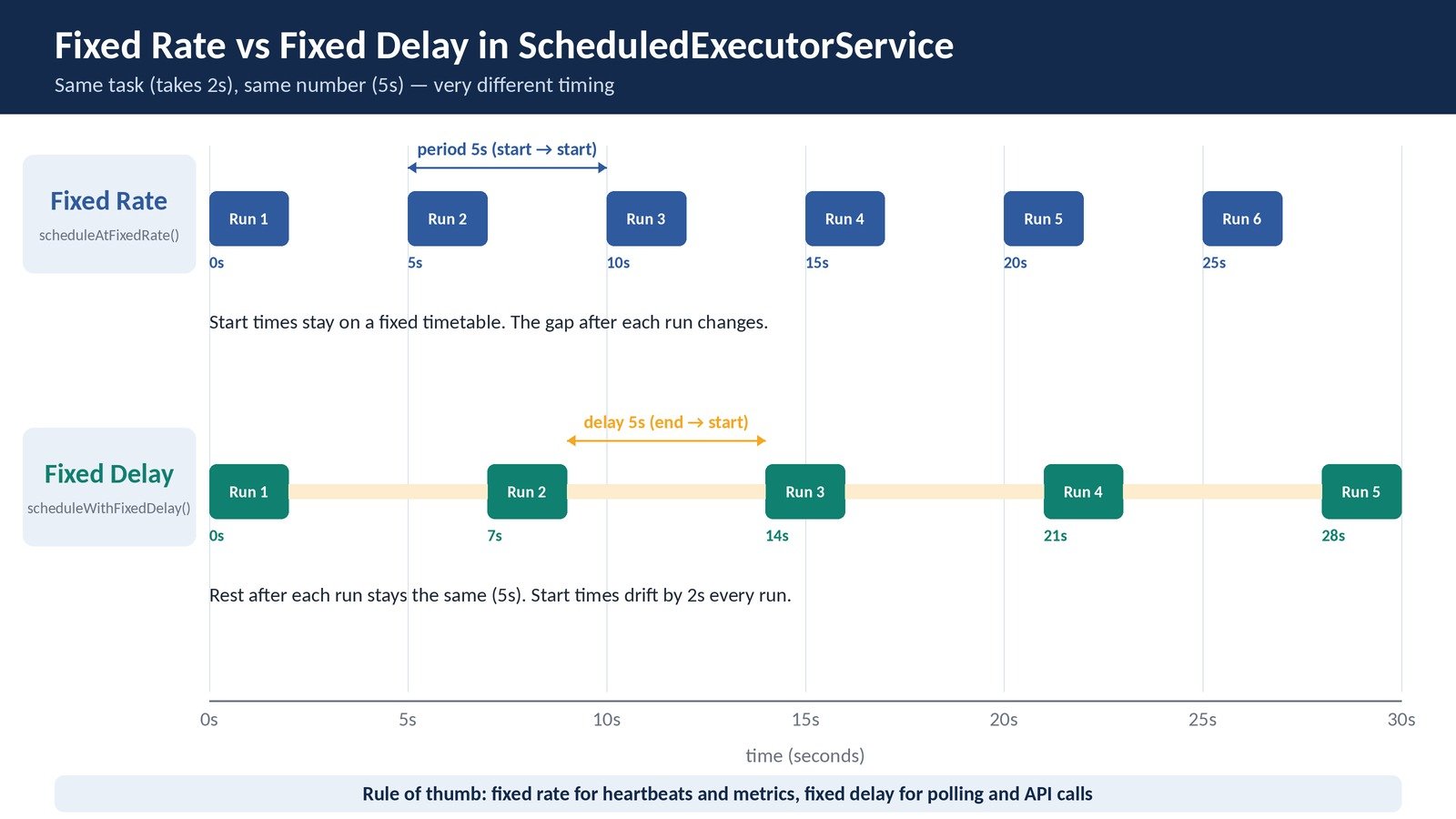
Take a job that needs 2 seconds per run, with a period (or delay) of 5 seconds:
| Run | Fixed rate start | Fixed delay start |
|---|---|---|
| 1 | 0s | 0s |
| 2 | 5s | 7s |
| 3 | 10s | 14s |
| 4 | 15s | 21s |
| 5 | 20s | 28s |
After five runs, fixed delay is already 8 seconds behind. Over a full day, the fixed-delay job runs about 5,000 fewer times than the fixed-rate one.
Let’s put both on the same scheduler and watch them side by side.
public class RateVsDelayDemo {

    public static void main(String[] args) throws InterruptedException {
        ScheduledExecutorService scheduler =
                Executors.newScheduledThreadPool(2);
        long start = System.currentTimeMillis();

        Runnable rateTask = () -> work("RATE ", start);
        Runnable delayTask = () -> work("DELAY", start);

        scheduler.scheduleAtFixedRate(rateTask, 0, 5, TimeUnit.SECONDS);
        scheduler.scheduleWithFixedDelay(delayTask, 0, 5, TimeUnit.SECONDS);

        Thread.sleep(22_000);
        scheduler.shutdown();
    }

    private static void work(String name, long start) {
        long seconds = (System.currentTimeMillis() - start) / 1000;
        System.out.println(name + " started at " + seconds + "s");
        try {
            Thread.sleep(2000); // the job takes 2 seconds
        } catch (InterruptedException e) {
            Thread.currentThread().interrupt();
        }
    }
}
Output (the order of the first two lines can vary):
RATE  started at 0s
DELAY started at 0s
RATE  started at 5s
DELAY started at 7s
RATE  started at 10s
DELAY started at 14s
RATE  started at 15s
RATE  started at 20s
DELAY started at 21s
RATE keeps its 5-second beat. DELAY slips by 2 seconds on every run. Same task, same number, very different timing.
Now make the job take 7 seconds, and keep the interval at 5 seconds. Here’s what happens:
Imagine that slow job calls a struggling database. Fixed rate keeps hitting it with no break. Fixed delay gives it room to breathe.
| Point | scheduleAtFixedRate() | scheduleWithFixedDelay() |
|---|---|---|
| Interval counted from | Start of previous run | End of previous run |
| Start times | Fixed, like a timetable | Drift with run time |
| Gap between runs | Changes with run time | Always the same |
| If a run is slow | Next run starts right away | Next run still waits the full delay |
| Catch-up after a pause | Yes, runs back to back | No |
| Best for | Heartbeats, metrics, clocks | Polling, cleanup, API calls |
Ask yourself one simple question. Does the outside world care about exact timing?
scheduleAtFixedRate(). For example, send a metric every 10 seconds so the dashboard graph stays smooth.scheduleWithFixedDelay(). For example, check for pending payouts, then rest 30 seconds.Still not sure? Pick fixed delay. It is the safer default, because slow runs can never pile up back to back.
| 💡 Interview Insight A favourite question goes like this: “Your job runs every 5 seconds but takes 7 seconds. What happens?” Say three things. Runs never overlap. With fixed rate, they run back to back with no gap. With fixed delay, a new run starts every 12 seconds. That answer shows you really know the API. |
I have seen this bug more than any other in real projects. A scheduled job works fine for weeks. Then one day it just stops. There’s no error in the logs and no crash. It simply never runs again.
If a repeating task throws an exception, the scheduler cancels all its future runs. The rule is the same for fixed rate and fixed delay.
Worse, the scheduler doesn’t print the exception. It quietly stores it inside the ScheduledFuture. Unless someone calls get() on that future, nobody ever sees it.
public class SilentFailureDemo {

    public static void main(String[] args) throws InterruptedException {
        ScheduledExecutorService scheduler =
                Executors.newSingleThreadScheduledExecutor();
        AtomicInteger count = new AtomicInteger();

        scheduler.scheduleAtFixedRate(() -> {
            int run = count.incrementAndGet();
            System.out.println("Run " + run);
            if (run == 3) {
                throw new IllegalStateException("Bad data in run 3");
            }
        }, 0, 1, TimeUnit.SECONDS);

        Thread.sleep(6000);
        scheduler.shutdown();
    }
}
Output:
Run 1
Run 2
Run 3
Run 4 never happens. No stack trace shows up anywhere. The worker thread is still alive and healthy, so your monitoring sees nothing wrong either.
scheduler.scheduleAtFixedRate(() -> {
    try {
        syncPendingPayments();
    } catch (Exception e) {
        // log it and keep the schedule alive
        System.err.println("Sync failed: " + e.getMessage());
    }
}, 0, 30, TimeUnit.SECONDS);
Now your code logs the bad run, and the next run still happens. In real code, use your logger instead of System.err.
Some teams wrap this in a tiny helper, so nobody forgets it:
static Runnable safely(Runnable task) {
    return () -> {
        try {
            task.run();
        } catch (Exception e) {
            System.err.println("Scheduled task failed: " + e);
        }
    };
}

// usage
scheduler.scheduleWithFixedDelay(
safely(() -> cleanupExpiredOtps()), 0, 1, TimeUnit.MINUTES);Want to see what killed a task? Call get() on its ScheduledFuture. For a repeating task, get() returns only when the task stops. If an exception stopped it, you get an ExecutionException with the real cause inside.
ScheduledFuture<?> future =
        scheduler.scheduleAtFixedRate(task, 0, 1, TimeUnit.SECONDS);
try {
    future.get();   // blocks until the task dies or gets cancelled
} catch (ExecutionException e) {
    System.err.println("Task died because of: " + e.getCause());
} catch (CancellationException e) {
    System.out.println("Task got cancelled");
}
This call blocks the thread that makes it. So run it from a separate monitoring thread, never from your main flow.
| 💡 Interview Insight “My scheduled task stopped running and the logs show nothing. Why?” Most likely, an uncaught exception killed it. The scheduler cancelled all later runs and kept the exception inside the ScheduledFuture. To fix it, wrap the task body in a try-catch. |
A repeating task runs forever unless you stop it. You have three common ways to do that.
ScheduledFuture<?> heartbeat = scheduler.scheduleAtFixedRate(
        () -> sendHeartbeat(), 0, 5, TimeUnit.SECONDS);

// later, when the connection closes
heartbeat.cancel(false);
With cancel(false), a run that is already in progress can finish, and no new runs start. With cancel(true), the scheduler also tries to interrupt the thread in the middle of a run.
One small detail here. By default, a cancelled task stays in the scheduler’s queue until its planned time comes. Cancel thousands of tasks with long delays and you waste memory. ScheduledThreadPoolExecutor has setRemoveOnCancelPolicy(true) to remove them right away.
Java has no built-in “repeat for one minute” option. But you can mix a repeating task with a one-shot task:
ScheduledFuture<?> poller = scheduler.scheduleWithFixedDelay(
        () -> System.out.println("Checking payment status..."),
        0, 2, TimeUnit.SECONDS);

// give up polling after 1 minute
scheduler.schedule(() -> poller.cancel(false), 1, TimeUnit.MINUTES);
This is a neat trick for “poll until timeout” flows. Payment status checks follow this pattern all the time.
scheduler.shutdown();
if (!scheduler.awaitTermination(10, TimeUnit.SECONDS)) {
    scheduler.shutdownNow();
}
Scheduled executors have a special rule here. When you call shutdown():
ScheduledThreadPoolExecutor lets you change both rules. The methods are setContinueExistingPeriodicTasksAfterShutdownPolicy() and setExecuteExistingDelayedTasksAfterShutdownPolicy(). Most apps never touch them.
Also, don’t forget to shut down at all. The default worker threads are non-daemon, so a forgotten scheduler can keep your JVM running forever.
Before Java 5, developers scheduled work with java.util.Timer and TimerTask. You will still find them in old codebases and old tutorials. In fact, the Timer Javadoc itself suggests ScheduledThreadPoolExecutor as a more flexible replacement.
Timer timer = new Timer();

timer.scheduleAtFixedRate(new TimerTask() {
    @Override
    public void run() {
        System.out.println("Old-style job");
    }
}, 0, 5000);
It looks similar on the surface. The trouble lies in how it runs underneath.
A Timer owns exactly one background thread. Every task you add shares it. If one task takes 30 seconds, all other tasks wait 30 seconds. Your “every 5 seconds” job quietly turns into “every 30 seconds”.
With ScheduledExecutorService, you choose the number of threads. A slow report job doesn’t hold up a fast heartbeat job.
This one is nasty. If any TimerTask throws a runtime exception, the Timer thread dies. Every other task on that Timer stops too. After that, any call to timer.schedule() throws an IllegalStateException.
Timer timer = new Timer();

timer.schedule(new TimerTask() {
    @Override
    public void run() {
        throw new RuntimeException("Boom");
    }
}, 100);

Thread.sleep(500);

// Throws IllegalStateException: Timer already cancelled.
timer.schedule(new TimerTask() {
    @Override
    public void run() {
        System.out.println("Never runs");
    }
}, 100);
With ScheduledExecutorService, an exception only affects the one task that threw it. Other tasks keep running. And you can still schedule new ones.
Timer works with absolute wall-clock time. Suppose someone changes the system time, or the clock sync jumps. Timer’s plan can go wrong, and tasks may fire too early or wait far too long.
ScheduledExecutorService measures delays with System.nanoTime(). That’s a relative clock, so wall-clock changes don’t affect it.
Every job must extend TimerTask. A plain Runnable or a lambda won’t work. On top of that, you can’t get a result back, because Timer has no Callable support and no futures.
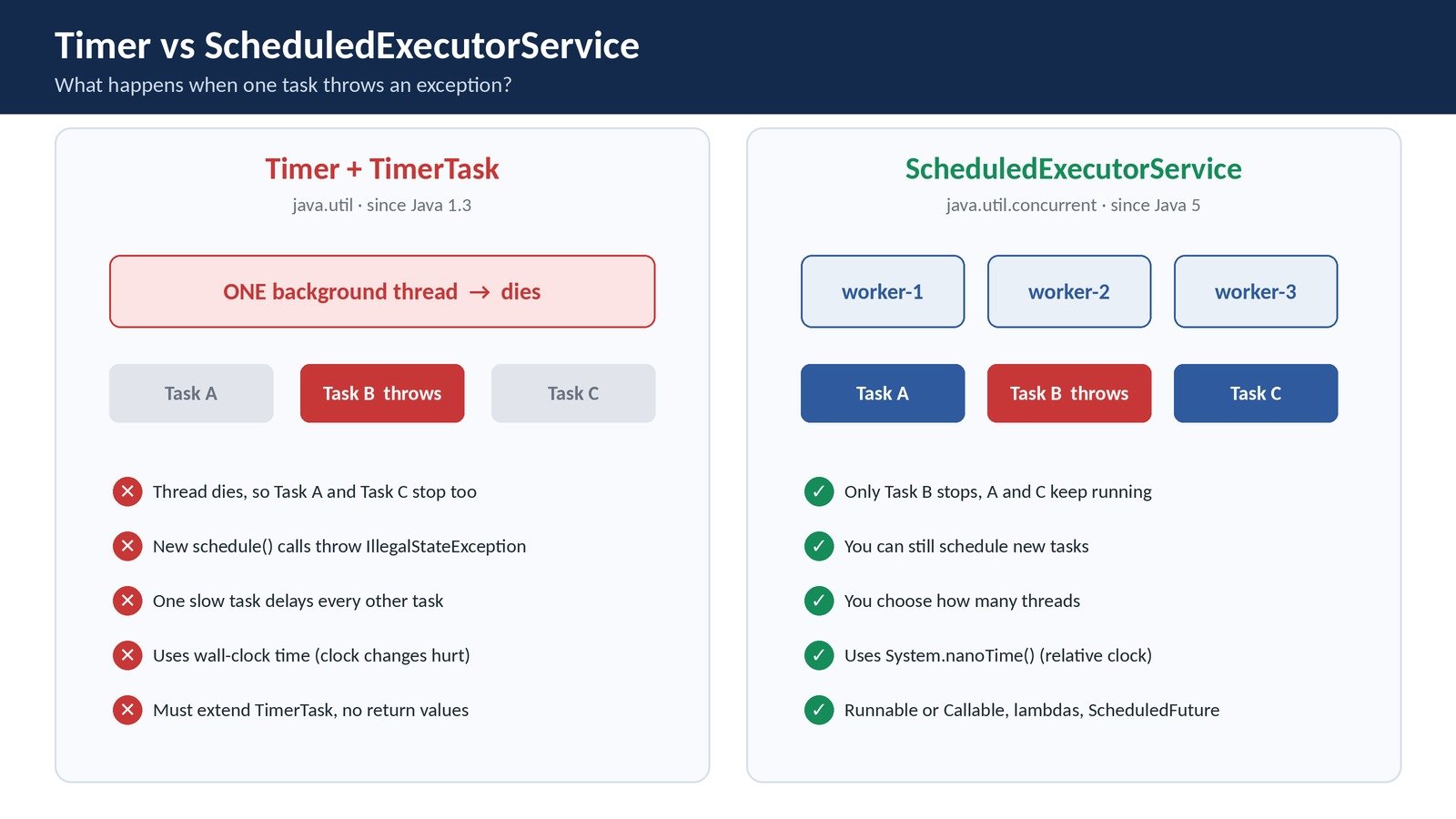
| Feature | Timer / TimerTask | ScheduledExecutorService |
|---|---|---|
| Threads | Always one | You choose (one or more) |
| Exception in a task | Kills the Timer and all its tasks | Stops only that task |
| Clock | Wall-clock time | Relative time (nanoTime) |
| Task type | Must extend TimerTask | Runnable or Callable, lambdas work |
| Return values | Not supported | Yes, through ScheduledFuture |
| Package | java.util (Java 1.3) | java.util.concurrent (Java 5) |
So, if you spot Timer in new code during a review, leave a comment. There’s no good reason to start with it today.
| 💡 Interview Insight “Why prefer ScheduledExecutorService over Timer?” Give three points: multiple threads, exception isolation, and a clock that ignores system time changes. You earn a bonus point if you mention that Timer’s own Javadoc suggests the switch. |
IllegalArgumentException. Only the initial delay can be zero.future.get() inside another scheduled task. That ties up a scheduler thread.ThreadFactory.ExecutorService.ScheduledFuture if you will ever need to cancel the task.If you use Spring, the @Scheduled annotation runs on a ScheduledExecutorService under the hood. Its fixedRate and fixedDelay options mean exactly what you learned here.
Spring adds two things on top. First, it logs exceptions from repeating tasks and keeps the schedule going. Second, Spring Boot’s default scheduler pool size is one. So one slow job can delay all your other jobs unless you raise the pool size.
ScheduledExecutorService is the standard way to run delayed and repeating work in Java. Once the fixed rate vs fixed delay idea clicks, the rest of the API feels easy.
Here’s a quick recap:
schedule() runs a task once after a delay. It accepts a Runnable or a Callable.scheduleAtFixedRate() keeps a steady timetable based on start times.scheduleWithFixedDelay() keeps a steady rest gap after each run ends.My advice? Pick one real job in your project, like a cleanup or a status poll. Move it to ScheduledExecutorService with fixed delay and a try-catch. You’ll feel the difference the first time something goes wrong at night.
A: It is an interface in java.util.concurrent that runs tasks after a delay or on a repeating schedule. It extends ExecutorService and adds four methods: two schedule() versions, scheduleAtFixedRate() and scheduleWithFixedDelay().
A: Fixed rate measures the interval from the start of one run to the start of the next. Fixed delay measures it from the end of one run to the start of the next. So fixed rate keeps a steady timetable, while fixed delay keeps a steady rest gap.
A: The runs never overlap. With fixed rate, the next run starts as soon as the slow one ends, with no gap. With fixed delay, the scheduler still waits the full delay after the slow run ends.
A: Most likely, the task threw an uncaught exception. The scheduler then cancels all future runs and stores the exception inside the ScheduledFuture without printing it. Wrap the task body in a try-catch to keep the schedule alive.
A: Keep the ScheduledFuture that the scheduling method returns and call cancel(false) on it. To stop everything, call shutdown() on the scheduler. Repeating tasks stop after shutdown, but delayed one-shot tasks still run by default.
A: Timer uses one thread, so one slow task delays all others. One exception kills the Timer and every task on it. Timer also depends on the system clock. ScheduledExecutorService supports many threads, isolates exceptions and uses a relative clock.
A: Yes. Pass a Callable to schedule(). It returns a ScheduledFuture, and calling get() on it gives you the result once the task finishes. The repeating methods only accept a Runnable, so they don’t return values.