ReentrantLock in Java: The Explicit-Lock Alternative to synchronized
-
Last Updated: October 4, 2026
-
By: javahandson
-
Series

ReentrantLock in Java explained simply: lock/unlock with try-finally, tryLock, timeouts, interruptible waits, fairness, and when to pick it over synchronized.
For a long time the only way to guard shared data in Java was the synchronized keyword. It works, it is simple, and most of us learn it first. But sometimes you need more control. You may want to try for a lock and give up if it is not free. You may want to wait only for two seconds and then move on. ReentrantLock in Java gives you exactly that kind of control, and that is what this guide is about.
Think of synchronized as an automatic door. You walk in, the door locks behind you, and it unlocks on its own when you leave. A Lock object is more like a door with a manual key. You decide when to lock it and when to unlock it. That extra freedom is powerful, but it also means you carry a bit more responsibility.
We will go step by step, and every idea comes with a small program you can run. First the Lock interface, then ReentrantLock itself, then the features that synchronized simply cannot offer. By the end you will know when to reach for an explicit lock and when the humble synchronized block is still the better pick.
Before we talk about ReentrantLock, we should meet the interface it implements. The Lock interface lives in the java.util.concurrent.locks package. It describes what any lock should be able to do, without saying how.
The synchronized keyword has served Java well since version 1.0. Still, it has a few hard limits. A thread that waits for a synchronized lock waits forever. You cannot give it a timeout. You cannot cancel it with an interrupt. And you cannot ask “is the lock free?” before you commit to waiting.
Java 5 added the java.util.concurrent.locks package to remove these limits. The idea was simple: turn the lock into a normal object with normal methods. Once a lock is an object, you can call methods on it, pass it around, and ask it questions.
The package is part of the wider concurrency toolkit. For a map of everything else in it, see the java.util.concurrent package overview.
A lock, at its heart, is just a tool that lets only one thread into a critical section at a time. The Lock interface promises a few basic actions:
The key idea is separation. With synchronized, locking and unlocking are tied to a block of code. With the Lock interface, lock and unlock are two separate method calls. You can call them in different methods, under different conditions, or even based on a timer.
ReentrantLock is the most common class that implements this interface. There are others, such as the locks inside ReentrantReadWriteLock, but for day-to-day work ReentrantLock covers almost everything you need.
| 💡 Interview Insight A common question is: why does Lock exist when we already have synchronized? The short answer is control. Lock lets you try for a lock, time out, stay interruptible, and pick a fairness policy. None of these are possible with a plain synchronized block. |
The name ReentrantLock has two parts. Reentrant means the same thread can lock it again without blocking itself. Lock means it guards a critical section. We will come back to the reentrant part in the next section. First, let us see why we need a lock at all.
Here is a counter that two threads update at the same time. Each thread adds 10,000, so we expect 20,000 at the end.
public class UnsafeCounterDemo {

    private static int count = 0;

    public static void main(String[] args) throws InterruptedException {
        Runnable task = () -> {
            for (int i = 0; i < 10_000; i++) {
                count++;            // not atomic: read, add, write
            }
        };

        Thread t1 = new Thread(task);
        Thread t2 = new Thread(task);
        t1.start();
        t2.start();
        t1.join();
        t2.join();

        System.out.println("Count: " + count);
    }
}
// Output (changes every run): Count: 13874
Why is the answer wrong? The line count++ looks like one step, but the CPU does three: read the value, add one, write it back. Two threads can read the same old value at once. Both add one, both write, and one update simply vanishes. This is called a race condition.
Now let us protect the counter with a ReentrantLock.
import java.util.concurrent.locks.Lock;
import java.util.concurrent.locks.ReentrantLock;

public class SafeCounterDemo {

    private static final Lock lock = new ReentrantLock();
    private static int count = 0;

    static void increment() {
        lock.lock();            // grab the lock
        try {
            count++;            // critical section
        } finally {
            lock.unlock();      // always release
        }
    }

    public static void main(String[] args) throws InterruptedException {
        Runnable task = () -> {
            for (int i = 0; i < 10_000; i++) {
                increment();
            }
        };

        Thread t1 = new Thread(task);
        Thread t2 = new Thread(task);
        t1.start();
        t2.start();
        t1.join();
        t2.join();

        System.out.println("Count: " + count);
    }
}
// Output: Count: 20000
Now the answer is right on every run. Only one thread can be inside increment() at a time. The other one waits at lock.lock() until the first thread calls unlock().
Notice the shape of the code. We call lock() first. Then we open a try block. Inside it sits the work we want to protect. The unlock() call goes into a finally block.
This try-finally pattern is not optional. It is the one rule you must never break with explicit locks.
Suppose the code inside the critical section throws an exception. If unlock() sat on a normal line after the work, Java would skip it. The lock would stay held forever. Every other thread waiting for it would freeze.
Here is that bug in action:
import java.util.concurrent.locks.ReentrantLock;

public class ForgottenUnlockDemo {

    private static final ReentrantLock lock = new ReentrantLock();

    static void riskyWork() {
        lock.lock();
        int result = 10 / 0;        // throws ArithmeticException
        lock.unlock();              // never reached!
    }

    public static void main(String[] args) throws InterruptedException {
        try {
            riskyWork();
        } catch (ArithmeticException e) {
            System.out.println("Caught: " + e.getMessage());
        }

        Thread other = new Thread(() -> {
            System.out.println("Other thread: waiting for the lock...");
            lock.lock();            // waits forever
            System.out.println("Other thread: got it");
        });
        other.setDaemon(true);
        other.start();
        other.join(2000);

        System.out.println("Lock still held? " + lock.isLocked());
    }
}
// Output:
// Caught: / by zero
// Other thread: waiting for the lock...
// Lock still held? true
The main thread caught the exception and moved on. But the lock never came back. The second thread now waits forever, and “Other thread: got it” never prints.
The finally block saves us. It runs no matter what happens inside try, whether the code finishes normally or blows up. So the lock is always released. Burn this shape into your memory: lock, then try, then finally with unlock.
| 💡 Interview Insight Interviewers love to ask where unlock() should go. The answer is always: inside a finally block. And lock() must sit just outside the try, not inside it. If lock() fails and throws, you do not want finally to call unlock() on a lock you never acquired. |
Now the reentrant part. Imagine a thread already holds the lock and then calls another method that also locks the same object. With a naive lock the thread would wait for itself, which is a guaranteed deadlock.
ReentrantLock avoids this. It remembers which thread owns it, and it keeps a hold count. When the owning thread locks again, the count goes up. Each unlock() brings it down by one. The lock is truly free only when the count reaches zero.
Lock lock = new ReentrantLock();

public void outer() {
    lock.lock();            // hold count = 1
    try {
        inner();            // same thread locks again
    } finally {
        lock.unlock();      // hold count = 0, now free
    }
}

public void inner() {
    lock.lock();            // hold count = 2
    try {
        // do some work
    } finally {
        lock.unlock();      // hold count = 1
    }
}
Is this a new idea? Not really, since synchronized is reentrant too. What ReentrantLock adds is a way to see the count with your own eyes.
The getHoldCount() method reports how many times the current thread holds the lock. It lives on the ReentrantLock class, not on the Lock interface, so declare your variable as ReentrantLock when you want it.
import java.util.concurrent.locks.ReentrantLock;

public class HoldCountDemo {

    public static void main(String[] args) {
        ReentrantLock lock = new ReentrantLock();

        lock.lock();
        System.out.println("After 1st lock:   " + lock.getHoldCount());
        lock.lock();
        System.out.println("After 2nd lock:   " + lock.getHoldCount());

        lock.unlock();
        System.out.println("After 1st unlock: " + lock.getHoldCount());
        lock.unlock();
        System.out.println("After 2nd unlock: " + lock.getHoldCount());

        System.out.println("Is it locked now? " + lock.isLocked());
    }
}
// Output:
// After 1st lock:   1
// After 2nd lock:   2
// After 1st unlock: 1
// After 2nd unlock: 0
// Is it locked now? false
One golden rule comes out of this. Every lock() needs a matching unlock(). If you lock twice, you must unlock twice. Miss one and the lock never frees up for other threads.
Recursion is the place where reentrancy really earns its keep. A recursive method that locks on every call would deadlock at once with a non-reentrant lock. With ReentrantLock it just works.
import java.util.concurrent.locks.ReentrantLock;

public class RecursiveLockDemo {

    private static final ReentrantLock lock = new ReentrantLock();

    static void countDown(int n) {
        lock.lock();
        try {
            System.out.println("n = " + n + ", hold count = " + lock.getHoldCount());
            if (n > 1) {
                countDown(n - 1);   // locks the same lock again
            }
        } finally {
            lock.unlock();
        }
    }

    public static void main(String[] args) {
        countDown(3);
        System.out.println("Final hold count = " + lock.getHoldCount());
    }
}
// Output:
// n = 3, hold count = 1
// n = 2, hold count = 2
// n = 1, hold count = 3
// Final hold count = 0
Each call adds one to the count on the way down. Each finally block takes one away on the way back up. When the first call returns, the count is back to zero and the lock is free.
So far our threads wait patiently for the lock. Sometimes waiting is the wrong choice. Maybe you would rather do something else than sit idle. This is where tryLock() shines, and it is a feature synchronized can never match.
The plain tryLock() call returns immediately. If the lock is free, it grabs it and returns true. If someone else holds it, it returns false at once and your thread keeps running.
import java.util.concurrent.locks.ReentrantLock;

public class TryLockDemo {

    private static final ReentrantLock lock = new ReentrantLock();

    public static void main(String[] args) throws InterruptedException {
        Runnable task = () -> {
            String name = Thread.currentThread().getName();
            if (lock.tryLock()) {
                try {
                    System.out.println(name + " got the lock");
                    sleep(1000);    // hold it for a while
                } finally {
                    lock.unlock();
                }
            } else {
                System.out.println(name + " found the lock busy, skipping");
            }
        };

        Thread t1 = new Thread(task, "T1");
        Thread t2 = new Thread(task, "T2");
        t1.start();
        sleep(100);                 // let T1 grab the lock first
        t2.start();
        t1.join();
        t2.join();
    }

    private static void sleep(long ms) {
        try {
            Thread.sleep(ms);
        } catch (InterruptedException e) {
            Thread.currentThread().interrupt();
        }
    }
}
// Output:
// T1 got the lock
// T2 found the lock busy, skipping
See the pattern? We only unlock inside the if branch, because that is the only place we actually took the lock. If tryLock() returned false, we never acquired it, so we must not unlock it.
Where does this help in real code? Here are some common cases:
The timed version is even more useful in real systems. You tell it how long you are willing to wait. If the lock becomes free within that time, you get it. If not, it gives up and returns false.
import java.util.concurrent.TimeUnit;
import java.util.concurrent.locks.ReentrantLock;

public class TimedTryLockDemo {

    private static final ReentrantLock lock = new ReentrantLock();

    public static void main(String[] args) throws InterruptedException {
        Thread holder = new Thread(() -> {
            lock.lock();
            try {
                System.out.println("Holder: got the lock, working for 3 seconds");
                Thread.sleep(3000);
            } catch (InterruptedException e) {
                Thread.currentThread().interrupt();
            } finally {
                lock.unlock();
            }
        });
        holder.start();
        Thread.sleep(100);

        System.out.println("Main: willing to wait 1 second");
        if (lock.tryLock(1, TimeUnit.SECONDS)) {
            try {
                System.out.println("Main: got the lock");
            } finally {
                lock.unlock();
            }
        } else {
            System.out.println("Main: gave up after 1 second, doing something else");
        }
        holder.join();
    }
}
// Output:
// Holder: got the lock, working for 3 seconds
// Main: willing to wait 1 second
// Main: gave up after 1 second, doing something else
This small feature prevents a lot of real-world pain. A thread stuck forever on a lock is one of the worst bugs to debug. With a timeout, the thread wakes up, reports the problem, and your system stays responsive.
| 💡 Interview Insight tryLock(time, unit) throws InterruptedException, but the plain tryLock() does not. The timed one is a blocking call that can be interrupted while it waits, so it must declare the checked exception. The no-argument version returns instantly and has nothing to interrupt. |
There is a bigger win hiding in the timed form. A classic deadlock happens when thread A holds lock 1 and waits for lock 2, while thread B holds lock 2 and waits for lock 1. Neither ever moves. You can read the full story in Deadlock in Java.
With synchronized, the only cure is to always take the locks in the same order. With tryLock() you get a second option. A thread tries for the second lock with a timeout. If it fails, it releases the first lock, backs off for a moment, and tries again from the start. Nobody holds a lock while waiting forever, so the cycle breaks.
We will build exactly this in the walkthrough near the end, using a bank transfer between two accounts.
Here is another gap that explicit locks fill nicely. When a thread blocks on a synchronized block, nothing can wake it. You cannot interrupt it. It waits until the lock is free, full stop.
That is fine most of the time. But think about a long-running task that a user wants to cancel. If the task is stuck waiting on a lock, your cancel button does nothing. The thread is deaf to interruption.
The same thing hurts during shutdown. A thread pool asks its workers to stop by interrupting them. A worker parked on a plain lock() call ignores that request. So the pool cannot shut down cleanly. We covered how pools stop their workers in ExecutorService in Java.
The lockInterruptibly() method changes this. A thread waiting here can be interrupted. When that happens, it stops waiting and throws InterruptedException. Your code can then clean up and exit gracefully.
import java.util.concurrent.locks.ReentrantLock;

public class InterruptibleLockDemo {

    private static final ReentrantLock lock = new ReentrantLock();

    public static void main(String[] args) throws InterruptedException {
        Thread holder = new Thread(() -> {
            lock.lock();
            try {
                Thread.sleep(5000);        // hold the lock for 5 seconds
            } catch (InterruptedException e) {
                Thread.currentThread().interrupt();
            } finally {
                lock.unlock();
            }
        }, "holder");

        Thread waiter = new Thread(() -> {
            try {
                System.out.println("Waiter: trying to get the lock");
                lock.lockInterruptibly();   // can be interrupted while waiting
                try {
                    System.out.println("Waiter: got the lock");
                } finally {
                    lock.unlock();
                }
            } catch (InterruptedException e) {
                Thread.currentThread().interrupt();   // restore the flag
                System.out.println("Waiter: interrupted, giving up");
            }
        }, "waiter");

        holder.start();
        Thread.sleep(100);          // make sure holder owns the lock
        waiter.start();
        Thread.sleep(1000);         // let the waiter block for a second

        System.out.println("Main: cancelling the waiter");
        waiter.interrupt();

        waiter.join();
        holder.join();
    }
}
// Output:
// Waiter: trying to get the lock
// Main: cancelling the waiter
// Waiter: interrupted, giving up
The waiter did not sit there for five seconds. It reacted to the interrupt within a moment and left. If we swapped lockInterruptibly() for lock(), the interrupt would do nothing, and the waiter would only print “got the lock” after the holder finished.
A quick note on that restore line. When Java throws InterruptedException, it clears the thread’s interrupt flag. Calling Thread.currentThread().interrupt() sets it back on. This way, code higher up the call stack still knows an interruption happened.
So when would you use lockInterruptibly()? Any time a task might need to be cancelled mid-wait. Think of worker threads in a pool that must shut down cleanly, or a background job a user can stop. Interruptible locking makes graceful shutdown possible.
Fairness is a quieter feature, but it matters in some designs. It answers one question: when several threads wait for a lock, who gets it next?
By default, ReentrantLock is non-fair. When the lock frees up, a thread that just arrived may grab it before the threads already waiting in line. This is called barging.
This sounds unfair, and it is. But it is also fast. Waking a parked thread takes time. If a running thread can take the lock right now, the CPU stays busy instead of sitting idle during the wake-up. For most programs, raw speed wins and the occasional queue-jump does no harm.
If you do need strict order, pass true to the constructor. Now the lock serves threads roughly in the order they asked for it, first come first served.
// non-fair lock (default) - faster
ReentrantLock fastLock = new ReentrantLock();

// fair lock - serves threads in arrival order
ReentrantLock fairLock = new ReentrantLock(true);

System.out.println(fastLock.isFair());  // Output: false
System.out.println(fairLock.isFair());  // Output: true
Let us start three threads that each grab the lock three times in a row.
import java.util.concurrent.locks.ReentrantLock;

public class FairnessDemo {

    public static void main(String[] args) throws InterruptedException {
        runWith(new ReentrantLock(true));
    }

    static void runWith(ReentrantLock lock) throws InterruptedException {
        Runnable task = () -> {
            for (int i = 0; i < 3; i++) {
                lock.lock();
                try {
                    System.out.println(Thread.currentThread().getName() + " got the lock");
                } finally {
                    lock.unlock();
                }
            }
        };

        Thread[] threads = { new Thread(task, "T1"), new Thread(task, "T2"), new Thread(task, "T3") };
        for (Thread t : threads) t.start();
        for (Thread t : threads) t.join();
    }
}
// Typical output with a fair lock (threads take turns):
// T1 got the lock
// T2 got the lock
// T3 got the lock
// T1 got the lock
// T2 got the lock
// T3 got the lock
// ...
With a fair lock, the threads tend to take turns. The thread that just released the lock goes to the back of the queue.
Now change the constructor to new ReentrantLock(false) and run it again:
// Typical output with a non-fair lock (one thread keeps re-taking it):
// T1 got the lock
// T1 got the lock
// T1 got the lock
// T3 got the lock
// T3 got the lock
// T3 got the lock
// T2 got the lock
// T2 got the lock
// T2 got the lock
Each thread grabs the lock three times in a row. It can re-take the lock before a parked thread even wakes up. Thread scheduling varies from machine to machine, so treat both outputs as typical, not guaranteed.
There is a cost, though. Fairness is slower, often by a wide margin under heavy contention. Every hand-off has to wake the next thread in line, and the CPU waits during each wake-up. One more thing to know: even a fair lock does not make the plain tryLock() fair. That method grabs a free lock straight away, whether or not other threads are waiting.
A simple rule helps here. Start with a non-fair lock, which is the default. Switch to fair only if you measure real starvation, where some thread keeps losing the race and never gets its turn.
| 💡 Interview Insight A classic trap: does a fair ReentrantLock guarantee no starvation forever? It strongly reduces starvation by serving threads in order, but tryLock() can still barge ahead because it ignores fairness. So fairness applies to the blocking lock() path, not to opportunistic tryLock() attempts. |
With synchronized, threads coordinate through wait(), notify() and notifyAll(). Those calls work, but every object has just one waiting room. If you have not met them yet, start with wait and notify in Java.
ReentrantLock replaces that single waiting room with Condition objects. You create them with lock.newCondition(), and one lock can have as many as you like.
Picture a bounded buffer shared by producers and consumers. Producers wait when the buffer is full. Consumers wait when it is empty. With wait and notify, both groups sit in the same waiting room.
So when a consumer takes an item, it calls notifyAll() and wakes everyone. The other consumers wake up, find nothing useful, and go back to sleep. That is wasted work. With two conditions, a consumer can wake only the producers, and a producer can wake only the consumers.
import java.util.ArrayDeque;
import java.util.Queue;
import java.util.concurrent.locks.Condition;
import java.util.concurrent.locks.ReentrantLock;

public class BoundedBuffer<T> {

    private final Queue<T> items = new ArrayDeque<>();
    private final int capacity;

    private final ReentrantLock lock = new ReentrantLock();
    private final Condition notFull  = lock.newCondition();
    private final Condition notEmpty = lock.newCondition();

    public BoundedBuffer(int capacity) {
        this.capacity = capacity;
    }

    public void put(T item) throws InterruptedException {
        lock.lock();
        try {
            while (items.size() == capacity) {
                notFull.await();        // wait for space
            }
            items.add(item);
            notEmpty.signal();          // wake one waiting consumer
        } finally {
            lock.unlock();
        }
    }

    public T take() throws InterruptedException {
        lock.lock();
        try {
            while (items.isEmpty()) {
                notEmpty.await();       // wait for an item
            }
            T item = items.remove();
            notFull.signal();           // wake one waiting producer
            return item;
        } finally {
            lock.unlock();
        }
    }
}
And here is a tiny program that uses it:
public class BufferDemo {

    public static void main(String[] args) throws InterruptedException {
        BoundedBuffer<Integer> buffer = new BoundedBuffer<>(2);

        Thread producer = new Thread(() -> {
            try {
                for (int i = 1; i <= 5; i++) {
                    buffer.put(i);
                    System.out.println("Produced " + i);
                }
            } catch (InterruptedException e) {
                Thread.currentThread().interrupt();
            }
        });

        Thread consumer = new Thread(() -> {
            try {
                for (int i = 1; i <= 5; i++) {
                    Thread.sleep(200);          // a slow consumer
                    System.out.println("Consumed " + buffer.take());
                }
            } catch (InterruptedException e) {
                Thread.currentThread().interrupt();
            }
        });

        producer.start();
        consumer.start();
        producer.join();
        consumer.join();
    }
}
// Typical output:
// Produced 1
// Produced 2
// Produced 3
// Consumed 1
// Consumed 2
// Produced 4
// Consumed 3
// Produced 5
// Consumed 4
// Consumed 5
The producer races ahead and fills both slots. Then it blocks on notFull.await() until the slow consumer frees a slot. The buffer never holds more than two items.
Why does “Produced 3” print before “Consumed 1”? The consumer took item 1 and signalled the producer. Then both threads raced to print, and the producer won. The print lines run outside the lock, so their order can shift between runs. The buffer itself stays correct every time.
Conditions follow the same rules as wait and notify, just with different method names:
In practice you rarely need to write this buffer yourself. The JDK’s ArrayBlockingQueue is built in almost exactly this way, with one ReentrantLock and two conditions named notEmpty and notFull. Still, knowing how it works makes the whole concurrency package much easier to follow.
Here is a small bonus that synchronized cannot offer at all. A ReentrantLock can tell you about its own state while your program runs. These methods help with debugging, logging and assertions.
import java.util.concurrent.locks.ReentrantLock;

public class LockInspectionDemo {

    public static void main(String[] args) throws InterruptedException {
        ReentrantLock lock = new ReentrantLock();
        System.out.println("Locked at start?  " + lock.isLocked());

        lock.lock();
        try {
            Thread waiter = new Thread(() -> {
                lock.lock();
                lock.unlock();
            });
            waiter.start();
            Thread.sleep(100);      // give the waiter time to queue up

            System.out.println("Locked now?       " + lock.isLocked());
            System.out.println("Held by me?       " + lock.isHeldByCurrentThread());
            System.out.println("Hold count:       " + lock.getHoldCount());
            System.out.println("Anyone waiting?   " + lock.hasQueuedThreads());
            System.out.println("Queue length:     " + lock.getQueueLength());
        } finally {
            lock.unlock();
        }
    }
}
// Output:
// Locked at start?  false
// Locked now?       true
// Held by me?       true
// Hold count:       1
// Anyone waiting?   true
// Queue length:     1
A handy use of isHeldByCurrentThread() is a guard inside helper methods. A private method that expects its caller to hold the lock can check it with an assertion: assert lock.isHeldByCurrentThread(). If someone calls it without the lock, the bug shows up straight away in testing.
Do not build program logic on getQueueLength() or isLocked(), though. The answer can change the very next moment, because other threads keep running. Treat these methods as a snapshot for monitoring, not as a decision you can trust.
We have seen the features one by one. Now let us put ReentrantLock and synchronized side by side so the trade-offs are clear in one view.
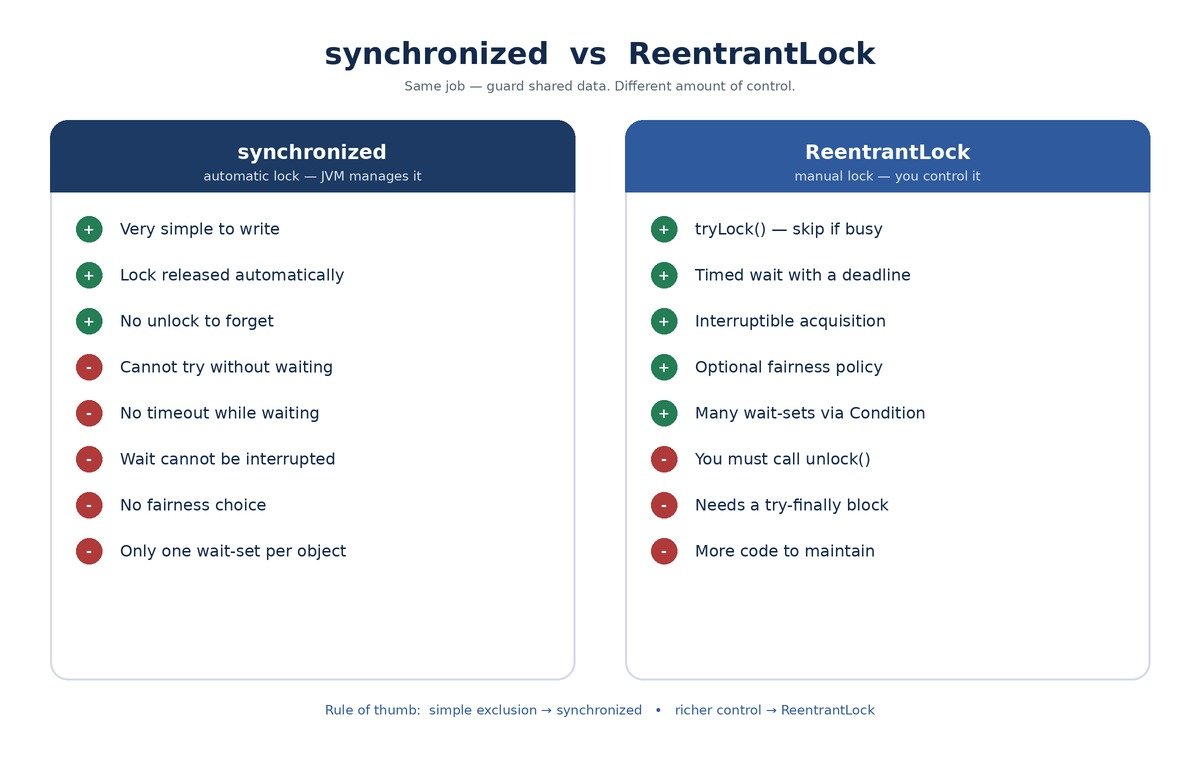
| Feature | synchronized | ReentrantLock |
|---|---|---|
| Locking style | Automatic (block or method) | Manual (lock / unlock calls) |
| Release on exception | Automatic by the JVM | You must use try-finally |
| Reentrant | Yes | Yes, with a visible hold count |
| Try without waiting | Not possible | Yes, with tryLock() |
| Timed waiting | Not possible | Yes, with tryLock(time, unit) |
| Interruptible waiting | No | Yes, with lockInterruptibly() |
| Fairness policy | No choice | Optional fair mode |
| Multiple wait-sets | One per object | Many, via newCondition() |
| Inspect lock state | Only Thread.holdsLock(obj) | isLocked(), getHoldCount(), getQueueLength() and more |
| Code simplicity | Very simple | More code to manage |
Here is a small bank account guarded first with synchronized and then with ReentrantLock. Both versions are equally correct.
// Version 1: synchronized
public class SyncAccount {
    private int balance;

    public synchronized void deposit(int amount) {
        balance += amount;
    }

    public synchronized int getBalance() {
        return balance;
    }
}

// Version 2: ReentrantLock
import java.util.concurrent.locks.ReentrantLock;

public class LockAccount {
    private final ReentrantLock lock = new ReentrantLock();
    private int balance;

    public void deposit(int amount) {
        lock.lock();
        try {
            balance += amount;
        } finally {
            lock.unlock();
        }
    }

    public int getBalance() {
        lock.lock();
        try {
            return balance;
        } finally {
            lock.unlock();
        }
    }
}
Look at how much shorter the first version is. When all you need is plain mutual exclusion, that brevity is a real advantage. The lock version only pays off once you use a feature that synchronized lacks.
In early Java versions, ReentrantLock was clearly faster than synchronized. That gap closed long ago. Since Java 6, the JVM has optimized synchronized heavily, and for ordinary code the two perform about the same. So do not switch to ReentrantLock for speed alone.
There was one recent twist with virtual threads. In Java 21, a virtual thread that blocked inside a synchronized block got pinned to its carrier thread, so ReentrantLock was the safer choice there. Java 24 removed that limitation (JEP 491), and synchronized now works well with virtual threads too.
Do not rush to replace every synchronized block. For plain mutual exclusion over a short piece of code, synchronized is cleaner and safer. The JVM releases the lock for you, so you cannot forget to unlock. Less code means fewer bugs.
Reach for synchronized when your need is simple: guard a small section, let one thread in at a time, and move on. For deeper coverage of the basics, see thread synchronization in Java.
Pick ReentrantLock when you need something synchronized cannot give:
There is also a cousin worth knowing. When many threads only read shared data and few write it, a read-write lock lets all the readers work at once. ReadWriteLock in Java builds directly on the ideas in this guide.
Explicit locks give you more power, and more ways to shoot yourself in the foot. Here are the mistakes that show up again and again in code reviews.
// Wrong
try {
    lock.lock();
    doWork();
} finally {
    lock.unlock();   // runs even if lock() itself failed
}

// Right
lock.lock();
try {
    doWork();
} finally {
    lock.unlock();
}
If lock() throws before it acquires anything, the wrong version still calls unlock(). That raises an IllegalMonitorStateException and hides the real error. Keep lock() on the line just before try.
// Wrong: every call gets its own private lock
public void increment() {
    Lock lock = new ReentrantLock();
    lock.lock();
    try {
        count++;
    } finally {
        lock.unlock();
    }
}
This code looks safe, but it protects nothing. Each thread locks its own brand-new lock, so nobody ever waits for anyone. All threads that guard the same data must share the same lock object. Make it a final field.
ReentrantLock lock = new ReentrantLock();
lock.lock();                    // main thread owns it

new Thread(() -> lock.unlock()).start();
// Output: Exception in thread "Thread-0" java.lang.IllegalMonitorStateException
Only the owner can release a ReentrantLock. A different thread that calls unlock() gets an IllegalMonitorStateException. If you need one thread to signal another, use a Condition or a tool like CountDownLatch instead.
Let us tie everything together in one small program. We will move money between two bank accounts from two threads at once, without any deadlock.
Each account has its own ReentrantLock. A transfer must lock both accounts, because it changes both balances. Thread one moves money from A to B. Thread two moves money from B to A, at the same time.
With plain synchronized blocks, this is the textbook recipe for a deadlock. Thread one holds A and waits for B, while thread two holds B and waits for A. Our version uses timed tryLock() calls, so a thread that cannot get both locks lets go and tries again.
import java.util.concurrent.ThreadLocalRandom;
import java.util.concurrent.TimeUnit;
import java.util.concurrent.locks.ReentrantLock;

public class BankTransferDemo {

    static class Account {
        private final ReentrantLock lock = new ReentrantLock();
        private int balance;

        Account(int balance) {
            this.balance = balance;
        }
    }

    static boolean transfer(Account from, Account to, int amount) throws InterruptedException {
        long deadline = System.nanoTime() + TimeUnit.SECONDS.toNanos(1);

        while (System.nanoTime() < deadline) {
            if (from.lock.tryLock(50, TimeUnit.MILLISECONDS)) {
                try {
                    if (to.lock.tryLock(50, TimeUnit.MILLISECONDS)) {
                        try {
                            if (from.balance < amount) {
                                return false;               // not enough money
                            }
                            from.balance -= amount;
                            to.balance += amount;
                            return true;                    // success
                        } finally {
                            to.lock.unlock();
                        }
                    }
                } finally {
                    from.lock.unlock();                     // let go of the first lock
                }
            }
            // could not get both locks: back off a little, then retry
            Thread.sleep(ThreadLocalRandom.current().nextInt(1, 10));
        }
        return false;                                       // gave up after 1 second
    }

    static void runTransfers(Account from, Account to) {
        int done = 0;
        int failed = 0;
        for (int i = 0; i < 1000; i++) {
            try {
                if (transfer(from, to, 1)) done++;
                else failed++;
            } catch (InterruptedException e) {
                Thread.currentThread().interrupt();
                return;
            }
        }
        System.out.println(Thread.currentThread().getName() + ": " + done + " done, " + failed + " failed");
    }

    public static void main(String[] args) throws InterruptedException {
        Account a = new Account(1000);
        Account b = new Account(1000);

        Thread t1 = new Thread(() -> runTransfers(a, b), "A-to-B");
        Thread t2 = new Thread(() -> runTransfers(b, a), "B-to-A");
        t1.start();
        t2.start();
        t1.join();
        t2.join();

        System.out.println("A = " + a.balance + ", B = " + b.balance);
        System.out.println("Total = " + (a.balance + b.balance));
    }
}
// Typical output:
// A-to-B: 1000 done, 0 failed
// B-to-A: 1000 done, 0 failed
// A = 1000, B = 1000
// Total = 2000
The two thread lines may print in either order. What never changes is the last line. The total stays at 2000 on every run, because no transfer ever touches a balance without holding both locks.
Could we solve this with lock ordering instead? Yes. If every thread always locked the account with the smaller id first, no cycle could form, and plain lock() calls would be enough. Both approaches are valid. The tryLock() version shines when you cannot easily agree on a global order, for example when locks come from different libraries.
A: ReentrantLock is an explicit lock in the java.util.concurrent.locks package. It does the same job as synchronized but gives you manual control — you call lock() and unlock() yourself, and you also get tryLock(), timed waiting, interruptible waiting, and an optional fairness policy.
A: It means the same thread can acquire the same lock more than once without blocking itself. The lock keeps a hold count that goes up on each lock() and down on each unlock(). The lock is free only when the count returns to zero, so every lock() needs a matching unlock().
A: If the critical section throws an exception, a normal unlock() line would be skipped and the lock would stay held forever, freezing every waiting thread. A finally block always runs, so the lock is always released. Also keep lock() just outside the try, so you never unlock a lock you failed to acquire.
A: synchronized is automatic and simple — the JVM releases the lock for you. ReentrantLock is manual but far more capable: it supports tryLock(), timed waits, interruptible acquisition, fairness, and multiple condition wait-sets. Use synchronized for plain exclusion; use ReentrantLock when you need that extra control.
A: The plain tryLock() does not — it returns instantly and has nothing to interrupt. The timed form tryLock(time, unit) does throw InterruptedException, because it is a blocking call that can be interrupted while it waits for the lock.
A: A fair lock serves threads in arrival order, which strongly reduces starvation on the blocking lock() path. But it is slower, and tryLock() still barges ahead because it ignores the fairness setting. Start non-fair (the default) and switch to fair only after you measure real starvation.
Let us wrap up what we covered. ReentrantLock in Java is the tool you grow into. You start with synchronized because it is simple and it works. Then one day you hit a wall: you need a timeout, or a cancellable wait, or a way to try without blocking. That is the day ReentrantLock becomes your friend.
We met the Lock interface and saw why Java added it. We fixed a broken counter, watched the hold count rise and fall, and saw a forgotten unlock() freeze another thread. Then we tried tryLock() with and without a timeout, cancelled a waiting thread with lockInterruptibly(), compared fair and non-fair locks, and built a bounded buffer with two conditions.
The main points to carry away are short. Always pair lock() with unlock() inside a finally block. Use tryLock() when waiting forever is not acceptable. Use lockInterruptibly() when a wait must be cancellable. Turn on fairness only when you have measured a real starvation problem.
Most of all, match the tool to the task. Simple exclusion stays with synchronized. Richer control moves to ReentrantLock. Once that choice feels natural, you are writing concurrent Java with real confidence.