Java 27 JEP 523: Make G1 the Default Garbage Collector in All Environments
-
Last Updated: October 6, 2026
-
By: javahandson
-
Series

Java 27 JEP 523 makes G1 the default garbage collector in all environments. Learn what changed, why Serial GC is dropped as default, and how to check yours.
Java 27 landed in September 2026. It ships with JEP 523, which makes G1 the default garbage collector in all environments. This sounds like a small line in the release notes. However, it quietly changes how your app manages memory on small machines, inside containers and on CI runners.
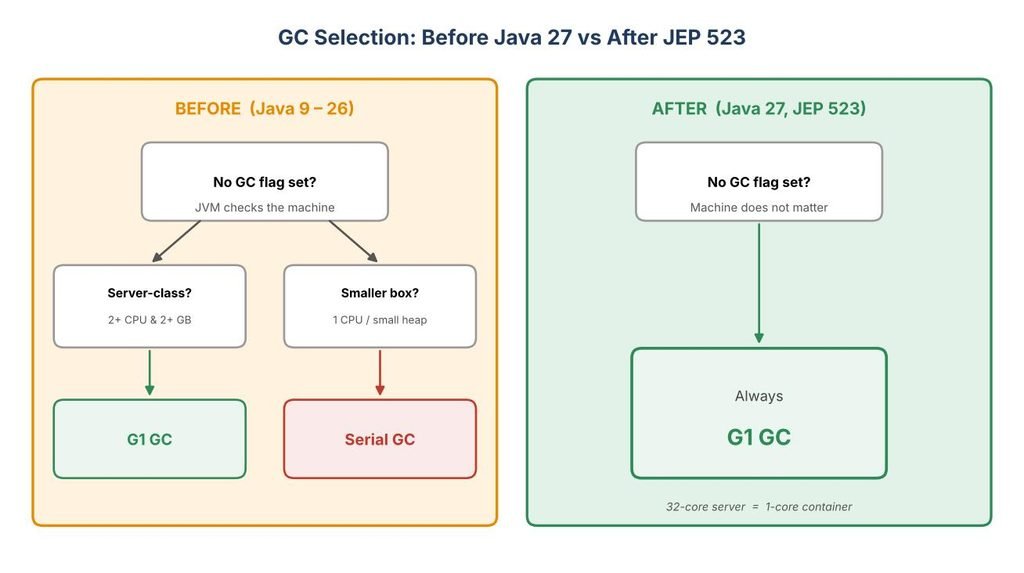
For years, the JVM picked your collector based on the machine. On a big server, you got G1. On a small box, you often got Serial GC without even knowing. So two environments running the same jar could behave quite differently.
In this guide, we will unpack what actually changed. First, we will look at why the old rule existed and what G1 is. After that, we will see what this switch means for your services. Finally, we will cover how to check your collector and how to override the default when you really need to.
One quick note before we dive in. Java 27 is a non-LTS release, while Java 25 is the current long-term support version. Even so, this GC change is a keeper. It will carry forward into the next LTS, so it is well worth understanding now.
By the end, you will know:
Let us get started.
Before we talk about the change, let us align on the basics. Feel free to skip this section if you already know how GC works.
Java does not make you free memory by hand. You create objects, use them, and then forget about them. The garbage collector, or GC, finds objects that nobody uses anymore. Then it frees that memory so your app can reuse it.
This is a big reason Java feels safe. You rarely get the memory bugs that haunt C and C++ developers. Still, this help is not free. The GC must do work while your app runs, and sometimes it pauses your app for a short moment.
Every collector juggles three things. No collector wins on all three at once. So each one picks a balance.
A batch job cares about throughput. A web API leans on low latency. Meanwhile, a tiny container worries most about footprint. Therefore, the right collector depends on the job.
The HotSpot JVM ships with several collectors. Each one targets a different need. Here are the main ones you will meet.
For a long time, the JVM did not force one choice on you. Instead, it guessed based on your hardware. That guess is exactly what JEP 523 removes.
To understand the change, we must look at the old rule. It goes back many years and has a name: ergonomics.
Ergonomics is the JVM’s way of tuning itself. When you do not pass any flags, the JVM looks at your machine and picks sensible defaults. It sets the heap size, the compiler and the garbage collector this way.
A key idea here is the server-class machine. The JVM calls a machine server-class when it has:
On a server-class machine, the JVM picked G1 by default. On anything smaller, it fell back to Serial GC. You never had to ask for this. The JVM just decided for you at startup.
This rule was not random. Years ago, tests showed Serial GC had real benefits on small boxes. It used less memory. It also started faster and did fine when the heap was tiny.
Back then, G1 was heavier. On a one-core machine with a small heap, Serial GC often won. So the old default made sense for that era.
The problem is simple, though. Hardware and software both moved on. Containers became normal, and G1 got much better. As a result, the old rule slowly turned into a surprise rather than a help.
There is a bit of history worth noting here. G1 first became the server default back in Java 9, through JEP 248. So the direction of travel was clear even then. JEP 523 is really the final step of a journey that started years ago.
Here is where many teams got bitten. Imagine you test your service on a laptop with eight cores. The JVM sees a server-class machine and picks G1. Everything looks smooth.
Then you deploy the same jar to a small container. Maybe it has one CPU and 512 MB of memory. Now the JVM sees a non-server machine, so it quietly picks Serial GC instead. Your production collector is not the one you tested with.
This mismatch is hard to spot. The app still runs. However, pause behaviour and throughput can differ in ways you did not expect. I have seen more than one late-night debugging session that traced back to this exact gap.
| 💡 Interview Insight Interviewers love this topic. A common question is: “Before Java 27, how did the JVM decide between Serial and G1?” The answer is ergonomics. On a server-class machine (2+ processors and 2+ GB memory) it chose G1. On smaller machines it chose Serial GC. JEP 523 removes this split and always picks G1. |
Since G1 is now the one default, it helps to know how it works. You do not need deep internals. A clear mental model is enough for most developers.
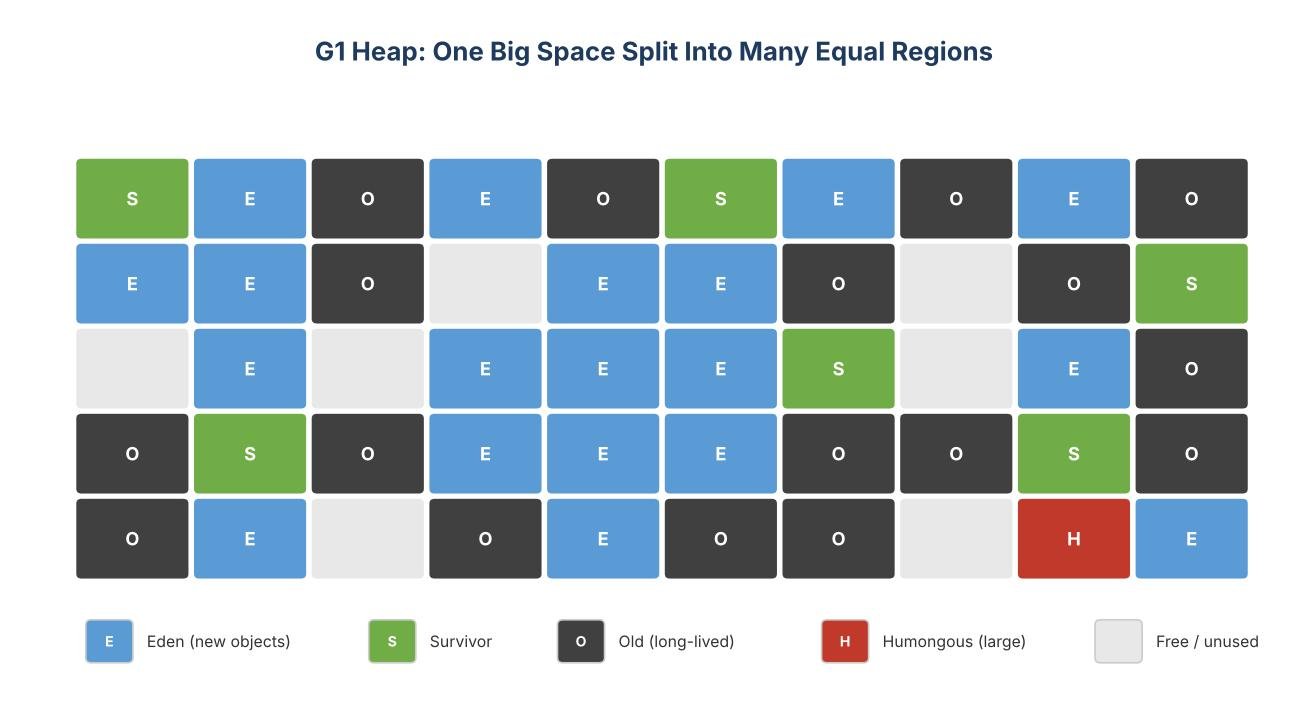
The name G1 stands for Garbage-First. Older collectors split the heap into a few big fixed areas. G1 takes a different path. It divides the heap into many small, equal-sized regions.
Each region can play a role at any time. One region may hold new objects. Another may hold old, long-lived objects. G1 can change these roles as your app runs.
This design gives G1 real flexibility. It can collect the regions with the most garbage first. That is where the Garbage-First name comes from.
G1 is still a generational collector. In plain terms, it treats new and old objects differently. Most objects die young, so this split pays off.
Because G1 reclaims old memory step by step, it rarely needs a big stop-the-world pause. Serial GC, on the other hand, cleans the old generation in one full pass. That is why G1 usually gives better worst-case pauses.
G1 has one feature that developers really like. You can give it a target pause time. It then tries to keep each pause under that limit.
You set this with a simple flag:
java -XX:MaxGCPauseMillis=200 -jar app.jar
The default value is 200 milliseconds. G1 treats this as a soft goal, not a hard promise. It decides how many regions to clean in each pause so it can stay close to your target. In short, you tell G1 what you want, and it adapts.
Since the whole change is about these two collectors, a quick side-by-side helps. Keep in mind that both are solid. They simply aim at different things.
For years, the second column felt like a luxury for big servers. Now, however, G1 is light enough to be the sensible default even on small boxes. That shift is exactly what led to JEP 523.
Now we reach the heart of this article. The change itself is small to describe but wide in effect.
From Java 27 on, the rule is simple. If you do not name a collector on the command line, the JVM always picks G1. It no longer checks the processor count or the heap size.
So the server-class check no longer drives GC selection. G1 is the default on a 32-core server and on a one-core container alike. In effect, the guesswork is gone.
The short answer is that G1 caught up with Serial GC, even on small heaps. OpenJDK engineers put real numbers behind this claim. Over many releases, they closed the gaps one by one.
With those three boxes ticked, the old split lost its reason to exist. So the team decided G1 can now replace Serial GC in every case where the JVM used to pick Serial.
You will see JEP 522 mentioned a lot next to JEP 523. The two are related but separate. JEP 522 shipped in Java 26, one release earlier.
JEP 522 made G1 faster by cutting synchronization between your app threads and GC threads. It uses a smaller, simpler write barrier and a second card table. The result was a throughput bump, reported as up to around five percent on x64 in some tests.
In other words, JEP 522 did the heavy engineering. JEP 523 then collected the reward and flipped the default. That is why people tell the two as one story.
It is just as important to know what stays the same. This change is narrow on purpose.
So nobody loses a collector. You simply get a more predictable default when you stay silent. If you were explicit before, you will not notice a thing.
| 💡 Interview Insight A sharp interviewer may ask: “Does JEP 523 remove Serial GC?” The answer is no. It only stops the JVM from selecting Serial by default. Serial GC still ships, and -XX:+UseSerialGC still works. The change is about the default, not about removal. |
Let us make this practical. How does the change touch real projects? The impact depends on where your code runs.
This is the group that feels the change most. Many microservices run in small containers with one CPU and a modest heap. Before Java 27, these often ran Serial GC without the team realising it.
Now they get G1 by default. For most request-serving apps, this is good news. G1 keeps pauses shorter and smooths out tail latency. Your slowest requests should get a little friendlier.
That said, test before you celebrate. On a very tiny heap, G1 uses a bit more memory than Serial GC. Usually this is fine. Still, measure your own service rather than trust a blog, including this one.
If you run on large machines, you likely had G1 already. The server-class rule gave you G1 for years. So, for you, this change is mostly a non-event.
Your defaults stay the same. Your tuning flags stay the same. You just stop relying on an implicit rule and lean on an explicit guarantee instead.
Here is a subtle win. Your CI runner and your laptop may differ a lot in cores and memory. In the past, they could pick different collectors, which made results harder to trust.
From Java 27, both pick G1. So your tests, your benchmarks and your production app now share one collector by default. Fewer moving parts means fewer surprises.
A few workloads still lean toward Serial GC. Think short-lived command-line tools or tiny functions with a very small heap. For these, Serial GC can start a hair faster and use less memory.
If that is your case, you are not stuck. You just switch the default back by hand. We will see how to do that next.
Good engineers verify instead of assume. So let us see how to confirm your collector and how to change it when needed.
The quickest way is to print the final flags. This one command shows the collector the JVM actually chose:
java -XX:+PrintFlagsFinal -version | grep -E "UseG1GC|UseSerialGC|UseParallelGC|UseZGC"
Look for the flag set to true. On Java 27 with no GC flag, you should see UseG1GC as true. On older Java, a small machine might show UseSerialGC as true instead.
You can also log GC activity at runtime. This flag prints a clear line for every collection:
java -Xlog:gc -jar app.jar
The log tells you the collector name and each pause time. It is the honest source of truth for what your app really does.
Overriding the default is easy. You just name the collector you want. Here are the common choices:
# Force G1 (now the default anyway)
java -XX:+UseG1GC -jar app.jar

# Go back to Serial GC
java -XX:+UseSerialGC -jar app.jar

# Use Parallel GC for throughput
java -XX:+UseParallelGC -jar app.jar

# Use ZGC for very low pauses
java -XX:+UseZGC -jar app.jar
Your explicit flag always beats the default. So if you have a tuned setup, keep it. JEP 523 will not override your wishes.
When you run in Docker or Kubernetes, give the JVM clear limits. Modern JVMs read container limits well, but it helps to be explicit. A simple memory flag goes a long way:
java -XX:MaxRAMPercentage=75.0 -jar app.jar
This tells the JVM to use up to 75 percent of the container memory for the heap. Pair it with G1, and your small service gets a sane, predictable setup. Also remember to set a pause goal if latency matters to you.
When you move a service to Java 27, a short checklist keeps you safe. I use roughly these steps every time.
The whole checklist takes under an hour for most services. Still, it saves you from nasty surprises later. In my experience, a little upfront care here pays for itself many times over.
| 💡 Interview Insight Expect a hands-on follow-up: “How would you confirm the collector in production?” Mention two tools. First, java -XX:+PrintFlagsFinal -version piped through grep to read the chosen flag. Second, -Xlog:gc to watch real collections and pause times. Saying both shows you work from evidence, not guesses. |
Let me share a few lessons to save you some pain. These come from real upgrades, not theory.
None of these are hard to avoid. They just need a little care during the upgrade. In most cases, the move to G1 is smooth and even helpful.
For most teams, the honest answer is: not much. If you already set a GC flag, you are safe. If you relied on the default, now is a good time to make it explicit.
My simple rule is this. Pick your collector on purpose and write it down in your startup config. Then the JVM version never surprises you, this year or the next.
| 💡 Interview Insight A strong closing question is: “Is this change risky for existing apps?” Give a balanced answer. The risk is low because explicit flags are untouched and Serial GC still ships. The main watch-out is small-heap services that silently ran Serial GC before. For those, benchmark G1 on the real workload before shipping. |
A: JEP 523 makes G1 the default garbage collector in all environments. If you do not name a collector on the command line, the JVM always picks G1, regardless of processor count or heap size. Before Java 27, small machines often got Serial GC instead.
A: No. Serial GC still ships with the JDK and you can still enable it with -XX:+UseSerialGC. JEP 523 only stops the JVM from selecting Serial GC by default; it does not remove the collector.
A: Through ergonomics. On a server-class machine, meaning 2 or more processors and roughly 2 or more GB of memory, the JVM picked G1. On smaller machines it fell back to Serial GC. JEP 523 removes this hardware-based split.
A: Run java -XX:+PrintFlagsFinal -version and look for the GC flag set to true, such as UseG1GC. You can also run your app with -Xlog:gc to see the collector name and each pause time in the logs.
A: For most teams, very little. If you already set a GC flag, nothing changes. If you relied on the default, confirm the collector, run a quick load test, and lock your GC choice into the startup config so it stays consistent.
A: No. Java 27 is a non-LTS release and Java 25 is the current LTS. However, the G1 default change is permanent and carries forward, so it will be the behaviour in the next LTS too.
JEP 523 is a small change with a nice payoff. It removes an old, hardware-based guess and replaces it with one clear default. From Java 27, if you say nothing, you get G1 everywhere.
Here is a quick recap:
The practical takeaway is easy. Check your collector after you move to Java 27. Set your GC flag on purpose. Then enjoy a more consistent JVM across every machine you run on.