CountDownLatch in Java with Examples
-
Last Updated: October 8, 2026
-
By: javahandson
-
Series

Learn CountDownLatch in Java with simple examples. See how await() and countDown() make threads wait for N tasks, two common patterns, and why it can’t be reused.
Sometimes one thread has to sit and wait until a few other threads finish their job. The CountDownLatch in Java is built for exactly this situation. You can picture it as a small counter that starts at some number. Each worker brings the counter down by one as it finishes. The waiting thread stays blocked until that counter reaches zero.
It sounds simple, and honestly it is. But this tiny tool solves a real headache. Beginners often fix thread timing with random sleeps and hope for the best. A latch removes that guesswork and makes the wait exact.
In this guide we go step by step. First the mental model, then the methods, then two very common patterns you can run today. By the end you will reach for this class with full confidence.
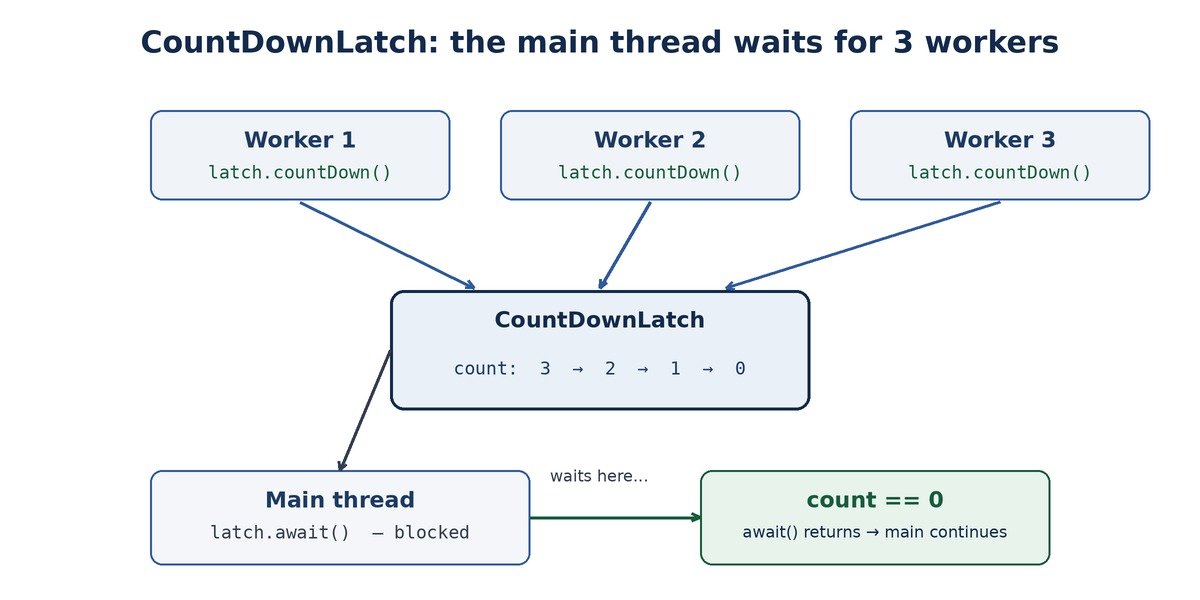
How a CountDownLatch lets the main thread wait for three workers to finish.
A CountDownLatch is a small helper from the java.util.concurrent package. Its only job is coordination between threads. One or more threads wait, while other threads raise a signal when they are done.
You create it with a starting number. That number is the count. Think of it simply as the number of things you are waiting for.
So the latch acts like a gate. The gate stays shut while the count is above zero. The moment it drops to zero, the gate opens and nobody waits anymore.
This class sits in java.util.concurrent, the package made for modern threading. Older code used wait() and notify() for such coordination. That style works, but it is fiddly and easy to get wrong.
A CountDownLatch wraps the same idea in a clean, safe API. You do not touch locks directly. You just set a count, count down, and wait. That is the whole deal.
Here is a fair question. Why not keep a simple boolean like isDone and check it in a loop? The reason is waste. That loop spins and burns CPU while it checks the flag again and again.
A latch is smarter than that. The waiting thread truly sleeps and uses no CPU. The system wakes it only when the count hits zero. So you get the same result, but in a clean and efficient way.
Before any heavy code, let us fix the mental model. A clear picture here makes everything else easy.
Imagine you are hosting a small dinner. Three friends are coming over. You will not start eating until all three arrive.
So you keep a mental count of three. As each friend walks in, you reduce the count by one. When the count reaches zero, you call everyone to the table.
That is a CountDownLatch in real life. You are the waiting thread. Each friend arriving is a countDown() call. The dinner starting is your await() finally returning.
The count is just a number you set once at the start. After that, you can never raise it again.
This “finished for good” part really matters. We will return to it later, because it is the one thing beginners trip over.
| 💡 Interview Insight A CountDownLatch is a one-shot gate. Once the count reaches zero, it stays open forever. If an interviewer asks for a barrier that resets and can be used again, that is CyclicBarrier, not CountDownLatch. |
A CountDownLatch has a tiny API. You mostly care about two methods. Let us look at each one on its own.
First, you make the latch and give it a starting count. The count is the number of signals you expect.
// Wait for 3 things to finish
CountDownLatch latch = new CountDownLatch(3);
Pick this number with care. It should match how many countDown() calls you plan to make.
The await() method blocks the current thread. The thread simply stops there and waits. It wakes up only when the count becomes zero.
You usually call await() from the thread that needs the final result. Often that is the main thread.
System.out.println("Waiting for workers...");
latch.await();   // blocks here until count == 0
System.out.println("Everyone is done. Moving on.");
There is also a version with a timeout. With it, your thread does not wait forever.
// Wait at most 5 seconds
boolean finished = latch.await(5, TimeUnit.SECONDS);
if (!finished) {
    System.out.println("Timed out. Not everyone finished.");
}
This timeout version returns true if the count hit zero in time. Otherwise it returns false. Many real systems prefer it, because waiting forever is risky.
The countDown() method drops the count by one. Each worker calls it once, right after it finishes its task.
doMyWork();
latch.countDown();   // tell the latch: one task done
Notice the direction. You never count up. You only count down. When enough workers have called it, the count reaches zero and the waiters wake up.
There is one more handy method, getCount(). It returns the current count without changing anything. People use it mainly for logging or debugging.
System.out.println("Still waiting on " + latch.getCount() + " workers");Do not build real logic around this number though. It can change the instant after you read it, since other threads keep counting down.
A thread stuck in await() can still be interrupted. If that happens, await() throws InterruptedException. So you must handle or declare that exception.
This is useful for clean shutdown. You can interrupt a waiting thread instead of leaving it stuck. Just catch the exception and exit gracefully.
You do not need the deep internals to use a latch. Still, a quick peek helps the idea click.
Inside, the latch holds one shared number, the count. The countDown() call lowers that number in a thread-safe way. The await() call checks the number and parks the thread if it is still above zero. When the last countDown() makes it zero, the latch wakes every parked thread at once. That is really all there is to it.
| 💡 Interview Insight await() does not reduce the count. It only reads it and waits. Only countDown() changes the number. Also, many threads can await() the same latch at once, and all of them are released together when the count hits zero. |
This is the most common use of a CountDownLatch in Java. You start several worker threads. Then you want the main thread to wait until all of them are done.
Say you fire off three background tasks. Each one takes a different amount of time. You need all three results before you print a final report.
Without a latch, people often add guesswork sleeps and hope the work is done. That approach is fragile. A latch makes the wait precise instead.
import java.util.concurrent.CountDownLatch;

public class WaitForWorkers {
    public static void main(String[] args) throws InterruptedException {
        int workers = 3;
        CountDownLatch latch = new CountDownLatch(workers);

        for (int i = 1; i <= workers; i++) {
            final int id = i;
            new Thread(() -> {
                System.out.println("Worker " + id + " started");
                try {
                    Thread.sleep(1000L * id);   // pretend to do work
                } catch (InterruptedException e) {
                    Thread.currentThread().interrupt();
                } finally {
                    System.out.println("Worker " + id + " finished");
                    latch.countDown();          // one less to wait for
                }
            }).start();
        }

        System.out.println("Main is waiting for workers...");
        latch.await();                          // blocks till count is 0
        System.out.println("All workers done. Main continues.");
    }
}Let us read this code the way the program runs it.
Run it, and you will see something close to this.
Worker 1 started
Worker 2 started
Worker 3 started
Main is waiting for workers...
Worker 1 finished
Worker 2 finished
Worker 3 finished
All workers done. Main continues.
The order of the worker lines may shift between runs. Still, the final main line always prints last. That guarantee is the whole point of the latch.
In real apps you rarely create raw threads. Most of the time you use a thread pool. The good news is that a latch works the same way there.
ExecutorService pool = Executors.newFixedThreadPool(3);
CountDownLatch latch = new CountDownLatch(3);

for (int i = 0; i < 3; i++) {
    pool.submit(() -> {
        try {
            doWork();
        } finally {
            latch.countDown();
        }
    });
}

latch.await();          // wait for all 3 tasks
pool.shutdown();
System.out.println("All pool tasks done.");
The idea does not change at all. Each task counts down when it ends. The main thread waits on the latch, then shuts the pool down. This is exactly why a latch beats join() when you work with pools.
| 💡 Interview Insight Put countDown() inside a finally block. If a worker throws an exception, the count must still drop. Otherwise the main thread waits forever, and your program just hangs. |
Here we flip the idea around. Instead of waiting for workers to finish, we make many threads begin together. This trick is great for simple load testing.
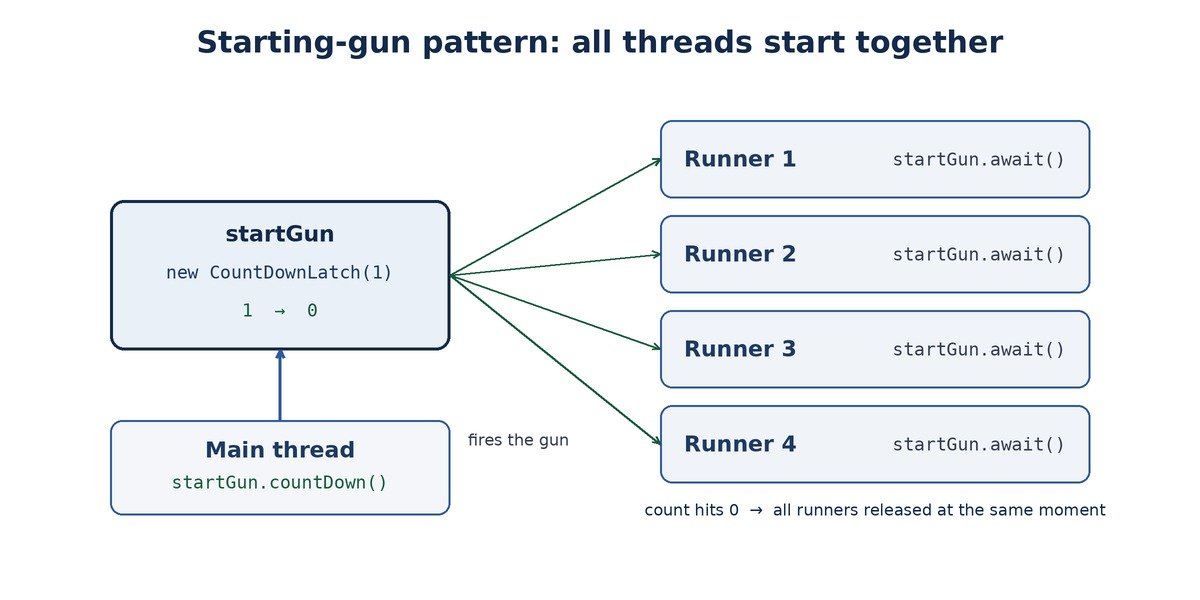
The starting-gun pattern: a count-one latch releases all threads at the same moment.
Picture a running race. All runners stand ready at the line. Nobody moves until the gun fires.
We can copy that with a latch of count one. Every worker waits on this latch. The main thread then fires a single countDown() as the gun.
import java.util.concurrent.CountDownLatch;

public class StartTogether {
    public static void main(String[] args) throws InterruptedException {
        int runners = 4;
        CountDownLatch startGun   = new CountDownLatch(1);
        CountDownLatch finishLine = new CountDownLatch(runners);

        for (int i = 1; i <= runners; i++) {
            final int id = i;
            new Thread(() -> {
                try {
                    startGun.await();           // wait for the signal
                    System.out.println("Runner " + id + " is running");
                    Thread.sleep(300);
                } catch (InterruptedException e) {
                    Thread.currentThread().interrupt();
                } finally {
                    finishLine.countDown();
                }
            }).start();
        }

        System.out.println("Ready... set...");
        Thread.sleep(1000);                     // let all runners reach await
        startGun.countDown();                   // fire! all start together
        System.out.println("Go!");

        finishLine.await();
        System.out.println("Race over.");
    }
}This small move removes a hidden timing bug. Without it, the first thread may start long before the last one is even created.
So here we used two latches together. One opens the gate. The other tells us when the work is over. This combo shows up a lot in test code.
Let us leave races and dinners for a moment. Here is a case you will meet on real projects.
Many apps need a few services ready before they serve any request. Maybe a cache, a database pool, and a config loader. You want all three up first.
CountDownLatch ready = new CountDownLatch(3);

startAsync("cache",     ready);   // each calls ready.countDown() when up
startAsync("db-pool",   ready);
startAsync("config",    ready);

System.out.println("Booting... waiting for services");
ready.await();                    // hold here until all three are up
System.out.println("All services ready. Accepting requests.");
Each service starts on its own thread. As it finishes loading, it calls countDown() once. The main boot thread waits on await() until all three report in.
This keeps your startup clean. You never accept traffic too early. And you never add blind sleeps to guess when things are ready.
The log output stays short and predictable, something like this.
Booting... waiting for services
[cache] up
[db-pool] up
[config] up
All services ready. Accepting requests.
Notice the gain here. The boot thread blocks for the shortest possible time. It waits exactly until the slowest service is up, not a moment more.
New learners often ask a fair question. Why not just use Thread.join()? After all, join() also waits for a thread to finish.
Both can make you wait. But they fit different shapes of problem. A quick table makes the difference clear.
| Point | Thread.join() | CountDownLatch |
|---|---|---|
| Waits on | One specific Thread object | A shared count, any tasks |
| Who signals done | The thread simply ending | An explicit countDown() call |
| Works with pools | Awkward, you need the Thread | Clean, tasks just count down |
| Partial waiting | No, all or nothing per thread | Yes, set any count you like |
In short, join() ties you to actual Thread objects. A latch does not care who counts down. That freedom helps a lot with thread pools and executors, where you never hold the raw Thread.
This is the single most important rule to remember. A CountDownLatch works only once. After the count reaches zero, it is done.
There is no reset method. There is no way to raise the count again. Once it is zero, it stays zero for the life of that object.
If you need to wait once more, you must create a brand new latch. The old one is finished.
CountDownLatch latch = new CountDownLatch(2);
latch.countDown();
latch.countDown();   // count is now 0, latch is "used up"

// There is NO latch.reset() or latch.setCount(2).
// To wait again, make a fresh one:
latch = new CountDownLatch(2);
Calling await() on a finished latch does not block at all. It returns straight away.
This behaviour is on purpose. A latch marks a one-time event, like “startup is complete” or “all files loaded”. Such events happen once, so the tool models that cleanly.
Maybe you want threads to meet again and again, round after round. A single-use latch cannot do that.
For that repeating, resettable behaviour, Java gives you a different tool. It resets on its own after every round, so the same object serves many cycles. You can read how that works in the dedicated guide,
CyclicBarrier in Java with Examples.
| 💡 Interview Insight Expect the classic one-liner: CountDownLatch vs CyclicBarrier. Short answer, a CountDownLatch counts down once and cannot reset. A CyclicBarrier waits for a fixed set of threads to meet, then resets and can be reused. Different jobs, different tools. |
A latch is easy to use, yet a few small slips cause big trouble. Here are the ones I see most often.
If a worker crashes before it reaches countDown(), the count never drops. As a result, the waiter hangs forever.
The fix is simple. Always put countDown() in a finally block, so it runs no matter what.
new Thread(() -> {
    try {
        doWork();            // may throw
    } finally {
        latch.countDown();   // always runs, even on error
    }
}).start();The starting count must match the number of countDown() calls. A mismatch breaks things in two ways.
So check this number against your loop. If you start N workers, the count is usually N.
A plain await() can block for a very long time. In production, that is risky. One stuck worker may freeze the whole flow.
Prefer the timeout version where you can. Then you get a chance to log an error and recover.
if (!latch.await(10, TimeUnit.SECONDS)) {
    System.out.println("Workers took too long. Handling it...");
    // log, alert, or fall back to a safe path
}People sometimes try to use the same latch for a second batch. That never works, because it cannot reset. Make a new latch per round instead.
Here is a short table you can keep handy while coding.
| Method | What it does |
|---|---|
| new CountDownLatch(n) | Creates a latch that waits for n signals. |
| await() | Blocks the caller until the count reaches zero. |
| await(time, unit) | Waits up to a limit. Returns false on timeout. |
| countDown() | Drops the count by one. Does nothing at zero. |
| getCount() | Returns the current count. Handy for debugging. |
A latch shines whenever you have a clear one-time milestone. Let us list a few honest, day-to-day cases.
In each case the event happens once. That one-time nature is your signal that a latch fits. If the event repeats every round, you want a resettable tool instead.
One gentle warning as well. Do not reach for a latch to do simple locking or repeating signals. For mutual exclusion you want a lock. For repeating rounds you want a reusable barrier. A latch is only for a one-time wait.
A: A CountDownLatch lets one or more threads wait until a set number of tasks finish. You start it with a count. Each task calls countDown() when done, and the waiting thread stays blocked in await() until the count reaches zero.
A: countDown() lowers the count by one and is called by worker threads. await() blocks the calling thread and is used by the thread that needs to wait. Only countDown() changes the count; await() just reads it and waits.
A: No. A CountDownLatch is one-shot. Once the count hits zero, it stays zero, and there is no reset method. If you need to wait again, you must create a new latch. For repeating rounds, use a CyclicBarrier instead.
A: A CountDownLatch counts down once and cannot reset. A CyclicBarrier waits for a fixed number of threads to meet at a point, then resets and can be reused for many rounds. Latch is for a one-time wait; barrier is for repeated meeting points.
A: Nothing harmful. Once the count is zero, extra countDown() calls are simply ignored. The count never goes below zero and never rises again.
A: So it always runs, even if the task throws an exception. If a worker crashes before calling countDown(), the count never reaches zero and the waiting thread hangs forever. A finally block prevents that.
A: Yes. It lives in the java.util.concurrent package, which holds Java’s modern threading tools. It gives a clean API over the older wait()/notify() style of coordination.
The CountDownLatch in Java is a small tool with a clear job. It lets one or more threads wait until a set of tasks is complete.
You start it with a count. Workers call countDown() as they finish. Waiters sit in await() until the count hits zero, and then everyone moves on. Two patterns cover most needs: waiting for N workers, and starting N threads at once.
Just remember the golden rule. A latch is one-shot. Once it opens, it stays open, and you cannot reset it. Keep that in mind, place countDown() in finally, and you will use this class with ease.