Java Optional: An Introduction and Why It Exists
-
Last Updated: October 9, 2026
-
By: javahandson
-
Series

Java Optional made simple. Learn what java.util.Optional is, why it was added in Java 8 to fix null problems, and how to use map, filter, orElse and orElseThrow.
If you have written Java for even a short while, you have met the dreaded NullPointerException. It shows up at runtime, often in production, and it rarely tells you much. Java Optional was added in Java 8 to help with exactly this pain.
In simple words, Optional is a small box. It either holds a value, or it holds nothing at all. So you open the box safely and then decide what to do next. As a result, you stop guessing whether a method returned null or a real object.
In this guide, we will keep things beginner friendly. First, we will see why null causes so much trouble. Then we will look at what Optional actually is. After that, we will go through its common methods with small examples.
Also, we will cover the parts that beginners often get wrong. For instance, many people overuse Optional and make their code worse. So we will draw a clear line on where it fits and where it does not.
By the end of this guide, you will know:
Let us begin with the problem that started it all.
Before Java 8, null was the only way to signal an absent value. So a method would return null. Then the caller had to remember a check. When the caller forgot that check, the program crashed. Sadly, this happened all the time.
The idea of null is not new, and it is not loved. Tony Hoare, a famous computer scientist, introduced the null reference back in 1965 in a language called ALGOL W. Years later, he even called it his “billion-dollar mistake” during a 2009 talk.
Why such a strong word? Because null errors have caused countless crashes, bugs and security holes over the decades. So Java is not alone here. In fact, many languages carry this same old wound.
Still, null is useful at times. The real issue is that the type system hides it. A String variable might hold text, or it might hold null. Meanwhile, the compiler stays silent about the risk. Therefore the bug only appears when the code finally runs.
That delay is what hurts the most. A compile-time error is cheap to fix. However, a runtime crash reaches your users first. So anything that moves the problem earlier is worth having. That is the gap Optional tries to close.
Let us look at a tiny example. Imagine a method that finds a user by id.
public User findUser(String id) {
    // returns null when no user is found
    return database.lookup(id);
}

// somewhere else in the code
User user = findUser("abc");
String city = user.getAddress().getCity();  // boom
Suppose no user exists. Then findUser returns null. The next line then calls a method on null. As a result, you get a NullPointerException at runtime. Worse, the stack trace points to getAddress, not to the real cause.
The deeper issue here is honesty. The method signature says it returns a User. However, it does not say “maybe a User, maybe nothing.” So the type quietly lies to you. In turn, the caller has no clear signal to check for the empty case.
For years, we defended ourselves with manual null checks. They do work, but they pile up fast. Soon your code is more checks than logic.
User user = findUser("abc");
if (user != null) {
    Address address = user.getAddress();
    if (address != null) {
        City city = address.getCity();
        if (city != null) {
            System.out.println(city.getName());
        }
    }
}
This pattern is often called the “pyramid of doom.” Each level adds another if block. Meanwhile, the real logic hides deep inside the nesting. Also, one missed check still brings the whole thing down.
I have maintained banking code full of such checks. Honestly, they are easy to write but hard to read. So a cleaner tool was overdue. Optional offers that cleaner path, as we will now see.
Optional lives in the java.util package and arrived with Java 8. The official docs describe it as a container object that may or may not hold a non-null value. In short, that one line captures the whole idea.
Think of Optional as a sealed box with a label. The label clearly says whether something is inside. So you never reach in blindly. Instead, you ask the box first, then act on the answer.
So the big win is clarity. When a method returns Optional<User>, the signature itself warns you. It says the result might be empty. Therefore you deal with that case right away, not later in production.
The docs mark Optional as a value-based class. In practice, this means you should treat two equal Optionals as interchangeable. Also, you should never use an Optional for locking or synchronization.
One more rule matters a lot here. An Optional variable should never itself be null. Instead, always point it to a real Optional instance, empty or full. In fact, returning null in place of an empty Optional defeats the entire purpose.
| 💡 Interview Insight A classic interview question is: “What problem does Optional solve?” Keep the answer sharp. It makes the possibility of a missing value explicit in the type. So the caller is nudged to handle the empty case, instead of hitting a NullPointerException later. |
There are three ways to create an Optional. Each one fits a different situation. So let us go through all three with short examples. That way, you will know which one to reach for.
Use Optional.of() when you are sure the value is not null. It wraps the value and returns a full Optional. In other words, it is the strict option.
Optional<String> name = Optional.of("Suraj");
System.out.println(name.isPresent());  // true
Be careful, though. If you pass null to Optional.of(), it throws a NullPointerException on the spot. So use it only when null is truly impossible. For anything uncertain, pick the next method instead.
Most real data might be null. For those cases, Optional.ofNullable() is the safe choice. It returns an empty Optional when the value is null. Otherwise, it returns a full one.
String maybeName = database.lookupName(id);  // could be null

Optional<String> name = Optional.ofNullable(maybeName);
// empty Optional if maybeName was null, no exception thrown
So this method is your everyday tool. It bridges old null-returning code with the new Optional style. In fact, most of your Optional objects will come from here. Therefore it is worth remembering first.
Sometimes you want to clearly say “no value.” For that, Optional.empty() gives you an empty box directly. It reads well and shows your intent. So the next reader sees the empty case on purpose.
public Optional<User> findUser(String id) {
    User user = database.lookup(id);
    if (user == null) {
        return Optional.empty();   // honest "not found"
    }
    return Optional.of(user);
}
Notice how the method now returns Optional<User>. So the signature itself tells the caller that a user may be missing. That single change removes a whole class of silent null bugs. In short, honesty is now built into the type.
Here is a small table to keep the three apart. Pin it in your memory before moving on.
| Method | When value is null | Use it when |
|---|---|---|
| Optional.of(value) | Throws NullPointerException | You are sure the value is present |
| Optional.ofNullable(value) | Returns an empty Optional | The value might be null |
| Optional.empty() | Not applicable | You want to return “no value” |
Creating an Optional is only half the story. The real benefit comes when you read it. Here Optional gives you several safe methods. So let us start with the simple checks first.
The simplest check is isPresent(). It returns true when a value exists. Its opposite, isEmpty(), arrived in Java 11. Also, it reads more naturally for the empty case.
Optional<User> result = findUser("abc");

if (result.isPresent()) {
    System.out.println("Found: " + result.get());
} else {
    System.out.println("No user found");
}
This works, yet it looks a lot like the old null check. So treat it as a stepping stone. The more elegant methods below usually read better. Moreover, they are much harder to get wrong.
The get() method returns the value inside the box. However, it throws NoSuchElementException when the box is empty. So calling get() without a check is just null trouble in a new costume.
Optional<User> result = findUser("missing");
User user = result.get();  // NoSuchElementException if empty!
Because of this risk, the docs now point you to safer options. As a rule, avoid bare get(). Instead, reach for orElse, orElseGet or orElseThrow. We will cover each one shortly.
Often you just want to run some code when a value exists. For that, ifPresent() does the job cleanly. It takes an action and runs it only when the box is full.
findUser("abc")
    .ifPresent(user -> System.out.println("Hello " + user.getName()));
Java 9 added a handy cousin called ifPresentOrElse(). So now you can handle both cases in one place. The first action runs when a value is present. Meanwhile, the second runs when the box is empty.
findUser("abc").ifPresentOrElse(
    user -> System.out.println("Hello " + user.getName()),
    ()   -> System.out.println("User not found")
);Here is a trap that catches many beginners. They call isPresent() first and then call get(). Technically, this is safe. However, it misses the whole point of Optional.
// works, but clumsy
Optional<User> result = findUser(id);
if (result.isPresent()) {
    return result.get().getName();
}
return "Guest";
That block is just a null check wearing a new coat. So prefer a single expression instead. The methods in the next sections do it in one clean line. As a rule, if you see isPresent() next to get(), you can usually simplify.
A missing value often needs a sensible fallback. For this, Optional offers three methods. They look similar but behave differently. So let us be precise about each one.
Use orElse() when you already have a ready default value. If the Optional is empty, it returns your fallback. Otherwise, it returns the real value. In short, it is the plain default.
String name = Optional.ofNullable(lookupName(id))
        .orElse("Guest");

// returns "Guest" when the lookup gives null
One subtle point trips up beginners. The argument to orElse() runs every time, even when a value is present. So avoid an expensive call inside orElse(). For that case, use the next method instead.
orElseGet() takes a Supplier, not a plain value. So the supplier runs only when the Optional is empty. Therefore it is perfect for a costly fallback. In other words, it is lazy on purpose.
User user = findUser(id)
        .orElseGet(() -> createGuestUser());  // runs only if empty
Compare the two clearly. With orElse(), createGuestUser() would run every single time. With orElseGet(), it runs only when needed. So for anything heavy, orElseGet() saves real work.
Sometimes an empty value is a genuine error. For that case, orElseThrow() fits best. It returns the value if present. Otherwise, it throws an exception.
User user = findUser(id)
        .orElseThrow(() -> new UserNotFoundException(id));
Since Java 10, you can also call orElseThrow() with no argument. It then throws a NoSuchElementException by default. Still, a custom exception usually gives a clearer message for your API. So prefer it in real services.
These three methods look alike, yet they differ in one key way. Here is a short table to keep them clear.
| Method | Takes | When Optional is empty |
|---|---|---|
| orElse(value) | A ready value | Returns it; but the value is built every time |
| orElseGet(supplier) | A Supplier | Runs the supplier, only when empty |
| orElseThrow(supplier) | An exception supplier | Throws your exception |
| 💡 Interview Insight Interviewers love the orElse versus orElseGet difference. Say it simply: orElse always evaluates its argument, while orElseGet calls its supplier only when the Optional is empty. So for an expensive default, orElseGet is the better and cheaper choice. |
The real power of Optional shows up when you transform its content. Here methods like map, flatMap and filter let you chain steps. Best of all, the empty case flows through safely. So you write no null checks at all.
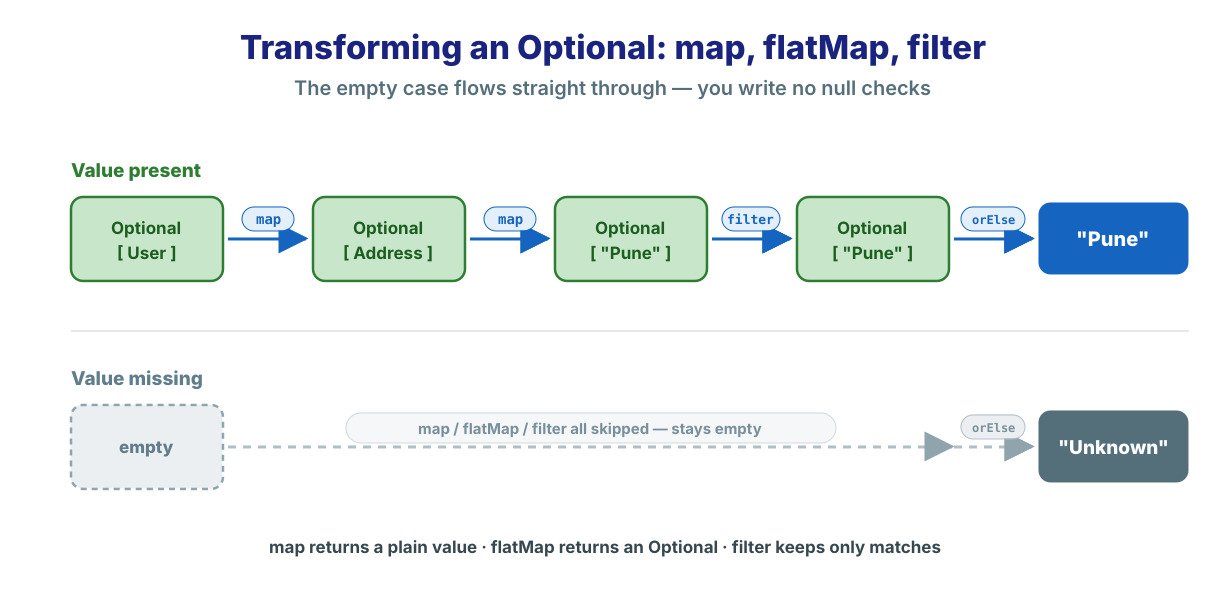
The map() method applies a function to the value inside the box. If the box is empty, it simply stays empty. So you never touch a null while chaining. In effect, the chain protects itself.
Optional<String> cityName = findUser(id)
        .map(User::getAddress)
        .map(Address::getCity)
        .map(City::getName);

String name = cityName.orElse("Unknown");
Now look back at the pyramid of doom from section 2. This chain does the same job in a few clean lines. If any step is missing, the result is just empty. So there is no crash and no nested ifs.
Sometimes a method already returns an Optional. Then, if you use map() on it, you get an Optional inside an Optional. That nesting is awkward. So flatMap() exists to fix it.
// getAddress() itself returns Optional<Address>
Optional<String> street = findUser(id)
        .flatMap(User::getAddress)   // not map()
        .map(Address::getStreet);
The rule here is easy to remember. Use map() when your function returns a plain value. Then use flatMap() when your function already returns an Optional. In short, flatMap keeps the result flat.
The filter() method checks the value against a condition. If the value passes, the Optional stays as is. However, if it fails, the Optional becomes empty. So it acts like a gate.
Optional<User> adult = findUser(id)
        .filter(user -> user.getAge() >= 18);

// empty if the user is under 18 or not found
This is great for validation inside a chain. So you keep only the values you care about. Everything else quietly turns into an empty Optional. As a result, the next step stays safe.
Sometimes your fallback is itself an Optional. For that, Java 9 added the or() method. It keeps the first value if present. Otherwise, it runs a supplier that returns a second Optional.
Optional<User> user = findInCache(id)
        .or(() -> findInDatabase(id))   // try DB only if cache missed
        .or(() -> findInBackup(id));    // then a backup source

// still an Optional<User> at the end
See how this differs from orElse(). With orElse(), you get a plain value out. With or(), you stay inside an Optional and can chain again. So it is perfect for trying several sources in order.
Optional and streams were born together in Java 8. So they share the same style. In fact, map, filter and flatMap feel the same on both. Once you learn one, the other comes easily.
Think about a stream search. The stream might match an element, or it might match nothing. So what should findFirst() return? Returning null would bring back the old problem. Therefore it returns an Optional instead.
Optional<User> firstAdmin = users.stream()
        .filter(User::isAdmin)
        .findFirst();

String name = firstAdmin
        .map(User::getName)
        .orElse("No admin found");
Notice the clean handover here. The stream ends with an Optional. Then the Optional methods take over. So the empty case is handled right where it appears.
Java 9 added a small but useful method called stream(). It turns an Optional into a stream of zero or one element. So you can plug an Optional straight into a stream pipeline.
List<String> names = userIds.stream()
        .map(this::findUser)        // Stream<Optional<User>>
        .flatMap(Optional::stream)  // drops the empties
        .map(User::getName)
        .toList();
Here flatMap plus Optional::stream removes the empty results. So only present users survive. As a result, you avoid a messy filter-then-get step. In short, the two APIs fit together by design.
If streams are still new to you, that is fine. The same map and filter ideas apply here. For a deeper walk-through, see the Java Streams article linked at the end.
Let us tie the pieces together. Here is a tiny service that reads a user’s city. It uses creation, transformation and a default, all in one place.
public String cityOf(String userId) {
    return findUser(userId)                 // Optional<User>
            .map(User::getAddress)          // Optional<Address>
            .map(Address::getCity)          // Optional<City>
            .map(City::getName)             // Optional<String>
            .filter(n -> !n.isBlank())      // drop empty names
            .orElse("Unknown city");        // safe default
}
Read that chain from top to bottom. First, we look up the user. Then we walk down to the city name. Next, we drop blank names with filter. Finally, we fall back to a default.
Compare this with the old nested ifs. The intent is now obvious at a glance. Also, there is not a single explicit null check in sight. So the code is both shorter and safer.
Optional is powerful, yet it is not for every spot in your code. The designers had a narrow goal in mind. So let us match our usage to that goal. Otherwise, Optional can make code worse, not better.
The official API note is clear on this. Optional is mainly meant as a method return type. It fits where you truly need to represent a missing result. Brian Goetz, Java’s language architect, has shared the same guidance publicly.
So the sweet spot is a method that may find nothing. A lookup, a search or a parse are all good examples. In each case, returning Optional makes the empty result obvious. Therefore every caller handles it with care.
// good use of Optional as a return type
public Optional<Order> findLatestOrder(String customerId) {
    // ...
}Do not use Optional as a class field or a bean property. It was not designed for that role. Also, it adds a real cost. Each Optional field is an extra object that lives as long as your entity.
There is a practical reason too. Optional does not implement Serializable. So an Optional field can break serialization frameworks. It can also trip up some persistence layers. Instead, keep a normal field and return Optional from the getter if you wish.
Passing Optional as a parameter is also discouraged. It forces every caller to wrap the argument, which is clumsy. So a plain parameter reads much better. Often, an overloaded method is the cleaner fix.
// avoid this
public void register(Optional<String> nickname) { }

// prefer overloads or a nullable parameter
public void register(String nickname) { }
public void register() { }Java also ships OptionalInt, OptionalLong and OptionalDouble. These avoid the cost of boxing a primitive into a wrapper object. So for a method that returns a missing int, OptionalInt beats Optional<Integer>. In tight loops, that small saving adds up.
| 💡 Interview Insight A sharp interview question is why Optional should not be a field. Give two reasons. First, the designers meant it only for return types, and it is not Serializable. Second, an Optional field adds an extra long-lived object, which wastes memory in large systems. |
We have met many methods along the way. So here is one table to pull them together. Keep it handy while you code. It groups each method by the job it does.
| Group | Method | What it does |
|---|---|---|
| Create | of / ofNullable / empty | Wrap a value, wrap a maybe-null, or make an empty box |
| Check | isPresent / isEmpty | Ask whether a value is there |
| Consume | ifPresent / ifPresentOrElse | Run code for the present and empty cases |
| Default | orElse / orElseGet / orElseThrow | Supply a fallback value or throw |
| Transform | map / flatMap / filter | Change, flatten or test the value inside |
| Fallback | or | Fall back to another Optional |
| Bridge | stream | Turn the Optional into a zero-or-one stream |
Notice a nice pattern in that list. The method name almost always tells you the job. So once the groups click, the whole API feels small. That is the real beauty of Optional.
Let me share a few habits that keep Optional code clean. These come from real projects, not just theory. So follow them and your code stays readable.
One more tip on collections. Never return Optional<List<T>>. Instead, just return an empty list when there is nothing. An empty list already means “no items.” So Optional only adds noise there.
A: Java Optional is a container class in the java.util package, added in Java 8. It either holds a non-null value or is empty. By returning Optional instead of null, a method tells the caller clearly that the result might be missing, which helps avoid a NullPointerException.
A: It was added to make missing values visible in the type system. Before Java 8, methods returned null and callers often forgot to check, causing runtime crashes. Optional moves that “maybe empty” signal into the method signature, so the empty case is handled on purpose.
A: orElse() always evaluates its argument, even when the value is present. orElseGet() takes a Supplier and runs it only when the Optional is empty. So for an expensive default, orElseGet() is the better and cheaper choice.
A: No. Optional is meant mainly as a return type. It is not Serializable and adds an extra long-lived object as a field, and it forces clumsy wrapping as a parameter. Use a normal field or a nullable parameter instead, and return Optional from the getter if needed.
A: It throws a NoSuchElementException. That is why bare get() should be avoided. Prefer orElse, orElseGet or orElseThrow, which handle the empty case safely.
A: No. Optional.of() throws a NullPointerException if you pass null, so use it only when the value is surely present. Optional.ofNullable() returns an empty Optional when the value is null, which makes it the safe choice for uncertain data.
A: orElse() unwraps the Optional and returns a plain value. or() stays inside an Optional — it returns the first value if present, otherwise a second Optional from a supplier. Use or() when you want to try several sources in order and keep chaining.
Java Optional is a small class with a big purpose. It turns a hidden null into a visible, honest type. So the caller sees the empty case and handles it on purpose. In the end, fewer surprises reach production.
Here is a quick recap of what we covered:
Now start small in your own code. Change one null-returning method to return Optional. Then let the cleaner calling code show you the benefit. Over time, your null checks will fade away.