API Gateway vs Service Mesh and Service Discovery: What Each One Solves
-
Last Updated: October 19, 2026
-
By: javahandson
-
Series

API gateway vs service mesh confusing you? Learn what an API gateway, service discovery, and a service mesh (Istio) each solve, with a clear beginner guide.
The moment you split one big application into many small services, a new problem shows up. Your services now need to talk to each other over the network, and clients outside need a way in. Suddenly questions pile up fast. How does a request from a phone reach the right service? How does one service find another when both keep moving? And how do you secure and watch all this traffic without rewriting every service? The API gateway vs service mesh debate sits right in the middle of these questions, and service discovery quietly ties them together.
People often mix these three tools up. They sound similar, they all deal with network traffic, and their feature lists overlap. But each one was built to solve a different problem. An API gateway guards the front door. Service discovery helps services find each other. A service mesh manages the thousands of little conversations happening inside your system. Once you see where each one lives, the confusion clears up.
This article walks through all three in plain language. We will start with the problem each one solves, look at how it actually works under the hood, and then see how they fit together in a real system. We will also go deep on Istio, the most popular service mesh, including its newer sidecar-free ambient mode. By the end, you will know exactly when to reach for each tool, and you will be able to explain the trade-offs clearly in a design discussion or an interview.
Think back to the old single-application days. Everything ran inside one process. When one part of the code needed another part, it just called a method. No network, no discovery, no retries. The call either worked or threw an error right there. Life was simple, and most of these problems did not exist at all.
Microservices changed that completely. Now a single user action might touch ten services spread across many machines. Each of those calls goes over the network, and the network is messy. Machines come and go. Instances scale up at busy hours and shut down when quiet. A service you called a second ago might have moved to a new address. So three fresh needs appeared.
Notice how these needs appear at different places. One sits at the edge, where the outside world meets your system. Another is about locating things. The third deals with the dense web of internal calls. Keep those three places in your head, and you will never confuse the tools again.
An API gateway is a single entry point that sits in front of all your backend services. Every request from the outside world, whether from a browser, a mobile app, or a partner system, lands on the gateway first. The gateway then decides where that request should go and forwards it to the right service. Clients never talk to your services directly. They only ever talk to the gateway.
Picture a large office building with one reception desk. Visitors do not wander the hallways looking for the person they want. They check in at reception, and reception sends them to the right floor. The API gateway is that reception desk for your system. It handles traffic that flows from outside to inside, which engineers call north-south traffic.
Without a gateway, every client would need to know the address of every service it talks to. That is fragile and hard to secure. The gateway takes over the cross-cutting jobs so each service does not have to repeat them. Here are the main ones.
Because all these jobs happen in one place, your individual services stay simple. They trust that anything reaching them has already passed the gateway’s checks. That single-point design is the gateway’s biggest strength, and also the reason it must be highly available.
A gateway config is usually just a set of routing rules. The example below is written in plain pseudo-config to stay language-neutral. It shows how a gateway maps incoming paths to backend services and attaches a couple of edge policies.
# API gateway routing rules (illustrative pseudo-config)

routes:
  - path: /orders/**        # anything starting with /orders
    service: order-service   # forward to the order service
    auth: required           # must have a valid token
    rate_limit: 100/min      # max 100 requests per client per minute

  - path: /products/**
    service: product-service
    auth: optional
    rate_limit: 500/min

# Clients only know the gateway address.
# They never see order-service or product-service directly.
The client simply calls the gateway with a path like /orders/42. It has no idea how many order-service instances exist or where they run. The gateway hides all of that. If you later rename or move a backend service, you change one routing rule, and clients never notice.
| Interview Insight: When asked “what does an API gateway do,” do not just list features. Lead with the core idea: it is the single entry point for external (north-south) traffic, and it centralizes cross-cutting concerns like auth, rate limiting, and routing so individual services stay simple. Then mention it is a potential single point of failure, so it must be deployed with redundancy behind a load balancer. |
Inside a microservices system, instances are never fixed. An order service might run three copies now and ten copies in the evening. Each copy gets its own network address, and those addresses change every time something restarts or scales. So a hard question appears. When the order service needs to call the payment service, how does it know where payment is right now?
Hard-coding addresses is out of the question. The addresses change too often. Service discovery solves this by acting like a live phone book for your system. Services register themselves when they start, and other services look them up by name instead of by address. The name stays the same even as the addresses behind it shift.
At the heart of service discovery sits the service registry. It is a database that keeps track of every running instance and its current address. When a new instance starts, it registers with the registry. When it shuts down or fails a health check, the registry removes it. This way the registry always holds a fresh list of healthy instances.
A registry usually stores a few key details for each service, so lookups return something useful.
Popular registries include Consul, etcd, and ZooKeeper. Netflix Eureka is another well-known one in the Java world. In Kubernetes, this role is built in through its internal DNS and the Kubernetes API, so you often get service discovery for free without running a separate tool.
There are two main ways discovery works, and the difference is simply about who does the lookup. In client-side discovery, the calling service does the work itself. It asks the registry for the list of healthy payment-service instances, picks one, and sends the request directly. It also does its own load balancing across the instances it got back.
Netflix Eureka paired with a client-side balancer is the classic example of this pattern. The upside is that the client has full control and can balance load cleverly. The downside is that every service now carries discovery logic, and if you change the registry’s protocol, you must update all the clients.
In server-side discovery, the caller stays simple. It just sends the request to a well-known address, usually a load balancer or router, and lets that intermediary do the lookup. The load balancer queries the registry, finds a healthy instance, and forwards the request. The client never talks to the registry at all.
Kubernetes DNS-based discovery works this way, and so does an AWS load balancer that integrates with a service registry. The benefit is that client code stays clean and discovery logic lives in one place. The trade-off is an extra network hop through the intermediary, and that intermediary must stay highly available.
Client-side vs server-side discovery
| Aspect | Client-Side Discovery | Server-Side Discovery |
|---|---|---|
| Who looks up | The calling service | A load balancer or router |
| Client complexity | Higher, carries discovery logic | Lower, just calls a fixed address |
| Load balancing | Done by the client | Done by the intermediary |
| Example | Netflix Eureka | Kubernetes DNS, AWS ELB |
| Extra network hop | No | Yes, through the intermediary |
| Interview Insight: A sharp follow-up is “how does the registry know an instance died?” The answer is health checks and heartbeats. Instances send periodic heartbeats, and the registry evicts any instance that stops reporting or fails its health check. Mentioning this shows you understand that a registry is only useful if it stays fresh. |
Now we reach the trickiest of the three. Imagine your system has grown to fifty services, and they call each other constantly. All that internal chatter, which engineers call east-west traffic, needs the same care as external traffic. Each call should be encrypted, retried when it fails, timed out when it hangs, and tracked so you can debug problems. The obvious approach is to add this logic to every service. But that means fifty copies of the same tricky networking code, in maybe five different languages.
A service mesh takes a smarter route. It pulls all that networking logic out of your application and into a dedicated infrastructure layer. Your services go back to simple business logic, and the mesh handles encryption, retries, timeouts, and observability for every call between them. The best part is that this happens without changing a single line of your application code.
The classic way a mesh does this is the sidecar pattern. Next to each service instance, the mesh runs a small proxy. Every request leaving your service goes through its proxy first, and every request arriving goes through the proxy too. Your service thinks it is making a normal call, but the proxy quietly intercepts it and applies all the mesh rules.
Because the proxy sits beside the service, it can do a lot on its own. It encrypts the connection, retries a failed call, enforces a timeout, and records metrics, all before the traffic reaches the other service’s proxy. Your code stays blissfully unaware. This is why a mesh is sometimes described as moving networking concerns from the application into the platform.
Every service mesh splits into two parts, and understanding this split is the key to understanding a mesh. The names are control plane and data plane, and they have very different jobs.
The split matters because it keeps things clean. You write a routing or security rule once in the control plane, and it pushes that rule out to every proxy automatically. You never configure proxies one by one. The control plane watches for changes and keeps the whole fleet of proxies in sync.
Once a mesh is in place, you get a bundle of powerful features across all your services at once. These are the capabilities teams reach for a mesh to get.
| Interview Insight: If asked why a service mesh is better than a shared library for these features, give the language point. A library must be rewritten and updated for every language your services use, and every upgrade means redeploying all services. A mesh lives in the proxy, outside your code, so it works the same across all languages and upgrades independently. That decoupling is the whole selling point. |
When people talk about service meshes, Istio comes up first. It is the most widely used open-source mesh, and it runs mainly on Kubernetes. Istio is a great example to study because it shows every mesh idea in a concrete form. Let us look at how it is built and what makes it tick.
Istio follows the control plane and data plane split exactly. Its control plane is a single component called istiod. In the traditional setup, its data plane is made of Envoy proxies, a fast and battle-tested proxy, running as sidecars next to each service.
Here is how the pieces work together in the classic sidecar setup.
The flow is clean. You apply a rule, istiod translates it and ships it to the proxies, and the proxies enforce it on live traffic. The control plane never reads your traffic, and the proxies never read your Kubernetes config. Each side stays in its lane.
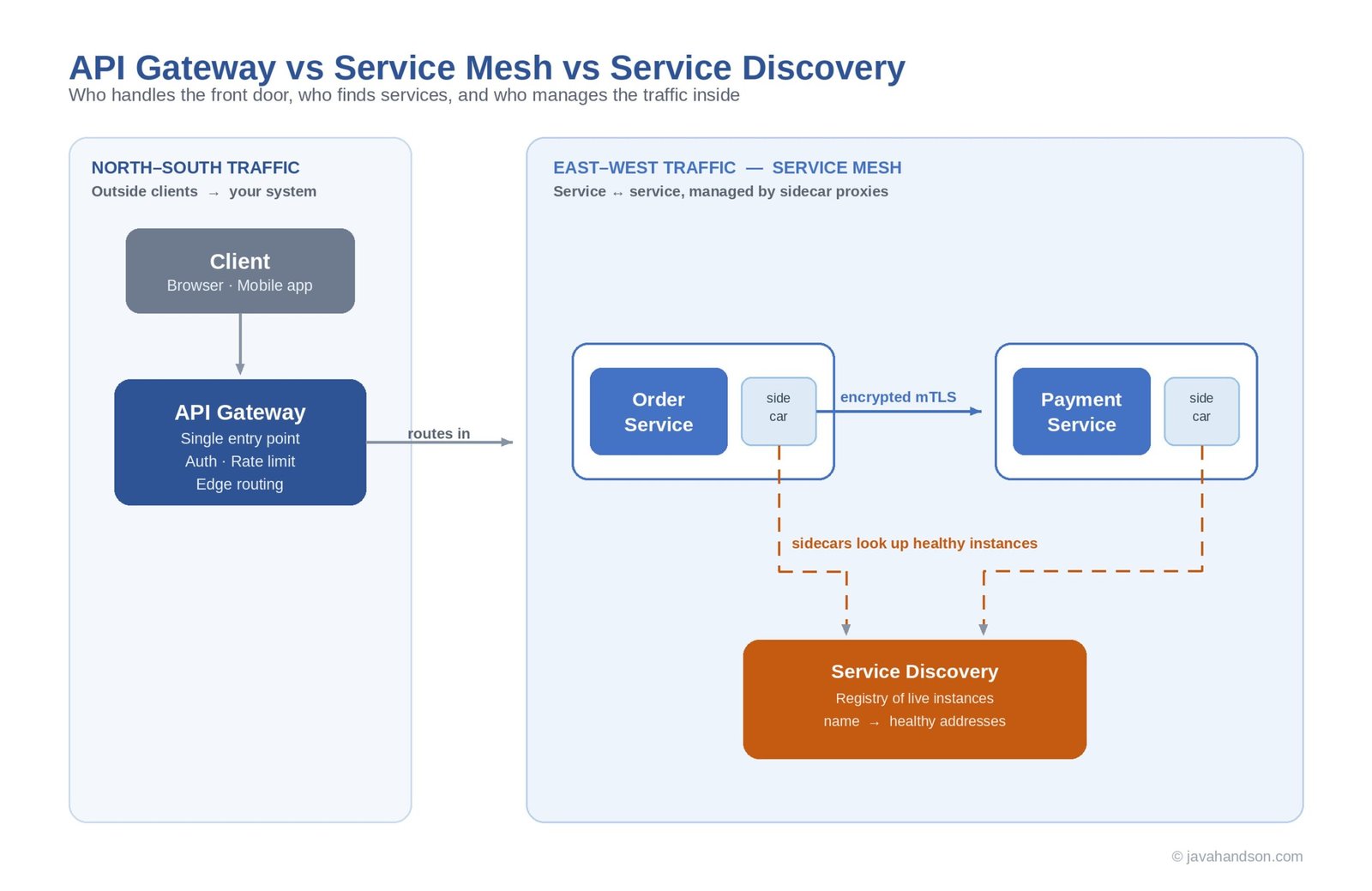
Let us trace a single call so the architecture feels real. Say the order service needs to call the payment service inside an Istio mesh. Here is what happens step by step.
Your application code only ever sees a plain call and a plain response. Everything in between, the discovery, the encryption, the retries, the metrics, is handled by the two sidecars. That is the mesh doing its quiet work.
Sidecars are powerful, but they have a cost. Running an Envoy proxy next to every single pod uses extra memory and CPU, and it adds operational overhead. To fix this, Istio introduced a newer data plane design called ambient mode, sometimes called sidecar-less. In ambient mode, your application pods stay completely untouched, with no proxy injected inside them.
Instead of a proxy per pod, ambient mode splits the data plane into two layers. This is the main idea to remember about ambient mode.
The control plane, istiod, stays the same and still issues certificates and distributes config. Only the data plane changes shape. The payoff is lower resource use and less overhead, because most pods just get cheap Layer 4 protection from ztunnel, and the heavier Layer 7 proxy appears only where it is needed. Ambient mode also improves security slightly, since the proxy no longer shares a network namespace with your application.
| Interview Insight: Mentioning ambient mode signals you follow the field. The one-line summary interviewers like is: ambient mode removes per-pod sidecars and splits the data plane into a per-node L4 proxy (ztunnel) for cheap encryption and an optional per-namespace L7 proxy (waypoint) for richer routing, cutting the resource cost of running a mesh while keeping istiod as the control plane. |
Now that we have seen each tool on its own, let us line them up side by side. The confusion between them usually comes from their overlapping feature lists. All three can do routing. All three touch service discovery in some form. But their purpose and their position in the system are different, and that is what truly separates them.
The simplest way to keep them straight is by the kind of traffic each one focuses on. A gateway handles traffic coming from outside. A mesh handles traffic flowing between internal services. Service discovery is not really a competitor to either, it is a building block that both of them rely on underneath.
The three tools compared
| Dimension | API Gateway | Service Discovery | Service Mesh |
|---|---|---|---|
| Main job | Single entry point for clients | Locating service instances | Managing service-to-service calls |
| Traffic direction | North-south (outside to in) | Used by both | East-west (service to service) |
| Lives at | The edge of the system | A registry others query | Beside every service |
| Typical features | Auth, rate limit, routing | Register, lookup, health | mTLS, retries, tracing |
| Example | Kong, APISIX, cloud gateways | Consul, Eureka, etcd | Istio, Linkerd |
The overlap is real, and it is worth naming so it stops confusing you. Many API gateways can do service discovery and even some mTLS. Many service meshes have an ingress gateway that can accept outside traffic, blurring into gateway territory. So the lines are not razor sharp, and vendors keep adding features that cross over.
The right way to think about it is by primary intent, not by feature checklist. An API gateway is built first for external client traffic. A service mesh is built first for internal service traffic. When you pick a tool, ask which problem is your main one, and choose the tool designed for that problem, even if the other tool could technically do a bit of the job.
Not every system needs all three, and adding tools you do not need just creates work. A small system with a handful of services may need only an API gateway, with the platform’s built-in discovery handling the rest. You bring in a service mesh when internal complexity grows, when you have many services in different languages and you need consistent security, retries, and observability across all of them.
In a large system, all three often coexist and play nicely together. Outside traffic hits the API gateway first, which does edge auth and routing. The gateway forwards the request into the cluster, where the service mesh takes over and manages the internal calls with mTLS and tracing. Service discovery runs underneath, keeping everyone’s address list fresh. Each tool handles the slice it was designed for.
Let us tie it all together with a single journey of one request, from a user’s phone to deep inside your system. Seeing the whole path makes the division of labor obvious, and it is exactly the kind of walkthrough that lands well in an interview.
Imagine a user opens a shopping app and taps to place an order. Here is the trip that request takes.
Look at how each tool did exactly one job. The gateway guarded the entrance. Discovery found the moving target. The mesh secured and tracked the internal hop. None of them stepped on the others, and together they turned a messy distributed call into something reliable and observable. That clean separation is the whole point.
Beginners trip on the same points when they first meet these tools. Knowing them early saves you from both confusion and awkward interview moments. Here are the ones that come up most.
The most common question is simply “what is the difference between an API gateway and a service mesh.” A weak answer lists overlapping features and sounds unsure. A strong answer leads with intent and traffic direction, then adds nuance.
Say that an API gateway is the single entry point for external, north-south traffic and centralizes edge concerns like auth and rate limiting. Then say a service mesh manages internal, east-west, service-to-service traffic and provides mTLS, retries, and observability through sidecar proxies without changing application code. Finish by noting the overlap and that large systems often use both. That structure, intent first and nuance second, is what impresses interviewers far more than a memorized feature list.
These three tools solve three different problems that all appeared when we moved to microservices. Keep the core idea of each one in your pocket, and the rest follows naturally.
| Term | Meaning in One Line |
|---|---|
| API gateway | Single entry point for external client traffic |
| North-south traffic | Traffic flowing between outside clients and your system |
| East-west traffic | Traffic flowing between internal services |
| Service discovery | Finding healthy service instances by name |
| Service registry | Live database of running instances and addresses |
| Service mesh | Infrastructure layer managing service-to-service calls |
| Sidecar | Proxy running beside each service to handle networking |
| Control plane | The brain that configures proxies (istiod in Istio) |
| Data plane | The proxies that handle actual traffic |
| mTLS | Two-way encrypted, authenticated service-to-service calls |
| Ambient mode | Istio’s sidecar-free data plane using ztunnel and waypoints |
A: An API gateway is the single entry point for external, north-south traffic and centralizes edge concerns like authentication, rate limiting, and routing. A service mesh manages internal, east-west, service-to-service traffic and adds mTLS, retries, and observability through sidecar proxies without changing application code. Large systems often use both together.
A: Not always. A small system with a few services may need only an API gateway, with the platform’s built-in discovery handling the rest. You add a service mesh when internal complexity grows and you need consistent security, resilience, and observability across many services. In large systems the two coexist, each handling the traffic it was designed for.
A: Service discovery is how services find each other when instances keep moving and scaling. Services register with a service registry when they start, and callers look them up by name instead of by a fixed address. Both API gateways and service meshes rely on it underneath to route to healthy instances.
A: Ambient mode is Istio’s newer, sidecar-free data plane. Instead of injecting an Envoy proxy into every pod, it splits the data plane into a per-node Layer 4 proxy called ztunnel for cheap mTLS encryption, and an optional per-namespace Layer 7 waypoint proxy for richer routing. The control plane, istiod, stays the same. The result is lower resource cost than running sidecars everywhere.
A: North-south traffic flows between outside clients and your system, and it is handled by the API gateway. East-west traffic flows between internal services, and it is handled by the service mesh. Keeping this distinction clear removes most of the confusion between the two tools.
A: The data plane is the set of proxies that sit beside your services and handle the real traffic, encrypting, retrying, and routing requests. The control plane is the brain that configures those proxies, distributes rules, and issues security certificates, without ever touching live traffic. In Istio, the control plane is istiod and the data plane is Envoy proxies.
The API gateway vs service mesh question feels confusing only until you see where each tool lives. A gateway guards the edge, a mesh manages the inside, and service discovery quietly helps everyone find everyone else. Three problems, three tools, each one shaped by the exact need it was born to solve.
None of this requires memorizing feature lists. It requires a simple mental map: north-south for the gateway, east-west for the mesh, and a live registry underneath them both. Carry that map into your next design discussion, pick each tool by its real intent, and you will reason about distributed systems the way senior engineers do. Master these three now, and the rest of the microservices world will feel far less intimidating.