CopyOnWriteArrayList and CopyOnWriteArraySet in Java
-
Last Updated: October 22, 2026
-
By: javahandson
-
Series

CopyOnWriteArrayList keeps reads lock-free by copying its array on every write. See how it and CopyOnWriteArraySet work, what they cost, and when to use them.
If you have ever shared a plain ArrayList between two threads, you already know the pain. One thread reads while another writes, and suddenly you get a ConcurrentModificationException or, worse, silently wrong data. CopyOnWriteArrayList is Java’s clean answer for the case where reads happen far more often than writes. It lives in the java.util.concurrent package, and its sibling CopyOnWriteArraySet is built right on top of it.
In this guide we will go slow and build the idea from the ground up. No jargon gets dumped on you without meaning. By the end you will understand how both classes work inside, when they shine, when they hurt, and how to answer the tricky interview questions that come up around them.
Let us start with why this class even exists. A normal ArrayList is fast, but it is not thread-safe. That single fact explains a lot of production bugs.
Imagine a list of event listeners. Many threads read this list all the time to fire events. Once in a while, someone adds or removes a listener. The moment two threads touch the same ArrayList together, things fall apart.
What actually breaks? A couple of things:
You have a few ways to make it safe. Each one comes with a catch:
The first two options slow down reads. And reads are the thing we do most. That mismatch is exactly the gap CopyOnWriteArrayList was built to fill.
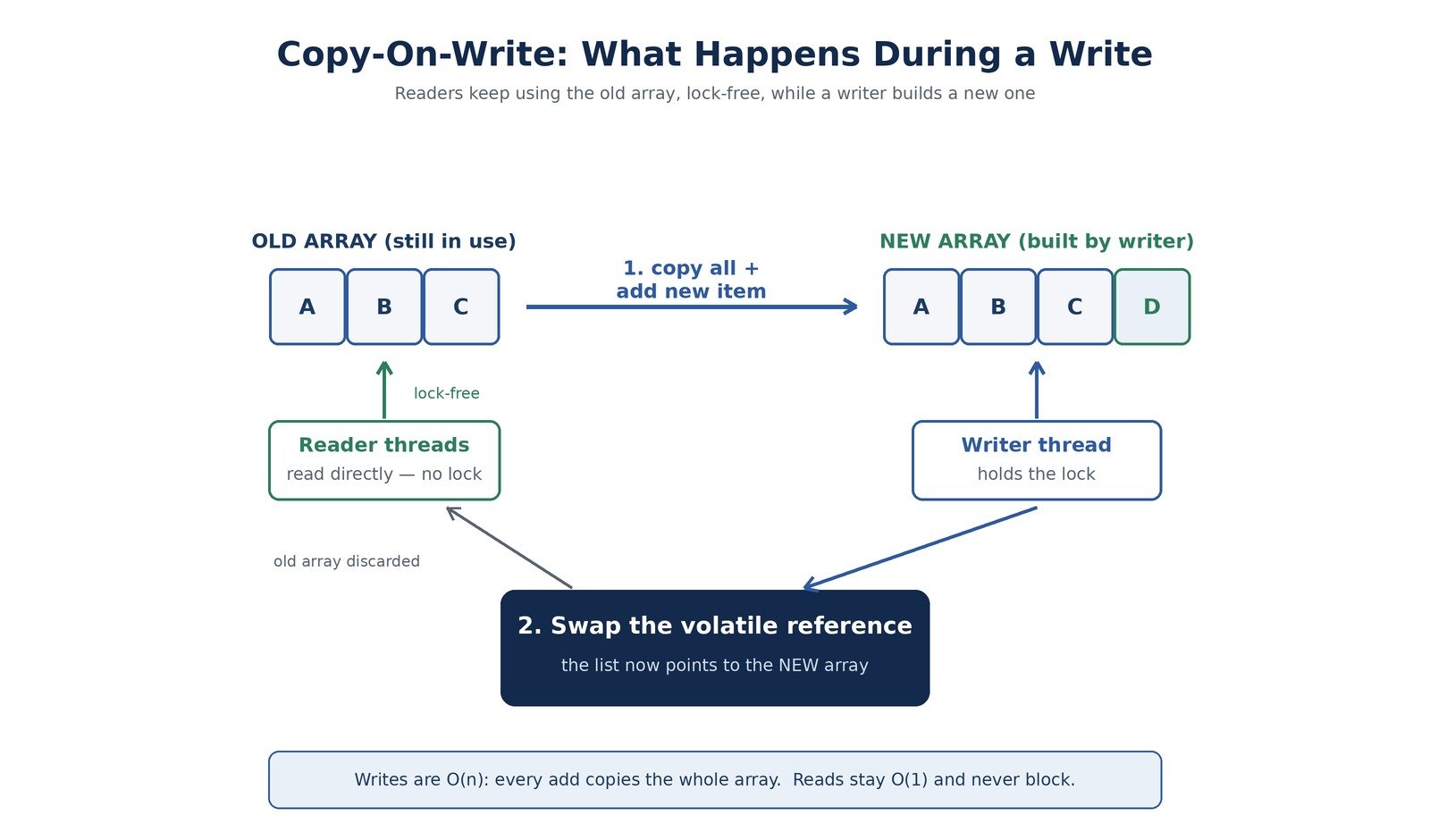
The name sounds fancy, but the idea is plain. The list keeps your data inside a private array. Reads touch that array directly, with no lock at all.
Writes are where the magic sits. The list does not change the existing array. Instead it does three things in order:
So every write creates a brand-new array. Readers who were already looping over the old array simply keep going. They never see the change mid-loop, and they never crash. That is the whole trick, and it is surprisingly powerful once it clicks.
Think of a printed notice board in an office. People read the current notice freely. When the admin wants to update it, they do not scribble over the old sheet while everyone is still reading. They print a fresh sheet, pin it up, and remove the old one. Anyone mid-read finishes the old sheet in peace. That printed-sheet swap is copy-on-write in everyday terms.
| 💡 Interview Insight Interviewers love this line: reads are lock-free, writes copy the entire array. If you can explain why that trade-off makes reads fast and writes expensive, you have basically answered half the questions on this topic. |
CopyOnWriteArrayList implements the List interface. So from the outside it feels just like an ArrayList. You can add, get, remove, and loop over it the same way. All the differences hide under the hood.
Inside, the class is simpler than people expect. It keeps just two things:
That volatile keyword matters more than it looks. When a writer swaps in a new array, the volatile write makes that new array visible to all other threads at once. No reader is left pointing at a stale reference. So you get clean memory visibility for free.
Here is a small program. One thread keeps reading while another adds items. With a plain ArrayList this would often blow up. Here it runs clean.
import java.util.List;
import java.util.concurrent.CopyOnWriteArrayList;

public class CowListDemo {
    public static void main(String[] args) throws InterruptedException {
        List<String> names = new CopyOnWriteArrayList<>();
        names.add("Asha");
        names.add("Ravi");

        // Reader thread: loops many times
        Thread reader = new Thread(() -> {
            for (int i = 0; i < 5; i++) {
                for (String name : names) {
                    System.out.println("Read: " + name);
                }
            }
        });

        // Writer thread: adds while reader is looping
        Thread writer = new Thread(() -> {
            names.add("Meera");
            names.add("John");
        });

        reader.start();
        writer.start();
        reader.join();
        writer.join();

        System.out.println("Final list: " + names);
    }
}
The reader never throws a ConcurrentModificationException. Even though the writer adds names mid-loop, each loop runs over a stable snapshot. The new names show up in a later loop, not the current one.
Let us trace a single add call. Suppose the list holds three items and you add a fourth. Here is the sequence the class runs through:
Notice the lock is only for writers. Readers never ask for it. A reader just grabs whatever array the reference currently points to and walks through it. That is why ten reader threads can run side by side with zero slowdown.
| 💡 Interview Insight A common follow-up: does a reader ever block a writer, or a writer block a reader? The answer is no on both counts. Readers stay fully lock-free. Only writers compete, and they compete only with other writers. |
This part trips up a lot of people, so let us be very clear. When you call iterator() on a CopyOnWriteArrayList, you get an iterator tied to the array as it looked at that exact moment. That frozen view is called a snapshot.
Two rules follow from this design:
Why block those methods? Because changing a snapshot would be pointless. The live list has already moved on to a newer array. So the designers simply disabled them rather than let you edit a frozen copy.
CopyOnWriteArrayList<Integer> nums =
        new CopyOnWriteArrayList<>(List.of(1, 2, 3));

for (Integer n : nums) {
    // Safe: this add touches the live list, not the snapshot
    if (n == 2) {
        nums.add(99);
    }
    System.out.println(n);   // prints 1, 2, 3 only
}

System.out.println(nums);    // [1, 2, 3, 99]
The loop prints 1, 2, 3. That 99 lands in the list, but the running iterator never sees it. Its snapshot was fixed before the add happened.
CopyOnWriteArrayList adds a couple of methods you will not find on a plain ArrayList. They exist to cut down wasted copies.
Both methods do the check and the copy under a single lock. So you avoid the race of checking first and adding later in two separate calls.
A read path is almost boring, and that is the point. When you call get(index), the list reads the current array reference and returns the element at that index. There is no lock to grab and no other thread to wait for.
Because the array reference is volatile, your read always sees the most recent array that any writer published. So you never read a half-updated state. You either see the array before a write or the array after it, never something in between.
Now the sibling. CopyOnWriteArraySet is a Set, so it holds unique elements with no duplicates. It gives you the same thread-safety style: lock-free reads and copy-based writes.
Here is the neat part. CopyOnWriteArraySet does not reinvent anything. Inside, it simply holds a CopyOnWriteArrayList and leans on it to store elements. When you add something, the set first checks whether that element already exists. If it does, nothing happens. If not, it appends.
That duplicate check is why a set write can cost even more than a list write. Before copying the array, the set scans the whole thing to look for a match. For a big set, that scan really adds up.
import java.util.Set;
import java.util.concurrent.CopyOnWriteArraySet;

public class CowSetDemo {
    public static void main(String[] args) {
        Set<String> tags = new CopyOnWriteArraySet<>();
        tags.add("java");
        tags.add("concurrency");
        tags.add("java");          // duplicate, ignored

        for (String tag : tags) {
            System.out.println(tag);
        }
        System.out.println("Size: " + tags.size());  // 2
    }
}
The second “java” gets dropped. The set keeps only unique values, exactly like any other Set. Its size stays at two.
A regular HashSet uses hashing, so lookups land in near O(1) time. CopyOnWriteArraySet does no hashing. It stores items in a plain array and checks duplicates by scanning. So its contains and add run in O(n), not O(1).
This tells you something important. For a small set, that cost is nothing to worry about. For a large set with frequent writes, it gets slow fast. Keep the size in mind before you reach for it.
| 💡 Interview Insight If asked how CopyOnWriteArraySet achieves thread safety, do not say “hashing” or “synchronized buckets”. Say it wraps a CopyOnWriteArrayList and inherits its copy-on-write behavior. That one sentence shows you actually know the internals. |
A few small facts round out the picture. They come up in code reviews more often than you would think:
That last point is handy. If you need a thread-safe collection that also remembers insertion order, the copy-on-write classes give you both in one go.
Nothing comes free. The speed of reads is paid for by the cost of writes. Let us look at both sides honestly.
A read is just an array access through a reference. No lock, no waiting, no contention. Many threads can read at once with no slowdown between them. This is the single biggest reason the class exists.
Every write copies the full array. So one add on a list of a million items copies a million references. Do that in a loop and you create a mountain of garbage for the collector to clean up later.
Here is a rough feel for the trade-offs between the safe list and a plain one:
| Operation | CopyOnWriteArrayList | Plain ArrayList |
|---|---|---|
| get (read) | O(1), lock-free | O(1), not thread-safe |
| add (write) | O(n), copies array | O(1) amortized |
| remove (write) | O(n), copies array | O(n) |
| Thread-safe | Yes | No |
The lesson is simple. Writing a lot to a copy-on-write collection is a bad idea. Use it only when writes stay rare.
There is one more hidden cost. While a write runs, two copies of the array exist at the same time: the old one and the new one. For a huge list, that brief doubling of memory can matter. Watch your heap if your lists grow very large.
The cost also grows with size. A write on a ten-item list is trivial. A write on a ten-thousand-item list copies ten thousand references each time. So the same class can feel instant in one place and sluggish in another, purely based on how big the collection has grown.
Now the practical bit. These classes fit a very specific shape of problem. Match that shape, and they are excellent. Miss it, and they quietly drag your performance down.
The observer pattern is the textbook use case. You keep a list of observers and notify each one when something happens. Notifications are frequent, but registering a new observer is rare. That read-heavy, write-rare mix is a perfect match.
public class EventSource {
    private final CopyOnWriteArrayList<Listener> listeners =
            new CopyOnWriteArrayList<>();

    public void register(Listener l) { listeners.add(l); }
    public void unregister(Listener l) { listeners.remove(l); }

    public void fire(String event) {
        // No lock needed, no risk of ConcurrentModificationException
        for (Listener l : listeners) {
            l.onEvent(event);
        }
    }
}
The fire method runs on a lock-free snapshot. A listener can even register during a notification, and the loop stays safe. That safety with zero locking is why Java’s own event code uses this pattern.
When writes are frequent, reach for ConcurrentHashMap, ConcurrentLinkedQueue, or a BlockingQueue instead. These handle heavy concurrent writes far better than a copy-on-write list ever could.
It helps to see where these classes sit among the alternatives. Each option solves a slightly different problem, so none of them is a blanket winner.
| Collection | Best When | Read Cost | Write Cost |
|---|---|---|---|
| CopyOnWriteArrayList | Many reads, few writes | Lock-free | High (copy) |
| Collections.synchronizedList | Balanced reads and writes | Locked | Locked |
| ConcurrentLinkedQueue | Heavy concurrent writes | Lock-free | Lock-free |
| Vector | Legacy code only | Locked | Locked |
A synchronized list locks on every operation, reads included. CopyOnWriteArrayList frees your reads entirely. That lock-free read is its one big edge, so use it only to get that edge.
People new to Java sometimes ask about Vector, since it is thread-safe too. But Vector locks every method, so reads are slow under load. It is also legacy code from the early Java days. For new work, skip Vector and pick a modern concurrent collection that fits your read-write balance.
A few traps catch people again and again. Knowing them upfront saves hours of confused debugging.
Adding items one by one inside a tight loop is the classic mistake. Each add copies the whole array. A loop of 10,000 adds does 10,000 copies. If you must bulk-load, build a normal list first, then hand it to the constructor in one shot.
// Bad: 10,000 array copies
CopyOnWriteArrayList<Integer> bad = new CopyOnWriteArrayList<>();
for (int i = 0; i < 10_000; i++) {
    bad.add(i);
}

// Good: one copy at construction time
List<Integer> source = new ArrayList<>();
for (int i = 0; i < 10_000; i++) {
    source.add(i);
}
CopyOnWriteArrayList<Integer> good =
new CopyOnWriteArrayList<>(source);Your iterator always sees a frozen view. If another thread adds data while you loop, you will not see it until your next loop starts. For most read-heavy work that is perfectly fine. Just never rely on instant visibility of writes.
Single operations like add or remove are atomic. But a check-then-act across two calls is not. For example, calling contains and then add as two steps can still race. Use addIfAbsent for that exact case, since it does both under one lock.
These classes work best when they stay small and settle down early. A list of twenty listeners that changes once an hour is ideal. A list of fifty thousand rows that mutates every second is a trap. Before you choose a copy-on-write collection, ask one question: do my writes stay rare? If the honest answer is no, pick something else.
| 💡 Interview Insight A sharp question to expect: what is the time complexity of add on a CopyOnWriteArrayList? Answer O(n), because every add copies the whole backing array. Candidates who say O(1) out of habit lose the point here. |
A: ArrayList is fast but not thread-safe. CopyOnWriteArrayList is thread-safe: reads happen with no lock, and every write copies the whole backing array. Use ArrayList for single-threaded code, and CopyOnWriteArrayList only when many threads read while few write.
A: Its iterator works on a snapshot of the array taken at the moment you call iterator(). Later writes create a new array and do not touch that snapshot, so the loop stays valid. These iterators are fail-safe, not fail-fast.
A: It is O(n), because each add copies the entire backing array into a new one. Reads stay O(1) and lock-free. This is why you should avoid writing to it inside a tight loop.
A: It wraps a CopyOnWriteArrayList and reuses its copy-on-write behavior. On add, it scans the array for a duplicate first, then copies. It does no hashing, so contains and add run in O(n), which keeps it best for small sets.
A: Avoid it when writes are frequent or the collection is large, since every write copies everything. For write-heavy needs, pick ConcurrentHashMap, ConcurrentLinkedQueue, or a BlockingQueue instead.
CopyOnWriteArrayList and CopyOnWriteArraySet solve one problem really well. They give you thread-safe collections where reads never lock and never crash, even while another thread writes. The price for all that is the copy on every write.
So the rule of thumb stays short. Pick them when reads crush writes in number, your collection is not huge, and you can live with a slight snapshot lag. Step outside that zone, and a different concurrent collection will serve you better. Choose the right tool, and your concurrent code stays both safe and fast.