Outbox Pattern, Dead-Letter Queues, and the Dual-Write Problem Explained
-
Last Updated: November 25, 2026
-
By: javahandson
-
Series

Outbox pattern explained simply — how it fixes the dual-write problem between a database and broker, plus dead-letter queues and poison-message handling.
Most backend services do two things at once. They save data to a database, and they tell the outside world about it. The second part usually means publishing a message to a broker like Kafka, RabbitMQ, or a cloud queue. On paper this looks harmless. In practice, it hides one of the nastiest bugs in distributed systems.
The trouble is simple to state. A database and a message broker are two separate systems. You cannot update both in one atomic step. So one write can succeed while the other fails. When that happens, your data and your events drift apart, and nobody notices until a customer complains. This article is about that exact failure, and the outbox pattern that fixes it cleanly.
We will keep the discussion language-neutral and purely about system design. First, we will look at the dual-write problem and why it is so sneaky. Next, we will see why the obvious fixes do not really work. After that, we will walk through the outbox pattern step by step. Finally, we will cover dead-letter queues, which handle the messages that still refuse to process. By the end, you will know how to keep your writes and your events honest.
A dual write happens any time one business action must update two systems. The classic case is a microservice that saves a record and then publishes an event. Think of an order service. It stores a new order in its database. Then it publishes an “OrderPlaced” event so the shipping service and the payment service can react.
These two steps feel like one action in your head. The code, though, runs them one after another. There is a tiny gap between them. And in that gap, anything can break. The network can drop, the broker can be down, or the service can crash mid-way. That gap is where the dual-write problem lives.
There are really only two orderings, and both have a bad failure mode. Let us take them one at a time, because each leaves the system in a different broken state.
Suppose you save to the database first and then publish the event. The save works. But before the event goes out, the broker is unreachable or the service dies. Now the order exists, yet nobody downstream knows about it. The customer paid, but shipping never hears about the order. This is a silent lost event.
Now flip the order. You publish the event first and then save to the database. The event goes out fine. But the database write fails and rolls back. Downstream services now act on an order that does not actually exist. Payment may charge for a ghost record. This is a phantom event, and it corrupts trust across the whole system.
| Core Definition A dual write is any single operation that writes to two different systems that cannot commit together. Because there is no shared transaction, one write can succeed while the other fails, leaving the two systems inconsistent. |
The worst part is how quiet this bug is. Each service looks healthy on its own. The database shows a clean commit. The logs show no error. Yet the two sides of the story do not match. Standard monitoring rarely spots it, because nothing actually threw an exception.
When developers first meet this problem, they reach for familiar tools. Sadly, the usual tricks do not hold up under real failures. Let us walk through the tempting ones and see where each breaks.
A local database transaction only covers the database. The message broker sits outside it. So wrapping the save and the publish in one transaction block does nothing for the broker. The transaction commits the row, but the broker call is a plain network request. It can still fail on its own. In short, a local transaction cannot reach across two systems.
Retries help with short network blips, and you should use them. However, retries alone do not solve the problem. If the service crashes right after the database commit, there is no running code left to retry the publish. The event is simply gone. Retries also risk sending the same event twice if you are not careful. So retries reduce the pain, but they never remove it.
Two-phase commit, or 2PC, tries to make two systems commit together. In theory, it fits this exact need. In practice, most teams avoid it, and for good reasons. Many message brokers do not support it at all. Even when they do, it is heavy and fragile.
So distributed transactions trade one hard problem for a worse one. We need the atomic guarantee without the cost of 2PC. That is precisely what the outbox pattern gives us.
The outbox pattern has one beautiful idea at its heart. Turn the dual write into a single write. Instead of writing to the database and the broker, you write only to the database. The event rides along inside the same transaction.
Here is the trick. You add a second table, often called the “outbox” table. When your service handles a request, it saves the business record and inserts the event row into the outbox. Both inserts happen in the same local database transaction. Because they share one transaction, they are atomic. Either both land, or neither does.
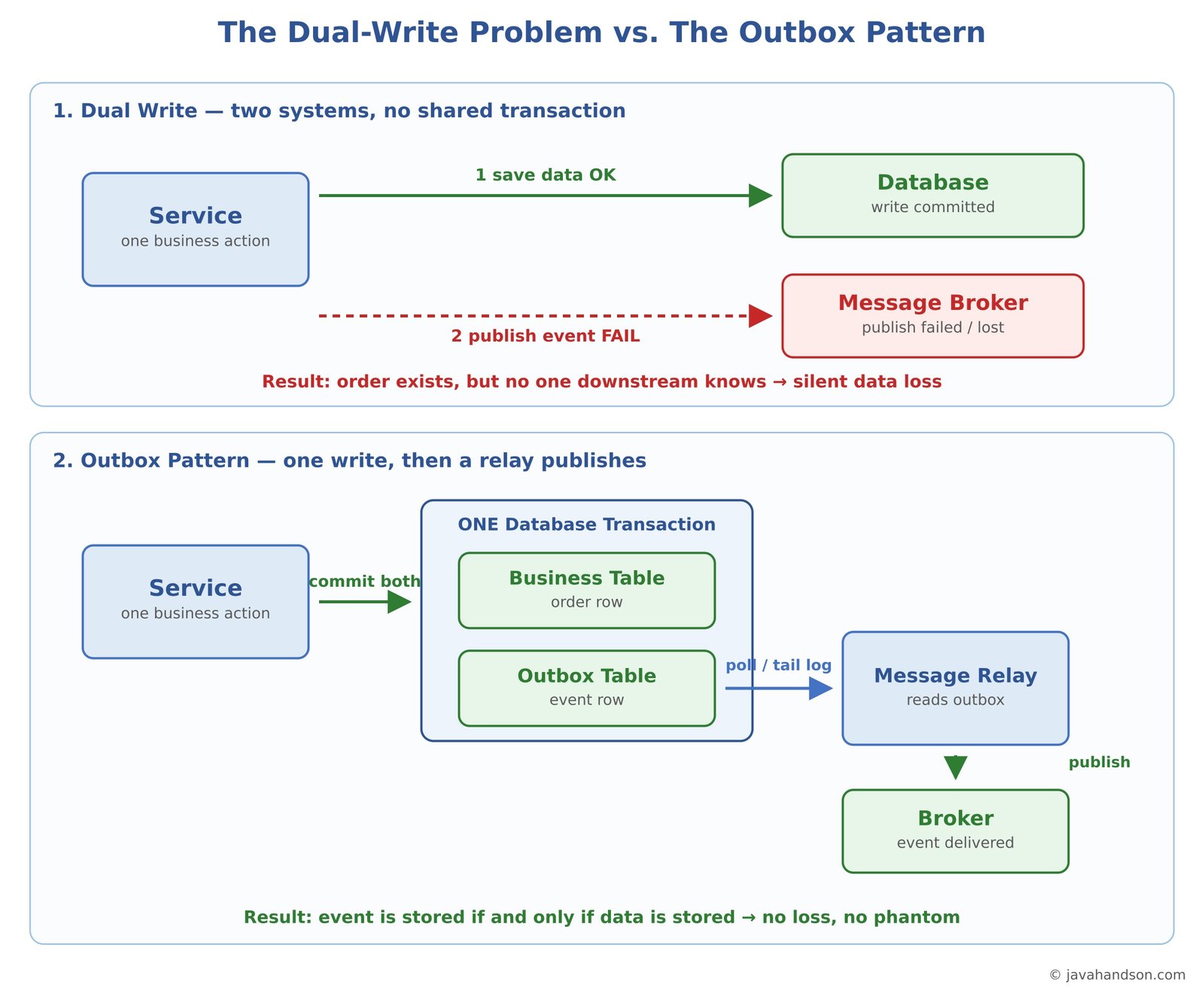
| The Key Guarantee With the outbox pattern, the event lands if and only if the business data lands. There is no gap and no phantom event. A separate process then reads the outbox and publishes the events to the broker. This moves the risky network call out of the critical write path. |
Let us trace a single order through the pattern. The flow is short, and each step has a clear job. Follow it once, and the whole idea clicks.
Write path (conceptual, language-neutral)
BEGIN TRANSACTION
    1. Insert the business record     -> orders table
    2. Insert the event record        -> outbox table
COMMIT TRANSACTION   // both rows commit together, or neither does

// The broker is NOT touched here.
// No network call sits inside the transaction.
Notice what is missing from that block. There is no call to the broker inside the transaction. The service only talks to its own database. That single fact is what removes the dual write. The event is now just another row, protected by the same commit as the order.
Writing the event to the outbox is only half the job. Something must still deliver it to the broker. That something is a separate process, usually called the message relay. It runs on its own, apart from the request that created the event.
The relay does three plain things, over and over. First, it reads new, unsent rows from the outbox table. Then it publishes each event to the broker. Finally, it marks the row as sent, or deletes it, once the broker confirms receipt. If the broker is down, the relay simply tries again later. The event waits safely in the table until delivery succeeds.
Relay loop (conceptual, language-neutral)
LOOP forever:
    rows = SELECT * FROM outbox WHERE sent = false ORDER BY sequence
    for each row in rows:
        publish(row.event) -> broker
        if broker acknowledged:
            mark row as sent   // or delete the row
        else:
            leave row for the next pass   // retry later
    sleep(poll_interval)
This design has a lovely property. The event cannot vanish, because it sits durably in the database. The relay can crash and restart freely. On restart, it just picks up any rows still marked unsent. So a crash causes a delay, never a loss.
There are two well-known ways to implement the relay. Both read the outbox, but they watch it differently. The right choice depends on your scale and your database.
The polling publisher queries the outbox table on a timer. Every few hundred milliseconds, it asks for unsent rows and ships them. It is simple to write and easy to reason about. The downside is the constant polling. Frequent queries add load, and there is a small delay between the write and the publish.
The second approach is transaction log tailing, better known as change data capture, or CDC. Instead of polling, it reads the database’s own commit log. Tools like Debezium watch that log and stream out each new outbox row as it is committed. This avoids polling queries and reacts almost instantly. In return, it needs more setup and a CDC tool in your stack.
| Aspect | Polling Publisher | Log Tailing (CDC) |
|---|---|---|
| How it reads | Queries the outbox on a timer | Reads the database commit log |
| Setup effort | Low — just a scheduled query | Higher — needs a CDC tool |
| Latency | Small polling delay | Near real-time |
| Database load | Extra queries each cycle | Light, log-based |
| Best for | Simple or lower-scale services | High throughput, low latency needs |
The outbox pattern is not free of trade-offs. Its main catch is duplicate messages. The relay guarantees at-least-once delivery, not exactly-once. So the same event can reach the broker more than once.
Why does this happen? Imagine the relay publishes an event, but crashes before it marks the row as sent. On restart, it sees the row still unsent and publishes it again. The consumer now gets two copies. This is normal and expected, so you must plan for it.
| Interview Insight Because delivery is at-least-once, the outbox pattern pushes a requirement onto consumers: they must be idempotent. In plain words, processing the same event twice must have the same result as processing it once. A common fix is to track processed event IDs and skip any ID already seen. Interviewers love it when you mention idempotency unprompted. |
Let us make this real with a small story. An order service takes a new order from a customer. It must save the order and tell two other services about it. The payment service needs to charge the card. The shipping service needs to prepare the parcel.
Without the outbox, the order service would save the order and then fire the event. If it crashes in between, the order sits in the database all alone. No charge happens, and no parcel ships. The customer waits for an item that the rest of the system never heard about.
With the outbox, the story changes for the better. The order service opens one transaction. It writes the order row and an “OrderPlaced” outbox row together, then commits. Later, the relay reads that outbox row and publishes the event. Now the payment and shipping services both get the news, even if the order service restarted in between.
This tiny example shows the whole value of the pattern. One commit replaces a fragile two-step dance. The event becomes as durable as the order itself. Everything downstream can trust that an order and its event always agree.
The outbox pattern gets events safely onto the broker. But getting an event onto the broker is not the end of the story. A consumer still has to process it. And sometimes a consumer just cannot handle a given message, no matter how many times it tries. This is where dead-letter queues come in.
A poison message is a message that fails every time you process it. The failure is not a passing blip. It is baked into the message itself. The payload might be malformed. The schema might be unsupported. Or a bug in the handler might trip on that exact data.
A poison message is dangerous because of what it does to the queue behind it. The consumer picks up the bad message and fails. It retries, and fails again. Meanwhile, every message sitting behind it has to wait. This is called head-of-line blocking, and it can stall a whole queue.
Queue starvation from a poison message
msg1  -> processed  OK
msg2  -> processed  OK
msg3  -> POISON -> fail -> retry -> fail -> retry -> fail ...
msg4  -> blocked (waiting behind msg3)
msg5  -> blocked (waiting behind msg3)
A dead-letter queue, or DLQ, is a separate queue for messages that cannot be processed. When a message fails too many times, the system moves it out of the main queue and into the DLQ. The main queue then flows freely again. The bad message is set aside, not lost.
Think of the DLQ as a quarantine area. The message is parked there so a human or a repair job can look at it later. The healthy messages keep moving. Meanwhile, the poison message waits safely for inspection. This one idea protects your throughput from a single bad apple.
| Core Definition A dead-letter queue is a dedicated destination. A broker or consumer routes a message there after it uses up its retry budget or fails a non-retryable check. The DLQ keeps poison messages from blocking the main queue. It also preserves them for diagnosis and possible reprocessing. |
Not every failure deserves a retry. Before you retry anything, you should ask why the message failed. Good systems sort failures into a few clear buckets. The bucket decides the next move.
| Failure Type | Example | Right Response |
|---|---|---|
| Success | Processing finished cleanly | Acknowledge and move on |
| Transient | Timeout, throttling, a dependency briefly down | Retry with a delay |
| Permanent | Bad schema, invalid data, forbidden action | Send straight to the DLQ |
| Unknown | Unexpected internal error | Allow a few retries, never unlimited |
This classification matters a lot. A transient failure will likely clear on its own, so a retry makes sense. A permanent failure never will, so retrying just wastes time and blocks the queue. Sending permanent failures straight to the DLQ keeps the pipeline healthy.
For failures that might clear, you retry. But you must retry with limits. Unbounded retries are how a poison message loops forever. So you bound retries in two different ways at once.
There is also the question of how fast to retry. Hammering a struggling dependency makes things worse. So you space out retries using backoff. Each retry waits a little longer than the last. You should also add jitter, which is a small random delay. Jitter stops many failed messages from retrying at the very same moment.
One more rule is easy to miss. Do not hold resources while waiting to retry. Release the worker, the database transaction, and the connection during the delay. Otherwise your retries will leak resources and create fresh problems. Delayed retry queues are a common way to park a message for its wait without tying anything up.
A message in the DLQ is not finished business. It is a signal that something needs a look. The DLQ is not a successful sink, so you should watch it closely. Alert on new messages, on growing age, and on rising counts.
Once you fix the root cause, you can send the messages back for another try. This is called redrive, or replay. However, you should not just dump them all back at once. A careful redrive follows a short, deliberate checklist.
Safe redrive checklist
1. Reproduce the failure with a safe sample message.
2. Deploy the fix to the consumer.
3. Confirm the consumer is still idempotent.
4. Check the message is still within its business validity window.
5. Replay at a low rate first, then watch the metrics.
6. Stop immediately if the failures come back.
| Interview Insight A strong answer notes that bulk redrive is risky. If a DLQ is full of genuinely invalid events, replaying them all at once simply recreates the original outage. Redrive should be slow, monitored, and reversible. Treat replay as a deliberate workflow, not a panic button. |
These three ideas are not rivals. They solve different parts of one bigger goal: reliable, event-driven communication. It helps to see where each one sits in the journey of a single event.
The dual-write problem is the danger. It threatens the moment a service tries to save data and publish an event together. The outbox pattern defends that moment. It guarantees the event exists whenever the data exists, with no gap in between. So the outbox gets the event safely onto the broker.
The dead-letter queue guards the other end of the journey. It handles events that reach the broker but cannot be processed by a consumer. One pattern protects the producer side, and the other protects the consumer side. Used together, they give you an event pipeline that neither loses events nor jams up.
Certain traps catch almost everyone the first time. Knowing them early saves you real pain in production and in interviews. Here are the ones that come up most often.
System design interviews reward clear reasoning over memorized facts. When event delivery comes up, start by naming the dual-write problem out loud. Explain the two failure orderings in plain words. That alone shows you understand why naive code is unsafe.
Next, propose the outbox pattern and state its guarantee precisely. Say that the event is stored if and only if the business data is stored. Then mention the cost — at-least-once delivery — and solve it with idempotent consumers. Naming the trade-off before the interviewer asks is a strong signal.
Finally, close the loop with dead-letter queues. Describe how you would classify failures, bound retries, and quarantine poison messages. Tie it together by noting that the outbox protects the producer while the DLQ protects the consumer. That full-pipeline view is exactly what senior rounds look for.
A: The dual-write problem happens when one action must write to two separate systems, such as a database and a message broker. These two systems cannot commit together, so one write can succeed while the other fails. The result is that your data and your events drift apart, which causes silent inconsistencies.
A: The outbox pattern turns two writes into one. The service saves the business record and an event row in the same database transaction. Because they share one commit, they are atomic. A separate relay process then reads the outbox and publishes the event to the broker, so the event is stored if and only if the data is stored.
A: Two-phase commit tries to make two systems commit together, but it has real costs. Many message brokers do not support it. Even when they do, it is slow, it adds locks, and it lowers availability because participants can block. Most teams avoid 2PC and use the outbox pattern instead.
A: No. The outbox pattern gives at-least-once delivery, not exactly-once. The relay may publish the same event twice, for example if it crashes before marking a row as sent. So consumers must be idempotent, usually by tracking processed event IDs and skipping any ID already seen.
A: A dead-letter queue, or DLQ, is a separate queue for messages a consumer cannot process. When a message fails too many times, the system moves it to the DLQ so the main queue keeps flowing. It is used to isolate poison messages, protect throughput, and keep bad messages for later inspection and redrive.
A: A poison message is a message that fails every time it is processed. The cause is durable, such as malformed data, an unsupported schema, or a handler bug. Retries never fix it, and it can block every message behind it in the queue. A dead-letter queue is the standard way to move it out of the main flow.
A: The outbox pattern protects the producer side. It makes sure an event is never lost when a service saves data and publishes an event together. A dead-letter queue protects the consumer side. It handles events that reach the broker but cannot be processed. Together they give you an event pipeline that neither loses events nor jams up.
Event-driven systems promise loose coupling and easy scaling. They also hide a quiet danger in plain sight. The dual-write problem turns a simple save-and-publish into a source of silent data loss. And the usual fixes — local transactions, bare retries, or 2PC — all fall short in their own way.
The outbox pattern cuts through the problem with one clean move. It turns two writes into one, so the event and the data share a single commit. A separate relay then delivers the event at your own pace. You pay for this with possible duplicates, which idempotent consumers handle with ease.
Dead-letter queues finish the picture at the consumer side. They classify failures, bound retries, and park poison messages for safe repair. Put these patterns together, and you get an event pipeline that is honest and sturdy. Master them now, and the harder topics ahead will feel like natural next steps.