Java 27 JEP 534: Compact Object Headers by Default (A Beginner’s Guide)
-
Last Updated: October 16, 2026
-
By: javahandson
-
Series

Java 27 JEP 534 makes compact object headers the default. Learn how the header shrinks from 12 to 8 bytes, the real heap savings, and how to measure it.
Most Java upgrade guides talk about new syntax and shiny language features. JEP 534 is different. It is a quiet change that touches every single object in your heap. In this guide, we will understand Java 27 Compact Object Headers by default, step by step, in plain language.
Here is the short version first. Starting with Java 27, every object in the HotSpot JVM carries a smaller header. The header shrinks from 12 bytes to 8 bytes. You change nothing in your code. You just upgrade, and your heap gets smaller.
That sounds small. But it adds up fast when your app creates millions of objects.
By the end of this guide, you will know:
Let us get started.
Before we talk about the change, let us understand the thing being changed. So what is an object header?
Every object you create in Java has two parts in memory. First, there is the actual data, like your fields. Second, there is a small block of bookkeeping data that sits in front. That bookkeeping block is the object header.
Think of it like a parcel. The data is what sits inside the box. On top of it, a shipping label tells the courier where the box goes. That label is the object header, and the JVM reads it to know a few important things about the object.
The header is tiny, but it does a lot of work. It holds the information the JVM needs to manage the object.
Without this label, the JVM would be lost. It could not run garbage collection. Threads could not synchronize safely. The runtime could not even tell one type from another.
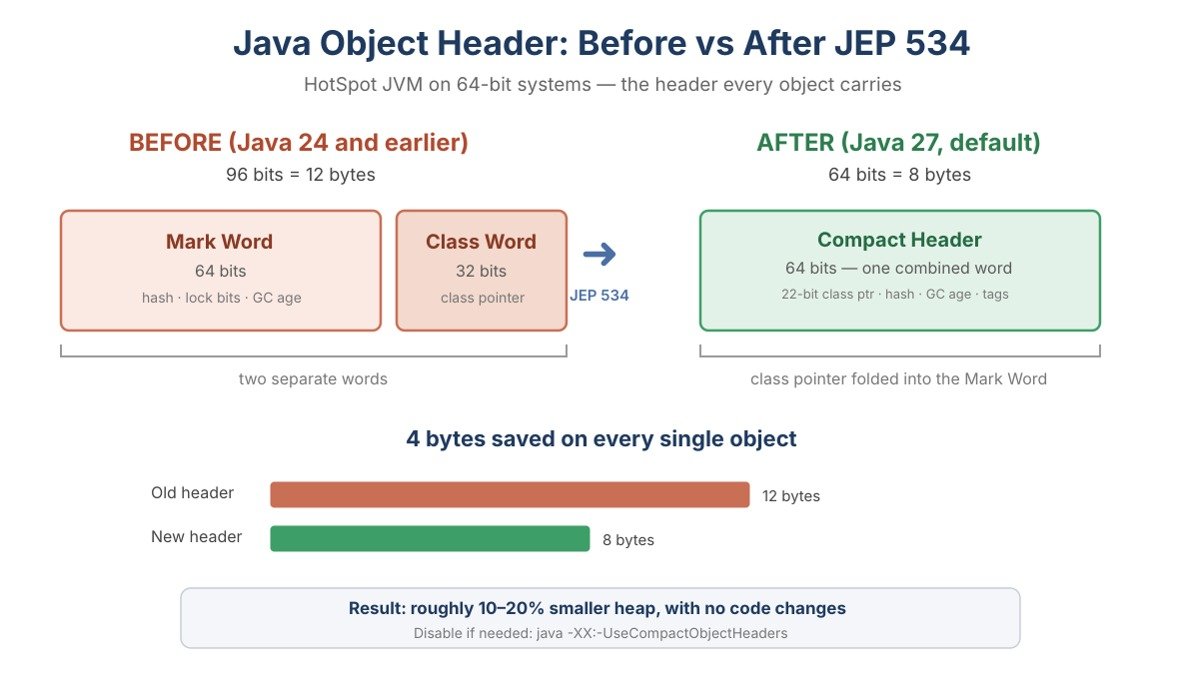
For years, the HotSpot header had two parts. There was a 64-bit Mark Word and a 32-bit Class Word. Together, they came to 96 bits, which is 12 bytes.
The Mark Word held the hash, lock bits and GC age. The Class Word held the pointer to the class metadata. So each object paid a 12-byte tax before it even stored a single field of its own.
For one object, 12 bytes is nothing. For an app holding ten million small objects, it becomes real memory. That is the problem JEP 534 finally solves by default.
Let me explain why the Java team cared so much about four bytes. The answer is simple. Small objects are everywhere.
Think about a typical Spring Boot app. It holds thousands of small DTOs, entity objects, map entries and wrapper objects. Many of these carry only one or two fields. For such objects, the header is a big chunk of their total size.
Here is a surprising fact from the Project Lilliput research at Amazon. Their study found that object headers made up a noticeable slice of live heap data. In some workloads, headers alone were around 6 to 7 percent of all live data after garbage collection.
That is memory you pay for but never use for your own data. So trimming the header trims real cost.
Smaller headers help in two ways. First, your heap holds more objects in the same space. Second, smaller objects fit better in the CPU cache.
Better cache usage means the CPU waits less for memory. As a result, you often get a small speed bump too. In short, the same work fits in less space and runs a bit faster.
Not every app gains equally. So it helps to know where this change shines. The winners are object-heavy workloads.
For cloud and container setups, this matters a lot. A smaller heap can mean a smaller pod. A smaller pod can mean a lower cloud bill. Therefore, the savings are not just technical; they touch your budget too.
Compact object headers did not appear overnight. The feature moved through three careful steps across three Java releases. This slow path is normal for low-level JVM changes.
Here is a quick question before we dig in. Why three JEPs for one feature? Because a change this deep can break things. So the team shipped it gradually and watched closely.
The feature first landed in Java 24 as JEP 450. At that stage, it was experimental. You had to unlock it with two flags.
java -XX:+UnlockExperimentalVMOptions -XX:+UseCompactObjectHeaders -jar app.jar
Experimental means “try it, but do not trust it in production yet”. The author, Roman Kennke, and the team wanted real feedback first. So early adopters tested it and reported results.
In Java 25, the feature grew up through JEP 519. It moved from experimental to a product feature. That is an important promotion.
Now you no longer needed the experimental unlock flag. A single flag turned it on.
java -XX:+UseCompactObjectHeaders -jar app.jar
However, there was still one catch. Even as a product feature, it stayed off by default. You had to switch it on yourself. So most developers never used it.
Finally, Java 27 brings JEP 534. Now compact object headers are the default. You do not add any flag at all.
So the three steps look like this:
This is why JEP 534 matters so much. Earlier, only curious teams got the benefit. Now every app on Java 27 gets smaller headers automatically.
| 💡 Interview Insight Interviewers love asking about the JEP 450, 519 and 534 progression. The key point is the status change at each step. JEP 450 made it experimental in Java 24. JEP 519 made it a product feature in Java 25, but still off by default. JEP 534 flips the default to on in Java 27. Mention that the owner is Roman Kennke, from Project Lilliput. |
Now comes the fun engineering. How do you remove 4 bytes from something the JVM depends on? You cannot just delete information. So the team got creative.
The trick has two parts. They squeezed the class pointer, and then they folded it into space that was going unused.
The 64-bit Mark Word was never fully packed. It had unused bits sitting idle during normal operation. In fact, there were around 27 bits going spare.
So the team asked a simple question. Why keep a separate 32-bit Class Word when we have free bits right here? That question led to the whole redesign.
The old class pointer used 32 compressed bits. The team found it could be done in just 22 bits. Here is the clever idea behind it.
Class metadata does not sit at random addresses. The JVM stores it in aligned blocks, roughly 1 KB each. So instead of pointing to an exact byte, the pointer can point to a block number. A 22-bit block number can address plenty of classes for almost any app.
As a result, the fat 32-bit Class Word disappears. The slim 22-bit class pointer now lives inside the Mark Word itself.
After the redesign, the whole header fits in 64 bits, which is 8 bytes. There is no separate Class Word anymore. Everything shares one 64-bit space.
Roughly, the new compact header packs in:
So the information did not vanish. Instead, it was repacked smartly into a tighter space.
This one bit deserves a quick note, because it is a neat detail. During garbage collection, the collector sometimes moves an object to a new spot. When that copy fails, the GC used to overwrite the Mark Word with a pointer back to the object itself.
But wait. In the new layout, the class pointer lives in that same Mark Word. If the GC overwrote it, the class pointer would be lost. That is dangerous, because the JVM needs the class pointer to know the object’s size.
So the team added the Self Forwarded Tag. Instead of overwriting the header, the GC just sets this one bit. The class pointer stays safe. Problem solved.
Talk is cheap, so let us look at actual results. These numbers come from the JEP itself and from large companies that tested it. I have kept only figures from trusted sources here.
The headline benefit is smaller heap usage. The JEP documentation reports a heap reduction of roughly 10 to 20 percent for typical apps.
Different teams reported different numbers, based on their object mix:
Your own number depends on your objects. Apps with many tiny objects save the most. Meanwhile, apps with large arrays or long strings save less, since the header is a small part of those.
Memory is not the only win. Smaller objects also help speed in many cases. The JEP notes a throughput improvement of about 5 to 10 percent when upgrading.
Amazon also reported roughly 8 percent less CPU usage across its services. That came with no application code changes at all. In other words, it was a free gain just from the JVM upgrade.
Let us make this concrete with a web example. One independent benchmark ran a small HTTP gateway service under load. It compared Java 27 with the feature on against Java 27 with the feature off, using the exact same bytecode.
The result was clear. Per user session, the compact-header run used around 300 fewer bytes. On its own, that sounds tiny. But multiply it by thousands of live sessions, and the heap graph bends down nicely.
The same test also showed fewer young-generation GC pauses and higher requests per second. So this is not just a lab trick with empty objects. It shows up in ordinary web traffic too.
Let me be honest here, because real engineering has trade-offs. The savings are not uniform. Object padding and alignment can eat part of the benefit for some types.
For example, a simple java.lang.Object clearly drops from 16 bytes to 8 bytes. But an int array of ten elements may stay the same size, because padding fills the gap. So you should always measure your own app, not just trust a blog number.
| 💡 Interview Insight A sharp follow-up question is: “Does every object save exactly 4 bytes?” The honest answer is no. The header shrinks by 4 bytes, but memory alignment and padding can absorb some of that gain for certain objects. Small objects like a plain Object benefit clearly, while large arrays may see little or no change. Always measure with a tool like JOL. |
Here is the best part of JEP 534. For most teams, there is nothing to do. You upgrade to Java 27, and the feature is already on.
Still, you should know how to check it and how to control it. So let us cover the few commands that matter.
On Java 27, compact object headers are active out of the box. The internal flag, UseCompactObjectHeaders, defaults to true. You do not pass any flag to get it.
So a plain run already uses the new, smaller headers.
java -jar your-app.jar
That command on Java 27 gives you compact headers. No extra setup is needed.
Sometimes you may want the old layout back. Maybe a rare native library or agent makes assumptions about header size. In that case, you can disable the feature with a minus flag.
java -XX:-UseCompactObjectHeaders -jar your-app.jar
Good news for safety. The old 96-bit layout is still in the codebase. The team did not remove it. So falling back is simple and supported if you hit a problem.
I have done many JVM upgrades in banking systems. A careful rollout always beats a blind one. So here is a simple plan.
If anything looks odd, you have the off switch ready. But most apps will just see smaller heaps and move on happily.
Numbers from blogs are nice. Numbers from your own machine are better. So let us see how to measure object size directly.
The tool for this job is JOL, which stands for Java Object Layout. It is a small, official OpenJDK tool. It prints the exact memory layout of any object.
First, add the JOL core library to your project. Here it is for Maven.
<dependency>
    <groupId>org.openjdk.jol</groupId>
    <artifactId>jol-core</artifactId>
    <version>0.17</version>
</dependency>
That one dependency gives you everything you need for a quick test.
Next, write a tiny program that prints the layout of an object. We will use a plain Object here for a clear before and after.
import org.openjdk.jol.info.ClassLayout;

public class HeaderDemo {
    public static void main(String[] args) {
        String layout = ClassLayout
                .parseInstance(new Object())
                .toPrintable();
        System.out.println(layout);
    }
}
Run this once on Java 27 with the default settings. Then run it again with -XX:-UseCompactObjectHeaders. After that, compare the two outputs.
With compact headers on, a plain Object reports an 8-byte size. With the feature off, the same object reports 16 bytes. The difference is the shrunk header plus the padding it used to need.
So you can prove the savings with your own eyes. That is far more convincing than any benchmark from the internet. Also, it is a great thing to show during an interview or a team demo.
Let me share a few practical lessons. These will save you some pain during your Java 27 move.
| 💡 Interview Insight A tricky question is: “What is the difference between compressed oops and compact object headers?” Do not confuse them. Compressed oops reduce the size of references that point between objects. Compact object headers reduce the metadata header within each object. Both save memory, but they work on different parts of the heap. A candidate who explains this clearly stands out. |
For most teams, this is close to a free lunch. You upgrade the JVM, and memory drops with zero code changes. That is rare in our world.
Still, “free” does not mean “untested”. So treat it like any other JVM change. Measure first, roll out slowly, and keep the fallback handy. Do that, and JEP 534 will quietly make your apps leaner.
A: JEP 534 makes compact object headers the default in the HotSpot JVM starting with Java 27. Every object header shrinks from 96 bits (12 bytes) to 64 bits (8 bytes), with no code changes needed. It was delivered by Roman Kennke from Project Lilliput.
A: The JEP reports a heap reduction of roughly 10 to 20 percent for typical applications. Amazon measured around 22 percent less heap across many production services, while Alibaba reported savings of 5 to 10 percent. Apps with many small objects save the most.
A: Run your app with the flag -XX:-UseCompactObjectHeaders. The old 96-bit layout is still in the codebase, so falling back is simple and fully supported if a rare native library or agent misbehaves.
A: Compressed oops shrink the references that point between objects. Compact object headers shrink the metadata header inside each object. They are two different optimizations that work on different parts of the heap, and they work together.
A: No. The header itself shrinks by 4 bytes, but memory alignment and padding can absorb part of that gain for some types. A plain Object drops from 16 to 8 bytes, while an int array may stay the same size. Always measure your own objects with the JOL tool.
A: Yes. On Java 25 the feature is a product feature but off by default, so you enable it with -XX:+UseCompactObjectHeaders. It was experimental in Java 24 under JEP 450. Java 27 simply makes it the default.
A: No. The identity hash code still works exactly as before. It simply uses fewer bits inside the new header. For everyday code, you will notice no difference at all.
A: This feature targets 64-bit architectures, which is where almost all servers run today. So for normal server and cloud deployments, you are covered. The old 32-bit world is not the focus here.
A: Java 27 also makes G1 the default garbage collector everywhere, through JEP 523, and the two work well together. Smaller objects mean G1 has less data to scan and move, so you may notice shorter young-generation pauses. Most teams simply upgrade and get both wins at once, but measure both, since your workload is unique.
Java 27 JEP 534 is a small change with a wide reach. It makes compact object headers the default in the HotSpot JVM. So every object now carries an 8-byte header instead of a 12-byte one.
Here is a quick recap:
Start by upgrading a test service to Java 27. Then measure the heap with JOL and your GC logs. You will likely see a smaller, faster app without touching a single line of code.