Core Java Interview Questions for Freshers: 45 Must-Know Q&A
-
Last Updated: October 26, 2026
-
By: javahandson
-
Series

Core Java interview questions for freshers: 45 beginner Q&A on OOP, collections, strings, exceptions, threads & the JVM. Your complete prep list.
Landing your first Java job starts with strong fundamentals. This guide brings together the most common core java interview questions for freshers, the ones that show up again and again in real interviews. You will find 45 questions here, grouped into ten topics, from language basics all the way to Java 8 streams.
I have written each answer the way you would actually say it to an interviewer. So you get enough depth to sound confident, without rambling on. Moreover, every topic group links to a deeper guide, so you can dig further wherever you feel shaky.
I have spent close to ten years building Java systems for banking and payments. So these answers lean on what interviewers actually test, not just dictionary definitions. Now let us start with the basics and build up from there.
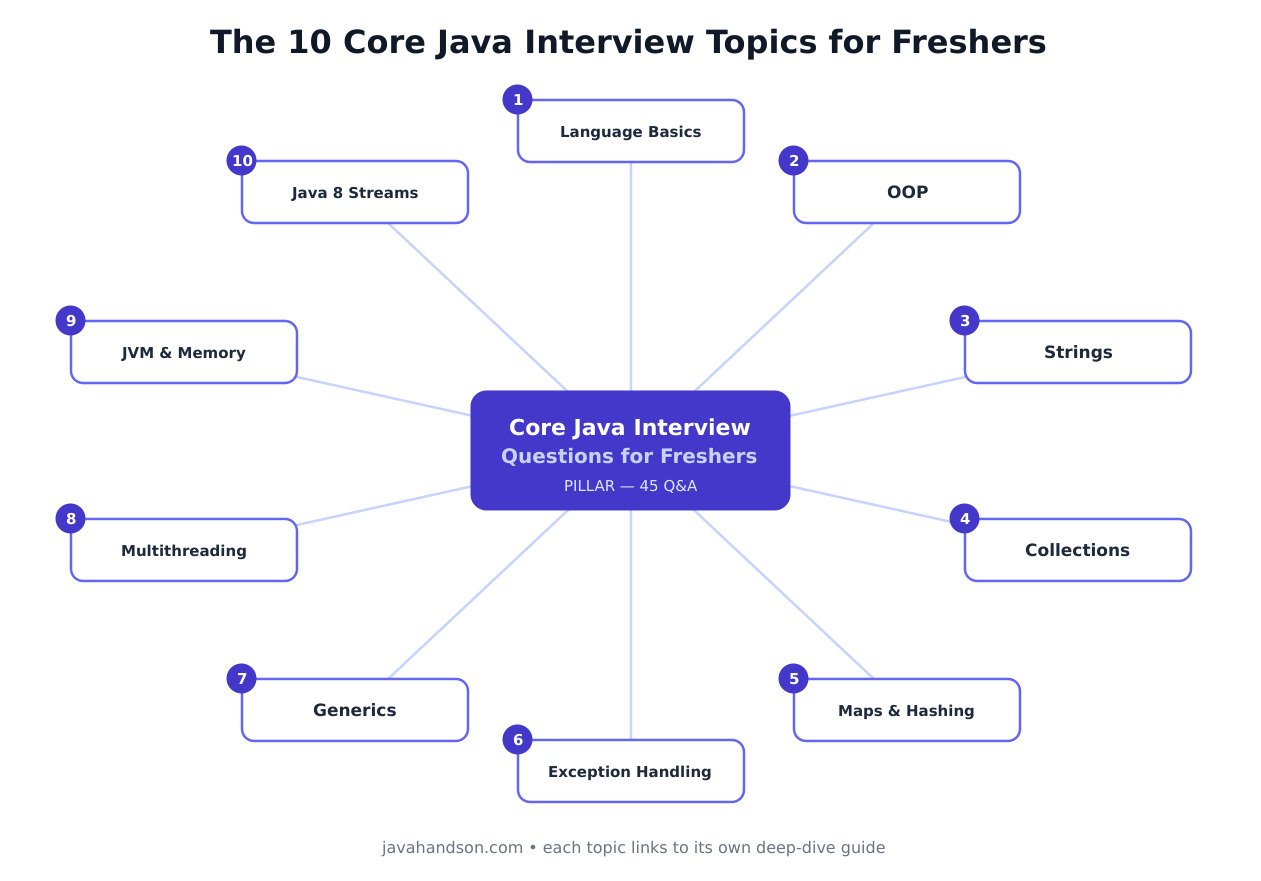
Interviewers almost always warm up with the basics. So nail these first, because a shaky answer here sets a weak tone for the rest.
Deep dive: see the full Java fundamentals guide for a closer look at each idea below.
Answer – Java is a high-level, object-oriented programming language that runs on top of the Java Virtual Machine (JVM).
When you compile Java, you do not get machine code directly. Instead, the compiler (javac) produces bytecode, a neutral, in-between format stored in .class files.
That bytecode then runs on any device that has a JVM, whether it is Windows, Linux, or macOS. The JVM translates it into instructions the local machine understands, so it quietly handles all the platform differences for you.
// Hello.java
public class Hello {
    public static void main(String[] args) {
        System.out.println("Hello, Java!");
    }
}

// Compile once:  javac Hello.java   -> produces Hello.class (bytecode)
// Run anywhere:  java Hello         -> Output: Hello, Java!
So “write once, run anywhere” means you compile your code just once, and the same .class file runs everywhere without changes. That portability is a big reason Java became so popular for large systems.
Answer – This is one of the most common opening questions, so answer it layer by layer, from the inside out.
JVM (Java Virtual Machine) – the engine that actually runs your bytecode. It loads and verifies classes, executes them (interpreting at first, then JIT-compiling the hot code into fast machine code), and manages memory through garbage collection. The JVM is platform-specific, which is exactly what lets your bytecode stay platform-neutral.
JRE (Java Runtime Environment) – the JVM plus the core class libraries such as java.lang and java.util. It contains everything you need to run a Java program, but it cannot compile one. Since Java 11, Oracle no longer ships a separate JRE download; the runtime comes inside the JDK, or you build a trimmed one with jlink.
JDK (Java Development Kit) – the outermost layer and the full developer kit. On top of the runtime, it adds the tools you need to build software: javac (the compiler), jar, javadoc, jdb (the debugger), and more.
You can see the split on your own machine. A plain runtime can launch programs, but only a JDK has the compiler:
java -version     # the launcher that starts a JVM: present in every runtime
javac -version    # the compiler: present only in a JDK
jlink --add-modules java.base --output my-runtime   # build a small, JRE-like runtime
On a machine with only a runtime, java Hello works, but javac Hello.java fails with “command not found”.
In short, you build with the JDK, run with the JRE, and the JVM does the actual execution.
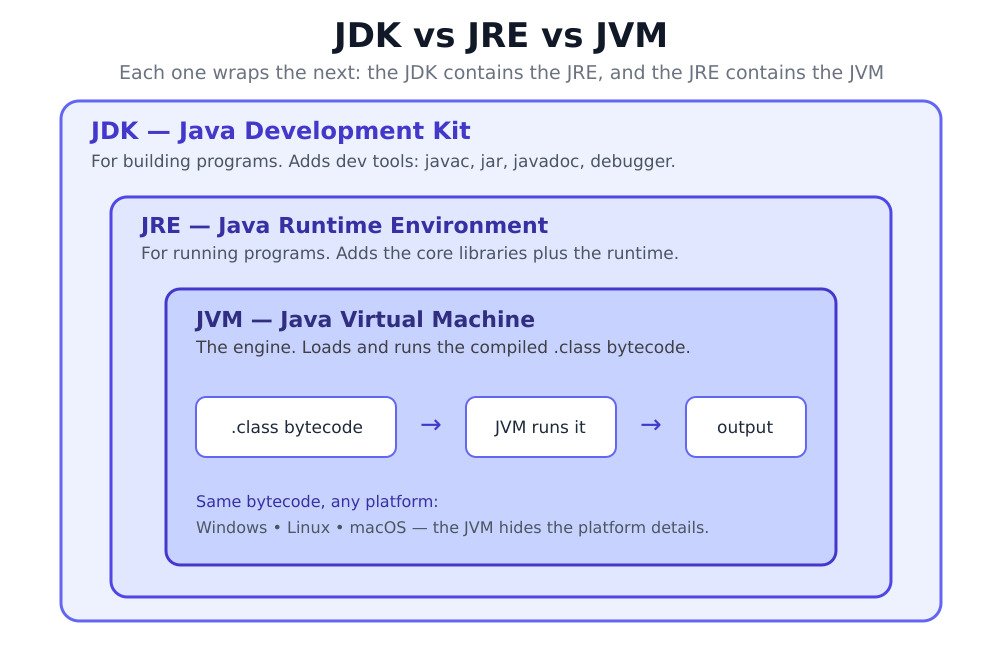
Interview tip: if you can draw the three as nested boxes on a whiteboard, you instantly look more prepared than a candidate who only recites words.
Answer – Java gives you eight primitive types that hold simple values directly, not as objects. Here is each one, from the smallest whole number up:
L suffix.f suffix, like 3.14f.'A'. Internally it is an unsigned number from 0 to 65,535.true or false. It is used for flags and conditions.byte age = 25; short year = 2026; int population = 1_400_000_000; long lightYearInMeters = 9_460_730_472_580_800L; // needs the L suffix float price = 99.99f; // needs the f suffix double pi = 3.141592653589793; char grade = 'A'; boolean isActive = true; System.out.println(0.1 + 0.2); // Output: 0.30000000000000004
Because these types are not objects, they stay fast and use very little memory. For everyday whole numbers, reach for int. For money, avoid float and double, since they can quietly lose precision (as the last line shows). Use BigDecimal instead.
Answer – This one trips up a lot of freshers, so it is worth being precise.
String and Integer override it to compare their values.String a = new String("Java");
String b = new String("Java");
System.out.println(a == b); // Output: false (two different objects)
System.out.println(a.equals(b)); // Output: true (same characters)
int x = 10, y = 10;
System.out.println(x == y); // Output: true (primitives compare values)One detail interviewers like: the default equals() inherited from Object is just ==. So your own classes must override it if you want content comparison. The rule to remember is simple: use == for identity, and equals() for value.
Answer – These three look similar but do completely different jobs, and interviewers love that confusion.
String is a final class.try and catch, whether or not an exception happened, which makes it perfect for cleanup.Cleaner instead.final int MAX_RETRIES = 3;
// MAX_RETRIES = 5; // compile error: cannot assign a value to final variable
try {
System.out.println(10 / 0);
} catch (ArithmeticException e) {
System.out.println("Caught: " + e.getMessage()); // Output: Caught: / by zero
} finally {
System.out.println("Cleanup runs anyway"); // Output: Cleanup runs anyway
}The final keyword also works on references, methods, and classes. And here is how finalize() used to look, so you can recognise it in old code:
final List<String> names = new ArrayList<>();
names.add("Asha");              // allowed: the object can still change
// names = new ArrayList<>();   // compile error: the reference itself is final

class Payment {
    final void audit() { }      // subclasses cannot override this method
}

final class Currency { }        // no class can extend this one
// class Rupee extends Currency { }   // compile error: cannot inherit from final Currency

class LegacyResource {
    @Override
    protected void finalize() throws Throwable {   // deprecated: don't write new code like this
        System.out.println("Cleaning up");
    }
}
A common follow-up asks about that first line. A final reference cannot point somewhere else, but the object it points to can still change.
So just remember: final is a keyword, finally is a block, and finalize was a method.
Answer – Autoboxing and unboxing are about moving between primitives and their wrapper classes, such as int and Integer, or double and Double.
int into an Integer.int back out of the Integer.Java does this quietly, so you can use primitives in places that expect objects, such as collections.
List<Integer> scores = new ArrayList<>();
scores.add(95);             // autoboxing: int 95 -> Integer.valueOf(95)
int first = scores.get(0);  // unboxing: Integer -> int

Integer missing = null;
int value = missing;        // NullPointerException at runtime!

Integer p = 127, q = 127;
System.out.println(p == q); // Output: true  (cached values -128 to 127)
Integer r = 1000, s = 1000;
System.out.println(r == s); // Output: false (two separate objects)
Two traps are worth mentioning. First, unboxing a null throws a NullPointerException, which surprises many people. Second, Integer caches only -128 to 127, so always compare wrapper objects with equals().
OOP is the heart of Java, so expect several questions here. Clear, example-led answers matter more than long definitions.
Deep dive: the Java OOPS interview questions guide covers the four pillars with runnable code.
Answer – Java has four core OOP pillars, and a clean answer names each with a one-line meaning.
extends.In real code, these four work together nicely. Here a bank account shows all of them at once:
abstract class Account {                       // abstraction
    private double balance;                    // encapsulation: hidden state

    public void deposit(double amount) {
        if (amount > 0) balance += amount;     // controlled access
    }

    public double getBalance() { return balance; }

    public abstract double interestRate();
}

class SavingsAccount extends Account {         // inheritance
    @Override
    public double interestRate() { return 0.04; }
}

class CurrentAccount extends Account {
    @Override
    public double interestRate() { return 0.0; }
}

Account acc = new SavingsAccount();            // polymorphism
acc.deposit(1000);
System.out.println(acc.interestRate()); // Output: 0.04Answer – A class is a blueprint, and an object is a real thing built from that blueprint.
new. It sits in memory and holds real values.class Account {
String holder;
double balance;
Account(String holder, double balance) {
this.holder = holder;
this.balance = balance;
}
}
Account a1 = new Account("Asha", 5000); // object 1
Account a2 = new Account("Ravi", 12000); // object 2, same class
System.out.println(a1.holder + " " + a2.holder); // Output: Asha RaviHere Account is the class that describes what an account looks like. Asha’s and Ravi’s accounts are two separate objects, each with its own holder name and balance. That one-to-many relationship is the key idea.
Answer – Both share a method name, but they solve different problems.
class Calculator {
    int add(int a, int b) { return a + b; }              // overloaded
    double add(double a, double b) { return a + b; }     // overloaded
    int add(int a, int b, int c) { return a + b + c; }   // overloaded
}

class Animal {
    String sound() { return "..."; }
}

class Dog extends Animal {
    @Override
    String sound() { return "Woof"; }                    // overridden
}

Animal pet = new Dog();
System.out.println(pet.sound());                 // Output: Woof (chosen at runtime)
System.out.println(new Calculator().add(2, 3));  // Output: 5    (chosen at compile time)
So the short version is this: overloading is many versions chosen by parameters, and overriding is one version replaced by a subclass. One is decided early, the other late.
Answer – Both let you define a contract, but they fit different situations.
default and static methods, and since Java 9 private ones. Its fields are always public static final. A class can implement many interfaces.abstract class Vehicle {
protected String name; // state
Vehicle(String name) { this.name = name; } // constructor
abstract int wheels(); // subclasses must implement
void describe() { // shared behaviour
System.out.println(name + " has " + wheels() + " wheels");
}
}
interface Electric {
int batteryKwh();
default String charge() { return "Charging..."; } // Java 8+
}
class Car extends Vehicle implements Electric {
Car() { super("Car"); }
int wheels() { return 4; }
public int batteryKwh() { return 60; }
}
new Car().describe(); // Output: Car has 4 wheelsMy rule of thumb is simple. I reach for an abstract class to share common base state and behaviour, and an interface to add a capability, like Comparable or Runnable.
Answer – A constructor is a special method that runs the moment you create an object. Its job is to set up the object’s starting state, like filling in the initial field values. It has the same name as the class and no return type. If you write none, the compiler adds a default no-argument constructor.
Constructor chaining is when one constructor calls another to avoid repeating setup code. You use this(...) to call another constructor in the same class, and super(...) to call the parent’s constructor. The call goes at the start of the constructor body.
class Person {
    Person() {
        System.out.println("1. Person constructor");
    }
}

class Employee extends Person {
    String name;
    double salary;

    Employee(String name) {
        this(name, 30000);              // chains to the other constructor
        System.out.println("3. Employee(name)");
    }

    Employee(String name, double salary) {
        super();                        // calls Person() first
        this.name = name;
        this.salary = salary;
        System.out.println("2. Employee(name, salary)");
    }
}

new Employee("Asha");
// Output:
// 1. Person constructor
// 2. Employee(name, salary)
// 3. Employee(name)
Notice the order. The parent constructor always finishes first, before the child’s own body. So the object gets built from the top of the family tree downward.
Answer – Both are reference keywords, but they point in different directions.
this(...).super(...).class Account {
void display() {
System.out.println("Account details");
}
}
class SavingsAccount extends Account {
private double rate;
SavingsAccount(double rate) {
this.rate = rate; // this.rate = the field, rate = the parameter
}
@Override
void display() {
super.display(); // run the parent's version first
System.out.println("Interest rate: " + rate);
}
}
new SavingsAccount(0.04).display();
// Output:
// Account details
// Interest rate: 0.04The two most common uses are shown above. this.rate clears up a clash between a parameter and a field, and super.display() reuses the parent’s version of an overridden method. Neither keyword works inside a static method, because there is no current object there.
Strings feel simple, yet they hide some sharp interview traps. Immutability and comparison come up almost every time.
Deep dive: the Java String interview questions guide explains the string pool with memory diagrams.
Answer – In Java, once you create a String, it never changes. If you try to modify it, you actually get a brand new String, and the old one stays as it was.
String city = "Pune";
city.concat(" City");          // creates a new String, but the result is thrown away
System.out.println(city);      // Output: Pune

city = city.concat(" City");   // point the reference at the new object
System.out.println(city);      // Output: Pune City
There are a few solid reasons for this design:
Interview tip: follow up by linking immutability to thread safety and HashMap keys. That connection is exactly what interviewers want to hear.
Answer – All three deal with text, but they differ in mutability and thread safety.
// Wasteful: creates a new String object on every pass
String s = "";
for (int i = 0; i < 5; i++) {
    s += i;
}

// Efficient: one mutable buffer, reused each time
StringBuilder sb = new StringBuilder();
for (int i = 0; i < 5; i++) {
    sb.append(i);
}

System.out.println(s);              // Output: 01234
System.out.println(sb.toString());  // Output: 01234
StringBuilder methods return the builder itself, so you can chain them:
StringBuilder sb = new StringBuilder("Java");
sb.append(" 21").insert(0, "Hello ");
System.out.println(sb);             // Output: Hello Java 21
System.out.println(sb.reverse());   // Output: 12 avaJ olleH
StringBuffer has the same methods. It only earns its place when several threads append to the same buffer:
StringBuffer log = new StringBuffer();
Runnable writer = () -> {
    for (int i = 0; i < 1000; i++) {
        log.append('x');            // synchronized: safe across threads
    }
};

Thread t1 = new Thread(writer);
Thread t2 = new Thread(writer);
t1.start(); t2.start();
t1.join();  t2.join();

System.out.println(log.length());   // Output: 2000
// With a shared StringBuilder, appends can be lost or an exception thrown
So my simple guidance is this. Use String for fixed text, pick StringBuilder when you build text in one thread, and keep StringBuffer only when several threads truly share one buffer.
Answer – The string pool is a special area in memory where Java stores unique string literals. Since Java 7 it lives inside the heap.
When you write a literal like "Pune", Java first checks the pool. If that text already exists there, Java reuses the same object instead of making a new one. We call this reuse interning, and it quietly saves a lot of memory.
The catch is that new String("Pune") skips the pool on purpose and forces a fresh object. You can pull the pooled copy back with intern().
String a = "Pune";
String b = "Pune";
String c = new String("Pune");

System.out.println(a == b);           // Output: true  (same pooled object)
System.out.println(a == c);           // Output: false (c is a separate object)
System.out.println(a == c.intern());  // Output: true  (intern() returns the pooled copy)
So two strings with the same text can still be different objects, which is exactly why == can fool you.
Answer – The == operator compares references, meaning it checks whether two variables point to the same object. It does not look at the characters inside the string at all.
Strings built at runtime, through new, concatenation, substring(), or user input, usually land in a different object from the matching literal. So == might return false even when the words clearly match.
String expected = "admin";
String typed = new StringBuilder("nimda").reverse().toString();  // built at runtime

System.out.println(typed == expected);                    // Output: false
System.out.println(typed.equals(expected));               // Output: true
System.out.println("ADMIN".equalsIgnoreCase(expected));   // Output: true

String role = null;
System.out.println("admin".equals(role));                 // Output: false (no NPE)
The safe habit is to always use equals() for string content, and equalsIgnoreCase() when case should not matter. Calling it on the known literal, as in the last line, also protects you from a NullPointerException.
Almost every Java role touches collections daily. Freshers should know when to pick each class, not just name them.
Deep dive: the Java Collections interview questions guide adds Big-O trade-off tables and a fail-fast demo.
Answer – The Collections Framework centres on a few main interfaces, and naming them cleanly shows you understand the structure.
ArrayList, LinkedList.HashSet has no order, LinkedHashSet keeps insertion order, and TreeSet keeps elements sorted.ArrayDeque, PriorityQueue.Collection. Common classes: HashMap, LinkedHashMap, TreeMap.List<String> names = new ArrayList<>(List.of("Asha", "Ravi", "Asha"));
Set<String> unique = new HashSet<>(names);
Queue<String> tasks = new ArrayDeque<>(List.of("build", "test", "deploy"));
Map<String, Integer> ages = new HashMap<>(Map.of("Asha", 24));
System.out.println(names); // Output: [Asha, Ravi, Asha]
System.out.println(unique.size()); // Output: 2
System.out.println(tasks.poll()); // Output: build
System.out.println(ages.get("Asha")); // Output: 24So each interface describes a behaviour, and each one has concrete classes that implement it.
Answer – Both are lists, but they store data in very different ways under the hood.
List<Integer> arrayList = new ArrayList<>(List.of(10, 20, 30));
LinkedList<Integer> linkedList = new LinkedList<>(List.of(10, 20, 30));

arrayList.get(1);         // O(1): jumps straight to index 1
linkedList.get(1);        // O(n): walks from the first node

linkedList.addFirst(5);   // O(1): just relinks the head
arrayList.add(0, 5);      // O(n): shifts every element one place right
In practice, I use ArrayList for almost everything, since fast random access is the common need. Even for queue or stack work, ArrayDeque usually beats LinkedList.
Answer – The main difference comes down to order and duplicates.
equals() and hashCode() to decide. Most Set types make no promise about order. Pick it when you only care about unique items, like distinct user IDs.List<String> cart = new ArrayList<>();
cart.add("apple");
cart.add("apple");
System.out.println(cart); // Output: [apple, apple]
Set<String> userIds = new HashSet<>();
userIds.add("u101");
System.out.println(userIds.add("u101")); // Output: false (duplicate rejected)
System.out.println(userIds); // Output: [u101]That one decision, duplicates or no duplicates, usually tells you which to choose.
If you need a Set with a predictable order, pick the implementation to match:
List<String> input = List.of("banana", "apple", "cherry", "apple");

System.out.println(new HashSet<>(input));        // no guaranteed order
System.out.println(new LinkedHashSet<>(input));  // Output: [banana, apple, cherry] (insertion order)
System.out.println(new TreeSet<>(input));        // Output: [apple, banana, cherry] (sorted)
All three drop the duplicate “apple”. They only differ in the order you get back.
Answer – Both let you walk through a collection, but one is more capable than the other.
List<String> langs = new ArrayList<>(List.of("Java", "C", "Python"));

Iterator<String> it = langs.iterator();
while (it.hasNext()) {
    if (it.next().equals("C")) {
        it.remove();                     // safe removal while iterating
    }
}
System.out.println(langs);               // Output: [Java, Python]

ListIterator<String> li = langs.listIterator();
while (li.hasNext()) {
    li.set(li.next().toUpperCase());     // replace in place
}
while (li.hasPrevious()) {
    System.out.print(li.previous() + " ");   // Output: PYTHON JAVA
}
A related trap: calling list.remove() inside a for-each loop throws ConcurrentModificationException. Use iterator.remove() or removeIf() instead.
Answer – Both are about sorting, but they answer different questions.
compareTo() method written inside the class itself. Use it when there is one obvious order.compare() method. Use it when you need several different orderings, or cannot change the class.class Account implements Comparable<Account> {
int number;
String holder;
double balance;
Account(int number, String holder, double balance) {
this.number = number;
this.holder = holder;
this.balance = balance;
}
@Override
public int compareTo(Account other) { // natural order: by account number
return Integer.compare(this.number, other.number);
}
double getBalance() { return balance; }
String getHolder() { return holder; }
}
List<Account> accounts = new ArrayList<>(List.of(
new Account(3, "Ravi", 500),
new Account(1, "Asha", 9000),
new Account(2, "Meera", 1500)));
Collections.sort(accounts); // by number: 1, 2, 3
accounts.sort(Comparator.comparing(Account::getBalance)); // by balance: Ravi, Meera, Asha
accounts.sort(Comparator.comparing(Account::getHolder)); // by name: Asha, Meera, RaviComparator deserves its own example. You can write it as a separate class, as a lambda, or with the Java 8 factory methods, and you never touch the Account class itself:
// 1. A separate Comparator class
class BalanceComparator implements Comparator<Account> {
    @Override
    public int compare(Account a, Account b) {
        return Double.compare(a.balance, b.balance);   // negative, zero, or positive
    }
}
accounts.sort(new BalanceComparator());                // Ravi, Meera, Asha

// 2. The same rule as a lambda
accounts.sort((a, b) -> Double.compare(a.balance, b.balance));

// 3. Factory methods: reverse order and tie-breakers
accounts.sort(Comparator.comparingDouble(Account::getBalance).reversed());
accounts.forEach(a -> System.out.print(a.getHolder() + " "));   // Output: Asha Meera Ravi

accounts.sort(Comparator.comparing(Account::getHolder)
                        .thenComparingDouble(Account::getBalance));   // name, then balance

// 4. Sorted collections accept a Comparator too
TreeSet<Account> byName = new TreeSet<>(Comparator.comparing(Account::getHolder));
byName.addAll(accounts);
Both compareTo() and compare() follow the same contract. Return a negative number if the first value comes first, zero if they are equal, and a positive number otherwise. Avoid the old shortcut return a.number - b.number;, because the subtraction can overflow for large values. Integer.compare() and Double.compare() are always safe.
So Comparable is the built-in default order, while Comparator lets you plug in any order you like from outside.
HashMap is a fresher favourite for a reason. One strong answer on hashing often carries real weight.
Deep dive: the HashMap interview questions guide walks through buckets, treeify, and the equals/hashCode contract.
Answer – A HashMap stores data as key-value pairs and gives you very fast lookups. You add an entry with put(), passing a key and a value, and read it back with get(), passing just the key.
Map<String, Double> balances = new HashMap<>();
balances.put("ACC101", 2500.0);     // store
balances.put("ACC102", 8000.0);
balances.put("ACC101", 3000.0);     // same key: the old value is replaced

System.out.println(balances.get("ACC101"));                // Output: 3000.0
System.out.println(balances.get("ACC999"));                // Output: null
System.out.println(balances.getOrDefault("ACC999", 0.0));  // Output: 0.0
System.out.println(balances.containsKey("ACC102"));        // Output: true
Behind the scenes, the map uses the key’s hashCode() to pick a bucket, then equals() to find the exact key inside it. Thanks to that hashing, put() and get() usually run in constant time, no matter how big the map grows.
Two details round out a strong answer. Keys are unique, so a second put() with the same key overwrites the value. And a HashMap makes no promise about iteration order; use LinkedHashMap if you need insertion order.
Answer – Both store key-value pairs, but they differ in age and in thread safety.
Map<String, String> hm = new HashMap<>();
hm.put(null, "allowed");
System.out.println(hm.get(null));    // Output: allowed

Map<String, String> ht = new Hashtable<>();
ht.put(null, "boom");                // throws NullPointerException

Map<String, Integer> safe = new ConcurrentHashMap<>();   // the modern thread-safe choice
ConcurrentHashMap also rejects nulls, like Hashtable. But instead of locking the whole table, it offers atomic update methods, so shared counters stay correct:
Map<String, Integer> hits = new ConcurrentHashMap<>();
Runnable visitor = () -> {
    for (int i = 0; i < 1000; i++) {
        hits.merge("home", 1, Integer::sum);   // atomic read-modify-write
    }
};

Thread t1 = new Thread(visitor);
Thread t2 = new Thread(visitor);
t1.start(); t2.start();
t1.join();  t2.join();

System.out.println(hits.get("home"));   // Output: 2000
So in modern code, if I need a plain map I use HashMap, and if I need a thread-safe map I use ConcurrentHashMap. It gives far better performance than locking the whole table.
Answer – A map leans on these two methods working together as a team:
Because of this teamwork, if you override one method, you must override the other. Look at what happens when a custom key class skips both:
class Emp {
    int id;
    Emp(int id) { this.id = id; }
    // equals() and hashCode() NOT overridden
}

Map<Emp, String> map = new HashMap<>();
map.put(new Emp(1), "Asha");
System.out.println(map.get(new Emp(1)));   // Output: null (lookup misses the entry)
The two Emp(1) objects have different hash codes, so the lookup misses. Overriding both methods fixes it:
class Emp {
    int id;
    Emp(int id) { this.id = id; }

    @Override
    public boolean equals(Object o) {
        return o instanceof Emp e && e.id == id;
    }

    @Override
    public int hashCode() {
        return Integer.hashCode(id);
    }
}

// Now map.get(new Emp(1)) returns "Asha"
Interview tip: say the contract out loud. Equal objects must return equal hash codes, but equal hash codes need not mean equal objects.
Good exception handling separates careful coders from careless ones. Interviewers probe judgment here, not just syntax.
Deep dive: the exception handling interview questions in Java guide covers try-with-resources and scenario traps.
Answer – The split comes down to whether the compiler forces you to deal with the exception.
throws, or the code will not compile. They usually point to outside problems you can recover from, such as a missing file. Example: IOException.RuntimeException, and the compiler does not force you to handle them. They usually point to bugs in your own code, such as a bad array index. Example: NullPointerException.// Checked: the compiler forces you to handle or declare it
public String readConfig(String path) throws IOException {
return Files.readString(Path.of(path));
}
// Unchecked: compiles fine, fails only at runtime
int[] nums = {1, 2, 3};
System.out.println(nums[5]); // ArrayIndexOutOfBoundsExceptionAnyone who calls readConfig() must now choose. They can catch the checked exception, or pass it on with their own throws:
// Option 1: handle it here
try {
    String config = readConfig("app.properties");
} catch (IOException e) {
    System.out.println("Using defaults: " + e.getMessage());
}

// Option 2: pass it up to your own caller
public void start() throws IOException {
    readConfig("app.properties");
}
Unchecked exceptions need neither. The right fix for them is usually better code, such as a bounds check or a null check, rather than a catch block.
So the mental model is simple: checked for expected trouble, and unchecked for programming mistakes.
Answer – Both sit under Throwable, but they signal very different levels of trouble.
OutOfMemoryError or StackOverflowError.// Exception: expected trouble, so catch it and recover
try {
Integer.parseInt("12a");
} catch (NumberFormatException e) {
System.out.println("Invalid number, using default 0");
}
// Error: a JVM-level failure, so don't try to catch it
void recurseForever() {
recurseForever(); // no exit condition -> StackOverflowError
}In practice, you handle exceptions carefully, but you let errors crash the program and then investigate the root cause. That difference in recoverability is the heart of the answer.
Answer – These three work as a team to handle failures in a controlled way.
FileReader reader = null;
try {
    reader = new FileReader("accounts.csv");
    // read the file...
} catch (FileNotFoundException e) {
    System.out.println("File missing: " + e.getMessage());
} finally {
    if (reader != null) {
        try { reader.close(); } catch (IOException ignored) { }
    }
}

// Since Java 7: try-with-resources closes the reader for you
try (BufferedReader br = new BufferedReader(new FileReader("accounts.csv"))) {
    System.out.println(br.readLine());
} catch (IOException e) {
    System.out.println("Could not read file: " + e.getMessage());
}
In short, try attempts, catch recovers, and finally cleans up. For anything that needs closing, try-with-resources is the modern, shorter way to get the same safety.
Answer – They look almost identical, but they play different roles.
class InsufficientFundsException extends Exception {
    InsufficientFundsException(String message) { super(message); }
}

public void withdraw(double amount) throws InsufficientFundsException {  // declares
    if (amount > balance) {
        throw new InsufficientFundsException("Balance too low");         // raises
    }
    balance -= amount;
}
Because withdraw() declares a checked exception, every caller has to deal with it. And throw works with unchecked exceptions too, in which case no throws clause is needed:
try {
    account.withdraw(5000);
} catch (InsufficientFundsException e) {
    System.out.println("Withdrawal failed: " + e.getMessage());
    // Output (when the balance is below 5000): Withdrawal failed: Balance too low
}

public void deposit(double amount) {           // no throws clause needed
    if (amount <= 0) {
        throw new IllegalArgumentException("Deposit must be positive");
    }
    balance += amount;
}
So throw is an action you perform, while throws is a promise you document. Keeping that action-versus-declaration difference clear usually satisfies the interviewer.
Answer – In almost every normal situation, yes. The finally block runs even if the try block returns early or throws an exception. That reliability is exactly why we trust it for cleanup.
static int test() {
    try {
        return 1;
    } finally {
        System.out.println("finally runs before the return");
    }
}
// test() prints "finally runs before the return", then returns 1

try {
    System.exit(0);
} finally {
    System.out.println("Never printed");   // the JVM has already shut down
}
However, there are a few rare cases where finally does not run:
kill -9, or a power cut stops everything.One more tip: never put a return inside finally. It silently swallows any exception thrown from the try block.
Generics confuse many freshers, so a calm answer stands out. Focus on type safety and the problem they solve.
Deep dive: the Java generics interview questions guide goes deep on type erasure and PECS.
Answer – Generics let you write classes and methods that work with a type you decide later. They solve two problems:
// Before generics: a raw list, a cast, and an error only at runtime
List rawList = new ArrayList();
rawList.add("Java");
rawList.add(42);                       // the compiler allows it
String s = (String) rawList.get(1);    // ClassCastException at runtime

// With generics: checked at compile time, no cast needed
List<String> names = new ArrayList<>();
names.add("Java");
// names.add(42);                      // compile error
String first = names.get(0);
You can write your own generic classes too. The T is a placeholder that the caller fills in:
class Box<T> {
    private T value;
    void set(T value) { this.value = value; }
    T get() { return value; }
}

Box<Integer> box = new Box<>();
box.set(10);
int n = box.get(); // no cast neededAnswer – A bounded type parameter puts a limit on which types a generic will accept. You write it with extends, like T extends Number, which means T can be Number or any subclass of it.
The real benefit is that inside your generic code, you can safely call Number methods like doubleValue(). Without the bound, the compiler would only trust Object methods.
static <T extends Number> double sum(List<T> numbers) {
    double total = 0;
    for (T n : numbers) {
        total += n.doubleValue();   // allowed: T is guaranteed to be a Number
    }
    return total;
}

System.out.println(sum(List.of(1, 2, 3)));   // Output: 6.0
System.out.println(sum(List.of(1.5, 2.5)));  // Output: 4.0
// sum(List.of("a", "b"));                   // compile error: String is not a Number
So bounds give you the best of both worlds. You stay flexible across many types, yet you keep enough safety to use the methods you need. You can even combine bounds, as in T extends Number & Comparable<T>.
A close cousin is the bounded wildcard. You use it in method parameters when you do not need to name the type:
static double total(List<? extends Number> numbers) {   // read from it: any Number subtype
    double sum = 0;
    for (Number n : numbers) sum += n.doubleValue();
    return sum;
}

static void addDefaults(List<? super Integer> target) { // write into it: Integer or a supertype
    target.add(0);
    target.add(100);
}

List<Object> bucket = new ArrayList<>();
addDefaults(bucket);                          // allowed: Object is a supertype of Integer
System.out.println(bucket);                   // Output: [0, 100]
System.out.println(total(List.of(1, 2.5)));   // Output: 3.5
The memory aid is PECS: Producer Extends, Consumer Super. Use ? extends when you only read from a collection, and ? super when you only write into it.
Answer – Java does not let you write new T[10], and the reason sits in how arrays and generics work.
You can see the array’s runtime check in action here:
Object[] objects = new String[2];
objects[0] = 42;    // compiles, but throws ArrayStoreException at runtime

class Container<T> {
    // private T[] items = new T[10];             // compile error: generic array creation
    private List<T> items = new ArrayList<>();    // the usual workaround
}
With a generic array, the JVM could not run that check, so unsafe values would slip in without any warning. To protect type safety, Java simply blocks generic array creation. The usual workaround is a List<T>, which plays nicely with generics.
Library code runs into this too. ArrayList, for example, keeps an Object[] internally and casts on the way out. If you truly need an array inside your own generic class, there are two common tricks:
// Trick 1: create an Object[] and cast it (safe while the array stays private)
class FixedStack<T> {
    private final T[] items;

    @SuppressWarnings("unchecked")
    FixedStack(int capacity) {
        items = (T[]) new Object[capacity];
    }
}

// Trick 2: pass in the Class object and create a real typed array
static <T> T[] newArray(Class<T> type, int size) {
    @SuppressWarnings("unchecked")
    T[] array = (T[]) java.lang.reflect.Array.newInstance(type, size);
    return array;
}

String[] names = newArray(String.class, 3); // a genuine String[]Concurrency is tricky, and freshers are not expected to master it. Still, clear answers on the basics impress interviewers.
Deep dive: the Java multithreading interview questions guide adds deadlock demos and Java 21 virtual threads.
Answer – A process is an independent program running with its own private memory space. A thread is a smaller unit of work that runs inside a process.
public static void main(String[] args) {
    System.out.println(Thread.currentThread().getName());   // Output: main

    Thread worker = new Thread(() ->
            System.out.println("Running in " + Thread.currentThread().getName()));
    worker.start();                                         // Output: Running in Thread-0
}
Every Java program is one process that starts with a main thread and can create many more. That shared-memory point is usually what the interviewer wants to hear.
Answer – There are two classic ways, plus modern approaches worth mentioning.
Thread and override run().Runnable (often a lambda) and pass it into a Thread. Preferred, because your class stays free to extend something else.Callable can even return a result.// 1. Extend Thread
class Downloader extends Thread {
@Override
public void run() { System.out.println("Downloading..."); }
}
new Downloader().start();
// 2. Implement Runnable
Runnable task = () -> System.out.println("Processing...");
new Thread(task).start();
// 3. Thread pool with a Callable that returns a value
ExecutorService pool = Executors.newFixedThreadPool(2);
Future<Integer> result = pool.submit(() -> 6 * 7);
System.out.println(result.get()); // Output: 42
pool.shutdown();
// 4. Virtual thread (Java 21+)
Thread.startVirtualThread(() -> System.out.println("Lightweight!"));These days we rarely create raw threads by hand in real projects. A thread pool or virtual threads are the usual choice.
Answer – This is a classic trap, so it pays to be careful here.
Thread t = new Thread(() ->
        System.out.println("Running on: " + Thread.currentThread().getName()));

t.run();     // Output: Running on: main      (plain method call)
t.start();   // Output: Running on: Thread-0  (a new thread)
// t.start(); // a second start() throws IllegalThreadStateException
Many freshers call run by mistake and then wonder why nothing runs in parallel. The clean way to say it is that start schedules a new thread, and run is only the body it executes.
Interview tip: whenever an interviewer asks this, mention that calling run() directly loses all the threading. That single line shows you truly understand it.
Answer – The synchronized keyword makes sure only one thread at a time can enter a block or method for a given lock. This stops two threads from changing shared data at once, which prevents corruption. It also guarantees that changes made inside the lock are visible to the next thread that takes it.
class Counter {
    private int count = 0;

    public synchronized void increment() {   // one thread at a time
        count++;
    }

    public int getCount() { return count; }
}

Counter counter = new Counter();
Thread t1 = new Thread(() -> { for (int i = 0; i < 10_000; i++) counter.increment(); });
Thread t2 = new Thread(() -> { for (int i = 0; i < 10_000; i++) counter.increment(); });
t1.start(); t2.start();
t1.join();  t2.join();

System.out.println(counter.getCount());   // Output: 20000 (without synchronized, often less)
You can synchronize a whole method, as above, or just a smaller block with synchronized (this) { ... }. Safety is the big win, but other threads must wait for the lock. So synchronize only the smallest section that truly needs it.
Here is the block form in a slightly more realistic class. Notice the private lock object. It stops outside code from grabbing the same lock and blocking you:
class BankAccount {
    private final Object lock = new Object();
    private double balance;

    public void deposit(double amount) {
        if (amount <= 0) {                 // validation needs no lock
            throw new IllegalArgumentException("Invalid amount");
        }
        synchronized (lock) {              // only the shared update is locked
            balance += amount;
        }
    }

    public static synchronized void audit() {   // static method: locks on BankAccount.class
        System.out.println("Auditing all accounts");
    }
}
So an instance method locks on this, a static method locks on the class object, and a block locks on whatever object you name.
Answer – A deadlock happens when two threads each hold a lock that the other one is waiting for. Neither thread can move forward, so both end up frozen forever. The usual cause is that the threads grab their locks in different orders.
Object lockA = new Object();
Object lockB = new Object();

Thread t1 = new Thread(() -> {
    synchronized (lockA) {
        pause(100);                        // helper that wraps Thread.sleep()
        synchronized (lockB) { System.out.println("t1 got both"); }
    }
});

Thread t2 = new Thread(() -> {
    synchronized (lockB) {                 // opposite order: deadlock!
        pause(100);
        synchronized (lockA) { System.out.println("t2 got both"); }
    }
});

t1.start();
t2.start();   // both threads freeze forever, nothing is printed
Here t1 holds A and waits for B, while t2 holds B and waits for A. You can avoid this in a few ways:
ReentrantLock.tryLock() with a timeout lets a thread back off instead of waiting forever.Here is the earlier example fixed both ways:
// Fix 1: t2 now takes the locks in the same order as t1
Thread t2 = new Thread(() -> {
    synchronized (lockA) {
        pause(100);
        synchronized (lockB) { System.out.println("t2 got both"); }
    }
});

// Fix 2: back off instead of waiting forever
ReentrantLock first = new ReentrantLock();
ReentrantLock second = new ReentrantLock();

if (first.tryLock(1, TimeUnit.SECONDS)) {
    try {
        if (second.tryLock(1, TimeUnit.SECONDS)) {
            try {
                System.out.println("Got both locks");
            } finally {
                second.unlock();
            }
        } else {
            System.out.println("Could not get the second lock, will retry");
        }
    } finally {
        first.unlock();
    }
}
To spot a deadlock in a running application, take a thread dump with jstack <pid>. It prints “Found one Java-level deadlock” and names the threads and locks involved.
A little JVM awareness goes a long way in interviews. You do not need deep internals, just a solid mental model.
Deep dive: the Java memory management interview questions guide diagrams the heap, GC, and modern collectors.
Answer – The JVM divides its memory into a few important areas, and naming them shows real awareness.
public class Bank {
    static String bankName = "JHB";       // static field: kept with the Class object, on the heap

    public static void main(String[] args) {  // main's frame goes on the main thread's stack
        int branches = 12;                // local primitive: on the stack
        Account acc = new Account();      // 'acc' on the stack, the Account object on the heap
    }
}
// Bank's class structure (methods, field layout) lives in Metaspace
For most interviews, heap, stack, and metaspace are the three you really need to explain well.
Answer – Garbage collection is the JVM’s way of automatically cleaning up memory you no longer use.
The JVM tracks which objects are still reachable from GC roots, such as local variables on thread stacks and static fields. When nothing can reach an object anymore, it becomes eligible for collection, and the JVM frees that memory.
Account a = new Account();   // the object is reachable through 'a'
a = null;                    // no references left -> eligible for GC
System.gc();                 // only a hint; the JVM may ignore it

static List<byte[]> cache = new ArrayList<>();
cache.add(new byte[1_000_000]);   // never removed -> still reachable, so a memory leak
Because of this, you do not manually free memory the way you would in C. That automation removes a whole class of nasty bugs, like dangling pointers and double frees.
Even so, the last two lines show the catch. Garbage collection frees only unreachable objects, so anything you keep referencing, like a static cache that only grows, causes a memory leak. Modern JVMs use G1 as the default collector, with ZGC available for very low pause times.
Answer – The difference is about what each area stores and how long it lasts.
StackOverflowError.OutOfMemoryError.void transfer() {
int amount = 500; // stack: primitive local
Account from = new Account("Asha"); // stack: reference 'from'; heap: the Account object
from.debit(amount);
} // on return, 'amount' and 'from' vanish from the stack;
// the Account object stays on the heap until GC finds it unreachableA simple way to picture it is this: the reference sits on the stack, and the object it points to sits on the heap.
Each area fails in its own way, and naming both errors is a nice touch:
// Stack: every call adds a frame, so endless recursion overflows it
static void dive() {
    dive();
}
// dive() -> java.lang.StackOverflowError

// Heap: objects that stay reachable keep filling it
List<long[]> hog = new ArrayList<>();
while (true) {
    hog.add(new long[10_000_000]);
}
// -> java.lang.OutOfMemoryError: Java heap space
You can tune both sizes when you start the JVM: -Xss sets each thread’s stack size, and -Xmx sets the maximum heap.
Answer – The static keyword ties a member to the class itself rather than to any single object. You can use it in four places:
Math.max() work this way.class Account {
static final double TAX_RATE = 0.18; // constant shared by everyone
static int totalAccounts = 0; // one copy for the whole class
String holder; // one copy per object
static {
System.out.println("Class loaded"); // runs once
}
Account(String holder) {
this.holder = holder;
totalAccounts++;
}
static int getTotal() { // call it without an object
return totalAccounts;
// return holder; // compile error: no instance inside a static method
}
}
new Account("Asha"); // Output: Class loaded
new Account("Ravi");
System.out.println(Account.getTotal()); // Output: 2The fourth use, a static nested class, shows up a lot in the Builder pattern. You can create the builder without first creating an Order:
class Order {
    private final String item;
    private final int quantity;

    private Order(Builder b) {
        this.item = b.item;
        this.quantity = b.quantity;
    }

    static class Builder {                 // static: no Order instance needed
        private String item;
        private int quantity = 1;

        Builder item(String item) { this.item = item; return this; }
        Builder quantity(int quantity) { this.quantity = quantity; return this; }
        Order build() { return new Order(this); }
    }
}

Order order = new Order.Builder().item("Laptop").quantity(2).build();
The quick way to say it is that static belongs to the class, while non-static belongs to each instance.
Java 8 changed how we write everyday code. Freshers who show comfort with lambdas and streams stand out fast.
Deep dive: the Java 8 stream interview questions guide adds coding problems like group-by and map vs flatMap.
Answer – A lambda expression is a short, clean way to write a block of code you can pass around like data. It implements a functional interface without the heavy boilerplate of an anonymous class.
The syntax is (parameters) -> body. So (a, b) -> a + b is a tiny function that adds two numbers.
// Before Java 8: an anonymous inner class
Comparator<String> byLength = new Comparator<String>() {
    @Override
    public int compare(String a, String b) {
        return Integer.compare(a.length(), b.length());
    }
};

// With a lambda: the same behaviour in one line
Comparator<String> byLengthLambda = (a, b) -> Integer.compare(a.length(), b.length());

List<String> names = new ArrayList<>(List.of("Ravi", "Asha", "Meenakshi", "Om"));
names.sort(byLengthLambda);
names.forEach(n -> System.out.println(n));   // Output: Om, Ravi, Asha, Meenakshi (one per line)
Lambdas shine with collections and streams, where you pass behaviour into methods like forEach or filter. One rule to remember: a lambda can only use local variables that are final or effectively final.
Answer – A functional interface is simply an interface with exactly one abstract method. That single method is the target that a lambda expression fills in. It can still have default and static methods.
Common examples include:
@FunctionalInterface
interface TaxCalculator {
    double calculate(double amount);
    // double other(double x);   // adding this breaks the compile: two abstract methods
}

TaxCalculator gst = amount -> amount * 0.18;
System.out.println(gst.calculate(1000));    // Output: 180.0

Predicate<Integer> isEven = n -> n % 2 == 0;
Function<String, Integer> length = String::length;
System.out.println(isEven.test(4));         // Output: true
System.out.println(length.apply("Java"));   // Output: 4
Here are Consumer, Supplier, and a couple of their cousins. Functional interfaces can also be chained through their default methods, like and() on Predicate:
Consumer<String> greet = name -> System.out.println("Hello, " + name);
Supplier<Double> randomRate = () -> Math.random() * 10;
BiFunction<Integer, Integer, Integer> multiply = (a, b) -> a * b;
UnaryOperator<String> shout = s -> s.toUpperCase() + "!";

greet.accept("Asha");                       // Output: Hello, Asha
System.out.println(randomRate.get());       // Output: a random number below 10
System.out.println(multiply.apply(6, 7));   // Output: 42
System.out.println(shout.apply("java"));    // Output: JAVA!

Predicate<String> notEmpty = s -> !s.isEmpty();
Predicate<String> shortWord = s -> s.length() < 5;
System.out.println(notEmpty.and(shortWord).test("Java"));   // Output: true
The @FunctionalInterface annotation makes the compiler enforce the single-method rule. So in short, one abstract method makes an interface functional, and that is what powers lambdas.
Answer – The Stream API is a modern way to process data as a flowing pipeline rather than with manual loops. Here is how a stream differs from a collection:
filter and map do nothing until a terminal operation like collect or count asks for a result.IllegalStateException.List<Double> balances = List.of(500.0, 12000.0, 75000.0, 300.0, 20000.0);
long bigAccounts = balances.stream()
.filter(b -> b > 10_000) // intermediate: lazy
.count(); // terminal: triggers the work
System.out.println(bigAccounts); // Output: 3
List<String> labels = balances.stream()
.filter(b -> b > 10_000)
.map(b -> "Rs " + b)
.collect(Collectors.toList());
System.out.println(labels); // Output: [Rs 12000.0, Rs 75000.0, Rs 20000.0]So with one readable chain, you can filter a list of accounts and count or relabel the big ones.
You can watch the laziness for yourself. Nothing runs until the terminal operation, and then elements flow through the pipeline one at a time:
Stream<String> pipeline = Stream.of("a", "bb", "ccc")
        .filter(s -> {
            System.out.println("filter " + s);
            return s.length() > 1;
        });

System.out.println("Nothing has run yet");
pipeline.forEach(s -> System.out.println("got " + s));
// Output:
// Nothing has run yet
// filter a
// filter bb
// got bb
// filter ccc
// got ccc

pipeline.count();   // IllegalStateException: stream has already been operated upon or closed
Collectors can also group results, which is a favourite coding question:
Map<Boolean, List<Integer>> evenOdd = Stream.of(1, 2, 3, 4, 5)
        .collect(Collectors.partitioningBy(n -> n % 2 == 0));
System.out.println(evenOdd);   // Output: {false=[1, 3, 5], true=[2, 4]}

Map<Integer, List<String>> byLength = Stream.of("Om", "Ravi", "Asha", "Meera")
        .collect(Collectors.groupingBy(String::length));
System.out.println(byLength); // Output: {2=[Om], 4=[Ravi, Asha], 5=[Meera]}Answer – Optional is a small container that may or may not hold a value. Its whole purpose is to make the possible absence of a value obvious in your code.
Instead of returning null and hoping callers check it, you return an Optional and bring the question into the open.
Optional<String> findEmail(int userId) {
    return userId == 1 ? Optional.of("asha@mail.com") : Optional.empty();
}

String email = findEmail(2).orElse("no-email@mail.com");
System.out.println(email);                  // Output: no-email@mail.com

findEmail(1)
        .map(String::toUpperCase)
        .ifPresent(System.out::println);    // Output: ASHA@MAIL.COM
The methods you will use most are:
Two follow-up questions come up a lot: of() versus ofNullable(), and orElse() versus orElseGet():
String fromDb = null;
Optional<String> maybe = Optional.ofNullable(fromDb);   // empty, no exception
// Optional.of(fromDb);                                 // NullPointerException

String a = maybe.orElse(loadDefault());          // loadDefault() runs every time
String b = maybe.orElseGet(() -> loadDefault()); // runs only when the Optional is empty

String email = findEmail(1).orElseThrow(
        () -> new IllegalStateException("User has no email"));

Optional<String> domain = findEmail(1)
        .filter(e -> e.endsWith("@mail.com"))
        .map(e -> e.substring(e.indexOf('@') + 1));
System.out.println(domain.orElse("unknown"));    // Output: mail.com
So prefer orElseGet() when the default is expensive to build, such as a database call. With orElse(), the default is computed even when a value is present.
One caution worth mentioning: Optional is meant for return types, not for fields or method parameters. And avoid calling get() without a check, since that just moves the NullPointerException somewhere else.
These 45 questions cover the ground most fresher interviews walk across. Revise them once the night before, then say each answer out loud in your own words. That small habit alone will make you sound far more confident in the room.
Next, pick the topics you find hardest and open their deep-dive guides below. Each one goes further with diagrams, runnable code, and the exact follow-up questions interviewers tend to ask.