Database Query Optimization in System Design: Indexing, Query Tuning, and Connection Pooling
-
Last Updated: August 14, 2026
-
By: javahandson
-
Series

Database query optimization in System Design explained simply — how indexing, query tuning, and connection pooling make your data layer fast, with diagrams and interview tips.
Almost every slow system I have seen traces back to the same place: the database, and database query optimization is usually the missing piece. You add more servers, you tune your code, and still the app feels sluggish. A well-designed system can crawl if its queries are lazy, and a modest setup can fly if its data layer is tuned well. So this article stays focused on that data layer, where most real speed lives.
This article walks through three tools that decide how fast your data layer runs. First, we look at indexing, which is how a database finds rows without reading the whole table. Then we cover query optimization, which is the art of asking the database questions it can answer quickly. Finally, we get into connection pooling, which keeps your app from wasting time opening fresh database connections again and again.
The ideas here are language-neutral. You will see pseudocode, generic config, and plain SQL rather than any single framework. Where a concrete tool helps, I point to one, but the thinking applies whether you write Go, Python, Java, or anything else. By the end, you should be able to spot a slow query, reason about why it is slow, and fix it with confidence.
Think back to the latency numbers every engineer keeps in their head. A memory read takes a handful of nanoseconds. A disk seek takes around ten milliseconds. That gap is roughly a hundred thousand to one. Your database lives on the slow side of that gap, so every trip to disk costs you dearly.
Now imagine a query that scans a million rows on disk. Even at a few microseconds per row, the total adds up fast, and users feel every millisecond. The goal of this whole article is simple: touch as little data as possible, and reuse expensive resources instead of rebuilding them.
Here is the mental model I want you to carry. Indexing reduces how much data the database reads. Query optimization reduces the work it does with that data. Connection pooling reduces the overhead of talking to the database at all. Three levers, one goal: faster responses at lower cost.
| Interview Insight When an interviewer asks you to make a system faster, resist naming a cache right away. Start with the data layer. Ask whether the slow query has the right index, whether it reads more rows than it needs, and whether connections are being reused. Fixing the database is often cheaper and simpler than adding a whole new caching tier, and interviewers love candidates who reach for the simple fix first. |
An index is a separate, sorted data structure that points back to your rows. The classic analogy is the index at the back of a textbook. Without it, finding every mention of a word means reading every page. With it, you flip to a sorted list and jump straight to the right pages.
A database index works the same way. It stores a sorted copy of one or more columns along with pointers to the actual rows. When you filter on an indexed column, the engine searches the small sorted structure instead of scanning the full table. Then it follows the pointer to fetch the row.
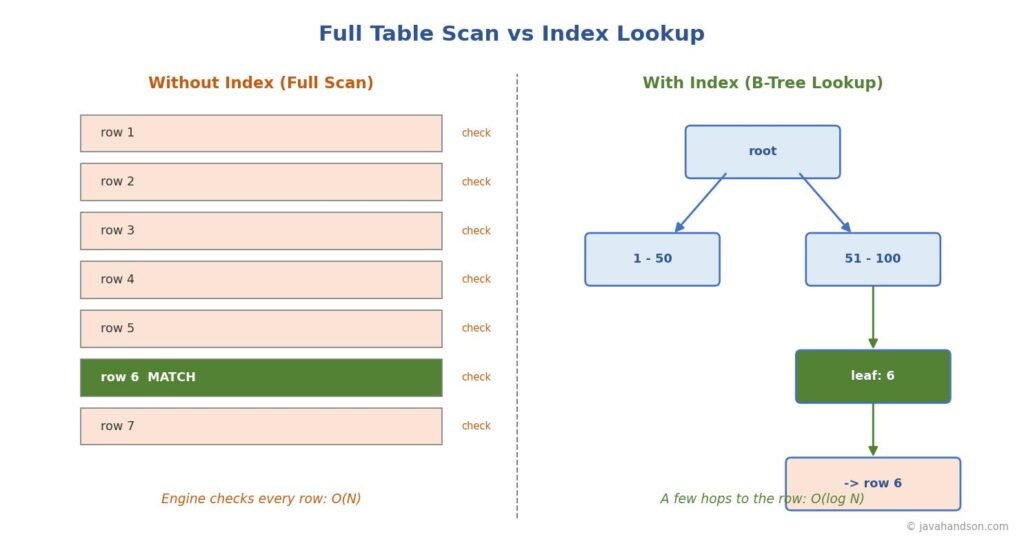
Without an index, the database has no choice but to read every row and check it against your filter. This is called a full table scan. On a small table it is fine. On a table with a hundred million rows, it is a disaster.
Consider a lookup by user email on a large table. A full scan is O(N): the work grows in a straight line with the number of rows. Double the table, double the time. That does not scale, and it is exactly the kind of thing that works in testing but melts in production.
-- No index on email: the engine reads every row.
SELECT * FROM users WHERE email = 'alice@example.com';

-- On 100 million rows this scans all 100 million.
-- Cost grows linearly: O(N).
Add an index on the email column, and the same lookup becomes O(log N). For a hundred million rows that is roughly twenty-seven comparisons instead of a hundred million reads. The difference is not a small tweak. It is millions of times less work for a single query.
Most databases use a B-tree, or more precisely a B+ tree, as their default index. A B-tree keeps its keys sorted and balanced. The tree stays shallow even when it holds huge amounts of data, so a lookup only takes a few hops from the root down to a leaf.
Why does this matter so much? Because each hop is one small read, and a shallow tree means very few hops. One well-known write-up shows a properly built B+ tree finding a value inside eight terabytes of data with only four disk reads. That is the power of keeping the tree balanced and shallow.
B-trees also handle range queries well. Because the keys sit in sorted order, the engine can walk a range like “all orders between two dates” by finding the start and reading forward. This is why B-trees are the right choice around ninety-five percent of the time.
A hash index takes a different route. It runs each key through a hash function that maps it to a bucket, then stores the row pointer in that bucket. Looking up an exact value is very fast, because the hash points straight to the bucket without any tree walking.
So why not use hash indexes everywhere? Because they only support exact equality. A hash index cannot answer a range query, cannot sort, and cannot handle a “starts with” search. The moment you need order, the hash index falls apart.
| Rule of Thumb Reach for a B-tree by default. It handles equality, ranges, sorting, and prefix matches. Only consider a hash index when your workload is almost entirely exact-match lookups on a single column, and you have measured that the B-tree is a real bottleneck. |
A composite index covers more than one column. It is sorted first by the leftmost column, then by the next, and so on, like a phone book sorted by last name and then first name. This ordering rule, often called the leftmost-prefix rule, decides which queries the index can help.
-- Composite index on (country, city)
CREATE INDEX idx_country_city ON users (country, city);

-- Uses the index fully:
WHERE country = 'IN' AND city = 'Hyderabad'

-- Uses the index (leftmost column present):
WHERE country = 'IN'

-- Cannot use the index efficiently (skips the left column):
WHERE city = 'Hyderabad'
Notice the last case. Filtering on city alone cannot use an index that starts with country. The order of columns in a composite index is not decoration. It directly decides which queries speed up, so put the column you filter on most often first.
Indexes are not free, and this is the trade-off beginners forget. Every index you add speeds up reads but slows down writes. When you insert, update, or delete a row, the database must also update every index on that table, and that extra work adds latency to writes.
Indexes also eat disk space and memory. So follow a few simple guidelines about where they earn their keep:
| Interview Insight A great answer to “should we add an index here?” is never just yes. Say: it depends on the read-to-write ratio and the column’s cardinality. Adding an index helps reads but taxes every write, so on a write-heavy table with a low-selectivity column it can hurt more than it helps. That single sentence shows you understand the trade-off, which is what the question is really testing. |
An index gives the database a fast path, but a poorly written query can still ignore it. Query optimization is about writing queries the database can run cheaply, and about reading the plan the database chooses. You do not need to memorize tricks. You need to see what the engine is actually doing.
Before you change anything, ask the database how it plans to run your query. Most engines expose this through an EXPLAIN command. It shows the plan without running the query, and a related form actually runs it and reports real timings and row counts.
-- Show the plan the engine will use.
EXPLAIN SELECT * FROM orders WHERE customer_id = 42;

-- Run it and report real timings and row counts.
EXPLAIN ANALYZE SELECT * FROM orders WHERE customer_id = 42;
When you read a plan, three signals tell you something is wrong. Learn to spot them:
The habit of writing SELECT star is convenient and quietly expensive. It pulls every column, including large text or blob fields you may not use. That means more data off the disk, more data over the network, and more memory to hold it all.
-- Wasteful: pulls every column, including heavy ones.
SELECT * FROM products WHERE category = 'books';

-- Lean: pulls only what the screen needs.
SELECT id, title, price FROM products WHERE category = 'books';
Naming your columns does more than trim bytes. It can unlock a covering index, which is an index that already holds every column the query needs. When that happens, the engine answers straight from the index and never touches the table at all.
The N+1 problem is one of the most common performance bugs in real applications. It happens when your code runs one query to fetch a list, then runs another query for each item in that list. Fetch a hundred orders, then loop and fetch the customer for each, and you have fired a hundred and one queries.
// The N+1 trap, in pseudocode.
orders = db.query("SELECT * FROM orders LIMIT 100");  // 1 query
for (order in orders) {
    customer = db.query(                                 // N queries
        "SELECT * FROM customers WHERE id = ?", order.customer_id);
}
// Total: 1 + 100 = 101 round trips to the database.
The fix is to fetch the related data in one shot. You can use a join, or gather the IDs and run a single query with an IN clause. Either way, you collapse a hundred and one round trips into one or two, and the latency drop is dramatic.
// The fix: one query with a join, or a batched IN clause.
SELECT o.*, c.name
FROM orders o
JOIN customers c ON c.id = o.customer_id
LIMIT 100;
// Total: 1 round trip.
A long transaction holds locks and ties up a connection the whole time it runs. While it is open, other queries may wait, and the risk of deadlocks climbs. Do the slow work, like calling an external service, outside the transaction, and keep the database part as short as you can.
This ties directly into the next topic. A connection held hostage by a slow transaction is a connection nobody else can use. That is where connection pooling comes in, and why pool health and query speed are two sides of the same coin.
| Interview Insight If asked to debug a slow endpoint, narrate a method, not a guess. Say you would run EXPLAIN ANALYZE on the query, check whether it uses an index, look for a full scan or a large rows-examined count, and check the application for N+1 patterns. Showing a repeatable diagnosis process beats naming a random optimization every time. |
Opening a database connection is surprisingly costly. It involves a network handshake, authentication, and memory allocation on both sides. If your app opens a fresh connection for every request, you pay that cost thousands of times a second, and most of your latency becomes pure setup overhead.
A connection pool solves this. It opens a set of connections once, keeps them alive, and lends them out as requests arrive. When a request finishes, it returns the connection to the pool instead of closing it. The connection gets reused again and again.
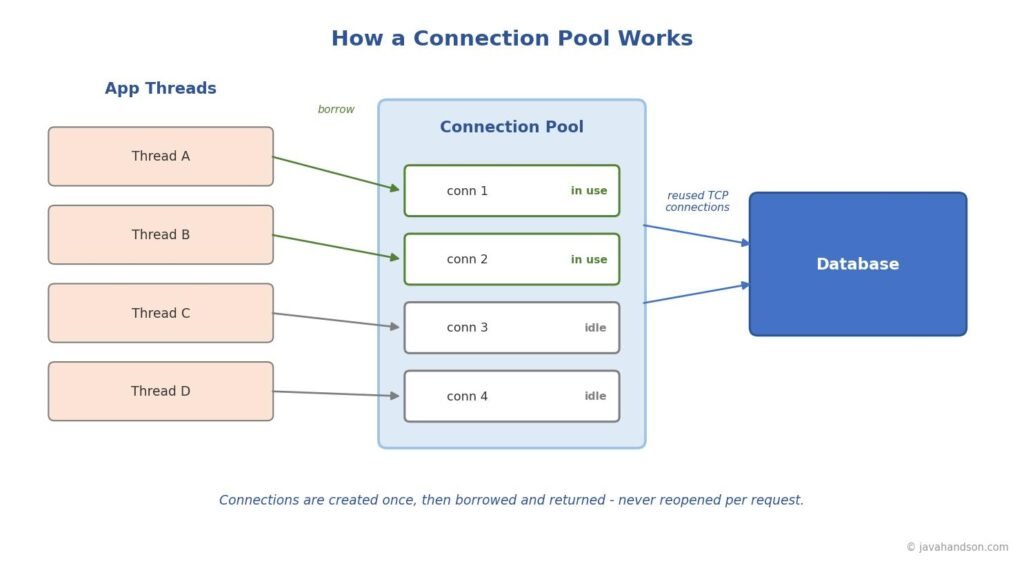
The flow is easy to picture. A thread needs the database, so it borrows a free connection from the pool. It runs its query, then hands the connection back. The connection never closes; it just changes hands.
// Pseudocode: borrow, use, return.
conn = pool.acquire();     // borrow a live connection
try {
    conn.execute("SELECT ...");
} finally {
    pool.release(conn);    // give it back, do NOT close it
}
What happens when every connection is busy? The pool makes the next request wait for a short, configured time. If a connection frees up in that window, the request proceeds. If not, it times out, which is a signal that your pool is too small or your queries are too slow.
The biggest surprise for most engineers is that the ideal pool is small. A giant pool does not mean more speed. Too many connections overwhelm the database with context switching and disk contention, which actually slows everything down.
A widely used starting formula comes from the connection pool community. It sizes the pool to the database server’s hardware, not the app server:
pool_size = (core_count * 2) + effective_spindle_count

// Example: a 4-core database on SSD
// (4 * 2) + 1 = 9 connections
That number feels tiny to people used to setting pools of a hundred. But the logic holds: a database with four cores can only truly run a few queries at once. Extra connections just wait in line while adding overhead. Treat the formula as a starting point, then measure and adjust under real load.
When you run several app instances against one database, split the budget. If the database can take forty connections and you run four instances, each pool holds ten, not forty. Forgetting this is a classic way to accidentally flood a shared database.
Every pooling library exposes a similar set of knobs. The names differ, but the concepts are the same across tools such as HikariCP, PgBouncer, and others. Here are the ones worth understanding:
# Generic pool config (concept, not tied to one tool)
maximum_pool_size: 10
minimum_idle: 10
connection_timeout: 30000   # ms to wait for a free connection
max_lifetime: 1740000       # ms before a connection is retired
| Interview Insight If asked “how big should the connection pool be?”, never answer with a large round number. Say the ideal pool is usually small, cite the (cores * 2) + spindles idea, and explain that an oversized pool hurts the database through contention. Then add that you would confirm the number by monitoring active connections and timeout counts under real traffic. That mix of formula plus measurement is exactly what senior interviewers want to hear. |
These three tools are not separate chores. They form a chain. Connection pooling gets your query to the database quickly. Indexing lets the database find the rows quickly. Query optimization makes sure you only ask for what you need. Weakness in any link shows up as slow response times.
Picture a single slow endpoint. Maybe the query lacks an index, so it scans the whole table. That slow query holds its connection longer, so the pool drains and other requests start waiting. Now one missing index has cascaded into a system-wide slowdown.
This is why you fix them together. Add the index so the query is fast, rewrite the query so it touches less data, and size the pool so connections free up quickly. Each fix makes the others more effective, and the whole endpoint gets snappy again.
There is an order that works best when you tune a real system. Start with the query plan to find the slow query. Fix the query and its index first, because that usually gives the biggest win. Only then revisit the pool, since a faster query already frees connections sooner. Tuning in that order stops you from throwing a bigger pool at a problem that a single index would have solved.
| Tool | What It Reduces | Main Risk If Ignored |
|---|---|---|
| Indexing | Rows the database must read | Full table scans that melt at scale |
| Query optimization | Work done per query | N+1 queries and bloated result sets |
| Connection pooling | Overhead of opening connections | Setup cost on every request; drained pools |
Certain mistakes show up again and again. Knowing them in advance saves you a painful production incident later.
Turn all of this into habits you apply on every project. A short checklist carries you a long way:
A quick glossary so you can revisit the core ideas at a glance:
| Term | Meaning in One Line |
|---|---|
| Index | A sorted structure that points to rows so lookups skip the full scan |
| Full table scan | Reading every row to find matches; O(N) and slow at scale |
| B-tree index | The default balanced index; handles equality, ranges, and sorting |
| Hash index | Fast exact-match lookups only; no ranges or ordering |
| Composite index | An index on several columns, sorted left to right |
| Covering index | An index that holds every column a query needs, skipping the table |
| Query plan | The engine’s chosen path for running a query, shown by EXPLAIN |
| N+1 problem | One query plus one per result row; collapse it into a join or batch |
| Connection pool | A reusable set of live database connections lent out per request |
| Pool size | The cap on pooled connections; usually far smaller than expected |
Database query optimization comes down to three levers you can pull on any project. Indexing cuts how much data the database reads. Query tuning cuts the work it does with that data. Connection pooling cuts the overhead of reaching the database at all.
None of this needs exotic tools or deep math. It needs the habit of looking before you leap: read the query plan, check the index, watch the pool. Do that on your next project, and the data layer stops being the thing that slows you down and starts being the thing that carries your scale.
To go deeper into these topics, explore the following widely respected resources: