Defaults in Spring AI: defaultSystem, defaultOptions, defaultTools & More
-
Last Updated: September 27, 2026
-
By: javahandson
-
Series

Learn defaults in Spring AI 2.0 with code: defaultSystem, defaultUser, defaultOptions, defaultAdvisors and defaultTools, plus how overrides really work.
When my first Spring AI project grew past three endpoints, I noticed something ugly. Every controller method repeated the same system message, the same logger and the same model settings. That is exactly the problem defaults in Spring AI solve. In this article, we will learn every default method on ChatClient.Builder, with working code for each one.
Defaults are settings you configure once while building a ChatClient. After that, Spring AI applies them to every request made through that client. You only override them when a request needs something different.
Here is what we will cover:
defaultSystem() and defaultUser() for default messagesdefaultOptions() for model settings like temperature and token limitsdefaultAdvisors() for logging, safety and memorydefaultTools() and defaultToolContext() for tool callingdefaultTemplateRenderer() for custom placeholder stylesI checked everything in this article against the Spring AI 2.0.1 docs and source code. The examples use Spring Boot 4 and Java 21.
If you are new to ChatClient, first read my beginner’s guide to ChatClient and ChatModel. It is also worth reading Message Roles in LLMs, because defaults build directly on system and user messages.
In simple words, a default is a value that Spring AI uses automatically unless you say otherwise. You set it on the ChatClient.Builder. Then every chatClient.prompt() call starts with those values already filled in.
Defaults are useful when:
Let us look at code without defaults first. Here, each method builds everything by itself:
@GetMapping("/refund")
public String refund(@RequestParam String message) {
    return chatClient.prompt()
            .system("You are a QuickPay support assistant. Keep answers short.")
            .user(message)
            .advisors(new SimpleLoggerAdvisor())
            .call()
            .content();
}

@GetMapping("/kyc")
public String kyc(@RequestParam String message) {
    return chatClient.prompt()
            .system("You are a QuickPay support assistant. Keep answers short.")
            .user(message)
            .advisors(new SimpleLoggerAdvisor())
            .call()
            .content();
}
Both methods repeat the same system text and advisor. Now imagine ten such methods. If the business team changes the tone, you must edit ten places. Sooner or later, one of them gets missed.
With defaults, the same setup moves into one bean:
@Configuration
public class SupportChatConfig {

    @Bean
    public ChatClient supportChatClient(ChatClient.Builder builder) {
        return builder
                .defaultSystem("You are a QuickPay support assistant. "
                        + "Keep answers short.")
                .defaultAdvisors(new SimpleLoggerAdvisor())
                .build();
    }
}
Now each endpoint becomes a single, clean call:
@GetMapping("/refund")
public String refund(@RequestParam String message) {
    return supportChatClient.prompt()
            .user(message)
            .call()
            .content();
}
This is the same idea as setting default headers on a RestClient. You configure the common parts once and keep each call focused on what is different.
It helps to know what happens inside. I read the Spring AI 2.0.1 source to confirm this flow:
ChatClient.Builder holds a hidden “default request” object.default*() method writes into that default request.build(), the ChatClient keeps this default request.chatClient.prompt() call makes a fresh copy of it..user() or .options(), then change only that copy.Because each request gets its own copy, one request can never change the defaults for another. That makes defaults safe to use in a busy web app.
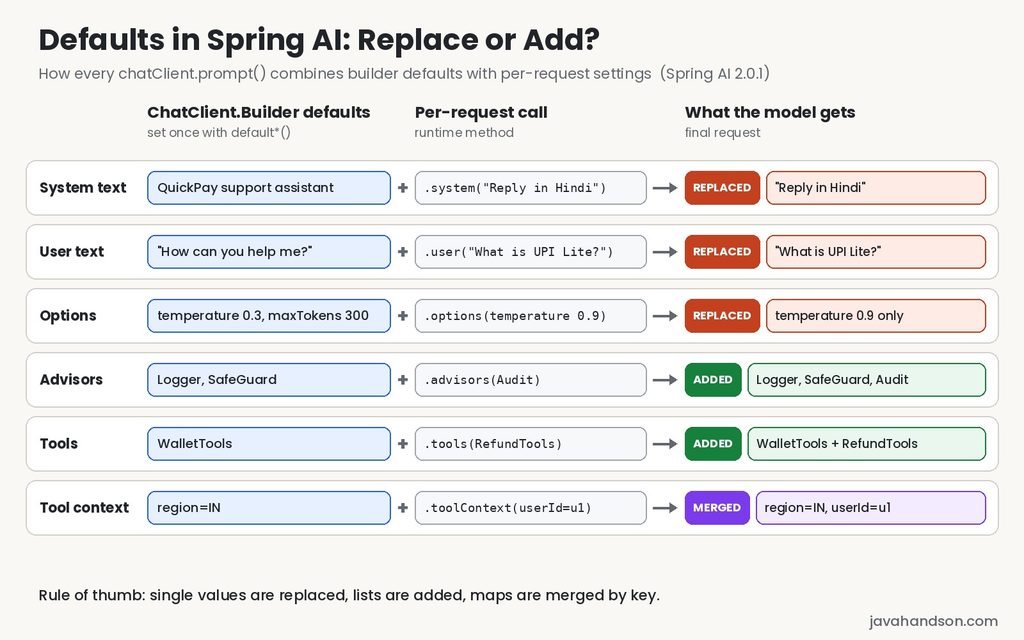
Here is the full list of default methods on ChatClient.Builder in Spring AI 2.0.1. Each one has a matching runtime method without the default prefix.
| Default method | What it sets | Runtime method |
|---|---|---|
defaultSystem() | System message text and params | system() |
defaultUser() | User message text and params | user() |
defaultOptions() | Model settings like temperature | options() |
defaultAdvisors() | Advisors and advisor params | advisors() |
defaultTools() | Tools the model can call | tools() |
defaultToolContext() | Extra data passed to tools | toolContext() |
defaultTemplateRenderer() | Placeholder syntax for templates | templateRenderer() |
There is one more thing to note. In 2.0, the old defaultToolCallbacks() methods are deprecated for removal. Use defaultTools() instead, because it now accepts tool objects, callbacks and providers in one method.
Let us now go through each method one by one.
The system message tells the model who it is and how it should behave. Usually, this stays the same for a whole feature. So, it is the most common default you will set.
We already saw the simple string version. Most of the time, a text block keeps longer instructions readable:
@Bean
public ChatClient supportChatClient(ChatClient.Builder builder) {
    return builder.defaultSystem("""
            You are a support assistant for QuickPay, a digital wallet app.
            Only answer questions about QuickPay payments, refunds and KYC.
            For any other topic, politely say you cannot help.
            Keep every answer under five sentences.
            """).build();
}
Every call through supportChatClient now carries these rules. In fact, the end user never sees them, but the model follows them on each request.
Long prompts inside Java code get messy. Instead, you can keep them in a file under src/main/resources. The builder accepts a Spring Resource directly:
@Bean
public ChatClient supportChatClient(ChatClient.Builder builder,
        @Value("classpath:/prompts/support-system.st") Resource systemPrompt) {
    return builder
            .defaultSystem(systemPrompt)
            .build();
}
I like this approach for real projects. Product owners can review the prompt file without reading Java. Also, prompt changes show up clearly in Git history.
Spring AI reads the file using the JVM’s default character set. On Java 18 and later, that is UTF-8, so Hindi or other non-English text works fine. Still, if you want to be explicit, use the overload that takes a Charset.
Sometimes most of the prompt is fixed, but a few words change. For that, use the lambda version with {placeholders}:
@Bean
public ChatClient supportChatClient(ChatClient.Builder builder) {
    return builder
            .defaultSystem(s -> s
                    .text("You are a support assistant for {appName}. "
                            + "Always reply in {language}.")
                    .param("appName", "QuickPay")
                    .param("language", "English"))
            .build();
}
Now a Hindi endpoint can change only the language at runtime:
String answer = supportChatClient.prompt()
        .system(s -> s.param("language", "Hindi"))
        .user(message)
        .call()
        .content();
Here is the nice part. When you pass only params, Spring AI keeps the default text. Then it merges your new param values over the default ones. So, appName stays “QuickPay”, while language becomes “Hindi” for this call only.
Interview Insight: A common question is whether .system() at runtime replaces or extends defaultSystem(). The accurate answer has two parts. If you pass new text, it fully replaces the default text for that request. If you pass only params through the lambda, the default text stays and the params merge. Knowing this difference shows you have actually used the API. |
The defaultUser() method sets a user message that goes with every request. At first, this sounds strange. Why would every request ask the same question?
It makes sense for clients that do one fixed job. For example:
Here is a simple welcome client:
@Bean
public ChatClient welcomeChatClient(ChatClient.Builder builder) {
    return builder
            .defaultSystem("You are a friendly QuickPay support assistant.")
            .defaultUser("How can you help me?")
            .build();
}
Now you can call it without any user text at all:
String welcomeText = welcomeChatClient.prompt()
        .call()
        .content();
The model receives the system message and the default question. Then it replies with a short introduction of what it can do. This works well for a chat window’s first message.
This one surprised me when I read the source code. Look at these two calls carefully:
// Sends TWO user messages: your question, then "How can you help me?"
welcomeChatClient.prompt("What is UPI Lite?").call().content();

// Replaces the default user text with your question
welcomeChatClient.prompt().user("What is UPI Lite?").call().content();
Why do they behave differently? The prompt(String) shortcut adds your text as a separate message in the middle of the list. However, the default user text still exists, and Spring AI always adds it at the end. So, the model sees your real question followed by “How can you help me?”.
On the other hand, .user() replaces the default user text completely. So, when a client has a defaultUser(), always use .user() for real questions.
Chat options control how the model generates its answer. For example, temperature controls creativity, and max tokens limits the reply length. With defaultOptions(), you set these once for a client.
The ChatOptions builder holds settings that most providers understand. These include model, temperature, max tokens, top-p, top-k, stop sequences and penalties.
@Bean
public ChatClient supportChatClient(ChatClient.Builder builder) {
    return builder
            .defaultSystem("You are a QuickPay support assistant.")
            .defaultOptions(ChatOptions.builder()
                    .temperature(0.3)
                    .maxTokens(300))
            .build();
}
Notice something important here. We pass the builder itself, without calling .build(). In Spring AI 2.0, defaultOptions() takes a ChatOptions.Builder. Many older tutorials show .build() at the end, and that code will not compile on 2.0.
Why does Spring AI want the builder? Because it needs to combine your values with the model’s own settings later. A builder can merge values. A finished options object cannot, since options are now fully immutable in 2.0.
Portable options cover the basics. However, each provider also has its own extra settings. For those, use the provider’s options class. Here is an OpenAI example:
@Bean
public ChatClient supportChatClient(ChatClient.Builder builder) {
    return builder
            .defaultOptions(OpenAiChatOptions.builder()
                    .model("gpt-4o-mini")
                    .temperature(0.3)
                    .maxTokens(300))
            .build();
}
Before you copy this, there are two OpenAI rules you must know. Both come straight from the Spring AI 2.0.1 OpenAI docs:
gpt-5, gpt-5-mini and gpt-5-nano do not support temperature. Setting it results in an error. Chat models like gpt-5-chat do support it.maxTokens for non-reasoning models like gpt-4o. Reasoning models need maxCompletionTokens instead. Never set both.This matters more than it looks. In Spring AI 2.0.1, the default OpenAI chat model is gpt-5-mini. So, if you add a temperature without choosing a model, your first call may fail.
For a reasoning model, the options look like this:
.defaultOptions(OpenAiChatOptions.builder()
        .model("gpt-5-mini")
.maxCompletionTokens(1000))Options can come from three places. It is worth knowing which one wins:
spring.ai.openai.chat.model or spring.ai.openai.chat.temperature. These become the chat model’s own options.ChatClient.Spring AI starts from the model’s options and then applies your client options on top. Only the values you actually set get applied. So, if defaultOptions() sets only temperature, the model name still comes from your properties.
Also note one change in Spring AI 2.0. It no longer sets a default temperature of 0.7 for you. Each provider’s own default now applies. So, if your app depended on the old value, set it explicitly in properties or in defaultOptions().
I found this one in the 2.0.1 source, and it is easy to miss. When you call .options() on a request, it replaces the whole defaultOptions() builder for that call. It does not merge with it.
// Defaults: temperature 0.3 and maxTokens 300
String answer = supportChatClient.prompt()
        .user(message)
        .options(ChatOptions.builder().temperature(0.9))
        .call()
        .content();
// This call uses temperature 0.9, but maxTokens 300 is gone
The request still falls back to the settings in application.properties. However, the default maxTokens of 300 no longer applies. So, when you override options per request, repeat any default values you still need.
Interview Insight: If an interviewer asks how Spring AI decides the final model settings, explain the layers. The base comes from the chat model’s options, which usually come from application.properties. Then the client’s options apply on top, and only non-null values win. Mentioning that a runtime .options() call replaces defaultOptions() rather than merging with it is a detail most candidates miss. |
Advisors work like interceptors or servlet filters for your AI calls. They can log requests, add memory, block sensitive words or add retrieved documents. Since these are usually needed everywhere, advisors are a natural fit for defaults.
Here we add a logger and a simple safety guard to every call:
@Bean
public ChatClient supportChatClient(ChatClient.Builder builder) {
    return builder
            .defaultSystem("You are a QuickPay support assistant.")
            .defaultAdvisors(
                    new SimpleLoggerAdvisor(),
                    new SafeGuardAdvisor(List.of("password", "cvv")))
            .build();
}
The SimpleLoggerAdvisor prints each request and response. To see its output, turn on debug logging:
logging.level.org.springframework.ai.chat.client.advisor=DEBUG
Meanwhile, SafeGuardAdvisor looks for the listed words in the prompt. If it finds one, it skips the model call and returns a polite failure message instead.
One detail from the source code is worth knowing. The check runs on the whole prompt, including your system message, and it ignores case. So, if your system text says “never ask for a password”, every single call gets blocked. Keep your guard words out of your own prompts.
Advisors behave differently from system text. When you add advisors at runtime, Spring AI adds them to the default list. It does not remove the defaults.
String answer = supportChatClient.prompt()
        .advisors(new MyAuditAdvisor())
        .user(message)
        .call()
        .content();
// Runs SimpleLoggerAdvisor, SafeGuardAdvisor and MyAuditAdvisor
Here, MyAuditAdvisor is just a placeholder for your own custom advisor. We will build a real one in the custom advisor article.
This add-on behaviour is exactly what you want most of the time. Logging and safety stay on, and each endpoint can add its own extra advisor.
Chat memory is another common default. Here is a verified 2.0.1 setup:
@Bean
public ChatClient memoryChatClient(ChatClient.Builder builder,
        ChatMemory chatMemory) {
    return builder
            .defaultAdvisors(
                    MessageChatMemoryAdvisor.builder(chatMemory).build())
            .build();
}
The advisor is a default, but the conversation ID must still come with each request. Without it, Spring AI throws an error:
String answer = memoryChatClient.prompt()
        .advisors(a -> a.param(ChatMemory.CONVERSATION_ID, username))
        .user(message)
        .call()
        .content();
We will cover chat memory fully in a separate article.
Tool calling lets the model ask your Java code for live data. If a client should always have certain tools, register them as defaults.
First, write a simple tool class with @Tool methods:
@Component
public class WalletTools {

    @Tool(description = "Get the current wallet balance for the logged-in user")
    public String getWalletBalance() {
        // In a real app, call your wallet service here
        return "Your QuickPay wallet balance is Rs 2,450.";
    }
}
Then pass the object to defaultTools():
@Bean
public ChatClient walletChatClient(ChatClient.Builder builder,
        WalletTools walletTools) {
    return builder
            .defaultSystem("You are a QuickPay wallet assistant.")
            .defaultTools(walletTools)
            .build();
}
In 2.0, defaultTools() accepts plain objects with @Tool methods, ToolCallback objects, ToolCallbackProvider objects, or a List of any of these. So, defaultTools(List.of(walletTools)) also works.
Tools also follow the add-on rule. The Spring AI tool calling docs clearly say that per-call .tools() appends to the client’s defaults. It does not replace them.
String answer = walletChatClient.prompt()
        .user("What is my balance and my last refund status?")
        .tools(refundTools)
        .call()
        .content();
// The model can use both WalletTools and RefundTools here
This is great for a base set of shared tools. Still, be careful. Every tool adds its description to the request, and that costs tokens. Too many tools can also confuse the model. So, keep default tools small and add feature-specific tools per request.
Sometimes a tool needs extra data that the model should never see. Examples include a tenant ID, a region or a user ID. Tool context carries this data straight to your tool method.
With defaultToolContext(), you set values that every tool call receives:
@Bean
public ChatClient walletChatClient(ChatClient.Builder builder,
        WalletTools walletTools) {
    return builder
            .defaultTools(walletTools)
            .defaultToolContext(Map.of("region", "IN", "channel", "mobile-app"))
            .build();
}
Inside the tool, add a ToolContext parameter and read the values:
@Tool(description = "Get the current wallet balance for the logged-in user")
public String getWalletBalance(ToolContext toolContext) {
    String region = (String) toolContext.getContext().get("region");
    String userId = (String) toolContext.getContext().get("userId");
    return walletService.balanceFor(userId, region);
}
At runtime, add request-specific values such as the user ID:
String answer = walletChatClient.prompt()
        .user("What is my balance?")
        .toolContext(Map.of("userId", currentUserId))
        .call()
        .content();
Here, the runtime context merges with the default context key by key. So, the tool receives region, channel and userId together. If both use the same key, the runtime value wins.
Interview Insight: Interviewers like asking how to pass a user ID to a tool without exposing it to the LLM. The answer is ToolContext. Static values like region go in defaultToolContext(), and per-user values go in .toolContext() on each request. The model never sees this data, so it cannot leak it or be tricked into changing it. |
By default, Spring AI uses curly braces for placeholders, like {appName}. This causes trouble when your prompt contains JSON, because JSON also uses curly braces.
In that case, you can switch to different delimiters for the whole client:
@Bean
public ChatClient jsonChatClient(ChatClient.Builder builder) {
    return builder
            .defaultTemplateRenderer(StTemplateRenderer.builder()
                    .startDelimiterToken('<')
                    .endDelimiterToken('>')
                    .build())
            .defaultSystem(s -> s
                    .text("Reply for <appName> as JSON: {\"status\": \"...\"}")
                    .param("appName", "QuickPay"))
            .build();
}
Now <appName> is the placeholder, and the JSON braces stay as normal text. We will look at templates in more depth in the prompt templates article.
Beginners often ask me a fair question. If application.properties can already set the model and temperature, why do we need defaultOptions() at all?
The answer depends on scope. Properties apply to the chat model, so every ChatClient built on that model shares them. Defaults apply to one ChatClient only.
Here is a simple rule of thumb I follow:
In practice, most apps use all three layers together. For instance, the properties pick the model, each ChatClient bean sets its own persona and options, and each request adds the user’s data.
There is one more benefit of this split. Your properties stay small and readable. Meanwhile, the feature-level behaviour stays close to the code that uses it, where it is easier to test and review.
The official docs say you can override any default with the matching method that has no default prefix. That is true. However, “override” means different things for different methods.
I went through the 2.0.1 source code to confirm the exact behaviour. Here is the summary:
| Setting | Runtime method | What happens |
|---|---|---|
| System text | system() | New text replaces default; params merge |
| User text | user() | New text replaces default; params merge |
| Options | options() | Replaces the whole defaultOptions builder |
| Advisors | advisors() | Added to default advisors |
| Advisor params | advisors(a -> a.param()) | Merged by key |
| Tools | tools() | Added to default tools |
| Tool context | toolContext() | Merged by key; runtime value wins |
| Messages | messages() | Added to the message list |
| Template renderer | templateRenderer() | Replaces the default renderer |
A simple way to remember this is to think in two groups:
Now let us combine everything into one realistic configuration for a support assistant:
@Configuration
public class SupportChatConfig {

    @Bean
    public ChatClient supportChatClient(ChatClient.Builder builder,
            @Value("classpath:/prompts/support-system.st") Resource prompt,
            ChatMemory chatMemory,
            WalletTools walletTools) {
        return builder
                .defaultSystem(prompt)
                .defaultOptions(OpenAiChatOptions.builder()
                        .model("gpt-4o-mini")
                        .temperature(0.3)
                        .maxTokens(400))
                .defaultAdvisors(
                        new SimpleLoggerAdvisor(),
                        MessageChatMemoryAdvisor.builder(chatMemory).build())
                .defaultTools(walletTools)
                .defaultToolContext(Map.of("region", "IN"))
                .build();
    }
}
The controller now contains only request-specific details:
@GetMapping("/support")
public String support(@RequestHeader("username") String username,
        @RequestParam String message) {
    return supportChatClient.prompt()
            .advisors(a -> a.param(ChatMemory.CONVERSATION_ID, username))
            .toolContext(Map.of("userId", username))
            .user(message)
            .call()
            .content();
}
Look at how small the controller is. All the shared behaviour lives in one bean, and each request adds only what is unique to it.
Spring Boot auto-configures the ChatClient.Builder bean with prototype scope. So, every injection point gets a brand-new builder.
This is important. If one config class adds defaultSystem(), another class that injects ChatClient.Builder does not see it. As a result, you can safely build many different clients from the same auto-configured builder.
If your app uses more than one chat model, this setup changes a little. I covered that in Multiple Chat Models in Spring AI, where we disable the auto-configured builder with spring.ai.chat.client.enabled=false.
Sometimes you need a second client that is almost the same as the first. For example, the Hindi support bot shares everything except the language rule. Instead of repeating the whole setup, call mutate():
@Bean
public ChatClient hindiSupportChatClient(ChatClient supportChatClient) {
    return supportChatClient.mutate()
            .defaultSystem("You are a QuickPay support assistant. "
                    + "Always reply in simple Hindi.")
            .build();
}
The mutate() method returns a builder that already holds all the defaults of the original client. You change only what differs, and the original client stays untouched.
As an app grows, one bean method can collect too many parameters. For that situation, Spring AI offers ChatClientBuilderCustomizer. It lets you split tools, advisors and options into small separate beans. Then the auto-configuration applies all of them to the builder.
Remember that these customizers are global. They apply to every builder that Spring injects. We will cover this pattern in a dedicated article.
Interview Insight: For senior roles, a good design question is how you would organise ChatClient configuration in a large app. A strong answer separates concerns. Cross-cutting defaults like logging and memory go in customizers. Client-specific behaviour like the system prompt goes in each client bean. Per-request data like the conversation ID and user ID goes on the request. Explaining why the builder is prototype-scoped completes the answer. |
Here are the mistakes I see most often, including a few I made myself.
Older examples pass a finished ChatOptions object. In Spring AI 2.0, defaultOptions() takes a builder. So, drop the .build() call and pass the builder directly.
The Spring AI docs state that gpt-5, gpt-5-mini and gpt-5-nano do not support temperature. Since gpt-5-mini is the default OpenAI model, this bites many beginners. Either choose a model that supports temperature, or leave it out.
With a default user message, prompt("question") sends two user messages. Use .user("question") so that your text replaces the default.
A runtime .options() call replaces the default options builder. Therefore, any default value you do not repeat falls back to your properties or the provider’s default.
Defaults are shared by every request. So, never put a user ID, conversation ID or session data in a default. Those always belong on the request.
A: Defaults are settings you configure once on ChatClient.Builder, such as the system message, chat options, advisors and tools. Spring AI applies them to every request made through that ChatClient unless the request overrides them.
A: If you pass new text to .system(), it replaces the default system text for that request only. If you pass only parameters through the lambda, the default text stays and the parameters merge with the default ones.
A: In Spring AI 2.0, defaultOptions() takes a ChatOptions.Builder instead of a finished ChatOptions object. Spring AI combines the builder with the chat model’s own options at call time, so pass the builder without calling build().
A: No. Tools and advisors added at runtime are appended to the defaults, so both sets are available for that request. Tool context merges key by key, and the runtime value wins when both use the same key.
A: The runtime options() call replaces the default options builder for that request. Values set only in defaultOptions() no longer apply, and the request falls back to the settings in application.properties or the provider’s defaults.
A: Use application.properties for app-wide settings such as the API key and main model, because every ChatClient on that model shares them. Use defaultOptions() for settings that belong to one feature, such as a low temperature for a support bot.
Defaults in Spring AI keep your code clean and consistent. You set the system prompt, model options, advisors and tools once. Then every request inherits them automatically.
Let us quickly recap the key points. First, use defaultSystem() for the assistant’s role and defaultOptions() for model settings. Next, use defaultAdvisors() and defaultTools() for behaviour that every call needs. After that, remember the override rule: single values get replaced, while collections get added.
Finally, keep an eye on three Spring AI 2.0 changes. The defaultOptions() method now takes a builder. The old defaultToolCallbacks() methods are deprecated. And the default temperature of 0.7 is gone.
Once you are comfortable with defaults, advisors and prompt templates become much easier to organise. You will see these same builder methods again in almost every Spring AI article in this series.