Introduction to Exception Handling in Java
-
Last Updated: September 21, 2024
-
By: javahandson
-
Series

Learn Java in a easy way

Exception handling in Java keeps a program running when something goes wrong. Learn checked and unchecked exceptions, errors, the Throwable hierarchy, and try-catch with clear beginner examples.
Exception handling in Java gives your program a plan for the moment things go sideways. A file goes missing. Somebody types letters where you wanted digits. The network call times out. Without a plan, the program simply stops.
Think about an ATM. You ask for cash, but the machine cannot reach the bank. It does not catch fire or freeze forever. It shows a polite message and hands your card back. That graceful recovery is exactly what we want from our code.
Java gives us a whole mechanism for this. Your code can spot a problem, package it up, and pass it to a piece of code that knows what to do about it. Meanwhile, the rest of your program keeps running.
Here is the part beginners often miss. Exceptions are not bugs. A bug is a mistake in your logic. An exception is a signal about a condition your code met while running. Some of those conditions you can plan for, and some you cannot.
We will start from the very beginning. No prior knowledge of try or catch needed. By the end you will know what an exception really is, how Java sorts them into families, and what to do when one shows up.
This article walks through the foundations, one idea at a time. Here is the plan:
Every idea comes with a small program you can run yourself. Type them out rather than skimming. Exceptions click far faster once you have watched one blow up on your own screen.
One more thing before we start. This article opens a five-part series on exception handling in Java, and here is where each part goes:
So we keep this part deliberately narrow. You will meet try-catch here, but only enough to survive a failure. The finer rules wait for the parts that cover them properly.
An exception is an event during execution that breaks the normal flow of your program. Your code was marching along line by line. Then it hit a wall.
Picture a recipe that says “add the eggs”. You open the fridge and find no eggs. The recipe has no line for that. You stop, and you shout to someone in the next room. That shout is the exception.
Two things cause most exceptions. Sometimes a coding slip does it, like reading past the end of an array. Other times the outside world does it, like a file that vanished or a user who typed nonsense.
Now here is the good news. An exception is not the end of the story. You can catch it, deal with it, and carry on. That single fact is what makes exception handling in Java so useful.
The instant a line of code fails, Java stops running that method. It does not skip the bad line and continue. Everything after it in that method goes unexecuted.
Instead, Java creates an exception object that describes the problem. Then it hands that object to the runtime and starts looking for someone to deal with it.
If your code catches the exception, your handler runs and the program lives on. If nobody catches it, the JVM prints a stack trace and shuts the thread down.
So one failing line can take your whole program with it. That is precisely why we handle exceptions instead of ignoring them.
Beginners often picture an exception as a kind of error message. It is much more than text. In Java, every exception is a real object with fields and methods.
That object carries the details you need. It knows its own type, it holds a message, and it remembers the exact path of method calls that led to the failure.
try {
    int[] numbers = {1, 2, 3};
    System.out.println(numbers[5]);
} catch (ArrayIndexOutOfBoundsException e) {
    System.out.println(e.getClass().getSimpleName()); // Output: ArrayIndexOutOfBoundsException
    System.out.println(e.getMessage());               // Output: Index 5 out of bounds for length 3
}
Look at that catch block. The variable e behaves like any other object. You call methods on it, you read its message, and you decide what to do next.
Because exceptions are objects, they also form an inheritance tree. That tree drives almost every rule in this article, so let us look at it next.
Every problem you can catch in Java descends from one class: java.lang.Throwable. If a class does not extend Throwable, you cannot throw it and you cannot catch it.
Throwable supplies the shared machinery. It stores the message, keeps the stack trace, and holds an optional cause. Every exception you ever meet inherits all of that.
getMessage() returns the short description you passed in.printStackTrace() dumps the full call path to the console.getCause() returns the underlying problem, when one exists.getStackTrace() hands back the frames as an array you can inspect.Directly under Throwable sit two children, and the split between them shapes everything else.
The first branch is Error. These represent serious trouble in the JVM itself, like running out of memory. Your code did not cause them, and your code usually cannot fix them.
The second branch is Exception. These represent conditions a reasonable application might want to catch. A missing file belongs here. So does a bad number format.
Keep that division clear in your head. Errors are for the platform. Exceptions are for you.
Throwable
 ├── Error                 // JVM level trouble, leave it alone
 │    ├── OutOfMemoryError
 │    └── StackOverflowError
 └── Exception             // your territory
      ├── IOException      // checked
      ├── SQLException     // checked
      └── RuntimeException // unchecked
           ├── NullPointerException
└── ArithmeticExceptionNotice RuntimeException in that tree. It extends Exception, so it is an exception like any other. But Java treats it differently, and that difference confuses a lot of beginners.
The compiler ignores RuntimeException and everything below it. You never have to declare it, and you never have to catch it. We call this whole group the unchecked exceptions.
Everything else under Exception falls into the checked group. For those, the compiler refuses to look away. It will not build your program until you deal with them.
So one simple question sorts any exception you meet. Does it extend RuntimeException? If yes, it is unchecked. If no, it is checked. Errors count as unchecked too, since the compiler never demands you handle them.
A checked exception extends Exception but not RuntimeException. The compiler checks these at build time, which is where the name comes from.
The rule Java enforces has a name: catch or declare. Either you wrap the risky call in a try-catch, or your method declares that it throws the exception onward. Skip both, and compilation fails.
Why the strictness? Checked exceptions describe problems outside your control that you can reasonably expect. Files go missing. Networks drop. Java wants you to think about those cases in advance.
Some developers find this rule annoying, and it does add noise. Still, it forces a useful habit. You cannot pretend that reading a file always succeeds.
Let us try to read a file with no handling at all. This program looks perfectly reasonable, yet it never runs.
package com.javahandson;

import java.io.FileReader;

public class CheckedExceptions {
    public static void main(String[] args) {
        FileReader reader = new FileReader("file.txt");
        reader.read();
        reader.close();
    }
}
// Output (compiler, not runtime):
// error: unreported exception FileNotFoundException; must be caught or declared to be thrown
// error: unreported exception IOException; must be caught or declared to be thrown
Read that output carefully. Those lines come from the compiler, not from a crash. The program never started. The FileReader constructor declares FileNotFoundException, while read() and close() declare IOException.
Now wrap the risky part in a try-catch. Since FileNotFoundException extends IOException, a single catch covers all three calls.
package com.javahandson;

import java.io.FileReader;
import java.io.IOException;

public class CheckedExceptions {
    public static void main(String[] args) {
        try {
            FileReader reader = new FileReader("file.txt");
            reader.read();
            reader.close();
        } catch (IOException ioException) {
            System.out.println("Could not read the file: " + ioException.getMessage());
        }
    }
}
// Output: Could not read the file: file.txt (No such file or directory)
That compiles, runs, and finishes calmly. The message tells the user what went wrong instead of dumping a stack trace on them.
Here is the hierarchy of the checked side, so you can see how these classes relate:
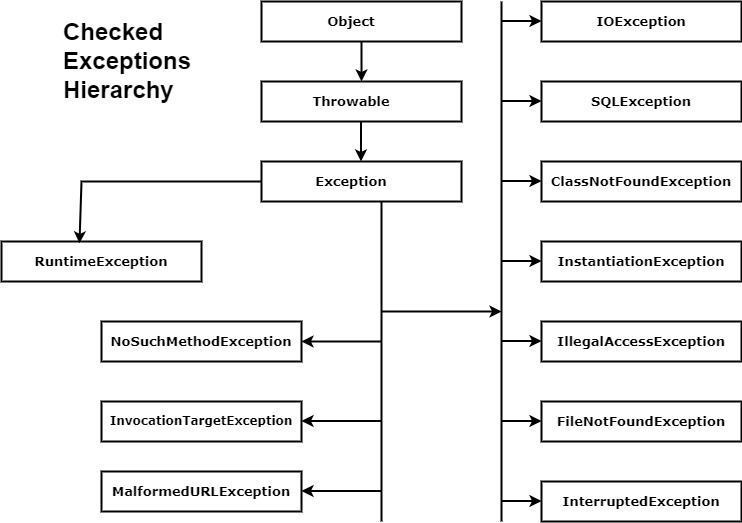
You have exactly two options with a checked exception. Option one handles it right here with try-catch. Option two passes the buck upward with a throws clause.
Which one should you pick? Handle it where you can actually do something useful. Declare it when the caller has more context than you do.
// Option 2: declare it and let the caller decide
public static String readConfig(String path) throws IOException {
    FileReader reader = new FileReader(path);
    int firstChar = reader.read();
    reader.close();
    return String.valueOf((char) firstChar);
}
Notice what the throws clause really means. It does not handle anything. It simply warns every caller that this method might fail, and now the compiler pushes the same duty on to them.
Eventually somebody has to catch it. Push it all the way to main and declare it there, and you are back to a crash with a stack trace.
A handful of checked exceptions cover most real work:
IOException for any file, stream, or socket trouble.FileNotFoundException, a child of IOException, for a missing path.SQLException whenever a database call goes wrong.ClassNotFoundException when reflection cannot locate a class.InterruptedException when another thread interrupts a sleeping one.See the pattern? Every one of them touches the world outside the JVM. Files, databases, other threads. Things you cannot fully control.
An unchecked exception extends RuntimeException. The compiler pays no attention to it. No try-catch required, no throws clause required.
These come from programming mistakes rather than outside conditions. A null reference. An index past the end. A cast to the wrong type. Better code prevents them, so Java does not ask you to catch them.
Your program still compiles happily with a lurking NullPointerException inside it. You only find out when the code actually runs that line.
Dividing an integer by zero is the classic example. Watch how the compiler stays completely silent.
package com.javahandson;

public class UncheckedExceptions {
    public static void main(String[] args) {
        int result = 10 / 0;
        System.out.println(result);
    }
}
// Output:
// Exception in thread "main" java.lang.ArithmeticException: / by zero
//     at com.javahandson.UncheckedExceptions.main(UncheckedExceptions.java:6)
The build succeeded. The crash arrived at runtime instead. That is the whole difference between the two families in one example.
One small detail worth remembering. This rule applies to integer division only. Write 10.0 / 0 with doubles and Java gives you Infinity rather than an exception.
Now suppose you do want to survive this. Wrap it in a try-catch and pick a sensible fallback.
package com.javahandson;

public class UncheckedExceptions {
    public static void main(String[] args) {
        int divisor = 0;
        int result;

        try {
            result = 10 / divisor;
        } catch (ArithmeticException arithmeticException) {
            System.err.println("Cannot divide by zero, using 0 instead");
            result = 0;
        }
        System.out.println("Result is : " + result); // Output: Result is : 0
    }
}
Honestly though, a simple if (divisor != 0) check reads better here. Prevention usually beats a catch block for unchecked exceptions, and we will come back to that idea in the mistakes section.
Here is the unchecked side of the family, laid out visually:

Imagine the alternative. Any line could produce a NullPointerException. If Java demanded a catch for every one, your code would drown in try blocks.
The designers drew a practical line. Problems you can prevent with better logic stay unchecked. Problems from the outside world stay checked.
That does not mean you should never catch an unchecked exception. Catching NumberFormatException around user input makes perfect sense, because you cannot control what somebody types.
The rule of thumb is simple. Fix unchecked exceptions in your logic when you can. Catch them only at the boundary where messy input arrives.
These five show up constantly in beginner code:
NullPointerException when you call a method on a null reference.ArrayIndexOutOfBoundsException when an index falls outside the array.ArithmeticException for integer division by zero.NumberFormatException when Integer.parseInt meets a non-number.ClassCastException when you cast an object to an incompatible type.Good news on the first one. Since Java 14 the JVM produces helpful NullPointerException messages, and Java 15 turned them on by default. The message now names the exact variable that held null, which saves a lot of guesswork.
Interviewers love this comparison, so here it is at a glance:
| Aspect | Checked | Unchecked |
|---|---|---|
| Parent class | Exception (not RuntimeException) |
RuntimeException |
| Compiler enforces handling | Yes, catch or declare | No |
| Detected at | Compile time | Run time |
| Typical cause | The outside world | A programming mistake |
| Usual response | Recover or report | Fix the code |
| Examples | IOException, SQLException |
NullPointerException, ArithmeticException |
One warning about that table. “Unchecked means unimportant” is a myth. A NullPointerException in production hurts just as much as a missing file. The compiler simply chooses not to police it.
Java tracks running methods in a stack. Call a method, and a frame goes on top. Finish it, and that frame pops off.
Say main calls process, and process calls divide. The stack now holds three frames, with divide sitting on top and main at the bottom.
Think of a pile of plates. You always add and remove from the top. Method calls work the same way.
Now something fails inside divide. Java stops that method immediately and pops its frame. Then it asks process: do you have a catch block for this type?
If process says no, Java pops that frame too and asks main. This walk upward has a name. We call it stack unwinding.
The search stops at the first matching catch block. That handler runs, the program recovers, and execution continues from there.
public class Unwinding {
    public static void main(String[] args) {
        try {
            process();
        } catch (ArithmeticException e) {
            System.out.println("main caught it: " + e.getMessage());
        }
        System.out.println("main keeps going");
    }

    static void process() {
        divide();                 // no catch here, so it travels up
        System.out.println("never printed");
    }

    static void divide() {
        int x = 10 / 0;
    }
}
// Output:
// main caught it: / by zero
// main keeps going
Trace the output. The line inside process never printed, because the exception blew past it. Yet main caught the problem and carried on to the final line.
Suppose no method catches it. The exception reaches the JVM’s default handler, which prints a stack trace and kills the thread.
A stack trace scares beginners, but it is genuinely friendly once you know the layout. Read it from the top down.
at line shows where the failure happened.main method.Caused by section reveals the original underlying problem.So the top tells you where, and the rest tells you how you got there. Nine times out of ten, the first line mentioning your own package points straight at the bug.
The try-catch block is the workhorse of exception handling in Java. Risky code goes inside try. Recovery code goes inside catch.
When the try block runs cleanly, Java skips the catch entirely. When something fails, Java jumps to the matching catch and runs it instead.
try {
    int age = Integer.parseInt("abc");   // fails here
    System.out.println(age);             // skipped
} catch (NumberFormatException e) {
    System.out.println("That was not a number"); // Output: That was not a number
}
One detail catches people out. The moment a line inside try fails, the rest of that try block gets skipped. Java does not resume where it left off.
So keep try blocks tight. Wrap only the lines that can genuinely fail, and you will always know which line the catch is answering.
A single try can have several catch blocks. Java checks them top to bottom and runs the first one whose type matches.
Order them from specific to general. We look at the full rule, and what the compiler does when you get it wrong, in try, catch and finally Blocks, which is part 2 of this series.
try {
    String input = args[0];
    int value = Integer.parseInt(input);
    System.out.println(100 / value);
} catch (ArrayIndexOutOfBoundsException e) {
    System.out.println("Please pass an argument");
} catch (NumberFormatException e) {
    System.out.println("That argument was not a number");
} catch (ArithmeticException e) {
    System.out.println("Zero is not a valid divisor");
}
Each failure now gets its own clear message. Compare that to one vague “something went wrong” line, and you can see why separate blocks help.
Sometimes two different failures deserve the exact same response. Repeating that code twice feels silly, and Java 7 fixed it.
Separate the types with a pipe character, and one block handles them all.
try {
    int value = Integer.parseInt(args[0]);
    System.out.println(100 / value);
} catch (NumberFormatException | ArithmeticException e) {
    System.out.println("Bad input: " + e.getMessage());
}
Use multi-catch when the recovery genuinely matches. Force unrelated failures into one block and your error messages turn vague again. Part 2 of this series digs into the finer points of the catch clause.
Catching is easy. Deciding what to do next is the real skill. A catch block has four honest options.
Any of those four is a fine answer. What you must never do is nothing at all, and section 10 explains exactly why.
Java also gives you a finally block for cleanup, plus try-with-resources for closing files automatically. We cover both in detail in the next article of this series.
An Error signals a problem in the environment your program runs in. Memory ran out. The stack filled up. A required class went missing from the classpath.
Notice what these have in common. Your catch block cannot fix any of them. Catching an OutOfMemoryError leaves you with a JVM that still has no memory.
So the guidance is blunt. Do not catch Errors. Let them crash the program, then fix the real cause in your configuration or your algorithm.
Java still lets you catch them, since Error extends Throwable. That freedom exists for tools and frameworks, not for everyday application code.
The easiest Error to trigger is StackOverflowError. Write a recursive method and forget the stopping condition.
package com.javahandson;

public class StackOverflowErrorTest {
    public static void main(String[] args) {
        System.out.println(factorial(5));
    }

    public static int factorial(int n) {
        return n * factorial(n - 1);   // nothing ever stops this
    }
}
// Output:
// Exception in thread "main" java.lang.StackOverflowError
//     at com.javahandson.StackOverflowErrorTest.factorial(StackOverflowErrorTest.java:9)
//     at com.javahandson.StackOverflowErrorTest.factorial(StackOverflowErrorTest.java:9)
//     at com.javahandson.StackOverflowErrorTest.factorial(StackOverflowErrorTest.java:9)
Follow the logic. The method calls itself with 4, then 3, then 2, then 1, then 0, then -1. It never stops, so every call adds another frame until the stack runs out of room.
Look at the repeated lines in that trace. Seeing the same method over and over is the classic fingerprint of runaway recursion.
Wrapping that call in try-catch would be pointless. The real fix is a base case, a condition that ends the recursion.
package com.javahandson;

public class StackOverflowErrorTest {
    public static void main(String[] args) {
        System.out.println("factorial of number : " + factorial(5));
    }

    public static int factorial(int n) {
        if (n <= 1) {        // base case: stop here
            return 1;
        }
        return n * factorial(n - 1);
    }
}
// Output: factorial of number : 120
Three lines of guard, and the Error disappears completely. This is the lesson to take away from the whole section. You fix Errors in the code, never in a catch block.
These four turn up in real projects:
OutOfMemoryError arrives when the heap cannot fit another object.StackOverflowError means recursion went too deep.NoClassDefFoundError points at a class missing from the classpath.ExceptionInInitializerError flags a failure inside a static initializer.Each one points to something structural. A memory leak, a broken algorithm, a build problem. Chase the cause rather than reaching for try-catch.
This one tops the list. An empty catch block silences the problem and tells nobody.
try {
    saveOrder(order);
} catch (IOException e) {
    // nothing here: the order silently vanishes
}
The compiler stays happy. Your users do not, because the save failed and nobody ever finds out why.
At the very least, log the exception. Better yet, tell the caller something went wrong so it can react.
Writing catch (Exception e) around a big block feels efficient. One catch, every problem covered.
The trouble is that it covers too much. A typo that throws NullPointerException lands in the same handler as a genuine missing file, and your log message fits neither.
Catch the specific types you expect. Reserve a broad catch for the outermost layer of your application, where its job is simply to stop the whole thing from dying.
Some developers write catch (Throwable t) hoping to survive anything. That handler now swallows OutOfMemoryError and StackOverflowError too.
Your program limps on in a broken state, and the real cause disappears from view. Debugging that later is miserable.
Stick to Exception and its subclasses. Leave Error alone.
Exceptions cost more than an if statement, mostly because building the stack trace takes work. They also make code far harder to follow.
// Poor: an exception drives ordinary logic
try {
    return list.get(index);
} catch (IndexOutOfBoundsException e) {
    return null;
}

// Better: just check first
if (index >= 0 && index < list.size()) {
    return list.get(index);
}
return null;
Keep exceptions for the exceptional. A value your code can easily test for is not exceptional at all.
Wrapping a low-level exception in your own is good practice. Dropping the original while you do it is not.
// Poor: the original stack trace disappears
catch (SQLException e) {
    throw new DataAccessException("Could not load user");
}

// Better: pass the cause along
catch (SQLException e) {
    throw new DataAccessException("Could not load user", e);
}
That second argument matters more than it looks. It produces the Caused by section in the stack trace, which usually holds the answer you actually need. Part 4 of this series builds custom exceptions like DataAccessException and covers chaining properly.
Let us pull the ideas together in one small program. We have a list of scores typed by a user, and we want the average.
What could go wrong? Somebody types a word instead of a number. The list arrives empty, so we divide by zero. Both are realistic, and both deserve a real response.
Notice that these two failures need different treatment. A bad word we can skip. An empty list means we have nothing to average at all.
package com.javahandson;

public class ScoreAverage {

    public static void main(String[] args) {
        String[] typed = {"90", "75", "oops", "85", "60"};
        System.out.println("Average: " + average(typed));

        String[] empty = {};
        System.out.println("Average: " + average(empty));
    }

    static String average(String[] values) {
        int total = 0;
        int counted = 0;

        for (String value : values) {
            try {
                total += Integer.parseInt(value);
                counted++;
            } catch (NumberFormatException e) {
                System.out.println("Skipping bad value: " + value);
            }
        }

        try {
            return String.valueOf(total / counted);
        } catch (ArithmeticException e) {
            return "no valid scores";
        }
    }
}
// Output:
// Skipping bad value: oops
// Average: 77
// Average: no valid scoresWalk through the first call. Four values parse cleanly and add up to 310. The word “oops” triggers a NumberFormatException, so the catch prints a note and the loop moves on.
Because counted only grows on success, it ends at 4. Dividing 310 by 4 gives 77 with integer division, and the method returns that.
The second call has nothing to parse. So counted stays at 0, the division throws ArithmeticException, and we return a clear message instead of crashing.
Look at what the try blocks buy us. One bad value no longer destroys the whole run, and an empty list produces a sensible answer. That is exception handling doing its job.
if (counted == 0) guard would work too, and reads even better.A: Exception handling in Java is the mechanism that deals with problems during execution so a program can recover instead of stopping. Your code wraps risky work in a try block, and a matching catch block takes over when something fails. The program then continues from there.
A: The compiler enforces checked exceptions, so you must either catch them or declare them with throws. Unchecked exceptions extend RuntimeException and carry no such duty. Checked ones usually come from the outside world, like IOException, while unchecked ones usually come from a coding mistake, like NullPointerException.
A: Both extend Throwable, but they serve different purposes. Exception covers conditions your application can reasonably handle, such as a missing file. Error covers serious JVM level trouble, such as OutOfMemoryError, which your code cannot fix. Catch exceptions, and leave errors alone.
A: java.lang.Throwable sits at the root. Error and Exception both extend it, and RuntimeException extends Exception. Only a class descending from Throwable can appear in a throw statement or a catch clause.
A: The exception travels up the call stack, method by method, looking for a matching catch block. If no method handles it, the JVM default handler prints a stack trace and terminates that thread. When it happens on the main thread, your program stops.
A: Yes. Java 7 added multi-catch, where you separate the types with a pipe, as in catch (IOException | SQLException e). The types must not share a parent-child relationship, and the caught variable behaves as final, so you cannot reassign it.
A: Java tests catch blocks from top to bottom and runs the first matching type. A broad type such as Exception placed first would match everything, leaving the later blocks unreachable. The compiler rejects that code with an “already caught” error.
A: The throws keyword in a method signature declares which checked exceptions that method might pass to its caller. It handles nothing itself. It simply moves the catch-or-declare duty up to whoever calls the method.
A: Usually not. Most unchecked exceptions point at a coding mistake you should fix in the logic instead. The sensible exception is a boundary where messy input arrives, such as catching NumberFormatException around user-typed text.
A: An empty catch block swallows the problem. The code carries on as if everything worked, so a failed save or a corrupt record passes unnoticed, and the stack trace disappears. Always log the exception, rethrow it, or tell the user.
Let us wrap up what we covered. An exception is an event that breaks the normal flow of a program, and Java models each one as an object descending from Throwable.
Throwable splits into two branches. Error means JVM level trouble you should leave alone, while Exception means conditions your application can reasonably handle.
Exceptions split again into checked and unchecked. The compiler forces you to catch or declare the checked ones, and stays quiet about anything extending RuntimeException.
When a failure happens, it climbs the call stack looking for a matching catch block. Find one and the program recovers. Find none and the JVM prints a stack trace and stops the thread.
You now have the try-catch basics, including multiple catch blocks and multi-catch. Keep try blocks small, catch specific types, and never leave a catch block empty.
That is everything part 1 needs to cover. Part 2 takes try, catch and finally apart properly, and the three parts after it move on to throwing exceptions, writing your own, and the rules that tie them together.