Java Module System Example: JPMS Explained Hands-On
-
Last Updated: October 24, 2026
-
By: javahandson
-
Series

A complete java module system example in Java 9 (JPMS). Build three modules from scratch, wire requires and exports, and run them step by step.
If you have written Java for a few years, you already know the pain of a messy classpath. Everything sits in one big flat bag of JARs. Any class can reach any public class in any JAR. Nothing stops that reach, and nothing documents it either. The Java module system, which arrived in Java 9 under the name JPMS, was built to fix exactly this. In this guide we will walk through a complete java module system example. We go from an empty folder to a running multi-module program, and I explain each moving part as we go.
My goal here is simple. By the end, you should be able to create your own modules and wire them together. You will also understand why the compiler suddenly complains when a module touches code it was never allowed to see. We keep the language plain and the examples small, because small examples are the ones you actually remember.
Before Java 9, the unit of reuse was the JAR file. A JAR is just a zip of class files with a little metadata. It carries no real boundary. Mark a class public and the whole world can use it. So library authors had a hard choice. Either keep helper classes package-private and lose the ability to split them across packages, or make them public and watch users depend on internals you wanted to hide.
This leads to three classic headaches, and the module system was designed around all three.
A module tackles each of these. It states its name. Then it declares what it needs. Finally it lists what it shares. Because of that, the JVM can check the whole picture at startup rather than letting you trip over it later. Think of it as turning a pile of loose JARs into a set of labelled boxes, where each box lists its contents and its dependencies on the outside.
Picture the difference with a quick before-and-after. Before modules, a utility class marked public was open to every caller on the classpath. You could not stop a user from reaching into it, so your internal helper quietly became part of your public contract. After modules, that same helper stays sealed unless you export its package on purpose. The result is a real boundary, enforced by the compiler and the runtime together, not just a comment that asks people to behave.
| 💡 Interview insight — Why interviewers love this topic Senior interviews often start with a soft question like “what actually changed in Java 9?”. The module system is the strongest answer you can give, because it shows you understand encapsulation at the architecture level, not just the private keyword. Mention strong encapsulation, explicit dependencies, and reliable configuration, and you have covered the three pillars in one breath. |
A module is a named collection of packages plus a short descriptor. That descriptor lives in a special file called module-info.java at the root of your source. The descriptor is where the magic happens, but the concept itself is small. You give the module a name, then you declare two kinds of relationships.
Everything a module does not explicitly show stays hidden. That single rule is the heart of strong encapsulation. A package that you do not export cannot be imported by another module, even if its classes are public. So “public” now means “public to those who are allowed to see the package”, not “public to the universe”.
| Note This article focuses on the big picture and a full working example. The exact syntax of every directive — requires, exports, opens, uses and provides — gets its own deep dive in a separate post, which I link at the end. |
Let us build something real. We will create three modules that model a tiny greeting application. Keeping three modules, rather than two, lets us show a dependency chain, which is where the module graph gets interesting.
Here is the folder layout. Each module gets its own source root, and the module-info.java file sits at the top of each root. Notice how the folder path mirrors the package name underneath each module root.
greeting-app/
├── com.greet.api/
│   ├── module-info.java
│   └── com/greet/api/
│       └── Greeting.java
├── com.greet.service/
│   ├── module-info.java
│   └── com/greet/service/
│       └── FriendlyGreeting.java
└── com.greet.app/
    ├── module-info.java
    └── com/greet/app/
└── Main.javaWe start with the simplest piece. The api module exposes one interface and nothing else. First the interface itself, a plain Java file with no module awareness at all.
// com.greet.api/com/greet/api/Greeting.java
package com.greet.api;

public interface Greeting {
    String message(String name);
}
Now the descriptor. It names the module and exports the single package that holds the interface. That export is what lets other modules import Greeting.
// com.greet.api/module-info.java
module com.greet.api {
    exports com.greet.api;
}
Read that out loud. “Module com.greet.api exports the package com.greet.api.” The module name and the package name happen to match here, which is a common convention, but they are different things. One names the module. The other names a package the module chooses to reveal.
The service module supplies a real implementation. It needs the interface, so it must read the api module. Then it keeps its own class hidden, because the app should only ever touch the interface.
// com.greet.service/com/greet/service/FriendlyGreeting.java
package com.greet.service;

import com.greet.api.Greeting;

public class FriendlyGreeting implements Greeting {
    @Override
    public String message(String name) {
        return "Hello " + name + ", welcome aboard!";
    }
}
The descriptor declares the dependency with requires, and it exports its own package so the app can create the object. Later, when you learn the services approach with provides and uses, you can hide even this package. For now we keep it visible to stay beginner friendly.
// com.greet.service/module-info.java
module com.greet.service {
    requires com.greet.api;
    exports com.greet.service;
}| 💡 Interview insight — A sharper design choice In real projects you would usually NOT export the service package. Instead you would register the implementation as a service and let the app discover it through a ServiceLoader. That keeps the concrete class fully hidden. I mention this so you know the exported-service version here is the teaching version, not the production ideal. The services mechanism deserves its own article, and it gets one. |
Finally the launcher. It reads both other modules, then wires them together in a tiny main method.
// com.greet.app/com/greet/app/Main.java
package com.greet.app;

import com.greet.api.Greeting;
import com.greet.service.FriendlyGreeting;

public class Main {
    public static void main(String[] args) {
        Greeting greeting = new FriendlyGreeting();
        System.out.println(greeting.message("Suraj"));
    }
}
// com.greet.app/module-info.java
module com.greet.app {
requires com.greet.api;
requires com.greet.service;
}That is the whole program. Three modules, three descriptors, and one dependency chain where the app sits on top, the service sits in the middle, and the api sits at the bottom holding the shared contract.
Now the fun part, where the command line shows the module system doing its job. We compile all three modules together using the –module-source-path flag, which tells javac where the module roots live.
# from inside greeting-app/
javac -d out --module-source-path . \
    $(find . -name "*.java")
The compiler reads every module-info.java, builds the dependency graph, and checks it. If the app forgot to require the service module, compilation would stop right here with a clear message. That early check is the reliable configuration benefit in action.
To run the program, we point java at the compiled module path and name the main module and class.
java --module-path out \
    --module com.greet.app/com.greet.app.Main
You should see the greeting printed to the console.
Hello Suraj, welcome aboard!
| 💡 Interview insight — Read the launch command carefully The value after –module has two halves split by a slash. On the left sits the module name, com.greet.app. On the right sits the fully qualified main class, com.greet.app.Main. Many beginners pass only the class name and get confused by the error. Remember: module-name/class-name, always both. |
Running from a compiled out folder is fine for learning. In real life you ship JARs. A module packaged as a JAR is called a modular JAR, and it is just an ordinary JAR that happens to contain a module-info.class at its root. Nothing exotic is going on. The same jar tool you already know does the work.
Let us package the api module as an example. We point the jar tool at the compiled classes for that one module.
jar --create \
    --file mods/com.greet.api.jar \
    -C out/com.greet.api .
Repeat the same command for the service and the app, changing the names each time. Now you have three modular JARs sitting in a mods folder. You run them the same way as before, except the module path points at the folder of JARs instead of the exploded classes.
java --module-path mods \
    --module com.greet.app/com.greet.app.Main
The output is identical to before. That is the whole point. Whether your module lives as loose class files or as a JAR, the module system treats it the same way. The boundary travels with the module, because the descriptor travels inside it.
| 💡 Interview insight — One handy shortcut You can bake the main class into the JAR with –main-class during jar –create. Then your launch command shrinks to java –module-path mods –module com.greet.app, with no class name needed. It is a small touch, but it makes your runnable module feel finished. |
The example runs, but the real lesson is why it runs. Two rules drive everything, and they build on each other. Once these click, the whole module system feels obvious rather than magical.
One module reads another when it requires it. The app reads the service, so the app can see whatever the service exports. Readability is not automatic and it is not transitive by default. Because the app requires the api directly, it can read the api. If the app had only required the service, it could not read the api, even though the service reads it.
Let us make this concrete. Suppose the app only ever talks through the Greeting interface. In that case the api is really part of the service’s public face, because the service hands back Greeting objects. Here requires transitive earns its keep. We mark the api as transitive inside the service descriptor.
// com.greet.service/module-info.java (transitive version)
module com.greet.service {
    requires transitive com.greet.api;
    exports com.greet.service;
}
Now the app can drop its own direct requires on the api and still read it. The read edge flows through the service, because the service promised to pass it along. This is exactly how a library exposes its own dependency to you without forcing you to name it yourself.
| Note Do not reach for requires transitive by default. Overusing it leaks dependencies and weakens the clarity the module system gives you. Reserve it for the real cases where your API surface genuinely shows another module’s types. |
Reading a module is only half the permission. The other half is whether the target package is exported. A type is accessible to you only when three things line up at once.
Miss any one of the three and access fails. That is a big shift from the old world, where public plus on-the-classpath was enough. Now a public class inside a non-exported package is private to the outside world, full stop.
| 💡 Interview insight — The one-line definition to memorise Accessible = public type + exported package + a readability edge. If an interviewer asks why your code cannot see a class that is clearly public, walk through these three conditions out loud. The missing one is almost always the export or the requires. |
It helps to picture the three modules as nodes with arrows. Each arrow means “requires”, so it points toward the dependency. So the app points to the service and to the api. From there the service points to the api. Meanwhile the api points to nothing, because it depends on no one.
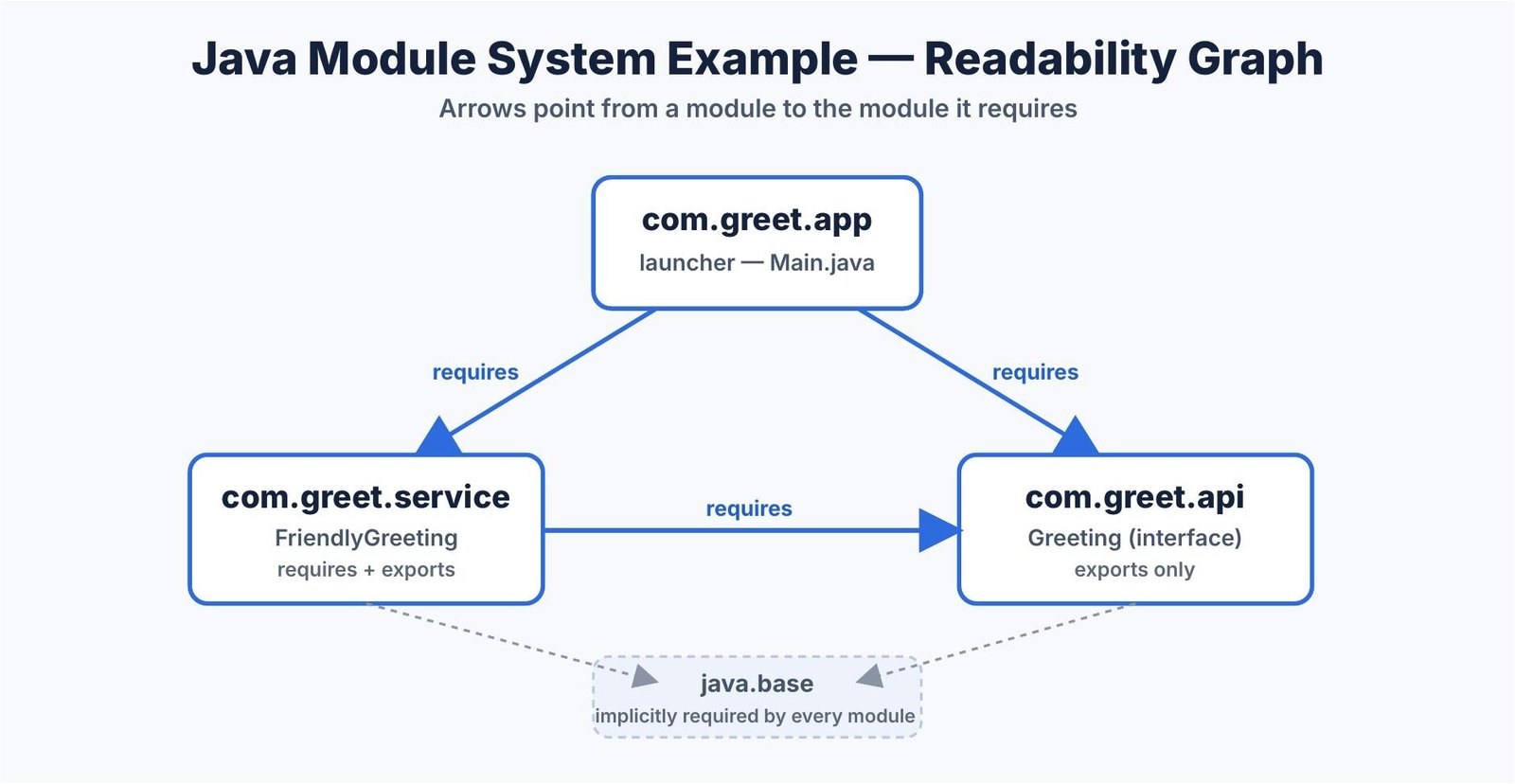
The JVM builds this graph at startup from every module-info it can find on the module path. Then it resolves the graph, confirms there are no missing modules, and only then starts your main method. A cycle between modules is rejected, so the graph always stays a clean one-way structure.
| Note Every module also implicitly reads java.base, the core module that holds java.lang, java.util and friends. You never write requires java.base, because the system adds it for you. It is the one dependency you get for free. |
Resolution is the step where the JVM turns your descriptors into a verified graph. It starts from your root module, then follows every requires edge outward. At each step it confirms the named module is present on the module path. The moment a required module is missing, resolution stops before any of your code runs.
This matters because it moves a whole class of failures to the front. In the old classpath world, a missing JAR often hid until the exact line that needed it executed. With modules, the same gap shows up at launch, in one clear message, every single time. You trade a late surprise for an early, predictable check.
Notice the pattern. Each rule exists to keep the graph clean and predictable. A clean graph is easy to reason about, and an easy graph is easy to maintain as the codebase grows.
People often ask whether the classpath is gone. It is not. Both still exist, and they behave very differently. Understanding the split saves you hours of confusion during migration.
When you pass –module-path, every JAR or folder there is treated as a module. Each one gets its boundaries enforced. The exports and requires rules apply fully.
When you pass the old –class-path, the code lands in the unnamed module. The unnamed module reads everything and exports everything, so it behaves like classic Java. This is the bridge that lets old libraries keep working while you modularise slowly.
So a project can run half on the module path and half on the classpath during a transition. The details of that mixed mode, including automatic modules, are a topic on their own, and I have given them a dedicated article rather than cramming them here.
When people meet modules for the first time, the same few errors show up again and again. Knowing them ahead of time turns a frustrating afternoon into a smooth one.
| 💡 Interview insight — Turn errors into a checklist When something will not compile or run under modules, read the error, then ask three questions in order. Did I require it? Did they export it? Is my module-info in the right place? Nine times out of ten the fix is one of those three. The actual migration errors, like the module-not-found family, are a big enough topic to deserve a troubleshooting guide of their own. |
You might run Java 17, 21 or 25 today, not Java 9. The module system still matters, and arguably matters more now. The JDK itself is fully modularised, so every time you use jlink to build a slim runtime, you are standing on JPMS. Many popular libraries, such as SLF4J and Jackson, now ship proper module descriptors too.
More to the point, the concepts never aged. Strong encapsulation, explicit dependencies and a resolved graph are the same ideas that guide clean architecture at any scale. Learning them on a three-module toy, as we did, gives you a mental model that scales straight up to a large codebase.
A: It is a Java 9 feature, also called JPMS, where each module names itself, declares the modules it requires, and declares the packages it exports. Anything a module does not export stays hidden, which gives you real encapsulation instead of a flat classpath where every public class is visible everywhere.
A: It sits at the module source root, directly above the package folders, not inside the package itself. For a module named com.greet.api, the file path is com.greet.api/module-info.java, while the actual classes live under com.greet.api/com/greet/api/.
A: Code on the module path (–module-path) is treated as real modules, so exports and requires rules are enforced. Code on the classpath (–class-path) lands in the unnamed module, which reads and exports everything, so it behaves like classic pre-Java-9 Java. Both still exist, which lets old libraries keep working during migration.
A: A type is accessible only when three things line up: the type is public, the package that holds it is exported by its module, and your module reads that other module with requires. Miss any one, usually the export or the requires, and access fails even though the class is public.
A: Yes. The JDK itself is fully modularised, so tools like jlink build slim runtimes directly on JPMS, and many libraries now ship module descriptors. More importantly, the core ideas of strong encapsulation, explicit dependencies, and a resolved dependency graph carry straight into every modern Java release.
We started with a flat, leaky classpath and ended with a tidy graph of three modules that compile, run and respect boundaries. Along the way you saw a full java module system example built from scratch, the requires and exports rules that drive it, and the three-part accessibility rule that decides what your code can touch.
Keep the mental model simple. A module names itself, declares what it reads, and declares what it shows. Everything else, from services to jlink images, is a layer on top of that one idea. Build the toy project yourself, break it on purpose by removing an export, and watch the compiler teach you the rule. That hands-on loop is the fastest way to make modules feel natural.