Java 27 JEP 537 Vector API (Twelfth Incubator): A Beginner’s Guide
-
Last Updated: October 17, 2026
-
By: javahandson
-
Series

A beginner-friendly guide to the JEP 537 Vector API in Java 27. Learn SIMD, lanes, species and masks — with simple code examples and when to use it.
Java 27 arrived in September 2026. It carries a feature that keeps showing up, release after release. That feature is the JEP 537 Vector API, now in its twelfth incubator round. Many developers read the word “incubator” and move on. That is a pity, because this API fixes a real and costly problem: slow number crunching.
Let me set the scene. Modern CPUs can process several numbers in one single step. Java, sadly, has long struggled to use that power cleanly. The Vector API is the fix. It lets you write fast, parallel maths in plain Java.
In this guide, we keep things beginner-friendly. We will cover what the API does and why it still incubates after twelve tries. Then we will write your very first vector program. You do not need a maths degree. If you can write a normal for loop, you are ready.
By the end, you will know:
Let us dive in.
First, let us understand the idea. The code comes later.
Your CPU is smarter than most loops give it credit for. It has wide registers that hold many numbers side by side. For example, a single 256-bit register can hold eight 32-bit floats at once.
SIMD stands for Single Instruction, Multiple Data. The name explains the trick nicely. One instruction acts on many values together. So rather than adding eight pairs one at a time, the chip adds all eight in one move.
This is not new hardware either. Intel and other vendors have shipped SIMD instructions for over 25 years. The widely used set on Intel chips today is called AVX. These instructions are genuinely fast. Reaching them cleanly from Java, though, has always been awkward.
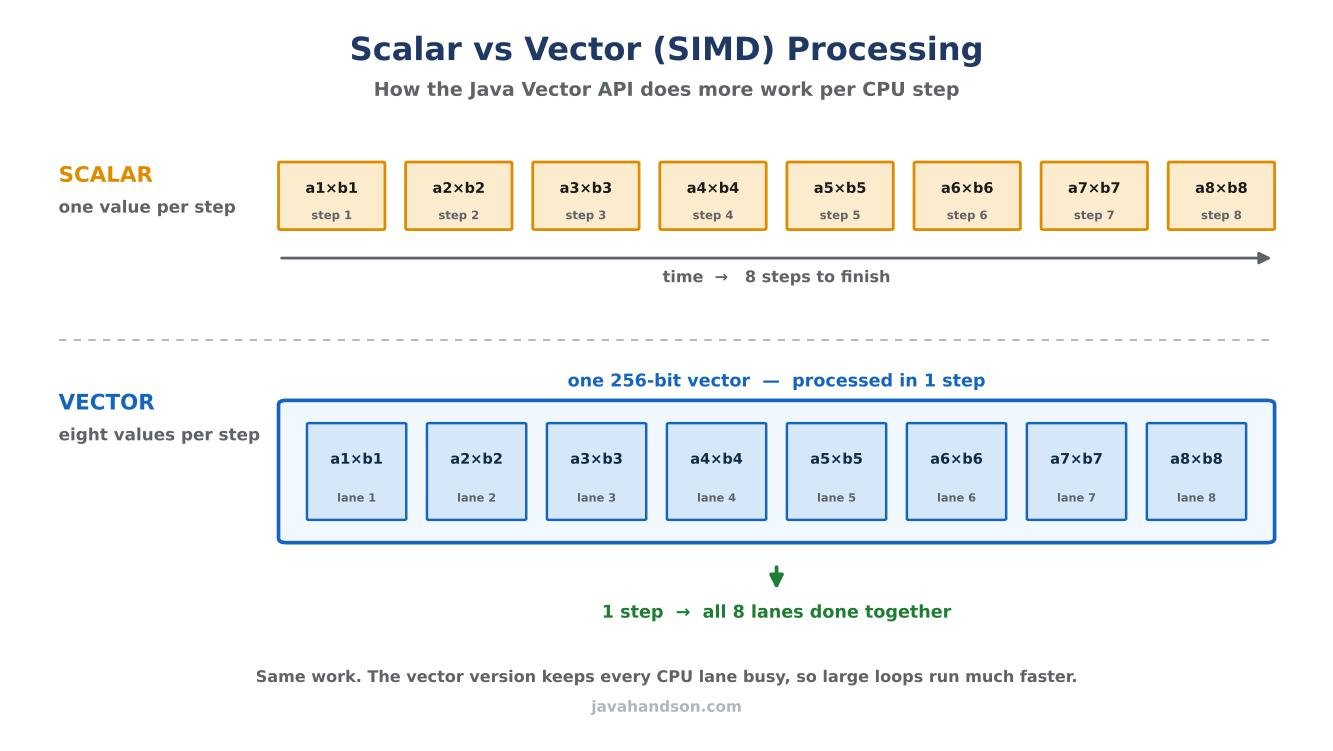
For years, Java relied on the JIT compiler here. HotSpot tries to spot loops it can speed up with SIMD on its own. People call this trick auto-vectorization.
It works, but only now and then. The compiler plays it very safe. When a loop looks even slightly tricky, it quietly drops back to plain, slow, one-at-a-time code. Worse still, it never warns you. Your program simply runs slower than the hardware allows.
As a result, you end up guessing. You rewrite the loop, run a benchmark, and hope the compiler agrees this time. Frankly, that is a painful way to chase performance. You want speed you can rely on, not speed by luck.
The Vector API changes who is in charge. Instead of hoping the compiler vectorizes your loop, you spell out the vector steps yourself. In other words, you tell the runtime exactly what you want.
You might say, in clear code, “load eight floats, multiply them, store the result”. The runtime then turns that into the best SIMD instructions for the CPU it runs on. If the chip supports wider vectors, your code uses them without any rewrite.
The official goals are easy to remember:
In short, you get predictable speed without dropping down to C or assembly. That is a big deal for Java shops.
Now let us talk about this specific release and what it means for you.
An incubator feature is a trial feature. It ships inside the JDK, but in a separate module. The team can change it freely between releases, based on real feedback. So nothing here is frozen yet.
JEP 537 is the twelfth such trial for the Vector API. That is a record. No other modern JDK feature has incubated for this long. Eleven earlier rounds shipped across JDK 16 through JDK 26. This twelfth one lands in JDK 27.
Here is the honest bit. JEP 537 brings no substantial implementation changes since JDK 25. The team simply re-incubated the API so it stays available while bigger work finishes elsewhere.
So should you care if nothing really changed? Yes, and for two good reasons.
First, “no change” is great news for early adopters. The API has settled down. Code you write against JEP 537 will likely look very similar to the final, graduated version. Your learning will not be wasted.
Second, remember that Java 27 is a non-LTS release. It shipped on 15 September 2026 and receives updates only until March 2027. JDK 25 remains the current long-term support release. The same incubator API also exists on 25. So you can learn it on 27 and still run production on the LTS line.
| 💡 Interview Insight Interviewers may ask, “Is the Vector API production-ready in Java 27?” The honest answer is no, not officially. It is still an incubating API in a non-LTS release, so it can change or even be removed. You may use it, but you must opt in with a module flag and accept that risk. Mention Project Valhalla as the real reason it has not graduated yet. |
Twelve rounds is unusual. Let me show the journey, then explain the delay.
The Vector API started life in JDK 16. Every release since has carried it forward. Here is the trail, round by round:
Notice the steady rhythm. One round arrives every six months, like clockwork. The API grew and matured over the years, yet it never graduated. Something clearly kept holding it back.
Here is the real reason, and it is actually interesting. The Vector API is waiting on another big project: Project Valhalla.
Today the API uses boxed types as stand-ins for primitives. A vector of 32-bit integers is written as Vector<Integer>, not Vector<int>. Java generics cannot hold primitives yet. So the team used the wrapper classes as a workaround.
That works, but it is not ideal. It feels slightly wrong, and it can cost performance. Once Valhalla brings value types and generics over primitives, the design can become cleaner and faster. The team wants to graduate the API with that final shape, not before. Therefore they keep re-incubating it until Valhalla is ready.
| 💡 Interview Insight A sharp question is, “Why has the Vector API not reached preview after so many years?” The answer is its dependency on Project Valhalla. The current design leans on box types like Vector<Integer>. The team plans to adopt Valhalla’s value types first, then promote the API from incubation to preview. Graduating early would lock in a design they already intend to replace. |
Before any code, learn four small words: lane, shape, species, and mask. Get these four, and the whole API suddenly feels easy.
Think of a vector as a tray with slots. Each slot holds exactly one number. These slots are called lanes.
A vector of eight floats has eight lanes. An operation like “multiply” then runs on every lane at once. That parallel work is where the speed comes from.
Shape is the total size of the vector in bits. Common shapes are 128-bit, 256-bit, and 512-bit.
The shape depends on the CPU. A 256-bit shape holding 32-bit floats gives you eight lanes. So the wider the shape, the more lanes, and the more work per step.
Species is the key concept to grasp. It bundles two things together: the element type and the shape. For example, “float with a 256-bit shape” is one species.
Normally you ask for the best species for the machine with SPECIES_PREFERRED. This keeps your code portable. The very same program then picks 512-bit lanes on a big server and 128-bit lanes on a small laptop.
A mask is a set of true-or-false flags, one per lane. It decides which lanes take part in an operation.
Masks are handy at the end of an array. Suppose seven numbers are left but your vector holds eight lanes. A mask switches off the empty eighth lane. That way you never read past the array.
Enough theory. Let us write some real code now.
The API lives in the jdk.incubator.vector module. Since it is an incubator, you must opt in. Add a flag both when you compile and when you run.
# Compile
javac --add-modules jdk.incubator.vector Main.java

# Run
java --add-modules jdk.incubator.vector Main
Then import the package inside your class:
import jdk.incubator.vector.*;
Skip these steps, and the code will not compile. The module stays switched off by default, on purpose. This reminds you that the feature is still experimental.
Let us multiply two float arrays, element by element. Here is the plain version everyone writes first.
void scalarMultiply(float[] a, float[] b, float[] c) {
    for (int i = 0; i < a.length; i++) {
        c[i] = a[i] * b[i];
    }
}
This code is correct and clear. However, it handles just one pair of numbers per step. On an eight-lane CPU, you waste seven lanes every single time. That is a lot of idle silicon.
Now the same work, but in blocks of several numbers. We pick the preferred species once, then loop in strides.
static final VectorSpecies<Float> SPECIES =
        FloatVector.SPECIES_PREFERRED;

void vectorMultiply(float[] a, float[] b, float[] c) {
    int i = 0;
    int upperBound = SPECIES.loopBound(a.length);

    for (; i < upperBound; i += SPECIES.length()) {
        FloatVector va = FloatVector.fromArray(SPECIES, a, i);
        FloatVector vb = FloatVector.fromArray(SPECIES, b, i);
        FloatVector vc = va.mul(vb);
        vc.intoArray(c, i);
    }

    // Tail: handle the leftover elements one by one
    for (; i < a.length; i++) {
        c[i] = a[i] * b[i];
    }
}
Let us read this slowly, line by line:
SPECIES_PREFERRED picks the best lane width for the current CPU.loopBound() returns the largest multiple of the lane count below the array length.fromArray() loads a block of floats from the array into a vector.mul() multiplies all lanes together in one step.intoArray() writes the result block back into the output array.The main loop jumps SPECIES.length() elements each time. On an eight-lane machine, it does eight multiplications per step. Multiply that across a huge array, and the saving adds up fast.
Arrays rarely divide evenly by the lane count. So some elements are left over at the end. The second loop above mops them up, one at a time.
There is a neater option too: masks. A masked loop processes the tail with vectors as well, using flags to ignore the empty lanes.
void vectorMasked(float[] a, float[] b, float[] c) {
    for (int i = 0; i < a.length; i += SPECIES.length()) {
        VectorMask<Float> m =
                SPECIES.indexInRange(i, a.length);
        FloatVector va = FloatVector.fromArray(SPECIES, a, i, m);
        FloatVector vb = FloatVector.fromArray(SPECIES, b, i, m);
        va.mul(vb).intoArray(c, i, m);
    }
}
Here indexInRange() builds a mask for each block. Full blocks get all lanes switched on. The final short block gets only its valid lanes on. One clean loop then handles everything, with no separate tail.
| 💡 Interview Insight Expect this one: “Why use SPECIES_PREFERRED instead of a fixed shape like SPECIES_512?” A fixed 512-bit shape will not vectorize on a CPU that supports only 256-bit vectors, so it quietly falls back to scalar code. SPECIES_PREFERRED adapts to the hardware at runtime, so one build runs well everywhere. Always pair it with loopBound() and length() so the loop tracks the real lane count. |
One useful addition came in JDK 25, and it carries straight into JDK 27. It is support for Float16, also called half precision.
Float16 is a 16-bit floating point number. It is smaller and less precise than a normal 32-bit float. In return, you fit twice as many values into the same register. That trade matters a lot in machine learning, where speed often beats exact precision.
So why mention it in a beginner guide? Because AI workloads lean heavily on half-precision maths. The Vector API moving toward solid Float16 support hints at its future. This API is being shaped, in part, for the AI era on the JVM.
This tool is powerful, yet it is not for every loop. Let me be clear about where it fits.
The API shines on heavy, repetitive number work over large arrays. Think of tasks like these:
In these cases, the same operation repeats millions of times. Vectorizing it can bring a real, measurable speed-up. That is exactly the sweet spot.
Do not reach for it by default, though. For most everyday code, it only adds complexity with no payoff.
My simple rule is this. Measure first, then decide. If a tight numeric loop is your real bottleneck, try the Vector API. Otherwise, keep your code simple and readable.
Let me close with a few lessons that save real debugging time.
SPECIES_PREFERRED for portable code. It adapts to each CPU on its own.loopBound(). Never hardcode a lane count.--add-modules jdk.incubator.vector. The code then refuses to compile.SPECIES_512 and getting slow scalar code on smaller CPUs.A: JEP 537 is the twelfth incubator round of the Java Vector API, shipped in JDK 27. It lets you write SIMD-style number crunching in plain Java, which the runtime compiles to fast vector instructions. It is a re-incubation with no substantial implementation change since JDK 25.
A: Not officially. It is still an incubating API, so it can change or be removed between releases. You can use it, but you must opt in with the module flag and accept that risk. Java 27 is also a non-LTS release, so most teams run it as an experiment, not in production.
A: It is waiting on Project Valhalla. The current design uses box types like Vector<Integer> as stand-ins for primitives. Once Valhalla brings value types and generics over primitives, the team will adopt them and promote the API from incubation to preview.
A: Add the incubator module flag when you compile and run: –add-modules jdk.incubator.vector. Then import the package with import jdk.incubator.vector.*; in your class. Without the flag, the code will not compile.
A: SPECIES_PREFERRED picks the best vector width for the CPU the code runs on. It keeps your code portable, so the same build uses 512-bit lanes on a big server and 128-bit lanes on a small laptop. Always pair it with loopBound() and length() so the loop tracks the real lane count.
A: Use it for heavy, repetitive maths over large arrays — image or audio processing, scientific or financial computations, and machine learning operations like dot products. Skip it for small arrays or plain business logic, where the setup cost outweighs the benefit. Always measure before committing.
The JEP 537 Vector API is a quiet but important part of Java 27. It lets you write fast, parallel number crunching in clean Java, with no C and no assembly. Under the hood, it maps your code to SIMD instructions like AVX.
Here is the quick recap:
SPECIES_PREFERRED and loopBound() keep your code portable across CPUs.Start small. Take one hot loop, write a vector version, and benchmark both. That single experiment will teach you more than any article. And when the API finally graduates, you will already be ready for it.