LocalDate vs LocalDateTime in Java: Clear Guide with Examples
-
Last Updated: October 12, 2026
-
By: javahandson
-
Series

LocalDate vs LocalDateTime in Java, with examples. What each class holds, how they differ, and how to convert LocalDate, LocalTime and LocalDateTime.
If you are learning the Java 8 date classes, one question comes up fast. What is the real difference of LocalDate vs LocalDateTime in Java? They look similar, yet they serve different needs.
In simple words, LocalDate holds only a date. Meanwhile, LocalDateTime holds a date and a time together. So picking the wrong one leads to messy code and bugs.
In this guide, we will keep things beginner friendly. First, we will understand each class on its own. Then we will compare them side by side. After that, you will always know which one to use.
We will also cover LocalTime, since it completes the trio. Moreover, we will see how to convert between all three. By the end, the whole group will feel easy.
I have used these classes across many projects. Honestly, the choice is simpler than it first looks. So do not worry if it feels fuzzy right now. By the end, the rule will be clear.
By the end of this guide, you will know:
Let us begin with the simplest class of the three.
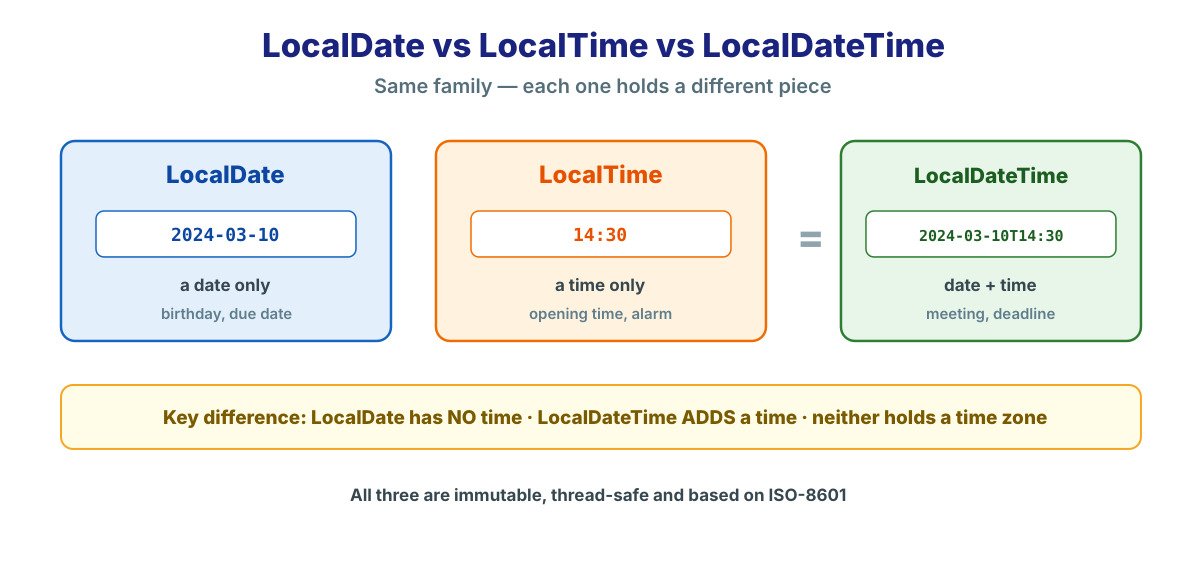
LocalDate represents a date with no time and no zone. Think of a birthday, a due date or a holiday. So it answers the question “which day?” and nothing more.
It lives in the java.time package and arrived with Java 8. Like every class there, it is immutable and thread-safe. Therefore you can share it freely without any worry.
Think of all the dates that carry no time. A birthday, a joining date or a bill due date all fit. So LocalDate is the right home for each of them. In fact, it is the class you will reach for the most.
There are a few easy ways to make a LocalDate. For the current date, you call now(). For a fixed date, you call of() with the parts.
LocalDate today = LocalDate.now();            // e.g. 2024-03-10
LocalDate due = LocalDate.of(2024, 3, 25);   // year, month, day
LocalDate parsed = LocalDate.parse("2024-03-25");
Notice the month is a normal number here. So March is 3, not 2. As a result, the old zero-based month trap is gone for good.
You can pull out any part of the date with simple getters. For instance, getYear() and getDayOfWeek() are easy to read. Moreover, each one returns a clear value.
LocalDate date = LocalDate.of(2024, 3, 10);
System.out.println(date.getYear());        // 2024
System.out.println(date.getMonth());       // MARCH
System.out.println(date.getDayOfWeek());   // SUNDAY
So reading a date needs no manual math. Each getter has a clear, readable name. Moreover, the values come back ready to use.
LocalDate also makes date math simple. For example, you can add days, weeks or months. Still, remember that each call returns a new date.
LocalDate date = LocalDate.of(2024, 3, 10);
LocalDate nextWeek = date.plusWeeks(1);    // 2024-03-17
LocalDate lastMonth = date.minusMonths(1); // 2024-02-10
boolean before = date.isBefore(nextWeek);  // true
So you never count days by hand again. The class handles month lengths and leap years for you. As a result, tricky edge cases just work.
LocalTime represents a time of day with no date. Think of a shop that opens at 09:00. So it answers the question “what time?” and nothing more.
This class suits repeating daily times very well. For example, an alarm or a shift start fits nicely. Because there is no date attached, the value stays simple.
LocalTime opening = LocalTime.of(9, 0);     // 09:00
LocalTime now = LocalTime.now();            // e.g. 14:30:15
boolean open = now.isAfter(opening);        // true
You can also add or subtract time with ease. For instance, plusHours() returns a new time. Still, remember that it never changes the original value.
LocalTime t = LocalTime.of(9, 30);
LocalTime later = t.plusHours(2);     // 11:30
int hour = t.getHour();               // 9
int minute = t.getMinute();           // 30
One more thing is worth noting here. LocalTime can hold seconds and nanoseconds too. However, you can ignore those parts when you do not need them.
So LocalTime is the lightest of the three. It carries no date at all. As a result, it fits any value that repeats each day. For instance, a daily cut-off at 17:00 is a perfect match.
You will often pair LocalTime with a date later. That is exactly how LocalDateTime is built. So think of LocalTime as one half of the full value.
LocalDateTime joins a date and a time into one value. However, it still carries no time zone. So it is a plain, local wall-clock value, like a meeting slot.
In practice, most app logic lives here. A booking, a deadline or an appointment all fit well. Therefore you will use this class very often.
Think of it as the two local classes combined. It is a LocalDate and a LocalTime together. So it gives you the full picture, minus the time zone.
You can build a LocalDateTime in several ways. For a quick value, pass all the parts to of(). Alternatively, you can join a LocalDate and a LocalTime.
LocalDateTime meeting =
        LocalDateTime.of(2024, 3, 10, 14, 30);   // 2024-03-10T14:30

LocalDate d = LocalDate.of(2024, 3, 10);
LocalTime t = LocalTime.of(14, 30);
LocalDateTime joined = LocalDateTime.of(d, t);   // same result
Both styles give the same value. So pick whichever reads better for you. Often, joining a date and time makes the intent clearer.
A LocalDateTime exposes both date and time parts. So getDayOfMonth() and getHour() both work. Moreover, you can pull out the date or time as a whole.
LocalDateTime dt = LocalDateTime.of(2024, 3, 10, 14, 30);
System.out.println(dt.getHour());        // 14
System.out.println(dt.toLocalDate());    // 2024-03-10
System.out.println(dt.toLocalTime());    // 14:30
Now we reach the heart of the matter. The core difference is simple. LocalDate has no time, while LocalDateTime adds a time.
So the question to ask is this. Do you care about the time of day? If yes, use LocalDateTime. If no, use LocalDate.
The table below sums up the differences. Keep it handy while you decide. It covers the points that matter most in daily work.
| Feature | LocalDate | LocalDateTime |
|---|---|---|
| Holds a date | Yes | Yes |
| Holds a time | No | Yes |
| Holds a time zone | No | No |
| Example value | 2024-03-10 | 2024-03-10T14:30 |
| Good for | Birthday, due date | Meeting, deadline |
So the only real gap is the time part. Both stay local, with no zone. For a zone-aware value, you would reach for ZonedDateTime instead.
Let us make this concrete with two examples. A library due date needs only the day, so use LocalDate. A doctor’s appointment needs a day and a time, so use LocalDateTime. In each case, you match the type to the real need.
Many beginners use LocalDateTime for a plain date. However, that adds a time of day you do not need. As a result, two “equal” dates may not match, because their times differ.
// storing a birthday as LocalDateTime is a mistake
LocalDateTime birthday = LocalDateTime.of(1995, 8, 15, 0, 0);
// the 00:00 time is noise — a birthday has no time

// better:
LocalDate birthdayBetter = LocalDate.of(1995, 8, 15);
So match the type to the real idea. A birthday has no time, so use LocalDate. This small habit saves many comparison bugs later.
| 💡 Interview Insight A common interview question is the difference between LocalDate and LocalDateTime. Keep the answer sharp. LocalDate holds only a date, while LocalDateTime holds a date and a time. Neither one holds a time zone, so both are local, wall-clock values. |
Both classes are called “Local” for a reason. The word means a wall-clock value with no zone. So 14:30 means 14:30 anywhere, with no offset attached.
This keeps the two classes simple and safe. For most internal logic, you do not need a zone. However, when you cross zones, you switch to ZonedDateTime instead.
Here is a handy way to think about it. A meeting invite that says “3 PM” is local. The actual global instant depends on the reader’s zone. So LocalDateTime models the wall clock, not the timeline.
Often you have one type and need another. Luckily, the conversions are short and clear. So let us go through the common ones. Each one is a single, readable method call.
To add a time to a date, use atTime() or atStartOfDay(). The first lets you pick the time. The second sets the time to midnight.
LocalDate date = LocalDate.of(2024, 3, 10);

LocalDateTime atNoon = date.atTime(12, 0);     // 2024-03-10T12:00
LocalDateTime atMidnight = date.atStartOfDay(); // 2024-03-10T00:00
To drop the time or the date, use the toLocal methods. So toLocalDate() keeps the date. Similarly, toLocalTime() keeps the time.
LocalDateTime dt = LocalDateTime.of(2024, 3, 10, 14, 30);

LocalDate datePart = dt.toLocalDate();   // 2024-03-10
LocalTime timePart = dt.toLocalTime();   // 14:30
You can also combine a date and a time directly. For this, LocalDate has an atTime() that takes a LocalTime. So the two merge into a LocalDateTime.
LocalDate d = LocalDate.of(2024, 3, 10);
LocalTime t = LocalTime.of(14, 30);
LocalDateTime dt = d.atTime(t);          // 2024-03-10T14:30
So conversions in this family are smooth. Each class knows how to reach the others. As a result, you rarely write any manual glue code.
Sometimes a local value is not enough. For a global event, the zone matters a lot. So you move from LocalDateTime to ZonedDateTime.
LocalDateTime local = LocalDateTime.of(2024, 3, 10, 14, 30);
ZonedDateTime zoned = local.atZone(ZoneId.of("Asia/Kolkata"));
// now it is 14:30 in India, a real point on the global timeline
So atZone() attaches a zone to a local value. However, use it only when you truly need a zone. For most app logic, the local classes are simpler and enough.
Beyond storing dates, you often display and compare them. Both jobs are easy across all three classes. So let us look at each one briefly.
To show a date nicely, use a DateTimeFormatter. So you define a pattern once and apply it. Moreover, the same formatter works across threads safely.
DateTimeFormatter fmt =
        DateTimeFormatter.ofPattern("dd MMM yyyy");

LocalDate date = LocalDate.of(2024, 3, 10);
System.out.println(date.format(fmt));   // 10 Mar 2024
The same idea works for LocalDateTime too. You just add time letters to the pattern. For instance, HH:mm shows the hour and minute.
DateTimeFormatter dtFmt =
        DateTimeFormatter.ofPattern("dd MMM yyyy, HH:mm");

LocalDateTime dt = LocalDateTime.of(2024, 3, 10, 14, 30);
System.out.println(dt.format(dtFmt));   // 10 Mar 2024, 14:30
You can also go the other way, from text to a date. So parse() reads a String into a value. However, the text must match the formatter’s pattern.
DateTimeFormatter fmt =
        DateTimeFormatter.ofPattern("dd-MM-yyyy");

LocalDate date = LocalDate.parse("25-03-2024", fmt); // 2024-03-25Comparing dates is clean and readable. So isBefore(), isAfter() and isEqual() answer the usual questions. Also, these classes implement Comparable for sorting.
LocalDate a = LocalDate.of(2024, 3, 10);
LocalDate b = LocalDate.of(2024, 3, 25);

System.out.println(a.isBefore(b));   // true
System.out.println(a.isAfter(b));    // false
So you avoid error-prone manual checks. The method names say exactly what they do. In turn, your code reads almost like a sentence.
These classes ship with many useful helpers. So you rarely need outside libraries. Let us look at a few that come up all the time.
A very common task is counting days between dates. For this, ChronoUnit does the job cleanly. So you get an exact number back.
import java.time.temporal.ChronoUnit;

LocalDate start = LocalDate.of(2024, 3, 1);
LocalDate end = LocalDate.of(2024, 3, 25);

long days = ChronoUnit.DAYS.between(start, end);  // 24
So you never loop through dates to count them. The method handles month lengths for you. Moreover, it also works for weeks, months and years.
Sometimes you need the start or end of a month. For that, TemporalAdjusters has ready helpers. So the edge cases stay correct.
import static java.time.temporal.TemporalAdjusters.*;

LocalDate date = LocalDate.of(2024, 3, 10);
LocalDate first = date.with(firstDayOfMonth());  // 2024-03-01
LocalDate last = date.with(lastDayOfMonth());    // 2024-03-31
Notice that March has 31 days here. However, February would give 28 or 29 correctly. So leap years are handled with no extra code.
You can also ask simple yes-or-no questions. For instance, isLeapYear() checks the year. Similarly, getDayOfWeek() tells you the weekday.
LocalDate date = LocalDate.of(2024, 3, 10);
System.out.println(date.isLeapYear());            // true
System.out.println(date.getDayOfWeek());          // SUNDAY
System.out.println(date.lengthOfMonth());         // 31
So these helpers remove a lot of fiddly logic. You ask a clear question and get a clear answer. As a result, your code stays short and correct.
Here is a simple rule to end all doubt. First, ask what the value really means. Then pick the class that matches that idea.
So do not overthink the choice. Match the type to the real-world idea. That habit keeps your code clean and your comparisons correct.
One more tip helps here. Try saying the value out loud in plain words. If you naturally mention a time, you likely need LocalDateTime. If you do not, then LocalDate is enough.
Let us see all three classes working together. Say we store an event date, add a start time, and print it.
LocalDate eventDate = LocalDate.of(2024, 3, 10);
LocalTime startTime = LocalTime.of(18, 0);
LocalDateTime start = eventDate.atTime(startTime);

System.out.println("Event date: " + eventDate);  // 2024-03-10
System.out.println("Starts at:  " + start);       // 2024-03-10T18:00
So each class does one clear job. The date stays a date, and the time stays a time. Together, they form the full start value with no fuss.
Let us push the example a little further. Say we want the event, plus a reminder one day before. So we reuse the same classes with simple math.
LocalDate eventDate = LocalDate.of(2024, 3, 10);
LocalTime startTime = LocalTime.of(18, 0);
LocalDateTime start = eventDate.atTime(startTime);

LocalDateTime reminder = start.minusDays(1);   // day before
System.out.println("Reminder: " + reminder);   // 2024-03-09T18:00
Notice how clean the reminder logic reads. We simply subtract one day from the start. Moreover, the time part stays the same automatically.
This is the whole point of the new classes. They let you express ideas in plain steps. So the code matches how you would describe it out loud.
| 💡 Interview Insight Interviewers may ask which class to use for a user’s birthday. The right answer is LocalDate, since a birthday has no time of day. Using LocalDateTime would add a meaningless 00:00 time, which can cause equality bugs during comparisons. |
Let me share a few habits from real projects. They keep your date code clean and bug-free. So try to follow them from day one.
That immutability point is worth repeating. A call like date.plusDays(1) returns a new date. So you must store that result, or the change is lost.
A: LocalDate holds only a date, like 2024-03-10. LocalDateTime holds a date and a time together, like 2024-03-10T14:30. Neither one holds a time zone, so both are local wall-clock values.
A: No. LocalDate holds only a date and has no hour or minute. If you need a time of day, use LocalDateTime instead.
A: Use atTime() to add a specific time, or atStartOfDay() to set the time to midnight. For example, date.atTime(14, 30) gives a LocalDateTime at 14:30.
A: Use LocalDate, since a birthday has no time of day. Using LocalDateTime would add a meaningless 00:00 time, which can cause equality bugs when comparing dates.
A: No, it does not, despite holding a time. It is a plain wall-clock value with no zone. Therefore, for zone-aware values, you use ZonedDateTime.
A: Call toLocalDate() on the value. It drops the time and keeps the date. Likewise, toLocalTime() keeps the time and drops the date.
A: In practice, the difference is tiny and rarely matters. However, LocalDate stores less data, since it skips the time. So for a plain date, it is the cleaner and lighter choice anyway.
The difference of LocalDate vs LocalDateTime in Java is really simple. LocalDate holds a date, while LocalDateTime adds a time. Neither carries a time zone, so both stay local.
Here is a quick recap of what we covered:
So start using the right class in your own code today. Pick LocalDate for dates and LocalDateTime for date-times. Over time, this choice becomes second nature.
If you want the bigger picture, read the pillar guide next. It maps the whole java.time package in one place. From there, each class links to its own deep dive. So you can learn the family step by step.