Java 8 Date and Time API: A Beginner’s Guide to java.time
-
Last Updated: October 12, 2026
-
By: javahandson
-
Series

Beginner’s guide to the Java 8 Date and Time API (java.time): why Date and Calendar broke, and how LocalDate, ZonedDateTime and Instant replace them.
Handling dates in Java used to be painful. The old Date and Calendar classes were confusing, bug-prone and hard to read. The Java 8 Date and Time API fixed all of this with a fresh start. It lives in the java.time package.
In this guide, we will keep things simple and beginner friendly. First, we will see why the old classes were so broken. Then we will meet the new classes one by one. Finally, you will know which class to use and when.
I have shipped a lot of date-heavy code in banking systems. So I have felt the old pain first-hand. Honestly, the new API is a big relief. It removes guesswork and makes the code say what it means.
This is also a pillar article. So it gives you the full map of the package. Then each linked article goes deeper into one part. Think of this page as your starting point.
By the end of this guide, you will know:
Let us start with the problem the new API was built to solve.
Before Java 8, most code used java.util.Date and java.util.Calendar. They worked, but they had deep design flaws. So these flaws caused real bugs in production. So the Java team decided to start over.
Let us walk through the biggest problems. Each one looks small on its own. Together, though, they made date handling a daily headache.
The old Date object could be changed after creation. So one part of your code could quietly change a date held by another part. As a result, this led to strange, hard-to-trace bugs.
Of course, shared mutable state is always risky. In a web app, two threads might touch the same Date. As a result, you could get wrong values with no clear cause. Worse, the bug often appeared only under heavy load.
To stay safe, people copied Date objects everywhere. However, those defensive copies cluttered the code. They also slowed things down for no real gain. Clearly, the design was pushing work onto every developer.
Here is the classic trap. In the old Calendar, January is month 0, not month 1. So December is 11, not 12. Naturally, countless developers got this wrong.
// old API: you must remember months are 0-based
Calendar cal = Calendar.getInstance();
cal.set(2024, 0, 10);   // 0 == January, not February
Date date = cal.getTime();
You had to stop and count every single time. So one off-by-one slip gave you the wrong month. Days, on the other hand, started at 1, which made it even more confusing.
Thus this mixed counting caused subtle date errors. For instance, reports came out a month off. Reminders fired on the wrong date. Naturally, these bugs were easy to miss in testing.
To format old dates, people used SimpleDateFormat. However, that class is not thread-safe. Its own Java documentation warns you to use a separate instance per thread.
Yet many teams missed this warning. So they shared one formatter across threads, often as a static field. Under load, it then returned garbled or wrong dates. This was a famous source of flaky, random-looking bugs.
So the usual fix was to add synchronization or thread-locals. Still, that was extra code for a basic task. All you wanted was to print a date. Instead, you had to think about concurrency.
Beyond these, the old API mixed too many ideas. A Date was really a timestamp, yet it had year and month methods, many now deprecated. Time zones were handled awkwardly. In short, the design fought you at every step.
For example, there was no clean type for a date without a time. There was also no simple type for a time without a date. So you bent Date to do jobs it was never meant for. Reading such code later was never fun.
Let me give you a real example. On one banking project, a report ran a month early for a while. As it turned out, the cause was a zero-based month in old Calendar code. Nobody spotted it for days, since the dates looked almost right.
After the switch to java.time, that whole class of bug vanished. Months were now plain numbers. Dates were now immutable. As a result, the team stopped firefighting date issues.
The lesson here is bigger than one bug. A good API prevents mistakes by design. So it does not just help when you read the docs. Instead, it guides you even when you forget them.
| 💡 Interview Insight A common interview question is why java.time replaced the old Date and Calendar. Give three solid reasons: the old classes were mutable, Calendar months were zero-based, and SimpleDateFormat was not thread-safe. The java.time classes fix all three, since they are immutable and thread-safe. |
The Java 8 Date and Time API was designed to be clear and safe. It took ideas from the popular Joda-Time library. So the whole package feels modern and predictable. Let us look at its three big wins.
Every class in java.time is immutable and thread-safe. Once you create an object, it never changes. Instead, each method returns a brand new object.
LocalDate today = LocalDate.now();
LocalDate nextWeek = today.plusDays(7);

// today is unchanged; plusDays returned a new date
System.out.println(today);     // e.g. 2024-03-10
System.out.println(nextWeek);  // e.g. 2024-03-17
This one change removes a whole class of bugs. You can share these objects freely across threads. So there is no hidden state to worry about. Also, defensive copies are no longer needed.
First, the class names say exactly what they hold. A LocalDate is just a date. A LocalTime is just a time. Therefore your code reads almost like plain English.
Still, this clarity matters more than it sounds. For instance, a new teammate can guess what each type does. So code reviews get faster. In turn, fewer bugs slip through.
The classes follow the ISO-8601 calendar standard by default. So a date prints as 2024-03-10, and a time as 10:15:30. This format is sortable and understood worldwide.
A sortable format is a quiet superpower. So you can order dates as plain text and still get the right sequence. Moreover, the format avoids the day-month-year confusion between countries.
Besides safety, the API gives you handy methods everywhere. For example, you can add days, compare dates, or extract the day of the week. Moreover, the method names are easy to guess.
LocalDate date = LocalDate.of(2024, 3, 10);
System.out.println(date.getDayOfWeek());    // SUNDAY
System.out.println(date.isLeapYear());      // true
System.out.println(date.plusMonths(1));     // 2024-04-10
So common tasks become one-liners. Instead of manual math, you call a clear method. As a result, your code stays short and readable.
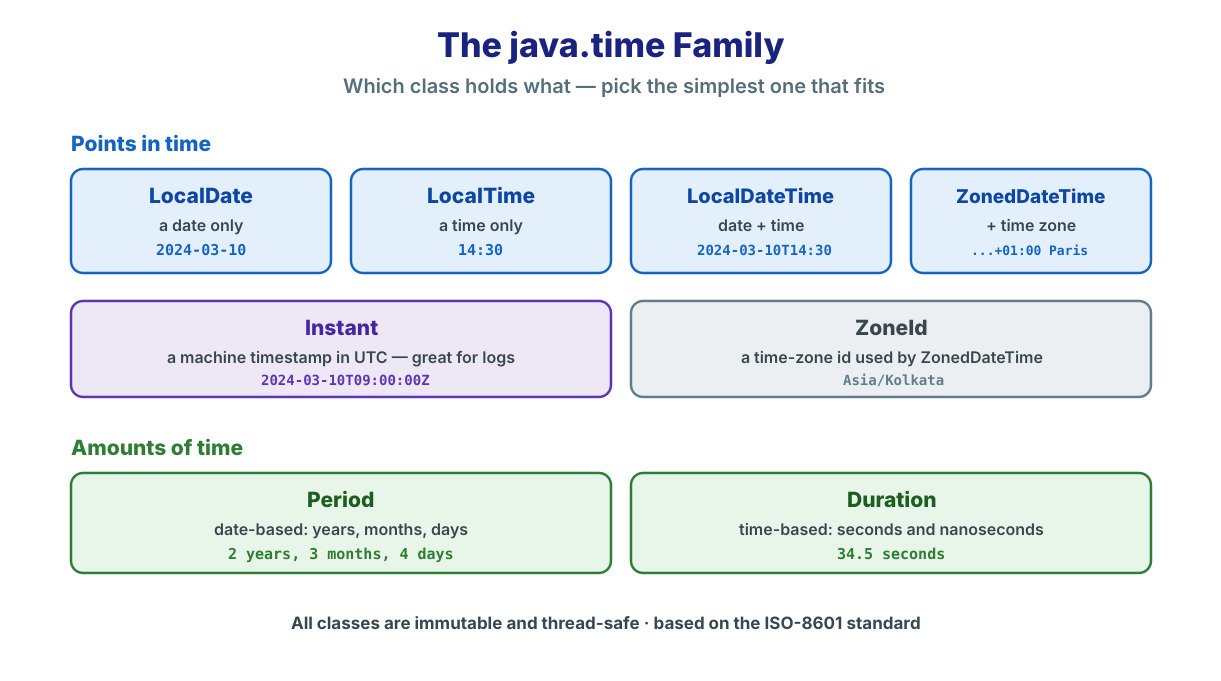
The java.time package has many classes. However, you only need a handful to start. Let us meet each core class in plain words. We will add a tiny example for each one.
LocalDate holds a date with no time and no zone. Think of a birthday or a holiday. It is the class you reach for most often.
LocalDate birthday = LocalDate.of(1995, 8, 15);  // 1995-08-15
LocalDate today = LocalDate.now();
boolean isBirthday = birthday.getMonthValue() == today.getMonthValue()
        && birthday.getDayOfMonth() == today.getDayOfMonth();
Also, notice that the month here is a normal number. August is 8, not 7. So the zero-based trap is finally gone. The code also reads just as you would say it aloud.
LocalTime holds a time of day with no date. Think of a shop that opens at 09:00. It simply does not care which day it is.
LocalTime opening = LocalTime.of(9, 0);   // 09:00
LocalTime now = LocalTime.now();
boolean isOpen = now.isAfter(opening);
So this class is perfect for recurring daily times. An alarm, a shift start or a cut-off time all fit well. Because there is no date, the value stays simple.
LocalDateTime joins a date and a time together. Still, it carries no time zone. Use it for an event at a known local time, like a meeting.
LocalDateTime meeting = LocalDateTime.of(2024, 3, 10, 14, 30);
// 2024-03-10T14:30
LocalDateTime later = meeting.plusHours(2);  // 16:30 same day
In practice, most everyday app logic lives here. It covers appointments, deadlines and schedules nicely. Since there is no zone, it stays easy to reason about.
ZonedDateTime adds a time zone to the mix. So it can say 2:30 PM in Paris, not just 2:30 PM. Use it when the zone truly matters, like a flight time.
ZonedDateTime parisTime =
        ZonedDateTime.now(ZoneId.of("Europe/Paris"));

ZonedDateTime tokyoTime =
        parisTime.withZoneSameInstant(ZoneId.of("Asia/Tokyo"));
Time zones add real complexity, though. They bring daylight saving and offset rules with them. So use a zone only when you need it. For most internal logic, a plain LocalDateTime is simpler.
Instant marks a single point on the timeline in UTC. It is great for logs, timestamps and measuring gaps. Machines love it, since it is just a count from the epoch.
Instant now = Instant.now();        // e.g. 2024-03-10T09:00:00Z
Instant later = now.plusSeconds(60);
In fact, you will see Instant in logging and auditing a lot. It answers “when exactly did this happen?” across the globe. Because it is in UTC, two servers always agree on it.
Each class offers a few simple ways to create a value. For a current value, you call now(). For a fixed value, you call of() with the parts. Also, you can parse a value straight from text.
LocalDate today = LocalDate.now();             // current date
LocalDate fixed = LocalDate.of(2024, 3, 10);  // from parts
LocalDate parsed = LocalDate.parse("2024-03-10");  // from text
Reading parts back is just as easy. So you call getYear(), getMonthValue() or getDayOfMonth(). Moreover, each getter returns a plain number, with no surprises.
You can also compare two values with ease. For instance, isBefore() and isAfter() answer the common questions. As a result, you rarely write manual comparison logic.
Time zones live in a class called ZoneId. It holds a region name like Europe/Paris or Asia/Kolkata. So a ZonedDateTime is really a LocalDateTime plus a ZoneId.
ZoneId india = ZoneId.of("Asia/Kolkata");
ZonedDateTime nowInIndia = ZonedDateTime.now(india);

// list is long; Java reads zones from the system database
Set<String> allZones = ZoneId.getAvailableZoneIds();
Java keeps the zone rules updated through its time-zone database. So daylight saving shifts are handled for you. Still, keep zones at the display edge, and store time in UTC when you can.
So far, every class marks a point in time. Sometimes, though, you want a length of time instead. For that, java.time gives you Period and Duration. They sound alike, yet they do different jobs.
Period measures an amount in years, months and days. So it is date-based and reads in human units. Use it to answer “how many days until my holiday?”
Period gap = Period.between(
        LocalDate.of(2024, 1, 1),
        LocalDate.of(2024, 3, 10));
System.out.println(gap.getMonths());  // 2
System.out.println(gap.getDays());    // 9
So Period fits anything you say in calendar terms. A loan tenure, an age or a notice period all work. Because it thinks in months and days, it matches how people talk.
Duration measures an amount in seconds and nanoseconds. So it is time-based, not date-based. Use it to answer “how long did this task take?”
Instant start = Instant.now();
// ... some work ...
Instant end = Instant.now();
Duration took = Duration.between(start, end);
System.out.println(took.toMillis() + " ms");
Similarly, Duration shines for machine-level timing. Think of timeouts, delays and performance checks. Since it counts exact seconds, it is precise down to nanoseconds.
The two are not the same, and the gap matters. Period thinks in calendar units like days. Duration thinks in exact seconds. We cover this fully in the Period vs Duration article.
Here is a simple way to remember it. Use Period when a human would say the amount. Use Duration when a stopwatch would measure it.
So the choice is usually obvious once you ask that question. Moreover, each class builds easily with of() methods. For instance, Period.ofWeeks(2) and Duration.ofSeconds(30) read clearly.
You will often turn a date into text, or text into a date. For both jobs, java.time gives you DateTimeFormatter. Best of all, it is immutable and thread-safe.
DateTimeFormatter fmt =
        DateTimeFormatter.ofPattern("dd-MM-yyyy");

LocalDate date = LocalDate.of(2024, 3, 10);
String text = date.format(fmt);          // "10-03-2024"

LocalDate back = LocalDate.parse("10-03-2024", fmt);
Notice the big win over SimpleDateFormat. One formatter can now be shared safely across threads. So you can define it once as a constant. We go deeper in the DateTimeFormatter article.
Also, the pattern letters are easy to learn. For example, dd is the day, MM is the month, and yyyy is the year. Java also ships ready-made formatters for common ISO styles.
With so many classes, beginners often freeze. So here is a simple rule. Pick the simplest class that still fits your need. The table below makes the choice quick.
| You want to store… | Use this class | Example |
|---|---|---|
| A date only | LocalDate | A birthday, a due date |
| A time only | LocalTime | A shop’s opening time |
| A date and time | LocalDateTime | A local meeting slot |
| A date, time and zone | ZonedDateTime | A flight departure |
| A machine timestamp | Instant | A log entry, an event time |
| A date-based length | Period | Days until a holiday |
| A time-based length | Duration | How long a task ran |
The official docs give the same advice. Start with the simplest type that models your domain. Then add a time zone only when you truly need one. That habit keeps your code clean and clear.
Beginners often overthink this choice. However, the table above settles most cases in seconds. So do not reach for ZonedDateTime by default. Instead, add complexity only when the problem truly asks for it.
Here is one more quick tip. A birthday is a date, so use LocalDate. A server log is a timestamp, so use Instant. Once you match the type to the real-world idea, the rest falls into place.
| 💡 Interview Insight Interviewers often ask when to use LocalDateTime versus Instant. Keep it simple. Use LocalDateTime for a human, local wall-clock value with no zone. Use Instant for a machine timestamp in UTC, like a log time or an event on the global timeline. |
In real projects, you rarely start on a clean slate. Often, older code still returns a java.util.Date. So you need a bridge between the old and new worlds. Luckily, java.time makes this easy.
The usual path goes through Instant. First, turn the old Date into an Instant. Then attach a zone to reach a local type. This keeps the conversion clear and correct.
Date legacy = new Date();                 // old API
Instant instant = legacy.toInstant();     // bridge to java.time

LocalDateTime local = instant
        .atZone(ZoneId.systemDefault())
        .toLocalDateTime();
Notice that Instant is the meeting point. The old Date is really a timestamp, and so is Instant. Therefore the two map onto each other cleanly.
Sometimes an old library still wants a java.util.Date. In that case, you convert the other way. Again, Instant sits in the middle of the trip.
LocalDateTime local = LocalDateTime.now();
Instant instant = local
        .atZone(ZoneId.systemDefault())
        .toInstant();

Date legacy = Date.from(instant);         // back to old API
So keep these bridges at the edges of your code. Convert as data comes in, and again as it leaves. In between, use only java.time. A separate article covers every conversion in detail.
This edge-only rule keeps your core logic clean. Inside your app, every date stays modern and safe. Meanwhile, the messy conversions sit in one small layer. As a result, the old API never leaks into your business code.
Let us tie it together with a tiny example. Say we book a slot and print a friendly line for the user.
LocalDate date = LocalDate.of(2024, 3, 10);
LocalTime time = LocalTime.of(14, 30);
LocalDateTime slot = LocalDateTime.of(date, time);

DateTimeFormatter fmt =
        DateTimeFormatter.ofPattern("EEE, dd MMM yyyy 'at' HH:mm");

System.out.println("Your slot: " + slot.format(fmt));
// Your slot: Sun, 10 Mar 2024 at 14:30
See how readable that is. Each class does one clear job. Also, nothing here can be changed by accident. That is the whole spirit of the new API.
Now try reading the same logic in the old API. You would juggle a Calendar and a SimpleDateFormat. You would also watch out for zero-based months. The new version simply reads better.
Let us compare the two styles directly. The difference jumps out at once. Here is the same idea in both worlds.
| Task | Old API | New API |
|---|---|---|
| Today’s date | new Date() (also has time) | LocalDate.now() |
| Set a date | cal.set(2024, 0, 10) (0 = Jan) | LocalDate.of(2024, 1, 10) |
| Add days | manual Calendar math | date.plusDays(7) |
| Thread-safe format | needs extra care | DateTimeFormatter, safe by default |
| Changeable? | mutable, risky | immutable, safe |
So the new column is shorter and clearer every time. Moreover, it carries no hidden traps. That is why teams move to java.time and rarely look back.
Let me share a few habits from real projects. They will save you time and bugs. Keep them close while you learn.
That last point about immutability trips up many beginners. A call like date.plusDays(1) does nothing on its own. You must capture its result in a new variable. Otherwise, the original date stays the same.
A: It is the java.time package added in Java 8. It provides clear, immutable classes like LocalDate, LocalDateTime, ZonedDateTime, Instant, Period and Duration. It replaces the old, error-prone Date and Calendar classes.
A: The old classes were mutable, Calendar months were zero-based, and SimpleDateFormat was not thread-safe. These flaws caused many runtime bugs. The java.time classes fix all three, since they are immutable and thread-safe.
A: Use LocalDateTime for a human, local wall-clock value with no time zone, like a meeting slot. Use Instant for a machine timestamp in UTC, like a log entry or an event on the global timeline.
A: Yes. Every class in java.time is immutable and thread-safe. A method like plusDays() returns a new object and never changes the original, so you must store the returned value.
The Java 8 Date and Time API turned a painful topic into a pleasant one. It is immutable, thread-safe and clearly named. So your date code finally reads the way you think.
Here is a quick recap of what we covered:
Overall, this article is your map of the whole package. From here, you can go deeper into each class. The linked articles below pick up where this one ends. So keep them handy as you learn.
One last piece of advice before you go. Do not try to memorise every method at once. Instead, start with LocalDate and LocalDateTime in a small project. Then reach for the other classes as real needs appear. Over time, the whole API will feel natural.