Object Class in Java: toString, equals, hashCode, getClass, and clone
-
Last Updated: July 29, 2026
-
By: javahandson
-
Series

Learn the Object class in Java the easy way. Understand toString, equals, hashCode, getClass, and clone with simple examples, shallow vs deep copy, records, and interview questions.
You write a class in Java. Maybe it’s a Student, a Book, or an Order. You never write “extends” anything. Yet somehow your object already knows how to do a few things.
Print it, and you get some text back. Compare it, and it answers. Drop it into a HashSet, and the set has an opinion about whether it’s a duplicate. None of that is magic. It all comes from a hidden parent.
Every class in Java quietly extends one common parent. That parent is the Object class in Java. It sits at the very top of the class family tree.
So each object you create, whatever its type, is also an Object underneath. And it inherits a small set of built-in methods from that parent. Those methods are the quiet machinery behind printing, comparing, and storing your objects.
In this article, we’ll open up the Object class and look at those methods one by one. We’ll see what they do out of the box. Then we’ll see how to make them work properly for your own classes.
Here’s the plan:
No deep theory needed. If you can write a simple class with a few fields, you’re ready to go. We’ll build everything up slowly from there.
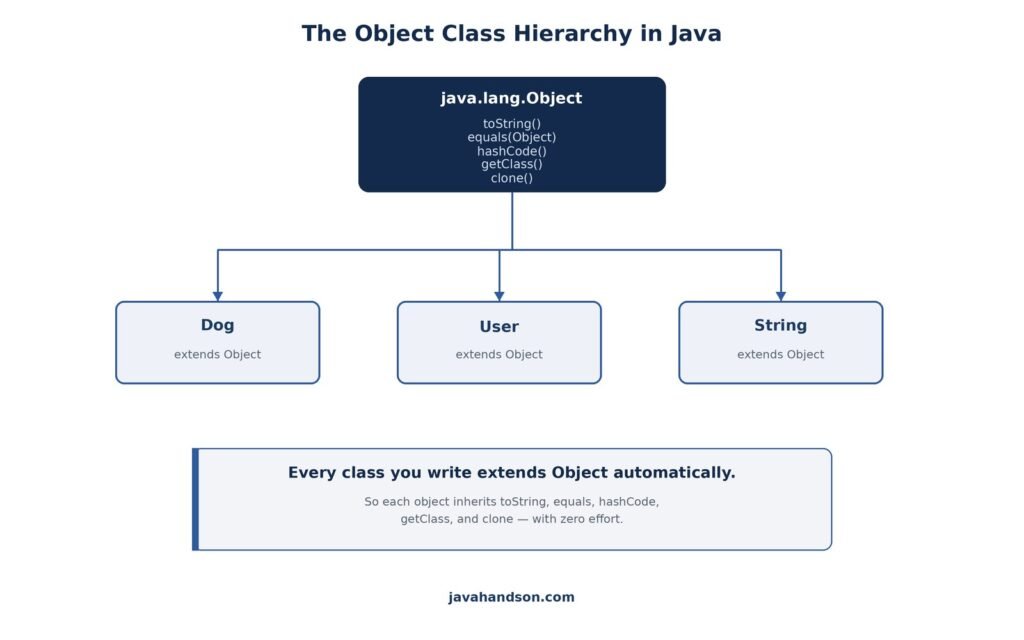
The Object class is the root of the whole class tree in Java. Its full name is java.lang.Object. Every other class descends from it, one way or another.
Think of a family tree. At the very top sits one ancestor. Below that sit children, grandchildren, and so on down the line. In Java, Object is that single top ancestor.
When you write a class and skip the extends keyword, Java steps in. It quietly makes your class extend Object for you. You never see it happen.
So these two lines mean the same thing to the compiler:
class Dog { }                 // what you write
class Dog extends Object { }  // what Java sees
Because of that, a fresh Dog already carries the Object methods. You get toString(), equals(), hashCode(), and a few more with zero effort on your part.
What if your class already extends something else? The rule still holds. Say Dog extends Animal. Then Animal extends Object, so Dog is still an Object further up the chain. Every path leads back to the same root.
The Object class hands down a handful of methods. Some you’ll use daily. Some you’ll rarely touch. Here are the ones that matter most for everyday code:
We’ll focus on the first five in this article. The threading trio belongs with a concurrency discussion, so we’ll leave those for another day.
You might ask why any of this counts. Here’s the short version. These methods run under the hood in many places you already use, whether you notice or not.
Print an object, and toString() fires. Put an object in a HashMap, and equals() and hashCode() decide where it lands. Compare two objects, and equals() gives the verdict. So knowing them saves you from confusing bugs later.
Here’s a real example. You build a Set of users to remove duplicates. It doesn’t work, and the same user shows up twice. Nine times out of ten, the cause is a missing equals() or hashCode().
Bugs like that are hard to spot because nothing crashes. The code runs fine and just gives wrong answers. Understanding these methods is how you dodge that whole class of problem.
Now let’s walk through each one. We’ll start with a small idea that makes the rest much easier.
Before we compare objects, one idea needs to be crystal clear. In Java, a variable doesn’t hold an object. It holds a reference to an object.
Picture the object as a house. The variable is a slip of paper with the house’s address on it. The paper is not the house. It only tells you where to find it.
So when you write Dog d = new Dog(), two things exist. There’s the Dog object out in memory. And there’s the variable d, which points to it.
Dog a = new Dog();
Dog b = a;   // copies the reference, NOT the object

// a and b now point to the SAME Dog
// There is still only one Dog in memory
Both a and b hold the same address. Change the Dog through a, and b sees it too. They are two slips of paper pointing at one house.
This detail explains a lot about comparison. When you compare two variables, you can ask two different questions.
The == operator answers the first question for objects. It compares the addresses on the slips. The equals() method, once you override it, answers the second. Keep this split in mind, and the rest of the article clicks into place.
The toString() method turns your object into a piece of text. Java calls it whenever an object needs to show up as a String.
By default, toString() gives you something ugly. It’s the class name, an @ sign, and a hex number. Not very helpful at all.
class Dog {
    String name = "Rex";
}

Dog d = new Dog();
System.out.println(d);            // Dog@1b6d3586
System.out.println(d.toString()); // same thing
That Dog@1b6d3586 tells you almost nothing. You see the type, but not the name inside. So most of the time, you’ll want to change it.
Where does that odd hex number come from? It’s the object’s hash code, printed in base 16. It’s meant to be unique-ish, not readable. That’s fine for the JVM, but useless for you.
One handy note. When you print an object with System.out.println, Java calls toString() for you. You don’t have to write it out yourself.
To get useful output, override the method. Return a String that shows the fields you care about. Here’s a cleaner Dog:
class Dog {
    String name;
    int age;

    Dog(String name, int age) {
        this.name = name;
        this.age = age;
    }

    @Override
    public String toString() {
        return "Dog{name=" + name + ", age=" + age + "}";
    }
}

Dog d = new Dog("Rex", 3);
System.out.println(d);  // Dog{name=Rex, age=3}
Now the output reads like plain English. You see the name and the age right away. That helps a lot during debugging.
Notice the @Override tag above the method. It’s optional, but it’s a good habit. If you misspell the method name, the compiler warns you right away.
A good toString() is easy to write once you follow a couple of habits. Keep these in mind:
That last point matters more than it sounds. Consistent output makes your logs scannable. When every object prints the same way, your eyes find problems faster.
This method runs in more places than you’d guess. Any time an object becomes text, it kicks in. A few common spots:
So a good toString() pays off everywhere. Write it once, and cleaner logs and clearer debugging follow you around the whole project.
The equals() method answers one question. Are these two objects equal? The tricky part is what “equal” really means.
By default, equals() checks if two references point to the very same object. It doesn’t look inside at the fields at all.
class Point {
    int x, y;
    Point(int x, int y) { this.x = x; this.y = y; }
}

Point a = new Point(1, 2);
Point b = new Point(1, 2);

System.out.println(a.equals(b));  // false
System.out.println(a.equals(a));  // true
Both points hold 1 and 2. To a human, they look equal. But the default equals() says false, because they’re two separate objects in memory.
That default behaves just like the == operator for objects. It compares addresses, not contents. Often, that’s not what you want.
Here’s a way to picture it. Two houses can have the exact same layout, yet they sit at different addresses. The default equals() cares about the address. Value equality cares about the layout inside.
Usually you care about the values inside. Two points with the same x and y should count as equal. To get that, override equals().
class Point {
    int x, y;
    Point(int x, int y) { this.x = x; this.y = y; }

    @Override
    public boolean equals(Object o) {
        if (this == o) return true;
        if (o == null || getClass() != o.getClass()) return false;
        Point p = (Point) o;
        return x == p.x && y == p.y;
    }
}

Point a = new Point(1, 2);
Point b = new Point(1, 2);
System.out.println(a.equals(b));  // true
Now equals() looks at the fields. Same x, same y, so it returns true. That matches how a person would judge it.
Let’s break down what each line is doing. The method reads top to bottom, and each check has a clear job.
Read in order, the method fails fast. It knocks out the easy cases first, then does the real comparison last. That order also keeps it safe from nulls and wrong types.
The Point above uses int fields, so == works fine for them. But what about object fields, like a String name? For those, you must use equals(), not ==.
There’s a small trap here too. A field might be null. Calling name.equals(…) on a null name throws. The clean fix is Objects.equals(), which handles null for you.
import java.util.Objects;

@Override
public boolean equals(Object o) {
    if (this == o) return true;
    if (o == null || getClass() != o.getClass()) return false;
    User u = (User) o;
    return id == u.id                 // primitive: use ==
        && Objects.equals(name, u.name); // object: null-safe
}
Objects.equals(a, b) returns true if both are null, false if only one is null, and otherwise calls a.equals(b). It’s the safe default for any object field.
A correct equals() has to obey a few rules. Break them, and collections may behave in odd ways. The contract says equals must be:
These sound formal, but the simple template above handles them all. Follow that pattern, and you’re safe.
Why do the rules matter in practice? Collections lean on them. A HashSet trusts that equal objects stay equal both ways. Break symmetry or consistency, and the set may store a duplicate or lose an item without warning.
Symmetry is the rule people break most often. It usually happens when a subclass tries to equal its parent. Suppose a ColorPoint extends Point and adds a color.
If ColorPoint.equals() accepts a plain Point, but Point.equals() rejects a ColorPoint, you get a one-way street. So a.equals(b) is true while b.equals(a) is false. That’s a broken contract.
Using getClass() in the check helps here. It forces both objects to share the exact same class. A Point and a ColorPoint then never count as equal, which keeps the relationship symmetric.
The hashCode() method returns an int for your object. That int helps hash-based collections store and find things fast.
Collections like HashMap and HashSet use hash codes as a shortcut. The hash code points to a bucket, a small group of items.
Instead of scanning every entry, the collection jumps to one bucket. Then it checks only the few items there. That’s why lookups stay quick even in a huge map.
So the hash code acts like a rough address. It narrows a big search down to a tiny one.
Picture a library with a thousand books. Without any system, finding one means checking every shelf. But group books by the first letter of the title, and you skip straight to the right shelf. A hash code plays that grouping role.
Here’s the rule you must never forget. If you override equals(), you have to override hashCode() too.
Why? Because of one simple contract. If two objects are equal, they must return the same hash code. Break that, and hash collections misbehave in confusing ways.
Picture this. You override equals() but skip hashCode(). Two “equal” points now get different hash codes. A HashSet drops them in different buckets and treats them as distinct.
// equals overridden, hashCode NOT overridden -- broken!
Set<Point> set = new HashSet<>();
set.add(new Point(1, 2));
System.out.println(set.contains(new Point(1, 2))); // false (!)
That false is a nasty surprise. The set holds an equal point, yet contains() misses it. The mismatched hash code sent the lookup to the wrong bucket.
Let’s trace exactly what goes wrong. It helps to see the two steps a HashSet takes on every lookup.
With hashCode() left as the default, your two equal points get different codes. So the lookup picks a bucket that doesn’t hold your point. It never even reaches the equals() step. The item is there, but the set looks in the wrong place.
This is why the pair must agree. equals() and hashCode() are a team. One decides the bucket, the other confirms the match. Break either, and the whole lookup falls apart.
Luckily, you don’t have to invent the math. The easy way is Objects.hash(). Pass it the same fields you used in equals(), and it does the work for you.
import java.util.Objects;

@Override
public int hashCode() {
    return Objects.hash(x, y);
}
That’s it. Use the very same fields that equals() checks. Keep those two methods in sync, and everything lines up.
One more tip. Two different objects can share a hash code, and that’s fine. It’s called a collision. The collection handles it by checking equals() inside the bucket.
Any int works as a hash code, but some are better than others. A good one spreads objects evenly across buckets. Keep these ideas in mind:
Returning a constant is a sneaky trap. It technically obeys the contract, since equal objects still share a code. But every object lands in one bucket, and your fast HashMap turns into a slow list.
It helps to see equals and hashCode side by side. They do different jobs, but they must agree.
| Method | Returns | Its Job |
|---|---|---|
| equals(Object) | boolean | Are two objects the same by value? |
| hashCode() | int | A bucket number for fast lookup |
Different return types, different roles. Still, equal objects must always share a hash code. That link is the whole point of the pair.
The getClass() method tells you the real type of an object at runtime. It hands back a Class object that describes the type.
Sometimes a variable’s declared type hides the real one. A variable of type Object might actually hold a String. getClass() cuts through that.
Object obj = "hello";
System.out.println(obj.getClass());          // class java.lang.String
System.out.println(obj.getClass().getName()); // java.lang.String
The variable says Object, yet getClass() reports String. It looks at the actual object, not the label on the variable. That’s the useful bit.
Why would this ever help you? Logging is one case. When you print an object’s real type in a log line, you can spot the true class behind a general variable. That saves guesswork when things break.
The Class object you get back is powerful. It lets you inspect a type at runtime, which is the start of reflection. You can ask it for its name and more.
Object obj = "hello";
Class<?> c = obj.getClass();

System.out.println(c.getSimpleName());  // String
System.out.println(c.getName());        // java.lang.String
System.out.println(c.getPackageName()); // java.lang
Frameworks lean on this heavily. Tools like Spring and Hibernate inspect your classes at runtime to wire things together. It all starts from a Class object like this one.
You already saw getClass() earlier. It showed up in the equals() template. There, it made sure both objects share the exact same type.
Using getClass() there is strict. A Point only equals another Point, never a subclass. That keeps equality predictable and clean, and it protects symmetry.
People often mix these two up. Both ask about type, but they answer slightly different questions.
So a Dog is an instanceof Animal, but its getClass() is Dog, not Animal. Pick the one that fits your intent.
Which should equals() use? Both appear in real code. getClass() is stricter and safer for symmetry, so many teams prefer it. The instanceof check is more flexible when you want subclasses to count as equal, but it takes extra care to keep symmetry intact.
The clone() method makes a copy of an object. It sounds simple, but it comes with sharp edges. Many teams avoid it entirely.
To use clone(), your class must implement the Cloneable interface. Then you override clone() and call super.clone() inside it.
class Point implements Cloneable {
    int x, y;
    Point(int x, int y) { this.x = x; this.y = y; }

    @Override
    public Point clone() throws CloneNotSupportedException {
        return (Point) super.clone();
    }
}

Point a = new Point(1, 2);
Point b = a.clone();
System.out.println(b.x + "," + b.y); // 1,2
The clone gives you a new Point with the same x and y. If you forget the Cloneable interface, clone() throws CloneNotSupportedException at runtime. That’s a checked exception you have to handle.
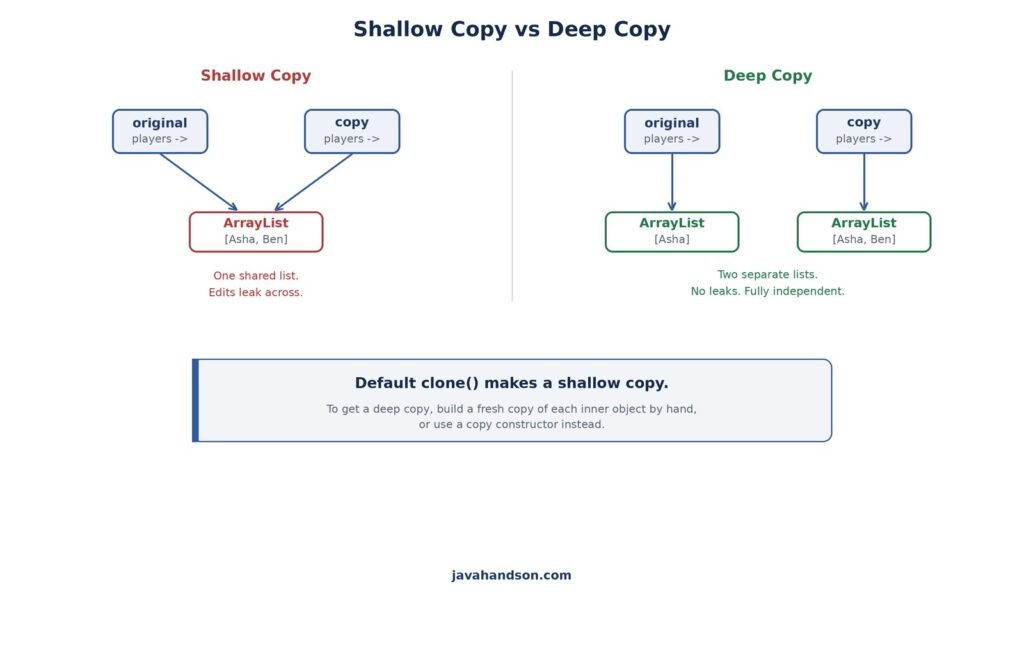
Here’s the big catch. The default clone() makes a shallow copy. It copies the fields, but not the objects those fields point to.
Remember the reference idea from earlier? A field that holds a List really holds a reference to that List. A shallow copy duplicates the reference, not the List behind it.
So after a shallow clone, both objects share the same List. Change it through one, and the other sees the change too. That’s rarely what you want.
class Team implements Cloneable {
    List<String> players = new ArrayList<>();

    @Override
    public Team clone() throws CloneNotSupportedException {
        return (Team) super.clone(); // shallow: shares the list
    }
}

Team original = new Team();
original.players.add("Asha");

Team copy = original.clone();
copy.players.add("Ben");

System.out.println(original.players); // [Asha, Ben]  <-- leaked!
Look at that last line. You added Ben to the copy, yet the original changed too. Both teams point at one shared list, so the edit leaks across. This bug is quiet and easy to miss.
To fix the leak, you copy the inner objects by hand. People call that a deep copy. You build a fresh list instead of sharing the old one.
@Override
public Team clone() throws CloneNotSupportedException {
    Team copy = (Team) super.clone();
    copy.players = new ArrayList<>(this.players); // fresh list
    return copy;
}
Now each team owns its own list. An edit on one no longer touches the other. The copy is truly independent, which is what most people expect from the word “copy”.
See the difference in the diagram below. A shallow copy shares the inner data. A deep copy duplicates it, so nothing leaks.
Because clone() is easy to get wrong, many developers skip it. There are cleaner ways to copy an object. Here are the popular ones:
A copy constructor is the usual favorite. It’s clear, it’s easy to read, and it doesn’t need the Cloneable interface at all.
class Point {
    int x, y;
    Point(int x, int y) { this.x = x; this.y = y; }

    // copy constructor
    Point(Point other) {
        this.x = other.x;
        this.y = other.y;
    }
}

Point a = new Point(1, 2);
Point b = new Point(a); // clean copy, no clone() needed
No interface, no checked exception, no shallow-copy surprise. For most cases, reach for a copy constructor first. It says exactly what it does.
Let’s tie it all together with one small class. Say you’re modeling a User with an id and a name.
A well-behaved value class usually overrides three methods: toString(), equals(), and hashCode(). Here’s a User that does all three the proper way.
import java.util.Objects;

class User {
    int id;
    String name;

    User(int id, String name) {
        this.id = id;
        this.name = name;
    }

    @Override
    public String toString() {
        return "User{id=" + id + ", name=" + name + "}";
    }

    @Override
    public boolean equals(Object o) {
        if (this == o) return true;
        if (o == null || getClass() != o.getClass()) return false;
        User u = (User) o;
        return id == u.id && Objects.equals(name, u.name);
    }

    @Override
    public int hashCode() {
        return Objects.hash(id, name);
    }
}
Notice the pattern. equals() and hashCode() use the same fields, id and name. That keeps them in agreement, which is the whole point of the pair.
Now let’s use the class. We’ll print a user, compare two users, and drop one into a HashSet.
User u1 = new User(1, "Asha");
User u2 = new User(1, "Asha");

System.out.println(u1);            // User{id=1, name=Asha}
System.out.println(u1.equals(u2)); // true

Set<User> users = new HashSet<>();
users.add(u1);
System.out.println(users.contains(u2)); // true
Everything just works. The print is readable. The two users count as equal. And the set finds an equal user even though it’s a different object.
That last line is the payoff. Because equals() and hashCode() agree, the HashSet behaves the way you expect.
Try removing the hashCode() method and running it again. The set will suddenly report false on that last line. One missing method, and the whole thing quietly breaks. That’s why the pair matters so much.
There’s a modern shortcut worth knowing. Since Java 16, you can use a record. A record is a compact way to write a value class, and it hands you these methods automatically.
Watch how much shrinks. The whole User class above becomes a single line as a record.
record User(int id, String name) { }

User u1 = new User(1, "Asha");
User u2 = new User(1, "Asha");

System.out.println(u1);            // User[id=1, name=Asha]
System.out.println(u1.equals(u2)); // true
System.out.println(u1.hashCode() == u2.hashCode()); // true
That one line gives you a constructor, getters, toString(), equals(), and hashCode(). The compiler writes them all, based on the fields you listed. And it writes them correctly, every time.
Records fit a specific shape. They shine when a class is mostly a bundle of data. Good fits include:
Records are not for everything. A class with lots of behavior, or one that must change its fields, still needs the full form. But for plain value types, a record saves you from writing these methods by hand. It also removes the chance of getting them wrong.
Still, learning the manual versions matters. Records generate the very methods we covered. Understanding them by hand is how you understand what a record does for you.
A handful of traps catch people over and over. Let’s name them so you can steer clear of each one.
This is the classic slip. You add a nice equals(), forget hashCode(), and your objects go missing in a HashSet or HashMap. Always override both together, every time.
The real signature is equals(Object o), with an Object parameter. Write equals(Point p) instead, and you’ve made a new method, not an override. The old default equals() still runs behind your back. The @Override tag catches this mistake for you.
Inside equals(), it’s easy to compare a String field with ==. That checks references, not text, so two equal strings can fail. Use equals() or Objects.equals() for object fields, and keep == for primitives.
The default clone() is shallow. Nested objects stay shared between the copy and the original. When in doubt, use a copy constructor or a deep copy instead.
For objects, == compares references, not contents. Two equal-looking strings can fail a == check, especially ones built at runtime. Use equals() for value comparison, and keep == for primitives.
Skip toString(), and your logs fill with lines like User@7c3df479. Add a simple one, and debugging turns from guessing into reading. It’s a small effort with a big return.
A: The Object class is the root of the class hierarchy in Java. Every class extends it, directly or indirectly, even when you don’t write extends. Because of that, every object inherits methods like toString(), equals(), hashCode(), getClass(), and clone().
A: Yes. If your class doesn’t extend anything, Java makes it extend Object automatically. If it extends another class, that chain still leads back up to Object at the top.
A: The contract says equal objects must return the same hash code. If you override equals() but not hashCode(), two equal objects may get different hash codes. Then hash-based collections like HashMap and HashSet place them in different buckets and treat them as distinct.
A: The == operator compares references for objects, so it checks if two variables point to the same object. The equals() method, once overridden, compares the values inside. For primitives, == compares actual values.
A: By default it returns the class name, an @ sign, and the object’s hash code in hexadecimal, like Dog@1b6d3586. That’s rarely useful, so most classes override toString() to show their fields.
A: getClass() returns the exact runtime type of an object. instanceof returns true for that type and any of its subclasses. So a Dog is instanceof Animal, but its getClass() is Dog, not Animal.
A: A shallow copy duplicates the fields but shares the objects they point to, so nested data stays linked between the copy and the original. A deep copy also duplicates the nested objects, so the two are fully independent. The default clone() makes a shallow copy.
A: clone() has several rough edges. It needs the Cloneable interface, throws a checked exception, and makes only a shallow copy by default. A copy constructor is clearer and avoids all of these issues, so many teams prefer it.
A: Yes. That’s called a collision, and it’s perfectly normal. Hash-based collections handle it by placing colliding objects in the same bucket and then using equals() to tell them apart.
A: Yes. A record automatically generates toString(), equals(), and hashCode() based on its fields, along with a constructor and accessors. That makes records a clean choice for simple value classes and map keys.
A: Most value classes override three methods: toString() for readable output, equals() for value comparison, and hashCode() to stay in sync with equals(). These three make your class behave well in collections and logs.
Let’s pull the threads together. The Object class in Java is the root parent of every class you write. You inherit its methods for free, whether you ask for them or not.
The toString() method gives your object a readable text form. Override it, and your logs and debugging get much clearer.
The equals() method compares objects by value once you override it. And hashCode() must travel with it, so hash collections work right. When one is missing, your sets and maps quietly break.
Then getClass() reveals an object’s true type at runtime, and it powers reflection under the hood. And clone() copies objects, though a copy constructor is usually the safer path.
For plain value types, a record hands you these methods for free. Even so, knowing the manual versions is what makes a record make sense.
Master these five methods, and you’ll write classes that play well with the whole Collections Framework. That’s a solid foundation for everything ahead.