Redis Cache Invalidation and Hot Keys: A Deep Dive
-
Last Updated: July 20, 2026
-
By: javahandson
-
Series

Learn Java in a easy way

Learn Redis cache invalidation and hot key fixes step by step: TTL and eviction, delete-on-write, SCAN, versioned keys, local caching, and stampede defenses.
In part one, we looked at how caching works and which patterns to reach for. Now we go one level deeper. This article is a practical guide to Redis cache invalidation and the hot key problem, two things that trip up almost every backend developer the first time they run a cache in production.
Caching sounds simple on paper. You store a copy of some data, you read it fast, and everyone is happy. Then real traffic arrives. Stale data shows up. One popular key melts a single Redis node. A restart wipes the cache and the database falls over. These are not rare edge cases. They are the normal growing pains of a cached system, and they all come back to two questions.
We will answer both. Along the way we will look at how Redis actually stores and expires data, why invalidation is genuinely hard, and how to spot and fix a hot key before it takes your service down. The examples stay language-neutral so the ideas carry across any stack, though the Redis commands are real.
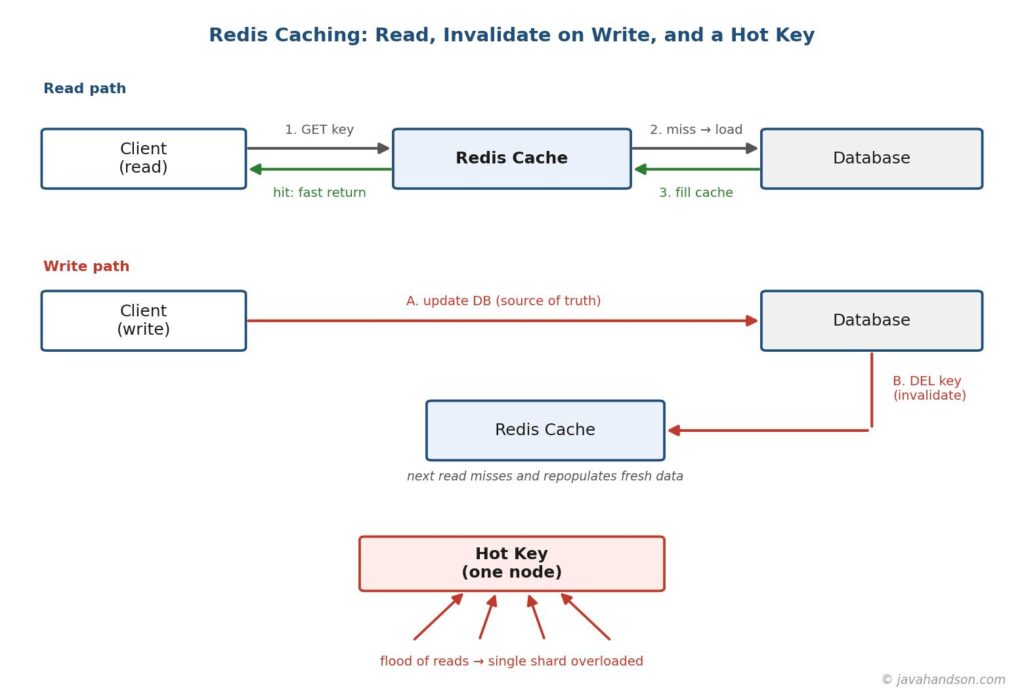
Before we talk about invalidation, it helps to know why Redis is the default choice for so many teams. Redis is an in-memory data store. It keeps data in RAM, so reads and writes return in well under a millisecond. That speed is the whole point of a cache.
But raw speed is not the only reason. Redis gives you a few things a plain hash map cannot.
Because Redis is a separate process, it survives an application restart. Your cache stays warm even when you deploy new code. That single trait removes a whole class of cold-start problems, though as we will see, it does not remove them all.
A cached entry in Redis is usually just a key and a value with a TTL attached. You design the key as a plain string. Its value is often a serialized object, such as JSON. The commands below show the shape of a typical cache write and read.
# Store a serialized product with a 10 minute expiry
SET product:42 '{"id":42,"name":"Wireless Mouse","price":19}' EX 600

# Read it back
GET product:42

# Check how long it has left before it expires
TTL product:42   # -> e.g. 512 (seconds remaining)
Notice the key name product:42. A clear naming scheme matters more than it looks. Good keys make it easy to find, group, and invalidate related data later. We will come back to key design when we talk about invalidating many entries at once.
Most people cache a whole object as one JSON string, and that is a fine default. But Redis offers other types that fit certain caches better. Picking the right one can save memory and make partial updates cheaper.
For a first cache, strings are almost always right. Reach for a hash when you find yourself deserializing a large object just to change one field. Reach for a sorted set when order is part of the data itself. Do not overthink this on day one, but know the options exist.
# Same product as a hash: update one field without rewriting all
HSET product:42 name 'Wireless Mouse' price 19 stock 120
HGET product:42 price     # read just the price
HINCRBY product:42 stock -1   # decrement stock atomically
EXPIRE product:42 600     # still attach a TTL to the whole key
Time-to-live, or TTL, is the simplest form of invalidation. You attach an expiry to a key, and Redis deletes it when the time is up. The data refreshes on the next read because the cache misses and reloads from the database. Many systems run on TTL alone, and for good reason. It is easy to reason about and needs no extra wiring.
But there is a detail people miss. Redis does not watch every key with a stopwatch. That would waste huge amounts of CPU. Instead it uses two mechanisms together.
When a client requests a key, Redis checks whether it has expired. If it has, Redis deletes it right then and returns nothing. This is cheap because it only happens when someone actually touches the key. The downside is obvious. A key that no one reads can sit expired in memory for a long time, still taking up space.
To clean up forgotten keys, Redis also runs a background sampler many times a second. It grabs a small random batch of keys that have a TTL, deletes the expired ones, and repeats if too many in the sample were stale. This keeps memory from filling with dead keys without scanning everything. The two methods together give a good balance of speed and tidiness.
| Interview insight A common question is how Redis expires keys without checking them all constantly. The strong answer names both parts: lazy expiration on access, plus active random sampling in the background. Mention that this is a trade-off. Lazy alone leaks memory, and active alone would be too costly if it scanned every key. |
TTL handles time. But what about space? Redis holds everything in RAM, and RAM is finite. When Redis hits its memory limit, it must decide what to drop. This is controlled by the maxmemory-policy setting. The common choices are worth knowing.
| Policy | What it evicts | Good for |
|---|---|---|
| noeviction | Nothing; new writes fail | Cache that must never lose data silently |
| allkeys-lru | Least recently used key, any key | General-purpose caching |
| allkeys-lfu | Least frequently used key | Skewed traffic with clear favorites |
| volatile-lru | Least recently used key with a TTL set | Mixing cache and persistent data |
| volatile-ttl | Key with the nearest expiry | Prioritizing short-lived entries |
For a pure cache, allkeys-lru or allkeys-lfu is the usual pick. They let Redis shed cold data on its own so hot data stays resident. If you store non-cache data in the same instance, a volatile policy protects the keys that lack a TTL. Choosing the wrong policy is a quiet source of bugs, so set it on purpose rather than leaving the default.
There is an old joke in computer science. There are only two hard things: cache invalidation and naming things. It is a joke, but the first half is true. Invalidation is hard because a cache is a second copy of your data, and now you have to keep two copies in agreement while both change under load.
The goal of Redis cache invalidation is simple to state. When the source data changes, the cached copy must not keep serving the old value for long. How you achieve that is where the difficulty lives. Let us walk through the main strategies from simplest to trickiest.
The easiest approach is to do nothing special on writes and just let keys expire. You accept that data can be stale for up to the TTL window. For a product description that changes rarely, a five minute or one hour TTL is completely fine. Nobody is harmed by a slightly old value.
This works well when three things are true. The data tolerates some staleness. The TTL is short enough for your needs. And the traffic is high enough that keys get refreshed often. When those hold, TTL-only is the least code and the fewest bugs. Do not over-engineer past it without a reason.
When staleness is not acceptable, you invalidate on write. The moment the database changes, you also touch the cache. The safest move is to delete the key, not to update it. We saw this in part one, and it matters even more with a shared Redis. The read path below shows the full cycle.
function updateProductPrice(id, newPrice):
    database.update(id, newPrice)      # 1. source of truth first
    redis.del("product:" + id)         # 2. remove the stale copy
    # next read misses, reloads fresh data, repopulates the cache

function getProduct(id):
    key = "product:" + id
    cached = redis.get(key)
    if cached is not null:
        return deserialize(cached)      # cache hit
    row = database.findProduct(id)      # cache miss
    redis.set(key, serialize(row), EX=600)
    return row
Why delete instead of update the cache in place? Because two writers can interleave. Writer A reads an old row, writer B writes a new row and updates the cache, then writer A updates the cache with its stale value. Now the cache holds old data while the database holds new data. Deleting sidesteps this. The next read simply misses and pulls the current truth.
| Interview insight If asked “update or delete the cache on write,” answer delete, and explain the race. Updating in place lets a slow writer overwrite the cache with a stale value after a faster writer already fixed it. Deletion is self-healing because the next reader repopulates from the database. |
Look again at the update function. It does two things: it writes the database, then it deletes the cache key. What if the process crashes between those two steps? The database is updated, but the stale key still sits in Redis. Every reader now gets old data until the TTL saves you. This is the dual-write problem, and it has no perfect fix, only trade-offs.
Here are the common ways teams reduce the risk.
Sometimes one change affects many cached entries. A user updates their profile, and you have cached ten different views that include their name. How do you clear all of them? This is where key design pays off. If you group related keys under a shared prefix, you can find them together.
It is tempting to reach for the KEYS command to match a pattern. Do not use KEYS in production. It scans the entire keyspace and blocks Redis while it runs, which can freeze every other client. Use SCAN instead. It walks the keyspace in small cursors without blocking.
# WRONG in production: KEYS blocks the whole server
# KEYS user:42:*

# RIGHT: SCAN walks the keyspace incrementally, non-blocking
cursor = 0
repeat:
    cursor, batch = redis.scan(cursor, match="user:42:*", count=100)
    for key in batch:
        redis.del(key)
until cursor == 0
An even cleaner design avoids the scan entirely. Store the set of related keys in a Redis set as you create them. To invalidate, read that set and delete its members in one pass, then delete the set itself. This turns a keyspace search into a direct lookup, which is far kinder to a busy server.
Two more patterns solve group invalidation elegantly. The first is versioning. Instead of deleting keys, you bump a version number that is part of the key. Old keys become unreachable and expire on their own later. The second is tagging, where keys carry a tag and you invalidate the tag.
# Versioned keys: bump the version to invalidate everything at once
# Read the current version, then build the real key from it
v = redis.get("ver:catalog")            # e.g. 7
key = "product:" + id + ":v" + v        # product:42:v7

# To invalidate the whole catalog view, just increment the version:
redis.incr("ver:catalog")               # now v8; all v7 keys go cold
Versioning is powerful because invalidation becomes a single atomic increment. No scanning, no deleting thousands of keys. The old entries linger until their TTL clears them, using a little extra memory in exchange for instant, safe group invalidation. Many large systems lean on this trick.
With so many options, how do you pick? The right strategy depends on how fresh the data must be and how many keys one change affects. The table below lines up the choices so you can match one to your case.
| Strategy | Freshness | Best for |
|---|---|---|
| TTL only | Stale up to TTL | Rarely-changing data that tolerates delay |
| Delete on write | Near-instant | Data that must not serve old values |
| Tracked key set | Near-instant, group | One change clears many related keys |
| Versioned keys | Instant, group | Large groups; avoids mass deletes |
| Change data capture | Follows commits | Strict correctness at high scale |
A practical system often mixes several. You might use versioned keys for a whole catalog, delete-on-write for a single product, and a TTL under all of it as a backstop. Start simple and add a strategy only when a real staleness or scale problem forces it. Layering these on purpose beats guessing.
Let us trace one realistic case end to end. Imagine a product page that shows the product, its price, and a list of reviews. Each part changes at a different rate, so each part gets its own caching choice.
Notice how one page uses three different strategies at once. That is normal and healthy. Matching the strategy to each piece of data, rather than forcing one rule everywhere, is what separates a robust cache from a fragile one. It also keeps your invalidation code as simple as each case allows.
Now to the second big topic. A hot key is a single cache entry that receives a wildly disproportionate share of traffic. Think of a celebrity’s profile, a flash-sale product, or the config that every request reads. In a distributed Redis setup, keys are spread across nodes by hashing the key name. That means one hot key lives on exactly one node.
Here is the trouble. When one key gets millions of reads per second, all that load lands on the single node that owns it. The other nodes sit half-idle while that one node saturates its CPU and network. Your cluster looks healthy on average, yet one shard is on fire. This is a hot key problem, and it does not show up until traffic skews.
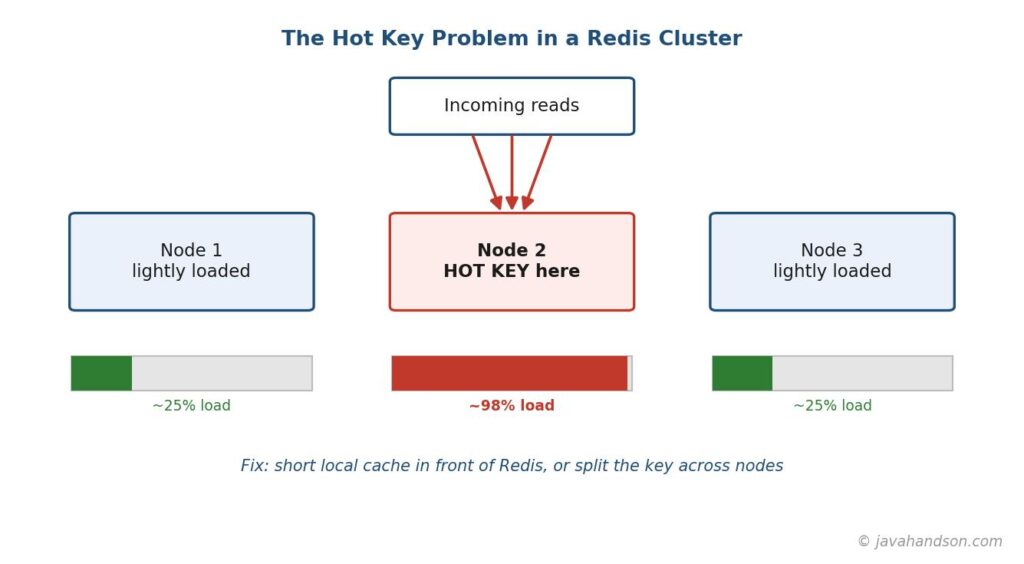
You cannot fix what you cannot see. Redis gives you a few ways to find hot keys before they hurt.
Uneven node CPU or network graphs are often the first hint. If one shard is pinned while others idle, suspect a hot key and start sampling. Catching it early turns a page-out incident into a quiet config change.
The most effective fix is to stop sending the traffic to Redis at all. Add a small in-process cache in front of Redis on each application instance. Hot keys get served straight from local memory, so Redis never sees the flood. This is sometimes called a two-tier or near cache.
# Two-tier read: check local memory, then Redis, then the database
function getConfig(key):
    local = localCache.get(key)         # tiny in-process cache
    if local is not null:
        return local                    # hottest path, no network
    value = redis.get(key)
    if value is not null:
        localCache.set(key, value, TTL=5s)   # short local TTL
        return value
    value = database.load(key)
    redis.set(key, value, EX=600)
    localCache.set(key, value, TTL=5s)
    return value
Keep the local TTL short, often just a few seconds. That bounds how stale a local copy can get while still absorbing almost all the read pressure. A key hit a million times a second only reaches Redis a handful of times per instance. The load simply disappears. The cost is a little extra staleness, which is usually a fine trade for surviving the spike.
Another approach spreads one hot key across many. Instead of a single key, you write several copies with a suffix, then read a random one. Because the copies hash to different nodes, the traffic fans out across the cluster rather than pounding one shard.
# Split one hot key into N replicas across the cluster
# On write, update all replicas
for i in 0..N-1:
    redis.set("hotkey:" + i, value, EX=600)

# On read, pick a random replica so load spreads
i = random(0, N-1)
value = redis.get("hotkey:" + i)
Splitting works best for read-heavy, rarely-changing data, since every write must update all copies. For a value that updates often, that write amplification hurts. So reach for splitting when the hot key is mostly read and local caching alone is not enough. Often the two techniques combine well.
| Interview insight Hot keys are a favorite scaling question. A complete answer covers three moves. First, detect with hotkeys sampling or per-key metrics. Second, add a short-lived local cache so most reads never reach Redis. Third, if needed, split the key across nodes to spread the remaining load. Name the trade-off for each: staleness for local caching, write amplification for splitting. |
There is a cousin of the hot key problem that deserves its own section. Picture a very popular key that suddenly expires. In the same instant, thousands of requests miss the cache together. All of them rush to the database at once to rebuild the same value. The database, which the cache was protecting, gets slammed. This is a cache stampede, also called a thundering herd.
It is sneaky because everything looks fine until the exact moment a hot key expires. Then a wall of identical queries hits the database. A few defenses handle it well.
# Lock so only one request rebuilds a hot key on miss
function getWithLock(key):
    value = redis.get(key)
    if value is not null:
        return value
    # SET NX succeeds for only one caller; it becomes the rebuilder
    gotLock = redis.set("lock:" + key, "1", NX=true, EX=5)
    if gotLock:
        value = database.load(key)
        redis.set(key, value, EX=600)
        redis.del("lock:" + key)
        return value
    else:
        sleep(50ms)          # let the winner finish, then retry
        return getWithLock(key)
The lock pattern is the workhorse fix. One request does the expensive work, and everyone else waits a beat and reads the fresh value. Combine it with jittered TTLs and you rarely see a stampede at all. These defenses cost little and save you from a self-inflicted outage on your busiest keys.
One more failure mode ties the topics together. Suppose Redis restarts, or you deploy a fresh cache. The cache is now empty. Every read misses and hits the database directly. If your traffic is high, that sudden flood can overwhelm the database before the cache refills. A cold cache is a real risk, not a hypothetical.
You have a few ways to soften a cold start.
Which one you choose depends on how sensitive your database is to a burst. High-traffic systems often use all three. The common thread across this whole article is the same. A cache protects your database, so every plan must ask what happens the moment that protection blinks.
You cannot run a cache well if you cannot see it. A few numbers tell you almost everything about the health of a Redis cache, and they are easy to collect. Watch these and you will catch most problems before users do.
The INFO command exposes most of these counters directly. Ship them to your dashboards and set an alert on a dropping hit ratio and on per-node latency. A cache that is watched is a cache that rarely surprises you. This one habit pays for itself the first time it warns you early.
# Pull the key health counters from a running Redis
redis-cli INFO stats | grep -E 'keyspace_hits|keyspace_misses|evicted_keys|expired_keys'

# hit ratio = keyspace_hits / (keyspace_hits + keyspace_misses)
redis-cli INFO memory | grep -E 'used_memory_human|maxmemory_human'
We have covered a lot, so here is the short version you can act on. These habits keep a Redis cache fast, correct, and calm under load.
A: Cache invalidation is the process of removing or refreshing a cached value once the underlying data changes, so users stop seeing stale data. In Redis this is done three main ways: attaching a TTL so keys expire on their own, deleting the key on every write, or grouping keys under a shared prefix, tag, or version so many entries can be invalidated at once. Most systems combine a TTL as a safety net with delete-on-write for data that must stay fresh.
A: Delete the key. Updating the cache in place opens a race condition where a slow writer overwrites the cache with a stale value after a faster writer already corrected it, leaving the cache behind the database. Deleting is self-healing: the next read simply misses and repopulates from the source of truth. Keep a TTL as well, so a missed delete still corrects itself within the expiry window.
A: A hot key is a single cache entry that gets a disproportionate share of traffic. Because Redis maps each key to one node by hashing its name, all that load lands on a single shard while the rest of the cluster sits idle. Detect it with redis-cli –hotkeys sampling or per-key metrics, then fix it by adding a short-lived local cache in each app instance so most reads never reach Redis, and if needed splitting the key into several suffixed copies so the traffic spreads across nodes.
A: A stampede, or thundering herd, happens when a hot key expires and thousands of requests miss at once and all rebuild it from the database together. Prevent it by using a short-lived Redis lock set with NX so only the first request rebuilds the value while others wait, refreshing hot keys in the background just before they expire, and adding a small random jitter to TTLs so keys created together do not expire together.
Redis makes caching fast, but the speed is only half the story. The real skill is keeping the cache honest and stable once traffic gets serious. Redis cache invalidation is about removing stale data safely, and it always trades some freshness against some complexity. Start with TTLs, add delete-on-write when staleness bites, and keep the TTL as a net for the writes you miss.
Hot keys and stampedes are the load-side twin of that story. One key can overwhelm a node, and one expiry can overwhelm a database. The fixes are cheap and well understood: local caching, key splitting, rebuild locks, and jittered expiries. None of this needs exotic tools. It needs the habit of asking, at every step, what happens when this key changes, gets hot, or disappears. Carry that question into your next project and your cache will protect you instead of surprising you.