Spring AI Chat Memory Explained: ChatMemory, MessageWindowChatMemory & Advisors
-
Last Updated: October 8, 2026
-
By: javahandson
-
Series

Spring AI chat memory explained simply — ChatMemory, MessageWindowChatMemory, memory advisors, JDBC/H2 persistence, and the conversationId, verified against Spring AI.
Ask an LLM your name, then ask it again in the very next request. It will not know. By default, large language models forget everything between calls. This is exactly where Spring AI chat memory comes in. It lets your Spring Boot app remember past messages, so the chat flows like a real conversation.
In the earlier articles, we looked at ChatClient, ChatModel, and running multiple chat models. Now we add memory on top of all that. The goal here is simple. We want our assistant to remember who the user is and what they said before.
By the end of this guide, you will know:
Let us get started.
Before any code, let us understand the problem. Once you see why memory is needed, the rest of the design makes sense.
Here is a fact that surprises many beginners. An LLM does not remember your last message. Each API call starts fresh, with no trace of the past.
Think of it like talking to someone with no short-term memory. You tell them your name. A minute later, they ask who you are. Pretty annoying, right?
So imagine a user says “My name is Suraj” and then asks “What is my name?”. The model cannot answer the second question. That second call has no idea the first one ever happened.
Why do LLMs work this way? Statelessness actually helps the providers scale. Each request stands on its own, so any server can handle it. Memory, then, is something we bolt on inside our own app.
Spring AI fixes this with one neat idea. Before each call, it gathers the past messages and sends them along with the new one. The model then sees the whole conversation, not just the latest line.
In practice, the framework does three things for you:
This is really the heart of Spring AI chat memory. The framework takes care of the plumbing, and you just hand it a conversation ID. As a result, your assistant starts to feel human. It carries context across turns, just like a real chat window on a website.
Here is a subtle point that trips people up. Chat memory and chat history are not the same thing, and the official docs are careful about this.
So do not treat ChatMemory as your permanent archive. For a complete record, use a normal database table with Spring Data. Keep these two jobs cleanly separate, and your design stays simple.
Spring AI splits memory into two clean pieces. One piece decides what to keep. The other decides where to keep it. This separation is the key to the whole feature.
The ChatMemory interface is the brain of the feature. It decides which messages to keep and when to drop the old ones. Think of it as the rulebook for memory.
It exposes a few simple methods:
Notice that every method takes a conversation ID. That ID is how Spring AI keeps one user’s chat apart from everyone else’s. We will come back to it, because it matters a lot.
The ChatMemoryRepository is the storage engine. Its only job is to store and read messages. It never decides what to trim, since that is the ChatMemory’s job.
This split is genuinely useful. You can keep the same trimming rule and just change the storage. In memory today, a database tomorrow, and your logic stays untouched.
Spring AI ships several repositories out of the box:
So what trimming rule does Spring AI use out of the box? It is MessageWindowChatMemory, and the idea behind it is easy to picture.
It keeps a sliding window of the most recent messages. By default, it holds up to 20 messages. As new messages arrive, the oldest ones quietly drop off the back.
ChatMemory chatMemory = MessageWindowChatMemory.builder()
        .maxMessages(10)
        .build();
Two small details are worth knowing here:
How do you pick a good maxMessages value? Match it to one or two full turns of your typical chat. Set it too low, and the model forgets quickly. Set it too high, and your prompt gets expensive.
| 💡 Interview Insight – A classic question is: what is the default ChatMemory implementation in Spring AI, and how many messages does it keep? The answer is MessageWindowChatMemory, with a default window of 20 messages. Add that system messages are always preserved, and you will clearly stand out. |
Now we know what stores the messages. But how do those messages actually reach the LLM? That is the advisor’s job, and it is the glue that ties everything together.
An advisor is like a middleware step in the prompt flow. The memory advisor hooks in, pulls the past messages, and adds them to your request. You do not wire this by hand on every single call. The diagram below shows the full round trip.
You can also stack advisors on one client. A logger advisor, a memory advisor, and a retrieval advisor can all sit together. They run in order, each doing its own small job. Memory is simply one link in that chain.
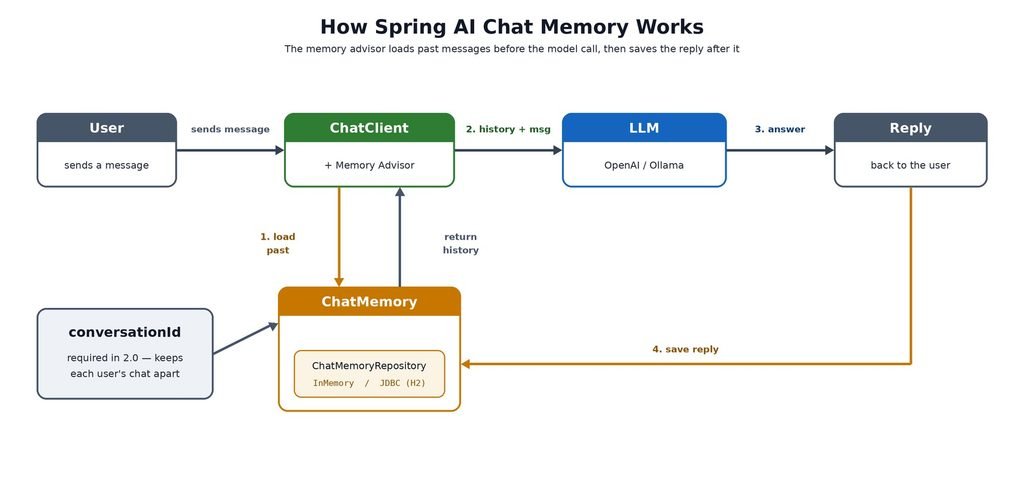
Figure 1: How a memory advisor adds past messages to each request and saves the reply back.
Spring AI gives you two memory advisors in version 2.0. Let us look at both.
This is the one you will use most of the time. It reads the stored history and adds it as a list of real chat messages. The model then sees the past turns exactly as messages, like a proper chat log.
ChatMemory chatMemory = MessageWindowChatMemory.builder().build();

ChatClient chatClient = ChatClient.builder(chatModel)
        .defaultAdvisors(
                MessageChatMemoryAdvisor.builder(chatMemory).build())
        .build();
Use it whenever you want the LLM to see the full, structured chat. For most assistants, this is simply the right default choice.
The second advisor is smarter for long chats. Instead of sending every recent message, it stores messages in a vector store. Then it pulls back only the most relevant ones using similarity search.
This suits long or knowledge-heavy conversations really well. It keeps the prompt small while still finding the right context. Under the hood, it leans on embeddings, the same idea we covered in the embeddings article.
If you follow older tutorials, you may run into a third advisor called PromptChatMemoryAdvisor. It added history as plain text inside the system prompt, which was handy for a tight token budget.
Heads up, though: this advisor was removed in Spring AI 2.0. On 2.0 or later, you should use MessageChatMemoryAdvisor instead. Thankfully, the builder API is identical, so the switch takes seconds.
// Before (Spring AI 1.x) - no longer compiles in 2.0
ChatClient chatClient = ChatClient.builder(chatModel)
        .defaultAdvisors(
                PromptChatMemoryAdvisor.builder(chatMemory).build())
        .build();

// After (Spring AI 2.0+)
ChatClient chatClient = ChatClient.builder(chatModel)
        .defaultAdvisors(
                MessageChatMemoryAdvisor.builder(chatMemory).build())
.build();To keep it clear, here is a quick way to choose between them:
Enough theory for now. Let us wire up a working assistant that actually remembers. We will start with in-memory storage, because it needs zero setup.
You only need the web starter and your model starter. We will use OpenAI here, but any chat model works the same way.
<dependency>
    <groupId>org.springframework.boot</groupId>
    <artifactId>spring-boot-starter-web</artifactId>
</dependency>

<dependency>
    <groupId>org.springframework.ai</groupId>
    <artifactId>spring-ai-starter-model-openai</artifactId>
</dependency>
No extra memory dependency is needed for the in-memory case. Spring AI auto-configures a ChatMemory bean for you. By default, that bean uses MessageWindowChatMemory backed by InMemoryChatMemoryRepository.
Next, attach the memory advisor to your ChatClient. Since Spring AI already created the ChatMemory bean, we simply inject it and pass it along.
@Configuration
public class ChatConfig {

    @Bean
    ChatClient chatClient(ChatClient.Builder builder, ChatMemory chatMemory) {
        return builder
                .defaultAdvisors(
                        MessageChatMemoryAdvisor.builder(chatMemory).build())
                .build();
    }
}
That one defaultAdvisors line is the whole trick. From now on, every call through this client carries the conversation history automatically.
Now for the controller. Here comes the key part, which is the conversation ID. Each user must have a stable, unique ID. To keep things simple, we will read a username from a request header.
@RestController
@RequestMapping("/api")
public class ChatMemoryController {

    private final ChatClient chatClient;

    public ChatMemoryController(ChatClient chatClient) {
        this.chatClient = chatClient;
    }

    @GetMapping("/chat-memory")
    public ResponseEntity<String> chat(
            @RequestHeader("username") String username,
            @RequestParam("message") String message) {

        String conversationId = username;

        String answer = chatClient.prompt()
                .user(message)
                .advisors(a -> a.param(ChatMemory.CONVERSATION_ID, conversationId))
                .call()
                .content();

        return ResponseEntity.ok(answer);
    }
}
That param(ChatMemory.CONVERSATION_ID, conversationId) line tells the advisor which conversation this is. Without it, the advisor cannot find the right history to load.
Start the app and send two requests with the same username:
curl -H "username: suraj" "http://localhost:8080/api/chat-memory?message=My+name+is+Suraj"

curl -H "username: suraj" "http://localhost:8080/api/chat-memory?message=What+is+my+name"
The second reply should come back with “Suraj”. Change the username, and the memory resets to empty. That is your conversation ID quietly doing its job.
There is one catch with in-memory storage, though. Restart the app and all memory is gone. For real apps, you want it to survive restarts, so let us add persistence next.
In-memory storage is great for a quick demo. But users expect their chat to survive a server restart. So we will store messages in a database using JDBC. We will use H2 here, because it needs no separate install.
<dependency>
    <groupId>org.springframework.ai</groupId>
    <artifactId>spring-ai-starter-model-chat-memory-repository-jdbc</artifactId>
</dependency>

<dependency>
    <groupId>com.h2database</groupId>
    <artifactId>h2</artifactId>
    <scope>runtime</scope>
</dependency>
The first starter brings in JdbcChatMemoryRepository. The second adds the H2 database itself. For the H2 web console, you do not need a special artifact. You just switch it on with a property, which we will do in a moment.
Spring AI also offers starters for Neo4j, Cassandra, MongoDB and Redis. The pattern is the same for every one of them. You swap the starter, and your code barely changes.
Now point the ChatMemory at the JDBC repository. Spring Boot auto-creates the JdbcChatMemoryRepository bean, so again we just inject it.
@Configuration
public class JdbcChatConfig {

    @Bean
    ChatMemory chatMemory(JdbcChatMemoryRepository repository) {
        return MessageWindowChatMemory.builder()
                .chatMemoryRepository(repository)
                .maxMessages(10)
                .build();
    }

    @Bean
    ChatClient chatClient(ChatClient.Builder builder, ChatMemory chatMemory) {
        return builder
                .defaultAdvisors(
                        MessageChatMemoryAdvisor.builder(chatMemory).build())
                .build();
    }
}
Notice how little actually changed. The advisor and the controller stay exactly the same as before. Only the storage behind ChatMemory is different now, which is the whole point of the clean split.
Add these settings to application.properties:
# H2 database, file-based so data survives restarts
spring.datasource.url=jdbc:h2:file:~/chatmemory;AUTO_SERVER=true
spring.datasource.driver-class-name=org.h2.Driver
spring.datasource.username=sa
spring.datasource.password=

# Create the chat memory table automatically
spring.ai.chat.memory.repository.jdbc.initialize-schema=always

# Optional: open the H2 web console at /h2-console
spring.h2.console.enabled=true
A couple of notes on these settings:
Now start the app, send a few messages, then restart it. The conversation is still there. That is persistent memory working end to end.
One honest limitation to flag here. The JDBC repository does not store tool-call messages. Assistant messages that carry tool calls, and the tool responses, get skipped on save. So if your app leans heavily on tool calling, plan around this. The Spring AI docs point to the Spring AI Session project for that case.
Want to see the stored messages with your own eyes? The H2 console makes it easy. This small peek also makes the whole feature feel real.
Run the app, then open http://localhost:8080/h2-console in your browser. Use the same JDBC URL from your properties to connect. After that, run a quick query:
SELECT * FROM SPRING_AI_CHAT_MEMORY
ORDER BY conversation_id, sequence_id;
You will see one row per message, grouped by conversation ID. The sequence_id column keeps the messages in the right order. Spring AI 2.0 added that column, so ordering is now consistent on every database, even MySQL.
The conversation ID is small but mighty. Get it wrong, and memory breaks in confusing ways. Spring AI 2.0 also tightened the rules around it, so this really deserves its own section.
In Spring AI 2.0, the conversation ID is required. Forget it, and the memory advisor throws an IllegalArgumentException at runtime. There is no silent fallback anymore, which is honestly a good thing.
So always set it per request, just as we did in the controller:
chatClient.prompt()
        .user(message)
        .advisors(a -> a.param(ChatMemory.CONVERSATION_ID, conversationId))
        .call()
.content();If you are moving from 1.x, watch out for these changes. They are small, yet they will break your build.
None of these are hard to fix. But if you copy old code, the compiler will complain loudly. At least now you know exactly why.
| 💡 Interview Insight – Interviewers love this one: how does Spring AI keep two users’ conversations apart? The answer is the conversation ID, passed through ChatMemory.CONVERSATION_ID on each call. Mention that 2.0 made it mandatory and dropped the old default ID, and you show you are current with the framework. |
A username on its own is a bit risky. Two browser tabs would end up sharing one memory. A better ID combines the user with their session.
String conversationId = userId + ":" + httpSession.getId();
Build the ID on the server, from values you trust. Never let the client send a raw conversation ID. Otherwise one user could quietly read another user’s chat, which is a nasty bug.
Memory is powerful, but it is not free. Every stored message becomes tokens in your next prompt. And every model has a limit on how many tokens it can read at once. That limit is called the context window.
Picture a whiteboard of a fixed size. You can only write so much on it. Once it fills up, you must rub out the old notes to make room for new ones.
The context window behaves the same way. When your messages cross the limit, the oldest ones fall off. The model simply forgets them. So piling on more memory is not always better.
A few simple habits keep you out of trouble:
In short, treat the context window as a budget. Spend it on the messages that truly matter, and skip the rest. A little care here keeps both your answers sharp and your costs low.
Let me share a few lessons that will save you some debugging time later.
These habits come from using Spring AI chat memory in real projects, not just quick demos.
| 💡 Interview Insight – A great closing question is: how would you add persistent, per-user memory in Spring AI? Walk through it step by step. A JDBC repository for storage, MessageWindowChatMemory to trim, a MessageChatMemoryAdvisor on the ChatClient, and a server-built conversation ID per user. That four-part answer covers the whole feature neatly. |
A: Spring AI chat memory lets your app remember past messages in a conversation. LLMs are stateless and forget each request, so Spring AI stores the history and sends it with every new call. This makes your assistant carry context across turns, like a real chat window.
A: The default is MessageWindowChatMemory. It keeps a sliding window of the most recent messages, up to 20 by default. System messages are always preserved, and eviction happens by whole turns, so the actual count can be slightly lower.
A: It uses a conversation ID, passed on each call through ChatMemory.CONVERSATION_ID. In Spring AI 2.0 this ID is required, and the memory advisor throws an IllegalArgumentException if it is missing. Build the ID on the server from trusted values, such as the user ID plus the session ID.
A: Yes. PromptChatMemoryAdvisor was removed in Spring AI 2.0. Use MessageChatMemoryAdvisor instead, which sends history as structured chat messages rather than plain text. The builder API is identical, so the switch is a one-line change.
A: Add the spring-ai-starter-model-chat-memory-repository-jdbc starter and a database driver like H2. Then build a MessageWindowChatMemory on the injected JdbcChatMemoryRepository. Set spring.ai.chat.memory.repository.jdbc.initialize-schema to create the SPRING_AI_CHAT_MEMORY table, and the chat survives restarts.
A: Chat memory is the short, trimmed context the model needs to answer well, meant for the prompt. Chat history is the full conversation record kept for audit or display. Do not use ChatMemory as a permanent archive; store the full history in a normal database table.
Chat memory turns a forgetful LLM into a real assistant. The idea is simple once you can see the pieces. ChatMemory decides what to keep. A repository decides where to keep it. An advisor then slips the history into each prompt.
The best part is how little code it takes. With Spring AI chat memory, a handful of beans give your app a proper memory. No custom caching, no manual prompt building, no fuss.
Here is a quick recap of the journey:
Start small with in-memory storage. Add JDBC once users need their chats to last. Then watch your tokens as conversations grow longer. That path keeps your assistant both smart and affordable.