Spring AI Embeddings Explained: Vectors and King − Man + Woman = Queen
-
Last Updated: October 7, 2026
-
By: javahandson
-
Series

Spring AI embeddings explained simply — what a vector is, why King − Man + Woman ≈ Queen works, and how to generate embeddings with EmbeddingModel in Spring AI.
Spring AI embeddings turn words into numbers, and those numbers carry meaning. That sounds strange at first. How can a list of numbers know that a king and a queen are related? Yet this one idea sits under semantic search, RAG and almost every smart feature you build with Spring AI.
In What Is Spring AI Framework, we connected Spring Boot to chat models. In Tokens in LLMs, we also saw how an LLM breaks your text into tokens. Now we go one step further. We look at what happens after tokenization, when those tokens become vectors.
By the end of this guide, you will understand:
No heavy maths is needed here. We keep it simple and visual. Let us begin with the core idea.
Let me start with a plain definition. An embedding is a list of numbers that represents the meaning of something, like a word, a sentence or a whole document. That list of numbers is called a vector.
Computers cannot read text the way we do. They only work with numbers. So every piece of text must become numbers before a model can use it. Embeddings are how we turn meaning into numbers that a machine can compare.
Here is the journey your text takes inside an AI system. It moves through four clear stages:
Text → Tokens → Token IDs → Vectors (embeddings)
First, the text is split into tokens. A token is a small chunk, often a word or a part of a word. Next, each token maps to a number called a token ID, picked from the model’s vocabulary. Finally, each token ID is converted into a vector. That vector is the embedding.
We covered the first two stages in the tokens article. This guide is about the last arrow, where a token ID becomes a vector that captures meaning. So think of embeddings as the bridge between raw numbers and real understanding.
Do not let the word “vector” scare you. In maths terms, a vector is simply an ordered list of numbers, like this:
V = [ v1, v2, v3, v4, v5 ]
Each number says how strongly the word relates to some hidden concept. One number might track royalty. Another might track gender. A third might track strength. Put enough of these together and you get a rich picture of what a word means.
Traditional software treats the word “King” as just four letters: K, I, N, G. An embedding does something smarter. It lets the model treat “King” as a ruler, male, royal, powerful and a leader, all at once, through numbers.
So the length of this list has a name. We call it the dimension of the embedding. A longer list holds more shades of meaning, while a shorter list is faster to store and search. Spring AI embeddings let you pick that length for the newer models, and we will tune it later in this guide.
Now comes the fun part. Once words are vectors, we can do geometry with meaning. Let us build the intuition with a tiny, made-up example.
Imagine an embedding for “King” with only five topics. The topics are Royalty, Female, Leadership, Strength and Fictional. In a real model you never name the topics, but here we will, just to learn.
Topics:   [ Royalty , Female , Leadership , Strength , Fictional ]

King  =   [  9.5   , -8.0   ,   7.5     ,   6.0    ,   2.0     ]
Queen =   [  9.5   ,  8.0   ,   7.0     ,   5.5    ,   2.0     ]
Read the “King” row slowly. The 9.5 means strong royalty. Next, the -8.0 means the opposite of female, so male. A value of 7.5 then signals high leadership. Now look at “Queen”. It is very close to “King” on royalty, leadership and strength. Only the gender value flips from negative to positive.
That single difference is the whole point. Words with similar meaning get similar vectors. Words that differ in just one way, like gender, differ in just one direction.
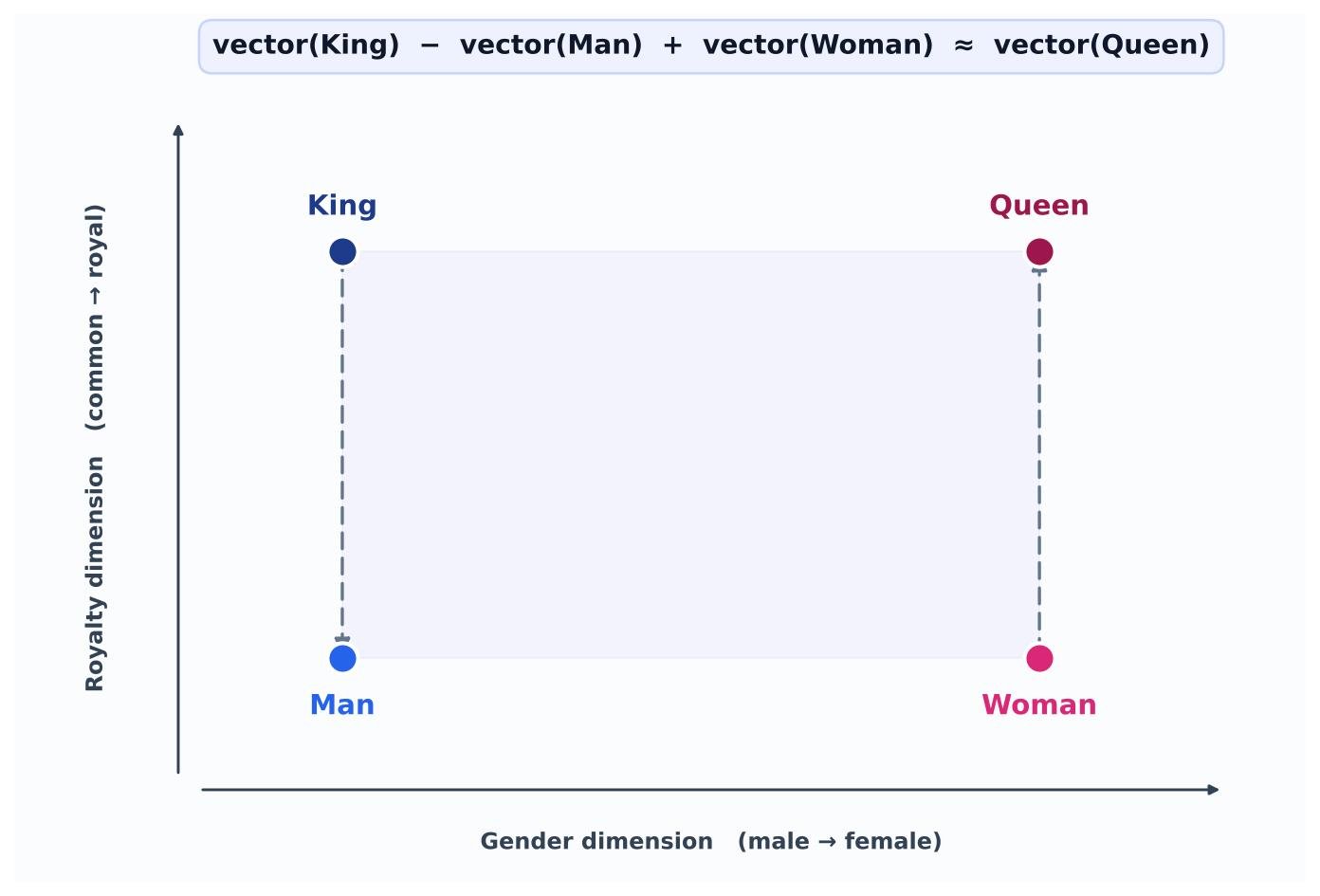
This is the most famous example in all of embeddings. In plain words, it says: take the idea of a king, remove “maleness”, add “femaleness”, and you land very close to a queen. Let us see it with simple 2D vectors.
King  = [0.1, 0.8]   // low gender, high royalty
Man   = [0.1, 0.2]   // low gender, low royalty
Woman = [0.9, 0.2]   // high gender, low royalty
Queen = [0.9, 0.8]   // high gender, high royalty

King - Man + Woman
  = [0.1, 0.8] - [0.1, 0.2] + [0.9, 0.2]
  = [0.9, 0.8]
  ≈ Queen
Step one, King - Man, strips away the common “man” part and leaves mostly the royalty part. Step two adds “Woman” back, which brings in the female direction. The result sits right on top of “Queen”.
The model was never told about a “gender axis” or a “royalty axis”. It learned these directions on its own from millions of sentences. So semantic relationships end up captured as geometry. That is why an LLM can handle analogies and comparisons so well.
This trick is not limited to royalty. The same idea works for geography. During training, the model reads many sentences that tie a country to its capital city.
vector("capital") + vector("France") ≈ vector("Paris")So when you ask for the capital of France, the model is really doing vector arithmetic in the background. It moves along a learned “capital-of” direction and lands near Paris. Change France to Germany, and the same direction points you to Berlin.
My five-topic example was tiny, built only to grow your intuition. Real embedding models use far more dimensions than five. The numbers get large because meaning is rich and layered.
Each extra dimension lets the model capture one more subtle feature of meaning. You cannot picture 12,288 dimensions in your head, and that is perfectly fine. The maths of distance and direction behaves the same, whether a vector holds 2 numbers or 12,000.
A fair question at this point is: where do these clever numbers come from? Nobody types them in by hand. The model discovers them through training.
At the very start, the vector for “King” is pure noise. It is just a list of random numbers with no meaning at all. Then training begins, and the model reads sentences like these:
For each sentence, the model tries to predict missing or next words. When it guesses wrong, it measures the error and nudges the vectors a little. After millions of such tiny updates, the vector for “King” settles near “queen”, “prince” and “royal”. The meaning is learned, not programmed.
This is why training needs so much text and so much compute. A model reads billions of words before its vectors become truly useful. The payoff is a set of numbers that quietly encode grammar, facts and relationships, all without anyone labelling them by hand.
There are two flavours of embeddings, and the difference matters. A static embedding is fixed. The vector for a word is always the same, whatever the sentence. Consider the word “bank”:
A static embedding gives “bank” one vector in both lines, even though the meaning changes. That is clearly not enough. So modern models add an attention layer on top. Attention looks at the surrounding words and adjusts the meaning. As a result, “bank” near “deposit” points to finance, while “bank” near “river” points to the shore. These context-aware vectors are called contextual embeddings.
| 💡 Interview Insight A transformer reads all tokens at once, so it has no built-in sense of word order. “The cat sat on the mat” and “The mat sat on the cat” use the same words but mean different things. To fix this, the model adds a positional embedding to each token embedding. So the final input carries both the meaning of a token and its position in the sentence. |
Vectors are useful only if we can compare them. We need a way to say “these two meanings are close” or “far apart”. Two simple measures do this job.
The dot product is the easy one. You multiply matching numbers from two vectors and add up the results. Let us try a quick example:
King  = [9, -5, 6]
Queen = [8, -4, 6]

dot = (9×8) + (-5×-4) + (6×6)
    = 72 + 20 + 36
    = 128   → strong similarity
A high positive number means the meanings are related. A value near zero means they are unrelated. Meanwhile, a negative number hints at opposite meanings. So “King” and “Queen” score high, while “King” and “Banana” would score low.
In real systems, cosine similarity is used more often than the raw dot product. It measures the angle between two vectors, not their length. The score ranges from -1 to 1. A score close to 1 means very similar, and a score near 0 means unrelated.
Why prefer the angle? Because a long document and a short sentence can share the same meaning. Cosine similarity ignores size and focuses only on direction. This is exactly what a vector database uses when it searches for similar text.
Keep one practical rule in mind. You can only compare vectors that come from the same embedding model. Vectors from two different models live in different spaces, so their distances mean nothing. We will return to this point in the best-practices section.
So far this has been theory. Now let us connect it to real features you will build. Embeddings power three things you probably use every day.
Semantic search is the first. Old keyword search needs exact words. Embeddings search by meaning instead. A query like “how to fix a laptop screen” can match a document about “repairing a broken display”, even with no shared words.
RAG is the second. In Retrieval-Augmented Generation, you store your documents as embeddings. At query time, you embed the question and fetch the closest chunks. Those chunks go into the prompt, so the LLM answers from your data, not just its training.
Recommendations and clustering are the third. Similar items sit close together in vector space. So you can group them, suggest related content, or remove near-duplicates with the same simple distance maths.
In every case, the same Spring AI embeddings power the feature. You compute vectors once, then let distance do the heavy lifting. That is a very small amount of code for a very large jump in capability.
It helps to see the gap with a quick contrast. Old keyword search matches letters, so it only finds documents that share the exact words. Miss a synonym, and you miss the result.
Semantic search matches meaning instead. The query and the documents both become vectors, and the closest vectors win. So a search for “laptop will not turn on” can surface a guide titled “fixing a dead notebook”. No shared keyword is needed, because the meanings sit close together.
Time for code. Spring AI makes embeddings feel like any other Spring bean. This guide uses Spring AI 2.0.1, the current stable release, which runs on Java 21 and Spring Boot 4.1 or newer.
Everything starts with one interface: EmbeddingModel. It is the embedding counterpart of ChatModel from the earlier articles. Here is a trimmed view of the methods you will use most.
public interface EmbeddingModel extends Model<EmbeddingRequest, EmbeddingResponse> {

    EmbeddingResponse call(EmbeddingRequest request);

    float[] embed(Document document);

    float[] embed(String text);

    List<float[]> embed(List<String> texts);

    EmbeddingResponse embedForResponse(List<String> texts);

    int dimensions();
}
Notice the return type. Each embedding comes back as a float[], a plain array of floats. The embed(String) method is the quick path for one text. The embedForResponse(...) method returns the full EmbeddingResponse, which also carries metadata like token usage and the model name.
| 💡 Interview Insight A common question is why Spring AI returns float[] instead of List<Double>. The short answer is memory and speed. A primitive float[] avoids boxing millions of numbers into Double objects, which matters a lot when you embed large document sets for a vector store. Older Spring AI 1.0 code used List<Double>; the switch to float[] is a deliberate performance choice. |
First, add the OpenAI starter to your pom.xml. The same starter gives you both the chat model and the embedding model.
<dependency>
    <groupId>org.springframework.ai</groupId>
    <artifactId>spring-ai-starter-model-openai</artifactId>
</dependency>
Next, set your API key and pick an embedding model in application.properties:
spring.ai.openai.api-key=${OPENAI_API_KEY}
spring.ai.openai.embedding.model=text-embedding-3-small
Keep the key in an environment variable, never in Git. The embedding auto-configuration is on by default. You can switch it with the top-level property spring.ai.model.embedding — set it to openai to enable, or none to turn it off.
Once the starter is present, Spring Boot creates an EmbeddingModel bean for you. Just inject it and call it, exactly like any other service.
@RestController
@RequestMapping("/api")
public class EmbeddingController {

    private final EmbeddingModel embeddingModel;

    public EmbeddingController(EmbeddingModel embeddingModel) {
        this.embeddingModel = embeddingModel;
    }

    @GetMapping("/embed")
    public Map<String, Object> embed(@RequestParam String text) {
        float[] vector = embeddingModel.embed(text);
        return Map.of("length", vector.length,
                      "preview", Arrays.copyOf(vector, 5));
    }
}
Call /api/embed?text=King and you get back a long array of floats. For text-embedding-3-small, that array has 1536 numbers. Those numbers are the meaning of “King”, ready for comparison or storage.
You have three handy entry points, and each suits a different job. Here is when to reach for each one:
embed(String) or embed(List<String>) — use these when you only want the raw vectors. The batch version is better when you embed many texts at once.embedForResponse(List<String>) — use this when you also need metadata, such as how many tokens were spent or which model answered.dimensions() — a quick helper that tells you the vector length for the current model. It is handy when you set up a vector store.The next snippet reads token usage from the response. This is the embedding version of the usage metadata you saw with chat models.
EmbeddingResponse response =
        embeddingModel.embedForResponse(List.of("King", "Queen"));

// one Embedding per input text
float[] kingVector  = response.getResults().get(0).getOutput();
float[] queenVector = response.getResults().get(1).getOutput();

// metadata, including token usage
var usage = response.getMetadata().getUsage();
System.out.println("Tokens used: " + usage.getTotalTokens());Spring AI 2.0.1 supports several OpenAI embedding models. The property spring.ai.openai.embedding.model selects one. The historical default is text-embedding-ada-002, but most new apps pick a newer model.
text-embedding-3-small — 1536 dimensions, cheap and fast. A great default for most apps.text-embedding-3-large — 3072 dimensions, higher quality, slightly higher cost.The newer text-embedding-3 models also let you shrink the vector size. A smaller vector saves storage and speeds up search, with only a small quality drop.
spring.ai.openai.embedding.model=text-embedding-3-small
spring.ai.openai.embedding.dimensions=512
| 💡 Interview Insight Only text-embedding-3 and later models support the spring.ai.openai.embedding.dimensions property. If you set it on an older model like text-embedding-ada-002, it is ignored. So first check that your model supports shrinking before you tune this value. |
Sometimes one request needs a different model or size. You do not have to change your properties for that. Pass an OpenAiEmbeddingOptions object with the request instead.
EmbeddingResponse response = embeddingModel.call(
        new EmbeddingRequest(
                List.of("Hello World", "Spring AI is fun"),
                OpenAiEmbeddingOptions.builder()
                        .model("text-embedding-3-large")
                        .dimensions(1024)
                        .build()));
Request-time options always win over the defaults in your properties. So you keep a sensible default for the whole app, yet stay flexible for a single call. Under the hood, Spring AI 2.0.1 uses the official openai-java SDK for these calls, which arrived in the 2.0 line.
Let us close the loop with our King and Queen idea in real Java. We embed three words, then measure how close each pair is. Higher cosine means closer in meaning.
float[] king   = embeddingModel.embed("King");
float[] queen  = embeddingModel.embed("Queen");
float[] banana = embeddingModel.embed("Banana");

double kingQueen  = cosine(king, queen);    // high
double kingBanana = cosine(king, banana);   // low

// cosine(): dot(a, b) / (norm(a) * norm(b))
Run this and the King-to-Queen score sits well above the King-to-Banana score. That tiny test is a nice sanity check. It proves your Spring AI embeddings really capture meaning, not just spelling.
You rarely embed text just to print it. The real goal is search. So embeddings and vector stores go hand in hand.
A vector store is a database built for vectors. Spring AI supports many of them, such as PGvector, Qdrant, Redis and Pinecone, all behind one VectorStore interface. The flow is simple and worth memorising:
Here Spring AI hides a lot of work. When you call vectorStore.add(documents), it quietly uses your EmbeddingModel to embed each chunk before saving. You never write the embedding call yourself. We will build a full RAG pipeline in a separate guide.
One more point is worth stressing. The embedding model and the vector store are separate concerns in Spring AI. You can swap Qdrant for PGvector without touching your embedding code. You can also change the embedding model without rewriting your store. This clean split is very much the Spring way, and it keeps your options open as the project grows.
Let me share a few lessons that save real debugging time. They are small, but they matter once your data grows.
spring.ai.openai.embedding.dimensions on a model that does not support it, then wondering why nothing changes.embed() to understand context like a chat model. An embedding model gives one vector per input text, not a running conversation.| 💡 Interview Insight Interviewers often ask how tokens and embeddings differ. Tokens are the small text chunks a model reads, each mapped to an ID. An embedding is the vector that an ID or a text becomes, and it carries meaning. In short, tokenization splits the text, while embedding gives that text a position in meaning space. |
A: An embedding is a list of numbers (a vector) that represents the meaning of a word, sentence or document. Words with similar meaning get similar vectors, so a machine can compare meaning using simple distance maths.
A: During training the model learns directions in vector space, such as a gender direction and a royalty direction, without anyone naming them. Removing the “man” part from “king” and adding the “woman” part lands you right next to “queen”, because meaning is captured as geometry.
A: Tokens are the small text chunks a model reads, each mapped to an ID. An embedding is the vector that an ID or a text becomes, and it carries meaning. Tokenization splits the text; embedding places that text in meaning space.
A: Add the spring-ai-starter-model-openai dependency, inject the auto-configured EmbeddingModel bean, and call embeddingModel.embed(“your text”). It returns a float[] vector. Use embedForResponse(List) when you also need token-usage metadata.
A: For most apps, text-embedding-3-small (1536 dimensions) is a cheap, fast default. Use text-embedding-3-large (3072 dimensions) when you need higher quality. Set it with spring.ai.openai.embedding.model, and keep one model for a whole collection.
A: No. An embedding model turns text into vectors. A vector database stores those vectors and searches for the nearest ones. In Spring AI they stay separate, so you can swap the store or the model without rewriting the other.
Embeddings look mysterious until you see them as lists of numbers that capture meaning. Once words become vectors, similar meanings sit close together, and relationships turn into simple arithmetic. That is the whole secret behind King − Man + Woman ≈ Queen.
In Spring AI 2.0.1, using all of this takes very little code. You add one starter, inject the EmbeddingModel bean, and call embed(). From there, vectors flow into a vector store and power semantic search and RAG.
Start small. Embed a few words, print the vectors, and check that “King” and “Queen” score closer than “King” and “Banana”. Once that clicks, you are ready for vector stores and full RAG.