TreeMap in Java Explained: Sorting, NavigableMap & SortedMap
-
Last Updated: August 7, 2026
-
By: javahandson
-
Series

TreeMap in Java keeps keys sorted using a red-black tree. Learn SortedMap, NavigableMap, floor/ceiling methods, custom comparators, and when to use it.
You have used HashMap for a while. It stores keys and values, and it is fast. But there is one thing it will not do for you. It will not keep your keys in order.
Try printing a HashMap. The keys come out in a jumbled way. There is no promise about the order at all. For many tasks that is fine. For some tasks it is a real problem.
This is where TreeMap in Java comes in. A TreeMap keeps every key sorted, all the time. Add keys in any order you like, and it still gives them back sorted.
In this guide we will start slow. First we look at what a sorted map means. Then we move into how TreeMap works under the hood, and how SortedMap and NavigableMap fit into the picture.
By the end you will know when to reach for it, and when a plain HashMap is the smarter call. You will also pick up the navigation methods that make TreeMap special.
Here is what we will cover:
No deep tree theory is needed here. If you know how a HashMap works, you are ready to go.
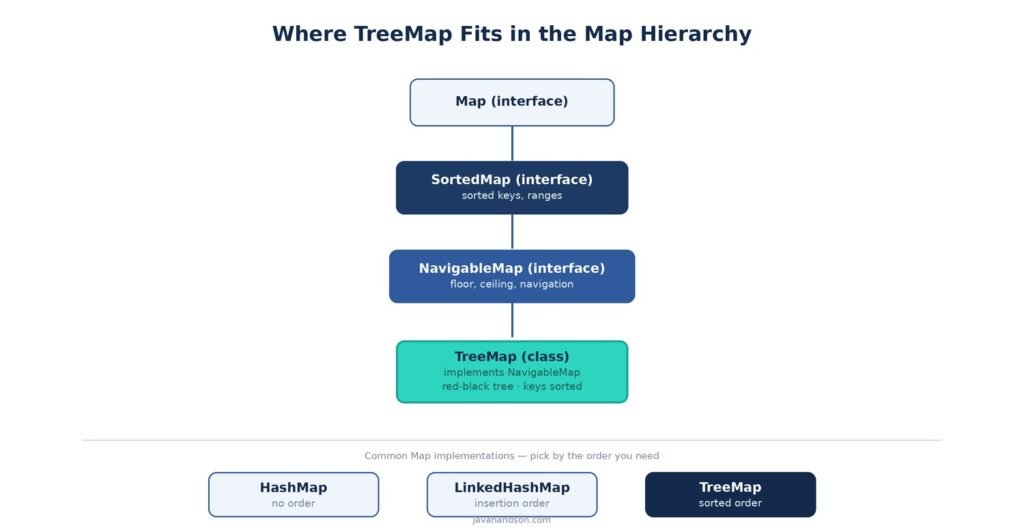
A TreeMap is a map that keeps its keys in sorted order. It stores key-value pairs, just like a HashMap. The difference is the ordering.
Think of a phone book. Names sit in alphabetical order, so you can flip straight to the letter you want. A TreeMap works in that same tidy way.
When you add keys to a TreeMap, it slots each one into the right spot. So the map stays sorted after every single insert.
You do not have to sort anything yourself. The map handles it for you, quietly, in the background. This saves you a lot of manual work.
TreeMap<String, Integer> scores = new TreeMap<>();
scores.put("Charlie", 90);
scores.put("Alice", 85);
scores.put("Bob", 78);

System.out.println(scores);
// {Alice=85, Bob=78, Charlie=90}
Notice the order. We put Charlie in first, but Alice shows up at the front. The map sorted the names for us.
One more thing about keys. A map holds each key once. Put the same key twice, and the second value simply replaces the first. That rule is the same as a HashMap.
Values, on the other hand, can repeat freely. Two players can share a score of 85. The map only cares that the keys stay unique and sorted.
Both maps store keys and values. Both let you look things up by key. Yet they behave in different ways once you start using them.
| Feature | HashMap | TreeMap |
|---|---|---|
| Key order | No order at all | Sorted order |
| Backing structure | Hash table | Red-black tree |
| get / put speed | O(1) average | O(log n) |
| Null keys | One null key allowed | No null keys |
| Extra methods | Basic map methods | Range and navigation methods |
So a HashMap wins on raw speed. A TreeMap wins when you need order. Pick the one that fits your job.
A TreeMap is more than a plain Map. It implements two extra interfaces that give it superpowers.
We will unpack both of these soon. For now, just know that TreeMap builds on top of them. This layered design is why it can do so much more than a basic map.
Let us make this concrete. Say you build a leaderboard for a small game. Each player has a score, and you want them ranked.
With a HashMap, you would store scores but then sort them by hand every time you show the board. With a TreeMap keyed on score, the ranking is already done for you.
You can also answer questions like “who is just above me?” in one call. That is the kind of task where a sorted map pays off. We will meet those exact methods later in the guide.
Before we go deep, here are the methods you will use most. They are the same names you know from Map, plus a few extras.
| Method | What it does |
|---|---|
| put(k, v) | Add or update a key-value pair |
| get(k) | Fetch the value for a key |
| remove(k) | Delete a key and its value |
| containsKey(k) | Check if a key is present |
| firstKey() / lastKey() | Smallest and largest key |
| size() | How many pairs are stored |
If you have used a HashMap, most of this feels familiar. The sorted behaviour comes for free on top.
Under the hood, a TreeMap is not a hash table. Instead it uses a special kind of tree. This tree is the reason the keys stay sorted.
A TreeMap stores its entries in a red-black tree. This is a type of self-balancing binary search tree. The name comes from the colour tag on each node.
In a binary search tree, smaller keys go left and larger keys go right. So an in-order walk of the tree hands back the keys in sorted order. That is the trick behind the sorting.
But a plain search tree can get lopsided. Add sorted keys one by one, and it can turn into a long chain. That would make lookups slow.
Picture adding 1, 2, 3, 4, 5 in order to a plain tree. Each key is bigger, so it keeps going right. Now the tree is really just a list, and lookups crawl.
The red-black rules exist to stop exactly this. They force the tree to spread out instead of stringing into a line. That is why a TreeMap stays fast no matter the insert order.
The red-black rules keep the tree short and wide. After each insert or delete, the tree may rotate a few nodes to stay balanced.
Because the tree stays balanced, its height stays small. The height is roughly log n for n keys. So a lookup only touches a handful of nodes.
You never see this balancing act. It runs on its own during put and remove. All you notice is that lookups stay quick even with many keys.
Think of it like a bookshelf that tidies itself. Every time you slot in a book, the shelf shuffles a little to stay even. You just place books and the shelf handles the rest.
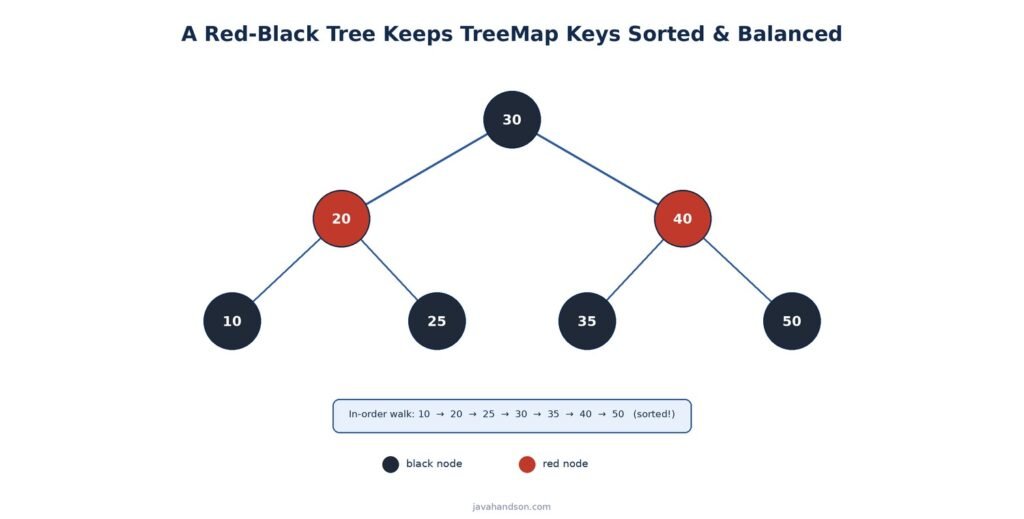
Let us trace a single get call. Say you ask for the key 25 in a tree that holds 10, 20, 30, and 40.
The map starts at the root and compares. Is 25 bigger or smaller than the root? It moves left or right based on the answer. Then it repeats at the next node.
Each step throws away half the remaining keys. So even a big tree needs only a few hops. That is the log n behaviour in action.
Compare this with a HashMap, which jumps straight to a bucket using a hash. The HashMap has no idea about order. The TreeMap trades that jump for a short walk, and gets sorting in return.
To sort keys, the TreeMap must compare them. So every key needs a way to say which one is bigger. There are two ways to give it that.
If you skip both, and the key is not Comparable, the map throws a ClassCastException. We will see custom sorting a bit later.
This is a common gotcha with your own classes. A plain class does not know how to order itself. So you must tell the map how, or it cannot place the keys.
You do not have to take my word for this. Open the JDK source for TreeMap, and you will spot the tree pieces we talked about.
The class holds a reference to the root node. Each node points to its left child, its right child, and its parent. It also carries a colour flag for the red-black rules.
// Simplified from the JDK source
static final class Entry<K,V> {
    K key;
    V value;
    Entry<K,V> left;    // smaller keys
    Entry<K,V> right;   // larger keys
    Entry<K,V> parent;
    boolean color;      // red or black
}
See the left and right links? That is the binary search tree shape. Smaller keys sit on the left, larger ones on the right. The colour flag keeps the tree balanced.
| 💡 Interview Insight A TreeMap does not allow a null key. It has to compare keys to place them, and comparing null throws a NullPointerException. A HashMap allows one null key because it never compares keys for order. Interviewers love this small difference. |
SortedMap is the first extra interface a TreeMap implements. It promises that keys have an order. On top of that, it adds a few handy methods.
Since the keys are sorted, the smallest and largest are easy to grab. SortedMap gives you two direct methods for that.
TreeMap<Integer, String> map = new TreeMap<>();
map.put(30, "thirty");
map.put(10, "ten");
map.put(20, "twenty");

System.out.println(map.firstKey()); // 10
System.out.println(map.lastKey());  // 30
No loop needed. The map already knows the ends of its range. So both calls are quick.
One warning here. Both methods throw a NoSuchElementException on an empty map. So check with isEmpty first if the map might have nothing in it.
SortedMap also lets you slice out a range of keys. You get a live view of part of the map, not a fresh copy.
TreeMap<Integer, String> map = new TreeMap<>();
map.put(1, "a"); map.put(3, "b");
map.put(5, "c"); map.put(7, "d");

System.out.println(map.headMap(5)); // {1=a, 3=b}
System.out.println(map.tailMap(5)); // {5=c, 7=d}
System.out.println(map.subMap(3, 7)); // {3=b, 5=c}
These views are handy for range queries. Think of dates between two days, or scores in a band. You slice the map and read only that part.
Here is a point people miss. A range view is backed by the original map. So it is not a fresh copy of the data.
Change the original map, and the view reflects it. In many cases you can even change the view, and it flows back to the map. This makes views cheap, but you must handle them with care.
Also note that range views throw an error if you step outside their bounds. Try to put a key beyond the range, and you get an IllegalArgumentException. The view guards its own limits.
When you loop over a TreeMap, you get keys in sorted order. This holds for the keys, the values, and the entries. No sorting step is needed on your side.
TreeMap<String, Integer> map = new TreeMap<>();
map.put("banana", 3);
map.put("apple", 5);
map.put("cherry", 1);

for (Map.Entry<String, Integer> e : map.entrySet()) {
    System.out.println(e.getKey() + " = " + e.getValue());
}
// apple = 5
// banana = 3
// cherry = 1
So a simple loop prints the fruits alphabetically. With a HashMap, the order would be a mess. This tidy iteration is a big reason people pick TreeMap.
NavigableMap extends SortedMap. It adds methods that help you move around the keys with more control. This is where TreeMap really shines.
Sometimes you want the key just below or just above a target. NavigableMap has four methods for exactly that.
| Method | What it returns |
|---|---|
| floorKey(k) | Largest key <= k |
| ceilingKey(k) | Smallest key >= k |
| lowerKey(k) | Largest key strictly < k |
| higherKey(k) | Smallest key strictly > k |
TreeMap<Integer, String> map = new TreeMap<>();
map.put(10, "a"); map.put(20, "b"); map.put(30, "c");

System.out.println(map.floorKey(25));   // 20
System.out.println(map.ceilingKey(25)); // 30
System.out.println(map.lowerKey(20));   // 10
System.out.println(map.higherKey(20));  // 30
See the pattern? Floor and ceiling can land on the key itself. Lower and higher always skip past it. That tiny difference trips people up in interviews.
These methods return null when there is no match. Ask for floorKey(5) on a map that starts at 10, and you get null. So always check the result before you use it.
There are also entry versions of each method. floorEntry gives you both the key and the value in one go. That saves a second lookup when you need the value too.
A quick way to remember the four: floor is the floor below your feet, ceiling is the roof above. Lower and higher are their strict cousins, never landing on the value itself.
NavigableMap can pull entries off either end. These methods read and remove in one step.
This makes a TreeMap handy as a priority-style store. You keep grabbing the smallest or largest and the map shrinks each time.
TreeMap<Integer, String> tasks = new TreeMap<>();
tasks.put(3, "low");
tasks.put(1, "urgent");
tasks.put(2, "medium");

System.out.println(tasks.pollFirstEntry()); // 1=urgent
System.out.println(tasks);                  // {2=medium, 3=low}
Here we pull the most urgent task off the top. The map removes it and hands it back in one step. The rest stay sorted, ready for the next poll.
Want the whole map in reverse? NavigableMap gives you a descending view with one call. It reads from largest key down to smallest.
TreeMap<Integer, String> map = new TreeMap<>();
map.put(1, "a"); map.put(2, "b"); map.put(3, "c");

System.out.println(map.descendingMap());
// {3=c, 2=b, 1=a}
The descending map is a view, not a copy. So changes flow back to the original map. That keeps it cheap to create.
The basic subMap from SortedMap has fixed rules. The low bound is included and the high bound is left out. NavigableMap lets you change that.
It gives you an overloaded subMap that takes two booleans. Each boolean says whether that bound is inclusive. So you get full control over the edges.
TreeMap<Integer, String> map = new TreeMap<>();
map.put(10, "a"); map.put(20, "b");
map.put(30, "c"); map.put(40, "d");

// low inclusive, high inclusive
System.out.println(map.subMap(20, true, 30, true));
// {20=b, 30=c}

// low exclusive, high inclusive
System.out.println(map.subMap(20, false, 40, true));
// {30=c, 40=d}
This matters for real range queries. Sometimes you want the edge, and sometimes you do not. The boolean flags let you say exactly which.
| 💡 Interview Insight floorKey and lowerKey sound the same but they are not. floorKey(k) can return k itself if that key exists. lowerKey(k) always returns something strictly smaller. The same split applies to ceiling versus higher. Remember: floor and ceiling are inclusive, lower and higher are exclusive. |
By default a TreeMap sorts keys in their natural order. Numbers go low to high, and strings go A to Z. But you can change that.
This flexibility is a big draw. You are not stuck with one fixed order. You decide the rule, and the map follows it for every key.
To use your own order, hand a Comparator to the constructor. The map then sorts every key by your rule instead.
TreeMap<String, Integer> map =
    new TreeMap<>(Comparator.reverseOrder());
map.put("Alice", 1);
map.put("Bob", 2);
map.put("Charlie", 3);

System.out.println(map);
// {Charlie=3, Bob=2, Alice=1}
Here we asked for reverse order. So the names come out Z to A. The comparator decides the whole layout.
A comparator can hold any logic you like. You might sort strings by length, or objects by a field. The map just follows your rule.
TreeMap<String, Integer> byLength =
    new TreeMap<>(Comparator.comparingInt(String::length));
byLength.put("bb", 1);
byLength.put("a", 2);
byLength.put("ccc", 3);

System.out.println(byLength);
// {a=2, bb=1, ccc=3}
One thing to watch here. If two keys compare as equal, the map treats them as the same key. So a length comparator would merge two strings of the same length.
| 💡 Interview Insight A TreeMap decides key equality using the comparator, not equals(). So if your comparator says two different keys are equal, the second put overwrites the first. This is a classic source of lost data. Make sure your comparator only returns zero for keys you truly want treated as one. |
Custom keys are where comparators really earn their place. Say you key a map by an Employee object. The map has no idea how to order employees on its own.
You have two clean options. Make Employee implement Comparable, or pass a comparator when you build the map. The second is more flexible, since you can switch the order any time.
record Employee(String name, int age) {}

TreeMap<Employee, String> byAge =
    new TreeMap<>(Comparator.comparingInt(Employee::age));
byAge.put(new Employee("Riya", 30), "QA");
byAge.put(new Employee("Sam", 25), "Dev");

System.out.println(byAge.firstKey());
// Employee[name=Sam, age=25]
Here the map sorts employees by age. So the youngest lands first. Swap in a name comparator, and the same data sorts alphabetically instead.
Sometimes one field is not enough. You may want to sort by age, then break ties by name. The comparator API makes this easy to chain.
Comparator<Employee> byAgeThenName =
    Comparator.comparingInt(Employee::age)
              .thenComparing(Employee::name);

TreeMap<Employee, String> map = new TreeMap<>(byAgeThenName);
Now two employees of the same age no longer collide. The name breaks the tie, so both keys survive. This also dodges the equals trap we saw above.
A TreeMap trades some speed for order. Its main operations cost a bit more than a HashMap. Still, they stay fast enough for most work.
The core methods walk down the tree. Because the tree is balanced, the walk is short. Each of these costs about log n:
Compare that with a HashMap, where these run in near O(1). For a million keys, log n is about twenty steps. Not free, but still snappy.
The navigation methods walk the tree too. So floorKey, ceilingKey, and their friends also cost about log n. That is a fair price for such handy lookups.
| Operation | TreeMap | HashMap |
|---|---|---|
| get / put / remove | O(log n) | O(1) average |
| containsKey | O(log n) | O(1) average |
| firstKey / lastKey | O(log n) | Not available |
| floorKey / ceilingKey | O(log n) | Not available |
| Iterate in sorted order | O(n) | Not sorted |
So the story is simple. You pay a small log n cost, and you get sorting and navigation in return. For many apps that trade is worth it.
You may hear that HashMap is O(1) and wonder how it beats a tree. The answer is amortized cost. On average a hash lookup is one hop, no matter the size.
A tree cannot match that. Its cost grows slowly with size, as log n. For ten items that is about three steps. For a thousand it is around ten.
So the tree stays fast, just not constant. For most real data sets the gap is tiny. You rarely notice it unless the map is huge and lookups are on a hot loop.
A TreeMap also uses a bit more memory per entry. Each node stores links to its children and parent, plus a colour flag. A HashMap entry is lighter.
For small maps this hardly matters. For millions of entries it can add up. So keep it in mind when memory is tight and order is not needed.
A TreeMap is not always the right pick. It shines in some spots and falls short in others. Let us look at both sides.
Reach for a TreeMap when order or range matters. These jobs suit it well:
Skip a TreeMap when you only care about speed. In these cases a HashMap serves you better:
So think about your access pattern first. If order never comes up, a HashMap is simpler and faster.
People often mix these two up. Both give you a predictable order, but the order is not the same kind.
So if you want A to Z, use a TreeMap. If you want “first added, first shown”, use a LinkedHashMap. They solve different problems, even though both feel ordered.
A TreeMap is not thread safe. If several threads change it at once, you can corrupt the tree. So plain TreeMap suits single-threaded code.
For shared access, you have two common choices. You can wrap it, or you can pick a concurrent cousin instead.
In heavy multi-thread work, the skip-list map is usually the better pick. It keeps sorting and scales well across threads.
Need sorting only at the end? You can use a HashMap during the work, then sort once when you print. That can beat paying the log n cost on every put.
Theory is nice, but code sticks better. Let us build a small example from start to finish. We will track events by time using a TreeMap.
Imagine a log of events, each stamped with a minute mark. We want them sorted by time, so a TreeMap fits well.
TreeMap<Integer, String> events = new TreeMap<>();
events.put(9, "Server started");
events.put(15, "First request");
events.put(3, "Config loaded");

System.out.println(events);
// {3=Config loaded, 9=Server started, 15=First request}
We added the events out of order. Yet the map lines them up by minute. The config load at minute 3 comes first, just as we want.
Now say we want every event in the first ten minutes. A range view gives us that slice in one line.
System.out.println(events.headMap(10));
// {3=Config loaded, 9=Server started}
The headMap call grabs keys below 10. So we see the two early events and skip the later one. No loop, no filtering by hand.
What if a user asks for the event nearest to minute 12? The floor and ceiling methods answer that.
System.out.println(events.floorKey(12));   // 9
System.out.println(events.ceilingKey(12)); // 15
So the nearest event below 12 is at minute 9. The nearest above is at minute 15. With a plain HashMap, you would loop through every entry to work this out.
Finally, we might want the first and last event overall. Two simple calls handle it.
System.out.println(events.firstEntry()); // 3=Config loaded
System.out.println(events.lastEntry());  // 15=First request
That is the power of a TreeMap in a nutshell. Order, ranges, and nearest-key lookups, all built in and ready to use.
TreeMap shows up a lot in Java interviews. It touches trees, ordering, and interface design, all in one class. Let us walk through the angles that come up most.
This is the classic opener. The short answer is the balanced tree. A red-black tree stays short, so a walk from root to leaf is brief.
You can add a nice detail. Each comparison cuts the search space in half. That halving is what gives you the log n shape.
Interviewers love this one. A TreeMap must compare keys to sort them. Comparing a null key would call a method on null, which throws.
So the map refuses null keys outright. Contrast that with HashMap, which never compares keys for order and so allows one null key.
A good follow-up asks how the map sorts. It uses natural order when the key is Comparable. It uses your comparator when you pass one.
Be ready to mention the equals trap. The comparator, not equals, decides key identity inside the map. Two keys that compare as equal become one.
Finally they may ask for a use case. Give a concrete one, like a range query over dates or scores. Mention floor and ceiling for nearest-key lookups too.
That kind of answer shows you know the tool, not just the definition. It lands far better than reciting big-O values.
A few traps catch people again and again with TreeMap. Knowing them up front saves you real debugging time.
A TreeMap cannot hold a null key. Try it, and you get a NullPointerException. This surprises folks coming from HashMap, which allows one null key.
If your key type does not implement Comparable, and you skip a comparator, the map fails. It throws a ClassCastException on the first put. Always give it a way to compare keys.
This one is subtle. A TreeMap uses the comparator to decide equality, not the equals method. So two keys that are not equal by equals can still collide. Watch out when your comparator ignores part of the key.
Some people swap a HashMap for a TreeMap and expect the same speed. But every operation now costs log n. On a hot path with many keys, that adds up. Use a TreeMap only when you need its order.
Methods like firstKey and lastKey assume the map has data. Call them on an empty map, and they throw. This bites people who build the map in a loop that might add nothing.
TreeMap<Integer, String> map = new TreeMap<>();

if (!map.isEmpty()) {
    System.out.println(map.firstKey());
} else {
    System.out.println("Map is empty");
}
A quick isEmpty guard saves you from a crash. It is a small habit that pays off in real code. So build it into your reflexes.
This one is sneaky. If you change a key object after adding it, the tree can break. The map placed the key based on its old value, and now that spot is wrong.
So treat your keys as fixed once they go in. If a value can change, do not use it as a key. This rule keeps the sorted order honest.
A: A TreeMap stores entries in a balanced red-black tree, not a hash table. A lookup walks from the root down to a leaf, and each step cuts the remaining keys in half. Since the tree stays balanced, its height is about log n, so a lookup touches only a handful of nodes. A HashMap jumps straight to a bucket by hash, which is near constant time but gives no ordering.
A: A TreeMap has to compare keys to place them in sorted order. Comparing a null key would call a method on null and throw a NullPointerException. So the map rejects null keys outright. A HashMap allows one null key because it never compares keys for order.
A: floorKey(k) returns the largest key that is less than or equal to k, so it can land on k itself if that key exists. lowerKey(k) returns the largest key strictly less than k, so it always skips past k. The same inclusive-versus-exclusive split applies to ceilingKey versus higherKey.
A: A TreeMap uses the comparator (or natural ordering), not the equals method, to decide key identity. If your comparator returns zero for two different keys, the map treats them as the same key and the second put overwrites the first. This is a common cause of lost data, so make sure your comparator only returns zero for keys you truly want merged.
A: Both keep a predictable order, but the kind of order differs. A TreeMap sorts keys by value, using natural order or a comparator, so keys come out low to high. A LinkedHashMap keeps insertion order, meaning the order in which you added the keys. Use TreeMap when you need sorted keys and LinkedHashMap when you need first-added, first-shown.
A: No, a plain TreeMap is not thread safe. If several threads change it at once, you can corrupt the tree. For shared access you can wrap it with Collections.synchronizedSortedMap, or use ConcurrentSkipListMap, which is a sorted map built for concurrency and usually the better choice under heavy multi-threaded load.
A: Reach for a TreeMap when order or range matters: you need keys sorted, you run range queries between two bounds, you want the nearest key above or below a value, or you often need the smallest or largest key. If you only store and fetch by key with no order needed, a HashMap is simpler and faster.
A TreeMap gives you a map that stays sorted at all times. Under the hood it uses a balanced red-black tree, which keeps lookups near log n. That is the core idea to hold on to.
On top of the plain map, it adds two powerful interfaces. SortedMap brings first, last, and range views. NavigableMap brings floor, ceiling, and reverse navigation.
So the next time you need order, or a nearest-key lookup, you know the tool. Reach for a TreeMap, hand it comparable keys, and let it do the sorting for you.
Just keep the trade-offs in mind. Every operation costs a little more than a HashMap, and null keys are off the table. When order matters, that price is easy to pay.
A good habit is to ask one question before you choose. Do I need my keys sorted, or do I just need fast lookups? Your answer points straight at TreeMap or HashMap.
Play with the code samples above in your own editor. Change the keys, try a comparator, and watch the order shift. That hands-on time is what makes the ideas stick.